 Embedded HandbookApps
142. Web services in C: HTTP, REST, CGI, FastCGI, sendfile
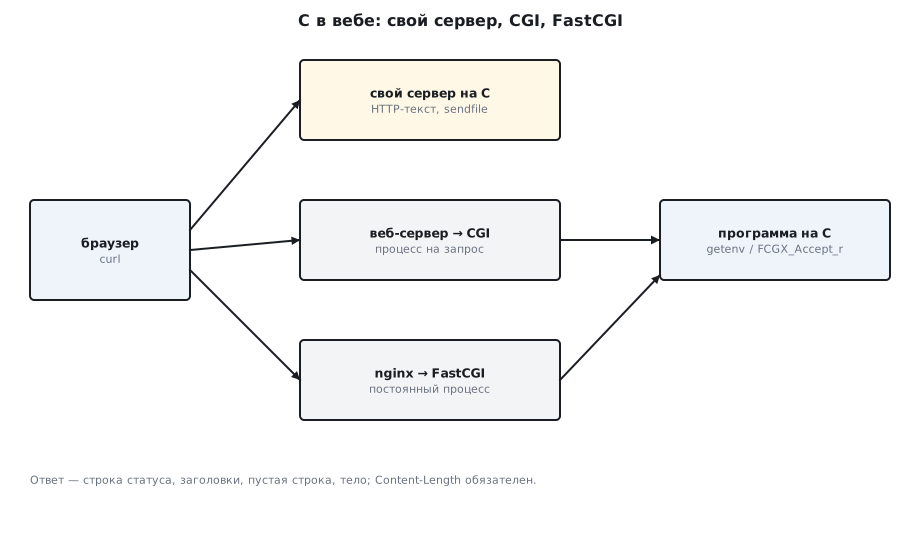
Section 78 showed sockets and a first web server; section 141 showed how to hold
thousands of connections. Here is the protocol itself and the ways to plug a program in
C into the web: with your own server, through CGI under someone else's server, through FastCGI
behind nginx. And the thing nginx is loved for — sending a file without copying it
through user space, sendfile. All the responses below were obtained with curl from
the programs in _verify/sys142/ in stm-sys:1; the CGI program was run by
a real CGI server.
Terms used in the documentation
Term Meaning request line, status line the first line of a request, of a response header, body metadata lines, then the payload method (GET, POST, PUT, DELETE) what to do with the resource status code the result of a request (200, 404, 405…) Content-Type,Content-Lengththe type and length of the body MIME type the content type REST, resource, endpoint REST, a thing with an address, an address that serves requests CGI (Common Gateway Interface) a gateway: one program run per request FastCGI a persistent process instead of a launch per request reverse proxy a server in front of the application (nginx) zero-copy, sendfileno copying through the program's memory WebSocket a two-way channel on top of HTTP
142.1 HTTP is text
HTTP/1.1 is lines of text separated by \r\n: the request line, the headers,
an empty line, the body. The response is the same. curl -v shows both sides
(> is the request, < is the response):
> GET /hello HTTP/1.1
> Host: 127.0.0.1:8080
>
< HTTP/1.1 200 OK
< Content-Type: text/plain
< Content-Length: 13
< Connection: close
<
Hello from C
The server must either state the length of the body (Content-Length), or close
the connection (Connection: close), or send it in chunks
(Transfer-Encoding: chunked) — otherwise the client cannot tell where the end is.
Your own server builds the response with one function:
static void reply(int c, int code, const char *text, const char *type, const char *body, long len)
{
    char hdr[256];
    int n = snprintf(hdr, sizeof hdr, "HTTP/1.1 %d %s\r\nContent-Type: %s\r\nContent-Length: %ld\r\nConnection: close\r\n\r\n",
                     code, text, type, len);
    write(c, hdr, n);
    if (body) write(c, body, len);
}
Parsing the request is sscanf("%7s %255s") for the method and path and a search for
\r\n\r\n before the body. Methods: GET reads, POST creates or
executes, PUT replaces, PATCH changes a part, DELETE
deletes, HEAD returns only the headers, OPTIONS tells what is allowed. Codes:
2xx success, 3xx redirection, 4xx client error (400 bad request,
404 not found, 405 method not allowed), 5xx server error.
142.2 REST: resource, method, representation
REST is not a library but a convention: every thing has an address (a resource),
standard methods are applied to it, and the state travels in the body
(usually JSON); the server remembers nothing between requests (no session).
An LED as the resource /api/led:
    } else if (!strcmp(path, "/api/led")) {                   /* REST: GET читает, PUT меняет */
        if (!strcmp(method, "PUT")) {
            static const char err[] = "{\"error\":\"expected {\\\"on\\\":0|1}\"}\n";   /* длину считает sizeof */
            int v; if (sscanf(body, "{\"on\":%d}", &v) == 1) led = v;
            else { reply(c, 400, "Bad Request", "application/json", err, sizeof err - 1); return; }
        } else if (strcmp(method, "GET")) { reply(c, 405, "Method Not Allowed", "text/plain", "", 0); return; }
curl http://…/api/led                          → {"on":0}
curl -X PUT -d '{"on":1}' http://…/api/led     → {"on":1}
curl http://…/api/led                          → {"on":1}
POST /api/led -> 405
PUT 'garbage' -> 400 {"error":"expected {\"on\":0|1}"}
The body length is computed by sizeof, not by hand: the error string is 34 bytes including
the newline, and a length of 32 written as a number would cut off the closing
brace — the client would get incomplete JSON.
This is what a device API looks like: GET for reading sensors, PUT for
setpoints, errors as a code plus JSON with an explanation. JSON is parsed by hand
only in a toy case like this one; real code uses cJSON or
jansson, and on a microcontroller cJSON too, or jsmn. Full-featured
REST servers in C are libmicrohttpd, ulfius, civetweb.
On a network beyond the developer's desk such an API is protected. Without TLS, setpoints
and passwords go in plain text; without authentication, anyone who sees the device on the network
can change a setpoint. On Linux, TLS is usually handled by nginx
in front of the application (142.4); on a microcontroller, by mbedTLS or the communication module
(107.7); for authentication use at least a key in the Authorization header, by
which the server tells its own clients apart (tokens — 88.7). And request parsing in your own
server is a place for overflows: check the length before copying (129.6).
142.3 CGI: a program per request
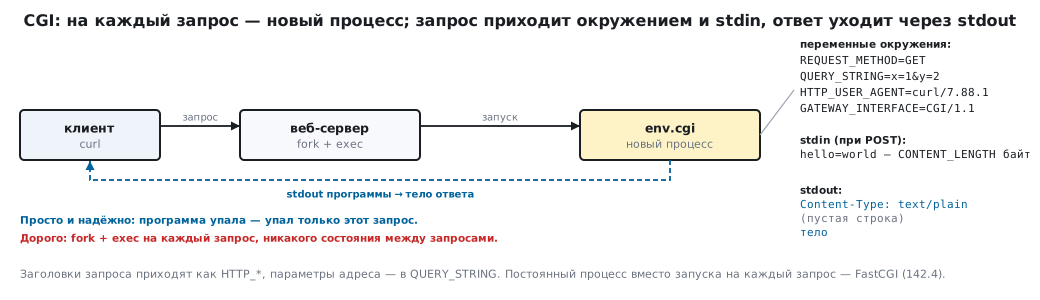
The oldest way to connect C to the web: the server starts a program for
each request, passes the parameters in environment variables and the body in
stdin, and sends the program's stdout to the client:
    const char *method = getenv("REQUEST_METHOD"), *query = getenv("QUERY_STRING"), *len = getenv("CONTENT_LENGTH");
    printf("Content-Type: text/plain\r\n\r\n");                /* заголовки, пустая строка, тело */
Under a real CGI server (python3 -m http.server --cgi):
curl "http://…/cgi-bin/env.cgi?x=1&y=2"
method=GET query=x=1&y=2
GATEWAY_INTERFACE=CGI/1.1
SERVER_PROTOCOL=HTTP/1.0
SCRIPT_NAME=/cgi-bin/env.cgi
REMOTE_ADDR=127.0.0.1
HTTP_USER_AGENT=curl/7.88.1

curl -d 'hello=world' http://…/cgi-bin/env.cgi
method=POST query=
body=hello=world
Request headers arrive as HTTP_*, the URL parameters in
QUERY_STRING, the body as CONTENT_LENGTH bytes from stdin. Simple and
reliable: if the program crashes, only this request fails. Expensive: fork
+ exec for every request (section 136), no state between
requests, the database connection is opened anew every time.
142.4 FastCGI: a persistent process behind nginx
FastCGI keeps the CGI contract — the same variables and streams — but the process lives permanently and accepts requests over a socket from the web server:
    FCGX_Init();
    int sock = FCGX_OpenSocket(":9000", 16);                     /* nginx: fastcgi_pass app:9000 */
    if (sock < 0) return 1;
    FCGX_Request r;
    FCGX_InitRequest(&r, sock, 0);
    long requests = 0;
    while (FCGX_Accept_r(&r) == 0) {                             /* каждый запрос — без нового процесса */
        const char *uri = FCGX_GetParam("REQUEST_URI", r.envp);
nginx stands in front of the application: it accepts HTTP, serves static files itself, and passes requests to the application over FastCGI:
location /app { fastcgi_pass app:9000; include fastcgi_params; }
The test runs in two containers on one Docker network — nginx and the application:
three requests in a row answer запрос №1, №2, №3 ("request no.") from one pid —
the state lives between requests, there is one process. php-fpm does the same
for PHP and uWSGI for Python; fcgiwrap turns an ordinary
CGI program into FastCGI.
142.5 sendfile: a file into a socket without copying
Sending a file over the network "head-on" is a loop of read into a buffer and write from it: every
byte goes kernel → program → kernel. sendfile(out, in, &off, n)
asks the kernel to move the data directly; for a socket the kernel does not even need to
copy — it hands the file's pages to the network stack.
while ((n = read(f, buf, sizeof buf)) > 0) if (write(fd, buf, n) != n) break; /* ядро → буфер → ядро */
while (off < SIZE && sendfile(fd, f, &off, SIZE - off) > 0) ; /* без выхода в пользователя */
256 MB through a pair of sockets on one machine:
read+write: 256 МБ за 114 мс, 2.4 ГБ/с, получено всё: да
sendfile:   256 МБ за 43 мс, 6.2 ГБ/с, получено всё: да
Faster — and with almost no CPU load. The server
from 142.1 serves /file/… this way: a megabyte of random bytes reached curl
intact. sendfile may send less than requested, so it runs
in a loop on off. Relatives: splice — between any descriptors
through a pipe, tee — duplication; TCP_CORK glues the header and the file into
one packet. nginx is built on this: static files through sendfile, thousands of
connections on epoll, 2.5 MB of memory per 10000 idle connections.
142.6 WebSocket and what comes next
HTTP is "request — response"; a device often needs the opposite, to send data
on its own initiative. WebSocket starts as an HTTP request with the
Upgrade: websocket header; after the 101 Switching Protocols response the connection
becomes a two-way channel of frames. In C it is provided by libwebsockets
and ulfius; for microcontrollers MQTT (section 87) is more common — it is lighter.
HTTP/2 and HTTP/3 are binary, with multiplexing; for a device with
one request per second they bring no gain, and HTTP/1.1 remains the norm.
142.7 Pitfalls
| Symptom | Cause |
|---|---|
| the client "hangs" after the response | there is no Content-Length, no Connection: close and no chunked |
| the browser shows garbage | Content-Type is missing or wrong |
| the CGI response is 500 "malformed header" | no empty line after the headers, or \n instead of \r\n\r\n |
| CGI does not see the parameters | look at QUERY_STRING and CONTENT_LENGTH, not at argv |
| FastCGI answers "502 Bad Gateway" | the application is not listening on the address from fastcgi_pass, or is on another network |
sendfile did not send everything |
it returns less than requested — loop on off |
sendfile returns EINVAL |
in_fd is a socket or a pipe; the input must be a file that supports mmap |
PUT with JSON returned 400 |
the body was parsed by the wrong parser — use a JSON library |
SIGPIPE killed the server |
the client closed the connection; signal(SIGPIPE, SIG_IGN) |
| one slow client stops everyone | the server from 142.1 is single-threaded; for many clients see section 141 |
142.8 Summary
- HTTP is text: the request line, the headers, an empty line, the body;
the end of the body is set by
Content-Length, by closing the connection or byTransfer-Encoding: chunked— otherwise the client waits. - REST: the resource
/api/led,GET/PUT, JSON, 405 and 400 with an explanation. - CGI: environment variables,
stdin,stdout; a process per request. - FastCGI: one process,
FCGX_Accept_rin a loop, nginx in front. sendfile: 6.2 GB/s versus 2.4 forread+write; in a loop onoff.
Full sources
http_min.c — a minimal HTTP/1.1 server with sendfile and the REST resource /api/led.
/* Раздел 142: минимальный сервер HTTP/1.1 — разбор строки запроса и заголовков, ответ с
   Content-Length, статический файл через sendfile, REST-эндпоинт /api/led с GET и PUT.
   Однопоточный, одно соединение за раз: цель — показать протокол, а не производительность. */
#define _GNU_SOURCE
#include <stdio.h>
#include <stdlib.h>
#include <string.h>
#include <unistd.h>
#include <fcntl.h>
#include <signal.h>
#include <sys/socket.h>
#include <sys/sendfile.h>
#include <sys/stat.h>
#include <netinet/in.h>

static int led;                                              /* «ресурс» для REST */

static void reply(int c, int code, const char *text, const char *type, const char *body, long len)
{
    char hdr[256];
    int n = snprintf(hdr, sizeof hdr, "HTTP/1.1 %d %s\r\nContent-Type: %s\r\nContent-Length: %ld\r\nConnection: close\r\n\r\n",
                     code, text, type, len);
    write(c, hdr, n);
    if (body) write(c, body, len);
}

static void handle(int c)
{
    char req[4096]; ssize_t n = read(c, req, sizeof req - 1);
    if (n <= 0) return;
    req[n] = 0;
    char method[8], path[256];
    if (sscanf(req, "%7s %255s", method, path) != 2) { reply(c, 400, "Bad Request", "text/plain", "bad\n", 4); return; }
    char *body = strstr(req, "\r\n\r\n"); body = body ? body + 4 : "";
    if (!strcmp(path, "/hello")) {
        const char *s = "Hello from C\n";
        reply(c, 200, "OK", "text/plain", s, strlen(s));
    } else if (!strcmp(path, "/api/led")) {                   /* REST: GET читает, PUT меняет */
        if (!strcmp(method, "PUT")) {
            static const char err[] = "{\"error\":\"expected {\\\"on\\\":0|1}\"}\n";   /* длину считает sizeof */
            int v; if (sscanf(body, "{\"on\":%d}", &v) == 1) led = v;
            else { reply(c, 400, "Bad Request", "application/json", err, sizeof err - 1); return; }
        } else if (strcmp(method, "GET")) { reply(c, 405, "Method Not Allowed", "text/plain", "", 0); return; }
        char js[32]; int l = snprintf(js, sizeof js, "{\"on\":%d}\n", led);
        reply(c, 200, "OK", "application/json", js, l);
    } else if (!strncmp(path, "/file/", 6) && !strstr(path, "..")) {  /* статический файл через sendfile */
        int f = open(path + 6, O_RDONLY);
        struct stat st;
        if (f < 0 || fstat(f, &st) < 0) { reply(c, 404, "Not Found", "text/plain", "no such file\n", 13); return; }
        reply(c, 200, "OK", "application/octet-stream", NULL, st.st_size);
        off_t off = 0;
        while (off < st.st_size && sendfile(c, f, &off, st.st_size - off) > 0) ;   /* ядро копирует само */
        close(f);
    } else reply(c, 404, "Not Found", "text/plain", "not found\n", 10);
}

int main(int argc, char **argv)
{
    signal(SIGPIPE, SIG_IGN);
    int port = argc > 1 ? atoi(argv[1]) : 8080;
    int s = socket(AF_INET, SOCK_STREAM, 0), one = 1;
    setsockopt(s, SOL_SOCKET, SO_REUSEADDR, &one, sizeof one);
    struct sockaddr_in a = { .sin_family = AF_INET, .sin_port = htons(port), .sin_addr.s_addr = htonl(INADDR_ANY) };
    if (bind(s, (struct sockaddr *)&a, sizeof a) < 0 || listen(s, 16) < 0) { perror("bind"); return 1; }
    for (;;) { int c = accept(s, NULL, NULL); if (c < 0) continue; handle(c); close(c); }
}
fcgi_app.c — a FastCGI application behind nginx with a counter kept between requests.
/* Раздел 142: приложение FastCGI — один процесс живёт постоянно и принимает запросы от nginx
   по TCP; между запросами хранит состояние (счётчик). Сборка: -lfcgi. */
#include <stdio.h>
#include <stdlib.h>
#include <unistd.h>
#include <fcgiapp.h>

int main(void)
{
    FCGX_Init();
    int sock = FCGX_OpenSocket(":9000", 16);                     /* nginx: fastcgi_pass app:9000 */
    if (sock < 0) return 1;
    FCGX_Request r;
    FCGX_InitRequest(&r, sock, 0);
    long requests = 0;
    while (FCGX_Accept_r(&r) == 0) {                             /* каждый запрос — без нового процесса */
        const char *uri = FCGX_GetParam("REQUEST_URI", r.envp);
        const char *method = FCGX_GetParam("REQUEST_METHOD", r.envp);
        requests++;
        FCGX_FPrintF(r.out, "Content-Type: text/plain\r\n\r\n");
        FCGX_FPrintF(r.out, "FastCGI: %s %s, запрос №%ld в этом процессе, pid %d\n", method, uri ? uri : "?", requests, getpid());
        FCGX_Finish_r(&r);
    }
    return 0;
}
Next: section 143 — static and dynamic libraries.