 Embedded HandbookApps
20. USB
The most complex interface in the handbook — and the only one that almost nobody implements from scratch. Here understanding what is going on matters more than the registers, along with the skill of configuring a ready-made stack correctly.
What it is called in the documentation
Original Meaning host / device the host / the device endpoint a communication channel inside the device descriptor a data structure describing the device enumeration identifying the device when it is plugged in control / bulk / interrupt / isochronous transfer the four transfer types packet memory area (PMA) the packet buffer memory pull-up resistor a resistor pulling a line up composite device a device with several classes vendor / product ID the manufacturer / product identifier virtual COM port a serial port emulated over USB maximum packet size the largest packet size of an endpoint NAK the endpoint's "not ready, retry" answer
20.1 Why it is complex
All the previous interfaces were about transferring bytes. USB is a protocol with a layered structure: the physical layer, packets, endpoints, descriptors, device classes, drivers on the computer side. Even "just sending a string" requires the device to first introduce itself to the system correctly.
The host is always in charge. A device cannot start a transfer on its own — it answers when asked. The computer polls all participants on a schedule.
A device must describe itself. When it is plugged in, the host requests descriptors: who you are, what class you are, how many communication channels you have, what size your packets are. This dialogue is called enumeration, and until it completes, the device does not exist for the system.
Hence the practical conclusion: you do not need to write a USB stack yourself. You take a ready-made one — the ST library or code generated by CubeMX — and configure it for the task.
20.2 ⚠️ Clocking: a crystal is mandatory
On the F1 and F4 this is a hard requirement that cannot be bypassed.
USB Full Speed requires exactly 48 MHz with an accuracy of ±0.25 %. The internal HSI oscillator gives about ±1 % — that is absolutely not enough.
| Accuracy | |
|---|---|
| USB requirement | ±0.25 % |
| HSI | ±1 % — unsuitable |
| HSE crystal | ±0.005 % — with a huge margin |
Where the 48 MHz comes from:
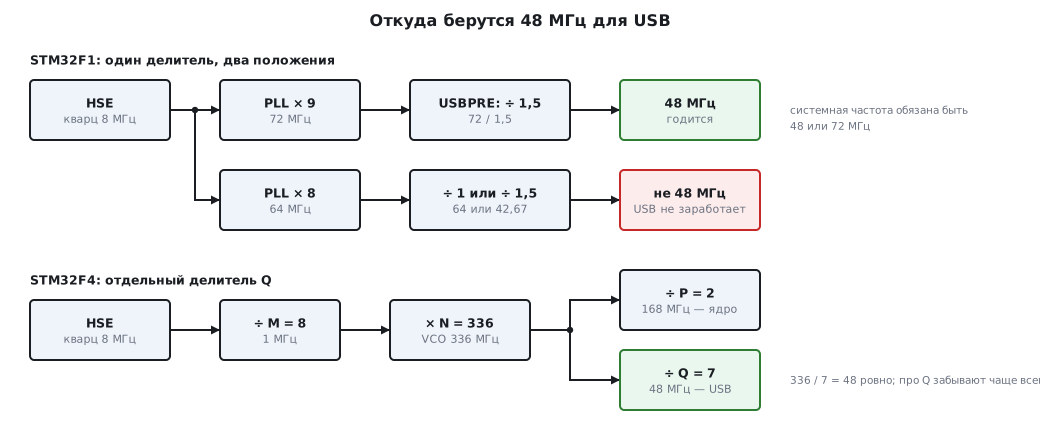
On the F1 there is only one divider, with two settings — by 1 or by 1.5, and it sits at the PLL output. So the PLL must produce either 48 or 72 MHz (the system clock can then be either the PLL or HSE):
RCC->CFGR &= ~RCC_CFGR_USBPRE;   /* сброшен -> деление на 1,5: 72 / 1,5 = 48 */
RCC->APB1ENR |= RCC_APB1ENR_USBEN;
The 64 MHz frequency, which is sometimes chosen to save power, is unsuitable for USB: neither of the two dividers produces 48 MHz from it.
On the F4 this is handled by the Q divider in the PLL setup — the very one people
forget about in section 6. With N = 336, Q = 7 works, and you get exactly
48 MHz.
Where a crystal is not needed. Many newer chips — F042 and F072, L0, most of L4 (except L475 and L476), G0B1, G4, U5, H5 — have their own 48 MHz oscillator (HSI48) with a CRS trimming block. The block adjusts the frequency using the start-of-frame packets the host sends once every millisecond, and the USB device works without a crystal. A host has nothing to adjust to: in host mode a crystal is needed there too.
20.3 Endpoints and transfers
An endpoint is a communication channel inside the device, each with its own direction and purpose. Endpoint number 0 is mandatory and is used for control; the others are added for the task.
Four transfer types:
| Type | What for | Guarantees |
|---|---|---|
| control | enumeration, commands | mandatory, with acknowledgement |
| bulk | large volumes: a flash drive, a virtual port | delivery guaranteed, timing not |
| interrupt | mouse, keyboard, sensors | polling at a set period |
| isochronous | audio, video | timing guaranteed, delivery not |
The difference between the last two is important: for audio it is better to lose a packet than to delay the stream, for a keyboard it is the other way round.
On the F103 the buffers of all endpoints live in 512 bytes of dedicated memory, which it shares with the CAN controller (section 19). Part of this memory is taken by the buffer descriptor table — 8 bytes per endpoint — so no more than seven 64-byte packets fit in it. A virtual port needs about 300 bytes: a table for three endpoints, two endpoint 0 buffers, two data buffers and a small interrupt endpoint buffer — in practice that is enough.
20.4 Device classes: what to choose
Ready-made classes save you from writing a driver on the computer side — the system recognizes the device with its standard means.
| Class | What the computer sees | When to use it |
|---|---|---|
| CDC | a virtual COM port | debugging, data exchange, a UART replacement |
| HID | a keyboard, a mouse or a custom device | when you cannot install a driver |
| MSC | a flash drive | access to files on a memory card (sections 41–42) |
| DFU | a bootloader | firmware update over USB |
CDC is the most common choice. The device appears as an ordinary serial port, works with all terminals, and the program on the computer is written as for a UART. In essence it is a UART without an adapter, but at a speed tens of times higher. The baud rate set in the terminal is merely passed to the device in a control request and does not affect the exchange.
HID is good because it needs no drivers at all — not on Windows, not on Linux, not on macOS. The class can carry arbitrary data, not only key presses, so it is often used for instruments that must work right after being plugged in.
A composite device combines several classes at once — for example, a virtual port and a flash drive at the same time.
20.5 ⚠️ The pull-up on the D+ line
The hardware detail that most often causes "the device is not detected".
The host learns about a connection from the pull-up resistor on the data line: 1.5 kΩ from D+ to the supply means a Full Speed device. No resistor — nothing is connected as far as the computer is concerned.
| Board | How it is done |
|---|---|
| BluePill | an external resistor, often of the wrong value |
| Nucleo, Discovery | according to the manufacturer's schematic, usually correct |
| F4 (OTG) | the pull-up is built into the controller, no external one needed; it is enabled only when VBUS is seen on PA9 |
⚠️ A known BluePill problem. Many clones have a 10 kΩ or 4.7 kΩ resistor instead of 1.5 kΩ. The device is then detected every other time, only on some ports, or not at all. The cure is to replace resistor
R10with 1.5 kΩ — the first thing to check if USB on a BluePill "does not work for no reason".⚠️ The F4 is not detected although the pull-up is built in. The OTG module connects it only when it sees the VBUS voltage on PA9 — if VBUS sensing is enabled. On boards where PA9 is not connected to the USB connector, sensing is disabled in the PCD setup (in CubeMX — in
usbd_conf.c):Init.vbus_sensing_enable = DISABLE. The library then sets theNOVBUSSENSbit inGCCFG(on the F446 and F412 it clearsVBDENand overrides the session signal), and the module considers VBUS always present.
A second technique, used deliberately: a switchable pull-up. The resistor is connected through a transistor to a microcontroller pin, and the program can "disconnect and reconnect" — this makes the host repeat enumeration without physically pulling the cable. Useful during firmware updates and debugging.
20.6 How it is done in practice
The sensible path is CubeMX (section 4):
- enable USB in device mode;
- choose the class — usually CDC;
- check that the clock tree gives exactly 48 MHz (the configurator will highlight a mismatch);
- generate the project.
From then on the work comes down to two functions: send a buffer and process a received one. Everything else — enumeration, descriptors, control transfers — is done by the library.
You will still have to change the descriptors if the device goes beyond a prototype: they contain the vendor and product IDs, as well as the text names the user will see in the system. The IDs from the examples are fine for debugging, but not for a production device — they are assigned by the organization that owns the standard.
20.7 🔧 Virtual COM port: receiving commands
CubeMX with the CDC class creates the usbd_cdc_if.c file, where you add your own code:
CDC_Receive_FS is called when a packet arrives, and CDC_Transmit_FS
sends a buffer. It looks like a UART, but it works differently — and almost all
the problems come from that.
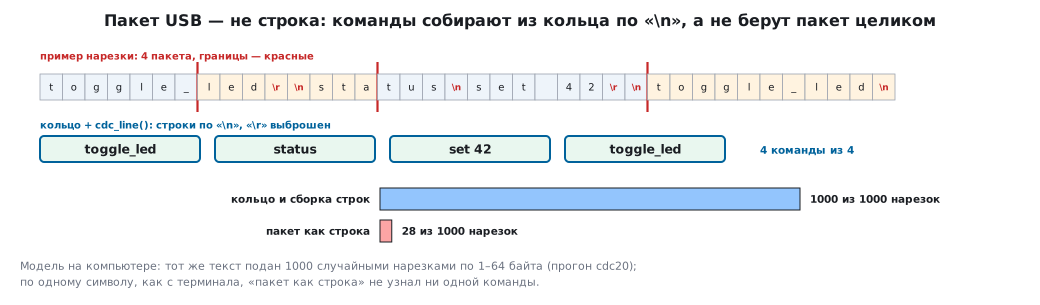
A packet is not a line. Data arrives in packets of up to 64 bytes, and where a packet
ends is decided by the computer, not by the sender. The toggle_led command may
arrive whole, in two pieces or stuck to its neighbour. A terminal where
you type by hand sends each character as a separate packet. If you compare a packet
with a command, you will almost never recognize it.
The callback runs in an interrupt. CDC_Receive_FS is called
from the USB interrupt handler, so you must not parse lines there, call printf
or wait for anything. The right way is to put the bytes into a ring buffer
and release the packet if the next one will fit, and to assemble lines in the main
loop:
#define CDC_PKT 64u                                     /* наибольший пакет Full Speed */
static volatile uint8_t rx_paused;                      /* пакет не отпущен: в кольце не было места */

int8_t CDC_Receive_FS(uint8_t *Buf, uint32_t *Len)
{
    cdc_rx_push(Buf, *Len);                             /* только сложить — разбор в главном цикле */
    USBD_CDC_SetRxBuffer(&hUsbDeviceFS, &Buf[0]);
    if (cdc_rx_room() >= CDC_PKT)
        USBD_CDC_ReceivePacket(&hUsbDeviceFS);          /* следующий пакет точно поместится */
    else
        rx_paused = 1;                                  /* не отпускать: хост получит NAK и подождёт */
    return USBD_OK;
}

/* главный цикл, после разбора строк: место освободилось — отпустить пакет */
void cdc_rx_resume(void)
{
    if (rx_paused && cdc_rx_room() >= CDC_PKT) {
        rx_paused = 0;
        NVIC_DisableIRQ(USB_LP_CAN1_RX0_IRQn);          /* F4: OTG_FS_IRQn */
        USBD_CDC_ReceivePacket(&hUsbDeviceFS);
        NVIC_EnableIRQ(USB_LP_CAN1_RX0_IRQn);
    }
}
The USB interrupt is disabled for the duration of the call from the main loop: the library is not designed to be called from two places at once.
#define RING 256u                           /* степень двойки: переполнение счётчиков не страшно */

static volatile uint8_t  ring[RING];
static volatile uint32_t head;              /* пишет только прерывание */
static volatile uint32_t tail;              /* пишет только главный цикл */
static volatile uint32_t lost;              /* не поместилось в буфер */

/* из CDC_Receive_FS: пакет buf длиной len; вернуть — сколько поместилось */
uint32_t cdc_rx_push(const uint8_t *buf, uint32_t len)
{
    uint32_t n = 0;
    while (n < len && head - tail < RING) {
        ring[head % RING] = buf[n++];
        head++;                             /* после данных — цикл увидит байт готовым */
    }
    lost += len - n;
    return n;
}

/* свободно в кольце: по нему решают, отпускать ли следующий пакет */
uint32_t cdc_rx_room(void)
{
    return RING - (head - tail);
}

/* главный цикл: 1 — в line готова строка без '\r' и '\n' */
int cdc_line(char *line, uint32_t size)
{
    static uint32_t pos;
    while (tail != head) {
        char c = (char)ring[tail % RING];
        tail++;
        if (c == '\r')
            continue;
        if (c == '\n') {
            line[pos] = 0;
            pos = 0;
            return 1;
        }
        if (pos + 1 < size)
            line[pos++] = c;                /* длинная строка обрезается, но не портит память */
    }
    return 0;
}
The head and tail counters only grow, and each is written by only one side.
The difference head − tail is the number of bytes in the buffer; it stays correct even after the
counters wrap past 2³², as long as the ring size is a power of two. head is incremented only
after the byte is written, so the main loop will not see a half-written one.
Zero bytes. String functions such as strncpy stop
at the first zero, and zeros are common in binary data. The ring copies bytes,
not strings.
What the model showed. On the computer the same text of four commands was fed in different slicings; between packets the main loop sometimes manages and sometimes does not manage to pick up the lines.
| How it arrived | Ring and line assembly | Packet as a line |
|---|---|---|
| 1000 random slicings of 1–64 bytes | all 1000 | 28 |
| one character at a time, as from a terminal | 4 commands out of 4 | none |
Overflow. If the main loop does not pick up the data, a 256-byte ring
accepts exactly 256, loses the rest and counts it: in the model, of 300 bytes
44 were lost. It is better not to lose anything. The library will not accept the next packet until
USBD_CDC_ReceivePacket is called — the host will wait. If the ring has less room than a packet,
the call is postponed to the main loop — that is what is done above: rx_paused remembers
that the packet has not been released, and cdc_rx_resume releases it when room appears.
Meanwhile the computer will slow down sending by itself.
Transmission. CDC_Transmit_FS returns USBD_BUSY until the previous
packet has gone, and does not copy the data: the buffer passed to it must not be changed until the
transfer ends. The reply is assembled in a separate buffer and sent when the previous one has gone —
with a retry, not on a "send and forget" basis.
20.8 Pitfalls
The device is not detected. In order: the pull-up on D+ (see above; on the F4 — VBUS sensing on PA9), exactly 48 MHz, a crystal instead of HSI, the integrity of the D+ and D− lines.
It is detected as an "unknown device". An error in the descriptors, or enumeration breaks off midway. Look with a protocol analyzer on the computer side — it will show at which request everything stopped.
It works on one computer and not on another. A classic sign of problems with the pull-up or line quality: different hosts tolerate deviations differently.
It disappears after going to sleep. USB requires periodic activity; low-power modes (section 10) combine poorly with it and need separate wake-up handling.
CAN and USB together on the F103. They will not work, the memory is shared.
Data is lost when sending fast. The host polls the device on its schedule, not when it suits you. You need a buffer and sending when ready, not in a loop.
The cable. Cheap unshielded cables with thin conductors give unstable operation, especially long ones. With strange behaviour it is worth trying another cable before looking for an error in the code.
A command is not recognized although it arrived. The packet was compared with the command, but it arrived in pieces — from a terminal, one character at a time. Assemble lines from the ring (20.7).
Binary data gets truncated. The packet was copied with strncpy, and it
stopped at the first zero byte.
The reply arrives corrupted. The buffer passed to CDC_Transmit_FS was changed
before the transfer ended.
20.9 Summary
- USB is a protocol with enumeration and descriptors, not just a byte transfer; writing the stack yourself is not sensible.
- It requires exactly 48 MHz with ±0.25 % accuracy, which on the F1 and F4 means a crystal. HSI with its ±1 % is unsuitable; on chips with HSI48 the frequency is held by CRS trimming on the host frames.
- On the F1 the system clock must be 48 or 72 MHz; 64 MHz is
unsuitable for USB. On the F4 the
Qdivider in the PLL is responsible for 48 MHz. - A device cannot start a transfer on its own — the host polls it on a schedule.
- The CDC class gives a virtual COM port and works without drivers; HID also needs no drivers and is suitable for arbitrary data.
- A 1.5 kΩ pull-up on D+ is mandatory; on BluePill clones the value is often wrong, and this is the main reason for "not detected".
- On the F103, USB and CAN share memory and do not work at the same time.
- CDC delivers data in packets of up to 64 bytes in any slicing. In the callback
from the interrupt — only put the data into the ring, assemble lines in the main loop;
while there is nowhere to put data, do not call
USBD_CDC_ReceivePacket— the host will wait.
Next: section 20а "USB OTG and host; 48 MHz without a crystal" — the microcontroller itself becomes a host for a flash drive or a keyboard, and the device gets by without a crystal: HSI48 with CRS trimming on the host frames and MSI from the watch crystal.