 Embedded HandbookApps
0б. Topic routes: CAN and automotive diagnostics
Routes A, B, V and G from section 0 follow the parts of the handbook, and the beginner's route (0а) leads to a first device. The routes here are of another kind: you already have a task, and you need to go through all the sections of one topic in order, without collecting them from the table of contents.
The first such route is D: CAN and automotive diagnostics. The topic is spread widely across the handbook: the bus, the protocols on top of it, message description files, a test bench on the computer and five mini-projects. In order, it reads in ten steps — from a frame on the bus to your own unit that lives on the bus on an equal footing with the factory ones.
Prerequisites: section 0 — levels and boards (0.1, 0.2); if you are not yet comfortable with the microcontroller, first take the beginner's route (0а) or route A (0.3) up to UART and interrupts.
Terms used in the documentation
Term Meaning learning path a route: sections in order for one task silent mode (SILM) listen-only mode: the node does not acknowledge frames and does not send error frames bus load the share of time the bus is occupied by frames rest-bus simulation simulating the other units on the bus on a test bench
0б.1 How to follow a topic route
The rules are the same as for the beginner's route (0а.1): one step — one section, you take away the "What to take away" column from the section, and the subsections from "What to skip for now" are put off until the second pass.
A topic route has one rule of its own: the car is not the first test bench. The first six steps are done on the desk — two boards, or a board and a USB-CAN adapter, on a short piece of bus with two terminators. The device is connected to the car at the seventh step, and the first connections are in "listen-only" mode only (198с.2).
The route level is intermediate → advanced: the CAN bus (19), UDS (19д) and your own unit (198у) are advanced sections, the other seven are intermediate.
0б.2 Route D: CAN and automotive diagnostics
Route level: intermediate → advanced. Ten steps: the bus, decoding messages, the test bench, a first device, diagnostics in two layers and three devices for the car.
| Step | Section | What to take away | What to skip for now |
|---|---|---|---|
| 1 | 19 | the frame and arbitration, the transceiver and two 120 Ω terminators, a sample point around 87.5 %, a receive filter is mandatory; loopback mode works without a transceiver | 19.7 errors and bus-off — at step 10 |
| 2 | 19е | what DBC is: message, signal, factor and offset; Intel and Motorola byte order | 19е.3–19е.5: the multiplexer, counters and CRC, the code generator — at steps 9 and 10 |
| 3 | 19ж | a bench on the computer: a USB-CAN adapter, SocketCAN, candump and cansend — the computer becomes a node on the bus | 19ж.2–19ж.3: how gs_usb works byte by byte |
| 4 | 198е | a first device: an SLCAN sniffer on the F103, listen-only mode, a ring buffer in the interrupt; why the strings go over UART rather than USB | 198е.6 checking the core against the model |
| 5 | 19в | a long message on top of 8-byte frames: SF, FF, CF and FC flow control; timeouts | 19в.4 addressing in the car and frame padding |
| 6 | 19г | OBD-II: the functional request 0x7DF and responses 0x7E8…0x7EF, response = service + 0x40, PIDs and formulas, trouble codes; a simulator on STM32 — no car needed yet | 19г.5 ELM327 |
| 7 | 198р | a scanner for the car: the connector and power through protection, a filter for eight response addresses, round-robin polling | — |
| 8 | 19д | UDS: the same path, a different vocabulary — sessions and TesterPresent, data by DID, trouble codes, flashing through diagnostics on the F407 | 19д.5 seed and key — on the first reading the idea is enough |
| 9 | 198с, 198т | a dashboard — listen-only, a filter list and signals from the DBC; a logger — timestamps, a ring buffer and writing to a card | one of the two — the other on a second pass |
| 10 | 198у | your own unit on the bus: a message in the DBC with a counter and CRC, your own trouble codes, bus-off, flashing over the bus | — |
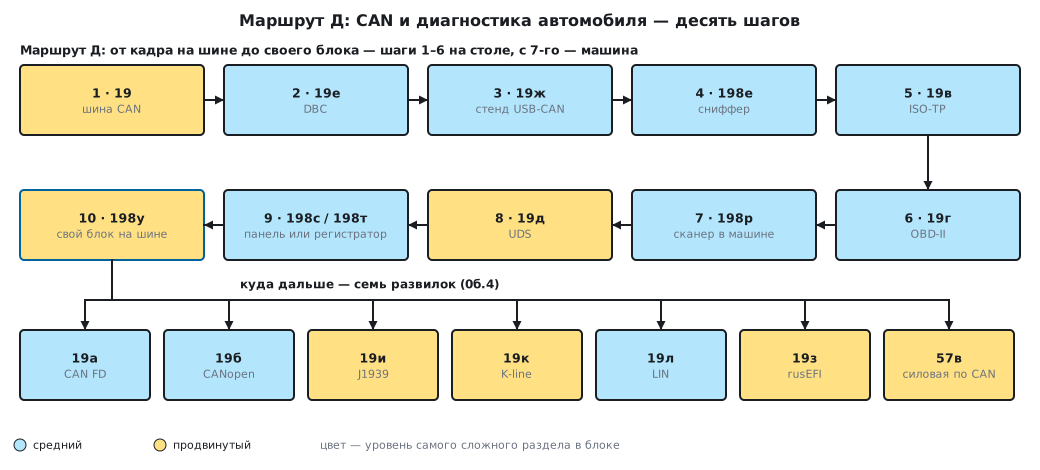
The order rests on one thing: every next step uses the previous one. The sniffer (4) reads the bus decoded by the DBC (2) and is tested on the bench (3); OBD-II (6) rides on top of ISO-TP (5); UDS (8) rides on the same ISO-TP with the same way of responding and refusing; your own unit (10) puts it all together: the DBC, trouble codes, UDS and flashing over the bus.
0б.3 What you need on the desk
- Steps 1–6. A BluePill and a 3.3 V transceiver (the same as in 198р.2); the second node is a USB-CAN adapter from 19ж or a second board; a piece of twisted pair and two 120 Ω terminators at the ends. No car is needed: the responses come from the simulator in 19г.6 and the bench in 19ж.6.
- Step 7. A car with an OBD-II connector, and the device powered from it — through a fuse and transient protection (198р.2, section 173).
- Steps 8–9. A board with the F407: it runs the UDS bootloader (19д.6), the dashboard and the logger (198с, 198т).
- Step 10. Your own unit is built on the F103 (198у.1); a variant on the G474 with FDCAN is only outlined in the section (198у.8).
0б.4 Where next: forks after route D
- 19а — CAN FD: 64 bytes per frame and a second bit rate for the data — when eight bytes and 1 Mbit/s are not enough.
- 19б — CANopen: an industrial protocol on top of CAN.
- 19и — J1939: CAN in trucks and heavy machinery.
- 19к — K-line: diagnostics of older cars over UART.
- 19л — LIN: a cheap body-electronics bus next to CAN.
- 19з — rusEFI: an open-source engine control unit, the whole topic in one real product.
- 57в — power electronics controlled over CAN.
0б.5 Pitfalls
Starting with the car. A node with the wrong bit rate on the car's bus does not stay silent: it sends error frames and disturbs the units. First the bench (step 3) and the simulator (19г.6); in the car, the first connections are in "listen-only" mode only (0б.1).
A single node on the bus. A frame without an acknowledgement is retransmitted endlessly — a lone node does not go bus-off but stays error-passive. For debugging without a second node there is loopback mode (19.7).
Waiting for reception without a filter. Without an explicitly configured filter, bxCAN receives nothing (19.5).
USB and CAN on the F103 at the same time. They share the same memory and are not available together (19.8) — that is why the sniffer sends its strings over UART (198е).
Confusing OBD-II and UDS. The road is the same — ISO-TP and the same way of responding and refusing — but the vocabulary differs: OBD-II is common to all cars, UDS is manufacturer-specific (19д.1).
0б.6 Summary
- Topic routes are for those who already have a task: the sections of one topic in order; the reading rules are the same as for the beginner's route (0а.1).
- Route D is ten steps: the bus (19), DBC (19е), the bench (19ж), the sniffer (198е), ISO-TP (19в), OBD-II (19г), the scanner (198р), UDS (19д), the dashboard or the logger (198с, 198т), your own unit (198у).
- The level is intermediate → advanced; the advanced steps are 19, 19д and 198у.
- Steps 1–6 are done on the desk, the car comes in from step 7, and at first only in "listen-only" mode.
- After the route there are seven forks: 19а, 19б, 19и, 19к, 19л, 19з, 57в.
Next: section 0в "Topic routes: from prototype to product" — the second topic route: the path from a working prototype to a device that can be handed over to series production.