 Embedded HandbookApps
0в. Topic routes: from prototype to product
The prototype works on the desk — and then it turns out that a device you can give away or sell is still half the way off. The program must survive interference and its own errors, the image must reach the device and not be replaced, the board must be assembled at the factory and pass the in-line test, and the product must get its documents and conformity assessment. All of this is in the handbook, but spread across seven parts.
Route E: from prototype to product gathers these sections into one order — fourteen steps from the map of stages to certification. The rules are the same as for the beginner's route (0а.1) and route D (0б.1): one step is one section or a pair of sections, and from each you take away the "What to take away" column.
Prerequisites: the beginner's route (0а) or route A (0.3) — a device that already works; section 0 — levels and boards (0.1, 0.2).
Terms used in the documentation
Term Meaning first article the first unit from a production run: it is checked before the batch is started release candidate a build proposed for release field failure a failure at the user's site, in the field product lifecycle the life cycle of a product
0в.1 How to follow route E
The route goes in the order in which questions come up for a product: first a program that survives a failure (steps 2–5), then the path of the image from the build to the device (6–9), then the board at the factory (10–11) and the product itself — robustness, documents, conformity (12–14).
The first step is the map: section 79 shows the whole path at once, the other steps are its stages in close-up. The route level is basic → advanced: step 1 is basic, the advanced ones are 36в, 48 and 48а, 11в.
0в.2 Route E: from prototype to product
Route level: basic → advanced. Fourteen steps: a program that survives a failure, the path of the image to the device, the board at the factory and the product as a whole.
| Step | Section | What to take away | What to skip for now |
|---|---|---|---|
| 1 | 79 | the stages form a loop, and an error costs more the later it is found; a requirement is measurable; from day one the program is written as for series production | 79.9 the team |
| 2 | 12 | the IWDG and WWDG watchdogs, how to recognize a watchdog reset; the hardware CRC | 12.6 RTC |
| 3 | 36в | you catch not the interference itself but its consequences; a trap in free Flash memory, no empty vectors, program flow monitoring | 36в.5 redundant storage of settings — on a second pass |
| 4 | 35в | a fault record in an area that startup does not zero survives a reset; analysis on the computer using the ELF | 35в.6 what the record survives and what it does not |
| 5 | 184 | three levels of tests and what each one catches; a module that is tested without a board; what to keep in the pipeline | 184.5–184.6: mutations, sanitizers and random inputs |
| 6 | 110, 110а | building in a container, the version from the history, a red build stops the release; the size delta on every change | 110.5 a matrix of two boards |
| 7 | 48, 48а | your own bootloader: layout, header, image check; a signature protects against substitution, the device holds only the public key | 48.10 over-the-air update |
| 8 | 11в | what readout protection promises and what it does not give on F1; what each level gives on F1, F4 and U5 | 11в.4 checking on a core model |
| 9 | 201а | the version from a git tag, metadata at a fixed place in Flash memory, the CRC computed by the release script, one file for the line | 201а.4 reproducible build |
| 10 | 199, 200 | what the factory wants from you: the BOM, the pick-and-place file, Gerbers; bringing up the board in order — inspection, continuity check, current-limited power, SWD | 199.6 panelization |
| 11 | 201 | the in-line test answers "is the board assembled", not "is the code correct"; a bed of nails, flashing from a script, the serial number, configuration bytes | 201.3 calculating the flashing time |
| 12 | 203, 204 | EMC: you make noise yourself — and you get jammed, a check in the workshop; reliability: what ages first, margins, in-house testing | 204.1 reliability in numbers |
| 13 | 205, 205б | the documentation set, board revisions and the firmware version, the change log; licences of borrowed open-source code and the SBOM | 205.3 designations |
| 14 | 206 | selling a device means conformity assessment; a radio module or your own radio; weed out errors at home before the lab | 206.6 marking and documents after testing |
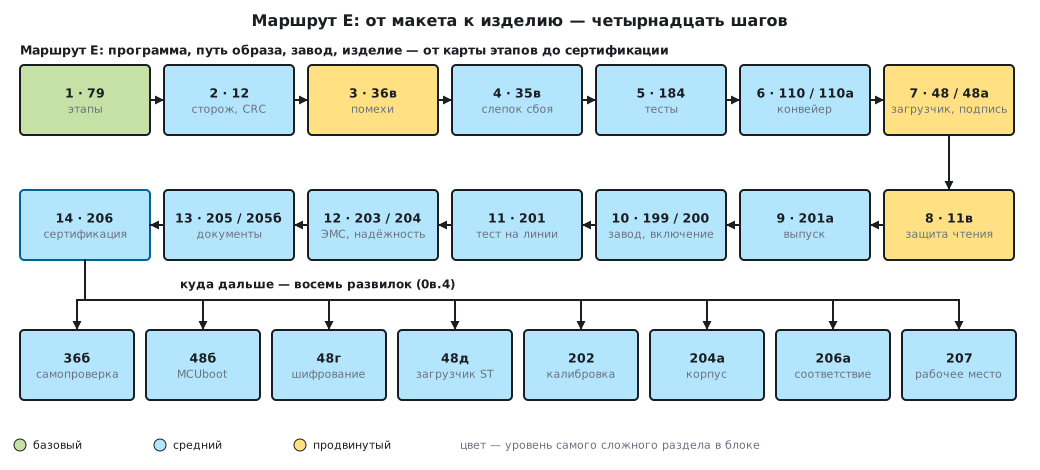
The order rests on one thing: every step builds on the previous one. The fault snapshot (4) is written by a handler that the program reaches thanks to the traps (3); the pipeline (6) runs the tests (5); the release (9) puts a header into the image that the bootloader checks (7); the in-line test (11) flashes the release file (9) and sets readout protection (8).
0в.3 What you need on the desk
- Steps 1–9. The board on which the prototype already works — a BluePill or a Discovery F407 — and an SWD programmer. A machine with Docker is needed for the pipeline (110).
- Step 10. A current-limited bench power supply, a multimeter, a magnifier (200.1–200.3).
- Step 11. SWD, UART and power pads brought out on the board during layout (201.2).
- Step 12. For the workshop check — whatever you have at hand (203.6).
0в.4 Where next: forks after route E
- 36б — self-test at run time: the core, RAM, Flash, the clock frequency.
- 48б — a ready-made bootloader with two slots and rollback instead of your own.
- 48г — image encryption: when a signature is not enough.
- 48д — the ST factory bootloader: flashing without your own bootloader.
- 202 — in-line calibration.
- 204а — the device enclosure.
- 206а — conformity assessment step by step.
- 207 — the assembly workstation: ESD, soldering, cleaning.
0в.5 Pitfalls
Thinking about series production after the prototype. A program "as for series production" starts on day one, not after the prototype has started working (79.5): a watchdog, an image check and a version cost more to build into code that did not know about them.
Signing the image and not comparing the version. An honestly signed old image passes the signature check; only a version comparison after the signature check saves you from a rollback to it (48а.2).
Taking F1 readout protection for firmware protection. On F1 the first level is protection against casual copying, not against a targeted attack (11в.8).
Building the release on your own machine. A commit after the tag or a change without a commit means a rejected release (201а.6); the release is built by the pipeline (110).
Powering a new board without current limiting. The first power-up is from a supply with a current limit (200.3): a defect then heats up by milliwatts instead of burning out.
0в.6 Summary
- Route E is fourteen steps: stages (79), the watchdog (12), interference (36в), the fault snapshot (35в), tests (184), the pipeline (110, 110а), the bootloader and signing (48, 48а), readout protection (11в), the release (201а), the factory and first power-up (199, 200), the in-line test (201), EMC and reliability (203, 204), documents (205, 205б), certification (206).
- The level is basic → advanced; the advanced steps are 36в, 48 and 48а, 11в.
- Four blocks: a program that survives a failure (2–5), the path of the image (6–9), the board at the factory (10–11), the product as a whole (12–14).
- After the route there are eight forks: 36б, 48б, 48г, 48д, 202, 204а, 206а, 207.
Next: section 0г "Topic routes: a device on an RTOS — architecture and observability" — the third topic route: how to build a device out of FreeRTOS tasks and how to see what is happening inside it.