 Embedded HandbookApps
22з. Color TFT display ST7735 over SPI: initialization, address window, RGB565, font, DMA and partial update
In section 22д the HD44780 controller drew the characters itself, and the program only sent it codes. A 128×160 color TFT on the ST7735 controller works the same way — the frame memory sits in the module itself — except that it knows no characters: the program draws every point, and there are 20 480 points of two bytes each. The general view of such displays is in section 22а (two paths to the glass, frame time over SPI), the prototype pitfalls with byte order and memory are in 83.3. Here is a specific module on the STM32F103 from the first command to redrawing a single digit: the pins and SPI1, initialization, the address window, RGB565, a rectangle, a line and a font, DMA, frames per second and the partial update when a frame buffer does not fit into RAM.
Sources: RM0008 (DocID13902 Rev 17): the SPI1_TX request is DMA1
channel 3, p. 281; the MSIZE and MINC bits, p. 285; CNDTR is up to
65 535, p. 286; SPI transmission over DMA and waiting for TXE, then
BSY, p. 719; the DFF bit only with SPE = 0, p. 742; the BR
divider, p. 743. DocID13587 Rev 17 (STM32F103x8/xB): 20 Kbytes of RAM,
p. 1; PA1–PA7 are not 5 V tolerant, p. 29; the master SPI clock is up to
18 MHz, p. 71. The project has no ST7735 document. The command codes, the
128×160 size, the COLMOD value for RGB565, the four MADCTL values for
the rotations and the "high byte first" order come from the ST driver in
the Keil packs (STM32G4xx DFP 1.6.0, Drivers/BSP/Components/st7735,
version 2.0.0); the SPI mode and the 15 MHz write limit come from the
board file stm32f4xx_nucleo.c (STM32F4xx DFP 2.17.1), where this display
is connected to a Nucleo. The meaning of the MADCTL bits, the pauses
after reset and sleep, the size of the controller memory and the glass
offset follow the manufacturer's documentation and are not checked: in the
model they are assumptions. All numbers below come from a run of the
driver _verify/tft22i/tft22i.c on a computer (gcc 12.2.0) with our own
model of the controller and the glass in Python 3.11; the firmware is
built by armclang 6.24 for the Cortex-M3.
What it is called in the documentation
Original Meaning D/C (data/command), A0, RS selects command or data frame memory, GRAM frame memory in the controller CASET / RASET window: columns / rows RAMWR (memory write) write to the frame memory MADCTL (memory data access control) memory scan order: mirrors, rotation, RGB or BGR COLMOD (interface pixel format) input pixel format SWRESET, SLPOUT, DISPON software reset, sleep out, display on backlight backlight transmit-only, TXE, BSY transmit only; transmit buffer empty; block busy dirty rectangle what has changed since the previous frame
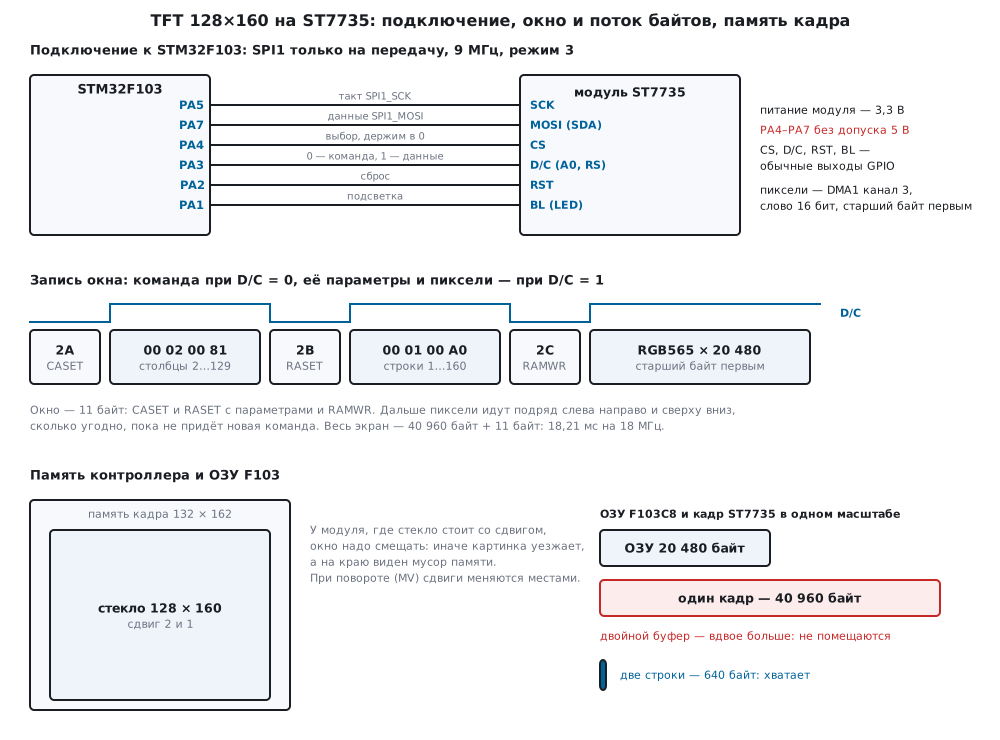
22з.1 The module and its connection: pins, D/C and SPI1
The module is a 128×160 glass and an ST7735 controller with a frame
memory: whatever is written there, it shows by itself, without the
microcontroller (the "display with its own controller" path from 22а.1).
The pixel format is set by COLMOD: 0x03 is 12 bits, 0x05 is RGB565,
0x06 is 18 bits; here it is RGB565, two bytes per point. The module pins
are power, ground, SPI clock and data, the CS select, the D/C line, the
RST reset and the backlight; the labels differ between boards — data may
be labelled SDA, D/C may be A0 or RS. There is no reading: MISO is not
needed, and SPI1 works transmit-only.
| Module | F103 | What |
|---|---|---|
| SCK | PA5 | SPI1 clock |
| MOSI (SDA) | PA7 | SPI1 data |
| CS | PA4 | select: one display on the bus, held at zero |
| D/C | PA3 | 0 is a command byte, 1 is parameters and pixels |
| RST | PA2 | reset |
| backlight | PA1 | backlight LEDs |
D/C is the same as RS of the HD44780 (22д): the same byte means a command or data. PA1–PA7 of the F103 are not 5 V tolerant (p. 29), so the module is powered from 3.3 V; whether the module has its own regulator and what the backlight current is depends on the module description and was not checked here.
SPI1. It is on APB2, 72 MHz; the BR divider (p. 743) gives 36, 18 or
9 MHz with /2, /4, /8. The master clock limit of the F103 is 18 MHz
(p. 71), the write limit of the ST7735 is 15 MHz according to a comment in
the ST board file. The firmware takes /8 — 9 MHz, inside both limits. The
mode is 3 (CPOL = 1, CPHA = 1), as in the same ST file. Commands are 8
bits, pixels are 16-bit words (DFF = 1): a 16-bit SPI word goes out high
byte first, and the color bytes need no swapping as in 83.3.
The main bus rule: D/C and DFF are touched only when the previous byte
has left completely. At the DMA flag the last word has only just landed
in the transmit buffer; the end is TXE = 1 and then BSY = 0 (p. 719).
DFF is changed only with SPI disabled (p. 742):
static void spi_idle(void)
{
    if (DMA1_Channel3->CCR & DMA_CCR1_EN) {
        while (!(DMA1->ISR & DMA_ISR_TCIF3)) {
        }
        DMA1->IFCR = DMA_IFCR_CTCIF3;
        DMA1_Channel3->CCR = 0;
    }
    while (!(SPI1->SR & SPI_SR_TXE)) {
    }
    while (SPI1->SR & SPI_SR_BSY) {
    }
    (void)SPI1->DR;                     /* приёма нет: снять RXNE и OVR (раздел 18.6) */
    (void)SPI1->SR;
}

static void spi_width(uint8_t w16)      /* DFF — только при выключенном SPI (RM0008, с. 742) */
{
    if (wide == w16)
        return;
    SPI1->CR1 &= ~SPI_CR1_SPE;
    if (w16)
        SPI1->CR1 |= SPI_CR1_DFF;
    else
        SPI1->CR1 &= ~SPI_CR1_DFF;
    SPI1->CR1 |= SPI_CR1_SPE;
    wide = w16;
}
Every bus function starts with this: a command byte, parameters, a row of
pixels over DMA. The driver tft22i.c knows no registers — it calls the
bus through a table of functions, and on the bench the same code prints the
bytes for the model. For comparison: the monochrome SSD1306 128 × 64 in the
198р scanner has a whole screen of 1024 bytes, and here it is 40 960: 40
times more.
22з.2 Initialization: SWRESET, SLPOUT, COLMOD, MADCTL
void tft_init(tft_t *t, const tft_bus_t *bus, uint8_t rot, uint8_t bgr, uint8_t col0, uint8_t row0)
{
    static const uint8_t rgb565 = 0x05u;
    t->bus = bus;
    t->col0 = col0;
    t->row0 = row0;
    t->madctl = bgr ? MAD_BGR : 0u;
    bus->reset();
    bus->cmd(ST_SWRESET);
    bus->delay_ms(150);                                 /* с запасом: документа производителя в проекте нет */
    bus->cmd(ST_SLPOUT);
    bus->delay_ms(120);
    bus->cmd(ST_COLMOD);
    bus->data(&rgb565, 1);                              /* 16 бит на пиксель */
    tft_rotate(t, rot);
    bus->cmd(ST_NORON);
    bus->cmd(ST_DISPON);
}
An RST pulse, a software reset, sleep out, the pixel format, the memory
scan order, normal mode and display on: in the run 6 commands and 8 bytes,
7.1 µs on the wire at 9 MHz. The start-up time is the pauses: 150 ms after
SWRESET and 120 ms after SLPOUT, 270 ms in total. How much is really
needed is written in the manufacturer's document; the pauses here have a
margin and are not checked. The ST driver from the pack does without
SWRESET and without pauses, but it also sets the frame rate
(B1–B3), the inversion mode (B4), the power (C0–C4), VCOM
(C5) and the gamma (E0, E1) — the values of these registers depend
on the glass. The short sequence relies on their values after reset —
this was not checked on a real module.
MADCTL. The bits: MY (0x80) mirrors the rows, MX (0x40) mirrors
the columns, MV (0x20) exchanges rows and columns, that is a 90°
rotation, BGR (0x08) is a glass with the blue-green-red order.
tft_rotate takes 0x00, 0x60, 0xC0 and 0xA0 for the four rotations — the
same four values as in the rotation table of the ST driver; which of them
is "upright" depends on how the glass sits on the module. With the BGR
bit the model got 0x08, 0x68, 0xC8 and 0xA8, and in all four rotations the
picture matched the reference point for point. With MV the width and
height swap (160×128), and the glass offset swaps with them — see 22з.7.
22з.3 The CASET/RASET window, RAMWR and RGB565
void tft_window(const tft_t *t, int16_t x, int16_t y, int16_t w, int16_t h)
{
    uint16_t x0 = (uint16_t)(x + t->xoff), x1 = (uint16_t)(x0 + w - 1);
    uint16_t y0 = (uint16_t)(y + t->yoff), y1 = (uint16_t)(y0 + h - 1);
    uint8_t ca[4] = {(uint8_t)(x0 >> 8), (uint8_t)x0, (uint8_t)(x1 >> 8), (uint8_t)x1};
    uint8_t ra[4] = {(uint8_t)(y0 >> 8), (uint8_t)y0, (uint8_t)(y1 >> 8), (uint8_t)y1};
    t->bus->cmd(ST_CASET);
    t->bus->data(ca, 4);
    t->bus->cmd(ST_RASET);
    t->bus->data(ra, 4);
    t->bus->cmd(ST_RAMWR);                              /* дальше — пиксели слева направо, сверху вниз */
}
The window is 11 bytes: a command and two 16-bit edges for the columns, the
same for the rows, and RAMWR. Then the pixels follow in a row, as many as
needed, until a new command comes; on reaching the right edge of the
window, writing moves to the next row. The whole screen of the module with
a glass offset of 2 and 1 is CASET 00 02 00 81 (columns 2…129) and
RASET 00 01 00 A0 (rows 1…160).
RGB565. The conversion from 24-bit color is the function from 83.3:
the top 5, 6 and 5 bits. Orange (255, 128, 0) is FC00. Dropping the low
bits is not the same as rounding: gray 200 gives CE59, and with rounding
(v · 31 + 127) / 255 it is C638. Back in 8 bits (the top bits repeated
in the low ones) this is 206, 203, 206 against 198, 199, 198. Over all 256
levels the largest error of dropping is 7, 3 and 7 units in red, green and
blue, of rounding 4, 2 and 4. For fills the difference is not visible, for
smooth color gradients rounding is more honest.
22з.4 A rectangle, a line and a 5×7 font
A rectangle is a window and w · h words of one color. DMA sends the
same word without stepping through memory (MINC = 0, p. 285), so a fill
needs no memory at all. A point is a 1×1 rectangle: 11 bytes of window for
2 bytes of color.
A line is Bresenham. The points are the same as in the classic algorithm, but those running in a row along the major axis go out as one rectangle:
void tft_line(const tft_t *t, int16_t x0, int16_t y0, int16_t x1, int16_t y1, uint16_t c)
{
    int dx = x1 > x0 ? x1 - x0 : x0 - x1, sx = x0 < x1 ? 1 : -1;
    int dy = y1 > y0 ? y0 - y1 : y1 - y0, sy = y0 < y1 ? 1 : -1;
    int err = dx + dy, flat = dx >= -dy;
    int x = x0, y = y0, rx = x0, ry = y0;               /* rx, ry — начало текущего отрезка */
    for (;;) {
        int px = x, py = y, e2 = 2 * err;
        if (x == x1 && y == y1) {
            tft_fill_rect(t, (int16_t)(rx < px ? rx : px), (int16_t)(ry < py ? ry : py),
                          (int16_t)((rx > px ? rx - px : px - rx) + 1), (int16_t)((ry > py ? ry - py : py - ry) + 1), c);
            return;
        }
        if (e2 >= dy) { err += dy; x += sx; }
        if (e2 <= dx) { err += dx; y += sy; }
        if (flat ? y != py : x != px) {                 /* шаг по второй оси — отрезок кончился */
            tft_fill_rect(t, (int16_t)(rx < px ? rx : px), (int16_t)(ry < py ? ry : py),
                          (int16_t)((rx > px ? rx - px : px - rx) + 1), (int16_t)((ry > py ? ry - py : py - ry) + 1), c);
            rx = x;
            ry = y;
        }
    }
}
18 segments from the screen center in all directions are 1200 points. The model compared them with the classic Bresenham point for point — differences 0. It took 8725 bytes; point by point it would be 13 bytes per point — 15 600.
The font is our own 5×7 array: a character is 5 column bytes, bit 0 is the top row, in a row from space to "Z" — 59 characters, 295 bytes (the same layout as the font in 198р). A character cell is 6×8 points with the gap, at scale 3 it is 18×24. A character is drawn as a window over the cell and rows together with the background, so the old character needs no erasing.
The test picture tft_demo — a background fill, a caption, three
rectangles red, green, blue, three lines and a label — matched the model
reference in all 20 480 points; it took 51 926 bytes and 1259 D/C
switches.
22з.5 Speed: bytes, DMA and frames per second
The time on the wire is bytes × 8 / SPI frequency, without gaps between words; this is how DMA sends. The whole screen in three ways:
| Way | Bytes | 9 MHz | 18 MHz | 36 MHz |
|---|---|---|---|---|
point by point (tft_pixel) |
266 240 | 236.66 ms | 118.33 ms | 59.16 ms |
| window and fill over DMA | 40 971 | 36.42 ms | 18.21 ms | 9.10 ms |
| frames per second, point by point | — | 4.2 | 8.5 | 16.9 |
| frames per second, window and DMA | — | 27.5 | 54.9 | 109.8 |
Point by point is 6.5 times more bytes and 122 879 D/C switches against 6.
Output through row buffers (22з.6) gives the same 40 971 bytes as the
fill. 36 MHz (divider 2) is beyond the limit of both the F103 (18 MHz) and
the ST7735 (15 MHz per ST): this column only shows the ceiling. Filling the
whole screen is one DMA transfer of 20 480 words: CNDTR holds up to
65 535 (p. 286).
A loop polling TXE sends the same bytes, but the processor is busy all
the time, and gaps remain between words (section 18.8) — the model does not
count them. With DMA the processor is free: while a row of 128 points goes
out at 18 MHz — 113.8 µs — the core at 72 MHz has 8192 cycles, 64 per
point, to compute the next row. That is why there are two row buffers: DMA
sends one, the processor fills the other, and spi_idle at the start of
the next transfer waits for the end of the previous one. For comparison, a
240×320 frame at the same 18 MHz takes 68.27 ms (18.8): it has 3.75 times
more points.
22з.6 A double buffer does not fit: dirty rectangles
A 128×160 frame of two bytes per point is 40 960 bytes, a double buffer is
81 920, and the F103C8 has 20 Kbytes of RAM, 20 480 bytes (p. 1). Not even
one frame fits (83.3). So the frame lives only in the display memory, and
the microcontroller sends the pieces that changed. The scene is described
by a function "color of point (x, y)" — meter_shade of the example
meter: a title, a number in a large font and a bar. A redraw takes a list
of rectangles, computes each one row by row into two row buffers and sends
them over DMA:
void tft_flush(const tft_t *t, tft_dirty_t *d, tft_shader_t shade, const void *ctx)
{
    for (uint8_t k = 0; k < d->n; k++) {
        tft_rect_t r = d->r[k];
        if (!clip(t, &r.x, &r.y, &r.w, &r.h))
            continue;
        tft_window(t, r.x, r.y, r.w, r.h);
        for (int16_t y = r.y; y < r.y + r.h; y++) {
            uint16_t *p = line[y & 1];                  /* пока DMA шлёт прошлую строку */
            for (int16_t i = 0; i < r.w; i++)
                p[i] = shade(ctx, (int16_t)(r.x + i), y);
            t->bus->pixels(p, (uint32_t)r.w);
        }
    }
    d->n = 0;
}
Two rows of 160 points are 640 bytes: that is exactly the static memory
armclang showed for tft22i.o. What is dirty is decided by the meter
itself: meter_set compares the new text with the old one character by
character and marks the cells that changed, and for the bar only the strip
between the old and the new end. tft_dirty_add merges touching
rectangles into one.
| Step | Rectangles | Points | Bytes | 18 MHz |
|---|---|---|---|---|
| whole screen, 23.4 | 1 | 20 480 | 40 971 | 18.21 ms |
| 23.4 → 23.5 | cell "4" and a strip of one point | 444 | 910 | 0.40 ms |
| 23.5 → 24.9 | two cells and a strip of 4 points | 912 | 1857 | 0.83 ms |
| 24.9 → 25.0 | two cells | 864 | 1750 | 0.78 ms |
| 25.0 → 19.9 | cells "2" and "5" merged into one, cell "0" and a strip of 15 points | 1476 | 2985 | 1.33 ms |
A hundred steps of 0.1 (from 20.0 to 29.9) take 98 129 bytes, on average 981 bytes and 0.44 ms per step instead of 40 971 bytes and 18.21 ms for a full redraw. After every step the model glass matched the reference meter with the same number — 0 differences: the partial update loses nothing.
The display shows its memory by itself and knows nothing about our writes:
a cell rewritten at the moment the glass refreshes it may look half old for
one frame. The ST7735 has the command TEON (0x35) for this — it turns on
the TE line; the model does not count it, and if the module has no such
line, only the small size of the redraw saves from tearing.
22з.7 Pitfalls
The picture is shifted by 1–2 points, a strip of garbage at the edge.
In the model, module B has a memory of 132 × 162, and the glass sits with
an offset of 2 columns and 1 row. With a zero offset in the driver the
picture moves 2 left and 1 up, and on the right and bottom 446 points of
memory garbage are visible (2 × 160 + 128 − 2). The offset is set in
tft_init (col0, row0); for a real module it is taken from the
description or adjusted by the edge of the picture.
After a rotation the offset came back. With MV the columns become
rows — and so do the offsets. If they are not swapped, in landscape the
picture moves by a point along both axes, garbage is 287 points.
tft_rotate swaps them itself.
Red became blue. The glass has the B-G-R order, and the BGR bit in
MADCTL is not set: in the model of module B the red rectangle is blue,
the blue one red, 19 202 points did not match. The same code on module A
(an R-G-B glass, without the bit) gives 0. If red is blue, swap the bit, not
the colors in the program.
Points disappear at the end of rows, text vanishes. D/C is lowered on
the DMA end flag: at that moment the last words are still in SPI and go out
as commands. In the model, with two words in the tail, 22 816 of the
24 808 points of the picture were written, the controller received 1008
"commands" made of color bytes (07, 08, 1F, E0, F8, FF), and a whole row
after such a "command" is lost entirely — only the top row of points is
left of the text. The cure is spi_idle: TXE = 1, then BSY = 0
(p. 719), and only then D/C.
The colors "drifted" when output over DMA. A uint16_t array went out
as bytes, low byte first (83.3). Pixels go as words with DFF = 1.
DFF does not switch. The bit is changed only with SPE = 0 (p. 742)
— spi_width turns SPI off and on.
Output is slow. Drawing point by point: 13 bytes and six D/C switches
per point; the screen point by point takes 118.33 ms at 18 MHz against
18.21 ms with a window. Every D/C switch is a GPIO write and a wait for
BSY; with a slow output function (HAL instead of BSRR) point-by-point
output is even longer. Draw with windows and segments.
22з.8 Summary
- ST7735: a 128×160 glass, its own frame memory, RGB565 (
COLMOD0x05); D/C is command or data, no reading — SPI1 transmit-only. - F103: SPI1 72 MHz / 8 = 9 MHz, mode 3; the F103 limit is 18 MHz, the
ST7735 write limit is 15 MHz. D/C and
DFFonly afterTXE= 1 andBSY= 0. - Start-up: 6 commands, 8 bytes and 270 ms of pauses;
MADCTLis the rotation (0x00, 0x60, 0xC0, 0xA0) and the color order (0x08). - The window is 11 bytes, the whole screen is 40 971 bytes: 36.42 ms at 9 MHz, 18.21 ms (54.9 frames per second) at 18 MHz; point by point it is 266 240 bytes.
- RGB565: dropping errs by up to 7/3/7 units, rounding by up to 4/2/4.
- A line is Bresenham in segments: 1200 points in 8725 bytes instead of 15 600; the 5×7 font is 295 bytes.
- A 40 960-byte frame is larger than the 20 480 bytes of F103C8 RAM: the display keeps the picture, the program sends dirty rectangles through two rows of 640 bytes — a meter step is 981 bytes on average, 0.44 ms at 18 MHz.
- Pitfalls: the 2/1 glass offset and its swap on rotation,
BGR, D/C before the end of the transfer.
Full sources
tft22i.h — ST7735 commands, MADCTL bits, the bus, the driver, the meter: types and prototypes.
/* tft22i.h — раздел 22з: цветной TFT 128×160 на контроллере ST7735 без регистров микроконтроллера.
 * Драйвер говорит с дисплеем через tft_bus_t: в прошивке fw22i.c это SPI1 + DMA1 канал 3 на F103,
 * в стенде host22i.c — печать байтов, которые читает модель контроллера model22i.py.
 * Коды команд — как в st7735_reg.h драйвера ST из паков Keil (BSP Components/st7735). */
#ifndef TFT22I_H
#define TFT22I_H
#include <stdint.h>

/* ── команды ST7735 ───────────────────────────────────────────────────── */
#define ST_SWRESET 0x01u                /* программный сброс */
#define ST_SLPOUT  0x11u                /* выход из сна */
#define ST_NORON   0x13u                /* обычный режим (не частичный) */
#define ST_DISPON  0x29u                /* включить показ */
#define ST_CASET   0x2Au                /* окно: столбцы от и до */
#define ST_RASET   0x2Bu                /* окно: строки от и до */
#define ST_RAMWR   0x2Cu                /* дальше — пиксели в окно */
#define ST_MADCTL  0x36u                /* порядок обхода памяти и цветов */
#define ST_COLMOD  0x3Au                /* формат пикселя: 0x05 — RGB565 */

/* ── MADCTL: биты зеркал, обмена осей и порядка цветов ────────────────── */
#define MAD_MY  0x80u                   /* зеркало строк */
#define MAD_MX  0x40u                   /* зеркало столбцов */
#define MAD_MV  0x20u                   /* обмен строк и столбцов: поворот на 90° */
#define MAD_BGR 0x08u                   /* стекло с порядком B-G-R */

#define TFT_W 128u                      /* стекло в книжной ориентации */
#define TFT_H 160u
#define TFT_LINE_MAX 160u               /* самая длинная строка — в альбомной */
#define TFT_DIRTY_MAX 4u                /* «грязных» прямоугольников до слияния в один */

/* Шина: каждая функция сама дожидается конца предыдущей передачи (DMA, TXE, BSY) и только потом
 * трогает D/C. pixels и fill могут вернуться раньше, чем байты ушли: передачу ведёт DMA. */
typedef struct {
    void (*reset)(void);                                /* RST в 0 и обратно */
    void (*delay_ms)(uint32_t ms);
    void (*cmd)(uint8_t c);                             /* D/C = 0: байт команды */
    void (*data)(const uint8_t *p, uint32_t n);         /* D/C = 1: байты параметров */
    void (*pixels)(const uint16_t *px, uint32_t n);     /* D/C = 1: n пикселей, старший байт первым */
    void (*fill)(uint16_t color, uint32_t n);           /* D/C = 1: n пикселей одного цвета */
} tft_bus_t;

typedef struct {
    const tft_bus_t *bus;
    uint16_t w, h;                      /* размер после поворота */
    uint8_t madctl;
    uint8_t col0, row0;                 /* сдвиг стекла в памяти контроллера (книжная ориентация) */
    uint8_t xoff, yoff;                 /* тот же сдвиг для текущего поворота */
} tft_t;

typedef struct { int16_t x, y, w, h; } tft_rect_t;
typedef struct { tft_rect_t r[TFT_DIRTY_MAX]; uint8_t n; } tft_dirty_t;
typedef uint16_t (*tft_shader_t)(const void *ctx, int16_t x, int16_t y);  /* цвет точки сцены */

uint16_t tft_rgb(uint8_t r, uint8_t g, uint8_t b);        /* RGB888 → RGB565 отбрасыванием младших битов */
uint16_t tft_rgb_round(uint8_t r, uint8_t g, uint8_t b);  /* … с округлением */

void tft_init(tft_t *t, const tft_bus_t *bus, uint8_t rot, uint8_t bgr, uint8_t col0, uint8_t row0);
void tft_rotate(tft_t *t, uint8_t rot);                   /* 0…3: книжная, альбомная, 180°, 270° */
void tft_window(const tft_t *t, int16_t x, int16_t y, int16_t w, int16_t h);
void tft_fill_rect(const tft_t *t, int16_t x, int16_t y, int16_t w, int16_t h, uint16_t c);
void tft_pixel(const tft_t *t, int16_t x, int16_t y, uint16_t c);
void tft_line(const tft_t *t, int16_t x0, int16_t y0, int16_t x1, int16_t y1, uint16_t c);
int tft_glyph(char ch, int col, int row);                 /* точка знака 5×7: 1 — горит */
void tft_text(const tft_t *t, int16_t x, int16_t y, const char *s, uint8_t scale, uint16_t fg, uint16_t bg);

void tft_dirty_add(tft_dirty_t *d, tft_rect_t r);
void tft_flush(const tft_t *t, tft_dirty_t *d, tft_shader_t shade, const void *ctx);

/* ── пример: прибор с числом и полосой, перерисовка только изменившегося ── */
#define METER_X 4                       /* число: масштаб 3, знак 18×24 */
#define METER_Y 40
#define METER_CELL_W 18
#define METER_CELL_H 24
#define METER_CHARS 6
#define BAR_X 4                         /* полоса: рамка 120×16, внутри до 116 точек */
#define BAR_Y 100
#define BAR_W 120
#define BAR_H 16
typedef struct {
    char text[METER_CHARS + 1];
    uint16_t bar;                       /* длина полосы, 0…BAR_W − 4 */
    uint16_t fg, bg, accent;
} meter_t;
uint16_t meter_shade(const void *ctx, int16_t x, int16_t y);
void meter_set(meter_t *m, tft_dirty_t *d, const char *text, uint16_t bar);
void meter_value(meter_t *m, tft_dirty_t *d, int tenths);    /* «dd.d C» и полоса: 40,0 — вся */
void tft_demo(const tft_t *t);                                  /* картинка для проверки: прямоугольники, линии, текст */

#endif
tft22i.c — the driver: start-up, window, rectangle, line, 5×7 font, dirty rectangles and the meter, shared by the firmware and the bench.
/* tft22i.c — раздел 22з: драйвер ST7735 (инициализация, окно, рисование, шрифт 5×7, «грязные»
 * прямоугольники) без регистров микроконтроллера: общий для прошивки fw22i.c и стенда host22i.c. */
#include "tft22i.h"

static uint16_t line[2][TFT_LINE_MAX];  /* две строки: DMA шлёт одну, процессор готовит другую */

/* Шрифт 5×7: знак — 5 столбцов, бит 0 — верхняя строка; подряд от пробела до «Z». */
static const uint8_t font5x7['Z' - ' ' + 1][5] = {
    {0x00, 0x00, 0x00, 0x00, 0x00},
    {0x00, 0x00, 0x00, 0x00, 0x00},
    {0x00, 0x00, 0x00, 0x00, 0x00},
    {0x00, 0x00, 0x00, 0x00, 0x00},
    {0x00, 0x00, 0x00, 0x00, 0x00},
    {0x43, 0x33, 0x08, 0x66, 0x61},   /* % */
    {0x00, 0x00, 0x00, 0x00, 0x00},
    {0x00, 0x00, 0x00, 0x00, 0x00},
    {0x00, 0x00, 0x00, 0x00, 0x00},
    {0x00, 0x00, 0x00, 0x00, 0x00},
    {0x00, 0x00, 0x00, 0x00, 0x00},
    {0x00, 0x00, 0x00, 0x00, 0x00},
    {0x00, 0x00, 0x00, 0x00, 0x00},
    {0x00, 0x08, 0x08, 0x08, 0x00},   /* - */
    {0x00, 0x60, 0x60, 0x00, 0x00},   /* . */
    {0x40, 0x30, 0x08, 0x06, 0x01},   /* / */
    {0x3E, 0x51, 0x49, 0x45, 0x3E},   /* 0 */
    {0x00, 0x42, 0x7F, 0x40, 0x00},   /* 1 */
    {0x42, 0x61, 0x51, 0x49, 0x46},   /* 2 */
    {0x21, 0x41, 0x45, 0x4B, 0x31},   /* 3 */
    {0x18, 0x14, 0x12, 0x7F, 0x10},   /* 4 */
    {0x27, 0x45, 0x45, 0x45, 0x39},   /* 5 */
    {0x3C, 0x4A, 0x49, 0x49, 0x30},   /* 6 */
    {0x01, 0x71, 0x09, 0x05, 0x03},   /* 7 */
    {0x36, 0x49, 0x49, 0x49, 0x36},   /* 8 */
    {0x06, 0x49, 0x49, 0x29, 0x1E},   /* 9 */
    {0x00, 0x36, 0x36, 0x00, 0x00},   /* : */
    {0x00, 0x00, 0x00, 0x00, 0x00},
    {0x00, 0x00, 0x00, 0x00, 0x00},
    {0x00, 0x00, 0x00, 0x00, 0x00},
    {0x00, 0x00, 0x00, 0x00, 0x00},
    {0x00, 0x00, 0x00, 0x00, 0x00},
    {0x00, 0x00, 0x00, 0x00, 0x00},
    {0x7E, 0x09, 0x09, 0x09, 0x7E},   /* A */
    {0x7F, 0x49, 0x49, 0x49, 0x36},   /* B */
    {0x3E, 0x41, 0x41, 0x41, 0x22},   /* C */
    {0x7F, 0x41, 0x41, 0x22, 0x1C},   /* D */
    {0x7F, 0x49, 0x49, 0x49, 0x41},   /* E */
    {0x7F, 0x09, 0x09, 0x09, 0x01},   /* F */
    {0x3E, 0x41, 0x49, 0x49, 0x7A},   /* G */
    {0x7F, 0x08, 0x08, 0x08, 0x7F},   /* H */
    {0x00, 0x41, 0x7F, 0x41, 0x00},   /* I */
    {0x20, 0x40, 0x41, 0x3F, 0x01},   /* J */
    {0x7F, 0x08, 0x14, 0x22, 0x41},   /* K */
    {0x7F, 0x40, 0x40, 0x40, 0x40},   /* L */
    {0x7F, 0x02, 0x0C, 0x02, 0x7F},   /* M */
    {0x7F, 0x04, 0x08, 0x10, 0x7F},   /* N */
    {0x3E, 0x41, 0x41, 0x41, 0x3E},   /* O */
    {0x7F, 0x09, 0x09, 0x09, 0x06},   /* P */
    {0x3E, 0x41, 0x51, 0x21, 0x5E},   /* Q */
    {0x7F, 0x09, 0x19, 0x29, 0x46},   /* R */
    {0x46, 0x49, 0x49, 0x49, 0x31},   /* S */
    {0x01, 0x01, 0x7F, 0x01, 0x01},   /* T */
    {0x3F, 0x40, 0x40, 0x40, 0x3F},   /* U */
    {0x1F, 0x20, 0x40, 0x20, 0x1F},   /* V */
    {0x3F, 0x40, 0x38, 0x40, 0x3F},   /* W */
    {0x63, 0x14, 0x08, 0x14, 0x63},   /* X */
    {0x03, 0x04, 0x78, 0x04, 0x03},   /* Y */
    {0x61, 0x51, 0x49, 0x45, 0x43},   /* Z */
};

uint16_t tft_rgb(uint8_t r, uint8_t g, uint8_t b)
{
    return (uint16_t)(((r & 0xF8u) << 8) | ((g & 0xFCu) << 3) | (b >> 3));
}

uint16_t tft_rgb_round(uint8_t r, uint8_t g, uint8_t b)
{
    uint32_t r5 = (r * 31u + 127u) / 255u, g6 = (g * 63u + 127u) / 255u, b5 = (b * 31u + 127u) / 255u;
    return (uint16_t)(r5 << 11 | g6 << 5 | b5);
}

void tft_rotate(tft_t *t, uint8_t rot)
{
    static const uint8_t mad[4] = {0x00u, MAD_MV | MAD_MX, MAD_MX | MAD_MY, MAD_MV | MAD_MY};
    uint8_t m = (uint8_t)((t->madctl & MAD_BGR) | mad[rot & 3u]);
    int swap = (m & MAD_MV) != 0;                       /* MV: строки и столбцы меняются местами */
    t->madctl = m;
    t->w = (uint16_t)(swap ? TFT_H : TFT_W);
    t->h = (uint16_t)(swap ? TFT_W : TFT_H);
    t->xoff = swap ? t->row0 : t->col0;                 /* и сдвиг стекла тоже */
    t->yoff = swap ? t->col0 : t->row0;
    t->bus->cmd(ST_MADCTL);
    t->bus->data(&t->madctl, 1);
}

void tft_init(tft_t *t, const tft_bus_t *bus, uint8_t rot, uint8_t bgr, uint8_t col0, uint8_t row0)
{
    static const uint8_t rgb565 = 0x05u;
    t->bus = bus;
    t->col0 = col0;
    t->row0 = row0;
    t->madctl = bgr ? MAD_BGR : 0u;
    bus->reset();
    bus->cmd(ST_SWRESET);
    bus->delay_ms(150);                                 /* с запасом: документа производителя в проекте нет */
    bus->cmd(ST_SLPOUT);
    bus->delay_ms(120);
    bus->cmd(ST_COLMOD);
    bus->data(&rgb565, 1);                              /* 16 бит на пиксель */
    tft_rotate(t, rot);
    bus->cmd(ST_NORON);
    bus->cmd(ST_DISPON);
}

void tft_window(const tft_t *t, int16_t x, int16_t y, int16_t w, int16_t h)
{
    uint16_t x0 = (uint16_t)(x + t->xoff), x1 = (uint16_t)(x0 + w - 1);
    uint16_t y0 = (uint16_t)(y + t->yoff), y1 = (uint16_t)(y0 + h - 1);
    uint8_t ca[4] = {(uint8_t)(x0 >> 8), (uint8_t)x0, (uint8_t)(x1 >> 8), (uint8_t)x1};
    uint8_t ra[4] = {(uint8_t)(y0 >> 8), (uint8_t)y0, (uint8_t)(y1 >> 8), (uint8_t)y1};
    t->bus->cmd(ST_CASET);
    t->bus->data(ca, 4);
    t->bus->cmd(ST_RASET);
    t->bus->data(ra, 4);
    t->bus->cmd(ST_RAMWR);                              /* дальше — пиксели слева направо, сверху вниз */
}

static int clip(const tft_t *t, int16_t *x, int16_t *y, int16_t *w, int16_t *h)
{
    if (*x < 0) { *w = (int16_t)(*w + *x); *x = 0; }
    if (*y < 0) { *h = (int16_t)(*h + *y); *y = 0; }
    if (*x + *w > (int16_t)t->w) *w = (int16_t)(t->w - *x);
    if (*y + *h > (int16_t)t->h) *h = (int16_t)(t->h - *y);
    return *w > 0 && *h > 0;
}

void tft_fill_rect(const tft_t *t, int16_t x, int16_t y, int16_t w, int16_t h, uint16_t c)
{
    if (!clip(t, &x, &y, &w, &h))
        return;
    tft_window(t, x, y, w, h);
    t->bus->fill(c, (uint32_t)w * (uint32_t)h);         /* один цвет: DMA без шага по памяти */
}

void tft_pixel(const tft_t *t, int16_t x, int16_t y, uint16_t c)
{
    tft_fill_rect(t, x, y, 1, 1, c);                    /* 11 байт окна ради 2 байт цвета */
}

/* Брезенхем: точки те же, что у классического, но подряд идущие по главной оси уходят одним
 * прямоугольником — окно на отрезок, а не на точку. */
void tft_line(const tft_t *t, int16_t x0, int16_t y0, int16_t x1, int16_t y1, uint16_t c)
{
    int dx = x1 > x0 ? x1 - x0 : x0 - x1, sx = x0 < x1 ? 1 : -1;
    int dy = y1 > y0 ? y0 - y1 : y1 - y0, sy = y0 < y1 ? 1 : -1;
    int err = dx + dy, flat = dx >= -dy;
    int x = x0, y = y0, rx = x0, ry = y0;               /* rx, ry — начало текущего отрезка */
    for (;;) {
        int px = x, py = y, e2 = 2 * err;
        if (x == x1 && y == y1) {
            tft_fill_rect(t, (int16_t)(rx < px ? rx : px), (int16_t)(ry < py ? ry : py),
                          (int16_t)((rx > px ? rx - px : px - rx) + 1), (int16_t)((ry > py ? ry - py : py - ry) + 1), c);
            return;
        }
        if (e2 >= dy) { err += dy; x += sx; }
        if (e2 <= dx) { err += dx; y += sy; }
        if (flat ? y != py : x != px) {                 /* шаг по второй оси — отрезок кончился */
            tft_fill_rect(t, (int16_t)(rx < px ? rx : px), (int16_t)(ry < py ? ry : py),
                          (int16_t)((rx > px ? rx - px : px - rx) + 1), (int16_t)((ry > py ? ry - py : py - ry) + 1), c);
            rx = x;
            ry = y;
        }
    }
}

int tft_glyph(char ch, int col, int row)
{
    if (ch >= 'a' && ch <= 'z')
        ch = (char)(ch - 'a' + 'A');
    if (ch < ' ' || ch > 'Z' || col < 0 || col > 4 || row < 0 || row > 6)
        return 0;                                       /* промежуток между знаками и неизвестные знаки */
    return (font5x7[ch - ' '][col] >> row) & 1;
}

void tft_text(const tft_t *t, int16_t x, int16_t y, const char *s, uint8_t scale, uint16_t fg, uint16_t bg)
{
    int16_t cw = (int16_t)(6 * scale), ch = (int16_t)(8 * scale);   /* знак 5×7 и промежуток в точку */
    for (; *s; s++, x = (int16_t)(x + cw)) {
        if (x < 0 || y < 0 || x + cw > (int16_t)t->w || y + ch > (int16_t)t->h)
            return;                                     /* знак целиком или никак */
        tft_window(t, x, y, cw, ch);
        for (int r = 0; r < ch; r++) {
            uint16_t *p = line[r & 1];
            for (int c = 0; c < cw; c++)
                p[c] = tft_glyph(*s, c / scale, r / scale) ? fg : bg;
            t->bus->pixels(p, (uint32_t)cw);            /* фон тоже: старый знак стирать не нужно */
        }
    }
}

/* ── «грязные» прямоугольники ─────────────────────────────────────────── */
static int touch(tft_rect_t a, tft_rect_t b)
{
    return a.x <= b.x + b.w && b.x <= a.x + a.w && a.y <= b.y + b.h && b.y <= a.y + a.h;
}

static tft_rect_t bbox(tft_rect_t a, tft_rect_t b)
{
    int16_t x0 = a.x < b.x ? a.x : b.x, y0 = a.y < b.y ? a.y : b.y;
    int16_t x1 = a.x + a.w > b.x + b.w ? (int16_t)(a.x + a.w) : (int16_t)(b.x + b.w);
    int16_t y1 = a.y + a.h > b.y + b.h ? (int16_t)(a.y + a.h) : (int16_t)(b.y + b.h);
    return (tft_rect_t){x0, y0, (int16_t)(x1 - x0), (int16_t)(y1 - y0)};
}

void tft_dirty_add(tft_dirty_t *d, tft_rect_t r)
{
    if (r.w <= 0 || r.h <= 0)
        return;
    for (uint8_t i = 0; i < d->n; i++)
        if (touch(d->r[i], r)) {                        /* касается или пересекает — объединить */
            r = bbox(d->r[i], r);
            d->r[i] = d->r[--d->n];
            tft_dirty_add(d, r);                        /* объединение может задеть соседей */
            return;
        }
    if (d->n < TFT_DIRTY_MAX) {
        d->r[d->n++] = r;
    } else {                                            /* мест нет: слить с последним */
        r = bbox(d->r[--d->n], r);
        tft_dirty_add(d, r);
    }
}

void tft_flush(const tft_t *t, tft_dirty_t *d, tft_shader_t shade, const void *ctx)
{
    for (uint8_t k = 0; k < d->n; k++) {
        tft_rect_t r = d->r[k];
        if (!clip(t, &r.x, &r.y, &r.w, &r.h))
            continue;
        tft_window(t, r.x, r.y, r.w, r.h);
        for (int16_t y = r.y; y < r.y + r.h; y++) {
            uint16_t *p = line[y & 1];                  /* пока DMA шлёт прошлую строку */
            for (int16_t i = 0; i < r.w; i++)
                p[i] = shade(ctx, (int16_t)(r.x + i), y);
            t->bus->pixels(p, (uint32_t)r.w);
        }
    }
    d->n = 0;
}

/* ── пример: прибор с заголовком, числом и полосой ────────────────────── */
uint16_t meter_shade(const void *ctx, int16_t x, int16_t y)
{
    const meter_t *m = ctx;
    if (y >= 6 && y < 22 && x >= 4 && x < 52)                       /* «TEMP», масштаб 2 */
        return tft_glyph("TEMP"[(x - 4) / 12], (x - 4) % 12 / 2, (y - 6) / 2) ? m->fg : m->bg;
    if (y >= METER_Y && y < METER_Y + METER_CELL_H && x >= METER_X && x < METER_X + METER_CHARS * METER_CELL_W)
        return tft_glyph(m->text[(x - METER_X) / METER_CELL_W], (x - METER_X) % METER_CELL_W / 3, (y - METER_Y) / 3)
                   ? m->fg : m->bg;
    if (y >= BAR_Y && y < BAR_Y + BAR_H && x >= BAR_X && x < BAR_X + BAR_W) {
        if (y == BAR_Y || y == BAR_Y + BAR_H - 1 || x == BAR_X || x == BAR_X + BAR_W - 1)
            return m->fg;                                           /* рамка */
        if (x >= BAR_X + 2 && x < BAR_X + 2 + m->bar && y >= BAR_Y + 2 && y < BAR_Y + BAR_H - 2)
            return m->accent;
    }
    return m->bg;
}

void meter_set(meter_t *m, tft_dirty_t *d, const char *text, uint16_t bar)
{
    int end = 0;
    for (int i = 0; i < METER_CHARS; i++) {
        char c = end ? ' ' : text[i];
        if (!c) {
            end = 1;
            c = ' ';
        }
        if (c != m->text[i]) {                          /* изменился знак — грязна только его клетка */
            m->text[i] = c;
            tft_dirty_add(d, (tft_rect_t){(int16_t)(METER_X + i * METER_CELL_W), METER_Y, METER_CELL_W, METER_CELL_H});
        }
    }
    if (bar > BAR_W - 4)
        bar = BAR_W - 4;
    if (bar != m->bar) {                                /* полоса — только полоска между старым и новым концом */
        uint16_t a = bar < m->bar ? bar : m->bar, b = bar < m->bar ? m->bar : bar;
        tft_dirty_add(d, (tft_rect_t){(int16_t)(BAR_X + 2 + a), BAR_Y + 2, (int16_t)(b - a), BAR_H - 4});
        m->bar = bar;
    }
}

void meter_value(meter_t *m, tft_dirty_t *d, int tenths)
{
    char s[METER_CHARS + 1] = "00.0 C";
    if (tenths < 0)
        tenths = 0;
    if (tenths > 999)
        tenths = 999;
    s[0] = (char)('0' + tenths / 100);
    s[1] = (char)('0' + tenths / 10 % 10);
    s[3] = (char)('0' + tenths % 10);
    meter_set(m, d, s, (uint16_t)(tenths * (BAR_W - 4) / 400));    /* полоса: 40,0 — вся */
}

/* ── пример: картинка из прямоугольников, линий и текста ──────────────── */
void tft_demo(const tft_t *t)
{
    uint16_t bg = tft_rgb(0, 0, 64), white = tft_rgb(255, 255, 255), yellow = tft_rgb(255, 255, 0);
    int16_t w = (int16_t)t->w, h = (int16_t)t->h;
    tft_fill_rect(t, 0, 0, w, h, bg);
    tft_text(t, 4, 4, "ST7735", 2, white, bg);
    tft_fill_rect(t, 4, 24, 36, 20, tft_rgb(255, 0, 0));
    tft_fill_rect(t, 46, 24, 36, 20, tft_rgb(0, 255, 0));
    tft_fill_rect(t, 88, 24, 36, 20, tft_rgb(0, 0, 255));
    tft_text(t, 4, 48, "R  G  B", 1, white, bg);
    tft_line(t, 0, 60, (int16_t)(w - 1), (int16_t)(h - 13), yellow);
    tft_line(t, (int16_t)(w - 1), 60, 0, (int16_t)(h - 13), yellow);
    tft_line(t, (int16_t)(w / 2), 60, (int16_t)(w / 2 + 9), (int16_t)(h - 13), white);
    tft_text(t, 4, (int16_t)(h - 10), w > h ? "160X128" : "128X160", 1, white, bg);
}
fw22i.c — STM32F103 firmware: SPI1 and DMA1 channel 3, D/C, RST, backlight; the meter is updated every 0.5 s.
/* fw22i.c — раздел 22з: TFT 128×160 на ST7735 у STM32F103 (BluePill), 72 МГц.
 * SPI1 ведущим: SCK — PA5, MOSI — PA7 (MISO не нужен), режим 3, как у платы ST с этим дисплеем;
 * CS — PA4 (на шине один дисплей: держим выбранным), D/C — PA3, RST — PA2, подсветка — PA1.
 * Пиксели и заливки идут через DMA1 канал 3 (SPI1_TX) 16-битными словами: старший байт первым сам.
 * На экране — прибор из tft22i.c: число и полоса, раз в 0,5 с перерисовывается только изменившееся.
 * Тактирование до 72 МГц — как в разделе 6 (здесь не повторяется); SPI1 на APB2 — 72 МГц. */
#include "stm32f10x.h"
#include "tft22i.h"

#define SPI_BR SPI_CR1_BR_1             /* 72 / 8 = 9 МГц; SPI_CR1_BR_0 — 72 / 4 = 18 МГц */
#define DC_LOW()   (GPIOA->BSRR = 1u << (3 + 16))
#define DC_HIGH()  (GPIOA->BSRR = 1u << 3)
#define RST_LOW()  (GPIOA->BSRR = 1u << (2 + 16))
#define RST_HIGH() (GPIOA->BSRR = 1u << 2)

static volatile uint32_t ticks;
static uint8_t wide;                    /* SPI сейчас 16-битный */
static uint16_t fill_word;              /* цвет заливки: DMA читает его без шага по памяти */

void SysTick_Handler(void)
{
    ticks++;
}

static void delay_ms(uint32_t ms)
{
    uint32_t t0 = ticks;
    while (ticks - t0 < ms) {
    }
}

/* Конец передачи: DMA отдал последнее слово, потом TXE = 1 и BSY = 0 (RM0008, с. 719). Только после
 * этого можно трогать D/C и DFF: по флагу DMA в SPI ещё лежат два слова. */
static void spi_idle(void)
{
    if (DMA1_Channel3->CCR & DMA_CCR1_EN) {
        while (!(DMA1->ISR & DMA_ISR_TCIF3)) {
        }
        DMA1->IFCR = DMA_IFCR_CTCIF3;
        DMA1_Channel3->CCR = 0;
    }
    while (!(SPI1->SR & SPI_SR_TXE)) {
    }
    while (SPI1->SR & SPI_SR_BSY) {
    }
    (void)SPI1->DR;                     /* приёма нет: снять RXNE и OVR (раздел 18.6) */
    (void)SPI1->SR;
}

static void spi_width(uint8_t w16)      /* DFF — только при выключенном SPI (RM0008, с. 742) */
{
    if (wide == w16)
        return;
    SPI1->CR1 &= ~SPI_CR1_SPE;
    if (w16)
        SPI1->CR1 |= SPI_CR1_DFF;
    else
        SPI1->CR1 &= ~SPI_CR1_DFF;
    SPI1->CR1 |= SPI_CR1_SPE;
    wide = w16;
}

static void dma_go(const void *src, uint32_t n, uint32_t minc)
{
    DMA1_Channel3->CMAR = (uint32_t)src;
    DMA1_Channel3->CNDTR = n;                           /* не больше 65 535 (RM0008, с. 286) */
    DMA1_Channel3->CCR = DMA_CCR1_DIR | minc | DMA_CCR1_PSIZE_0 | DMA_CCR1_MSIZE_0 | DMA_CCR1_EN;
}

static void bus_reset(void)
{
    RST_LOW();
    delay_ms(10);
    RST_HIGH();
    delay_ms(10);
}

static void bus_cmd(uint8_t c)
{
    spi_idle();
    spi_width(0);
    DC_LOW();
    SPI1->DR = c;
}

static void bus_data(const uint8_t *p, uint32_t n)
{
    spi_idle();
    spi_width(0);
    DC_HIGH();
    while (n--) {
        while (!(SPI1->SR & SPI_SR_TXE)) {
        }
        SPI1->DR = *p++;
    }
}

static void bus_pixels(const uint16_t *px, uint32_t n)
{
    spi_idle();                                         /* прошлая строка ушла целиком */
    spi_width(1);
    DC_HIGH();
    dma_go(px, n, DMA_CCR1_MINC);                       /* и сразу назад: строку шлёт DMA */
}

static void bus_fill(uint16_t c, uint32_t n)
{
    spi_idle();
    spi_width(1);
    DC_HIGH();
    fill_word = c;
    while (n) {
        uint32_t k = n > 65535u ? 65535u : n;
        spi_idle();
        dma_go(&fill_word, k, 0);                       /* MINC = 0: одно слово k раз */
        n -= k;
    }
}

static const tft_bus_t bus = {bus_reset, delay_ms, bus_cmd, bus_data, bus_pixels, bus_fill};
static tft_t tft;
static meter_t meter;
static tft_dirty_t dirty;

int main(void)
{
    RCC->APB2ENR |= RCC_APB2ENR_IOPAEN | RCC_APB2ENR_SPI1EN;
    RCC->AHBENR |= RCC_AHBENR_DMA1EN;
    GPIOA->BSRR = 1u << 2 | 1u << 3 | 1u << (4 + 16);  /* RST и D/C в 1, CS в 0 */
    GPIOA->CRL = (GPIOA->CRL & 0x0F00000Fu)             /* PA0 и PA6 не трогаем */
               | 0x2u << 4 | 0x3u << 8 | 0x3u << 12 | 0x3u << 16    /* PA1–PA4 — выходы */
               | 0xBu << 20 | 0xBu << 28;                           /* PA5, PA7 — SPI1, 50 МГц */
    SPI1->CR1 = SPI_CR1_MSTR | SPI_CR1_SSM | SPI_CR1_SSI | SPI_BR | SPI_CR1_CPOL | SPI_CR1_CPHA;
    SPI1->CR2 = SPI_CR2_TXDMAEN;
    SPI1->CR1 |= SPI_CR1_SPE;
    DMA1_Channel3->CPAR = (uint32_t)&SPI1->DR;
    SysTick_Config(72000u);                             /* 1 мс */
    GPIOA->BSRR = 1u << 1;                              /* подсветка */

    tft_init(&tft, &bus, 0, 1, 2, 1);                   /* как модуль Б модели: сдвиг 2 и 1, стекло BGR */
    tft_demo(&tft);
    delay_ms(2000);
    meter.fg = tft_rgb(255, 255, 255);
    meter.bg = tft_rgb(0, 0, 64);
    meter.accent = tft_rgb(255, 128, 0);
    for (int i = 0; i < METER_CHARS; i++)
        meter.text[i] = ' ';
    tft_dirty_add(&dirty, (tft_rect_t){0, 0, (int16_t)tft.w, (int16_t)tft.h});
    int v = 200;
    for (;;) {
        meter_value(&meter, &dirty, v);                 /* 20,0 … 29,9 по кругу */
        tft_flush(&tft, &dirty, meter_shade, &meter);
        v = v < 299 ? v + 1 : 200;
        delay_ms(500);
    }
}
Next: section 22и "Port expander MCP23017 over I2C: 16 lines, interrupt-on-change, keypad and bounce" — from the screen to input: 16 lines over two I2C wires, a keypad and an interrupt on change.