 Embedded HandbookApps
63. How text becomes a program; number systems
The processor does not understand C. It understands binary instruction codes, and nothing else. Between the text you write and the bytes that sit in Flash there are four programs, and each one does its own part of the job. When something fails to build, the first thing to find out is at which of the four stages the error happened.
The second half of the section is about how numbers look inside the machine: binary and hexadecimal notation, negative numbers, fractions, characters. Without this you cannot read registers, a memory dump or the debugger's messages.
Terms used in the documentation
Term Meaning source file, translation unit the file you write; the file plus everything it includes preprocessor the text-processing stage before compilation compiler translates C into processor instructions assembler turns instructions into bytes linker joins object files into one image and resolves names object file compiled code of one file, addresses not yet fixed image, executable the final program ready to load optimization level how hard the compiler works to shrink and speed up code undefined symbol a name used but defined nowhere radix, base the number of digits in a number system hexadecimal, octal, binary base sixteen, base eight, base two two's complement the standard way to store negative integers sign-magnitude a sign bit plus the absolute value nibble four bits, half a byte
63.1 A program is written for people
An algorithm is a sequence of steps, each of which is clear to the performer and unambiguous. A program is the same algorithm written in a language that can be translated into machine instructions.
An important idea worth accepting from day one: program text is written first of all for people, and only then for the compiler. The compiler does not care how variables are named or whether there is indentation; the person who opens the file six months later (most likely you) does.
A language is defined by three things:
- the alphabet: which characters are allowed;
- the syntax: which combinations of them are correct;
- the semantics: what these combinations mean.
The compiler catches syntax errors. Semantic ones it does not: a = b and
a == b are both syntactically correct, but they mean different things (section 65).
63.2 Compiler, interpreter and the middle way
There are two ways to translate text into instructions.
A compiler translates the whole program in advance. The result is ready machine code that runs without the translator. This is how C works.
An interpreter reads the program and executes it line by line right while it runs. This is how scripting languages traditionally work.
Between them lies the middle way: the program is compiled into code for a virtual machine, and that code is executed by an interpreter or compiled further on the fly.
On a microcontroller it is almost always a compiler, and the reason is practical: an interpreter needs memory and time, and a small chip has neither to spare. Interpreters for microcontrollers exist, but they live on the larger models.
Where instructions are stored. In the classic (von Neumann) architecture, instructions and data sit in one memory and travel over one bus. In the Harvard architecture they have separate buses. The Cortex-M3 and M4 cores are Harvard in their buses: an instruction and data can be read at the same time. But they share one common address space (section 1.4), and a pointer can point both into Flash and into RAM.
63.3 Four build stages
| Stage | What it does | Input → output | armclang option |
|---|---|---|---|
| preprocessor | works with text: inserts files, substitutes names | .c → text |
-E |
| compiler | translates C into processor instructions | text → .s |
-S |
| assembler | turns instructions into bytes | .s → .o |
-c |
| linker | joins files into one image, binds names | .o → image |
armlink |
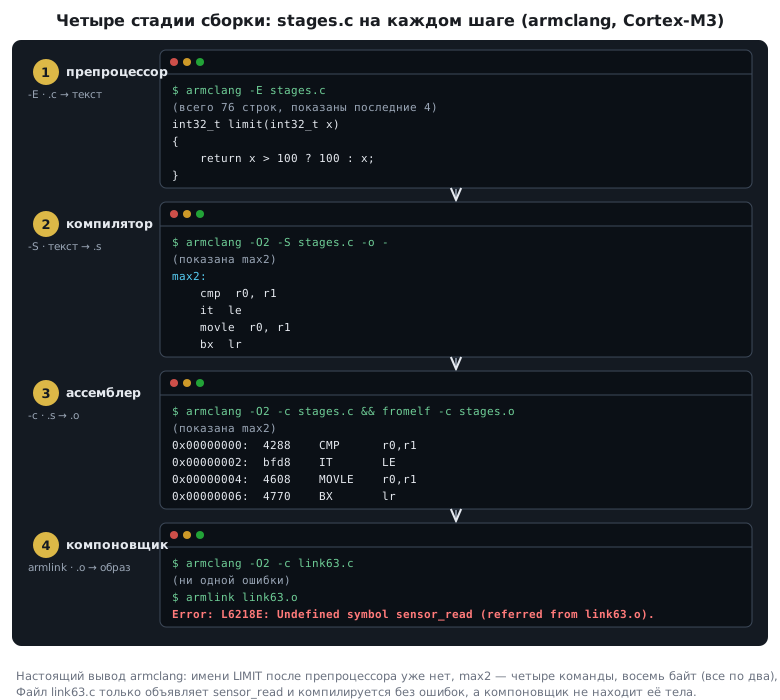
Usually all of this is done with one command, and the stages are not visible. But you can stop at any step and look at what came out. Take a small file:
#include <stdint.h>

#define LIMIT 100

int32_t max2(int32_t a, int32_t b)
{
    if (a > b)
        return a;
    return b;
}

int32_t limit(int32_t x)
{
    return x > LIMIT ? LIMIT : x;
}
Fifteen lines. Let us take it through all four stages.
63.4 The preprocessor: text only
The preprocessor knows nothing about C. It executes the lines that start with
# and works with the text like a text editor:
#includeis replaced with the contents of the file, whole;- a name from
#defineis replaced with whatever is written after it; - comments are thrown away.
After it, our fifteen lines turn into 76, more than five
times longer. The extra part is the inserted stdint.h: that is where int32_t came from,
and it turned out to be an ordinary typedef. And the end of the file looks like this:
int32_t limit(int32_t x)
{
    return x > 100 ? 100 : x;
}
The name LIMIT is gone: the compiler will never see it. This is the source of a whole
class of errors, covered in detail in section 71: the preprocessor substitutes
text literally, without thinking about meaning.
63.5 The compiler: from C to processor instructions
The compiler translates the text into assembly instructions. And here you see for the first time how much the result depends on the optimization level.
Without optimization, the function max2 turns into 17 instructions: the arguments
are first written to the stack, then read back, compared,
a branch is taken, the result is written to the stack again and read again.
Everything literally, line by line.
With optimization, into four:
max2:
    cmp r0, r1
    it  le
    movle   r0, r1
    bx  lr
Compare, and if a is not greater than b, copy b into the place of the result.
There is no branch at all: the branching has become a conditional move.
The function limit is also four instructions instead of fifteen.
| Without optimization | With optimization | |
|---|---|---|
max2 |
17 instructions | 4 |
limit |
15 instructions | 4 |
| total code | 64 bytes | 16 bytes |
A fourfold difference. So why build without optimization at all? Because such code is easy to debug: every line of C maps to its own piece of machine code, and the debugger honestly shows variable values. After optimization, variables live in registers, lines are shuffled, and part of the code disappears completely. This is exactly where the bugs that "do not reproduce in the debug build" surface (section 3.4). More about optimization in section 75.
63.6 The assembler: instructions become bytes
The assembler translates each instruction into its binary code and puts the
result into an object file. Here is the whole max2 function in bytes:
0x00000000:    4288    CMP      r0,r1
0x00000002:    bfd8    IT       LE
0x00000004:    4608    MOVLE    r0,r1
0x00000006:    4770    BX       lr
Eight bytes. All the instructions here are two bytes long: the Thumb-2 instruction set (section 1.6)
has 16- and 32-bit instructions, and simple operations on the low registers
are encoded in the short form. That is why the 32 instructions of the unoptimized version give
exactly 64 bytes, and the eight optimized ones give 16. In other code you will also meet
four-byte ones, for example mov.w and str.w (section 66.3).
The code 4770, return from a function, is worth remembering: you see it in any
Cortex-M firmware dump, and it is a handy way to find where functions end.
An object file is not yet a program. The addresses in it are provisional, and calls to functions from other files are left as empty slots marked "the address of such-and-such name goes here". The function names are kept in it, precisely for the next stage.
63.7 The linker: binding names
The linker collects all the object files into one image, places them at memory addresses according to the linker script (section 11.3) and binds names: every function call gets a real address.
This is where an error happens that puzzles beginners. The file
#include <stdint.h>
int32_t sensor_read(void);
int32_t main(void) { return sensor_read() + 1; }
compiles without a single error: there is a declaration, the types match. But the linker stops:
Error: L6218E: Undefined symbol sensor_read (referred from link63.o).
The function is declared but defined nowhere: there is no file with its body. The compiler sees only one file at a time and took the declaration on trust. The linker sees everything at once and found that the promised body is missing.
The rule: "undefined symbol" is not an error in the code but an error in the makeup of the project. A file was not added, a library was not linked, there is a typo in the name in one of the two places. How multi-module programs are organized is in section 71.
63.8 Where is "Hello, world" on a microcontroller
The first program in any language prints a greeting. A microcontroller has no screen, so there are two ways here.
The first program is a blinking LED (section 8). It checks everything at once: that the project builds, that the firmware gets into the chip, that the clock works and the pin is configured.
printf works if you redirect it: to the serial port
(section 16.6) or to the debug channel (section 21.3). The function itself
formats the string, and you decide where the characters go.
And the answer to a common question: can you write a program without
libraries? On a microcontroller this is routine. A program that
writes to registers and prints nothing may not call the standard library
itself at all. But the compiler is free to insert calls on its own:
memcpy and memset when copying a structure or zeroing an array
(section 68.2), helper functions for 64-bit division, for division
on Cortex-M0 and for float without an FPU. When building with no libraries at all, you
have to provide them yourself. The bare minimum is the startup code, which
prepares memory and calls main (section 11.2).
63.9 Positional number systems
In a positional system, the value of a digit depends on its position. In the notation
555, three identical digits mean five hundred, fifty and five. The base of the
system is how many different digits it has and how many times more each
next position "weighs".
A simple riddle: can 8 + 8 = 10? It can, in the hexadecimal
system. Or: a spider has 1000 legs, a dog 100, a human 10. All
correct if you write in binary: that is 8, 4 and 2.
Four systems matter to a programmer:
| Base | Digits | Where you meet it |
|---|---|---|
| 2 | 0, 1 | register bits, logic |
| 8 | 0 … 7 | file permissions and a trap in C |
| 10 | 0 … 9 | everything human |
| 16 | 0 … 9, A … F | addresses, registers, memory dumps |
63.10 Converting between systems
To decimal: the sum of the digits multiplied by the weight of their position:
0x27F = 2·16² + 7·16 + 15 = 2·256 + 112 + 15 = 639
0173  = 1·8²  + 7·8  + 3  = 64 + 56 + 3      = 123
From decimal: division by the base with remainder. The remainders, read from bottom to top, give the notation. Let us convert 12345678 to hexadecimal:
| Dividend | ÷ 16 = quotient | remainder |
|---|---|---|
| 12345678 | 771604 | 14 → E |
| 771604 | 48225 | 4 |
| 48225 | 3014 | 1 |
| 3014 | 188 | 6 |
| 188 | 11 | 12 → C |
| 11 | 0 | 11 → B |
From bottom to top: 0xBC614E. A few more pairs to check yourself:
| Decimal | Hexadecimal |
|---|---|
| 1000000 | 0xF4240 |
| 305419896 | 0x12345678 |
| 16777216 | 0x1000000 |
Note the last two rows: the same digits "12345678" and "1000000" mean completely different numbers in the two systems. Hence the rule of notation: always state the base explicitly.
63.11 Related systems: 2, 8 and 16
The main property for which the hexadecimal system is needed at all: one of its digits is exactly four bits. Converting from binary and back needs no arithmetic at all, just substitution from a table:
0x27F      →  0010 0111 1111
1010 0100  →  0xA4
With octal it is the same, only in groups of three bits:
0173 → 001 111 011
Hence the convenience for registers: a 32-bit register is exactly eight
hexadecimal digits, and each of them corresponds to its own four bits.
The address 0x40021018 in decimal is 1073877016, and nobody writes it that way:
decimal notation shows neither the boundaries of memory blocks nor individual
bits.
63.12 How to write numbers in C
The same number can be written in four ways:
42          /* десятичная */
0x2A        /* шестнадцатеричная */
052         /* восьмеричная — ведущий ноль! */
0b101010    /* двоичная */
⚠️ A leading zero makes a number octal.
010in C is eight, not ten. The classic mistake is aligning a column of numbers with zeros:
c
const uint16_t delays[] = { 100, 050, 010 };   /* 100, 40 and 8 */
The compiler will not warn you: the notation is valid, it just means something else. The digits 8 and 9 are not allowed in octal, so
09at least causes an error, but010passes silently.
Binary notation 0b… entered the language standard only in C23, but
compilers for microcontrollers have accepted it for a long time as an extension.
For register masks, hexadecimal or shifts are more convenient anyway
(section 3а).
63.13 Units: why a kilobyte is 1024
| Unit | How much |
|---|---|
| bit | 0 or 1 |
| byte | 8 bits |
| kilobyte | 2¹⁰ = 1024 bytes = 8192 bits |
| megabyte | 2²⁰ = 1048576 bytes |
Memory is addressed by binary numbers, so its sizes are powers of two. 64 KB of Flash is 65536 bytes, not 64000: a difference of 1536 bytes, and you have to take it into account when laying out memory.
In transfer rates, on the contrary, "kilo" is usually decimal: a kilobit per second is a thousand bits. Where it matters not to confuse them, binary units are written as KiB and MiB.
63.14 Signed integers: two's complement
Unsigned numbers are stored as they are. Signed ones are stored in two's complement:
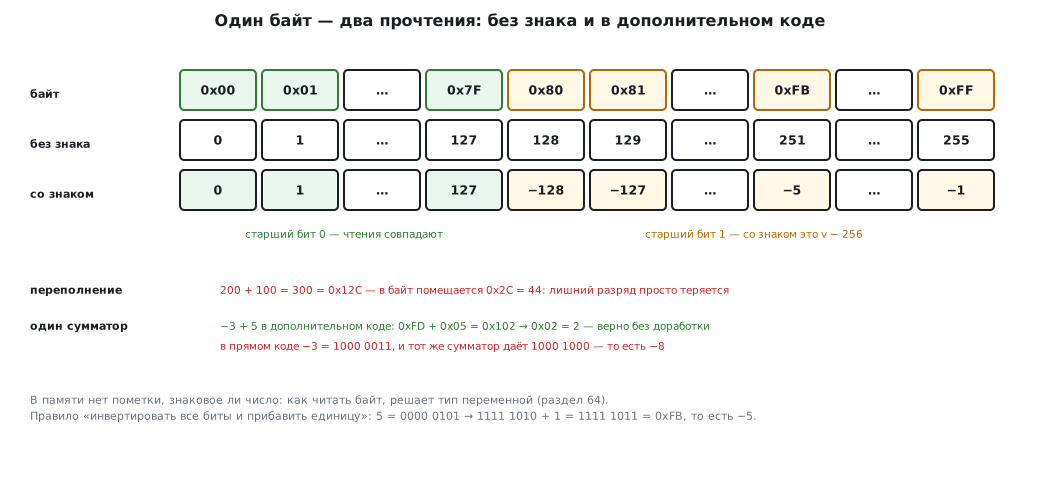
a negative number −x in k bits is written as 2ᵏ − x.
−5 в восьми битах: 256 − 5 = 251 = 0xFB = 1111 1011
The same result comes from the rule "invert all the bits and add one". The most significant bit becomes the sign bit: it is 1 for negative numbers.
| Bits | Signed | Unsigned |
|---|---|---|
| 8 | −128 … 127 | 0 … 255 |
| 16 | −32768 … 32767 | 0 … 65535 |
| 32 | −2147483648 … 2147483647 | 0 … 4294967295 |
Why such complications, why not just a sign bit? That notation exists too, sign-magnitude, and it has two drawbacks.
First: sign-magnitude has two zeros, 0000 0000 and 1000 0000, that is +0 and
−0. Second, and more important: addition needs a separate circuit. Let us add −3 and 5.
In sign-magnitude, −3 is 1000 0011; an ordinary adder (section 60.5)
gives 1000 1000, that is −8. In two's complement the very same
adder gives the correct 2, with no changes at all. One adder for
signed and unsigned numbers: that is the whole reason.
The same bits are different numbers. The byte 0xFB is 251 if
you read it as unsigned, and −5 if you read it as signed. There is no
mark in memory: the type of the variable decides how to read it (section 64). And if
the result does not fit, the extra bits are simply lost: 200 + 100 in
one byte gives 44. That is how the adder behaves; in C this is guaranteed only
for unsigned types. Signed overflow during a computation is undefined
behavior, and the optimizer may assume it never happens (section 123.3).
63.15 Fractions: not every one is finite
The fractional part is converted to binary by multiplying by 2: the integer parts of the results are the digits:
0,375 × 2 = 0,75   → 0
0,75  × 2 = 1,5    → 1
0,5   × 2 = 1,0    → 1          0,375 = 0,011₂
Three steps, and the remainder is zero. But it does not always work out like that. Convert 0.1:
0,1 = 0,0001100110011…₂ (0011 повторяется бесконечно)
A finite decimal fraction can turn out to be infinite in binary, and only an approximation goes into memory. That is why 0.1 in a computer is not quite 0.1, and you must not compare real numbers for exact equality.
With an integer and a fractional part together: 15.625 = 1111.101₂, and in float format
this is the word 0x417A0000. How this format works and what it means for
calculations is in section 69.
63.16 Characters are numbers too
There are no letters in memory, only codes. Each character is assigned a number:
| Character | Code |
|---|---|
'0' |
48 |
'A' |
65 |
'a' |
97 |
Two techniques that come up all the time follow from this table:
- a digit character is converted to a number by subtracting the code of zero:
'7' − '0'gives 7. This is how numbers that arrive over the serial port are parsed; - a lowercase letter differs from an uppercase one by one bit,
0x20. The difference between the codes is exactly 32.
And the reverse trap: '7' and 7 are different things. The first is code 55, the second is
the number seven.
63.17 Logical and bitwise operations
The laws of Boolean algebra and truth tables are in section 59.1–59.2, techniques with individual bits are in section 3а. Here is one distinction on which everyone makes mistakes.
Logical operations &&, ||, ! work with the number as a whole:
zero is false, everything else is true, the result is 0 or 1.
Bitwise &, |, ^, ~ work with each bit separately.
| Expression | Result | Why |
|---|---|---|
65 & 35 |
1 | the only bit they share is the lowest one |
65 \| 35 |
99 | union of the bits |
65 && 35 |
1 | both are non-zero |
2 & 1 |
0 | no common bits |
2 && 1 |
1 | both are non-zero |
The last two rows are the source of a bug people hunt for hours:
if (flags && 0x20) { ... } /* хотели проверить бит, а проверили «flags не ноль» */
Fortunately, armclang notices this: the line builds, but with a
warning that the logical operation has a constant operand, "use '&' for
a bitwise operation". GCC stays silent even with -Wall -Wextra and warns
only with the -Wlogical-op option. Warnings are not switched off, they are read.
One more property that is useful in practice: exclusive OR applied twice with the same number returns the original. The simplest encryption and checksums are built on this.
63.18 Pitfalls
Everything compiles but does not link: "undefined symbol". The function is declared but not defined: a file was not added to the project, or there is a typo in the name.
Are "linker" and "link editor" the same thing? Yes. And "build" most often means all four stages together.
printf prints nothing. On a microcontroller it has to be
redirected to a port or a debug channel.
It works in the debug build but not after optimization. The optimizer threw out
or reordered what it considered unnecessary. Most often this is a variable without
volatile (section 3.4) or undefined behavior: signed overflow,
going past the end of an array, an uninitialized variable (section 123).
A delay became several times shorter. The constant table has 010 instead of 10:
that is eight.
A number from a register looks meaningless. It is in decimal. Registers are read in hexadecimal: each digit is four bits.
A bit check is always true. && was written instead of &.
A byte shows 251 instead of −5. The same bits were read as an unsigned number: it is a matter of type.
A byte counter became zero after 255. Bits that do not fit in the type are lost.
Flash ran out sooner than expected. A kilobyte is 1024 bytes; 64 KB is 65536, not 64000.
A character from the port is compared with a number. '7' is code 55, not seven.
0.1 + 0.2 is not equal to 0.3. Decimal fractions in binary
are approximate: section 69.
63.19 Summary
- A build has four stages: the preprocessor works with text, the compiler translates C into instructions, the assembler makes bytes out of them, the linker binds the names into one image.
- The preprocessor inserts files and substitutes names: the fifteen lines of the example became 76.
- Optimization changes the result several times over:
max2is 17 instructions without it and 4 with it, 64 bytes of code versus 16. - "Undefined symbol" is a linker error, not a compiler error: a definition is missing, not a declaration.
- One hexadecimal digit is four bits, an octal one is three; that is why registers are written in hexadecimal.
- A leading zero in C makes a number octal:
010is eight. - Negative numbers are stored in two's complement: −5 in a byte is
0xFB. This way one adder adds both signed and unsigned numbers. - The same bits mean different numbers: the type decides.
- 0.1 is infinite in binary: real numbers are approximate.
- A character is a code:
'7' − '0'gives 7, a lowercase letter differs from an uppercase one by the bit0x20. &and&&are different operations:2 & 1gives 0,2 && 1gives 1.
Next: section 64 "Data types": how much space each type takes and why on a microcontroller it is not the same as on a computer.