 Embedded HandbookApps
64. Data types
A type tells the compiler three things: how many bytes a value takes, how to read those bytes and which operations are allowed on them. The same four bytes can turn out to be an integer, a floating-point number or an address: there is no mark in memory, only the type carries it (section 63.14).
The main rule for a microcontroller, to take fixed-width types
from stdint.h, is already explained in section 3.1, along with the table of sizes on
Cortex-M and the trap of signed char. This section covers what lies beneath that
rule: where sizes and ranges come from, how types turn into one another
without asking, why 5 / 2 equals two and what printf actually
prints.
Terms used in the documentation
Term Meaning object, variable a named place in memory holding a value declaration, definition announcing a name; creating the object or body initializer the starting value identifier a name type specifier, qualifier the type word; a modifier such as constinteger literal, suffix an integer constant in the text; letters like u,Lafter itimplicit conversion a type change the compiler makes on its own usual arithmetic conversions the rules for bringing two operands to a common type cast an explicit type conversion truncation toward zero dropping the fractional part, rounding toward zero side effect a change of memory during evaluation sequence point a point where all previous side effects are complete undefined behavior the standard promises nothing format specifier the %code that tellsprintfthe type
64.1 A variable: name, address, value
A variable is a place in memory that has a name, an address and a value. The value can be changed; the new one is written over the old one, and the old one is lost.
int a;              /* объявление: место выделено, значение не задано */
int five = 5;       /* объявление с начальным значением */
float pi = 3.14f;
char c = 'A';
⚠️ A local variable without an initial value contains garbage: whatever was left in that place on the stack. Global and
staticvariables are guaranteed to be zero: the startup code clears them beforemain(section 11.2). Relying on zero in a local variable is one of the most common mistakes.
64.2 Names
A name can consist of Latin letters, digits and underscores, and cannot
start with a digit. Uppercase and lowercase letters are different: Speed and
speed are two different variables.
| Name | Allowed? | Why |
|---|---|---|
super173, _my_string, ABCdf |
yes | |
4you |
no | starts with a digit |
h&m, a*b |
no | operator characters |
Иван |
allowed, but better not | gcc from version 10 and armclang accept it, but not every tool and not every colleague will |
[goodname] |
no | brackets |
Separately: names that start with an underscore and an uppercase letter
or with two underscores are reserved for the compiler and the
library. You can meet them in headers, __IO, _Bool, but
do not give them to your own variables: one day there will be a clash.
How to choose meaningful names is in section 3.7.
64.3 Type size: guarantee and reality
The language standard does not set the sizes of the basic types exactly: it sets a lower bound. Everything above it is decided by the platform.
| Type | Standard guarantees at least | Cortex-M | Computer x86-64, Linux |
|---|---|---|---|
char |
8 bits | 1 byte | 1 |
short |
16 bits | 2 | 2 |
int |
16 bits | 4 | 4 |
long |
32 bits | 4 | 8 |
long long |
64 bits | 8 | 8 |
float |
4 | 4 | |
double |
8 | 8 | |
long double |
no less than double |
8 | 16 |
pointer, size_t |
4 | 8 | |
_Bool |
1 | 1 |
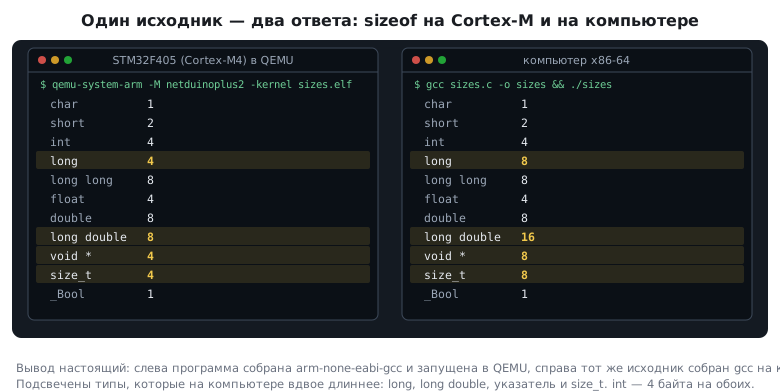
On Windows, on the same processor, the data model is different: long is 4 bytes with
both compilers, Microsoft and MinGW, and long double with the
Microsoft compiler is 8. So long is not portable even between computers;
where an exact width is needed, use int32_t and int64_t.
Two conclusions.
int is not the width of the processor. On a 64-bit computer
int is 4 bytes, just as on the 32-bit Cortex-M. Only
16 bits are guaranteed, and on 8-bit microcontrollers int is exactly that. Code
that silently counts on 32 bits ports with surprises, hence the
rule of section 3.1.
long and a pointer are twice as long on a computer. A program that
stores an address in int or uint32_t, or prints size_t with %u, works on the
chip, but on a computer loses the upper half. For an address as a
number there is uintptr_t from stdint.h, and for printing size_t there is %zu.
You find out the size with the sizeof operator: it is evaluated by the compiler and
costs nothing at run time.
64.4 Where ranges come from
k bits give 2ᵏ different combinations. For an unsigned type these are the numbers from
0 to 2ᵏ − 1, for a signed type, in two's complement (section 63.14), from
−2ᵏ⁻¹ to 2ᵏ⁻¹ − 1:
| Type | Range |
|---|---|
int8_t |
−128 … 127 |
uint8_t |
0 … 255 |
int16_t |
−32768 … 32767 |
uint16_t |
0 … 65535 |
int32_t |
−2147483648 … 2147483647 |
uint64_t |
0 … 18446744073709551615 |
Why −128 and not −127? Because two's complement has only one zero,
and the freed combination 1000 0000 goes to one more
negative number. There turns out to be one more negative number than
positive ones.
Older editions of the standard gave the minimum range of signed char as
−127 … 127, to allow machines with sign-magnitude, which have two
zeros. There is not a single such machine among microcontrollers, and in the
latest edition of the language two's complement became mandatory.
64.5 Constants have a type too
This is the part people notice last. A number written in the text is not "just a number": it has a type, and the type affects the computation.
| Constant | Type | Size on Cortex-M |
|---|---|---|
3.14 |
double |
8 |
3.14f |
float |
4 |
'A' |
int |
4 |
100000 |
int |
4 |
3000000000 |
long long |
8 |
5u, 5ul |
unsigned, unsigned long |
4 |
Hence the suffix f: without it 0.1 is a double, and on a Cortex-M4 the whole
expression goes into slow software arithmetic (section 3.1). With 0.5
the optimizing compiler will do without it, since this number is exactly representable in float,
but you should not rely on such luck.
The character constant 'A' in C has type int, not char: this is a
historical quirk of the language. In practice it does no harm: the character code
simply turns out to be an integer.
A constant that does not fit in int becomes longer by itself: three
billion got an eight-byte type. But this rule applies only to the
constant itself: the result of the expression 100000 * 100000 stays
int and overflows. The compiler notices this and warns that instead of
ten billion you get 1410065408, which is what you get if you simply
drop the upper bits. But the language does not promise that: signed overflow
is undefined behavior (section 123.3), and with variables instead of constants
the optimizer may assume it never happens. If you need a 64-bit result,
make one of the factors 64-bit: 100000LL * 100000.
64.6 Implicit conversions
When different types meet in an expression, the compiler brings them to a common one without asking. The rules are:
- If one operand is floating-point, the other becomes floating-point too.
- Types shorter than
intare widened toint: this is integer promotion, and its traps are covered in section 3.5. - If one operand is unsigned and the other is signed of the same length, the signed one becomes unsigned.
The third rule is the source of the strangest results:
unsigned u = 5;
if (-10 < u) { ... }     /* не выполнится: −10 стало 4 294 967 286 */

unsigned n = 50;
int      s = -500;
int answer = s / n;      /* 85 899 335, а не −10 */
In the first line −10 turns into the unsigned 4294967286, which is,
of course, greater than five. In the second, −500 becomes 4294966796, is divided
by 50 and gives 85899335. The -Wsign-compare option catches only the first
case, the comparison. It lets the division pass silently; only
-Wsign-conversion, which warns about every change of signedness, notices it.
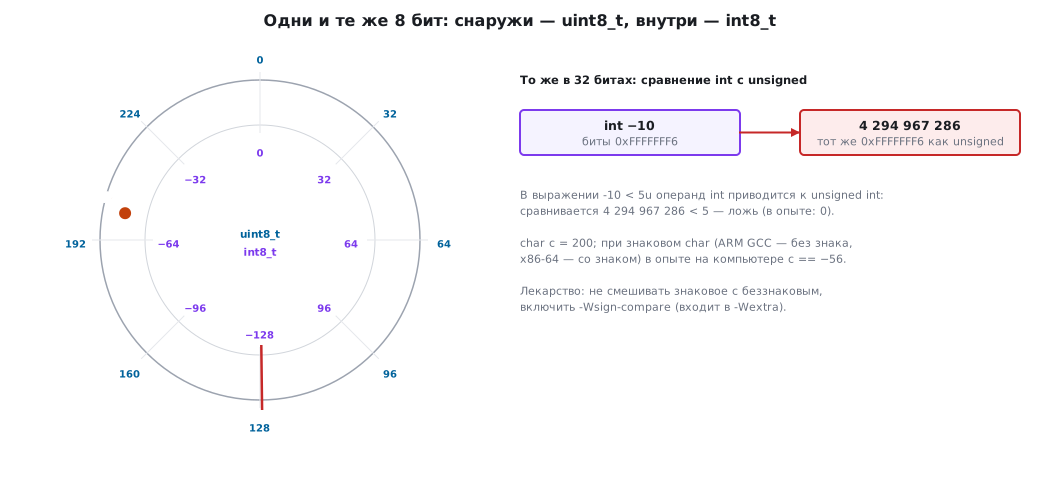
A rule from practice: in one expression, use either only signed or only unsigned values.
Assignment converts too. The value is converted to the type of the left-hand side. And here is the most important part: the conversion happens after the right-hand side has been evaluated.
float f;
f = 3 / 2;        /* 1.0 — деление было целым, результат 1 превратился в 1.0 */
f = 3.0f / 2;     /* 1.5 */

int a = 7;
f = a / 4;        /* 1.00 */
f = 4 / a;        /* 0.00 */
f = (float)a / 4; /* 1.75 */
The fact that there is a float on the left has no effect at all on the division on the right.
64.7 Explicit conversion
You can specify the type yourself, with the type name in parentheses: (float)a,
(uint8_t)x. This is needed in two cases: when the implicit conversion
gives the wrong thing (like (float)a / 4 above), and when you want to show the reader
that the loss of precision here is deliberate.
A floating-point value converted to an integer is not rounded; the fractional part is dropped:
(int)3.99 is 3, (int)−3.99 is −3. If you need rounding,
do it explicitly: lroundf(x) or roundf(x) from math.h. The trick "add
a half and truncate" works only for non-negative values:
(int)(-2.7f + 0.5f) gives −2, not −3 (section 69.5).
A cast does not rescue you from overflow after the fact. In
(int64_t)(a * b) the multiplication of two int32_t has already been done in 32 bits and
has overflowed. Cast the operand: (int64_t)a * b, then the
multiplication is done in 64 bits. A cast to uint32_t on Cortex-M does not widen
anything: int there is already 32-bit, and (uint32_t)a * b loses
the same upper bits.
64.8 Integer division and remainder
For integers, / gives the integer part and % gives the remainder. Rounding is toward zero,
not down, and the remainder takes the sign of the dividend:
| Expression | Result |
|---|---|
27 / 5, 27 % 5 |
5 and 2 |
−27 / 5, −27 % 5 |
−5 and −2 |
−27 % −5 |
−2 |
27 % −5 |
2 |
−7 / 2, −7 % 2 |
−3 and −1 |
And (a / b) * b + a % b == a always holds.
For negative numbers this is not what a mathematician expects: the mathematical "−7 divided by
2 is −4 with remainder 1" does not work here. Hence the trap when working with a
ring buffer or an angle: index % size with a negative index
gives a negative result.
In integers, the order of operations decides everything. 1 / 3 * 3 is 0, because
1 / 3 is already zero. But 1 * 3 / 3 is 1. When scaling in
integer arithmetic, multiply first and divide afterwards, making sure
not to overflow (section 3.5).
Division and remainder by 10 split a number into digits:
int n = 123;
int sum = n % 10 + (n / 10) % 10 + (n / 100) % 10;   /* 3 + 2 + 1 = 6 */
In the same way, the product of the digits of 435 is 60, and of 102 it is zero.
64.9 Assignment is an expression
= in C is not a statement but an operator, and it has a value: the value that was
assigned. Hence chains and techniques like
a = b = 7;             /* обе переменные — 7 */
x = (a = 3) + 1;       /* a = 3, x = 4 */
Hence also the famous mistake if (a = 5) instead of if (a == 5): the condition
is always true, and a is spoiled (section 65).
The compound forms a += b, a -= b, a *= b, a /= b, a %= b,
and also &=, |=, ^=, <<=, >>= mean a = a ⊕ b. For registers
this is the most common notation: GPIOA->ODR |= 1u << 5 (section 3а).
Increment and decrement come in two kinds:
int x = 5, y = 5;
int pre  = ++x;        /* сначала увеличить, потом взять: pre = 6, x = 6 */
int post = y++;        /* сначала взять, потом увеличить: post = 5, y = 6 */
64.10 Side effects and sequence points
A side effect is a change of memory during evaluation: an assignment,
++, --, a call to a function that writes something. The problem is that
the order in which the parts of an expression are evaluated is unspecified. The compiler may
evaluate the left operand of + before the right one or the other way round.
That is why there is a rule: between two sequence points, one variable may be modified no more than once. The sequence points are:
- the end of a full expression: the semicolon;
&&,||and the comma: between the left and right operands;? :: after the condition;- a function call: after all the arguments have been evaluated.
a = b++ + ++b;         /* НЕЛЬЗЯ: b меняется дважды */
a = (c = 3) + (c = 2); /* НЕЛЬЗЯ: c меняется дважды */
printf("%d %d", i, i++);  /* НЕЛЬЗЯ: чтение и изменение без точки следования */
This is not an "unpredictable result" but undefined behavior: the standard promises nothing, and different compilers or optimization levels really do give different results. Such code is not fixed; it is rewritten as several lines.
And one subtlety the other way round: sizeof does not evaluate its expression. After
sizeof(k++) the value of k does not change: the compiler looked only at the
type.
64.11 Formatted output and input
printf and scanf describe the type of each value with a specifier.
The compiler cannot check that the type of the variable matches it:
that is your responsibility (although GCC-compatible compilers
warn you if the format string is written directly in the call).
| Specifier | Type |
|---|---|
%d, %i |
int |
%u |
unsigned |
%ld, %lu |
long, unsigned long |
%lld, %llu |
long long |
%zu |
size_t |
%x, %X |
unsigned in hexadecimal |
%f, %e |
double (and float, which is widened) |
%c |
character |
%s |
string |
%p |
pointer |
The full form is %[flags][width][.precision][size]type. Here is what you actually get
(output of a real run; the square brackets show the boundaries of the
field):
| Call | Output |
|---|---|
printf("[%9d]", 1234) |
[ 1234] |
printf("[%f]", 123.4567f) |
[123.456703] |
printf("[%9.3f]", 123.4567f) |
[ 123.457] |
printf("[%e]", 123.4567f) |
[1.234567e+02] |
printf("[%10.2e]", 123.4567f) |
[ 1.23e+02] |
printf("[%x][%#x][%X]", 255, 255, 255) |
[ff][0xff][FF] |
printf("[%05d][%+d][%-5d]", 42, 5, 42) |
[00042][+5][42 ] |
Two rows deserve attention. %f of a float with the value 123.4567
prints 123.456703: the tail "03" is the storage error, since
float has about seven correct digits (section 69). And %9.3f rounds
to 123.457, unlike a cast to int, which truncates.
scanf writes to the variable, so it needs an address:
int a, b;
scanf("%d", &a);          /* правильно */
scanf("%d", a);           /* ошибка: передано значение, а не адрес */
scanf("%d%d", &a);        /* ошибка: спецификаторов больше, чем адресов */
scanf("%f", &a);          /* ошибка: %f для int */
You cannot convert types inside scanf: the specifier must match the
type of the variable.
On a microcontroller printf works after output is redirected
(sections 16.6 and 21.3). And keep in mind that in cut-down library variants
output of floating-point numbers is disabled to save Flash and is enabled
by a separate setting; otherwise you get nothing in place of the number.
64.12 const and #define
A common question: what is the difference between const int N = 10; and #define N 10?
#define N 10 |
const int N = 10; |
|
|---|---|---|
| what it is | text substitution (section 63.4) | a variable that cannot be changed |
| type | none | yes, checked |
| address | none | yes |
| visible in the debugger | no | yes |
| scope | to the end of the file | like a variable |
| array size outside a function | allowed | not allowed by the standard |
The last row surprises those who came from C++: in C, const does not
make a compile-time constant.
const int N = 10;
int table[N];            /* по стандарту нельзя: N не константное выражение */
And here compilers disagree. GCC refuses to build it: "variably
modified 'table' at file scope". armclang builds it, but warns
that it folded the size into a constant as an extension, and turns this
into an error if you ask for strict conformance to the standard. Code that
builds only thanks to an extension will break when you change
compilers.
With #define N 10 the same declaration builds everywhere. That is why array sizes,
bit numbers and addresses in C are traditionally defined with #define, while
const is used for values that are needed as variables: tables in
Flash (section 3.6), function parameters that the function promises not to
change. For integer constants there is also a third way, enum { N = 10 };: it is
a true compile-time constant, it works for an array size even outside a
function, it has a scope, and the debugger usually shows its name.
C23 added constexpr for the same purpose.
64.13 Pitfalls
A local variable is "sometimes" not zero. No initial value was given. Globals are zeroed, locals are not.
Is int a different size on the chip and on a computer? No, both are 4 bytes.
What differs are long, pointers, size_t and long double.
f = 3 / 2 gave 1.0. The division is integer; the type of the left-hand side does not
affect it. You need 3.0f / 2.
if (-10 < u) does not trigger. The signed value is compared with an unsigned one and
becomes a huge number.
The average of negative numbers was rounded the wrong way. Integer division rounds toward zero: −7 / 2 is −3.
(int)2.9999 gave 2. A cast drops the fractional part.
An index taken modulo went negative. % of a negative number is
negative.
b++ + ++b gives different results on two compilers. Undefined
behavior: one variable is modified twice without a sequence point.
printf prints garbage. The specifier does not match the type: %d for
long long, %u for size_t on a computer.
scanf crashes the program. A value was passed instead of an address.
printf("%f") prints nothing on the chip. In the cut-down library,
floating-point output is switched off.
An array of size const int N builds in Keil and does not build in
GCC. In C this is not a compile-time constant; one compiler
accepts it as an extension, the other does not. #define works everywhere.
sizeof(void) gave one. This is a compiler extension; by the
standard you must not write this, and with the -pedantic option the compiler
warns you.
64.14 Summary
- A type sets the size, the way the bytes are read and the allowed operations; there is no type mark in memory.
- Local variables without an initial value contain garbage, global ones are zeroed.
- The standard guarantees only a lower bound on size:
intis at least 16 bits. On Cortex-M and on a computerintis the same, whilelong, pointers andsize_tdiffer by a factor of two. - A signed type has one more negative number than positive ones:
int8_tis −128 … 127. - Constants have a type too:
3.14isdouble,'A'isint. - Signed mixed with unsigned becomes unsigned:
−10 < 5uis false,−500 / 50uis 85899335. - Assignment converts a result that is already computed:
f = 3 / 2is 1.0. - A cast to an integer drops the fraction; division rounds toward zero, and the remainder takes the sign of the dividend.
- One variable must not be modified twice between sequence points: that is undefined behavior.
- The
printfandscanfspecifier must match the type;scanfneeds an address. constin C is not a compile-time constant: GCC will not build an array of sizeconst intoutside a function, andarmclangbuilds it only as an extension. For array sizes you need#define.
Next: section 65 "Branches and loops".