 Embedded HandbookApps
0. Where to start and where to go
The handbook is not a novel: it has 417 sections in 27 parts and 25 appendices, and you cannot read it cover to cover — nor do you need to. This section is a map. It explains how the difficulty levels work, which two boards underlie all the examples and what to buy on the first round, and then gives four routes: from scratch, to the intermediate level, into electronics and into networking. Pick yours, let the rest wait. And if you are opening the handbook for the first time and have nothing to choose from yet, go straight to section 0а: a single road of twenty sections to your first device.
Terms used in the documentation
Term Meaning getting started introductory documents and first steps development board a board for development and debugging firmware the program flashed into the microcontroller bare metal a program without an operating system RTOS real-time operating system breadboard a solderless prototyping board prerequisite what you need to know beforehand
0.1 How the handbook is organized: levels and what to skip
Every section has a level field in its header, and it decides whether to read the section now or put it off:
| Level | Sections | What it means |
|---|---|---|
| basic | 64 | readable without preparation; the routes start with these sections |
| intermediate | 296 | builds on the basic sections of its part; the bulk of the handbook |
| advanced | 52 | internals: assembler, exception frames, bootloaders, the OS kernel |
| reference | 5 + 25 appendices | not read in order but opened when needed |
The rule for the first reading is simple: follow the route for your level and skip everything above it. An advanced section will not go anywhere — it will become clear and necessary once you run into what it was written for.
The second rule is about lettered sections: 2а, 7б, 11а, 132г and the like. These are branches off the parent number, deeper dives into a single topic. On the first reading you skip all of them: section 7 is mandatory, sections 7а–7в wait until interrupts become familiar.
At the bottom of every section there is a "Next:" line — a chain running through the whole handbook, from that section to the last one. It is for the second pass or for the stubborn; the first pass is faster and more useful along the routes in 0.3–0.6.
0.2 Two reference boards and what to buy to start
All the examples in the handbook are built on two platforms — the register chapters of every peripheral section are labelled with their names:
| BluePill | Discovery with F407 | |
|---|---|---|
| chip | STM32F103C8 | STM32F407VG |
| core | Cortex-M3, 72 MHz | Cortex-M4 with FPU, 168 MHz |
| Flash | 64 KB | 1 MB |
| RAM | 20 KB | 192 KB: 128 regular + 64 CCM |
| role | cheap learning board: register level | floating point, DSP, fast DMA |
| LED | PC13, cathode to the pin |
PD12…PD15 |
Instead of the Discovery you can use the Nucleo-F401RE: the same Cortex-M4 with FPU,
84 MHz, 512 KB Flash and 96 KB RAM, with the debugger already on the board — but no DAC,
and the LED is on PA5. A learning variant of the BluePill is the NR Blue Kit with
ready-made support circuitry. Boards, revisions and counterfeits are covered in detail in 2.6
and 2а.
Even closer to the BluePill in price and size is the WeAct BlackPill on the STM32F411CE
or F401CC: the same Cortex-M4 with FPU, 100 or 84 MHz, 512 or 256 KB of Flash,
flashed over USB by the factory bootloader without a programmer. No DAC, CAN
or Ethernet, the LED is on PC13, the crystal is 25 MHz. The board and porting the examples
from the Discovery are in 2ж.
The first purchase is five lines; everything else is bought along the route:
| What for | |
|---|---|
| board: BluePill or Nucleo | everything |
| ST-Link (on the board for Nucleo and Discovery) | flashing and debugging |
| USB–UART adapter | terminal: the main debugging tool |
| breadboard, wires, buttons, LEDs, resistors | the first ten projects |
| potentiometer | everything about the ADC |
An oscilloscope is not on this list: it is the only expensive item in the toolkit, and you can do without it almost everywhere. The full list of hardware for every project is in 38.3.
0.3 Route A: from scratch on the BluePill
Route level: basic → intermediate. Twenty-one steps; each is one section. Every step has two notes: what you must take away from the section and what to skip on the first reading. Nothing skipped is lost — later sections bring you back to it.
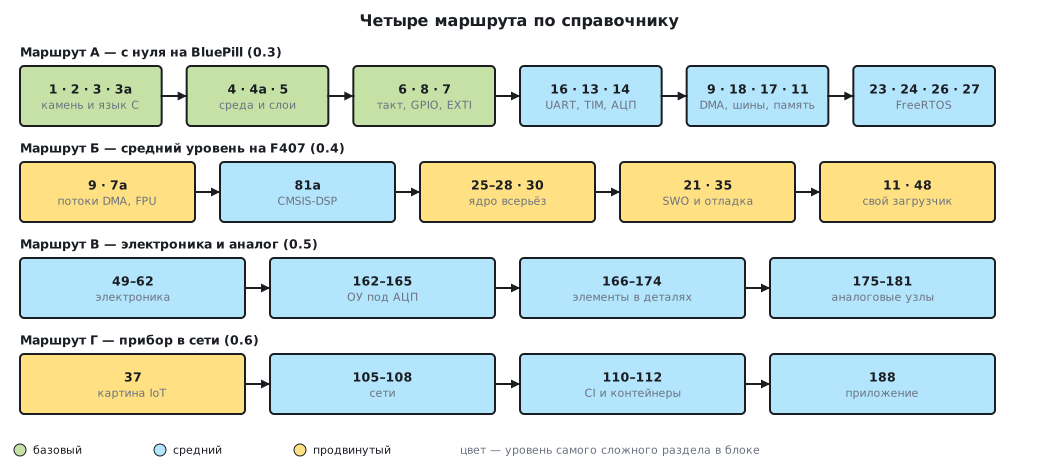
| Step | Section | What to take away | What to skip for now |
|---|---|---|---|
| 1 | 1 | core, memory, peripherals; the memory map (1.4) | bit-banding (1.5) and the pipeline (1.7) |
| 2 | 2 | part marking (2.2), choosing a board (2.6), ST-Link (2.7) | replacing the chip (2.9); section 2б |
| 3 | 3 | stdint.h, volatile (3.4), a pointer to a register (3.3) |
type promotion (3.5) — in more depth in 122 |
| 4 | 3а | the four operations on a bit; read-modify-write (3а.6) | byte order (3а.8) |
| 5 | 4 | choose an IDE (4.2), install it, flash the board (4.9) | building without an IDE (4.8) — expanded in 4в |
| 6 | 4а | program layers, packs, Debug and Release | building from the command line (4а.10); if your IDE is CubeIDE, read 4б instead of 4а |
| 7 | 5 | when registers and when HAL; assignment versus adding bits (5.4) | a CubeMX project (5.7) — until you first work with it |
| 8 | 6 | the clock tree, 72 MHz (6.3); a peripheral clock is enabled by hand | HSI trimming (6.8); F0 and G0 (6.7) |
| 9 | 8 | output modes, BSRR; an LED (8.4) and a button (8.5) |
alternate functions — they come back in 13 and 16 |
| 10 | 16 | frame, baud rate, sending to a terminal (16.3), levels (16.7) | Modbus (16.8); receiving (16.5) is easier after DMA |
| 11 | 13 | PSC/ARR/CCR, shadow registers, PWM (13.5) |
one-pulse mode (13.8) and synchronization (13.9) |
| 12 | 7 | the EXTI → NVIC chain, a button on an interrupt (7.6) | sections 7а–7в: that is the advanced level |
| 13 | 14 | a single conversion (14.4), sampling time, calibration | scanning (14.6) — two steps later, together with DMA |
| 14 | 9 | channel, priority, circular buffer; projects 9.5 and 14.6 | the FIFO on F4 (9.6) — F1 does not have one |
| 15 | 18 | CPOL/CPHA, block transfer (18.5) |
slave mode — section 17а |
| 16 | 17 | start — address — repeated start, a sensor (17.4), recovering the bus (17.6) | EEPROM (17.8) — when you meet it |
| 17 | 11 | where variables live, the stack and the heap; settings in Flash (11.5) | your own linker script (4в) and the MPU (11а) |
| 18 | 23 | the limits of the superloop; when you do not need an OS (23.6) | the cooperative scheduler (23.7) — when the superloop stops being readable |
| 19 | 24 | what a kernel consists of, what it needs to start (24.4) | the CMSIS-RTOS wrapper (24.6) |
| 20 | 26 | a task and its stack; vTaskDelay versus xTaskDelayUntil (26.4) |
static creation (26.8) |
| 21 | 27 | a queue copies (27.1); button → queue → LED (27.7) | variable-length data (27.5) |
From step 9 on, reading without a board is pointless: build the projects in parallel in the order of 38.2 — the route steps follow the same order. The last projects on that list (30.8 and 42.5) are left for later: they rely on sections of a higher level. When you get stuck, section 36 sorts failures by symptom, from "does not build" to "works sometimes".
0.4 Route B: intermediate level on the F407
Route level: intermediate → advanced. For those who have completed route A or come with equal experience — for example, from confident Arduino work with registers. The board is the Discovery with F407: here you get the FPU, the DSP library and enough memory to fit FreeRTOS without counting bytes.
| Step | Section | Why |
|---|---|---|
| 1 | 9 | DMA on the F4 is different: streams instead of channels (9.2), FIFO (9.6) |
| 2 | 7а | the stack frame and the FPU: what the core pushes onto the stack and at what cost (7а.4) |
| 3 | 81а | FIR and IIR with CMSIS-DSP — the FPU at work |
| 4 | 25 | the five FreeRTOS heaps: which one to take and how much memory to give |
| 5 | 26 | tasks, priorities, the stack of each task |
| 6 | 27 | queues — the main channel between tasks |
| 7 | 28 | interrupts and the kernel: FromISR and the priority mask |
| 8 | 30 | races, mutexes, priority inversion |
| 9 | 21 | SWO and ITM: output without a UART and timing in clock cycles |
| 10 | 35 | the debugger in earnest: analysing a HardFault (35.2), the stack (35.4) |
| 11 | 11 | linking and memory layout — the foundation of the next step |
| 12 | 48 | your own bootloader and firmware update |
After the twelfth step the natural continuation is firmware signing (48а) and, if the device faces a network, route G.
0.5 Route V: electronics and analog
Route level: basic → intermediate. Firmware runs into the circuit sooner than you think: the very first sensor brings pull-ups, voltage division and noise with it. This route is followed in parallel with any other — in stages, each stage being several sections in a row:
| Stage | Sections | What to take away |
|---|---|---|
| 1 | 49, 50 | Ohm's law, the divider, RC circuits — the arithmetic of everything else |
| 2 | 51, 52, 53, 55 | diodes and transistors, switches and relays, power supply and regulators |
| 3 | 59, 60, 61, 62 | logic, microcontroller support circuitry, pin protection |
| 4 | 54, 56, 57, 57а, 58 | isolation, op-amps, power PWM, motors, switching converters |
| 5 | 162, 163, 164, 165 | the ADC front end: gain, stability, the real op-amp, the noise budget |
| 6 | 166, 167, 168, 169, 170, 171, 172, 173, 174 | components in detail — from the resistor TCR to the crystal |
| 7 | 175, 176, 177, 178, 179, 180, 181 | building blocks: comparators, in-amps, voltage references, filters, the ADC chain, layout |
The first three stages are worth completing no later than the middle of route A — after that the sections on sensors (95–104) and external circuitry will rely on them silently.
0.6 Route G: a networked device
Route level: intermediate → advanced. Once a device works, you want to see it from afar: telemetry, updates, an app. Nine steps — from how a network works to your own device on it and an app for it; many steps are a pair of sections:
| Step | Section | Why |
|---|---|---|
| 1 | 37 | the whole picture: ways to connect, why MQTT, security |
| 2 | 105, 106 | the network from the bottom up: Ethernet and IP, TCP and UDP |
| 3 | 106а, 106б | Ethernet on the F407: the PHY and DMA descriptors; a packet byte by byte through the eyes of the microcontroller |
| 4 | 106в | lwIP on STM32: buffers, three interfaces and memory |
| 5 | 198ж, 198з | first networked devices: a sensor over UDP, a web page and REST |
| 6 | 107, 108 | DNS, DHCP, HTTP and TLS; routing, VLAN, Wi-Fi and VPN |
| 7 | 37а, 198и | what TLS costs on a microcontroller; an MQTT client with reconnection |
| 8 | 110, 111, 112 | building in a container, infrastructure, logs and metrics |
| 9 | 188 | the app talks to the device: HTTP, WebSocket, MQTT |
If you are not comfortable with Git yet, read section 109 before the eighth step. Background knowledge about networks and clouds without reference to a device is in 86–91; those sections are basic level and can be read at any time.
0.7 Reference sections: when something does not work
Five sections and the appendices work differently: you do not read them, you open them.
| Where | When |
|---|---|
| 36 | the device does not work: symptom → cause → fix tables |
| 38 | what to build and in what order; what hardware you will need |
| 34 | you forgot the name or arguments of a FreeRTOS function |
| 39, 39а | how to read a datasheet and the RM; where to get which ST document |
| 40 | an English term from the documentation → where it is covered here |
| A–A18 | register maps of all families |
| B, C, D | CMSIS, HAL and FreeRTOS API cheat sheets |
| E, F, G | board pinouts, abbreviations, the index of registers and functions |
A trick that saves time: when you meet an unfamiliar word in someone else's code or in the RM, do not search through the sections — go to the glossary in 40: it is assembled from the "Terms used in the documentation" boxes of all sections and leads straight to the right place.
0.8 Notation and conventions in code examples
All the examples in the handbook follow the same rules — once you get used to them in part I, you will read the code further on without explanations:
static volatile uint32_t g_ticks;                /* меняется в прерывании — volatile */

void SysTick_Handler(void)
{
    g_ticks++;
}

void led_init(void)
{
    RCC->APB2ENR |= RCC_APB2ENR_IOPCEN;          /* такт порта — до обращения к нему */
    GPIOC->CRH = (GPIOC->CRH & ~(0xFu << 20))    /* PC13: очистить поле режима...    */
               | (0x2u << 20);                   /* ...и записать «выход 2 МГц»      */
}
- Types come from
stdint.h:uint32_t, notint(why — 3.1). Unsigned constants have theusuffix. - Registers are accessed through CMSIS structures:
RCC->APB2ENR,GPIOC->CRH. Bit masks use the names from the ST headers where a name exists; bare shifts only with a comment saying which field it is. - Variables shared with an interrupt are
volatileand have theg_prefix (naming style — 3.7). - Comments are in Russian and explain "why" rather than restating the line.
- Units: KB = 1024 bytes; frequencies in MHz and kHz; pins by
port name:
PC13.
Icons in the text: ⚠️ — a pitfall on the spot, 🔧 — a complete project
that is built on the board (all such projects are collected in 38.1).
References like "(section 14)" or "(14.6)" are jumps within the handbook.
The ✅ box at the bottom of a section is a report of how its numbers and listings were checked:
by building, by emulator, by calculation. The listing above, for example, was built
with armclang for Cortex-M3 — see the box at the end of this section.
0.9 Pitfalls
Reading cover to cover, like a book. With 226 sections this is a sure way to give up somewhere in the second ten. The "Next" chain is for the second pass; the first one follows a route from 0.3–0.6 (0.1).
Jumping straight to advanced material. Sections 7а–7в sit next to 7 but are written for a different reader. The level in a section header is a filter: if it is not your level, skip it with confidence — the road will lead there eventually (0.1).
Reading without a board. From step 9 of route A, text without hardware stops sticking: the projects in 38.2 are not an appendix to the reading but half of it (0.3).
Skipping electronics. "But I'm a programmer" ends at the first sensor: pull-up, divider, noise. The first three stages of route V — no later than the middle of route A (0.5).
0.10 Summary
- The handbook has 417 sections in 27 parts and 25 appendices; the level in a section header is the filter for the first reading: basic → intermediate → advanced, and lettered sections are deeper dives for later.
- There are two reference boards: the BluePill (F103C8: Cortex-M3, 72 MHz, 64 KB Flash, 20 KB RAM) and the Discovery with F407 (Cortex-M4 with FPU, 168 MHz, 1 MB, 192 KB); the starter kit is a board, an ST-Link, a USB–UART adapter, a breadboard with small parts, a potentiometer.
- Route A is twenty-one steps from scratch to FreeRTOS queues; from the ninth step on — only together with the board and the projects in 38.2.
- Route B is the F407: DMA streams, the FPU and DSP, the kernel in earnest, debugging, your own bootloader.
- Route V is electronics from Ohm's law to the ADC analog front end; the first stages are needed sooner than you think.
- Route G is a networked device: from the IoT big picture to the app talking to the device.
- Reference sections and appendices are not read but opened: 36 on a failure, 38 when choosing a project, 40 for an unfamiliar term.
- Code examples use
stdint.h, CMSIS registers,volatilefor data shared with interrupts; the ✅ at the bottom of a section says how its numbers were checked.
Next: section 0а "Beginner's route: twenty sections in order" — one road from "I know nothing" to a thermostat on your desk: what to take away from each section and what to skip for now.