 Embedded HandbookApps
35а. Semihosting: output and files through the debugger
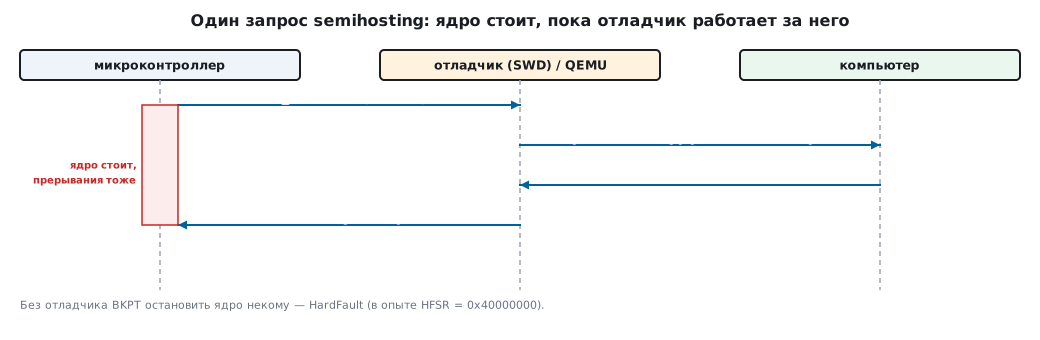
The firmware needs output, but there is no free UART. SWO (section 21) needs an output pin on the debug connector. There is a third way, the oldest one: semihosting — the program on the microcontroller asks the debugger to carry out an action on the computer for it: print a string, open a file, read the time, exit with an exit code.
Everything shown here is a run in QEMU (the netduinoplus2 machine, Cortex-M4) with
semihosting enabled and without it; the program _verify/semi35a/sh35.c does without
any libraries. The check is _verify/semi35a_check.py.
Terms used in the documentation
Term Meaning semihosting the debugger carries out the program's requests on the computer BKPT 0xABa breakpoint with a number by which the debugger recognises a request SYS_WRITE0,SYS_OPEN,SYS_EXITsemihosting operations rdimon(--specs=rdimon.specs)a newlib variant whose input and output go through semihosting Debug state the core halted for the debugger
35а.1 How it works
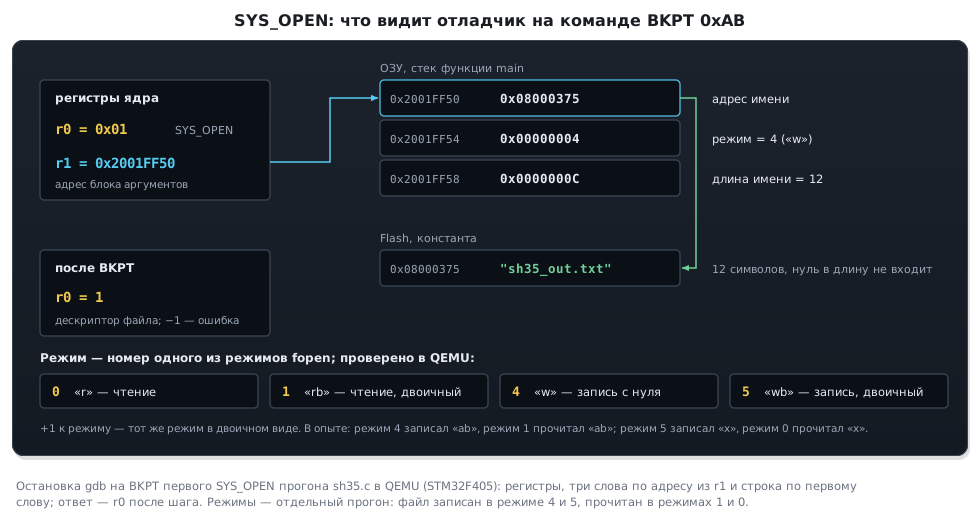
A call is three registers and one instruction:
static int semi(int op, void *arg)
{
    register int r0 __asm("r0") = op;
    register void *r1 __asm("r1") = arg;
    __asm volatile("bkpt 0xAB" : "+r"(r0) : "r"(r1) : "memory");
    return r0;
}
r0 holds the operation number, r1 the address of the argument block (or the argument itself),
and the result comes back in r0. According to the core manual, the BKPT instruction puts the processor
into the debug state. The debugger sees the halt, sees the number 0xAB in the instruction, reads
r0/r1 and the memory, carries out the request on the computer, writes the answer into r0 and
lets the core run on.
The operations tested in the experiment:
| Code | Operation | Argument | In the experiment |
|---|---|---|---|
| 0x04 | SYS_WRITE0 — print a string |
address of the string | "semihosting: hello from the target" |
| 0x03 | SYS_WRITEC — one character |
address of the character | "!" |
| 0x01 | SYS_OPEN — open a file |
name, mode, name length | the file sh35_out.txt on the computer |
| 0x05 | SYS_WRITE — write |
handle, buffer, length | 0 bytes not written |
| 0x06 | SYS_READ — read |
handle, buffer, length | the same string read back |
| 0x10 | SYS_CLOCK — time since start |
— | answer received |
| 0x18 | SYS_EXIT — exit |
reason directly in r1 |
QEMU exited with code 0 |
| 0x20 | SYS_EXIT_EXTENDED |
reason and code | QEMU exited with code 3 |
SYS_WRITE and SYS_READ return how many bytes could not be written or read:
0 means everything went through.
35а.2 What you get: files and an exit code
The firmware wrote a string into a file on the computer, closed it, opened it again and read it back — "written by the target via SYS_WRITE". The file sits in the debugger's working folder. This is how memory dumps, logs and measurement results are dumped without any interface on the board.
The exit code turns the firmware into an ordinary program for scripts: a test running under
the debugger (or in an emulator) prints what it checked and exits with a code —
and the build system (section 110) looks at the code just as it does for any program on the computer.
In the experiment SYS_EXIT_EXTENDED with code 3 — QEMU exited with code 3.
35а.3 What it costs: without a debugger it is a HardFault
The same firmware without semihosting in the emulator (on a board — with no debugger connected):
start
HardFault: HFSR=0x40000000 DFSR=0x00000000
The very first BKPT instruction — and a HardFault: there is no one to halt the core. The file is not created.
HFSR = 0x40000000 (the FORCED bit) is how the emulator reports the fault. On the chip
such a HardFault arrives with bit 31 DEBUGEVT (HFSR = 0x80000000) — that is how
you recognise it. And if the debugger was disconnected without removing power, the core simply
halts on the first BKPT: debugging (C_DEBUGEN in DHCSR) stays enabled until a power
reset, and the board looks hung.
Hence the main rule: semihosting belongs only in a debug build; in firmware
that goes onto a board without a debugger, not a single call may remain.
You can check at run time whether a debugger is connected by the C_DEBUGEN bit
(bit 0) in CoreDebug->DHCSR, but only on Cortex-M3, M4 and M7: on M0/M0+
the program cannot read this register. And the bit, as said above, stays set
after the debugger is disconnected until a power reset — so something else is more reliable.
The simplest is an output macro that is empty in the release build.
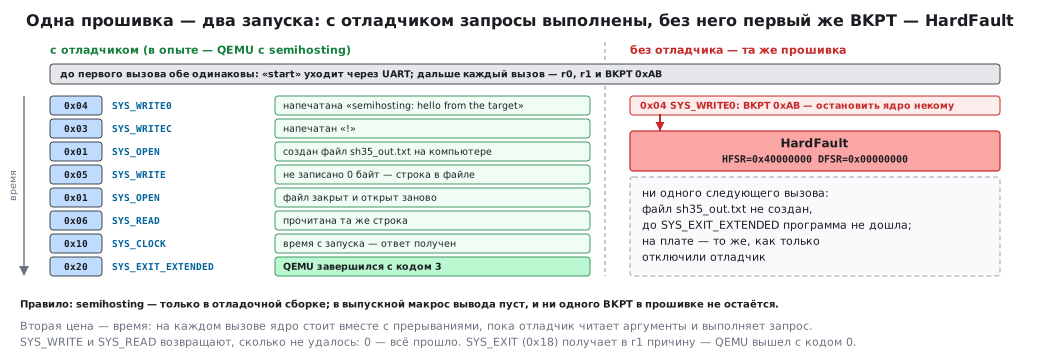
The second cost is time. On every call the core halts, the debugger reads the arguments from memory, carries out the request and only then lets the program go. While it works, everything stands still, interrupts included: SWO (section 21) and UART do not behave like this — the data goes out and the program runs on. For output from handlers and control loops semihosting is unsuitable.
35а.4 printf through semihosting: the rdimon library
Newlib (the standard C library from the arm-none-eabi-gcc toolchain) can route
printf, fopen and exit into semihosting by itself — the rdimon variant:
arm-none-eabi-gcc -mcpu=cortex-m4 -mthumb -Os --specs=rdimon.specs ...
arm-none-eabi-gcc -mcpu=cortex-m4 -mthumb -Os --specs=nano.specs --specs=rdimon.specs ...
Program size for the single line printf("x=%d y=%s\n", 42, "ok"):
| Library | Code |
|---|---|
| full newlib + rdimon | 31756 bytes |
| newlib-nano + rdimon | 10252 bytes |
The difference is in printf itself and in buffering: the nano variant is cut down. For a debug build
either will do; for firmware neither: rdimon input and output go through semihosting.
For printf through rdimon to print anything, four things are needed — in the experiment, without each of the last
three the line did not appear, even though the program ran to the end:
- semihosting is enabled in the debugger: in OpenOCD —
monitor arm semihosting enableafter connecting, in QEMU — the option-semihosting-config enable=on,target=native; - in a project with its own startup file — which is how a CubeIDE project is built — the rdimon startup code does not
run, and the first line of
maincallsinitialise_monitor_handles();(declaration:extern void initialise_monitor_handles(void);); - the project's
syscalls.cis excluded from the build: its_writeintercepts the output; - the string ends with
\nor is followed byfflush(stdout): otherwise it just stays in thestdoutbuffer.
35а.5 Pitfalls
The board hangs or falls into HardFault as soon as the debugger is disconnected. A semihosting call
was left in the build — BKPT without a debugger.
The program "freezes" on the first printf under the debugger. Semihosting is not enabled in the debugger:
the core is halted on BKPT and waiting. In OpenOCD — monitor arm semihosting enable.
printf under the debugger is silent, but the program runs. initialise_monitor_handles() was not called,
_write from syscalls.c intercepted the output, or a string without \n is waiting in the buffer (35а.4).
Interrupts are late while output is running. Every call halts the whole core.
The file did not appear. The path is relative to the debugger's working folder, not the project.
SYS_EXIT returned the "wrong" code. In 32-bit mode SYS_EXIT gets the
reason in r1, not the code; the exit code is passed by SYS_EXIT_EXTENDED.
35а.6 Summary
- Semihosting: operation number in
r0, arguments inr1,BKPT 0xAB; the debugger carries out the request on the computer. - Output, files on the computer, time, exit code — in the experiment QEMU wrote and returned a file and exited with code 3.
- Without a debugger the very first call is a HardFault (on the chip — with the
DEBUGEVTbit), and if the debugger was disconnected without a power reset — a core halt; for debug builds only. --specs=rdimon.specsgivesprintfand files from newlib: 31756 bytes, with nano — 10252.
Full source code
sh35.c — semihosting without libraries: calls through BKPT 0xAB.
/* Раздел 35а: semihosting без библиотек — прогон в QEMU netduinoplus2.
 * Вызов: номер операции в r0, адрес блока аргументов в r1, команда BKPT 0xAB; результат — в r0.
 * Отладчик (здесь — QEMU с -semihosting) видит остановку на BKPT, выполняет запрос на компьютере
 * и продолжает программу. Без отладчика BKPT поднимает HardFault — обработчик пишет об этом в USART1. */
#include <stdint.h>

#define SYS_OPEN 0x01
#define SYS_CLOSE 0x02
#define SYS_WRITEC 0x03
#define SYS_WRITE0 0x04
#define SYS_WRITE 0x05
#define SYS_READ 0x06
#define SYS_CLOCK 0x10
#define SYS_EXIT 0x18
#define SYS_EXIT_EXTENDED 0x20

static int semi(int op, void *arg)
{
    register int r0 __asm("r0") = op;
    register void *r1 __asm("r1") = arg;
    __asm volatile("bkpt 0xAB" : "+r"(r0) : "r"(r1) : "memory");
    return r0;
}

/* USART1 — чтобы HardFault было чем сообщить без отладчика */
#define RCC_APB2ENR (*(volatile uint32_t *)0x40023844)
#define USART1_SR (*(volatile uint32_t *)0x40011000)
#define USART1_DR (*(volatile uint32_t *)0x40011004)
#define USART1_CR1 (*(volatile uint32_t *)0x4001100C)
#define SCB_HFSR (*(volatile uint32_t *)0xE000ED2C)
#define SCB_DFSR (*(volatile uint32_t *)0xE000ED30)

static void uputs(const char *s)
{
    for (; *s; s++) {
        while (!(USART1_SR & (1u << 7))) {
        }
        USART1_DR = (uint32_t)*s;
    }
}

static void uhex(uint32_t v)
{
    static const char h[] = "0123456789abcdef";
    char b[11] = "0x";
    for (int i = 0; i < 8; i++)
        b[2 + i] = h[(v >> (28 - 4 * i)) & 0xF];
    b[10] = 0;
    uputs(b);
}

void HardFault_Handler(void)
{
    uputs("HardFault: HFSR=");
    uhex(SCB_HFSR);
    uputs(" DFSR=");
    uhex(SCB_DFSR);
    uputs("\n");
    for (;;) {
    }
}

static unsigned slen(const char *s)
{
    unsigned n = 0;
    while (s[n])
        n++;
    return n;
}

int main(void)
{
    RCC_APB2ENR |= 1u << 4;
    USART1_CR1 = (1u << 13) | (1u << 3);
    uputs("start\n");

    semi(SYS_WRITE0, (void *)"semihosting: hello from the target\n");
    char c = '!';
    semi(SYS_WRITEC, &c);
    c = '\n';
    semi(SYS_WRITEC, &c);

    /* файл на компьютере: открыть на запись (режим 4 = "w"), записать, закрыть; открыть на чтение и прочитать */
    static const char name[] = "sh35_out.txt";
    static const char text[] = "written by the target via SYS_WRITE\n";
    uint32_t a_open[3] = {(uint32_t)name, 4, slen(name)};
    int fd = semi(SYS_OPEN, a_open);
    uint32_t a_wr[3] = {(uint32_t)fd, (uint32_t)text, slen(text)};
    int notw = semi(SYS_WRITE, a_wr);
    uint32_t a_cl[1] = {(uint32_t)fd};
    semi(SYS_CLOSE, a_cl);
    uint32_t a_open_r[3] = {(uint32_t)name, 0, slen(name)};
    int fr = semi(SYS_OPEN, a_open_r);
    static char back[64];
    uint32_t a_rd[3] = {(uint32_t)fr, (uint32_t)back, sizeof back - 1};
    int notr = semi(SYS_READ, a_rd);
    semi(SYS_CLOSE, (uint32_t[1]){(uint32_t)fr});
    back[sizeof back - 1 - notr] = 0;

    char line[96];
    const char *p = "fd=";
    unsigned n = 0;
    while (*p)
        line[n++] = *p++;
    line[n++] = (char)('0' + (fd >= 0));
    p = " not_written=";
    while (*p)
        line[n++] = *p++;
    line[n++] = (char)('0' + notw);
    p = " read_back=";
    while (*p)
        line[n++] = *p++;
    for (const char *q = back; *q && *q != '\n'; q++)
        line[n++] = *q;
    line[n++] = '\n';
    line[n] = 0;
    semi(SYS_WRITE0, line);

    int cs = semi(SYS_CLOCK, 0);                    /* время с запуска программы; −1 — ошибка */
    semi(SYS_WRITE0, cs >= 0 ? (void *)"clock ok\n" : (void *)"clock fail\n");

#ifdef EXIT_EXTENDED
    uint32_t a_exit[2] = {0x20026, 3};              /* SYS_EXIT_EXTENDED: причина и код выхода 3 */
    semi(SYS_EXIT_EXTENDED, a_exit);
#else
    semi(SYS_EXIT, (void *)0x20026);                /* 32-битный SYS_EXIT: причина прямо в r1, кода нет */
#endif
    uputs("not reached\n");
    for (;;) {
    }
}
Next: section 35б "Flashing and debugging from the command line: OpenOCD, GDB, CubeProgrammer CLI" — OpenOCD, GDB and STM32_Programmer_CLI without any IDE.