 Embedded HandbookApps
35б. Flashing and debugging from the command line: OpenOCD, GDB, CubeProgrammer CLI
An IDE flashes and debugs with one button — as long as you sit at a desk with one board. As soon as you need to flash ten boards in a row, build flashing into the build pipeline (section 110), debug on a machine without a graphical desktop or take apart someone else's project without its IDE, it turns out that behind the button are ordinary command-line programs, and you can call them yourself. Three of them cover almost everything: OpenOCD runs the server and flashes, GDB debugs through that server, STM32_Programmer_CLI from ST changes the option bytes and talks to the factory bootloader. This section is about linking them into a working chain.
Everything about GDB is shown by a run in QEMU (the netduinoplus2 machine, Cortex-M4):
QEMU is started as a GDB server (-S -gdb tcp::1234), and gdb-multiarch from the
stm-arm:1 image connects to it and executes session.gdb. The OpenOCD and
STM32_Programmer_CLI commands need a physical ST-LINK and a board — they are given from
their own documentation (OpenOCD 0.12.0, STM32CubeProgrammer 2.23.0) without
invented output. The check is _verify/cli35b_check.py.
Terms used in the documentation
Term Meaning adapter / probe the programmer-debugger (ST-LINK, J-Link, CMSIS-DAP) interface / transport the interface and the transport (SWD, JTAG) target config the description of the chip for the debugger GDB server / remote the GDB server that the debugger connects to monitorcommanda command not for GDB but for the server breakpoint / watchpoint a stop point at an instruction / a stop point on a data access SVD (System View Description) an XML description of the peripheral registers option bytes / RDP the configuration bytes / read-out protection IDCODE / TAP ID the identification code of the debug port
35б.1 Three programs and what each can do
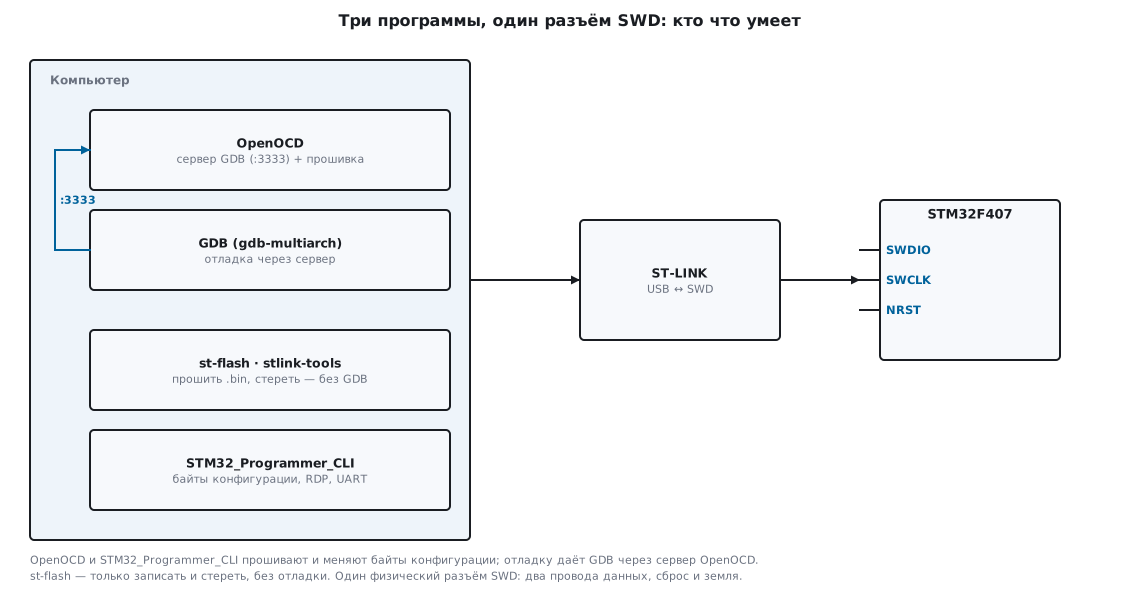
They get mixed up often enough that it is worth separating them right away. All three talk to the chip through the same SWD connector, but they do different things.
| Program | Where from | What it can do | What it cannot do |
|---|---|---|---|
| OpenOCD | open source, any adapter | flash, erase, start a GDB server on port 3333 | does not debug by itself — it only runs the server |
| st-flash (stlink-tools) | open source, ST-LINK only | flash a .bin, erase, read |
no GDB server, no .elf, no debugging |
| STM32_Programmer_CLI | ST, closed source | flash .elf/.bin/.hex, option bytes, RDP, factory bootloader over UART and USB DFU |
does not start a GDB server |
GDB (gdb-multiarch) |
open source | debugging: breakpoints, stack, memory, registers | does not connect to the chip by itself — only to a server |
Hence the two typical combinations. Flash and leave — one line of OpenOCD, st-flash
or CubeProgrammer, with no GDB at all (35б.3). Debug — the OpenOCD server
plus GDB on top of it (35б.4). Option bytes, RDP and the UART bootloader are
the job of STM32_Programmer_CLI (35б.7); OpenOCD also has stm32f4x options_* commands,
but the vendor program handles this more smoothly.
Versions everything was checked on: OpenOCD 0.12.0, st-flash v1.7.0,
STM32CubeProgrammer 2.23.0, GDB 13.1. A separate arm-none-eabi-gdb
may be missing from the arm-none-eabi-gcc toolchain — it is not in the image, and instead
gdb-multiarch is used (one program for all architectures).
35б.2 OpenOCD: interface and target, SWD clock, connect under reset
OpenOCD is assembled from two descriptions: what we connect with (the adapter) and to what (the chip). Each is its own configuration file from the distribution:
# ST-LINK + любой STM32F4
openocd -f interface/stlink.cfg -f target/stm32f4x.cfg
# то же одним файлом платы Nucleo-F4
openocd -f board/st_nucleo_f4.cfg
The adapter file interface/stlink.cfg selects the hla driver (adapter driver hla,
hla_layout stlink) — a "high level adapter", where the ST-LINK executes the
SWD sequences itself. The chip file target/stm32f4x.cfg creates a
cortex_m core and knows its flash. For F1 it is target/stm32f1x.cfg; a BluePill board
is covered by interface/stlink.cfg plus this target. Ready-made board files
(board/st_nucleo_f103rb.cfg, board/stm32f4discovery.cfg) simply include
the right interface and target and add transport select hla_swd.
SWD clock. By default target/stm32f4x.cfg starts at adapter speed 2000
— 2 MHz, safe on a cold chip while the clocks are not yet configured. The
init script raises it to adapter speed 8000 after the PLL is started. To set it
by hand — before init:
openocd -f interface/stlink.cfg -f target/stm32f4x.cfg -c "adapter speed 1800"
Too high a clock over long wires gives Error: init mode failed —
it is the first thing to lower when the connection is flaky.
Reset. How OpenOCD drives NRST is set by reset_config. In stm32f4x.cfg
it is srst_nogate (the reset does not gate the debug clock), and cortex_m reset_config
sysresetreq tells it to reset through a core register. If the chip goes to sleep right after
start-up or reassigns the SWD pins (a common trouble with a bootloader
in the application or with configured power saving), you cannot connect to it
while it runs — you need connect under reset: the adapter holds NRST low while
it establishes the connection.
openocd -f interface/stlink.cfg -f target/stm32f4x.cfg \
        -c "reset_config connect_assert_srst" -c "init" -c "reset halt"
⚠️
connect_assert_srstneedsNRSTto be wired. On a board where the ST-LINK reset pin is not connected (onlySWDIO,SWCLK, ground), the trick does not work: there is nothing to hold. On such a board what remains is the factory bootloader viaBOOT0(section 4.9) or a full erase.
35б.3 Flash with one line: program … verify reset exit
The most common scenario, with no debugging at all, is to load the image and restart. OpenOCD
has a single program command for this, and -c after it closes the server:
openocd -f interface/stlink.cfg -f target/stm32f4x.cfg \
        -c "program fw.elf verify reset exit"
The four words after the file name are steps: program writes to flash (the address is taken
from the .elf), verify reads it back and compares, reset restarts the chip,
exit terminates OpenOCD so that the command returns control to the shell along with an exit
code. Without exit the server stays running and waits for a connection.
🔧 st-flash — when you only need a byte-for-byte image. It takes a .bin
(not an .elf) and an explicit address:
st-info --probe                       # проверить, что ST-LINK видит камень
st-flash erase                        # стереть всю флеш
st-flash write fw.bin 0x08000000      # залить с начала флеш
🔧 STM32_Programmer_CLI — the vendor tool, takes an .elf. The connection is set with
-c port=…, writing with -w (also --download), reset afterwards with -rst:
STM32_Programmer_CLI -c port=SWD -w fw.elf -rst
According to the program's own description, -w accepts "bin, hex, srec, s19, elf,
stm32 or tsv file", and a start address is needed only for a .bin — from an .elf
and a .hex it is read automatically.
⚠️ A forgotten
verify— the firmware "went in" but was not checked. With a bad contact or a flat programmer battery the write goes through partially, and the device silently does not start.verifyin OpenOCD and-vin CubeProgrammer cost a fraction of a second and save half a day of searching.
35б.4 GDB without an IDE: load, monitor reset halt, breakpoints, x, info registers
Debugging is a server plus GDB. With a real ST-LINK the server is OpenOCD
(without exit, it waits on port 3333); in the experiment QEMU plays its role on port 1234.
GDB connects to the server and from then on works the same way.
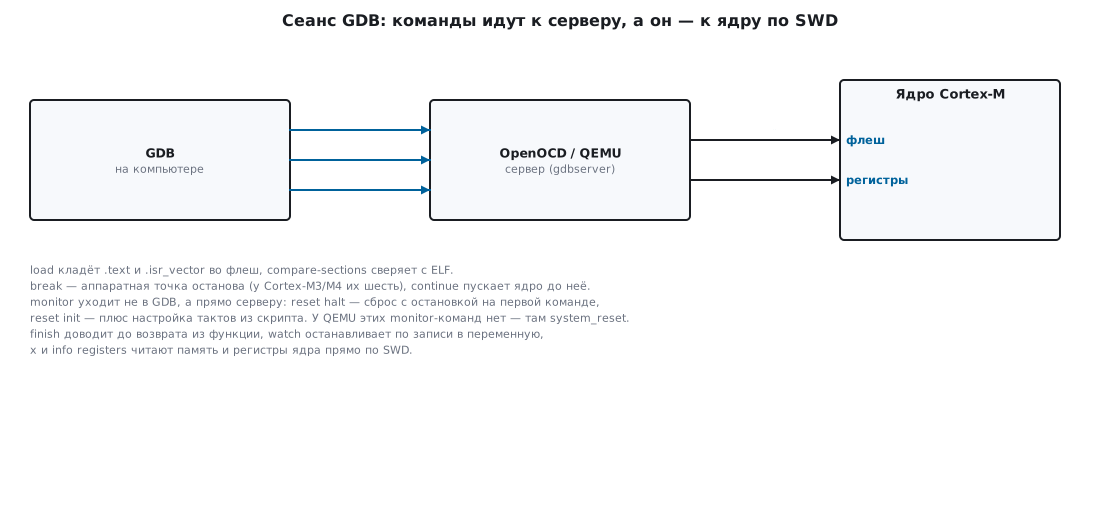
The key difference between two kinds of commands. Ordinary GDB commands (break, continue,
print, x) the debugger executes itself, reading memory and registers through the server.
Commands that start with monitor GDB does not understand — it passes them to the
server verbatim: monitor reset halt — reset and halt at the first instruction,
monitor reset init — plus clock setup from the script, monitor flash … —
flash operations. This is the way to reach what OpenOCD can do without
leaving GDB.
The full session in the experiment (QEMU as the server, port 1234):
target extended-remote localhost:1234
load
compare-sections
break main
continue
info registers pc sp
break mix
continue
backtrace
finish
watch ticks
continue
print/x result
x/8wx &samples
What GDB printed, verbatim from the run:
Loading section .isr_vector, size 0x40 lma 0x8000000
Loading section .text, size 0xd0 lma 0x8000040
Start address 0x08000042, load size 272
Section .isr_vector, range 0x8000000 -- 0x8000040: matched.
Section .text, range 0x8000040 -- 0x8000110: matched.

Breakpoint 1, main () at fw35b.c:50
pc  0x80000da   sp  0x2001fff8

Breakpoint 2, mix (x=1) at fw35b.c:13
#0  mix (x=1) at fw35b.c:13
#1  0x080000c0 in fill () at fw35b.c:23
#2  0x080000ee in main () at fw35b.c:53
Value returned is $1 = 270369

Hardware watchpoint 3: ticks
Old value = 0
New value = 1
$1 = 0xaf422ba3
0x20000000 <samples>: 0x00042021  0x04080601  0x9dcca8c5  0x1255994f
0x20000010 <samples+16>: 0x8ef917d1  0x2c6f5bd0  0x25b2331a  0x19f91cb2
Let us go through it line by line. load puts the .elf sections into flash through the server:
272 bytes, .isr_vector from address 0x08000000 and .text after it; on a real
chip this is the flashing itself. compare-sections immediately reads them back and
confirms matched — the same meaning as verify. break main + continue
stop at the entry to main: pc = 0x80000da, the top of the stack
sp = 0x2001fff8 (on the F4 the stack starts at the end of 128 KB of RAM). break mix + continue
catch the function, and backtrace shows where we came from: mix was called from
fill, and that one from main. finish runs to the return and prints the result of
mix(1) — 270369. watch ticks sets a watchpoint on a variable:
the next continue stops exactly at the write, Old value = 0 / New value = 1.
print/x result gives the program's result 0xaf422ba3, and x/8wx &samples —
eight words of the array in memory: this is the xorshift32 sequence starting from one,
and its sum is exactly 0xaf422ba3.
The number of hardware breakpoints in the core is limited (Cortex-M3 and M4 have six,
section 35.1) — GDB will not set a seventh. A watch watchpoint is also
a hardware resource, also limited in number, and is set on the address of a variable.
⚠️
loadwithout a live server hangs GDB. If OpenOCD is not running or the ST-LINK does not see the chip,target extended-remotewill not connect, andloadwill wait. First a working server, then GDB.
With a real ST-LINK everything is the same, except that the first line is target extended-remote
localhost:3333, and a reset with halt is done by monitor reset halt before load.
QEMU has no such monitor commands — there the whole machine is reset by
monitor system_reset.
35б.5 Scripts: .gdbinit, your own commands, gdb in a pipeline
There is no point typing ten lines every time — GDB reads them from a file.
.gdbinit in the project folder is picked up automatically, but with a security
caveat. In the experiment GDB refused to execute the local .gdbinit:
warning: File ".gdbinit" auto-loading has been declined by your
`auto-load safe-path' set to "$debugdir:$datadir/auto-load".
This is a protection: someone else's repository must not execute arbitrary commands when
it is opened. You allow it either once with an option or with a line in your home ~/.gdbinit:
gdb-multiarch -iex "set auto-load safe-path /" fw35b.elf   # доверять всему
# или в ~/.gdbinit: add-auto-load-safe-path /путь/к/проекту
With permission the same file was executed — in the experiment it printed local .gdbinit loaded.
Your own commands are created with define — handy for repeated actions:
define reflash
  monitor reset halt
  load
  compare-sections
end
Now reflash in the session reflashes and verifies with one command.
GDB in a pipeline — the firmware is run like an ordinary program and its exit
code is checked (section 110). A subtlety: in a non-interactive script, continue towards a
distant breakpoint returns before the core has halted, and the next
command fails with "Cannot execute this command while the target is running".
A reliable trick is not to drive the program from GDB, but to connect to one that has already finished computing:
QEMU (or the board) is started without a halt, GDB connects, the server immediately
halts the core in the loop after the calculation, and the script only reads the result and
returns a code:
target extended-remote localhost:1234
if result == 0xaf422ba3
  quit 0
else
  quit 1
end
In the experiment a good image gave CI: result ok and exit code 0, and the same script with
a substituted reference value gave CI: result BAD and exit code 1. From there the build
system looks at the code as it would for any command.
35б.6 SVD from the pack: peripheral registers by name
Bare GDB knows the program's variables but not the peripherals: USART1->SR is
just the address 0x40011000 to it. The names of registers and fields are in the SVD — the XML description
of the chip that ST puts into the device support pack (.../Keil/STM32F4xx_DFP/…/CMSIS/SVD/
STM32F405.svd). A small Python script inside GDB reads this file and
adds a per command that prints a register with its bits decoded:
source svd35b.py
per USART1 SR CR1
In the experiment (after the program had configured the USART) the command printed:
USART1.SR  @ 0x40011000 = 0x000000C0  TXE=1 TC=1
USART1.CR1 @ 0x4001100C = 0x00002008  UE=1 TE=1
The addresses and bits are not invented: the USART1 base address is 0x40011000, the SR offset is 0,
CR1 is 0x0C, bit TXE is bit 7, TC bit 6, UE bit 13, TE bit 3 — all from
the same SVD. The script takes into account that in ST's SVD the USART1 registers are defined through
derivedFrom from USART6, and takes them from there. In IDEs (CubeIDE, Keil) the peripheral
window works the same way — it reads the SVD; from the command line the same is done with
twenty lines of Python.
35б.7 STM32_Programmer_CLI: option bytes, RDP, the factory bootloader over UART
What plain GDB does not have is work with option bytes (section 11.6) and the factory bootloader. This is the job of the vendor program.
Show and set the option bytes. According to its own description,
-ob (--optionbytes) is for "displaying or modifying" the bytes, -ob displ prints
the whole set, and -ob <name>=<value> programs one of them:
STM32_Programmer_CLI -c port=SWD -ob displ            # показать все
STM32_Programmer_CLI -c port=SWD -ob RDP=0xAA         # снять защиту чтения (F4)
STM32_Programmer_CLI -c port=SWD -ob nRST_STOP=1      # не сбрасываться в STOP
RDP — read-out protection. The level is set by the RDP byte; the values are from the
HAL headers (OB_RDP_LEVEL_*):
| Level | Value (F4) | What it does | Removal |
|---|---|---|---|
| 0 | 0xAA |
no protection, the debugger reads the flash | — |
| 1 | anything except 0xAA and 0xCC (e.g. 0x55) |
the debugger cannot read the flash | by a full erase of the flash |
| 2 | 0xCC |
debugging and the bootloader are disabled forever | impossible |
The F1 has no level 2, and "no protection" is 0xA5 (section 11.6). The vendor program performs
the change from level 1 to 0 itself, erasing the whole flash along the way — otherwise the protection
would make no sense.
⚠️ Level 2 is irreversible.
-ob RDP=0xCCpermanently disables SWD and the factory bootloader: there will be nothing left to reflash the chip with. During debugging only level 1 is set, and only deliberately.
The factory bootloader over UART. When SWD is not available (protection, no connector,
production flashing), you flash through the built-in bootloader: BOOT0 = 1, reset
(section 4.9) — and the chip listens on USART1. CubeProgrammer connects to it
through a USB-UART adapter, with a COM port and baud rate instead of port=SWD:
STM32_Programmer_CLI -c port=COM5 br=115200 -w app.bin 0x08000000 -v -rst
The same -w, but the transport is UART; the bootloader accepts the image and checks the
checksum of each block itself. On the F4 the bootloader also supports USB DFU —
then -c port=usb1 without any adapter.
35б.8 Pitfalls
A clone chip — OpenOCD complains about the IDCODE. Cheap "STM32" parts (GD32, CKS and
others) answer with a debug code that does not match the expected one, and OpenOCD stops
at expected-id. The fix is to give it the actual code before the target — for the F4 over SWD
it is 0x2ba01477, for the F1 0x1ba01477 (over JTAG — 0x4ba00477 and 0x3ba00477):
openocd -f interface/stlink.cfg -c "set CPUTAPID 0x2ba01477" -f target/stm32f4x.cfg
To disable the check completely — set CPUTAPID 0.
monitor commands go to the server, not to GDB. monitor reset halt is an OpenOCD
command; QEMU does not have it, there the machine is reset with monitor system_reset. Mix up the
server and you get "Undefined command".
st-flash does not take an .elf. It needs a .bin and an explicit address; .elf and .hex
are understood only by OpenOCD (program) and CubeProgrammer (-w).
load in GDB hangs. The server is not running or the ST-LINK does not see the chip: load
waits for a connection. Start OpenOCD first, then GDB.
continue in a non-interactive script runs ahead. In batch mode it
returns before the halt — the next command fails with "target is running".
Connect to a program that has already finished computing, or drive the session through the GDB Python API
(35б.5).
RDP removed, and the flash is empty. Removing read-out protection from level 1 always erases the whole flash — this is not a failure but the design (section 11.6). Flash the firmware again.
A forgotten verify/-v. The write went through partially, the device silently does not start.
A read-back check costs a fraction of a second (35б.3).
35б.9 Summary
- Three programs: OpenOCD (GDB server + flashing), st-flash (only
.bin, no debugging), STM32_Programmer_CLI (.elf, option bytes, RDP, UART/DFU bootloader); GDB debugs only through a server. - OpenOCD is assembled from
interface/*.cfgandtarget/*.cfg(orboard/*.cfg); the SWD clock starts at 2 MHz; for a flaky connection —connect_assert_srstwithNRSTwired. - Flash and leave:
program fw.elf verify reset exitwith OpenOCD,st-flash write … 0x08000000,-w fw.elf -rstwith CubeProgrammer; withoutverifythe write is not checked. - Debugging:
target extended-remote :3333(QEMU —:1234),loadwrites the flash,compare-sectionsverifies;break/continue,backtrace,finish,watch,x,info registers— in the experiment they got to the value0xaf422ba3and the eight words ofsamples. monitor …is a command for the server, not GDB:monitor reset haltin OpenOCD versussystem_resetin QEMU.- Scripts are automated with
.gdbinit(keepingauto-load safe-pathin mind),defineand the exit code; in a pipeline it is more reliable to read the result from a program that has already finished computing (exit codes 0 and 1 in the experiment). - An SVD from the pack gives peripheral registers by name:
USART1.SR = 0x000000C0(TXE=1 TC=1) in the experiment — addresses and bits from the same file. - A clone with a foreign IDCODE is handled with
set CPUTAPID(F4 SWD0x2ba01477, F10x1ba01477); RDP level 2 (0xCC) is irreversible.
Next: section 35в "A failure in the field: a state snapshot that survives a reset, and analysis after reboot" — how to save a device failure without a debugger and analyse it using the ELF.