 Embedded HandbookApps
35. Debugging
Part V is about what to do when things do not work. This section is about tools: what a debugger gives you beyond the "stop" button, how to read a processor fault, how to see the kernel's tasks and where the stack goes. The next one is about symptoms and their causes.
Terms used in the documentation
Term Meaning breakpoint / watchpoint stop at a line / stop when memory is written single step / step over / step out one instruction or line / over a call / out of a function call stack the chain of calls that led here fault a hardware exception caused by an error stacked frame the registers the processor pushed onto the stack fault status register the register that says why the fault happened escalation raising a fault to HardFault kernel awareness the debugger understands the RTOS objects run time statistics how much CPU time each task used high water mark the smallest headroom ever seen cycle counter a counter of CPU clock cycles
35.1 What a debugger gives you
Four things, of which a beginner uses one.
Breakpoint — stop at a line. Everybody uses it. Two subtleties: Cortex‑M3 has six hardware breakpoints, and the debugger cannot set a seventh; and a breakpoint in an interrupt handler stops everything, including the kernel tick — after you continue, the timing in the device will be distorted.
Watchpoint — stop when a variable changes. It answers the question "who wrote this", which a breakpoint cannot: the write may come from ten places. Cortex‑M3 has four hardware watchpoints, and they are set on an address, not on a name — the debugger converts it for you.
Call stack — how you got here. When stopped in the
configASSERT trap, this is the only thing to look at: the third or fourth
line of the stack names the kernel function that was called incorrectly,
and the fifth names your function that called it.
Memory window — raw bytes at an address. Indispensable for task stacks (35.4) and DMA buffers (section 9): you see not the value of a variable but what is actually stored.
⚠️ Single-stepping under the kernel is misleading. A step over
vTaskDelaycompletes instantly — because the debugger stopped everything, including the tick, and from the task's point of view time does not pass. Real timing behaviour is examined not by stepping but with breakpoints in the right places and with output via SWO (section 21).
Conditional breakpoints, hit counters, breakpoints with commands — every debugger has them, and they all come down to one thing: stopping less often than on every pass. On a device where an event happens once in a thousand iterations, an ordinary breakpoint is useless.
35.2 Processor fault: how to read a HardFault
The device has stopped, and the debugger shows HardFault_Handler with an endless
loop in it. From here you go step by step, and the answer is always found.
Step 1: where
On exception entry the processor pushes eight words onto the stack
(section 7). The seventh is PC at the moment of the fault: the address of the instruction
where it broke.
| Offset | Word |
|---|---|
| 0 | r0 |
| 4 | r1 |
| 8 | r2 |
| 12 | r3 |
| 16 | r12 |
| 20 | lr — where it came from |
| 24 | pc — where it broke |
| 28 | xPSR |
A handler that fetches the frame and passes it to C:
typedef struct {
    uint32_t r0, r1, r2, r3, r12, lr, pc, xpsr;   /* порядок — как в таблице кадра */
} fault_frame_t;

volatile uint32_t g_fault_pc, g_fault_lr, g_cfsr, g_bfar, g_mmfar;

__attribute__((naked)) void HardFault_Handler(void)
{
    __asm volatile (
        "tst   lr, #4     \n"       /* какой стек: MSP или PSP */
        "ite   eq         \n"
        "mrseq r0, msp    \n"
        "mrsne r0, psp    \n"
        "b     hardfault_c\n"
    );
}

void hardfault_c(const fault_frame_t *f)
{
    g_fault_pc = f->pc;
    g_fault_lr = f->lr;
    g_cfsr = SCB->CFSR;
    g_bfar = SCB->BFAR;             /* верен, если в CFSR стоит BFARVALID */
    g_mmfar = SCB->MMFAR;           /* верен, если стоит MMARVALID */
    for (;;) { }                    /* точка останова — сюда */
}
hardfault_c is an ordinary external function, not static: the b instruction
in the inline assembly jumps to it by name, and the compiler does not see this reference (in the experiment
it is also given __attribute__((used))).
Checking bit 2 of LR is mandatory under the kernel: tasks run on PSP,
handlers on MSP, and the frame of the faulting task lies on its own stack.
Without this check you read the wrong stack and get garbage.
Then put the address g_fault_pc into the disassembly window, and the line is found.
Step 2: why
The SCB->CFSR register is split into three fields for three kinds of faults — a byte, a byte
and a halfword:
| Bits | Fault | What it means |
|---|---|---|
| 0–7 | MemManage | memory protection violation; almost never happens without the MPU |
| 8–15 | BusFault | access to a non-existent address |
| 16–31 | UsageFault | undefined instruction, division by zero, unaligned access |
The bits you meet in real life:
| Bit | Name | Usual cause |
|---|---|---|
| 25 | DIVBYZERO |
division by zero with the check enabled |
| 24 | UNALIGNED |
a word at an address not divisible by 4, or a halfword at an odd one: for LDM/STM, LDRD/STRD, LDREX/STREX — always, for ordinary LDR/STR — only with the UNALIGN_TRP check enabled |
| 19 | NOCP |
an FPU instruction with the coprocessor disabled: the project is built for the FPU, but SCB->CPACR is not enabled (F4, section 69.8) |
| 17 | INVSTATE |
a jump to an even address, without the Thumb bit: a corrupted return address or function pointer |
| 16 | UNDEFINSTR |
a jump into data: a corrupted function pointer, stack overflow |
| 12 | STKERR |
the frame did not fit on the stack on exception entry: the stack went past the RAM boundary; with the MPU bit 4 MSTKERR reports the same |
| 9 | PRECISERR |
access to a bad address, the address is in BFAR — if bit 15 BFARVALID is set; without it BFAR has nothing to do with this fault |
| 10 | IMPRECISERR |
the same, but the address is unknown: the write went into the bus buffer |
| 7 | MMARVALID |
not a cause but a flag: the address of the memory protection fault is in SCB->MMFAR |
| 1 | DACCVIOL |
a read or write where it is not allowed |
⚠️
IMPRECISERRis the nastiest. The processor does not wait for a write to a bad address: it goes into the bus buffer, and the fault arrives several instructions later.PCin the frame points to the wrong instruction. The trick: while debugging, disable write buffering with theDISDEFWBUFbit inSCB->ACTLR— the fault becomes precise, andPCcorrect.
If bit 30 FORCED is set in SCB->HFSR, the fault was escalated: it was a
MemManage, BusFault or UsageFault, but its handler is disabled or could not
preempt the current code because of priority, and the processor raised the fault to HardFault.
The cause is still in CFSR — it is recorded during escalation too. An empty CFSR
on a HardFault means you have to look at the other bits of HFSR: bit 1 VECTTBL is
a failure reading a vector from the table, bit 31 DEBUGEVT is a debug event without
a debugger, for example a BKPT instruction (section 35а; the emulator there shows
FORCED instead).
The "Fault" tab in the app's calculators helps decode both registers bit by bit:
enter the values of CFSR and HFSR and you get the bits that are set and what
to check for each.
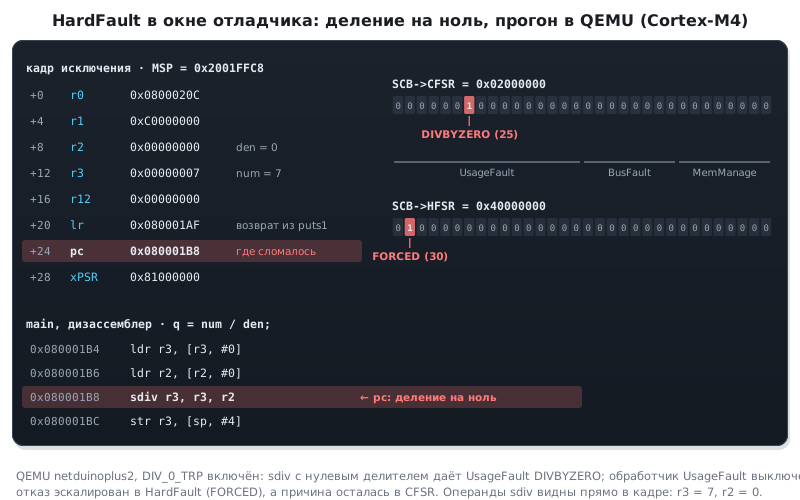
This is what a real analysis looks like: division by zero with DIV_0_TRP enabled, a run in QEMU (Cortex-M4)
with the handler from this subsection. The operands of the divide instruction are visible right in the frame:
Step 3: typical diagnoses
| Symptom | Diagnosis |
|---|---|
PC in the data area or garbage, UNDEFINSTR or INVSTATE |
a stack overflow overwrote the return address |
STKERR or MSTKERR |
the stack ran out before entering the handler: a task or an interrupt did not have enough stack (35.4) |
PRECISERR, BFAR = a peripheral address |
the peripheral is not clocked (section 6) |
PRECISERR, BFAR = a small number |
a null pointer dereferenced with an offset |
IMPRECISERR |
a write through a bad pointer; enable DISDEFWBUF |
UNALIGNED |
a uint32_t * into a byte buffer; most often in packet parsing. The check is disabled but the fault still happens — the compiler merged two reads into LDRD or LDM; parse packet fields with memcpy |
a fault right after vTaskStartScheduler |
the handler names were not remapped (section 24) |
a fault in vPortValidateInterruptPriority |
the interrupt priority is above the threshold (section 28) |
35.3 The kernel through the debugger's eyes
By itself the debugger sees one task — the one that was interrupted. The others are just bytes in memory for it. There are three ways to see more.
Kernel awareness in the IDE
IDEs with FreeRTOS support show a task window: name, state, priority, stack headroom — and windows for queues, semaphores and timers. In Keil this comes together with the kernel from the pack: the description of the kernel objects for the debugger sits in the same place as the source code.
⚠️ Queues and semaphores without names. The debugger sees them as addresses. The registry gives them names:
vQueueAddToRegistry(q, "cmd")— and the window shows "cmd" instead of0x20000A40. Mutexes and semaphores are queues too and are registered with the same function. The registry size isconfigQUEUE_REGISTRY_SIZE; in the product it is set to zero.
A snapshot from the program
Without an IDE, via SWO or into a variable:
static TaskStatus_t status[8];
uint32_t total_run;

UBaseType_t n = uxTaskGetSystemState(status, 8, &total_run);
/* status[i]: pcTaskName, eCurrentState, uxCurrentPriority,
              uxBasePriority, usStackHighWaterMark, ulRunTimeCounter */
Requires configUSE_TRACE_FACILITY. A task status entry is 36 bytes, an array
for eight tasks is 288; it is allocated statically once.
A field worth looking at separately: uxBasePriority versus
uxCurrentPriority. If they differ, the task right now
holds a mutex that a higher-priority task is waiting for, and its priority is inherited
(section 30). Live priority inversion, caught in the act.
The functions vTaskList and vTaskGetRunTimeStats print the same as text —
convenient, but they require configUSE_STATS_FORMATTING_FUNCTIONS and pull in
formatting code with the stack it needs.
Load statistics
The only honest answer to "why is it slow". The kernel needs a counter
finer than the tick, and Cortex‑M3 has one — the cycle counter DWT->CYCCNT:
static void cycle_counter_init(void)
{
    CoreDebug->DEMCR |= CoreDebug_DEMCR_TRCENA_Msk;
    DWT->CYCCNT = 0;
    DWT->CTRL  |= DWT_CTRL_CYCCNTENA_Msk;
}

/* в FreeRTOSConfig.h */
#define configGENERATE_RUN_TIME_STATS             1
#define portCONFIGURE_TIMER_FOR_RUN_TIME_STATS()  cycle_counter_init()
#define portGET_RUN_TIME_COUNTER_VALUE()          (DWT->CYCCNT)
The kernel accumulates the counter difference at every switch and distributes it
among the tasks. The result is in ulRunTimeCounter of each task and in total_run:
the task's share is the ratio.
⚠️ A 32-bit counter at 72 MHz overflows in 59 seconds. For the kernel this is not a problem — it counts differences — but the task share computed from absolute numbers becomes meaningless after a minute. The kernel has no standard way to reset the statistics. For long runs you take a slower counter — a timer that ticks 10–100 times faster than the system tick: at 10 kHz 32 bits last almost 5 days. Another way is a 64-bit counter type (
configRUN_TIME_COUNTER_TYPE=uint64_t) andCYCCNTextended in software with an upper word.
The same counter is the best tool for timing a piece of code without an oscilloscope:
uint32_t t0 = DWT->CYCCNT;
work();
uint32_t cycles = DWT->CYCCNT - t0;     /* верно и через переполнение */
The resolution is one cycle (13.9 ns at 72 MHz). The result also includes interrupts that arrived during the measured piece: for a clean measurement you disable them or repeat the measurement and take the smallest value. A couple of cycles go to reading the counter itself — subtract them after measuring an empty piece.
The cycle counter exists on Cortex-M3, M4, M7 and M33. M0 and M0+ (F0, G0, L0, C0)
do not have it at all: there is no DWT block in their headers, the code above will not compile, and
statistics there are kept on a general-purpose timer (section 73.1). On Cortex-M7
(F7, H7) DWT has a write lock — the DWT->LAR register (the M3
and M4 headers have no such field): before enabling, write the key 0xC5ACCE55 to it,
otherwise the write to DWT->CTRL does not take effect, and CYCCNT stays at zero.
35.4 The stack: see it, measure it, catch it
Stack overflow is the most common cause of "it works, but sometimes strangely". Three levels of protection.
See it
When a task is created, its stack is filled with the byte 0xA5 — if at least
one of these is enabled: configCHECK_FOR_STACK_OVERFLOW greater than 1,
configUSE_TRACE_FACILITY = 1, INCLUDE_uxTaskGetStackHighWaterMark = 1
or INCLUDE_uxTaskGetStackHighWaterMark2 = 1.
Without them there is no fill, the memory window shows whatever was in RAM, and the trick below
silently does not work. The stack grows down,
so the untouched A5 bytes stay at its start, at the low addresses.
Open the memory window at the stack start address: for a static task this is
the name of its array, for the others it is the pxStackBase field from uxTaskGetSystemState.
Addresses in the window grow from top to bottom, and at the top you see rows of A5 A5 A5 A5,
below them the data. The boundary between them is how much stack has been used
over the whole run. If no A5 is left at all, the stack ran out.
This is a way to measure without a single function call: open memory
at the stack start address and see where the A5 bytes end.
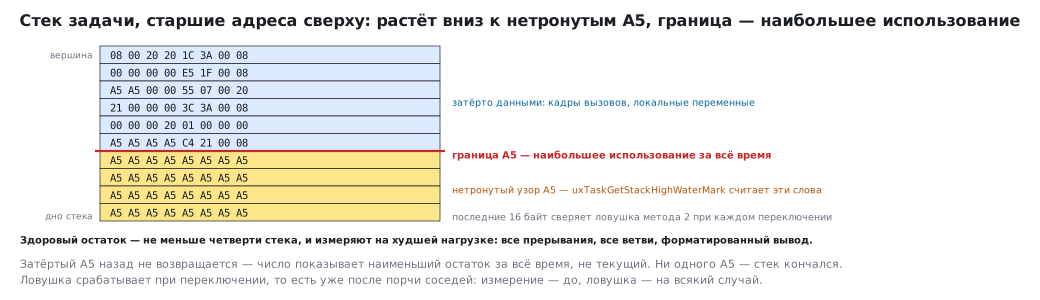
In the figure the high addresses are at the top, as stacks are usually drawn: it grows down, from the data
towards the untouched A5. In the debugger window addresses grow from top to bottom, and the same picture
is upside down — A5 at the top.
Measure it
UBaseType_t words = uxTaskGetStackHighWaterMark(handle); /* NULL — про себя */
It counts exactly the same thing: how many 0xA5 in a row are left from the end. Two
consequences follow. The number is in words. And it is the smallest headroom over the whole
run, not the current one: an overwritten A5 does not come back.
A healthy headroom is at least a quarter of the stack. Measure it under the worst load: all interrupts, all branches, formatted output. A stack that was enough on the bench runs out in the field on a branch that never executed on the bench.
Catch it
#define configCHECK_FOR_STACK_OVERFLOW 2
| Method | How | What it catches |
|---|---|---|
| 1 | at a switch, compare the stack pointer with the limit | an overflow that is still in progress at the moment of the switch |
| 2 | at a switch, check four words at the start of the stack, at the low addresses, against the pattern 0xA5A5A5A5 — 16 bytes |
an overflow that overwrote the tail, even if it has already receded |
Method 2 is more reliable and slightly more expensive; it is the one used during development.
⚠️ Both methods trigger at a switch — that is, after the damage. The overflow has already overwritten what lay below the stack: another stack, a control block, a buffer. The hook names the culprit but does not undo the consequences. So measure beforehand, and keep the hook just in case.
The hook:
void vApplicationStackOverflowHook(TaskHandle_t t, char *name)
{
    g_overflow_task_name = name;    /* имя виновника — сюда */
    for (;;) { }
}
A breakpoint in it plus the name variable — a diagnosis in five seconds.
35.5 Techniques that save days
configASSERT is always enabled during development. It catches wrong
priorities, calls from the wrong context, corrupted lists — before they
show up as something else.
An endless loop in every hook. Not return, not blinking —
a loop on which you can set a breakpoint and look at the call
stack.
Debug variables are volatile and global. Otherwise the compiler
throws them away, and the debugger shows "optimized out".
-O0 only for hunting, -O2 for verification. A bug that disappears
when you change optimization is almost always a race or a missing volatile (section 3),
not a compiler bug.
Output via SWO, not via printf to UART. The first costs a few
cycles and does not change timing; the second costs milliseconds and does.
One SWO channel for timestamps. Write DWT->CYCCNT to the channel
on entry and exit of a piece of code — a profile without stopping.
A watchpoint on the corrupted variable. The question "who wrote this" is solved in a minute, not in a day.
A task snapshot on a button. uxTaskGetSystemState on a button press —
and you see who is busy with what when the device behaves strangely.
Freeze peripherals at a breakpoint. The core is paused, but
timers, watchdogs and the RTC are not: the watchdog resets the board right under
the debugger, a counter runs ahead, an interval is measured wrong. The
DBGMCU block can stop these counters together with the core, and HAL provides
a macro for each:
| Family | Where the macros write | What can be frozen |
|---|---|---|
| F4 | DBGMCU->APB1FZ and DBGMCU->APB2FZ |
22 macros: TIM1…TIM14, RTC, IWDG, WWDG, CAN1, CAN2 and the timeouts of I2C1…I2C3 |
| F1 | a single DBGMCU->CR |
the same bits DBG_IWDG_STOP, DBG_TIM2_STOP and others, without splitting by bus |
__HAL_DBGMCU_FREEZE_IWDG();      /* сторож не перезагрузит плату на паузе */
__HAL_DBGMCU_FREEZE_TIM2();      /* счётчик остановится вместе с ядром   */
…
__HAL_DBGMCU_UNFREEZE_TIM2();    /* вернуть как было                     */
The freeze bits act only while the core is halted by the debugger: in a product
without a debugger the core does not halt, and the watchdog works as usual (section 12).
In a release build the neighbouring bits of the same block are dangerous — DBG_SLEEP, DBG_STOP,
DBG_STANDBY: they keep the debug clock running in sleep, the sleep current rises, and a system
reset does not clear them — only a power cycle does (section 10).
35.6 Pitfalls
Under the debugger vTaskDelay completes instantly. Everything is stopped, including the tick; timing
behaviour is examined with breakpoints and SWO output (35.1).
PC in the fault frame points to the wrong instruction. This is IMPRECISERR: the write went into the bus buffer. While debugging,
disable buffering with the DISDEFWBUF bit (35.2).
Queues in the debugger window are bare addresses. The registry gives them names: vQueueAddToRegistry (35.3).
Task statistics are meaningless after a minute. A 32-bit counter at 72 MHz overflows in 59 seconds — read it more often or reset it (35.3).
The stack overflow hook fired, but the data is already corrupted. The check runs at a switch, that is after the damage; measure the stack headroom beforehand (35.4).
35.7 Summary
- A watchpoint answers "who wrote it"; the call stack answers "how did we get here"; the memory window shows what is actually stored.
- Single-stepping under the kernel is misleading: time stands still.
HardFault: the seventh word of the frame is the faultPC; under the kernel choose the stack by bit 2 ofLR.CFSRis a byte, a byte and a halfword for three faults;IMPRECISERRpoints to the wrong instruction and is cured withDISDEFWBUF;FORCEDinHFSRmeans escalation.- The queue registry gives names to objects in the debugger; mutexes are queues too.
uxTaskGetSystemStateis a snapshot of all tasks; a difference between the base and current priority is live inversion.- Load statistics run on
DWT->CYCCNT; the counter overflows in 59 seconds, so read it more often. - The stack is filled with
0xA5; the headroom is counted by the untouched bytes, in words, and it is the minimum over the whole run. - Overflow checks trigger at a switch — after the damage; measuring matters more than the hook.
Next: section 35а "Semihosting: output and files through the debugger".