 Embedded HandbookApps
36ж. Oscilloscope, part 4: bus decoding, masks, segmented memory, saving and SCPI control
The first three parts (36г, 36д, 36е) taught the instrument to see: how a signal gets into memory, how to catch the right moment and how to take a number from a record. This part is about what the instrument does with the record afterwards. It can read the bus bytes in it and list them in a table, compare every record against a tolerance and count failures, stack thousands of short records instead of one long one, find a rare event in a long record, save everything to a file — and hand control to a program on a computer.
Each of these functions saves hours, but each has a condition under which it silently lies. The decoder does not see the bus if memory holds fewer than a few samples per bit. A mask rejects a good board if the tolerance is smaller than the noise. Search misses things if it looks in the wrong place. So for every item: what it is, what it is for, what you see, a typical mistake and a case from embedded board work.
The examples use the author's instrument, a RIGOL DHO900: menu item names are in English, as on the screen, and numbers come from its documents. General points (how many samples per bit a decoder needs, why a narrow mask rejects noise) hold for any digital oscilloscope; anything specific to the DHO900 is marked as such.
Sources: RIGOL DHO900 User Guide (Books/DHO900_UserGuide_EN.pdf; page
numbers here and below are PDF pages): pp. 31 and 177–180 — digital
channels, pp. 202–204 — reference waveforms, pp. 205–209 — Pass/Fail,
pp. 210–233 — decoding, pp. 234–235 — windows, pp. 236–240 — waveform
recording, pp. 241–246 — search and navigation, pp. 250–261 and 270–271 —
saving, pp. 263–268 — network and AUX output, pp. 273–275 — remote
control; RIGOL DHO900 Datasheet (Books/dho900-datasheet.pdf):
p. 9 — overview, pp. 11–12 — digital channels, p. 15 — search, p. 17 —
recording and Pass/Fail, pp. 18–19 — decoding, p. 23 — connectors, p. 26 —
file formats; RIGOL DHO800/DHO900 Programming Guide
(Books/DHO800900_ProgrammingGuide_EN.pdf, 2024): pp. 25–35 — syntax,
waiting and root commands, pp. 42, 93–98, 134–135, 148–151, 167–168,
217–218, 290, 314, 322–329, 425–436 — the commands in 36ж.15.
STM32F103 input thresholds — Table 35 of the datasheet
(via 36а.6). All calculated numbers come from a run of _verify/scope36zh/model36zh.py
(Python 3.11 and numpy in the stm-lab:1 container); the Python listings are
files in the same folder, checked in the same run.
What it is called in the documentation
Original Meaning protocol decoding, Decode 1…4, Bus Status bus decoding, four decoders, decoder on/off Bus Type: Parallel, RS232, I2C, SPI, CAN, LIN bus type Threshold, SCL Thre, SDA Thre threshold: above is one, below is zero Baud, Polarity, Endian (LSB, MSB), Parity rate, polarity, bit order, parity Copy Trig take the settings from the trigger Event Table, Export event table, export to CSV logic analyzer (LA), digital channels D0–D15 logic analyzer, digital channels Pass/Fail test, X Mask, Y Mask, Err Action mask test, time and voltage tolerance, action on failure AUX OUT rear-panel output: trigger or test result Waveform Recording, Frames, Interval, Play waveform recording, frames, interval, playback segmented memory, UltraAcquire, Frame Segment segmented memory: one record per trigger Search, MarkTable, Navigation search, table of found events, moving through the record Reference waveform (Ref) reference waveform Save Image / Save Wave / Save Setup; .bin, .csv, *.stp screenshot, data, settings SCPI, IEEE 488.2 common commands instrument command language, common commands of the standard VISA address, USB-TMC, LXI, Web Control instrument address, USB class, network standard, browser control :WAVeform:PREamble?, TMC block header #N record description: steps and origins on both axes; binary block header
36ж.1 The decoder: threshold, clock and what it reads
What it is. The decoder (Decode) takes samples of one, two or four channels from memory, compares each with a threshold (Threshold) — above it is a one, below it a zero — and, following the rules of the selected bus, builds bytes, addresses and errors from the ones and zeros. The result is drawn as a strip under the waveform and written to the event table (Event Table).
The DHO900 has four independent decoders — Decode 1…Decode 4, working at the same time (User Guide p. 210; datasheet p. 18). Bus types: Parallel, RS232/UART, I2C, SPI, CAN and LIN. The source can be any analog channel CH1–CH4 or, with the logic probe, a digital channel D0–D15 (User Guide pp. 211, 217).
Items common to all buses (User Guide pp. 211–219):
- Bus Status — turn the decoder on;
- Threshold — threshold for an analog channel; while you turn it, a dotted level line is shown on the screen, and it disappears after 2 s;
- Copy Trig — copy the trigger settings for the same bus into the decoder (36д.19): no need to enter the rate and polarity twice;
- Format — Hex, Dec, Bin or ASCII, for the strip and the table;
- Label — bus type label above the strip;
- Event Table and Export — the event table and its export to CSV.
What for. To read the exchange instead of counting bits with a cursor. A packet of 64 UART bytes is 640 bits; you cannot decode them by hand, while the decoder gives you the line in a fraction of a second.
What you see and what you do not. The decoder strip shows what fits on the screen: on the DHO900 the number of table rows changes with the time base, and details on the strip appear only at a fast enough time base (User Guide p. 215). To read a long packet in full, use the event table; to look at one byte, use zoom (36г.12).
Where the decoder is off. The DHO900 does not decode in Roll mode (User Guide p. 74) or in UltraAcquire (User Guide p. 70; 36г.17). The table can be exported only in the STOP state (User Guide p. 215).
Mistake. The default threshold is not at the middle of the swing. A 3.3 V line with the threshold near zero decodes "almost correctly": a spike on the zero level becomes an extra bit, and an error shows up once in a hundred frames. The DHO900 guide's rule for the logic probe applies here too: the threshold goes to the middle of the signal swing (User Guide p. 31).
36ж.2 How many samples per bit: the record decides everything
What it is. The decoder reads only what is in memory. The sample rate is the memory depth divided by the screen window (10 divisions), but no more than the ADC limit (36г.14). So the number of samples per bus bit depends on three controls at once: time base, memory depth and the number of enabled channels.
Model. Three typical transfers; the time base is chosen so that the whole transfer fits in the window (1-2-5 steps):
| bus | transfer | lasts | time base | 1 k points | 10 k (default) | largest memory |
|---|---|---|---|---|---|---|
| UART 115200, 1 channel | 64 bytes 8N1 | 5.56 ms | 1 ms/div | 0.868 per bit | 8.68 per bit | 10851 per bit |
| I2C 400 kHz, 2 channels | read of 128 bytes, 1179 clocks | 2.95 ms | 500 µs/div | 0.5 per clock | 5 per clock | 1563 per clock |
| SPI 8 MHz, 4 channels | 4 KB from flash, 32800 clocks | 4.10 ms | 500 µs/div | 0.025 per clock | 0.25 per clock | 39 per clock |
The largest memory on the DHO900 is 50 M points for one channel, 25 M for two and 10 M for three or four (36г.1). With four channels SPI hits the ADC limit rather than memory: 312.5 MSa/s.
How this affects decoding. The model's simple decoder (it finds the start edge and reads bit centres) on the same UART transfer, 20 different sample phases, transmitter at the exact rate and 2 % faster:
| memory | sample rate | correct bytes out of 64 (worst case) |
|---|---|---|
| 1 k | 100 kSa/s | 0 |
| 10 k | 1 MSa/s | 64 |
| 100 k | 10 MSa/s | 64 |
I2C the same way (10 phases; the decoder catches start and stop and reads SDA on the SCL rising edge): at 1 k points 1 event out of 136 is correct, at 10 k and 100 k — all 136.
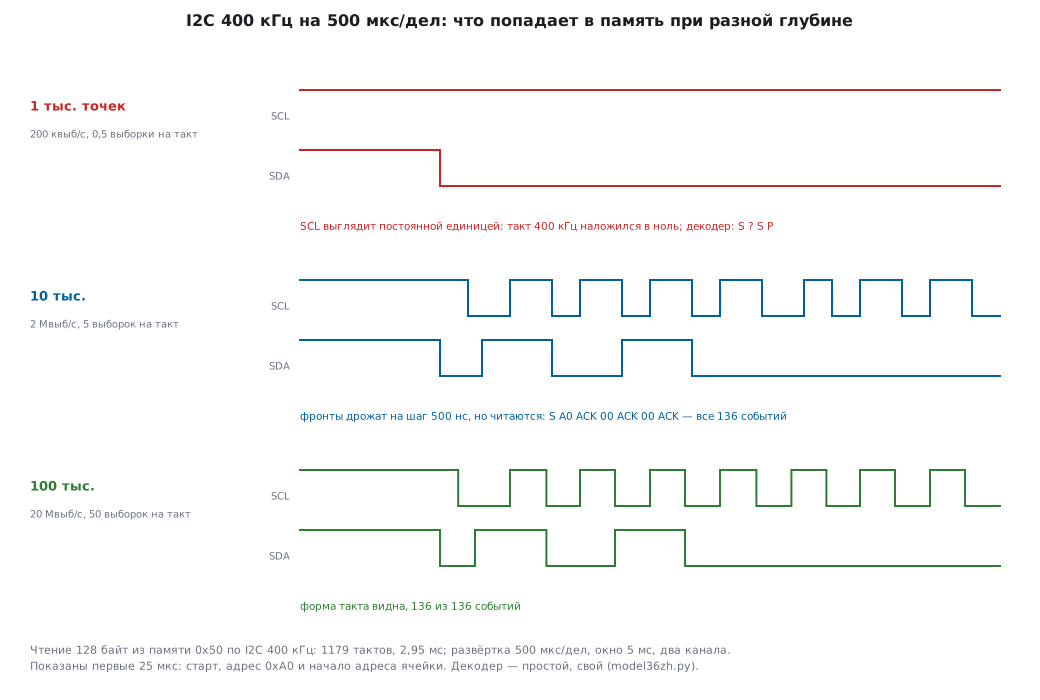
With it and without it. At 1 k points I2C is worse than "too few points": 200 kSa/s is an exact submultiple of the 400 kHz clock, and all samples land on the same phase — SCL looks like a constant one. This is aliasing (36г.15) on a bus: the instrument shows a confident, clean and false picture.
Rule. At least four to five samples per bit, ten is better — just as for a logic analyzer (36а.6). For SPI at 8 MHz with four channels at the default (10 k) — a quarter of a sample per clock: the decoder reads nothing. You need 10 M points (39 per clock) or the digital channels (36ж.9).
Mistake. Slowing the time base so the whole transfer fits, without raising the memory depth. The DHO900 default depth is 10 k points (36г.14): enough for one byte, not for a packet.
Case. A board answers over UART every other time. At 200 µs/div and 10 k memory the decoder reads everything; the time base is changed to 10 ms/div to see the whole exchange — and framing errors appear that are not on the wire. The instrument dropped to 100 kSa/s. The errors "go away" when memory is raised to 1 M points.
36ж.3 UART and RS232
What it is. An asynchronous line: each byte starts with a start bit (zero), followed by 5–9 data bits, a parity bit (if used) and stop bits (one). There is no clock on the wire — the receiver counts bits by the rate (Baud). The DHO900 handles up to 20 Mbit/s (datasheet p. 18).
DHO900 menu items (User Guide pp. 216–219):
- Tx and Rx — two sources, each with its own threshold; you cannot turn both off;
- Polarity — Positive (high level is one, as on a microcontroller pin) or Negative (as on an RS-232 line after the level converter, where the logic is inverted);
- Baud — from the list or User with your own value;
- Data — 5, 6, 7, 8 or 9 bits;
- Parity — None, Even or Odd; Stop Bit — 1, 1.5 or 2;
- Endian — LSB (least significant bit first, the way UART works) or MSB.
What you see. The DHO900 UART event table has the columns Line No., Time,
Tx/Rx, Data, Error (User Guide p. 219). Model: the string ADC=1234
with CR and LF, 8E1 (Even parity), 115200, time base 200 µs/div, memory
10 k — 5 MSa/s, 43.40 samples per bit; in the fifth byte one bit on the
line is corrupted. The table built by the model's decoder:
Line  Time         Tx    Data  Error
1     34.70 us     'A'   0x41
2     130.10 us    'D'   0x44
3     225.70 us    'C'   0x43
4     321.10 us    '='   0x3D
5     416.70 us    '5'   0x35  Parity
6     512.10 us    '2'   0x32
7     607.50 us    '3'   0x33
8     703.10 us    '4'   0x34
9     798.50 us    '.'   0x0D
10    894.10 us    '.'   0x0A
Instead of 1 the byte 0x35 arrived — and only parity says it is an error,
not data. Without parity (None) the string would read ADC=5234, with no
mark at all.
Bit order and polarity. The same byte 0x41 (A) with Endian MSB
reads as 0x82. Swapped polarity is worse: the start bit is
looked for in the wrong place. In the model the same string with Negative instead of Positive gave 9
"bytes", none of them correct, and 2 framing errors.
Mistake. A rate that is "about right". The limit of rate mismatch and why the error builds up towards the end of the frame — 36д.19; the same place covers the trigger on a framing error (Error) and on parity (Check Error).
Case. A GPS module or a modem sends lines, and the firmware does not understand them. A decoder on the module's Tx and the microcontroller's Rx (two channels, one decoder) shows both sides with timing: you can see that the reply arrives before the firmware has enabled the receiver.
36ж.4 I2C
What it is. A two-wire bus: SCL — clock from the master, SDA — data in both directions. A transfer starts with the START condition (SDA falls while SCL is high), then the address and the R/W direction bit; after each byte comes the acknowledge bit ACK (zero) or NACK (one), and at the end STOP.
DHO900 menu items (User Guide pp. 220–223): CLK and SDA — sources, SCL Thre and SDA Thre — each with its own threshold; Exchange — swap SCL and SDA if the probes are mixed up; R/W — With or Without: show the address with or without the direction bit.
R/W With and Without. A memory chip at address 0x50 is shown with Without as 0x50, with With — as 0xA0 for write and 0xA1 for read. It is the same address; documentation for different chips uses both forms. When you compare the address with a datasheet, set the same form.
What you see. The I2C event table: Line No., Time, Address, R/W, Data, ACK (User Guide p. 222). A NACK after a write is highlighted in red (User Guide p. 223) — this is the main answer to "why is the sensor silent": wrong address, the slave is not powered or is busy.
Model. A read of 128 bytes from memory 0x50 (the cell address is two bytes, repeated start, 128 data bytes, the last one with NACK, as the bus requires) at 400 kHz: 136 events; with 10 k points at 500 µs/div all of them are correct (36ж.2).
Mistake. The SCL threshold close to the high level. I2C pull-ups are slow (the edge is the RC of the pull-up and bus capacitance, 36д.9): a high threshold moves the SCL "edge" later, and SDA is read at the wrong moment. The threshold goes to the middle of the swing.
Case. A sensor answers while debugging and is silent after a cold start. Trigger on I2C MissedAck (36д.19), decoder with the table: the first transaction goes out right after power-up, when the sensor is not ready yet — NACK. The fix is a start-up delay in the firmware, not the address.
36ж.5 SPI
What it is. A synchronous bus: CLK clock from the master, data MOSI (from the master) and MISO (to the master), slave select CS. A bit is read on a clock edge — rising or falling, depending on the mode.
DHO900 menu items (User Guide pp. 224–226):
- CLK with a threshold and Slope — Rising or Falling: which edge to read on;
- MISO and MOSI — each with its own threshold; you cannot turn both off;
- Mode — CS (a word starts at active CS, with its own CS Polarity) or Timeout (a word starts after a clock pause longer than the set value: from 8 ns to 10 s, 1 µs by default; it must be longer than half the clock period);
- Endian — LSB or MSB; data Polarity; Width — word length from 4 to 32 bits, 8 by default.
Timeout in numbers. SPI at 8 MHz: half a period is 62.5 ns. The pause must be longer than this and shorter than the gap between words. The default 1 µs works if the master pauses between bytes for more than 1 µs; DMA sends bytes back to back — then only CS works.
What you see with the wrong edge. Mode 0: data changes on the falling edge and is read on the rising edge. Model: the slave answers 0x33; with Slope Rising the decoder reads 0x33, with Falling — 0x66: each bit is taken one clock later, the byte is shifted by one place. Such a shift is the signature of a wrong mode (sections 18 and 36д.17).
Width. The command 0x8F and a dummy byte with Width 16 show up as one word 0x8F00 — handy for 16-bit registers, awkward for a byte-oriented protocol.
Mistake. Four analog channels on a long transfer: memory is split, the sample rate drops (36ж.2). SPI with CS is easier to capture with the digital channels.
Case. A display shows garbage. Decoder on MOSI with CS — the commands are correct; MISO is not needed. A second decoder on the same CLK with Slope Falling shows the same data: the display is set to a different mode.
36ж.6 CAN
What it is. A differential bus of cars and machine tools. A bit is carried by the difference of CAN_H and CAN_L; every node hears everyone. A frame holds the identifier, length (DLC), data, the CRC checksum and the ACK acknowledge bit. So that receivers keep synchronization, after five equal bits the transmitter inserts an opposite one (bit stuffing).
DHO900 menu items (User Guide pp. 231–232): Source with a threshold; Signal — CAN_H, CAN_L, Rx, Tx or Diff; Baud — from the list or User; Sample Position — where within a bit to read the level, from 10 % to 90 %. Up to 5 Mbit/s (datasheet p. 19).
Signal. Rx and Tx — transceiver pins on the microcontroller side, an ordinary probe. CAN_H or CAN_L — one bus wire. Diff — the difference taken with a differential probe: plus to CAN_H, minus to CAN_L (User Guide p. 231). Why not "two channels and A−B math" — 36е.17 and 36з.
Frame model. A standard frame, ID 0x123, 8 data bytes 11 22 33 44 55 66 77 88: before stuffing 98 bits from the start of frame to the CRC, 1 bit inserted, CRC 0x4237; the whole frame with the acknowledge field, end of frame and gap — 112 bits, at 500 kbit/s — 224 µs. Time base 50 µs/div, memory 10 k: 40 samples per bit — plenty.
Sample Position. A bit at 500 kbit/s is 2 µs; at 75 % the instrument reads the level 1.5 µs after the start of the bit. Set it the same as the sample point in the network controller settings: the instrument must read where the node reads, otherwise on a long bus with reflections they will see different things.
What you see. The table: Line No., Time, Frame ID, DLC, Data, CRC, ACK (User Guide p. 233). An ACK equal to one (nobody acknowledged) and a bit stuffing error (Stuff) are highlighted.
Mistake. A single node on the bus — nobody acknowledges the frame, and the transmitter sends it again and again. The decoder shows an even series of frames with an ACK error: the problem is not the firmware but the second node or the terminator.
Case. An STM32 board with bxCAN does not see a machine tool. Decoder on the transceiver's Rx: the machine's frames decode without errors only if the decoder is set to a different rate than the one in the firmware — so the error is in the bxCAN prescaler, not in the wiring.
36ж.7 LIN
What it is. A slow single-wire bus of car body electronics: the master sends the header (a long zero Break, the sync byte 0x55, the protected identifier PID), the slave sends data and a checksum.
DHO900 menu items (User Guide pp. 228–229): Source with a threshold; Baud Rate — from the list or your own; Parity bit — With or Without; Version — 1.X, 2.X or Both. The table: Line No., Time, Frame ID, Data, Checksum, Error (User Guide p. 229); a checksum error is shown in red (User Guide p. 230).
Version means the checksum. In LIN 1.X the checksum covers only the data ("classic"), in 2.X — the PID and the data ("enhanced"). Model: ID 0x10 gives PID 0x50, data 01 02 03 04 — classic checksum 0xF5, enhanced 0xA5. The wrong version — every frame is red, although the bus is fine.
Frame length. Break 13 bits, delimiter, three header bytes and 4 data bytes — 84 bits, at 19200 bit/s — 4.38 ms.
Mistake. Both, when the bus has nodes of both versions, is convenient; Both out of habit — and a red checksum from your own node is lost among the "foreign" ones.
36ж.8 Parallel bus (Parallel)
What it is. Several data lines and, usually, a clock. The instrument reads all lines at once on a clock edge: Rising, Falling or Both (User Guide pp. 210–211). If there is no clock (CLK = OFF), it reads at every data change.
DHO900 menu items (User Guide pp. 212–214): BUS — ready-made channel groups (D7-D0, D15-D8, D15-D0 and the reverse ones) or User with your own width and assignment of each bit; with analog channels — up to 4 bits (datasheet p. 18); Endian and Polarity.
What for. A parallel display, a DAC or ADC bus, a state machine state on marker pins (36а.7): four debug pins give 16 states on one strip instead of four lines.
Mistake. CLK = OFF on a bus without a clock: the lines do not switch exactly together, and short "intermediate" values appear between states — the DHO900 skew between digital channels is ±5 ns (datasheet p. 12). Read on a clock or on a strobe line.
36ж.9 Sixteen digital channels and the logic analyzer
What it is. The DHO900 has 16 digital channels D0–D15 — a built-in logic analyzer (LA). Each channel compares the voltage with a threshold and stores one bit. It needs the PLA2216 active logic probe, which is bought separately (datasheet p. 9; User Guide p. 177).
DHO900 specifications (datasheet pp. 11–12; User Guide pp. 178–180):
| item | value |
|---|---|
| threshold | separate for D0–D7 and for D8–D15; ±15 V in 10 mV steps |
| preset thresholds | TTL 1.4 V, CMOS3.3 1.65 V, CMOS2.5 1.25 V, CMOS1.8 0.9 V and others |
| threshold accuracy | ±(100 mV + 3 % of the threshold) |
| minimum signal swing | 500 mV |
| input | about 101 kΩ and about 8 pF |
| maximum voltage | ±40 V |
| shortest pulse | 5 ns |
| channel-to-channel skew | ±5 ns |
Threshold in numbers. The CMOS3.3 threshold of 1.65 V with an accuracy of ±149.5 mV. The F103 input is guaranteed to see zero below 1.155 V and one above 2.145 V (36а.6) — the threshold has margin on both sides. For 1.8 V logic — a threshold of its own: on the DHO900 it is set per group of eight channels, so 3.3 V and 1.8 V lines go to different groups (the datasheet also lists a User threshold for a single channel; the User Guide does not describe it).
Loading. 8 pF at 10 MHz is 1989 Ω: on a fast line the probe is noticeable. A long common ground lead is the same trouble as with an analog probe (36а.2); the guide recommends a ground next to each signal (p. 31).
Menu items (User Guide pp. 178–180): enable one by one or as a group D0–D7, D8–D15; size Small, Medium, Large (Large — if no more than 8 channels are on); order D0-D15 or D15-D0; labels from a preset list (CLK, CS, MISO, MOSI, RX, TX, DATA, ADDR and others) or your own; probe calibration on first connection and when the temperature changes by more than 5 °C.
What cannot run together. On the DHO900 the digital channels are incompatible with the Average mode (User Guide p. 69) and do not work in slow sweep or in Roll (User Guide p. 74). The probe must not be plugged in or pulled out while the instrument is on (User Guide p. 177).
Compared with a USB logic analyzer (36а.6). A cheap USB analyzer — 8 channels, 24 MSa/s, the record streams to the computer and lasts as long as you like: on UART 115200 that is 208 samples per bit for an hour if needed. An oscilloscope keeps the record in its own memory: at the same 10 samples per bit the DHO900 records 43.4 s with one analog channel (50 M points), with four (10 M) — 8.68 s. The DHO900 documents do not state the sample rate and memory depth of the digital channels directly (a footnote on skew mentions 625 MSa/s — datasheet p. 26).
| what you need | better choice |
|---|---|
| edge shape, ringing, levels | analog channels of the oscilloscope |
| bus and analog together: an SPI byte and the motor current | digital + analog channels of one instrument |
| an hour of traffic, a rare protocol failure | USB analyzer recording to a computer |
| SPI at 8 MHz and above, many lines | digital channels or a fast analyzer |
Mistake. Trusting a digital channel about a level. It says "1" at 1.7 V as well as at 3.3 V — a bad one is visible only on an analog channel.
Case. A stepper motor misses steps. Four analog channels — currents and the supply voltage, digital D0–D3 — STEP, DIR, ENABLE and an interrupt marker pin: you can see that the missed step coincides with a supply dip, not with a step-counting error.
36ж.10 Masks (Pass/Fail)
What it is. A "pass — fail" check on every record. A corridor is built around the reference waveform: X Mask — time tolerance, Y Mask — voltage tolerance (in divisions); everything outside the corridor is shaded. If a record touches the shaded area, it fails (User Guide pp. 206, 208).
DHO900 menu items (User Guide pp. 205–209):
- Source — CH1–CH4;
- X Mask, Y Mask, Create — build the mask; Save and Load — a *.pf file;
- Aux Output, Output Event (Pass or Fail), Polarity, Pulse — a pulse on the rear-panel [AUX OUT] connector from 100 ns to 10 ms, by default 1 µs;
- Err Action — Stop (stop on a failure), Beeper (beep) or Screenshot (a screenshot to a USB stick or internal memory; acquisition stops for it and then continues);
- statistics: Failed, Passed, Total Frames; Reset Stat — reset.
During the test you cannot change the source or the mask (User Guide p. 208); there is no test in UltraAcquire or Roll (User Guide pp. 70, 74).
Model: the mask against noise. A signal at 0.5 V/div with 20 mV noise; the mask is compared at a nominal 1000 points of the record:
| Y Mask | tolerance in noise sigmas | point outside tolerance | record fails |
|---|---|---|---|
| 0.1 div (50 mV) | 2.5 σ | 0.0124 | 1 — all 2000 of 2000 in the simulation |
| 0.3 div (150 mV) | 7.5 σ | 6.38e−14 | 6.38e−11 — 0 of 2000 |
A narrow mask rejects a good board: noise at even one of a thousand points goes beyond 2.5 σ almost surely. With a 0.3 div tolerance the noise does not matter, and a real defect — a missing pulse about once per thousand records — is caught every time: out of 10000 records 11 were bad, and the mask found 11.
X Mask and jitter. The edge jitters with a standard deviation of 2 ns, time base 10 ns/div. X Mask 0.2 div (2 ns) — 31.7 % of records fail; 0.5 div (5 ns) — 1.24 %. Choose the time tolerance from the edge spread measured with statistics or a histogram (36е.14, 36е.15).
What for. An overnight test: the instrument watches the output, beeps or takes a screenshot on a failure and counts the failure rate. In production — an AUX OUT pulse to a counter or to the test station controller.
Mistake. Building the mask from one random record where the noise happened to be small, with a skin-tight tolerance.
Case. A valve control board must output a pulse of a given length with a given delay after a command. A mask on the output, trigger on the command (36д), Err Action Screenshot, a night of running — in the morning several screenshots, and in all of them the delay coincided with a flash write.
36ж.11 Waveform recording and segmented memory
What it is. Instead of one long record the instrument writes many short ones — one per trigger — and keeps them side by side. No memory is spent between triggers. The DHO900 has two functions built this way.
Waveform Recording (User Guide pp. 236–240; datasheet pp. 9, 17). Up to 500000 frames (datasheet p. 9). Items: Interval — the gap between frames, from 10 ns to 1 s; Frames — how many to record; Max Frames — how many fit: the larger the memory depth, the fewer frames (User Guide p. 238); Beeper — a beep at the end. Playback: one frame at a time or continuous, forwards or backwards, playback Interval from 1 ms to 1 s, start and end frame. Each frame has ΔT, the time since the first frame. Played frames can be measured and decoded (datasheet p. 17). Recording is not available in UltraAcquire (User Guide p. 236).
UltraAcquire (36г.17) also uses segments, but for speed: up to 1 000 000 waveforms/s, viewed through Frame Segment navigation (36ж.12). It has no decoding.
Model: why segments. A sensor sends 20 bytes over I2C at 400 kHz once every 100 ms; a transfer takes 0.5175 ms, that is 0.517 % of the time. You need to look at 1000 transfers in a row.
- As one record: 100 s means 10 s/div; even 50 M points give 1.25 samples per clock. The decoder reads nothing (36ж.2), and at such a time base the instrument goes into Roll anyway, where there is no decoder.
- As segments: each transfer is a frame at 100 µs/div, 10 k memory: 25 samples per clock. 1000 frames are 10 M points of useful data.
ΔT — a free timing log. Model: 1000 frames of a task that should arrive every 100 ms, spread 0.30 ms. The largest gap is 200.0 ms at frame 618: one packet is missing. You cannot find this by eye on one long record, but in the ΔT column it is obvious at once.
How long to watch. Playing back 500000 frames even at the shortest interval of 1 ms takes 500 s, 8.3 minutes. Long records are not watched in full — you move through them with search and navigation (36ж.12).
Mistake. Recording without a properly set trigger (36д): frames land anywhere, and most of them are the pause between packets. Segments make sense only with a trigger that fires at the start of the event you need.
Case. The exchange with a sensor hangs every few minutes. Trigger on I2C START, recording thousands of frames, in the morning — the frames with NACK in playback and their ΔT: the failures come at equal intervals, at the same time as the log is written to the SD card.
36ж.12 Search and navigation
What it is. Search (Search) marks all places in a captured record where a condition is met and lets you step through them. On the DHO900 the conditions are Edge and Pulse (pulse width), the source is an analog channel (User Guide pp. 241–242; datasheet p. 15). Found events are marked with triangles above the graticule and collected into the MarkTable; it can be saved to CSV (User Guide p. 243). Turning search on also turns on zoom (User Guide p. 241). To Trigger and From Trigger copy the condition between search and trigger (User Guide p. 242).
Navigation (User Guide pp. 243–246; datasheet p. 15) — only in the STOP state:
- Time — scrolling the record in time, at a chosen speed;
- Search Event — to the previous, next, first or last found event;
- Frame Segment — through UltraAcquire segments page by page: start 3 and end 9 — 7 segments per page.
Model: why the eye does not find it. A record of 50 M points at 1.25 GSa/s is 40 ms. The DHO900 screen is 1024 pixels wide (datasheet p. 9), and the graticule is narrower still, so one screen column covers at least 48828 samples. A glitch of 20 ns is 25 samples, at most 0.0512 % of a column. It is either invisible or seen as a line with no shape. A Pulse search for "shorter than 50 ns" on the same record (PWM at 20 kHz and three glitches in different places): out of 802 pulses exactly 3 were found — at 5.6320, 18.7740 and 32.8400 ms.
Mistake. Searching in a record that does not have the event: search works on memory, not on the screen. A short glitch that slipped between samples (36г.16) will not be found — first fix the memory depth or use Peak.
Case. A motor PWM occasionally produces a "needle". Single at 4 ms/div with 50 M points, Search Pulse shorter than 50 ns, the MarkTable: three needles, all right after a duty cycle change. The cause is updating the timer compare register without preload (section 13).
36ж.13 Reference waveforms (Ref)
What it is. A copy of a waveform that stays on the screen while a new record runs. On the DHO900 the source is CH1–CH4, D0–D15 or Math, up to 10 references on screen (User Guide p. 202; datasheet p. 26); five colours, own scale and offset, a label (User Guide pp. 202–203).
What for. To compare "before" and "after" a change: an edge before and after a series resistor, ripple before and after a second capacitor.
The main trap. SaveToRef puts the copy into memory that is cleared at power-off and on a settings reset (User Guide p. 202). To keep it — Export to .ref, .bin or .csv; only .ref can be loaded back (User Guide pp. 203–204).
Mistake. Comparing the reference and the live waveform at different scales: the reference VScale is changed separately. Reset puts it back where the source channel was.
36ж.14 Saving: screenshots, data, settings — and reading them in Python
What it is. The Storage → Save menu (User Guide pp. 250–255):
| what | formats | items |
|---|---|---|
| Save Image — screenshot | .png, .bmp, *.jpg | Invert, Color or Gray, Header (model and date in the header) |
| Save Wave — data | Screen: .bin, .csv; Memory: .bin, .csv, *.wfm | Data Source: screen or whole memory |
| Save Setup — settings | *.stp | loaded with Load |
The path is the internal disk or a USB stick (the stick by default if inserted, User Guide p. 252; FAT32 or NTFS — p. 261); Overlay — overwrite a file with the same name. The quick action key on the panel saves a screenshot, data, settings or all of them with one press — Save Group (User Guide pp. 270–271). Internal memory is 8 GB (datasheet p. 26).
Screen or Memory. Screen is what is drawn; Memory is the whole record. For processing on a computer — only Memory: the screen copy is decimated.
BIN, not CSV. The *.bin format is described in the DHO900 User Guide
(pp. 255–258): a 16-byte file header (the RG cookie, version, file
size, number of waveforms), for each channel a 140-byte waveform header
and a 16-byte data header, then float32 points. File
size: 1 M points of one channel — 4000172 bytes; 10 M on four
channels — 160000640 bytes. Text for the same point in our
"time,value" format took 26 bytes — 6.6 times more, and it reads many times
slower.
What the description leaves out. The waveform header fields in the guide's table add up to 128 bytes out of 140; 12 bytes are not described. The byte order is not stated either. So the reader takes the header size from the file itself rather than from a constant:
# read_bin.py — чтение файла *.bin осциллографа DHO900 (раскладка из руководства)
import struct, sys
import numpy as np


def read_bin(path):
    raw = open(path, "rb").read()
    cookie, ver, size, nwav = struct.unpack_from("<2sHqi", raw, 0)
    assert cookie == b"RG" and size == len(raw), "не тот файл или обрезан"
    pos, out = 16, {}
    for _ in range(nwav):
        hsize, wtype, nbuf, npts = struct.unpack_from("<iiii", raw, pos)
        dt, x0 = struct.unpack_from("<dd", raw, pos + 32)
        name = raw[pos + 112:pos + 128].split(b"\0")[0].decode()
        pos += hsize                       # размер заголовка — из файла, не 140
        dsize, btype, bpp, nbytes = struct.unpack_from("<ihhq", raw, pos)
        pos += dsize
        y = np.frombuffer(raw, "<f4", nbytes // 4, pos)
        pos += nbytes
        out[name] = (x0 + dt * np.arange(npts), y)
    return out


if __name__ == "__main__":
    for name, (t, y) in read_bin(sys.argv[1]).items():
        print("%s: %d точек, шаг %.3g с, от %.3g до %.3g В" % (name, len(y), t[1] - t[0], y.min(), y.max()))
In the model run this script reads a file assembled according to the guide's description, two channels of 1000 points (8328 bytes), and returns the points bit for bit:
CH1: 1000 точек, шаг 1e-06 с, от 0 до 3.3 В
CH2: 1000 точек, шаг 1e-06 с, от -0.5 до 0.5 В
Reading CSV is simpler — numpy.loadtxt(path, delimiter=",", skiprows=…),
but the number of header lines and the CSV column names are not described
in the DHO900 guide: open the file in a text editor first. The *.wfm format is
not described at all. The decoder event tables and the search results are CSV too.
Mistake. Save Wave with Data Source = Screen, and then surprise that the file has a thousand points instead of a million. And another one — a screenshot as the only record of a test: you cannot recompute a single number from a picture. A screenshot for the report, BIN for reprocessing, STP to set the instrument up the same way a month later.
Case. A power supply start-up test: Save Group on the key — screenshot, data and settings with one press after each run. The script from 115в collects the files and builds a summary over all start-ups.
36ж.15 SCPI control: DHO900 commands from Python
What it is. SCPI is a text command language for measuring instruments: the program sends a line, the instrument answers with a line. The DHO900 has two ways (User Guide pp. 273–275; datasheet p. 23):
- USB DEVICE on the rear panel — the instrument appears as USB-TMC;
- LAN 10/100 Mbit/s — over the network; the instrument conforms to LXI.
For the commands the User Guide refers you to a separate
document — the Programming Guide (User Guide p. 273). This is the DHO800/DHO900 Programming Guide
(Books/DHO800900_ProgrammingGuide_EN.pdf, below "PG",
page numbers are PDF pages). Another file in Books/, DHO_programming_manual.pdf,
is for the DHO1000/DHO4000 series; its commands do not apply to the DHO900.
Instrument address. The VISA address is shown in Utility → IO (User Guide
p. 263); over the network the :LAN:VISA? query returns it — with the parameter USB,
LXI or SOCKet, and without a parameter it returns the LXI address (PG
pp. 167–168). The same Utility → IO menu has DHCP, Auto IP or Static IP and the mDNS name
(User Guide pp. 264–265). The TCP port number for a raw socket is not given
as a number in the guides: it is part of the address that :LAN:VISA? SOCKet returns.
How to write commands (PG pp. 25–27, 33):
- levels are separated by colons:
:TRIGger:EDGE:LEVel; a query ends with?; - case does not matter, the short form is the capital letters:
:WAV:DATA?is the same as:WAVeform:DATA?; - units are not sent: the instrument accepts only a number in the default
units (volts, seconds) —
:CHANnel1:SCALe 1, not1V.
A minimal set for the bench (pages in the PG):
| task | commands | p. |
|---|---|---|
| who are you, reset, errors | *IDN?, *RST, *OPC?, *CLS, :SYSTem:ERRor? |
148–151, 290 |
| channel | :CHANnel1:DISPlay, :SCALe, :OFFSet, :COUPling, :PROBe |
93–98 |
| time base and memory | :TIMebase:MAIN:SCALe, :ACQuire:MDEPth |
314, 42 |
| trigger | :TRIGger:MODE EDGE, :TRIGger:EDGE:SOURce, :SLOPe, :LEVel, :TRIGger:SWEep |
322–329 |
| acquisition | :SINGle, :RUN, :STOP, :TFORce, :TRIGger:STATus? |
33–35, 324 |
| memory readout | :WAVeform:SOURce, :MODE, :FORMat, :STARt, :STOP, :PREamble?, :DATA? |
426–436 |
| measurements | :MEASure:ITEM, :MEASure:ITEM? |
217–218 |
| screenshot | :DISPlay:DATA? |
134–135 |
Waiting for completion. Of all the commands only *RST runs
in parallel with the following ones (the table on p. 32), so after a reset
you wait with *OPC?. Page 31 says that *OPC? waits and answers 1;
p. 151 says it answers 0 until the operation is done; the safe way is to ask
until 1 arrives. :SINGle puts the trigger into Single mode (the same
as :TRIGger:SWEep SINGle, p. 35); the end of a single acquisition shows up in
:TRIGger:STATus? — it answers TD, WAIT, RUN, AUTO or STOP (p. 324).
Readout modes (PG pp. 427–429):
- NORMal — what is on the screen: no more than 1000 points, the XINCrement step is time base/100; at 500 µs/div that is 5 µs;
- RAW — the whole memory, only in the STOP state; the step is 1/sample rate: at 500 µs/div and 1 M points — 5 ns, 1000 times finer;
- MAXimum — like NORMal in RUN, like RAW in STOP.
The format is BYTE (one byte per point, the default), WORD (two bytes) or ASCii
(volts as numbers separated by commas). The point range is set with :WAVeform:STARt
and :WAVeform:STOP; the guide says memory can be read
in parts, and each part comes as its own block (p. 426).
The preamble :WAVeform:PREamble? — 10 numbers separated by commas (p. 436):
| field | meaning |
|---|---|
| format | 0 — BYTE, 1 — WORD, 2 — ASCii |
| type | 0 — NORMal, 1 — MAXimum, 2 — RAW |
| points | number of points, up to 50000000 |
| count | number of averages in Average mode, otherwise 1 |
| xincrement | time step, s |
| xorigin | time of the first point, s |
| xreference | time reference point (the first point, 0) |
| yincrement | voltage step, V per code |
| yorigin | offset in codes relative to the reference level |
| yreference | reference level in codes |
A point code is converted to volts as: (code − YORigin − YREFerence) ×
YINCrement (p. 426); the time of a point is XORigin plus its index × XINCrement.
The preamble example from the guide is 0,0,1000,1,1.000000E-8,-5.000000E-6,0.000000E-12,4.000000E-03,0,128:
1000 points of 10 ns — a 10 µs window, YINCrement 4 mV — that is 0.1 V/div
(in NORMal YINCrement = scale/25, p. 432). The byte 0x8E in this example is
0.056 V.
Binary block. :WAVeform:DATA? in BYTE and WORD and :DISPlay:DATA?
answer with a block #N<length><data> and a terminator: N is how many
digits the length has, followed by the length itself in bytes. The guide's example is
#9000001000…: 9 digits, 1000 data bytes (p. 425); for a screenshot —
#9000387356, 387356 bytes (p. 135). A block header with a 9-digit length is
11 bytes.
Listing: one waveform in volts. Reset, channel CH1 with a
1:10 probe, 1 V/div and −1.6 V offset, 500 µs/div, 1 M points, trigger on
a 1.6 V edge, Single, wait for STOP, read memory in parts of 250000
points, convert to volts with the preamble, own frequency and :MEASure for
comparison:
# scpi_capture.py — одна осциллограмма с DHO900 по SCPI: настройка, Single, память, вольты
import sys, time
import numpy as np
import pyvisa

ADDR = sys.argv[1]            # VISA-адрес: Utility → IO или ответ :LAN:VISA?
CHUNK = 250000                # точек за одно чтение :WAVeform:DATA?

scope = pyvisa.ResourceManager().open_resource(ADDR)
scope.timeout = 10000         # мс
scope.read_termination = "\n"
scope.write_termination = "\n"


def cmd(s):
    """Команда и сразу проверка очереди ошибок."""
    scope.write(s)
    err = scope.query(":SYSTem:ERRor?").strip()
    if int(err.split(",")[0]) != 0:
        raise RuntimeError(s + " -> " + err)


print(scope.query("*IDN?").strip())
scope.write("*RST")
while scope.query("*OPC?").strip() != "1":    # *RST идёт параллельно с другими командами
    time.sleep(0.1)

cmd(":CHANnel1:DISPlay ON")
cmd(":CHANnel1:PROBe 10")
cmd(":CHANnel1:SCALe 1")                 # В/дел, единицы не пишутся
cmd(":CHANnel1:OFFSet -1.6")             # В
cmd(":CHANnel1:COUPling DC")
cmd(":TIMebase:MAIN:SCALe 0.0005")       # 500 мкс/дел
cmd(":ACQuire:MDEPth 1M")
cmd(":TRIGger:MODE EDGE")
cmd(":TRIGger:EDGE:SOURce CHANnel1")
cmd(":TRIGger:EDGE:SLOPe POSitive")
cmd(":TRIGger:EDGE:LEVel 1.6")
cmd(":SINGle")
t0 = time.time()
while scope.query(":TRIGger:STATus?").strip() != "STOP":
    if time.time() - t0 > 5:
        raise TimeoutError("нет запуска за 5 с")
    time.sleep(0.05)

cmd(":WAVeform:SOURce CHANnel1")
cmd(":WAVeform:MODE RAW")                # вся память, только в STOP
cmd(":WAVeform:FORMat BYTE")
pre = scope.query(":WAVeform:PREamble?").split(",")
npts = int(pre[2])
xinc, xorg, xref = float(pre[4]), float(pre[5]), float(pre[6])
yinc, yorg, yref = float(pre[7]), float(pre[8]), float(pre[9])
raw = b""
for start in range(1, npts + 1, CHUNK):
    cmd(":WAVeform:STOP %d" % min(start + CHUNK - 1, npts))
    cmd(":WAVeform:STARt %d" % start)
    raw += scope.query_binary_values(":WAVeform:DATA?", datatype="B", container=bytes)
code = np.frombuffer(raw, np.uint8).astype(float)
volt = (code - yorg - yref) * yinc       # формула руководства по программированию
t = xorg + (np.arange(npts) - xref) * xinc

mid = (volt.max() + volt.min()) / 2
up = np.flatnonzero((volt[:-1] < mid) & (volt[1:] >= mid))
f_own = (len(up) - 1) / (t[up[-1]] - t[up[0]])
cmd(":MEASure:ITEM FREQuency,CHANnel1")
cmd(":MEASure:ITEM VPP,CHANnel1")
f_meas = float(scope.query(":MEASure:ITEM? FREQuency,CHANnel1"))
vpp = float(scope.query(":MEASure:ITEM? VPP,CHANnel1"))
scope.close()
print("точек %d, шаг %.3g с, от %.3g с; %.2f…%.2f В" % (npts, xinc, xorg, volt.min(), volt.max()))
print("частота: по данным %.1f Гц, :MEASure %.1f Гц; размах %.2f В" % (f_own, f_meas, vpp))
Against the stand-in instrument (scpi_test.py: it knows only commands
from the guide and answers in its formats; CH1 carries a 1 kHz PWM 0…3.3 V
with 10 mV noise) the listing printed:
RIGOL TECHNOLOGIES,DHO924,DHO9A000000000,00.02.01
точек 1000000, шаг 5e-09 с, от -0.0025 с; -0.04…3.36 В
частота: по данным 1000.0 Гц, :MEASure 1000.0 Гц; размах 3.40 В
Memory was read with 4 :WAVeform:DATA? requests. With a −1.6 V offset
and 1 V/div YINCrement is 0.04 V and YORigin is −40 codes: 3.3 V is code 170,
0 V is code 88, and the full byte from 0 to 255 covers −3.52 to 6.68 V.
A screenshot over a raw socket — no VISA, only the standard
library; here the #N block is parsed by hand:
# scpi_sock.py — снимок экрана DHO900 через голый сокет: двоичный блок #N
import socket, sys

HOST, PORT, OUT = sys.argv[1], int(sys.argv[2]), sys.argv[3]   # порт — из :LAN:VISA? SOCKet


def read_exact(s, n):
    buf = b""
    while len(buf) < n:
        part = s.recv(min(65536, n - len(buf)))
        if not part:
            raise ConnectionError("прибор закрыл соединение")
        buf += part
    return buf


def read_block(s):
    if read_exact(s, 1) != b"#":
        raise ValueError("нет заголовка блока #")
    ndig = int(read_exact(s, 1))             # N — сколько цифр в длине
    size = int(read_exact(s, ndig))          # длина данных, байт
    data = read_exact(s, size)
    read_exact(s, 1)                         # завершающий перевод строки
    return data


with socket.create_connection((HOST, PORT), timeout=10) as s:
    s.sendall(b":DISPlay:DATA? PNG\n")
    png = read_block(s)
open(OUT, "wb").write(png)
print("снимок: %d байт, подпись PNG: %s" % (len(png), png[:8] == b"\x89PNG\r\n\x1a\n"))
снимок: 69 байт, подпись PNG: True
Errors go to a queue. A wrong command does not break the link: the instrument
puts an error into the queue, and :SYSTem:ERRor? returns it as
<number>,"<text>", for example -113,"Undefined header; command cannot be found"
(p. 290). The cmd() function in the listing reads the queue after every
command: a typo in a command name shows up immediately, not ten
lines later as empty data. In the run all 27 different commands of the listings
were accepted, errors — 0.
What a readout costs. 10 M points over 100 Mbit/s LAN take at least 0.8 s in BYTE and 3.2 s if four bytes went per point; over USB 2.0 (480 Mbit/s) — 0.167 and 0.667 s. These are lower bounds from the wire speed; the real speed is a matter of experiment.
Mistake. Reading RAW during RUN: memory is being rewritten, and
the guide allows RAW only in STOP (pp. 427–428). The second — forgetting
the \n terminator: the instrument waits for the end of the command, the program for the answer, and both
hang until the timeout. The third — sending commands while a person turns the
knobs — the settings change under their hands.
36ж.16 A test script: flash, capture, measure, log
What for. Checking a board by hand after every firmware change takes five minutes and a chance to skip a step. A script does the same in seconds and leaves a log: which instrument, when, what it measured, whether the board passed. How such a script is built is in 115в; here the "instrument at the other end" is the oscilloscope.
Scenario. The firmware outputs a 1 kHz PWM with a 25 % duty cycle on a pin (a 250 µs pulse). The script:
- flashes the board with an external command (the programmer is given as a string — any one that works from the command line);
- sets up the time base and an edge trigger on CH1, enables the
width and frequency measurements, sends
:SINGle; - waits for STOP no longer than 3 s — no edge means the firmware did not start, and that is a result too;
- reads
:MEASure:ITEM? PWIDth,CHANnel1andFREQuency, compares them with the expected values (1 % tolerance); - appends a line to a CSV log and returns exit code 0 or 1 — CI or make will pick it up.
# bench_pwm.py — испытатель: прошить плату, поймать ШИМ на CH1, сравнить, записать в журнал
import csv, shlex, subprocess, sys, time
import pyvisa

ADDR, FLASH, LOG = sys.argv[1], sys.argv[2], sys.argv[3]
WANT_W, WANT_F, TOL = 250e-6, 1000.0, 0.01        # ширина, частота, допуск 1 %

subprocess.run(shlex.split(FLASH), check=True, timeout=120)   # прошивка платы

scope = pyvisa.ResourceManager().open_resource(ADDR)
scope.timeout = 10000
scope.read_termination = scope.write_termination = "\n"
for c in (":TIMebase:MAIN:SCALe 0.0005", ":TRIGger:MODE EDGE",
          ":TRIGger:EDGE:SOURce CHANnel1", ":TRIGger:EDGE:SLOPe POSitive",
          ":TRIGger:EDGE:LEVel 1.6", ":MEASure:ITEM PWIDth,CHANnel1",
          ":MEASure:ITEM FREQuency,CHANnel1", ":SINGle"):
    scope.write(c)
t0 = time.time()
while scope.query(":TRIGger:STATus?").strip() != "STOP":
    if time.time() - t0 > 3:
        sys.exit("FAIL: нет фронта на CH1 за 3 с")
    time.sleep(0.05)
width = float(scope.query(":MEASure:ITEM? PWIDth,CHANnel1"))
freq = float(scope.query(":MEASure:ITEM? FREQuency,CHANnel1"))
idn = scope.query("*IDN?").strip()
scope.close()
ok = abs(width - WANT_W) <= TOL * WANT_W and abs(freq - WANT_F) <= TOL * WANT_F
with open(LOG, "a", newline="") as f:
    csv.writer(f).writerow([time.strftime("%Y-%m-%d %H:%M:%S"), idn,
                            "%.4e" % width, "%.2f" % freq, "PASS" if ok else "FAIL"])
print("%s: ширина %.1f мкс (нужно %.0f ± %.1f), частота %.1f Гц" % (
    "PASS" if ok else "FAIL", width * 1e6, WANT_W * 1e6, TOL * WANT_W * 1e6, freq))
sys.exit(0 if ok else 1)
Two runs against the stand-in instrument — a good board and a board with a 30 % duty cycle:
PASS: ширина 250.0 мкс (нужно 250 ± 2.5), частота 1000.0 Гц
FAIL: ширина 300.0 мкс (нужно 250 ± 2.5), частота 1000.0 Гц
The log has 2 lines: PASS and FAIL, each with the instrument's *IDN?.
Mistake. Comparing without a tolerance: 250.0 and 249.9 µs are the same
for a crystal-driven PWM, but == says "fail". And not checking that a trigger
happened at all: without a timeout on STOP the script waits forever, and without a trigger
:MEASure returns a measurement of the old picture.
Case. After a timer prescaler change in a shared library the script on three boards at once reports FAIL with exactly half the frequency — the bug is found before the firmware goes to production.
36ж.17 Web control, LXI and a second screen
Web Control (User Guide p. 273; datasheet p. 23). Type the instrument's IP address into a browser — and a computer, tablet or phone shows the live instrument screen, which you can operate; the SCPI Panel Control button there sends the commands from 36ж.15 straight from the browser (PG p. 28). The LXI page with the model, serial number, MAC and IP opens at the same address (User Guide p. 275); the web control module version is in Utility → About (User Guide p. 268).
What for. The instrument stands at a live test bench (36з), and it is more convenient to watch from a safe place. To show the picture to a colleague without screenshots. Firmware update over the network is there too, via LAN (User Guide p. 260).
Security. Web control has a factory user name and password, and they are printed in the User Guide (p. 273) — that is, known to everyone. Changing the password is not described in the guide. So the instrument is kept on a separate test bench network, not on the general office network, and certainly not exposed to the internet: through the web page you can not only watch but also change settings during someone else's test.
HDMI (datasheet p. 23; User Guide p. 41) — a second screen: a projector at a review or a large monitor above the bench. The instrument screen keeps working as well.
Windows (User Guide pp. 234–235). Not control, but close: Windows → Result Table → Decode shows the decoder table in a separate window — handy on a large screen over HDMI.
Mistake. Connecting communication cables to a powered instrument: the guide asks you to turn it off before connecting (p. 273).
36ж.18 Pitfalls
The decoder lies on a long transfer. The time base was slowed, memory left at 10 k: on SPI at 8 MHz — 0.25 samples per clock, on I2C at 1 k points SCL looks like a constant one (36ж.2).
A parity error, but no "correct" data. A corrupted bit
without Parity gives a confidently wrong byte: 1 → 5 (36ж.3).
The I2C address is "wrong". 0x50 and 0xA0 are one address with and without the R/W bit; the R/W switch (36ж.4).
SPI bytes shifted by one place. Wrong Slope: 0x33 reads as 0x66 (36ж.5).
LIN — every checksum is red. Version 1.X versus 2.X: 0xF5 and 0xA5 on the same data (36ж.7).
The mask fails everything. Y Mask 0.1 div with 20 mV noise at 0.5 V/div — every record fails (36ж.10).
A long record instead of segments. 1000 transfers of 0.5175 ms over 100 s — 1.25 samples per clock; with segments — 25 (36ж.11).
The reference waveform is gone. SaveToRef does not survive power-off; Export to *.ref (36ж.13).
The file has a thousand points. Data Source = Screen (36ж.14).
The script hangs. No \n at the end of a command or answer (36ж.15).
Memory reads as garbage. RAW during RUN — read only after STOP; compute volts from the preamble, not as "code × scale" (36ж.15).
The test script waits forever. No timeout on :TRIGger:STATus? — the board
did not start, and the script never found out (36ж.16).
Web control with the factory password on a shared network (36ж.17).
36ж.19 Summary
- The decoder reads memory, not the wire: at least four to five samples per bit, ten is better. The default memory depth (10 k) is fine for a byte, not for a packet.
- Threshold in the middle of the swing; polarity, bit order, R/W, SPI edge, LIN version are common causes of "wrong" data on a healthy bus.
- DHO900 digital channels: 16 lines, a threshold per group of eight, ±(100 mV + 3 %); not with Average, not in Roll. Levels only with an analog channel; an hour of traffic with a USB analyzer.
- Make the mask wider than the noise: 7.5 σ does not reject good boards and catches a real defect.
- Segments (Recording, UltraAcquire) keep only what is needed and give the ΔT of every trigger.
- Search finds in 50 M points what takes 0.0512 % of a screen column — if it is in memory.
- For processing — BIN from Memory; take the header size from the file.
- DHO900 SCPI:
:SINGleand waiting for STOP,:WAVeform:MODE RAWin STOP, a 10-field preamble and the code-to-volts formula, the#Nblock; errors — via:SYSTem:ERRor?. A bench test script — flashing, Single,:MEASure, a tolerance and a log; web control — on a separate network.
Next: section 36з "Galvanic isolation in measurements: oscilloscope ground, isolated channels, differential probe" — why you must not cut the oscilloscope ground and how to look at signals relative to different points, including in mains circuits.