 Embedded HandbookApps
130а. How to read a schematic: symbols, nets, sheets
Section 130 looked at the board as a product: layers, decoupling, crystal, track width. But before you lay out your own board or connect something to someone else's, you have to read a schematic — your own, a development board's or a module's. This section shows how to do it: what the symbols and letters mean, how a schematic says that two pins are connected, how multi-sheet schematics are organised and how to find where a given pin really goes. The examples are the real schematic of the Nucleo-64 board and a small schematic of our own with the blocks around a microcontroller.
Sources: GOST 2.701-2008 and GOST 2.702-2011 (rules for schematics, texts in
_research/regs); the Nucleo-64 MB1136 schematic, revision C.3, and the UM1724
Rev 9 user manual from the Keil STM32NUCLEO_BSP pack. Our own schematic is drawn by a script, and
a model on the PC rebuilds the net list from the drawing and compares it with the
specified one.
Terms used in the documentation
Term Meaning schematic (circuit diagram) the electrical diagram of a device (E3 in GOST terms) symbol the graphic sign of a component (UGO in GOST terms) reference designator the letters and number that name a part net, net label a set of connected pins, a name written on a wire junction a dot that marks a connection power port, ground symbol the supply sign, the ground sign bus a bundle of nets drawn as one line sheet, sheet entry, port a sheet, a sheet entry, a port multi-part component one part drawn as several symbols N/A, DNP (do not populate) not fitted solder bridge, SB a solder blob jumper on the board netlist the list of nets
130а.1 What a schematic shows and what it does not
A schematic answers one question: what is connected to what electrically. Per GOST 2.702 it shows all components and all connections between them, plus the connectors through which nets leave the board. Where a component sits on the board, how long a track is and on which layer — the schematic does not show: those are other documents (section 205а).
Hence the first rule of reading: the position of symbols on the sheet says nothing about their position on the board. A capacitor drawn next to a supply pin can sit anywhere; that it must be "at the pin" is stated in a note or settled by the layout (section 130).
Second: the schematic is drawn for the device switched off (GOST 2.702, clause 5.3.3). A button is drawn open, a relay with no current in its coil.
Third: anything that cannot be expressed with symbols is written as words on the sheet — values, notes, "do not fit". These notes are read just as carefully as the lines.
130а.2 Symbols and letters
Each component on a schematic is a symbol (UGO) and a reference designator: letters for the component type plus a number. In Russia the letters are set by GOST 2.710 (its codes are covered in section 205а); foreign manufacturers have their own practice. On ST's Nucleo-64 schematic the same components are named differently:
| What it is | GOST 2.710 | On the MB1136 schematic |
|---|---|---|
| IC (microcontroller, regulator) | DD — digital, DA — analog | U5, U3, U4 |
| resistor, capacitor, inductor | R, C, L | R31, C14, L1 |
| quartz crystal | BQ | X2, X3 |
| push button | SB | B1, B2 |
| LED | HL | LD2, LD3 |
| connector | XP (plug), XS (socket) | CN5…CN10 |
| transistor, diode | VT, VD | T2, D4 |
| jumper | — | JP5, SB21 |
Be careful with SB: in GOST it is a push button, but on ST boards it is a solder blob jumper (solder bridge) that you close or cut with a soldering iron.
Numbering per GOST 2.702: numbers start from one within each letter (R1, R2, R3; C1, C2…), going down the sheet from top to bottom and left to right (clauses 5.3.9–5.3.10), and the designator is written to the right of the symbol or above it (clause 5.3.11). Symbols may be rotated by multiples of 90° (GOST 2.701, clause 5.4.4).
The symbols themselves mostly match between Russian and foreign practice; the most noticeable
difference is the resistor: in GOST and IEC it is a rectangle, in the American
ANSI style a zigzag (the figure below shows both). The value is written next to the symbol;
the mark [N/A] on an ST schematic means "the footprint is there, the part is not fitted": on the
MB1136 this mark is on the 8 MHz crystal X3 and its capacitors C33, C34 of
20 pF each.
130а.3 Nets, labels, power and ground
A net is everything connected together: pins, wires, labels. A schematic shows a connection in three ways:
- a wire — a line from pin to pin; where wires meet in a T-junction a dot is placed, and lines that simply cross are not connected;
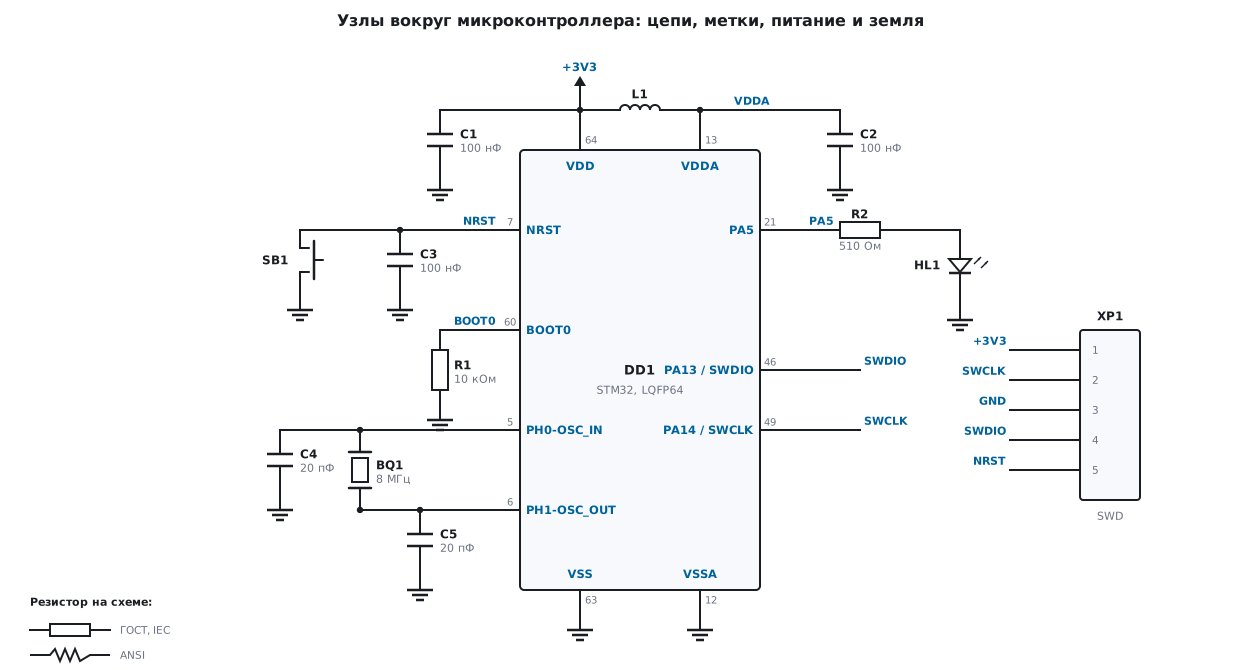
- a net label — a name written on a wire. Two labels with the same name are one net, even if there is no wire between them. In the figure this is how SWDIO, SWCLK and NRST of the microcontroller are connected to the connector XP1;
- a power or ground symbol — the same label, only drawn as a sign:
all
GNDsigns on the sheet are one net, all+3V3signs are another.
Some nets have no name at all — for example, the one between R2 and the LED HL1: it is short and fully visible, it does not need a name.
The model checks the drawing the same way an EDA tool does when it exports the net list: points on one wire are merged, labels with the same name are merged too. The drawing yields 11 nets on 38 pins — exactly the list that is specified separately in the model, without a single extra or lost pin. The model also runs the checks that you do by eye when reading a schematic: no pin in two nets and no single-pin net, VDD and VDDA have a capacitor to ground, NRST has a capacitor and a button, BOOT0 is pulled to ground, the crystal sits between OSC_IN and OSC_OUT. Zero violations; broken variants (R1 removed, the button moved to another net) are caught by the model.
On a real schematic the opposite also happens: text on a wire that is not a net name. MB1136 says so directly in note 1: italic text on a wire is not a net name but a hint at which Arduino signal it is.
Power and grounds are often split: on MB1136 the analog part has its own
AVDD and AGND, and VDD and AVDD are connected through the ferrite bead L1. The
figure does the same for VDDA.
130а.4 Sheets, buses and component parts
A large schematic does not fit on one sheet. GOST 2.701 (clause 5.5.3) says
a line going to another sheet is broken off without an arrow and labelled with its name
and address — the sheet number and the zone in brackets, for example (5, A6). Within a sheet
a break is allowed, but it ends with an arrow (clause 5.5.4). In an EDA tool the same job
is done by net labels and ports: the same name means one net.
The MB1136 schematic is hierarchical, on four sheets: "TOP & POWER", "MCU",
"STLINK/V2-1", "Extension connectors". The top sheet holds the power supply and three
rectangles that refer to the other sheets (MCU_64.SchDoc,
Connectors.SchDoc, ST_LINK_V2-1.SCHDOC); between them run not separate
wires but buses PA[0..15], PB[0..15], PC[0..15] — one thick
line for 16 nets. GOST 2.702 (clause 5.2.13) calls this a group connection
line and requires every line to be marked where it joins; in an EDA tool the mark is
the name of the net inside the bus, PA5 in the bus PA[0..15].
One more technique is a component drawn in parts. The microcontroller on MB1136 is drawn as two symbols, U5A and U5B: the first holds the port pins, the second — power, reset, BOOT0 and the HSE crystal pins. It is one package; GOST 2.702 (clause 5.3.14) calls this the split method and requires the designator on every part.
130а.5 Where a pin goes: PA5 on the Nucleo-64
The task: the green LED LD2 is blinking on the board — which pin drives it?
- The UM1724 manual says: LD2 is connected to Arduino signal D13, which is PA5 (pin 21) or PB13 (pin 34) depending on the chip; it lights when the pin is high.
- The "MCU" sheet of the schematic: at symbol U5A, pin 21 is labelled
PA5, and in the internal markup of the PDF it is assigned to netPA5. The net goes into the busPA[0..15]and through a port to the connectors sheet. - The "Extension connectors" sheet: the net goes out to the connectors, and the LED LD2 (Green) hangs on it through resistor R31 510 Ohm and jumper SB21. According to UM1724: SB21 closed — LD2 is connected to D13, open — disconnected.
The practical conclusion: PA5 on the Nucleo-64 is not free — it carries an LED with a 510 Ohm resistor. If you need a pin with no load, cut SB21.
Other pins are found the same way: button B1 USER is PC13 (pin 2),
B2 RESET is NRST (UM1724); on the "MCU" sheet nets PA13 and PA14 go out to the ports
TMS and TCK — these are SWDIO and SWCLK of the debugger. Labels at the symbol such as
PB13/PB14 at pin 34 and notes like F373: … mean that one schematic
serves several chips, and the pin name depends on which one
is soldered on.
130а.6 Typical blocks of a microcontroller board
The figure shows the blocks found on almost any board (the pin numbers of DD1 are for LQFP64, as for U5 on MB1136: NRST — 7, BOOT0 — 60, OSC_IN and OSC_OUT — 5 and 6, PA13 and PA14 — 46 and 49, VDD — 64, VSS — 63, VDDA — 13, VSSA — 12):
- decoupling — 100 nF at every supply pin (C1 at VDD, C2 at VDDA; on the "MCU" sheet of MB1136 — C23, C24, C27, C28 of 100 nF each) and bead L1 between the digital and analog supplies;
- reset — C3 100 nF from NRST to ground and button SB1; NRST is also brought out to the debug connector;
- BOOT0 — R1 10 kΩ to ground so that the chip starts from flash;
- crystal — BQ1 between OSC_IN and OSC_OUT, C4 and C5 to ground (20 pF — as in the X3 position on MB1136; how to calculate the capacitance — section 174);
- LED — HL1 through R2 510 Ohm, like LD2 on the Nucleo;
- SWD — XP1 with the same pin order as CN4 on the Nucleo-64 per UM1724: 1 — supply, 2 — SWCLK, 3 — ground, 4 — SWDIO, 5 — NRST. The first pin is not a power output: the programmer only measures the board voltage on it (VDD_TARGET).
Why these exact values and how to lay them out — in section 130 (decoupling, crystal, reset and BOOT0) and 174 (crystal). When reading someone else's schematic it is convenient to start from these blocks: finding them means understanding how the board is powered, how it starts and how it is programmed.
130а.7 Pitfalls
You decided a pin was free, but it has an LED on it. On the Nucleo-64 PA5 is LD2 with a 510 Ohm resistor, and the same holds for many boards: a pin on a connector does not yet mean "connected to nothing". Check the connectors sheet and the jumper table.
SB on an ST schematic was taken for a button. It is a solder blob jumper; in GOST SB is a button. Read the letters in the context of the document.
A net name was confused with a note. Italic text on a wire on MB1136 is not a net name (note 1 on the first sheet). Only labels, ports and power symbols connect.
A crossing was taken for a connection. Without a dot, crossing lines are not connected. The EDA tool knows this, a person skimming the schematic does not.
You look for a part marked [N/A] on the board. It is not there — the footprint is empty (on MB1136 — the 8 MHz crystal X3).
One schematic for several chips. Labels like PB13/PB14 and
notes with a series name: which pin works is decided by the chip that is soldered
on, not by the first line of the label.
You looked for a net on one sheet. In a hierarchical schematic a net leaves through a port or a bus to another sheet; follow the name, not the line.
130а.8 Summary
- A schematic shows only electrical connections; the position of symbols says nothing about the board; the device on the schematic is switched off.
- A reference designator is the type letters plus a number starting from one within the letter (GOST 2.702, clauses 5.3.9–5.3.11); ST uses other letters: U, X, B, LD, CN, SB.
- A net is joined by wires, dots, labels with the same name and power symbols; for our own schematic the model rebuilt 11 nets on 38 pins — matching the list, zero violations.
- A link between sheets is a break with a name and an address
(sheet, zone)per GOST 2.701, or a port and a bus in an EDA tool; MB1136 has 4 sheets and the busesPA[0..15],PB[0..15],PC[0..15]. - PA5 on the Nucleo-64 is pin 21, carrying LD2 through R31 510 Ohm and SB21.
- The blocks of any board: 100 nF decoupling, reset, BOOT0 10 kΩ, a crystal with two capacitors, an SWD connector 1…5 like CN4.
Next: section 130б "Heat on the board: thermal resistance, copper area and vias under the package" — why θJA from the datasheet refers to someone else's board, and how much copper and how many vias a regulator dissipating 0.5–1.5 W needs.