 Embedded HandbookApps
39. How to read ST documentation
Sooner or later every handbook runs out, while the question remains. Then you open the manufacturer's documentation, and it is all in English, about a thousand and a half pages long, and split into a dozen documents with opaque names. This section is about how to find your way in them and how to read their language.
The good news: the language of ST documentation is extremely uniform. Once you learn some forty phrases, you will understand any of its sections, even without speaking English fluently.
Terms used in the documentation
Term Meaning datasheet (DS) the chip description: pins, electrical data, packages reference manual (RM) the reference guide: peripherals and registers errata sheet (ES) the list of known silicon bugs and workarounds application note (AN) a note on use: how to solve a specific task user manual (UM) the user guide of a board or a program programming manual (PM) the guide to programming the core reset value the register value after reset reserved, must be kept at reset value reserved, keep the value it has after reset
39.1 What kinds of documents there are
| Type | What is inside | When to open it |
|---|---|---|
| DS: Datasheet | pinout, electrical characteristics, packages, contents of the chip | "which pin", "how much current", "does it tolerate 5 V" |
| RM: Reference manual | how the peripherals work and all their registers | "which bit is responsible for this" |
| PM: Programming manual | the Cortex-M core: instruction set, NVIC, SysTick, MPU | "what does this instruction do", "how is the NVIC built" |
| ES: Errata sheet | known silicon bugs and workarounds | before development starts, not after |
| AN: Application note | a ready solution of a specific task | "how to do X properly" |
| UM: User manual | evaluation boards and tools | "what is soldered on the Discovery" |
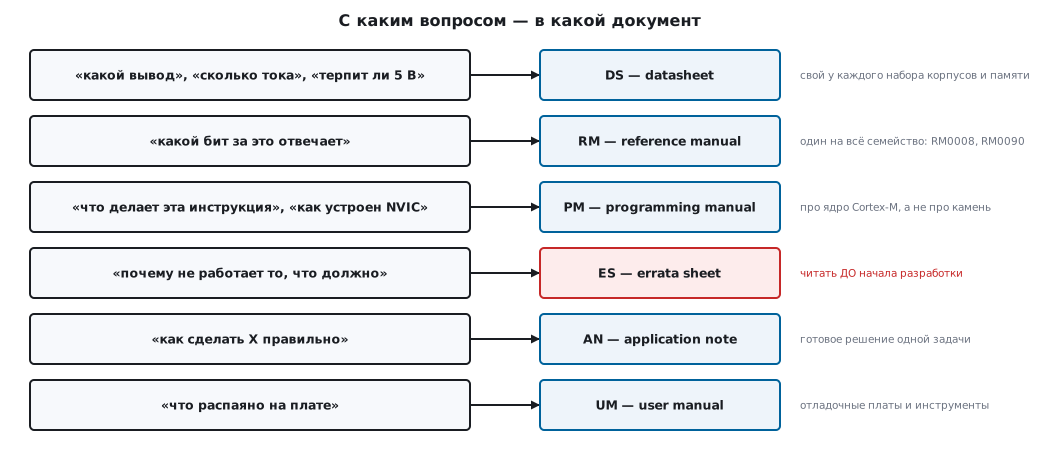
The main distinction, which saves hours of searching:
- There is one reference manual for the whole family.
RM0008covers STM32F101, F102, F103 and F105/107 at once.RM0090covers all of F405/407/415/417/427/437/429/439. Registers within a family mostly match, so the document is shared. The differences are stated right in the text. InRM0008the RCC of the Connectivity line (F105/F107) hasAHBRSTRandCFGR2, which the F103 does not have (section 37), and some bits are marked "available only in connectivity line devices". InRM0090the chapter on the LTDC display controller "applies only to STM32F429xx/439xx devices", and the F42x/F43x have FMC instead of FSMC. When you meet such a note, check the datasheet of your chip: does it have this block or this bit. - Each set of packages and memory sizes has its own datasheet. The STM32F103 has several: one for "medium density", another for "high density". That is exactly why the pinout is looked up in the datasheet, not in the reference manual: a shared document simply cannot contain it.
For our two platforms:
| STM32F103 | STM32F407 | |
|---|---|---|
| Reference manual | RM0008 |
RM0090 |
| Programming manual | PM0056 (Cortex-M3) |
PM0214 (Cortex-M4) |
| Errata | ES096 |
ES0182 |
39.2 What to look for where
| Question | Document | Section (as named in the original) |
|---|---|---|
| Which pin goes where | DS | Pinouts and pin description |
| Which peripheral is on which pin | DS | Alternate function mapping |
| Does the pin tolerate 5 V | DS | same place, column I/O structure, mark FT |
| Limiting current and voltage | DS | Absolute maximum ratings |
| Real parameters in operation | DS | Electrical characteristics |
| How much it draws in each mode | DS | Supply current characteristics |
| How a peripheral and its registers work | RM | the section named after the block |
| Address map | RM | Memory map |
| Clock tree | RM | Reset and clock control (RCC) |
| Processor instructions | PM | The Cortex-M instruction set |
| What is broken in this silicon | ES | Description of device limitations |
| How to flash through the bootloader | AN2606 | Bootloader for your family |
A practical trick. When you open a reference manual, do not leaf through it: use the PDF table of contents and search by register name. Search not for "GPIO output" but directly for
GPIOx_ODR: register names are unique, and the search takes you straight to the bit description, to the register map, and to the places where it is mentioned.
39.3 How a register description is built
All register descriptions in a reference manual are built the same way. Once you work through one, you can read any. The example is from RM0008 (STM32F103):
GPIOx_ODR — Port output data register (x = A..G)

Address offset: 0x0C
Reset value: 0x0000 0000

31                            16 15                             0
├─────── Reserved ──────────────┤├──────── ODR15..ODR0 ─────────┤
                                        rw

Bits 31:16  Reserved, must be kept at reset value.
Bits 15:0   ODRy: Port output data (y = 0..15)
            These bits can be read and written by software.
What to read first:
- Address offset: the offset from the base address of the block. Full address =
port base + offset. This is exactly how the register structures in the headers are built
(section 3). On the F4,
MODER,OTYPER,OSPEEDR,PUPDRandIDRcome beforeODR, so the offset ofGPIOx_ODRthere is 0x14. Offsets differ between families; always take them from the RM of your chip. - Reset value: what the register holds after reset. Useful for understanding which bits are already set as needed and need not be touched.
- The access notation under the bit map is the most important and the most underrated place.
Access notation
| Notation | In full | What it means in practice |
|---|---|---|
rw |
read/write | an ordinary bit: you write and read it |
r |
read-only | writes are ignored |
w |
write-only | reading returns zeros: do not use \|= |
rc_w1 |
read / clear by writing 1 | cleared by writing a ONE |
rc_w0 |
read / clear by writing 0 | cleared by writing a zero |
rc_r |
read / cleared by reading | cleared by the read itself |
rs |
read / set by software | can only be set; the hardware clears it |
t |
toggle | writing a one toggles the bit |
Res. |
reserved | do not touch, keep the default value |
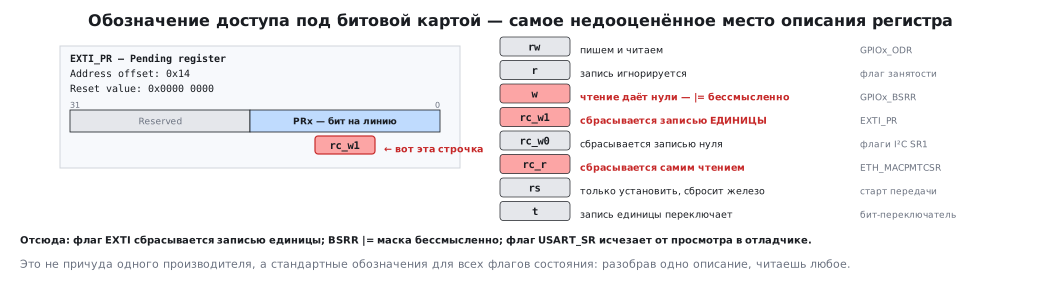
This explains things that otherwise look inexplicable:
EXTI_PRis markedrc_w1: that is why an interrupt flag is cleared by writing a one, not a zero (section 7). This is not a quirk of the EXTI block: writing a one clears flags in many ST blocks. But not in all of them: the timer flags inTIMx_SRare markedrc_w0and are cleared by writing a zero, while the DMA flags inDMA_ISRare read-only (r); they are cleared by writing a one to a separate registerDMA_IFCR(on the F4,DMA_LIFCRandDMA_HIFCR). How to clear a flag, you check each time in the notation under the bit.GPIOx_BSRRis markedw: that is whyBSRR |= maskmakes no sense: there is nothing to read (section 5, where this is confirmed by comparing the assembly).USART_SRon the F1 and F4 is markedrc_w0andr, notrc_r: the error flags (PE,FE,ORE, the noise flag) andIDLEare cleared by a sequence: readSR, thenDR. The debugger's peripheral window reads all registers of the block, includingDR: the sequence is done, the flag is gone, and the received byte is lost. Hence the classic mistake: you looked at the register in the debugger, the flag vanished, and the program behaved differently than without the debugger. A realrc_ris rare in STM32: for example, theWFRandMPRflags inETH_MACPMTCSRare cleared by reading the register itself.
39.4 The language of the documentation
About forty phrases cover almost all of the text. They repeat word for word from section to section.
About bits and registers
| Term | Meaning | What to do |
|---|---|---|
| must be kept at reset value | must keep its reset value | do not touch |
| this bit is set by hardware | the hardware sets the bit | you only read it |
| cleared by software | the program clears it | clear it yourself |
| cleared by writing 1 | cleared by writing a one | a one, exactly |
| this bit is set and cleared by software | the program sets and clears it | an ordinary configuration bit |
| read as 0 | reads as zero | do not rely on the contents |
| write access is protected | writing is protected | an unlock sequence is needed |
| this bit can be written only when … is disabled | writable only while … is off | turn the block off first |
About behavior
| Term | Meaning |
|---|---|
| the following sequence must be applied | you must perform the following sequence |
| it is mandatory to | you are required to |
| it is recommended to | it is advised to |
| shall / must | is obliged to |
| should | ought to, but not critical |
| may / can | is allowed |
| refer to Section 9.2 for details | details are in section 9.2 |
| whichever comes first | whichever happens earlier |
| unless otherwise specified | unless stated otherwise |
| is not affected | does not change |
| takes effect after … | becomes effective after … |
| up to | up to … inclusive |
| at least | no less than |
| typical / min / max | typical / minimum / maximum value |
⚠️ The difference between must, should and may in technical documentation is not a matter of style.
must: violating it makes the thing not work;should: violating it is allowed but risky;may: simply a possibility. Translations often erase this difference, and a recommendation turns into a requirement or the other way round.
Words that are translated wrongly
| Original | Wrong | Right |
|---|---|---|
| to assert a signal | "to claim" | drive into the active state |
| to negate / deassert | "to deny" | remove the signal |
| sample | "a specimen" | a reading, a sample value |
| to latch | "to snap a latch" | capture and hold a value |
| granularity | a borrowed word, "granularity" | step, resolution |
| overrun | "overflow" | data received on top of unread data |
| underrun | "underfill" | data ran out before it was requested |
| idle | "idling", as an engine | inactivity, no activity |
| frame | "a picture frame" | a frame (a transmission unit) |
| word | "a word" in the general sense | exactly 32 bits |
| half-word | "half of a word" of any size | 16 bits |
| wait state | "a state of waiting" | a wait cycle |
| prescaler | a borrowed word, "preskaler" | a pre-divider |
| duty cycle | "a working cycle" | the fill factor D = τ/T, in percent |
| jitter | a borrowed word, "dzhitter" | edge trembling |
| glitch | a borrowed word, "glitch" | a short disturbance, a false pulse |
The Russian term "skvazhnost" in the strict sense is the inverse quantity T/τ: at a 25 % fill factor it equals 4. In speech, and in this handbook too, "skvazhnost" often means the fill factor itself (section 82.2); keep them apart in calculations.
39.5 Errata: read before, not after
An errata sheet is the official list of what in the silicon works differently from what the reference manual says. The document is short, takes half an hour to read, and that half hour pays off many times over.
A typical entry looks like this:
2.1.5  I2C analog filter may provide wrong value, locking BUSY flag

Description: ...
Workaround:  ...
That is: what is broken, under which conditions it shows up, and how to work around it.
Classic examples that cost people days:
- the F1 has a known sticking
BUSYflag in I²C, because of which the bus "hangs" after a glitch; the workaround requires toggling the lines by hand (the F405/F407 have no such item: read the list for your own chip, 39б); - in some families the first ADC sample after power-up is unreliable;
- in individual silicon revisions the behavior on wake-up from Stop differs.
The list is split by silicon revision, and for many items it says in which
revision they were fixed, so you first need to know yours. You find it from the revision
letter in the package marking or from the REV_ID field, the upper 16 bits of
DBGMCU_IDCODE at address 0xE0042000 (the address is the same on the F1 and the F4). Which code
corresponds to which letter is given at the start of the list and in the description of DBGMCU_IDCODE
in the reference manual: on the F405/F407 0x1000 is revision A, 0x1001 is Z.
The F103 has a catch: without a debugger DBGMCU_IDCODE reads as zero, and the program
cannot find out its own revision; this is also an item of the errata list (section 2а).
The symptom is always the same: the code is written strictly according to the documentation, but works differently. Before you spend a third hour looking for a bug of your own, open the errata.
39.6 Application notes
A genre of its own: not a description of the hardware but a complete solution of a task, with formulas, schematics and code. Often it is a ready answer to a question you would otherwise have to piece together from a dozen places.
| Document | What it is about |
|---|---|
AN2606 |
the built-in bootloader: which interfaces, how to enter it, the protocol |
AN2867 |
how to choose a crystal and lay it out properly; why it "does not start" |
AN4013 |
timers: modes, synchronization, cascading |
AN4776 |
general-purpose timers, practical calculations |
AN2834 |
ADC: how to get the specified accuracy |
AN3116 |
ADC: operating modes and where to use which |
AN4031 |
DMA: techniques and pitfalls |
If a task looks typical, there is almost certainly an application note about it. Search:
STM32 <topic> application noteor directlyANwith the number on the ST site.
39.7 How to search
The right keywords save more time than fluent English.
| What you need | What to search for in the document |
|---|---|
| pin configuration | port bit configuration, alternate function |
| pin current | output driving current, I/O current injection |
| frequency and dividers | clock tree, prescaler, PLL configuration |
| Flash wait states | latency, wait states, prefetch buffer |
| interrupts | interrupt and status register, vector table, NVIC |
| UART baud rate setup | baud rate generation, USART_BRR, fractional baud |
| ADC modes | conversion modes, sampling time, injected channels |
| PWM | PWM mode, output compare, capture/compare |
| power saving | low-power modes, Stop mode, Standby mode |
| boot | boot configuration, system memory, option bytes |
The register table trick. At the end of every reference manual section there is
a summary table <block> register map and reset values: on one page, all
the registers of the block with their offsets and reset values. Usually this is
the only thing you need when the mechanism is already clear and you just have to
check a bit.
39.8 Pitfalls
Done strictly according to the documentation, but it works differently. First of all, the errata list of the silicon: it may contain exactly this case (39.5).
A recommendation read as a requirement, or the other way round. must, should and may differ in meaning,
and translations erase this difference (39.4).
The pinout is not in the reference manual. It is in the datasheet of the specific chip; registers are in the reference manual, the core is in the core programming manual (39.1–39.2).
39.9 Summary
- There is one reference manual per family, and a datasheet for each package. The pinout lives in the datasheet, registers in the reference manual, the core in the programming manual.
- The access notation under the bit map explains what otherwise looks like
arbitrariness:
rc_w1means clearing by writing a one,wmeans there is nothing to read,rc_rmeans the flag disappears from the read itself. - The language of the documentation is uniform: some forty phrases cover almost all
of the text.
must,shouldandmaydiffer in meaning, not in style. - Errata are read before development. The symptom "done by the documentation, works differently" is a reason to open them first of all.
- For a typical task there is almost always an application note with a ready solution.
- Search a document by register name, not by description: the names are unique and lead straight to all the places you need.
Next: section 39а "Official documents: what to get and where".