 Embedded HandbookApps
39а. Official documents: what to get and where
Section 39 explained how to read documentation. This one explains which documentation
and where to get it. All the documents are free and publicly available; the links
lead to the manufacturers' pages, not to copies. The document number
(RM0008, DS5319…) is the main key: by it you can find the document
with the site search even when the page address has changed.
Every link was checked to open, by a script or, where the site does not let scripts in, in a browser; the check date is in the section footnote.
Terms used in the documentation
Term Meaning datasheet (DS) the datasheet: pins, electrical parameters, packages reference manual (RM) the reference guide: registers and how the blocks work programming manual (PM) the guide to programming the core errata sheet (ES) the list of hardware bugs of the silicon application note (AN) a note on use: how to solve a typical task user manual (UM) the user guide of a board or a tool technical reference manual (TRM) the technical guide to the core architecture reference manual (ARM) the description of the architecture generic user guide a general guide to the core for the programmer
39а.1 Four documents for every chip
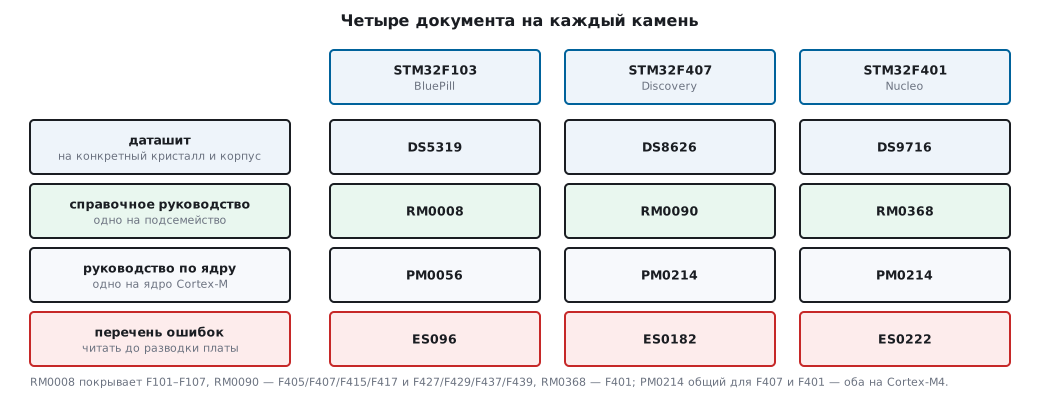
Any STM32 needs exactly four, and the easiest way to find them is from the page of the specific chip, the Documentation tab:
| STM32F103 (BluePill) | STM32F407 (Discovery) | STM32F401 (Nucleo) | |
|---|---|---|---|
| chip page | stm32f103c8 | stm32f407vg | stm32f401re |
| datasheet | DS5319 | DS8626 | DS9716 |
| reference manual | RM0008 | RM0090 | RM0368 |
| core manual | PM0056 (Cortex‑M3) | PM0214 (Cortex‑M4) | PM0214 |
| errata list | ES096 | ES0182 | ES0222 |
ES096 is the errata list for the medium-density F103x8/xB, that is, for the BluePill; the high-density F103xC/xD/xE have their own, ES0340.
What to look for in which, by sections of this handbook:
| Question | Document | Sections |
|---|---|---|
| what each pin can do, alternate functions | datasheet, Pin definitions table | 8, E |
| limiting currents, frequencies, ADC accuracy | datasheet, Electrical characteristics | 14, 15, 10 |
| any register, any bit | reference manual | 6–22, A, A2 |
| the clock tree with a diagram | reference manual, RCC chapter | 6 |
vector table, priorities, NVIC |
reference manual, Interrupts; core manual | 7 |
instructions, PRIMASK/BASEPRI, faults |
PM core manual | 1, 28, 35 |
| "should work but does not" | errata list | 36 |
⚠️ The errata list is read before the board layout, not after. For the F103 it contains, for example, restrictions on I²C remapping and
DBGMCUregisters that are inaccessible to the program without a debugger (section 2а.4); for the F407, known peculiarities of I²C and SDIO. But the fact that USB and CAN on the F103 do not work at the same time is not a bug: they share 512 bytes of buffer memory, and this is written in the reference manual. A device that "does not work for no reason" often falls into exactly one of the items.
There is one reference manual per subfamily: RM0008 covers F101–F107,
RM0090 covers F405/F407/F415/F417 and F427/F429/F437/F439, RM0368 covers F401.
A datasheet is for a specific chip and package.
39а.2 Application notes
Application notes are the most underrated thing a manufacturer has: they work through exactly those tasks people stumble over. You find them by number on the site or from the chip page, Documentation tab → Application notes.
| Number | What it is about | Section |
|---|---|---|
| AN2606 | the built-in bootloader: which interfaces, which protocol | 11 |
| AN3155 | the bootloader protocol over UART | 11, 16 |
| AN2834 | how to get the specified accuracy from the ADC | 14 |
| AN4073 | ADC accuracy on the F2/F4 | 14 |
| AN4031 | DMA on the F2/F4: streams, FIFO, priorities | 9 |
| AN4013 | timers: an overview of all modes | 13 |
| AN4776 | a timer "cookbook": example circuits | 13 |
| AN4899 | GPIO configuration and hardware limits | 8 |
| AN4838 | memory protection, MPU | 11 |
| AN3364 | migration and differences between series | 2 |
| AN2867 | choosing a crystal and its surrounding parts | 6 |
| AN4879 | USB: hardware requirements, layout | 20 |
| AN3154 | the bootloader over CAN | 19 |
| AN4989 | debugging on STM32: SWO, breakpoints, typical mistakes | 21, 35 |
39а.3 Boards
| Board | Document | What is inside |
|---|---|---|
| Nucleo‑64 | UM1724 | schematic, jumpers, Arduino/Morpho connectors, HSE from the ST‑Link |
| Discovery F407 | UM1472 | schematic, LEDs, accelerometer, audio, USB OTG |
| ST‑Link | UM1075 | the debugger: modes, firmware update |
| BluePill | no official document | the schematic circulates on the net; pinout in appendix E |
The board schematics are in the same manuals, on the last pages: that is
where you learn that the Nucleo LED is on PA5, and the Discovery button is
on PA0 with a pull-down (appendix E).
39а.4 The Cortex‑M core
ARM documents cover what is the same for all manufacturers: the instruction
set, NVIC, SysTick, faults, modes.
| Document | What it is | Section |
|---|---|---|
| Cortex‑M3 Devices Generic User Guide | the core through a programmer's eyes: registers, exceptions, instructions | 1, 7, 35 |
| Cortex‑M4 Devices Generic User Guide | the same for the M4, plus FPU and DSP | 1, 24 |
| Cortex‑M3 Technical Reference Manual | how the core is built: pipeline, buses, timings | 1, 23 |
| Cortex‑M4 Technical Reference Manual | the same for the M4 | 1 |
| ARMv7‑M Architecture Reference Manual | the whole architecture: instruction encoding, memory model | 3а, 30 |
For everyday work the first one is enough; you look into the architecture manual
for the exact behavior of instructions, for example LDREX/STREX
or barriers (appendix B).
39а.5 CMSIS and ST libraries
| What | Where | Section |
|---|---|---|
| CMSIS-Core: documentation | arm-software.github.io/CMSIS_5 | 5, B |
| CMSIS: sources | github.com/ARM-software/CMSIS_5 | 5 |
| F1 device headers | github.com/STMicroelectronics/cmsis_device_f1 | A |
| F4 device headers | github.com/STMicroelectronics/cmsis_device_f4 | A2 |
| HAL and LL for F1 | github.com/STMicroelectronics/stm32f1xx_hal_driver | 5, C |
| HAL and LL for F4 | github.com/STMicroelectronics/stm32f4xx_hal_driver | 5, C |
| the whole STM32CubeF1: examples, middleware | github.com/STMicroelectronics/STM32CubeF1 | 4, 5 |
| the whole STM32CubeF4 | github.com/STMicroelectronics/STM32CubeF4 | 4, 5 |
| HAL/LL description, F1 | UM1850 | 5, C |
| HAL/LL description, F4 | UM1725 | 5, C |
| CubeMX: the configurator | st.com/stm32cubemx | 4 |
| CubeIDE: the IDE | st.com/stm32cubeide | 4 |
The sources on GitHub are the fastest way to find out what a HAL function
really does: open stm32f4xx_hal_uart.c and read it. This is often
quicker than finding the right place in the manual.
39а.6 FreeRTOS
| What | Where | Section |
|---|---|---|
| the kernel site and documentation | freertos.org | 23–34 |
| kernel sources | github.com/FreeRTOS/FreeRTOS-Kernel | 24 |
| the book "Mastering the FreeRTOS Real Time Kernel" | github.com/FreeRTOS/FreeRTOS-Kernel-Book | 23–34 |
| CMSIS-FreeRTOS: a pack for Keil | github.com/ARM-software/CMSIS-FreeRTOS | 24 |
| CMSIS-RTOS2: a wrapper | arm-software.github.io/CMSIS_5/RTOS2 | 24 |
The kernel book is official and free, in source form on GitHub; the statements that "tasks of different priority do not share time" and "FromISR functions do not wait" (sections 26, 28) come from it, and there they are given with figures.
39а.7 Tools
| What | Where | Section |
|---|---|---|
| Keil MDK: documentation | developer.arm.com/keil | 4 |
| Arm Compiler 6: reference | developer.arm.com/documentation/100748 | 3, 4 |
| Arm Compiler: assembler and linker | developer.arm.com/documentation/100069 | 11 |
| GNU Arm Embedded: the compiler | developer.arm.com/gnu-toolchain | 4 |
| OpenOCD: an open-source debugger | openocd.org | 4 |
| STM32CubeProgrammer: flashing | st.com/stm32cubeprog | 4, 11 |
| FatFS: a file system | elm-chan.org/fsw/ff | 42 |
39а.8 How to search
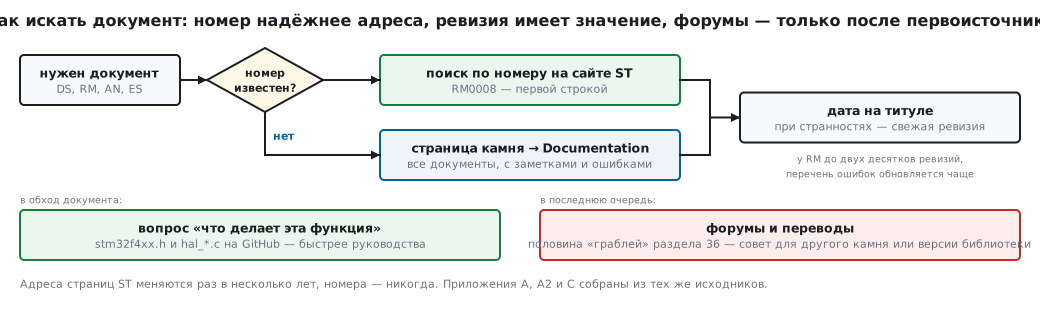
By document number. On the ST site a search for RM0008 gives the document
in the first line. This is more reliable than any link: ST page addresses change
every few years, the numbers never do.
From the chip page. The Documentation tab on the chip page lists all documents related to it, including application notes and the errata list. If you do not know the number, go there.
The version matters. Reference manuals have up to two dozen revisions; the errata list is updated more often. Check the date on the title page, and when something looks odd, the latest revision.
Sources instead of a document. The stm32f4xx.h header and hal_*.c
on GitHub answer the question "what does this function do" faster than
the manual. Appendices A, A2 and C were compiled exactly from there.
What not to search. Forums and translations only after the primary source. Half of the "pitfalls" from section 36 come from advice given for another chip or another library version.
39а.9 Summary
- Every chip has four documents: the datasheet, the reference manual, the core manual and the errata list (39а.1). The errata list is read before the board layout.
- Searching by document number is more reliable: page addresses change, numbers do not (39а.8).
- Links are given through product pages, not as direct file addresses.
Next: section 39б "Errata in practice: how to read the silicon errata list and work around the bugs" — the errata list in hand: the silicon revision, the summary table and workarounds in code.