 Embedded HandbookApps
204а. Device enclosure: from board to enclosure, tools, checks before printing
The board from section 199 is assembled, flashed and tested, and it lies bare on the desk. It becomes a device inside an enclosure: the enclosure holds the board, lets connectors and light out, and protects against fingers, dust and water. This section shows how to get an enclosure from the same board model without redrawing dimensions by hand: KiCad exports the board, a script builds the enclosure from it and checks that everything fits, and only then does the enclosure go to the printer.
The whole path was run on the board from 199 (F103 in LQFP-48, a SOT-223 regulator,
a crystal, two pin headers, an LED): kicad-cli 9.0.9 exported the board to STEP,
a CadQuery 2.8.0 script read the board file, found places for the screws,
built the base and the lid, checked intersections and exported STL. Part heights are
a table in the script: the KiCad image has no solid models of the parts, and for all parts
except the LQFP-48 these are assumptions.
What it is called in the documentation
Original Meaning enclosure, housing the case around the device standoff, boss a post that holds the board, a post for a screw mounting hole a hole for fastening the board courtyard (F.CrtYd) the outline occupied by a part on the board STEP exchange format for solid models between CAD tools STL a triangle mesh for the slicer and printing slicer slicer: cuts the model into layers for the printer clearance gap between parts ingress protection (IP) protection rating of the enclosure light pipe a light guide from an LED to a window in the enclosure
204а.1 Off-the-shelf, printed or custom
| Option | When | What it costs you |
|---|---|---|
| off-the-shelf enclosure from a catalog | the board is designed for it: dimensions and standoffs follow the enclosure drawing | the board is drawn to fit the enclosure, not the other way round |
| FDM printing | tens of units, prototypes, custom shapes | print time, visible layers, plastic softens with heat |
| resin printing (SLA) | small details, smooth surface | brittleness, post-processing |
| milling, injection molding | series production, metal, strength | tooling and lead time; molding pays off at thousands of units |
The order of decisions is the reverse of what people usually do. First you choose the enclosure, or at least its outer dimensions and screw positions, and only then route the board. An off-the-shelf enclosure from a catalog is almost always cheaper and stronger than a printed one; a custom one is needed when the shape is dictated by the product.
204а.2 What the enclosure takes from the board
The enclosure needs five things, and all of them are already in the board file:
| What | Where from | On the board from 199 |
|---|---|---|
| outline and thickness | the Edge.Cuts layer, (thickness …) |
45 × 32 mm, 1.6 mm |
| where each part sits | the F.CrtYd outline of each part |
15 parts |
| height above the board | solid models of the parts | a table of assumptions; LQFP-48 is 1.6 mm from the F103 datasheet |
| what goes outside | connectors, LEDs, buttons | J1, J2 are pin headers; D1 is an LED |
| how it is held | mounting holes | there are none: the script finds a place (204а.4) |
Redrawing this by hand in CAD is a source of errors on every board revision. The right way is to read it from the file: the board changes, the script rebuilds the enclosure.
204а.3 Tools
| Tool | What it does in this chain | License |
|---|---|---|
KiCad, kicad-cli pcb export step |
exports the board (and the parts, if their models exist) to STEP | GPL |
| CadQuery (OpenCascade kernel) | the enclosure as a Python program: parameters, checks, export | Apache 2.0 |
| FreeCAD + KiCad StepUp | the same with the mouse: open the board STEP, draw the enclosure around it | LGPL |
| OpenSCAD | the enclosure as text in its own language; convenient for simple boxes | GPL |
| Fusion, Onshape | cloud CAD; convenient to draw, inconvenient to repeat | commercial |
| trimesh | checking STL meshes: volume, watertightness | MIT |
| slicer (PrusaSlicer, Cura, OrcaSlicer) | STL → layers → G-code for the printer | open source |
CadQuery is chosen here: the enclosure is described by a program, like everything in this handbook, so it can be rebuilt for a new board and checked by the same run. FreeCAD is good when a complex enclosure shape is easier to draw than to describe; it opens the board STEP just as well.
Exporting the board is one command in the kicad/kicad:9.0 image:
kicad-cli pcb export step --subst-models -f -o board.step board.kicad_pcb
CadQuery read this STEP: the board is 45.00 × 32.00 × 1.51 mm. Not 1.6: only the board substrate went into the STEP, that is, the total thickness of 1.6 mm minus copper and solder mask on both sides, (0.035 + 0.01) × 2 = 0.09 mm. The enclosure is calculated from the full thickness in the board file, not from the STEP.
204а.4 Mounting holes go in before routing, not after
The board from 199 has no mounting holes. The script looks for a place for an M2 screw (a ⌀ 2.2 mm hole plus another 0.5 mm of margin to any part) near each corner: the point closest to the corner that is no closer than 3 mm to the board edge and does not touch the outline of any part.
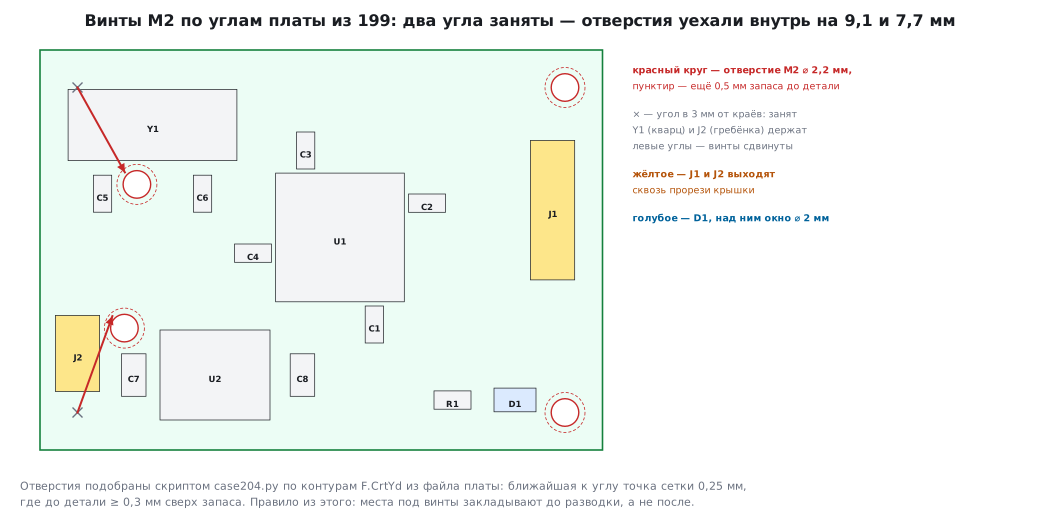
| Corner | Hole | Margin beyond 0.5 mm to a part |
|---|---|---|
| top left | x = 7.75, y = 10.75 | 0.30 mm |
| top right | x = 42.00, y = 3.00 | 2.63 mm |
| bottom left | x = 6.75, y = 22.25 | 0.38 mm |
| bottom right | x = 42.00, y = 29.00 | 0.72 mm |
The right corners are free: the screws sit exactly 3 mm from the edges. The left ones are taken: the crystal runs along the top edge for almost 14 mm, and at the bottom there are pin header J2 and the regulator. The screws moved into the board, so the board will be held asymmetrically; the standoffs inside the enclosure will not be where you expect them.
The conclusion is simple: mounting holes are placed first, before placing the parts, and covered with a keepout zone, just like the board outline. Most often these are four M2.5 or M3 holes in the corners; their coordinates are the contract between the board and the enclosure.
204а.5 The enclosure as a program
The parameters are at the top of the script; everything else is calculated from them and from the board file:
WALL = 2.0          # стенка и дно, мм — для печати соплом 0,4 это 5 проходов
GAP = 0.5           # зазор плата — стенка с каждой стороны
STANDOFF = 4.0      # стойка под платой: хвосты выводов гребёнок снизу — до 3 мм
LID_CLEAR = 1.5     # над самой высокой деталью под крышкой
HOLE_D = 2.2        # отверстие в плате под винт M2
The base is a box with a hollowed-out cavity and standoffs for self-tapping screws at the found positions:
    split = z_board + thick                         # дно по верх платы, выше — крышка
    base = (cq.Workplane("XY").box(out_w, out_h, split, centered=False).translate((ox, fy(by2) - GAP - WALL, 0))
            .cut(cq.Workplane("XY").box(in_w, in_h, split, centered=False).translate((bx1 - GAP, fy(by2) - GAP, WALL))))
    for cx, cy, _ in hs:
        boss = (cq.Workplane("XY").circle(BOSS_D / 2).extrude(STANDOFF).translate((cx, fy(cy), WALL))
                .cut(cq.Workplane("XY").circle(PILOT_D / 2).extrude(STANDOFF).translate((cx, fy(cy), WALL))))
        base = base.union(boss)
The lid is the same kind of box on top; it has slots following the pin header outlines
with a 0.3 mm margin and a ⌀ 2 mm window above the LED. One subtlety: in KiCad
the Y axis points down, in CAD it points up, so all board coordinates
go through fy(y); forget it and the slots end up mirrored.
The result:
| Dimension | How it is calculated | Value |
|---|---|---|
| outside, length × width | 45 + 2 · 0.5 + 2 · 2 and 32 + 2 · 0.5 + 2 · 2 | 50.0 × 37.0 mm |
| outside, height | 2 + 4 + 1.6 + 4.3 + 1.5 + 2 | 15.4 mm |
| slot J1 / J2 | pin header outline + 2 · 0.3 | 4.14 × 11.76 / 4.14 × 6.69 mm |
| plastic volume: base / lid | from the model | 5841 / 5467 mm³ |
The 4.3 mm height under the lid is the HC49-SD crystal from the table of assumptions; for your own board, take it from the drawing of the tallest part.
204а.6 Checks before printing
Printing an enclosure takes hours. An error that is visible in the model within a second is found before printing:
- Intersections. The enclosure is intersected with the board and with the part volumes: both intersection volumes are 0.0000 mm³. A nonzero volume means a part hits a wall, a standoff or the lid.
- Cross-check with KiCad. The board size from the STEP is 45.00 × 32.00 mm, the same as the outline in the file; the thickness is 1.51 mm (204а.3).
- Margin at the holes beyond the mandatory 0.5 mm is from 0.30 to 2.63 mm: all positive.
- Openings to the outside. The slots sit above J1 and J2, the window above D1; this is checked with the same intersection: a pin header must not touch the lid.
The script exports case_base.stl and case_lid.stl for the slicer and case.step
for anyone who will refine the enclosure in another CAD tool.
204а.7 Printing, material and protection
Printing tolerances. An FDM printer lays a line wider than the calculated one, holes come out smaller, and fits are tighter than in the model. So holes for self-tapping screws are adjusted on the real part: a test print of one standoff is cheaper than an enclosure. Set the wall to a multiple of the line width: 2.0 mm with a 0.4 nozzle is five passes.
Material. PLA is the easiest to print, but it softens with heat: an enclosure in the sun or in a car warps. For warm places and outdoors use PETG or ASA, for loaded parts use the same with higher infill. Softening temperatures are in the datasheet of the specific plastic.
IP protection rating (GOST 14254, also known as IEC 60529). The first digit is protection against solid objects and dust, the second against water: IP54 is dust-protected and protected against splashes from all sides; IP67 is dust-tight and withstands brief immersion. A printed enclosure with slots for pin headers is IP20 at best: protected against fingers, not water. Seals, sealed connectors and testing for the declared rating are a job for the design, not for the printer (section 206).
Radio and the enclosure. Metal and filled plastic shield an antenna. A module with an on-board antenna is placed against a plastic wall and not covered with metal; more on this in 206.3.
204а.8 Pitfalls
- Mounting holes after routing. The corners are already taken, so the screws move into the board, as on the board from 199. Place the holes first.
- Thickness from the STEP. KiCad exports the board substrate as 1.51 mm instead of 1.6. Calculate the height from the thickness in the board file.
- The Y axis. In KiCad it points down, in CAD up; the slots come out mirrored.
- Lead tails underneath. Through-hole parts stick out 2–3 mm below the board; with a lower standoff the board rests on the leads.
- Heights "by eye". Without part models, take the height from the drawing in the datasheet, not from a photo.
- An enclosure with no margin at the edge. The board is cut with a tolerance; a gap of 0.5 mm on each side lets it fit.
- Checking only by eye. Intersecting volumes in the model finds a part hitting a standoff within a second; a printed enclosure finds it in hours.
204а.9 Summary
- The enclosure is built from the board file: outline, thickness, part outlines and heights are all read by the program, nothing needs to be redrawn.
- The chain:
kicad-cli pcb export step→ CadQuery → checks → STL for the slicer and STEP for other CAD tools. - On the board from 199, two corners are taken by the crystal and a pin header: the M2 screws moved inward by 9.1 and 7.7 mm. Mounting holes are planned before routing.
- Enclosure 50.0 × 37.0 × 15.4 mm: 2 mm wall, 0.5 gap, 4 mm standoffs, 1.5 mm above the tallest part; intersections with the board and parts are 0.0000 mm³.
- The board STEP from KiCad is 1.51 mm thick: without copper and solder mask.
- Choose the material by the temperature of the place; the protection rating comes from the design and testing, not from the printer.
Full source code
case204.py: an enclosure from a KiCad board, parametric, in CadQuery.
# -*- coding: utf-8 -*-
"""204а: корпус по плате из KiCad — параметрически, в CadQuery.

Запуск в образе с CadQuery (cadquery-cad): python case204.py board.kicad_pcb
Читает из файла платы контур (Edge.Cuts), толщину и контуры деталей (F.CrtYd), подбирает
места под винты M2 в углах так, чтобы отверстие с запасом не задевало ни одной детали,
строит дно со стойками и крышку с прорезями под разъёмы и окном над светодиодом,
проверяет пересечения и зазоры и выгружает STL, STEP и проекции SVG."""
import math, re, sys

import cadquery as cq

# ── параметры корпуса (всё, что меняют под свой прибор) ─────────────────
WALL = 2.0          # стенка и дно, мм — для печати соплом 0,4 это 5 проходов
GAP = 0.5           # зазор плата — стенка с каждой стороны
STANDOFF = 4.0      # стойка под платой: хвосты выводов гребёнок снизу — до 3 мм
LID_CLEAR = 1.5     # над самой высокой деталью под крышкой
HOLE_D = 2.2        # отверстие в плате под винт M2
KEEP = 0.5          # запас от края отверстия до контура детали
BOSS_D = 5.0        # стойка под саморез M2
PILOT_D = 1.6       # отверстие в стойке под саморез M2 в пластик
CORNER_INSET = 3.0  # центр отверстия — не ближе 3 мм к краю платы
MIN_CLEAR = 0.3     # и не ближе 0,3 мм (сверх KEEP) к контуру детали

# высота деталей над платой, мм: LQFP-48 — «A max» из даташита F103, остальное — допущения
# (объёмных моделей в образе KiCad нет; сверять с даташитом своей детали)
HEIGHT = {"LQFP-48": 1.6, "SOT-223": 1.8, "Crystal_SMD_HC49-SD": 4.3, "C_0603": 0.9, "C_0805": 1.3,
          "R_0603": 0.55, "LED_0805": 0.8, "PinHeader": 8.5}
THROUGH_LID = ("PinHeader",)   # эти выходят наружу через прорези крышки


def num(s):
    return float(s)


def parse(path):
    s = open(path, encoding="utf-8").read()
    thick = num(re.search(r"\(thickness ([\d.]+)\)", s).group(1))
    xs, ys = [], []
    for m in re.finditer(r'\(gr_line\s*\(start ([\d.\-]+) ([\d.\-]+)\)\s*\(end ([\d.\-]+) ([\d.\-]+)\).*?\(layer "Edge\.Cuts"\)', s, re.S):
        a, b, c, d = map(num, m.groups())
        xs += [a, c]
        ys += [b, d]
    board = (min(xs), min(ys), max(xs), max(ys))
    parts = []
    starts = [m.start() for m in re.finditer(r'\n\t\(footprint "', s)] + [len(s)]
    for i in range(len(starts) - 1):
        blk = s[starts[i]:starts[i + 1]]
        name = re.search(r'\(footprint "([^"]+)"', blk).group(1)
        at = re.search(r'\n\t\t\(at ([\d.\-]+) ([\d.\-]+)(?: ([\d.\-]+))?\)', blk)
        x0, y0 = num(at.group(1)), num(at.group(2))
        rot = math.radians(num(at.group(3))) if at.group(3) else 0.0
        ref = re.search(r'\(property "Reference" "([^"]+)"', blk).group(1)
        pts = []
        for m in re.finditer(r'\(fp_(?:line|rect)\s*\(start ([\d.\-]+) ([\d.\-]+)\)\s*\(end ([\d.\-]+) ([\d.\-]+)\)(?:(?!\(fp_).)*?\(layer "F\.CrtYd"\)', blk, re.S):
            a, b, c, d = map(num, m.groups())
            pts += [(a, b), (c, d), (a, d), (c, b)]
        # KiCad: поворот по часовой при оси Y вниз
        tp = [(x0 + px * math.cos(rot) + py * math.sin(rot), y0 - px * math.sin(rot) + py * math.cos(rot)) for px, py in pts]
        bx = (min(p[0] for p in tp), min(p[1] for p in tp), max(p[0] for p in tp), max(p[1] for p in tp))
        h = next(v for k, v in HEIGHT.items() if name.startswith(k))
        parts.append((ref, name, bx, h))
    return thick, board, parts


def clear(cx, cy, parts):
    """Расстояние от края отверстия (с запасом) до ближайшего контура детали; > 0 — свободно."""
    r = HOLE_D / 2 + KEEP
    best = 1e9
    for _, _, (x1, y1, x2, y2), _ in parts:
        dx = max(x1 - cx, 0, cx - x2)
        dy = max(y1 - cy, 0, cy - y2)
        best = min(best, math.hypot(dx, dy) - r)
    return best


def holes(board, parts):
    """У каждого угла — ближайшая к нему точка на сетке 0,25 мм, где отверстие не ближе
    CORNER_INSET к краям платы и не ближе MIN_CLEAR к контуру любой детали."""
    bx1, by1, bx2, by2 = board
    out = []
    for sx, sy in ((0, 0), (1, 0), (0, 1), (1, 1)):
        best = None
        for i in range(0, 81):
            for j in range(0, 61):
                dx, dy = CORNER_INSET + i * 0.25, CORNER_INSET + j * 0.25
                cx = bx1 + dx if sx == 0 else bx2 - dx
                cy = by1 + dy if sy == 0 else by2 - dy
                c = clear(cx, cy, parts)
                if c >= MIN_CLEAR:
                    d = math.hypot(dx, dy)
                    if best is None or d < best[0]:
                        best = (d, (round(cx, 2), round(cy, 2), round(c, 2)))
        out.append(best[1] if best else None)
    return out


def build(path):
    thick, board, parts = parse(path)
    bx1, by1, bx2, by2 = board
    bw, bh = bx2 - bx1, by2 - by1
    hs = holes(board, parts)
    top_parts = [p for p in parts if not p[1].startswith(THROUGH_LID)]
    tallest = max(p[3] for p in top_parts)
    in_w, in_h = bw + 2 * GAP, bh + 2 * GAP
    z_board = WALL + STANDOFF                       # низ платы
    z_top_in = z_board + thick + tallest + LID_CLEAR  # потолок изнутри
    ox, oy = bx1 - GAP - WALL, by1 - GAP - WALL     # угол корпуса в координатах платы
    out_w, out_h = in_w + 2 * WALL, in_h + 2 * WALL
    # координаты платы (Y вниз) → корпус (Y вверх): y' = by2 - y + by1
    fy = lambda y: by2 - y + by1

    split = z_board + thick                         # дно по верх платы, выше — крышка
    base = (cq.Workplane("XY").box(out_w, out_h, split, centered=False).translate((ox, fy(by2) - GAP - WALL, 0))
            .cut(cq.Workplane("XY").box(in_w, in_h, split, centered=False).translate((bx1 - GAP, fy(by2) - GAP, WALL))))
    for cx, cy, _ in hs:
        boss = (cq.Workplane("XY").circle(BOSS_D / 2).extrude(STANDOFF).translate((cx, fy(cy), WALL))
                .cut(cq.Workplane("XY").circle(PILOT_D / 2).extrude(STANDOFF).translate((cx, fy(cy), WALL))))
        base = base.union(boss)
    lid_h = z_top_in + WALL - split
    lid = (cq.Workplane("XY").box(out_w, out_h, lid_h, centered=False).translate((ox, fy(by2) - GAP - WALL, split))
           .cut(cq.Workplane("XY").box(in_w, in_h, lid_h - WALL, centered=False).translate((bx1 - GAP, fy(by2) - GAP, split))))
    cut_list = []
    for ref, name, (x1, y1, x2, y2), h in parts:
        if name.startswith(THROUGH_LID):            # прорезь по контуру гребёнки + 0,3 мм
            w, d = x2 - x1 + 0.6, y2 - y1 + 0.6
            lid = lid.cut(cq.Workplane("XY").box(w, d, lid_h + 1, centered=False)
                          .translate((x1 - 0.3, fy(y2) - 0.3, split - 0.5)))
            cut_list.append((ref, round(w, 2), round(d, 2)))
        if name.startswith("LED"):                  # окно над светодиодом, ⌀ 2 мм
            lid = lid.cut(cq.Workplane("XY").circle(1.0).extrude(WALL + 1).translate(((x1 + x2) / 2, fy((y1 + y2) / 2), z_top_in - 0.5)))
            cut_list.append((ref, "окно 2", ""))

    pcb = cq.Workplane("XY").box(bw, bh, thick, centered=False).translate((bx1, fy(by2), z_board))
    for cx, cy, _ in hs:
        pcb = pcb.cut(cq.Workplane("XY").circle(HOLE_D / 2).extrude(thick).translate((cx, fy(cy), z_board)))
    comps = None
    for ref, name, (x1, y1, x2, y2), h in parts:
        body = cq.Workplane("XY").box(x2 - x1, y2 - y1, h, centered=False).translate((x1, fy(y2), z_board + thick))
        comps = body if comps is None else comps.union(body)
    return dict(thick=thick, board=board, parts=parts, holes=hs, tallest=tallest, out=(out_w, out_h, z_top_in + WALL),
                base=base, lid=lid, pcb=pcb, comps=comps, cuts=cut_list, split=split, z_board=z_board)


def vol(wp):
    return sum(s.Volume() for s in wp.vals()) if wp is not None else 0.0


if __name__ == "__main__":
    r = build(sys.argv[1] if len(sys.argv) > 1 else "board.kicad_pcb")
    bx1, by1, bx2, by2 = r["board"]
    print("плата: %.1f × %.1f мм, толщина %.1f" % (bx2 - bx1, by2 - by1, r["thick"]))
    for ref, name, bx, h in r["parts"]:
        print("деталь %s %s: контур %.2f…%.2f × %.2f…%.2f, высота %.1f" % (ref, name, bx[0], bx[2], bx[1], bx[3], h))
    for k, hcl in enumerate(r["holes"]):
        print("отверстие %d: x=%.2f y=%.2f, запас сверх 0,5 мм до детали %.2f мм" % ((k + 1,) + hcl))
    print("самая высокая деталь под крышкой: %.1f мм" % r["tallest"])
    print("корпус снаружи: %.1f × %.1f × %.1f мм" % r["out"])
    for c in r["cuts"]:
        print("вырез %s: %s %s" % c)
    solid = r["base"].union(r["lid"])
    for what, other in (("плата", r["pcb"]), ("детали", r["comps"])):
        inter = vol(solid.intersect(other))
        print("пересечение корпуса и %s: %.4f мм³" % ("платы" if what == "плата" else "деталей", inter))
    print("объём дна %.0f мм³, крышки %.0f мм³" % (vol(r["base"]), vol(r["lid"])))
    import os
    if os.path.exists("board.step"):               # сверка с выгрузкой kicad-cli pcb export step
        bb = cq.importers.importStep("board.step").val().BoundingBox()
        print("плата из STEP: %.2f × %.2f × %.2f мм" % (bb.xlen, bb.ylen, bb.zlen))
    cq.exporters.export(r["base"], "case_base.stl")
    cq.exporters.export(r["lid"], "case_lid.stl")
    cq.exporters.export(r["base"].union(r["lid"]), "case.step")
    asm = r["base"].union(r["pcb"]).union(r["comps"])
    cq.exporters.export(asm, "view_base.svg", opt={"projectionDir": (1, -1.2, 1.1), "showHidden": False,
                                                   "width": 520, "height": 360, "strokeWidth": 0.35})
    cq.exporters.export(r["lid"], "view_lid.svg", opt={"projectionDir": (1, -1.2, 1.1), "showHidden": False,
                                                      "width": 520, "height": 360, "strokeWidth": 0.35})
    print("выгружено: case_base.stl, case_lid.stl, case.step, view_base.svg, view_lid.svg")
Next: section 205 "Product documentation: the set, designations, revisions": the device lives for years; now it must be possible to reproduce, repair and change it without digging through the developer's memory.