 Embedded HandbookApps
205. Product documentation: the set, designations, revisions
The board is assembled (section 199), tested on the line (201) and has survived interference (203) — but what turns it into a product is not soldering, it is paper: a set of documents that lets someone repeat, repair and change the product without its author. While there are three boards, the documentation lives in your head; by the tenth board and the second year of service, your head stops being a reliable storage medium. This section is about the minimum of order: which documents make up the set, how to name and number them, what a revision is and how the firmware finds out which board revision it has woken up on.
The numbers in this section come from the arithmetic in _verify/docs205/doc_calc.py; reading the board
revision is board_rev.c, run on a PC and built for Cortex-M3 in stm-arm:1;
PDF export from the command line is kicad-cli from the KiCad 9.0 image.
Everything is checked by _verify/docs205_check.py.
Terms used in the documentation
Term Meaning engineering change order (ECO) a change notice: what changes, where and why changelog, revision history the log of a document's revisions assembly drawing a view of the board with the positions of the parts title block the stamp with the designation, name and revision manufacturer part number (MPN) the exact variant of a part from its maker board revision (rev A, rev B…) a hardware version of one product form, fit and function the test for whether a new number is needed as-built documentation of how a particular unit was actually made nameplate a plate with the model, serial number and date of manufacture
205.1 Who reads the set: four readers and you in a year
Documentation is not written "for the sake of order" but for specific readers, and none of them can ask the author:
- the factory — builds from the archive of 199.1 exactly what is in the archive, and nothing from the email thread;
- the assembler and the tuner — fit the board into the enclosure, program and calibrate it from the instructions, not from memory;
- the repair technician — three years later looks for the schematic, the values and the purpose of the jumpers of a unit that "does not switch on";
- the customer — reads the passport and the manual: what it is, how to connect it, what it guarantees;
- you in a year — the main reader. An author forgets their own decisions faster than the warranty runs out.
From this follows the single rule from which everything else is derived: the product is defined by its documents, not by the unit on your desk. If the board differs from the documentation, the board is wrong: either it is brought into line with the documents, or the documents are changed honestly as in 205.6. A device that exists only as "this one here, the one that works" cannot be repeated.
205.2 What the set contains: what describes the product
The Russian tradition is collected in the design documentation system — ESKD (Unified System for Design Documentation); for a small series what matters is not its formalities but the idea: each aspect of the product has its own document with its own code. The minimum set for a microcontroller device:
| Document | Code | What it contains | Who reads it |
|---|---|---|---|
| schematic diagram | E3 | all nets and component designators | developer, repair technician |
| parts list | PE3 | what is on the board: values, packages, part numbers | purchasing, factory (this is the BOM of 199.2) |
| assembly drawing | SB | a view of the board with positions: what goes where | assembly, inspection, repair |
| specification | — | what the product consists of: board, enclosure, fasteners, documents | kitting, warehouse |
| passport | PS | what the device is, serial number, parameters, warranty | customer, repair |
| manual | RE | how to connect and use it | customer |
The specification is the root: it lists everything the product consists of, including the other documents. Next to the design set sits the production archive of 199.1 — Gerber, drill files, the placement file: these are exports from the board project, frozen at a specific revision, not documents in their own right.
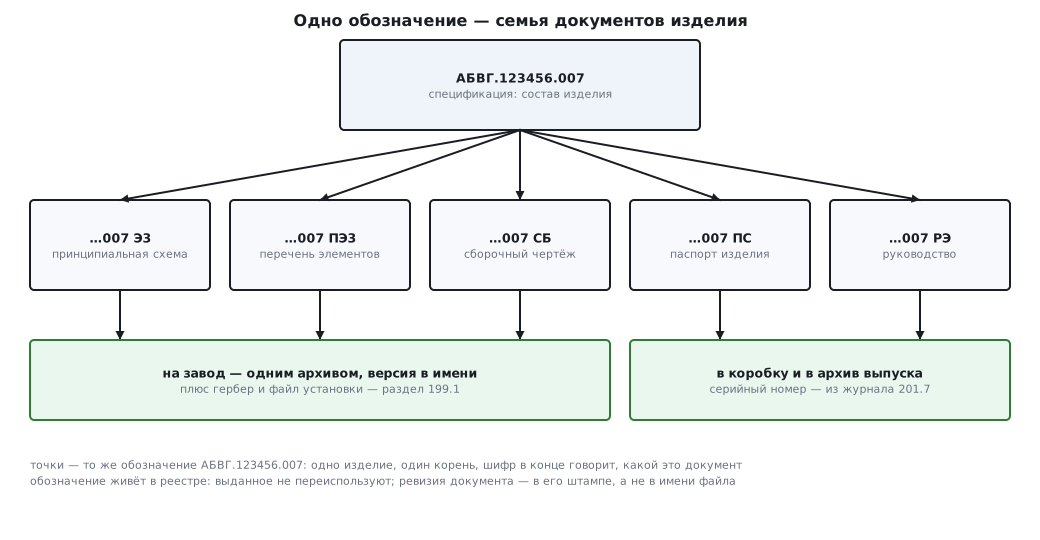
🔧 The minimum for a series of a few dozen units. Schematic, parts list and assembly drawing — PDFs with a date and revision; the specification — a table; the passport and the manual — a page or two each. Six files, one evening of work — and the product no longer depends on your memory. Anything less than this is still a prototype.
205.3 Designations: the decimal number and an honest substitute for it
For documents to refer to each other, the product needs a
designation — a name that does not change from revision to revision.
The classic scheme is the decimal number: ABVG.123456.007
(the classification code here is made up). It is read field by field:
ABVG— a four-letter code of the developer organization;123456— six digits of the classification code: class, subclass, group, subgroup, type — "what kind of thing this is" according to the classifier;007— a three-digit sequence number within that classification code.
In total 13 characters plus two dots (run of doc_calc.py); the product's documents
get the same designation with a code at the end: ABVG.123456.007
E3 — the schematic, …SB — the assembly drawing. One product, one root,
and any document is found by its designation without searching through folders.
For a small series without a design department it is more honest not to imitate a classifier you do not have, but to set up your own system with the same properties — uniqueness, immutability, the document code at the end:
ТМ10-021-Э3  rev B
ТМ10   код изделия: ваш прибор
021    номер в реестре: выдан один раз и навсегда
Э3     шифр документа: словарь тот же, что в таблице 205.2
rev B  ревизия документа
The rules that make a system a system: the number register is one file
in the repository (a table "number — what it is — who issued it — when"); a number
is issued once and never reused, even if the product is dead;
three digits are enough for 999 items — a small series cannot
exhaust the register (run of doc_calc.py).
⚠️ A file name is not a designation. Files get renamed, copied
into final_v2_new, lost when moving to another disk. The designation and
revision live in the document itself — in the title block (stamp) of the drawing,
in the header of the table, on the board silkscreen — and only as a copy in the file name.
205.4 Board and product revisions
A revision is a state of the product under the same designation. The boundary rule: as long as units are interchangeable in "form, fit and function", they are revisions of one product; as soon as an old and a new unit cannot be swapped, it is a new product with a new number, not "rev F".
What counts as a new board revision is any change after which the factory will make a different board: changes to copper, drilling, outline, footprints. Changing a value or a part number without touching the copper is a revision of the parts list (an assembly variant): same board, different contents. Hence three independent counters — for the board, the parts list and the firmware — and all three are recorded in the release log of each unit (201.7).
The revision mark is put on the board itself — in silkscreen in a free corner:
the board designation and rev B. A board without a mark is indistinguishable from
its neighbour a year later; putting two "identical" boards of different revisions side by side is a way
to lose a day on "my pinout is different". The compatibility rules between
revisions are written into the changelog explicitly: "rev C is interchangeable with rev B;
rev A requires firmware no newer than 1.x".
⚠️ Board revision and product revision are different axes. Device rev 2 may be built on board rev C with parts list rev D and firmware 2.3.1. Trying to reduce everything to one number ends with the number no longer meaning anything. The axes are tied together by the release log: unit serial number → which revisions it contains.
205.5 Firmware version and board revision
Firmware is also part of the product, and it has the same compatibility questions. While there is one board, the firmware version just grows; from the second board revision on, a "firmware × board" matrix appears, and it has to be kept explicitly:
| Firmware version | rev A | rev B | rev C | rev D |
|---|---|---|---|---|
| 1.x | yes | yes | — | — |
| 2.0–2.2 | — | yes | yes | — |
| 2.3 and newer | — | yes | yes | yes |
The matrix lives in the firmware changelog, but you cannot rely on people: the firmware must detect the board revision itself. The cheapest way is straps: three free inputs with internal pull-ups and three footprints for 0 Ω resistors to ground. On rev A nothing is fitted; after that each revision gets its own code: an empty footprint reads as one, a fitted one as zero.
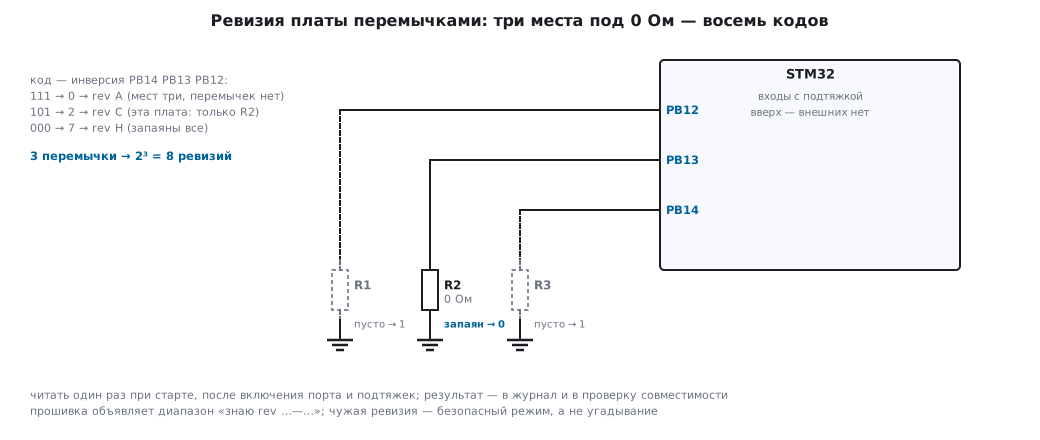
🔧 Reading the revision and checking compatibility (board_rev.c; REV_IDR
on F1 is GPIOB->IDR; in the PC run a variable stands in for the port):
enum { REV_SHIFT = 12 };                   /* PB12, PB13, PB14: подтяжка вверх */

uint32_t board_rev(void)                   /* 0 = rev A, 1 = rev B, ... 7 = rev H */
{
    uint32_t raw = (REV_IDR >> REV_SHIFT) & 7u;
    return ~raw & 7u;                      /* запаянная перемычка тянет вход в 0 */
}

enum { FW_REV_MIN = 1, FW_REV_MAX = 3 };   /* эта сборка прошивки знает rev B..D */

int rev_supported(uint32_t rev)            /* при отказе — безопасный режим + журнал */
{
    return rev >= FW_REV_MIN && rev <= FW_REV_MAX;
}
The run goes through all eight codes; the extreme lines:
входы PB14..PB12 = 111 -> rev 0 (A) НЕ поддерживается: стоп
входы PB14..PB12 = 101 -> rev 2 (C) поддерживается
входы PB14..PB12 = 000 -> rev 7 (H) НЕ поддерживается: стоп
On Cortex-M3 the whole mechanism is 32 bytes of code and not a single byte of RAM (built
in stm-arm:1, run board_rev_host.txt). Three straps give
2³ = 8 revisions, four give 16; if three pins are too precious, the same job
is done by one ADC input with a resistor divider: with a level step of 0.3 V
12 codes fit, and the worst-case drift of a divider made of ±1 % resistors is
±16.5 mV, nine times less than half a step (run of doc_calc.py).
The code is read once at startup; an unknown revision means safe mode
and a log entry, not an attempt to guess the pinout.
It is useful to expose the firmware version, board revision and serial number (201.5) — in the UART start-up line, in a telemetry register, in the reply to a "who are you" command: half of all "field mysteries" are solved when the device itself says what it contains.
205.6 Changes: the changelog and the change notice
Every document carries a changelog — a table in the document itself:
| Revision | Date | What and why |
|---|---|---|
| A | 2026-03-02 | first release |
| B | 2026-06-14 | R7 470 → 220 Ω: brightness; change notice ECO-012 |
A change almost never touches just one document: you change a
value — the schematic, the parts list and possibly the calibration are edited; you move
a connector — the assembly drawing, the Gerbers and the enclosure. The bundle is fixed by a
change notice (ECO) — in the ESKD sense: a short document "what we
change, why, which documents are affected and from which revision, what to do
with the work in progress" — with old-revision boards in stock: rework them, fit them with
old firmware or write them off. The notice number (ECO-012) appears
in the changelog of every affected document — through it the change
can be traced in full.
⚠️ There are no "silent" fixes. Soldering a resistor onto a board and not writing it down means creating a unit that does not exist in the documentation: the next batch goes to the factory without the fix, and the repair technician will repair the device from a schematic it does not match. Any difference between the hardware and the documents is either a hardware defect or a new revision of the documents; there is no third state. For a one-off rework of a single unit the honest way out is an "as-built" entry in the release log of that serial number.
205.7 Passport and manual
The passport is the document of a specific unit, and its minimum content is: model and designation; the factory serial number — the same as in the release log (201.7) and in the chip's memory (201.5); date of manufacture; the main parameters (supply, consumption, ranges); scope of delivery; operating and storage conditions; warranty and the inspection mark. One or two pages are enough, but the serial number and date are mandatory: without them a device back from repair cannot be linked to its batch or its calibration (202.5).
The manual is the document of the model: how to connect it (connectors and pinout from the user's point of view), how to switch it on and what the indicators mean, operating modes, specifications, what to do on typical failures and what must not be done. It is written for the reader from 205.1 who cannot ask: the quality test for a manual is to give the device and the text to an outsider and keep silent while they connect it.
The nameplate on the enclosure is the passport's younger brother: model, serial number, date, supply. A device outliving its passport is a fact of life; the nameplate remains the only thread to the release log, so the serial number on the enclosure always duplicates the one in the passport.
205.8 Storage: git for hardware and dated exports
The product's sources — the schematic and board project, the firmware, the document texts,
the designation register — live in git just like code (35б — the same
philosophy: everything from the command line, everything repeatable). Releasing a revision
is a tag: TM10-rev-B on the repository state from which the files
for the factory were made. The question "what was the March batch built from?" becomes
a git checkout instead of archaeology through final_v2 folders.
But git stores sources, while the readers from 205.1 work with exports: the factory with Gerbers, the repair technician with a PDF of the schematic. So next to the tag a release folder is frozen: the production archive of 199.1 plus PDFs of the schematic and drawing, each with the designation, revision and date in its title block. The export is done by the same command line as in 132в and 199:
kicad-cli sch export pdf -o out/TM10-021-E3-revB.pdf board.kicad_sch
🔧 Revision into the title block — from the script. kicad-cli has the option
--define-var KEY=VALUE, which substitutes project variables during
export: the release script writes the revision and date into the title block itself, and a PDF
never ends up with "forgot to update the frame" (the options are in kicad_pdf_host.txt).
A PDF with the date in the title block is also insurance against format change: a ten-year-old CAD project may not open in a new version of the program, while PDF and Gerber stay readable. The rule is simple: sources in git with tags, and for each release frozen exports that can be read without CAD.
205.9 Pitfalls
Two boards marked "rev B" in stock behave differently. A silent fix: the copper was regenerated, the mark was not changed. Any change to the board geometry is a new revision with new silkscreen; a change without a changelog entry is prohibited by the cheapest means there is — habit.
A firmware update knocked out half the fleet. Version 2.0 silently assumed board rev C, while half the fleet in the field is rev B. The firmware must read the revision itself: three straps, 32 bytes of code (205.5) — and unknown hardware is met with safe mode, not guesswork.
The factory built a batch from a parts list one change older than the schematic. The change went into the schematic, the parts list was forgotten: the change notice lists all affected documents, and the factory gets one archive of one revision (199.1), not files "from the email thread".
A designation was reused — two products live under one name.
The old device died, its number was given to a new one, and now in repair, in the warehouse
and in correspondence 021 means two different devices. A number is issued once
and forever; the register is one file, and numbers are issued only through it.
Two years later the board source will not open. The CAD format has moved on, the plugin is dead, the license has expired. What saves you are the frozen release exports: Gerber, PDFs of the schematic and drawing with the date and revision in the title block — they can be read without CAD even ten years later (205.8).
There is a passport, but no serial number in it. A device came back from the field — and it cannot be linked to the release log (201.7), to the board batch or to the calibration (202.5): the repair starts with "so what have we got here". The serial number goes into the passport, onto the nameplate and into the chip (201.5), and it is one and the same number.
205.10 Summary
- The product is defined by its documents, not by a unit: the minimum set is the E3 schematic, the PE3 parts list, the SB assembly drawing, the specification, the passport and the manual — six documents plus the production archive of 199.1.
- A designation is an unchanging name: the decimal number is 4 letters + 6 digits + 3 digits, 13 characters; your own system for a small series must give the same: uniqueness, a register in one file, a number once and forever, 999 items on a three-digit counter.
- A revision is a state under the same designation, the boundary is "form, fit, function"; the board, the parts list and the firmware have independent counters, tied together by the release log through the serial number.
- The firmware reads the board revision itself: three straps = 8 codes, 32 bytes of code and 0 bytes of RAM on Cortex-M3; a divider on one ADC input gives 12 levels at a step of 0.3 V against a worst-case drift of ±16.5 mV.
- A change is a record: a changelog in every document, a change notice ties together the documents of one change, there are no "silent" fixes.
- Sources in git with a tag per release, next to them frozen exports:
Gerber and PDF with the revision and date in the title block (
kicad-cli sch export pdfwith--define-var— straight from the release script).
Full sources
board_rev.c — how the firmware finds out the board revision.
/* Раздел 205.5: как прошивка узнаёт ревизию платы.
 *
 * На плате: три свободных входа с внутренней подтяжкой вверх и три
 * места под резисторы-перемычки 0 Ом на землю. На rev A не запаяно
 * ничего, на каждой следующей ревизии запаивается свой код. Не
 * запаяно — вход читается единицей, запаяно — нулём.
 *
 * Здесь, на компьютере, вместо порта — переменная fake_idr, и прогон
 * перебирает все восемь кодов.
 *
 * Сборка на ПК:  gcc -O2 -Wall -Wextra -o board_rev board_rev.c && ./board_rev
 * Для кристалла: arm-none-eabi-gcc -mcpu=cortex-m3 -mthumb -O2 -DNO_HOST_TEST -c board_rev.c
 */
#include <stdint.h>
#ifndef NO_HOST_TEST
#include <stdio.h>
static uint32_t fake_idr;
#define REV_IDR fake_idr
#else
#define REV_IDR (*(volatile uint32_t *)0x40010C08u)  /* GPIOB->IDR на F1 */
#endif

enum { REV_SHIFT = 12 };                   /* PB12, PB13, PB14: подтяжка вверх */

uint32_t board_rev(void)                   /* 0 = rev A, 1 = rev B, ... 7 = rev H */
{
    uint32_t raw = (REV_IDR >> REV_SHIFT) & 7u;
    return ~raw & 7u;                      /* запаянная перемычка тянет вход в 0 */
}

enum { FW_REV_MIN = 1, FW_REV_MAX = 3 };   /* эта сборка прошивки знает rev B..D */

int rev_supported(uint32_t rev)            /* при отказе — безопасный режим + журнал */
{
    return rev >= FW_REV_MIN && rev <= FW_REV_MAX;
}

#ifndef NO_HOST_TEST
int main(void)
{
    printf("== сборка на ПК: без предупреждений\n");
    printf("прошивка объявляет: знаю rev %d..%d (B..D)\n", FW_REV_MIN, FW_REV_MAX);
    for (uint32_t raw = 7;; raw--) {       /* от «ничего не запаяно» к «запаяны все» */
        fake_idr = raw << REV_SHIFT;
        uint32_t rev = board_rev();
        printf("входы PB14..PB12 = %u%u%u -> rev %u (%c) %s\n",
               (raw >> 2) & 1u, (raw >> 1) & 1u, raw & 1u, rev, 'A' + (int)rev,
               rev_supported(rev) ? "поддерживается" : "НЕ поддерживается: стоп");
        if (raw == 0)
            break;
    }
    return 0;
}
#endif
Next: section 205а "ESKD documents for a device" — document codes, the E3 schematic and the PE3 parts list from KiCad.