 Embedded HandbookApps
205а. ESKD documents for a device: codes, the E3 schematic, the PE3 list of elements from KiCad
Section 205 explained the meaning of the document package: who reads it, how to designate the product, how to manage revisions and changes — deliberately without the ESKD formalities. When a device goes to a factory, to a customer or to conformity assessment (206а), the formalities are needed: documents with codes, a schematic with a list of elements, reference designators according to the standard. This section covers which documents exist and what they are called, how an E3 schematic differs from a picture from KiCad, and how to produce the PE3 list of elements from the same board file by a program rather than by hand.
The sources are the texts of the ESKD standards (ESKD, the Unified System for Design Documentation — a Russian series of GOST state standards): GOST 2.102-2013 (types and completeness of documents), GOST 2.701-2008 (schematics: kinds, types, list of elements), GOST 2.702-2011 (rules for electrical schematics); letter codes — GOST 2.710-81. The list of elements is built by a script from the board of section 199.
Terms used in the documentation
Term Meaning ESKD Unified System for Design Documentation: the GOST 2.xxx series of standards document code the letters after the product designation: SB, GCh, E3, PE3 electrical circuit schematic (E3) the full set of elements and the connections between them list of elements (PE3) the table of elements for an E3 schematic reference designator C1, R1, DD1 — the name of an element on the schematic and on the board specification the main document of an assembly unit: what it consists of bill of materials (BOM) the list of purchased parts; close to VP and PE3 title block the document stamp: name, designation, signatures
205а.1 Which documents exist and what they are called
GOST 2.102-2013, table 3, lists the types of design documents and their codes. For a microcontroller device the ones most often needed are:
| Code | Document | What is in it |
|---|---|---|
| — | specification | the composition of the assembly unit: what goes into it and how many |
| SB | assembly drawing | how to assemble: board, parts, enclosure, fasteners |
| GCh | outline drawing | the outer dimensions and mounting points of the device |
| ME | wiring drawing | wires, harnesses, soldering between parts |
| per GOST 2.701 | schematics | E3 — electrical circuit schematic, and others |
| VP | list of purchased items | everything that is bought ready-made |
| PZ | explanatory note | how it works and why, calculations |
Operating documents — the manual, the product passport — are issued under their own
standard, GOST 2.601. The code is written after the product designation: the schematic of the device
ABVG.123456.007 is the document ABVG.123456.007 E3 (how the designation
is built is covered in section 205.3; the classification part here is a placeholder).
For a small device a sensible minimum is: the specification, E3 with the PE3 list, the board assembly drawing, the device outline drawing (from the enclosure model, section 204а) and the operating documents.
205а.2 The E3 schematic: kind and type
The schematic code under GOST 2.701-2008 consists of a kind letter and a type digit. The kind comes from table 1: E — electrical schematic, G — hydraulic, P — pneumatic, K — kinematic. The type comes from table 2: 1 — block diagram, 2 — functional, 3 — circuit (complete), 4 — connection (wiring), 5 — hook-up, 6 — general, 7 — layout.
Hence E3 is the electrical circuit schematic: the document "defining the full set of elements and the interconnections between them". A KiCad schematic is an E3 in content; in form it lacks a frame with a title block and reference designators according to GOST 2.710 (205а.4). GOST 2.702, clause 5.3.18: all elements on the schematic must be unambiguously identified, their data is recorded in the list of elements according to GOST 2.701, and the list is linked to the schematic through the reference designators.
205а.3 The PE3 list of elements: rules
GOST 2.701-2008, section 5.7:
- the list is placed on the first sheet of the schematic or issued as a separate document; for electronic documents — only as a separate one;
- the code of a separate list is the letter P plus the code of the schematic it is issued for: for E3 it is PE3; format A4;
- a table with the columns "Ref. designator", "Name", "Qty", "Note", filled in from top to bottom;
- "Name" holds the name of the element as given in the document on whose basis it is used, and that document's designation (a standard, technical specifications);
- elements are recorded in groups in alphabetical order of the letter reference designators, and within a group in ascending order of numbers;
- identical elements with consecutive numbers may be written in one line: "R3, R4", "C8 ... C12", with their count in "Qty".
GOST 2.702 adds: if the schematic elements are included in the electronic structure of the product, it is recommended to obtain the list from it as a report. In other words, the list is an export, not something typed by hand; that is exactly how it is made below.
205а.4 Letter codes: KiCad and GOST 2.710
By default KiCad writes J1 for a connector, U1 for an IC, Y1 for a crystal. GOST 2.710-81 gives other letters:
| On the board from 199 | Element | GOST 2.710 code | What it means |
|---|---|---|---|
| C1…C8 | capacitors | C | capacitors |
| R1 | resistor | R | resistors |
| U1 | microcontroller | DD | digital integrated circuit |
| U2 | voltage regulator | DA | analog integrated circuit |
| Y1 | crystal resonator | BQ | piezoelectric element |
| D1 | indicator LED | HL | light signalling device |
| J1, J2 | pin headers | XP | pin (plug) |
The letters are changed in the schematic before the documents go to the factory: the reference designators are the shared key of the schematic, the list, the board and the placement file (section 199), and changing them later means changing everything at once.
205а.5 The list of elements by a program
The script reads the reference designators from the board file of section 199, converts the letters to GOST 2.710 codes, numbers the elements within each code, sorts them and merges identical consecutive ones into one line. The board has no values — it was built by a script, as section 199 notes — so the names are taken from a table in the script, as an example for such a circuit:
| Ref. designator | Name | Qty | Note |
|---|---|---|---|
| BQ1 | Crystal resonator 8 MHz, HC49-SD | 1 | |
| C1 ... C4 | Capacitor 0603 X7R 100 nF ±10 % 50 V | 4 | |
| C5, C6 | Capacitor 0603 C0G 20 pF ±5 % 50 V | 2 | |
| C7, C8 | Capacitor 0805 X5R 10 µF ±10 % 16 V | 2 | |
| DA1 | Regulator 3.3 V AMS1117-3.3, SOT-223 | 1 | |
| DD1 | Microcontroller STM32F103C8T6, LQFP-48 | 1 | |
| HL1 | LED 0805 green | 1 | |
| R1 | Resistor 0603 1 kΩ ±1 % 0.1 W | 1 | |
| XP1 | Pin header 1 × 4, pitch 2.54 mm | 1 | |
| XP2 | Pin header 1 × 2, pitch 2.54 mm | 1 |
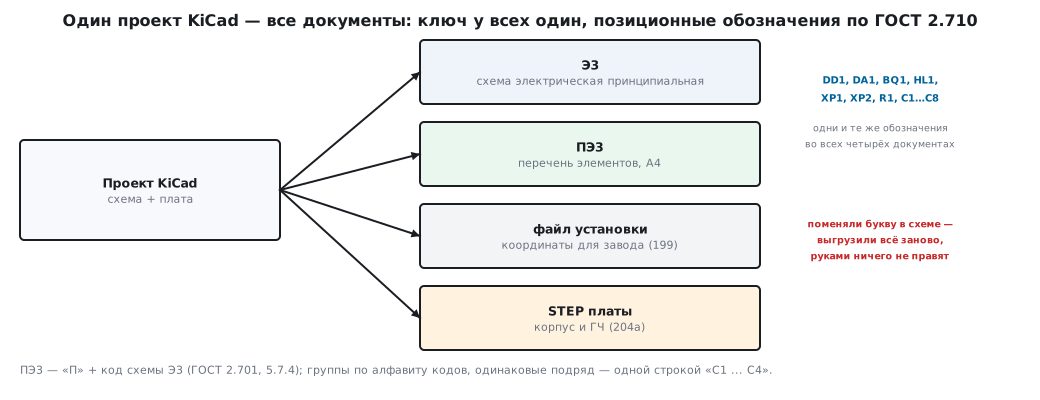
Fifteen elements — ten lines. Six designators are renamed: Y1 → BQ1, U2 → DA1, U1 → DD1, D1 → HL1, J1 → XP1, J2 → XP2. The groups follow the alphabetical order of the codes: BQ, C, DA, DD, HL, R, XP. The script exports the table to CSV; in the document it is transferred to an A4 sheet with a title block according to GOST 2.104 (forms 2 and 2а).
For purchased parts without Russian technical specifications (TU), the "Name" column holds the manufacturer's designation, as here; if an element is used under a standard or TU, it gets its designation from that document.
205а.6 Documents and conformity assessment
The package from 206а.5 — technical specifications (if any), operating documents, the list of standards, test reports — relies on these same documents. The manufacturer identifies the product — checks it against the documents of the package (TR TS 020, the EAEU technical regulation on electromagnetic compatibility, clause 7.1.2): the schematic, the list and the board itself must match the tested sample. That is why a list exported from the same board file as the placement file is more reliable than a list typed by hand: it cannot drift away from what is actually on the board.
205а.7 Pitfalls
- KiCad letters in the documents. J, U, Y instead of XP, DD/DA, BQ; changing the designators after release means redoing the schematic, the list, the board and the placement file.
- The list is typed by hand. It diverges from the board after the very first edit. Export it from the same file as the placement file.
- One line for different values. Only identical elements with consecutive numbers may be merged into one line.
- The list on the first sheet of an electronic schematic. For electronic documents GOST 2.701 requires a separate PE3 document.
- Empty values in the board. The list will come out of package names, as with the board from 199: values are filled in in the schematic, not in the list.
- Kind and type codes reversed. First the kind letter (E), then the type digit (3): E3, not 3E.
205а.8 Summary
- Document types and codes — GOST 2.102: SB, GCh, ME, VP, PZ, specification, schematics per GOST 2.701; operating documents — GOST 2.601.
- E3 is an electrical (E) circuit (3) schematic; its list is PE3, and for electronic documents only as a separate document on A4.
- The list: groups in alphabetical order of letter designators, numbers ascending within a group; identical consecutive ones in one line, "C1 ... C4".
- Letters per GOST 2.710: DD — digital IC, DA — analog IC, BQ — crystal, HL — indicator LED, XP — pin.
- The board from 199: 15 elements — 10 lines of PE3, six designators renamed.
- The list is exported by a program from the same file as the placement file.
Next: section 205б "Open-source licenses and SBOM: what you may put into firmware".