 Embedded HandbookApps
86. Network types and core technologies
A device that goes online lives by the network's rules: it has an address, neighbors on its subnet, a gateway, and someone decides whether an outsider can reach it. How to open a socket and run a web server is covered in section 78; the ways an STM32 connects to a network at all are in section 37.1. This section is about the network itself: what kinds there are, how addresses work and why a device behind a home router does not wait for incoming connections but calls out by itself.
The address arithmetic in this section is written in C so that it works on a
microcontroller, built with armclang and compared with an independent reference —
the ipaddress module from the Python standard library.
Terms used in the documentation
Term Meaning PAN, LAN, MAN, WAN personal, local, metropolitan, wide area network topology: star, bus, ring, mesh how nodes are wired: to a hub, on one line, in a loop, to several neighbors circuit / packet switching a reserved path / independent packets client–server, peer-to-peer some nodes ask and others answer / all nodes equal MAC address the physical address of an interface subnet mask, prefix (CIDR) which bits of the address are the network; their count default gateway where packets for other networks go DHCP, DNS, DDNS automatic address setup, name service, dynamic name NAT, PAT, port forwarding address translation, with port substitution, an opened port VLAN, ACL, QoS virtual network, access list, quality of service load balancer, reverse proxy spreads requests over servers; a front for servers
86.1 What kinds of networks there are
By coverage:
| Network | Where | Example for a device |
|---|---|---|
| personal (PAN) | on a desk, on the body | a fitness band and a phone over Bluetooth |
| local (LAN) | room, building, site | Ethernet and Wi-Fi in a workshop or a home |
| metropolitan (MAN) | city | an operator's network, the meters of a district |
| wide area (WAN) | country, continent | links between branch offices |
| the internet | the whole world | the union of all networks |
By transmission method. In circuit switching a whole path is reserved for the duration of a call — this is how telephony worked. In packet switching data is cut into packets, and each one travels on its own; Ethernet and IP work this way. A broadcast medium is heard by everyone (radio, a shared bus); a point-to-point link only by two (UART between boards).
By topology. Star — everyone connects to one node: a switch or a Wi-Fi access point. Bus — everyone on one pair of wires: CAN (section 19) and RS-485. Ring — each node transmits to its neighbor. Mesh — each node is linked to several others, and data goes around failed nodes (section 89). The topology determines what happens when a node or a wire fails.
By node role. In the client–server model some nodes make requests and others answer. In a peer-to-peer network all are equal.
86.2 Centralization and distribution
| Centralized | Decentralized | Distributed | |
|---|---|---|---|
| structure | one server for everyone | several servers, each a part of the system | all nodes are equal |
| advantages | simple, cheap, data is consistent | no single point of failure, scales out | the highest survivability |
| drawbacks | server failure means total failure; hard to scale | more expensive, nodes must be kept in agreement | reaching agreement is the hardest part |
| in IoT | devices and one broker | several brokers, one per site | a mesh network of sensors |
Most devices work with the first scheme: the device sends data to a broker or a server (section 37.2). So the rest of this section covers what it takes for the device to reach that server.
86.3 The device address: MAC and IP
MAC is six bytes, the address of an interface within the local segment. A Wi-Fi module has it written at the factory. An STM32 with Ethernet (F407) has no factory MAC, and the firmware sets it itself. There are three ways: buy a block of addresses for a product series, fit a memory chip with an address written into it, or derive a locally administered address from the chip's unique ID (section 79.7):
void mac_from_uid(const uint32_t uid[3], uint8_t mac[6])
{
    uint32_t h = 2166136261u, g = 0;            /* FNV-1a по 12 байтам номера */
    for (int i = 0; i < 12; i++) {
        h ^= (uid[i / 4] >> (8 * (i % 4))) & 0xFFu;
        h *= 16777619u;
        g = g * 31u + h;
    }
    mac[0] = 0x02;
    mac[1] = (uint8_t)(h >> 24);
    mac[2] = (uint8_t)(h >> 16);
    mac[3] = (uint8_t)(h >> 8);
    mac[4] = (uint8_t)h;
    mac[5] = (uint8_t)(g ^ (g >> 8) ^ (g >> 16) ^ (g >> 24));
}
The first byte 0x02 is two flags: "locally administered address" (bit 1) and
"unicast, not multicast" (bit 0 cleared). The other five are a hash of the
ID. In the check, 10000 adjacent IDs gave 10000 different MACs; IDs
differing by one bit give different addresses. A local address is unique within
the network, not the world — for a device on its own network that is enough; for a
mass-produced series it is more correct to buy a block.
IPv4 is 32 bits written as four numbers. The address is split into two parts: the network number and the host number within it. Where the boundary lies is set by the prefix length (or the mask): /24 means the first 24 bits are the network, the remaining 8 the host.
This is where a common confusion comes from. With the mask 255.255.255.0 the first three numbers are the network, and the last one is the host number, not the other way around. And the boundary does not have to fall on the dots at all:
| 192.168.1.77 with prefix | Mask | Network | Broadcast | Hosts |
|---|---|---|---|---|
| /16 | 255.255.0.0 | 192.168.0.0 | 192.168.255.255 | 65534 |
| /24 | 255.255.255.0 | 192.168.1.0 | 192.168.1.255 | 254 |
| /26 | 255.255.255.192 | 192.168.1.64 | 192.168.1.127 | 62 |
| /30 | 255.255.255.252 | 192.168.1.76 | 192.168.1.79 | 2 |
The network address and the broadcast address are not assigned to hosts — hence "minus two". All of this is a few bit operations:
uint32_t ip_mask(unsigned prefix)
{
    return prefix == 0 ? 0 : 0xFFFFFFFFu << (32 - prefix);
}

uint32_t ip_network(uint32_t ip, unsigned prefix)
{
    return ip & ip_mask(prefix);
}

uint32_t ip_broadcast(uint32_t ip, unsigned prefix)
{
    return ip | ~ip_mask(prefix);
}

/* В одной ли подсети два узла: да — пакет идёт напрямую, нет — через шлюз */
int ip_same_subnet(uint32_t a, uint32_t b, unsigned prefix)
{
    return ((a ^ b) & ip_mask(prefix)) == 0;
}
Prefix 0 is handled separately: shifting a 32-bit number by 32 is undefined in C (section 3а). The last function is exactly the decision that the TCP/IP stack makes on every packet: 192.168.1.10 and 192.168.1.200 in the same /24 — the packet goes directly; 192.168.2.10 — already through the gateway, although in a /16 they would be neighbors. A wrong mask in the device settings, and it tries to reach a server that sits behind the gateway directly.
Private addresses. The ranges 10.0.0.0/8, 172.16.0.0/12 and 192.168.0.0/16 are not routed on the internet: they are addresses of internal networks. One more range, 100.64.0.0/10, is the address space of an operator's network behind its own NAT (cellular modems are often connected this way).
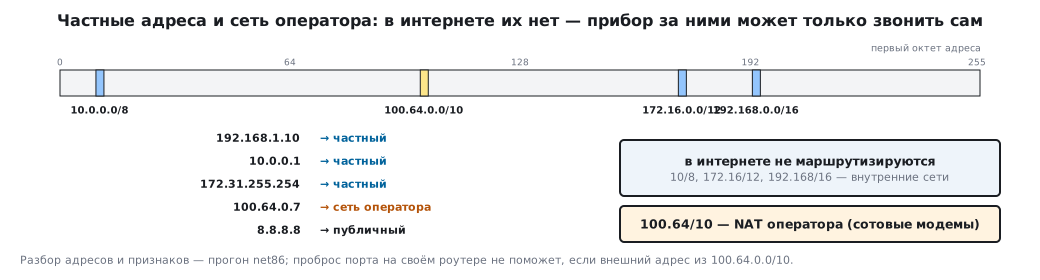
int ip_private(uint32_t ip)
{
    return (ip >> 24) == 10u                       /* 10.0.0.0/8 */
        || (ip >> 20) == (172u << 4 | 1u)          /* 172.16.0.0/12 */
        || (ip >> 16) == (192u << 8 | 168u);       /* 192.168.0.0/16 */
}
86.4 DHCP and DNS
DHCP gives the device, at power-up, an address, a mask, a gateway and the address of the name server. TCP/IP stacks for microcontrollers support this out of the box. If the device must always be found at the same address, the address is reserved for it on the router — by MAC. That is why the MAC must be permanent: derived from the chip ID, it does not change from one firmware to the next.
DNS turns a name into an address. The server, the broker, the update service are written into the firmware by name, not by address: the server address may change, the name does not. DDNS updates the record when the address of the node itself changes — for a home connection without a permanent address.
86.5 NAT: why the device calls out by itself
A home or office router lets all internal devices out to the internet through one external address. To tell them apart, it substitutes ports and remembers which belongs to whom:
/* Исходящий пакет: найти или завести запись; вернёт внешний порт, 0 — мест нет */
uint16_t nat_out(nat_t *n, uint32_t ip, uint16_t port)
{
    for (int i = 0; i < NAT_SLOTS; i++)
        if (n->e[i].used && n->e[i].in_ip == ip && n->e[i].in_port == port)
            return n->e[i].out_port;
    for (int i = 0; i < NAT_SLOTS; i++)
        if (!n->e[i].used) {
            n->e[i] = (nat_entry_t){ip, port, n->next_port++, 1};
            return n->e[i].out_port;
        }
    return 0;
}

/* Входящий пакет на внешний порт: кому он? 0 — записи нет, пакет отброшен */
uint32_t nat_in(const nat_t *n, uint16_t out_port, uint16_t *port)
{
    for (int i = 0; i < NAT_SLOTS; i++)
        if (n->e[i].used && n->e[i].out_port == out_port) {
            *port = n->e[i].in_port;
            return n->e[i].in_ip;
        }
    return 0;
}
In the model, three devices — 192.168.1.10, .11 and .12 — went out from the same local port 5000. The router let them out through external ports 40000, 40001 and 40002; the reply to 40001 went back to .11 on port 5000, and a packet that arrived at 40005, where there is no entry, was dropped.
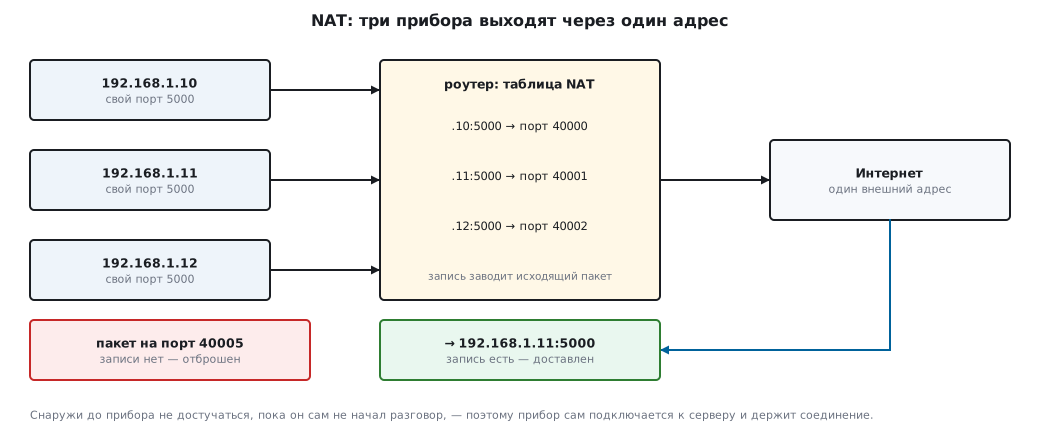
The last point is the key one for IoT. An entry in the table appears only from an outgoing packet. From outside, a device behind NAT cannot be reached until it starts the conversation itself — and behind the operator's NAT, in the range 100.64.0.0/10, it cannot be reached even with port forwarding on your own router. Therefore:
- the device connects to the broker or server by itself and keeps the connection (MQTT and keep-alive — section 37.2): NAT entries live while traffic flows through them, and how long they live without it is up to the router (below);
- commands to the device go over that same connection, not as a separate incoming request;
- forwarding a port to the device's web server (section 78) exposes it to anyone on the internet — without access control and encryption you must not do this (section 37.4).
How long an entry lives without traffic. In the Linux kernel, which runs most routers, the defaults are: UDP — 30 s until there has been a reply, and 120 s after an exchange in both directions; an established TCP connection — 5 days. The requirements for gateways are no less than 2 minutes for UDP and 2 h 4 min for TCP, but carriers, especially cellular ones, often remove entries without traffic after minutes. So the keep-alive interval is taken noticeably shorter than the shortest timeout: for MQTT over a cellular network — a minute or two (in 37.2 — 60 s), for UDP-based protocols (CoAP, section 89) — tens of seconds.
86.6 Other network engineer's terms
| Technology | What it does | Why a device developer cares |
|---|---|---|
| VLAN | splits one physical network into several logical ones | devices in their own network, separate from office computers |
| ACL | rules for "who may go where" | the device may reach only the broker and nothing else |
| QoS | priority for some kinds of traffic over others | control commands should not queue behind video |
| link aggregation | several lines acting as one | rarely needed for a device; for servers, yes |
| load balancer | spreads requests across servers | thousands of devices do not overload one server |
| forward proxy | an intermediary for clients | a device in a closed network goes out only through it |
| reverse proxy | an intermediary in front of servers | accepts device connections, encrypts and hands them to servers |
The balancer and the proxy share a downside: they themselves become a single point of failure unless they are duplicated.
86.7 Pitfalls
Two devices from the same batch "fight" on the network. The firmware has the same MAC written into it — identical on all devices.
After the router was replaced, the device disappeared. The address was entered by hand, and the new network hands out different ones.
The device sees its neighbors but not the server. A wrong mask or no gateway set: the device thinks the server is on its subnet and looks for it directly.
The device cannot find the broker by name. With manual setup the name server was forgotten; DHCP would have provided it.
The server cannot "reach" the device. The device behind NAT waits for an incoming connection; it has to connect by itself.
The connection to the broker silently drops every few minutes. There is no traffic on it, and the router removed the NAT entry; you need keep-alive.
Port forwarding does not help on a cellular modem. The modem is behind the operator's NAT. The sign: the modem's external address differs from the one from which the server sees the connection; the address itself may be from 100.64.0.0/10, but many operators also hand out private 10.x.x.x addresses.
The device's web page is reachable from the whole internet. A port is forwarded to the device without a password and encryption.
"The last number of the address is the network number." The other way round: with /24 the last number is the host number, and the boundary is set by the prefix anyway.
86.8 Summary
- Networks are classified by coverage (from personal to the internet), by transmission method, by topology (star, bus, ring, mesh) and by node role.
- The centralized scheme is simple but has a single point of failure; most devices work with one broker or server.
- An STM32 has no factory MAC: a locally administered address is derived from the chip ID, the first byte is 0x02.
- The network/host boundary in IPv4 is set by the prefix: /24 gives 254 hosts, /26 gives 62; the network and broadcast addresses are not assigned.
- DHCP provides the address, mask, gateway and name server; servers are written in the firmware by name.
- NAT lets in only replies to outgoing packets: the device connects by itself and keeps the connection; port forwarding without protection is unacceptable.
- VLAN and ACL separate devices from the rest of the network and limit where they may go.
Next: section 87 "Virtualization, clouds, containers".