 Embedded HandbookApps
87. Virtualization, clouds, containers
The device is only half of the system. The other half is the server: a broker that receives messages, a database that stores them, and dashboards on which they are viewed. Today such a server is almost never installed "on bare metal": it runs in a virtual machine, in a container, or is rented in the cloud. A device developer needs to understand this at least to build a test bench and not to hard-code into the firmware something that will move tomorrow.
This section runs a real experiment: an MQTT broker is started in a container, and
it receives packets built by portable C code — the same code that
builds with armclang for Cortex-M.
Terms used in the documentation
Term Meaning virtual machine (VM) a whole computer emulated in software hypervisor, type 1 / type 2 runs VMs: on bare metal / on top of an OS container, image, registry isolated process, its template, storage of templates volume data kept outside the container Docker Compose a set of containers described in one file IaaS, PaaS, SaaS infrastructure, platform, software as a service public / private / hybrid cloud shared with everyone / kept for one company / both serverless functions run on events SLA service level agreement vendor lock-in dependence on one supplier grid computing computing spread over many machines
87.1 Virtual machine
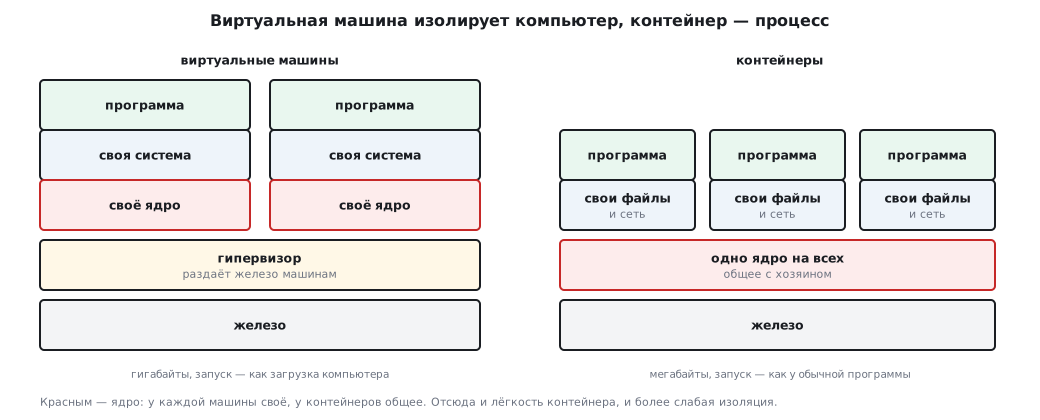
A virtual machine is a whole computer in software: with its own processor, memory, disk and its own operating system. They are created and partitioned by a hypervisor. It comes in two kinds:
- running directly on the hardware — essentially a small system itself that hands out resources to the machines (this is how cloud servers work);
- running on top of an ordinary system — a program on a workstation in which a "computer in a window" runs.
What a virtual machine gives you: isolation (a crash or a break-in in one does not affect its neighbors), running incompatible software (Linux on Windows), snapshots and rollback, moving to other hardware as a whole. The price is that each machine carries its own kernel and its own system: gigabytes on disk, memory for the system, booting like a real computer.
87.2 Container
A container isolates not a computer but a process: it has its own file
system, its own network and processes, but the kernel is shared with the host. You can see this
directly: the check started two containers — an MQTT broker on Alpine Linux
and a build environment on Ubuntu. Both reported the same kernel,
6.6.87.2-microsoft-standard-WSL2 — the kernel of the virtual machine in
which Docker runs under Windows. Different systems, one kernel.
That is why a container is light: the broker image is on the order of ten megabytes, it starts in a fraction of a second, and dozens of them run on one machine.
| Virtual machine | Container | |
|---|---|---|
| isolates | the whole computer | a process |
| kernel | its own | shared with the host |
| size | gigabytes | megabytes to hundreds of megabytes |
| start-up | like booting a computer | like starting a program |
| other system | any | only with the same kernel (Linux on Linux) |
| isolation | stronger | weaker: shared kernel |
Three concepts you cannot work with containers without:
- an image is an immutable template: system, program, settings; a container is a running instance of an image. Images are taken from a registry with a version number;
- a volume is a directory outside the container. A container is disposable: you update the image, delete the old container and create a new one. Everything that must survive this — the database, settings, logs — is kept in volumes;
- a container network — inside it containers find each other by
name. In the experiment below the publisher connects to the broker simply by the name
mq.
87.3 Clouds
A cloud is renting computing resources as a service: you pay for what you use and get it on demand. The models differ in what the tenant manages and what the provider manages:
| Layer | Own hardware | IaaS | PaaS | SaaS |
|---|---|---|---|---|
| hardware, network, power | you | provider | provider | provider |
| virtualization | you | provider | provider | provider |
| system, updates | you | you | provider | provider |
| runtime, database | you | you | provider | provider |
| application | you | you | you | provider |
| data | you | you | you | you — but at the provider's |
IaaS is a rented virtual machine; PaaS is a platform where you put only your application; SaaS is a ready program in the browser, including ready-made Internet of Things platforms (section 91). Serverless computing means functions that run on each event, for example on each message from a device, and are paid for per call.
A private cloud is kept by a company for itself, a public one is rented to everyone, a hybrid one combines both: sensitive data stays in-house, peak computing is rented.
The pros of the cloud: no hardware of your own, easy to grow, high availability under contract (SLA). The cons: dependence on the network and on the provider, data held by a third party, and moving to another provider can be expensive.
For firmware this leads to one rule: the device must not know where the server lives. The firmware holds a name (section 86.4) and a port, and in such a way that they can be changed without reflashing: through settings or an over-the-air update (section 48). Moving the server to another cloud then does not turn into a trip to every device.
87.4 A stack for devices in containers
A typical set for collecting and displaying data from devices:
| Container | Role |
|---|---|
| MQTT broker (Mosquitto) | receives device messages (section 37.2) |
| collector (Telegraf) | subscribes to topics and writes values into the database |
| time-series database (InfluxDB) | stores measurements with timestamps |
| dashboards (Grafana) | charts and alerts in the browser |
| flows (Node-RED) | optional: "if — then" rules with the mouse |
The whole stack is described by one Compose file:
services:
  mosquitto:
    image: eclipse-mosquitto:2
    ports: ["1883:1883"]
    volumes: ["./mosquitto.conf:/mosquitto/config/mosquitto.conf:ro",
              "./passwd:/mosquitto/config/passwd:ro"]
    restart: unless-stopped
  influxdb:
    image: influxdb:2.7
    environment:
      DOCKER_INFLUXDB_INIT_MODE: setup
      DOCKER_INFLUXDB_INIT_USERNAME: admin
      DOCKER_INFLUXDB_INIT_PASSWORD: ${INFLUX_PASSWORD:?задайте в .env}
      DOCKER_INFLUXDB_INIT_ORG: lab
      DOCKER_INFLUXDB_INIT_BUCKET: sensors
      DOCKER_INFLUXDB_INIT_ADMIN_TOKEN: ${INFLUX_TOKEN:?задайте в .env}
    volumes: ["influx-data:/var/lib/influxdb2"]
    restart: unless-stopped
  telegraf:
    image: telegraf:1.30
    environment:
      INFLUX_TOKEN: ${INFLUX_TOKEN:?задайте в .env}
    volumes: ["./telegraf.conf:/etc/telegraf/telegraf.conf:ro"]
    depends_on: [mosquitto, influxdb]
    restart: unless-stopped
  grafana:
    image: grafana/grafana:10.4.0
    ports: ["3000:3000"]
    volumes: ["grafana-data:/var/lib/grafana"]
    depends_on: [influxdb]
    restart: unless-stopped
volumes:
  influx-data:
  grafana-data:
Three habits built into this file:
- version numbers on images — not "latest": otherwise one day the stack will come up with a new version and break without you touching anything;
- data in volumes — the database and the dashboards survive container updates;
- no secrets in the file: the password and the token come from the
.envfile next to it, which is not committed to git. The entry${INFLUX_PASSWORD:?…}makes them mandatory — verified: without them Compose refuses to assemble the stack and says plainly what is missing.
The settings files sit next to the Compose file. Without mosquitto.conf Docker
creates an empty folder in its place, and the broker will not start: "Are you trying
to mount a directory onto a file". With an empty file it starts but
listens only inside its own container — the log says "Starting in local only
mode" — and neither the devices nor Telegraf can reach it, even though the port is
published. The minimum is three lines:
listener 1883
allow_anonymous false
password_file /mosquitto/config/passwd
The password file is created by a program from the same image — it will ask for the password:
docker run --rm -it -v "$PWD:/w" eclipse-mosquitto:2 \
  sh -c "mosquitto_passwd -c /w/passwd sensor1 && chown 1883:1883 /w/passwd"
The file is created with access for the owner only, and the broker runs
as user 1883; without chown it cannot read the file and will not start:
"Unable to open pwfile". The broker will not let in a device without a password: "not
authorised". In telegraf.conf there is an input [[inputs.mqtt_consumer]] with the address
tcp://mosquitto:1883, topics, user name and password, and an output
[[outputs.influxdb_v2]] with the address http://influxdb:8086, the token
${INFLUX_TOKEN}, the organization lab and the bucket sensors.
The entry 1883:1883 opens the port on all network interfaces of the machine:
docker port shows 0.0.0.0:1883 and [::]:1883. Docker writes the rules for
published ports into iptables itself, bypassing ufw — a port
"closed" by the firewall turns out to be open. For the broker to be visible only to
the devices of your own network, put the address of that interface before the port:
192.168.1.10:1883:1883; only this machine — 127.0.0.1:1883:1883.
The broker is exposed to the internet only with passwords and TLS (section 37.4), usually
on port 8883.
87.5 Experiment: the device talks to a real broker
The device builds MQTT packets itself — a few dozen lines of C that depend on neither the network nor the operating system:
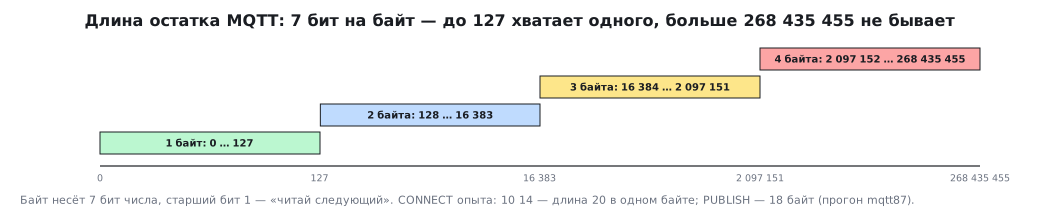
/* Длина остатка: от 1 до 4 байт по 7 бит, старший бит — «дальше ещё» */
size_t mqtt_put_len(uint8_t *p, uint32_t n)
{
    size_t k = 0;
    do {
        uint8_t b = (uint8_t)(n % 128);
        n /= 128;
        p[k++] = n ? (uint8_t)(b | 0x80) : b;
    } while (n);
    return k;
}

/* CONNECT: протокол «MQTT» уровня 4 (3.1.1), чистая сессия, keep-alive в секундах */
size_t mqtt_connect(uint8_t *buf, const char *client_id, uint16_t keepalive)
{
    uint32_t rem = 10u + 2u + (uint32_t)strlen(client_id);
    size_t k = 0;
    buf[k++] = 0x10;
    k += mqtt_put_len(buf + k, rem);
    k += put_str(buf + k, "MQTT");
    buf[k++] = 4;                           /* уровень протокола */
    buf[k++] = 0x02;                        /* флаги: чистая сессия */
    buf[k++] = (uint8_t)(keepalive >> 8);
    buf[k++] = (uint8_t)keepalive;
    k += put_str(buf + k, client_id);
    return k;
}

/* PUBLISH с QoS 0: заголовок 0x30, топик и данные — без номера пакета */
size_t mqtt_publish(uint8_t *buf, const char *topic, const void *data, size_t len)
{
    uint32_t rem = 2u + (uint32_t)strlen(topic) + (uint32_t)len;
    size_t k = 0;
    buf[k++] = 0x30;
    k += mqtt_put_len(buf + k, rem);
    k += put_str(buf + k, topic);
    memcpy(buf + k, data, len);
    return k + len;
}
The packets are written straight into the transmit buffer, without intermediate copies. Which transport sends them — a TCP/IP stack socket, a chip with a built-in stack or a module with AT commands (section 37.1) — does not matter to this code.
The experiment. Three participants are started in a container network:
- the Mosquitto broker — under the name
mq; - a subscriber — the
mosquitto_subclient on the topicstm/test; - the "device" — the same
mqtt87.c, built for the computer, which connects tomqover TCP and publishest=23.5.
What happened:
| Step | Result |
|---|---|
| CONNECT from the device | 22 bytes: 10 14 00 04 MQTT 04 02 00 3C 00 08 stm32-87 |
| broker reply | a 4-byte CONNACK, code 0 — accepted |
| in the broker log | client stm32-87: protocol 4, clean session, keep-alive 60 |
| PUBLISH | 18 bytes |
| subscriber received | stm/test t=23.5 |
The broker log repeated exactly the flags set in the CONNECT bytes, and the bytes matched an encoder written anew in Python. The remaining length takes one byte up to 127, two from 128, three from 16384, four from 2097152; a packet cannot be larger than 268435455.
⚠️ In the experiment the broker runs without authentication — only inside a closed container network. A broker is exposed to the outside only with passwords and encryption (section 37.4).
87.6 Distributed computing
When a task is too big for one machine, it is cut into pieces and handed to many — in a cluster or directly over the internet. This is how weather is computed, large models are trained and drugs are searched for. Devices rarely need this, but the idea itself — hand work out to many nodes and collect the answer — continues in section 88.
87.7 Pitfalls
After the server moved, all devices went silent. The firmware has an address written in, not a name, or the name cannot be changed without reflashing.
After a container update all data was gone. The database was stored inside the container, not in a volume.
One day the stack did not come up by itself. Images without a version number: a new, incompatible one was pulled.
The database password ended up in the repository. The secrets were written directly into the
Compose file, not into .env.
The broker is open to the whole internet. Port 1883 is published without an address, passwords and encryption; ufw does not close such a port.
Devices do not connect although the port is published. A broker without its own
mosquitto.conf listens only inside the container: "local only mode".
A container cannot find its neighbor by name. The containers are on different networks, or the request goes to the machine's address instead of the name in the container network.
Under Windows a path inside the container turned into C:/Program Files/….
The Git Bash shell rewrites arguments that look like paths.
For Docker commands you turn this off: MSYS_NO_PATHCONV=1. The experiment from 87.5
tripped over this too — the broker could not find its settings file.
The cloud bill grew several times over. The load grew, and spending limits and alerts were not set up.
87.8 Summary
- A virtual machine is a whole computer with its own kernel; a container is an isolated process on a shared kernel: in the check Alpine and Ubuntu had the same kernel.
- An image is a template, a container is an instance, a volume is data that outlives the container; inside a container network neighbors are found by name.
- IaaS, PaaS and SaaS differ in what is left to you; the cloud removes the hardware burden but adds dependence on the network and the provider.
- The device knows the server's name, not its location: the name and port change without reflashing.
- The device stack — broker, collector, database, dashboards — is described by one
Compose file: versions pinned, data in volumes, secrets in
.env. - MQTT packets from portable C code were accepted by a real broker: a 22-byte CONNECT, code 0, the message reached the subscriber.
Next: section 88 "Distributed systems and APIs".