 Embedded HandbookApps
131. KiCad: a board from a script and checks from the command line
KiCad is a free suite for schematics and boards, and it has something that most commercial ones lack: the board is accessible from Python, and the checks and the export of factory files are available from the command line. So a board can be built, checked and released the same way as firmware: by a script, in a container, on a server.
That is exactly what is done here. A board with an STM32F103C8 — crystal, decoupling, SWD connector,
regulator, LED — is placed by a pcbnew script, checked with DRC
and exported to Gerber by the kicad-cli program from the kicad/kicad:9.0 image
(KiCad 9.0.9). All the numbers in this section come from these runs; the principles the
board follows are in section 130.
The board is built without a schematic — so that it can be constructed and
checked by a script. In normal work the parts and nets come from the schematic: in
the board editor that is Tools / Update PCB from Schematic (F8; in the Russian
interface it has a translated name). And then the schematic is also checked
from the command line: kicad-cli sch erc — the electrical rules,
kicad-cli pcb drc --schematic-parity — whether the board matches the schematic.
Terms used in the documentation
Term Meaning footprint the land pattern: pads and the outline of a part symbol the sign of a part on the schematic pad a copper contact area for a pin track, via a copper trace, a plated hole between layers zone, copper pour an area filled with copper courtyard the area a part occupies on the board silkscreen the printed text and markings on the board solder mask the protective coating over the copper Design Rules Check (DRC) the check of the layout rules unconnected items connections not routed yet netclass a class of nets: track width and clearances Gerber, drill file layer and drilling files for the factory
131.1 What is in a project
| File | What is in it |
|---|---|
*.kicad_pro |
project settings: rules, net classes |
*.kicad_sch |
the schematic |
*.kicad_pcb |
the board: footprints, tracks, zones |
*.kicad_sym |
a symbol library |
*.pretty/*.kicad_mod |
a footprint library: a folder with one file per package |
All the files are text in an S-expression notation, convenient to keep in git and to diff.
The standard libraries are installed together with KiCad: the STM32F103 symbol is in
MCU_ST_STM32F1.kicad_sym, the package in Package_QFP.pretty/LQFP-48_7x7mm_P0.5mm.kicad_mod.
131.2 A board from Python
The pcbnew module is the same code that draws the board in the window. A footprint
is taken from the library, placed at a point and gets nets on its pins:
def place(lib, name, ref, x, y, rot=0, pins=None):
    fp = pcbnew.FootprintLoad(FP + lib + ".pretty", name)
    fp.SetReference(ref)
    fp.SetPosition(VECTOR2I(mm(x), mm(y)))
    fp.SetOrientationDegrees(rot)
    b.Add(fp)
    for pad in fp.Pads():
        n = (pins or {}).get(pad.GetNumber())
        if n:
            pad.SetNet(net(n))
    return fp
The controller is one line with a pin table: which pin goes to which net. This board has 15 footprints and 13 nets.
131.3 Decoupling: along the normal to the pin row
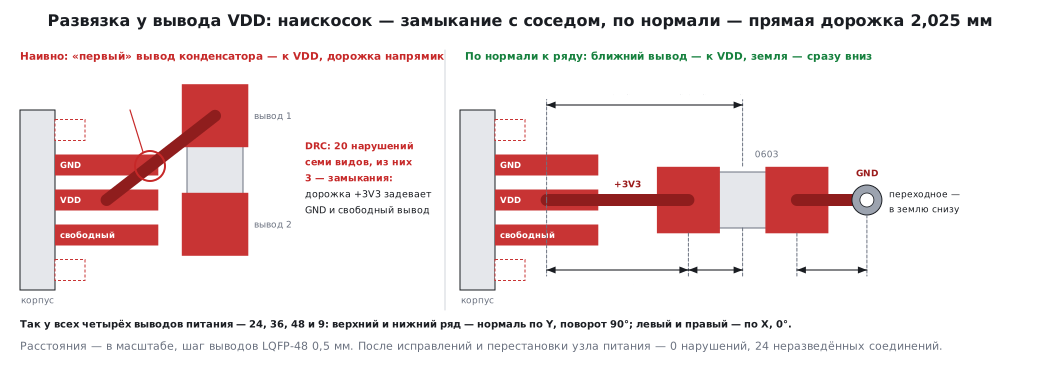
The first placement was naive: the capacitor next to the pin, the "first"
capacitor pin to the supply, the track straight across. DRC found 20 violations in it,
and three of them were short circuits: the track from the capacitor to VDD ran diagonally
and touched neighbouring package pins — GND and an unused pin (131.5).
The right way is to put the capacitor on the normal to the pin row, pointing outward, and
connect to VDD the capacitor pin nearest to it. The track is then straight
and passes by the neighbours, and the ground pin of the capacitor goes straight down
through a via into the solid ground of the bottom layer:
    for i, vdd in enumerate(("24", "36", "48", "9"), 1):
        px, py = xy(pad(mcu, vdd))
        dx, dy = px - MCU[0], py - MCU[1]
        if abs(dy) > abs(dx):                         # верхний или нижний ряд: нормаль по Y
            nx, ny, rot = 0.0, (1.0 if dy > 0 else -1.0), 90
        else:                                         # левый или правый ряд: нормаль по X
            nx, ny, rot = (1.0 if dx > 0 else -1.0), 0.0, 0
        c = place("Capacitor_SMD", "C_0603_1608Metric", "C%d" % i, px + nx * 2.8, py + ny * 2.8, rot)
        track((px, py), xy(near), "+3V3")             # прямая дорожка по нормали — мимо соседних выводов
        fx, fy = xy(far)
        v = (fx + nx * 1.0, fy + ny * 1.0)
        track((fx, fy), v, "GND")
        via(v, "GND")                                 # земля конденсатора — сразу в полигон нижнего слоя
The track from each VDD pin to its capacitor is 2.025 mm: the capacitor centre
is 2.8 mm from the pin, and the pad of the 0603 package is 0.775 mm from its centre,
2.8 − 0.775 = 2.025.
131.4 Ground: the zone and its fill
The whole bottom layer is a zone of net GND. The outline is given by points, and the copper
inside is computed by a separate step — the fill: it goes around foreign pads
with a clearance and connects its own ones through thermal reliefs.
Here is a trap: filling a board built by a script in memory crashes KiCad 9 without
a window — Segmentation fault inside ZONE_FILLER.Fill. It works if you
first save the board, load it from the file and build the connectivity:
b = pcbnew.LoadBoard(path)
b.BuildConnectivity()
filler = pcbnew.ZONE_FILLER(b)
ok = filler.Fill(b.Zones())
pcbnew.SaveBoard(path, b)
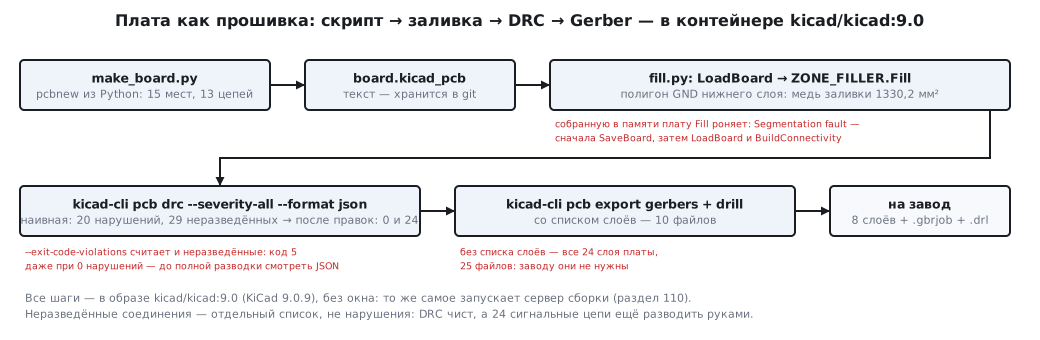
On the finished board the fill copper is 1330.2 mm².
131.5 DRC from the command line
kicad-cli pcb drc --severity-all --format json -o drc.json board.kicad_pcb
The JSON report has two parts: rule violations and unrouted connections. The naive placement from 131.3:
| Violation | Count | What it is |
|---|---|---|
shorting_items |
3 | the +3V3 track touches foreign package pins |
solder_mask_bridge |
3 | the same places: no mask is left between different nets |
courtyards_overlap |
4 | parts overlap each other — the regulator, capacitors, connector |
copper_edge_clearance |
1 | a connector pin is closer to the board edge than allowed |
silk_over_copper |
5 | silkscreen text on pads |
silk_edge_clearance |
2 | silkscreen at the very edge |
silk_overlap |
2 | silkscreen texts overlap each other |
In total 20 violations of seven types and 29 unrouted connections. After the fixes from 131.3 and moving the power block — 0 violations and 24 unrouted connections: these are signal nets left to be routed by hand, not errors.
The --exit-code-violations option makes the exit code non-zero — and it counts
not only violations but also unrouted connections. The fixed board has 0 violations
and 24 unrouted connections — and the exit code is the same, 5, as for the naive one. So on a build
server (section 110) the option is used once the board is fully routed; until then DRC is run without
it and the number of violations is checked in the JSON report.
131.6 Files for the factory
kicad-cli pcb export gerbers --layers F.Cu,B.Cu,F.Mask,B.Mask,F.Silkscreen,B.Silkscreen,F.Paste,Edge.Cuts -o fab/ board.kicad_pcb
kicad-cli pcb export drill -o fab/ board.kicad_pcb
Without a list of layers export gerbers exports all the board layers — 24 layers and a
job file, 25 files, including user layers, fabrication layers and part courtyards
that the factory does not need. With the list — exactly what manufacturing needs: eight layers,
the job description file .gbrjob and the drill file .drl, 10 files in total.
131.7 Pitfalls
| Symptom | Cause |
|---|---|
DRC: shorting_items on package pins |
the track from a decoupling capacitor runs diagonally across neighbouring pins |
Segmentation fault in the script |
filling a zone on a board built in memory — fill a board loaded from a file |
| "extra layers" at the factory | Gerber without a layer list — all 24 layers exported |
| DRC fails in the build although there are no violations | --exit-code-violations also counts unrouted connections |
| DRC is clean but the board does not work | unrouted connections are a separate list, not violations |
| a colleague has different rules | rules and net classes live in *.kicad_pro — keep it in git together with the board |
131.8 Summary
- A KiCad board is text;
pcbnewbuilds it from Python,kicad-clichecks it and exports the files — all in thekicad/kicad:9.0container. - Decoupling goes on the normal to the pin row, nearest pin to
VDD, ground straight into a via: tracks of 2.025 mm each, 0 violations. - The naive placement gives 20 violations of seven types, 3 of them shorts.
- Compute the fill on a board loaded from a file.
- Gerber with a layer list: 10 files instead of 25.
Next: section 132 "DipTrace" — the same path in another program.