 Embedded HandbookApps
132. DipTrace: schematic, board and plug-ins
DipTrace is a package of four programs with shared libraries: schematic, board, component editor and pattern (footprint) editor. You automate it with plug-ins: an external program in any language gets an XML exchange file from DipTrace, edits it and hands it back. There is no in-process API — only the file.
This section follows a board in DipTrace from the schematic to the files for the factory, and builds the "Decoupling" plug-in: it checks that every power pin of the microcontroller has its own capacitor no farther than 3 mm away. The plug-in was tested on the board from section 131: the exchange file was built from it according to the specification, and the pad positions were compared with what KiCad computed. The machine runs DipTrace 5.3.0.3.
Terms used in the documentation
Term Meaning schematic capture entering the schematic PCB layout laying out the board pattern land pattern — DipTrace's word for a footprint component component: the schematic symbol together with its pattern net class a class of nets ratline an unrouted connection, a "rubber band" real-time DRC rule checking while you draw N/C drill, Excellon the drill file tented via a via covered with solder mask plug-in, exchange file plug-in, exchange file back annotation back annotation: changes on the board go back to the schematic
132.1 Four programs and their files
| Program | What it holds | File |
|---|---|---|
| Schematic | the schematic | .dch |
| PCB Layout | the board | .dip |
| Component Editor | component library: symbol and pattern | .eli |
| Pattern Editor | pattern library | .lib |
All four programs are version 5.3.0.3. Schematic and board files are binary: the sample
board from the package starts with the tag DTBOARD, the schematic with DTSCHEM. You can keep
them in git, but you cannot diff them. The text form is XML: every program
can save to XML, and exactly this XML is what DipTrace writes for plug-ins.
132.2 From schematic to board
In the schematic — File / Convert to PCB (Ctrl+B): the schematic opens in PCB Layout, and the rules come from the schematic or from any other board. At first the parts lie in a heap; Placement / Arrange Components spreads them out near the origin, then you place them by hand or automatically.
Set the rules before routing. Route / Net Classes — net classes: trace width, clearance, via styles. Every net belongs to some class, Default by default. The clearance between classes (Class to Class) takes precedence over the clearance inside a class. The autorouter — Route / Run Autorouter (Ctrl+F9) — respects the classes.
If the schematic changed after routing, you update the board from the schematic (Renew layout by schematic), and changes made on the board go back to the schematic by back annotation (Back annotate).
132.3 Checks
Three checks are in the Verification menu:
| Command | What it checks |
|---|---|
| Check Design Rules (F9) | clearances, sizes, differential pairs — against the rules |
| Check Net Connectivity | broken and merged nets |
| Compare to Schematic | the board matches the schematic |
The rules are in Verification / Design Rules, four tabs: Clearances, Sizes, Real-time DRC, Options. Real-time DRC draws a red circle as soon as a trace comes closer than allowed. But it checks only what is enabled in its settings — so run the full F9 check at least once before you generate the output files.
132.4 Files for the factory
File / Export / Gerber — each layer in its own file. The Export All button offers three options: an archive with Gerber only, an archive with Gerber and drill data, or separate files. The factory needs both — Gerber and drill data.
Three settings people get wrong:
- in the mask layer, clear the Vias checkbox — the vias are then covered with mask;
- in the paste layer — SMD pads only;
- do not tick Pad/Via Holes: holes in Gerber are needed only if you drill yourself; the factory takes them from the drill file.
Drill data — File / Export / N/C Drill in Excellon format; the Auto button picks the tools. Gerber X2 can put the holes into its own files, but most factories still expect Excellon. There is also ODB++ — File / Export / ODB++.
132.5 License
The free version (Freeware) is for non-commercial use only: its license says so directly. For paid work you need one of the paid versions — Starter, Lite, Standard, Extended or Full. The license text does not name the pin and layer limits of the versions: look them up in the version descriptions before you buy.
132.6 Plug-in: how DipTrace runs it
A plug-in is an ordinary .exe program in any language. It lives in its own folder inside
the DipTrace folder: for the board — Plugins\Pcb\<name>\, for the other programs —
Plugins\Schematic\, Plugins\CompEdit\, Plugins\PattEdit\. The folder holds
the program itself and the description file settings.xml.
The sequence:
- The user picks Tools / Plugins /
. - DipTrace writes
plugin_exchange.xmlto a temporary folder — what exactly goes in is set byExpModeand the filters insettings.xml. - It starts the
.exewith the full path to this file as the first argument; the working folder is the plug-in folder. - It waits until the process exits.
- If the file has changed, it reads it and applies the changes to the board according to
ImpMode.
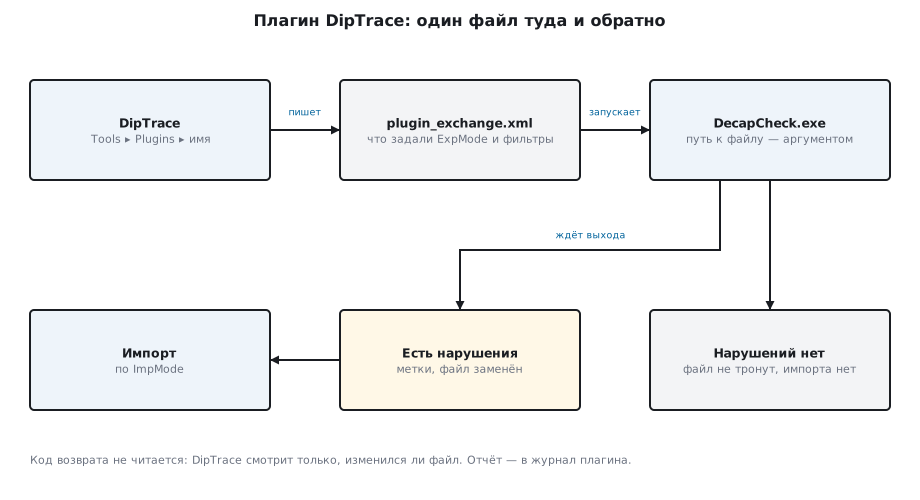
Five rules of this contract shape how a plug-in is built:
- The exit code is not read. DipTrace tells success from failure only by whether the file has changed. A plug-in that found nothing, or crashed, leaves the file untouched.
- There is no channel for messages — no console, no error file. Everything the plug-in wants to say goes to its own log or its own window.
- There is no timeout. A hung plug-in holds DipTrace until the user presses Cancel; then the process is killed and nothing is imported.
- Plug-ins are discovered once, when the program starts. After installing
or editing
settings.xml, restart DipTrace. - Paths must be short and in the Windows code page. The command line is passed through an old ANSI buffer of about 255 bytes.
132.7 The exchange file
The exchange file is the same XML that DipTrace saves in text form. For a board
the root is <Source Type="DipTrace-PCB">, with two parts inside: the library of patterns
that the board uses, and the board itself, <Board>. Here is pin 9 of the microcontroller
on the board from section 131 — in the pattern, in the component and in the net:
<Source Type="DipTrace-PCB" Version="5.3.0.3" Units="mm">
  <Library Type="DipTrace-ComponentLibrary" Name="Design cache" Units="mm">
    <Library Type="DipTrace-PatternLibrary" Name="Design cache" Units="mm">
      <Patterns>
        <Pattern Id="6" PatternStyle="PatType6" Mounting="SMD">
          <Name>LQFP-48_7x7mm_P0.5mm</Name>
          <Pads>
            <Pad Id="8" Style="PadT6" X="-4.1625" Y="-1.25" Angle="0" Side="Top">
              <Number>9</Number>
            </Pad>
          </Pads>
        </Pattern>
      </Patterns>
    </Library>
  </Library>
  <Board>
    <Components>
      <Component Id="12" PatternStyle="PatType6" X="24" Y="-15" Angle="0" Side="Top" Flip="N" HorzFlip="N" Group="-1" Locked="N" Selected="N">
        <RefDes>U1</RefDes>
        <Pads>
          <Pad Id="8" NetId="0" InternalConnection="-1" />
        </Pads>
      </Component>
    </Components>
    <Nets>
      <Net Id="0" NetClass="0" RouteMode="Ratlines" Locked="N">
        <Name>+3V3</Name>
        <Pads>
          <Item Comp="12" Pad="8" />
        </Pads>
      </Net>
    </Nets>
  </Board>
</Source>
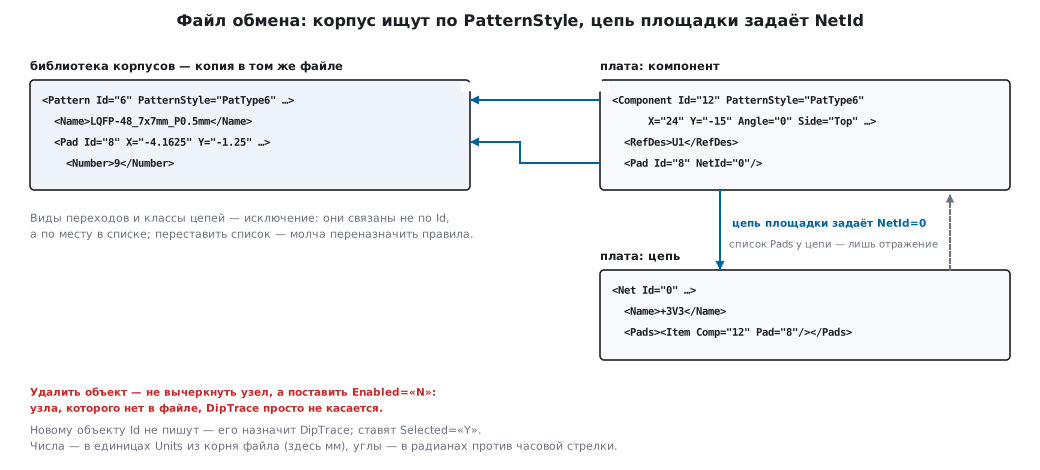
Format rules you need to know before the first line of a plug-in:
- References go by
Idnumbers: a component refers to its pattern throughPatternStyle, a pad refers to its net throughNetId. A pad's net is set byNetIditself; the net's<Pads>list is only a reflection of it. - To delete an object, you do not strike out the node but set
Enabled="N": a node that is missing from the file is simply left alone by DipTrace. - You do not invent an
Idfor a new object — DipTrace assigns it; you setSelected="Y". - Lengths are in the units from
Units(mm,inchormil), the decimal separator is a dot, angles are in radians, counterclockwise. - The parameters of a trace segment (layer, width, via) are stored at its second end.
- Via styles and net classes are linked by position in the list,
not by
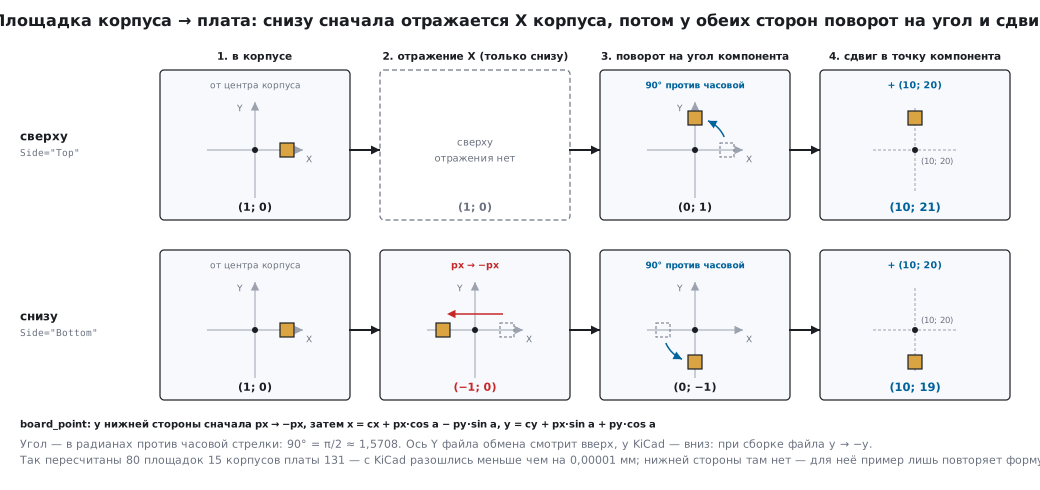
Id: reorder the list and you silently reassign the rules. - Pattern pads are stored relative to the pattern centre. To move them onto the board: on the bottom side mirror X, then rotate by the component angle and shift to the component point.
And a trap right at the start: in settings.xml the type is written with underscores —
DipTrace_Pcb_Plugin, while in the exchange file it uses a hyphen — DipTrace-PCB.
132.8 The "Decoupling" plug-in
The rule from section 130: every power pin has its own capacitor, right next to it. The plug-in checks it on a DipTrace board: for each power pin of the IC it looks for the nearest capacitor pad on the same net and compares the distance with the 3 mm limit.
The description file:
<?xml version="1.0" encoding="utf-8"?>
<Source Type="DipTrace_Pcb_Plugin" Name="Decoupling check" ExeFile="DecapCheck.exe"
        Hint="Power pin to its capacitor distance">
  <Settings>
    <ExpMode>Partial</ExpMode>
    <ImpMode>Edit</ImpMode>
    <Comp>All</Comp>
    <Net>All</Net>
    <Shape>Selected</Shape>
    <Plane>None</Plane>
    <Table>None</Table>
    <Dim>None</Dim>
    <Diff>None</Diff>
    <Board>None</Board>
    <Trace>None</Trace>
    <Stamp>No</Stamp>
  </Settings>
</Source>
The analysis needs the components and nets in full: Comp and Net — All. Only selected
graphic objects are accepted back — Shape in Selected
mode, and the plug-in's marks are selected. All twelve lines that a board
requires must be present: a missing line does not mean "default".
Pattern pad → board:
def board_point(comp, px, py):
    """Площадка корпуса → плата: у нижней стороны X корпуса отражается, затем поворот и сдвиг."""
    if comp["side"] == "Bottom":
        px = -px
    a = comp["angle"]
    return (comp["x"] + px * math.cos(a) - py * math.sin(a),
            comp["y"] + px * math.sin(a) + py * math.cos(a))
The nearest capacitor to each power pin:
    for p in ic["pads"]:
        if not POWER.match(p["net"]) or on_net[p["net"]] < 2:
            continue                                     # не питание или вывод ни с чем не соединён
        best = None
        for c in caps:
            for q in c["pads"]:
                if q["net"] == p["net"]:
                    d = math.hypot(q["x"] - p["x"], q["y"] - p["y"])
                    if best is None or d < best[0]:
                        best = (d, c["ref"], q)
        rows.append((ic["ref"], p, best))
The IC is the pattern with the most pins; power is nets with names
like +3V3, VDD…, VCC…; a pin whose net has only one pad is not connected to anything
and is skipped. A capacitor already given to a closer pin
does not count for a second one.
The result is narrow. The components and nets were needed only for the analysis; only the marks go back:
    board = root.find("./Board")
    for tag in ("Components", "Nets", "Shapes"):
        for e in board.findall(tag):
            board.remove(e)
A mark is a line from the pin to the capacitor and a label on the assembly layer
Top Assy, not on copper and not on silkscreen.
No violations — the file is left alone. If there are some, the plug-in writes to a temporary file next to it, reads it back and replaces the original with a single rename: an interrupted write will not leave DipTrace half a file.
    if not bad:
        return False                                     # файл не тронут — DipTrace ничего не импортирует
    mark(root, units, bad)
    atomic_write(tree, path)
    return True
    fd, tmp = tempfile.mkstemp(prefix="plugin_exchange.", suffix=".tmp", dir=path.parent)
    os.close(fd)
    tmp = Path(tmp)
    try:
        tree.write(tmp, encoding="utf-8", xml_declaration=True)
        ET.parse(tmp)                                    # перечитать до замены
        os.replace(tmp, path)
    finally:
        tmp.unlink(missing_ok=True)
The report goes to the log %LOCALAPPDATA%\DipTrace\PluginLogs\DecapCheck.log,
one line per power pin.
132.9 Testing without DipTrace
DipTrace runs only .exe files. A Python plug-in is packed into one with
PyInstaller — the script build_exe.ps1 comes with the developer kit
(Docs\plugin_sdk). Here the .exe was not built: the logic was tested — on exchange
files built according to the specification from the board of section 131.
First, the coordinate transform. For all 80 pads of the 15 patterns the plug-in computed the position on the board itself — from the component point and angle and the pad offset in the pattern — and compared it with what KiCad computed. The difference is less than 0.00001 mm: the pad coordinates are multiples of 0.0001 mm, and the parts are rotated by 0 or 90°, so with four digits written there is nothing to round. At arbitrary angles the error could reach 0.00005 mm — half of the last digit. (In KiCad the Y axis points down, in the exchange file it points up; when building the file, y was replaced with −y.)
Then — six exchange files:
| Exchange file | What the plug-in reported | File after the plug-in |
|---|---|---|
| board 131, millimetres | 4 power pins, each with its own capacitor at 2.025 mm | untouched |
| the same board in mils | the same 2.025 mm | untouched |
| the same board in inches | 2.024–2.027 mm | untouched |
| C4 moved away by 4 mm | pin 9: 6.025 mm — one violation | line and label |
C3 deleted, Enabled="N" |
pin 48: nearest is C4, 6.412 mm | line and label |
| pattern missing from the library | exit code 1, the reason is in the log | untouched |
The changed file has no components and no nets, and the library is left as it was — exactly the narrow result described above.
Inches are a lesson of their own: four digits in inches is a step of 2.54 µm, and distances drift already in the third digit of a millimetre. For decoupling it does not matter; for clearances of hundredths of a millimetre it does.
Board 131 has no bottom side, and the formula for it has not been
checked against the program itself. It is taken from the developer kit: the pattern X is mirrored only
by Side="Bottom", and Flip and HorzFlip are not applied a second time — they are already
taken into account in the pattern that DipTrace puts into the exchange file. Numbers by hand
only repeat the formula: a pattern pad at (1; 0), the component at (10; 20),
angle 90°. On top the pad ends up at (10; 21), on the bottom at (10; 19): the pattern X
is mirrored first.
Before working on a real board, run the plug-in on a real exchange file:
the developer kit has capture_exchange.py — it saves the file
that DipTrace passed to the plug-in without changing anything in it.
For the bottom side, this is the check: a board with one part on the bottom at
an angle of 90°, the exchange file captured with capture_exchange.py, and the pad coordinates
the plug-in computed are compared with their positions in the bottom copper Gerber.
Until such a check, the result for bottom-side parts is in question.
132.10 Pitfalls
| Symptom | Cause |
|---|---|
| the plug-in ran, but the board did not change | the exchange file was not rewritten: DipTrace looks only at whether it changed |
| an object is "deleted" in the XML but stays on the board | the node was struck out; delete with Enabled="N" |
| the plug-in is not in the menu | the type in settings.xml is written with a hyphen, but it must be DipTrace_Pcb_Plugin; or DipTrace was not restarted |
| DipTrace "hangs" after starting the plug-in | the plug-in waits for input from a console it does not have — Console.ReadLine() in the kit's example does exactly that |
| via styles were reordered — holes changed across the whole board | references to via styles and net classes go by position in the list |
| distances in an inch file disagree in the third digit | four digits in inches is a step of 2.54 µm |
| the factory asks for drill data | holes go in a separate N/C Drill file in Excellon format |
| a commercial order was made with Freeware | the free version is for non-commercial use only |
132.11 Summary
- Four DipTrace 5.3.0.3 programs; schematic and board are binary files, the text form is XML.
- The board's path: Convert to PCB → net classes → routing → F9 → Gerber one layer per file, plus N/C Drill.
- A plug-in is an
.exeandsettings.xml; the conversation with DipTrace is one file, the exit code is not read. - Delete with
Enabled="N"; new objects — withoutId, withSelected="Y". - "Decoupling" on board 131: 4 power pins at 2.025 mm each; 80 pads matched KiCad.
- Freeware — non-commercial use only.
Full sources
decap_check.py — the PCB Layout "Decoupling" plug-in: its own capacitor at every power pin.
# -*- coding: utf-8 -*-
"""Плагин PCB Layout DipTrace «Развязка»: у каждого вывода питания микросхемы — свой конденсатор
не дальше LIMIT_MM. Протокол SDK: DipTrace передаёт путь к файлу обмена первым аргументом и после
выхода читает этот же файл. Нарушений нет — файл не трогаем; есть — дописываем метки на сборочный
слой и заменяем файл целиком одним переименованием. Отчёт — в журнал: другого канала назад нет."""
import math, os, re, sys, tempfile, traceback
import xml.etree.ElementTree as ET
from pathlib import Path

NAME, VERSION = "DecapCheck", "1.0"
LIMIT_MM = 3.0
TO_MM = {"mm": 1.0, "inch": 25.4, "mil": 0.0254}
DIGITS = {"mm": 4, "inch": 4, "mil": 2}
POWER = re.compile(r"^(\+?\d+V\d*|VDD\w*|VCC\w*|VBAT\w*|VREF\w*)$", re.I)


def real(el, attr, default=None):
    raw = el.get(attr)
    if raw is None and default is not None:
        return default
    try:
        v = float(raw.replace(",", "."))
    except (AttributeError, ValueError):
        raise ValueError("%s: %s=%r" % (el.tag, attr, raw))
    if not math.isfinite(v):
        raise ValueError("%s: %s=%r" % (el.tag, attr, raw))
    return v


def fmt(v, units):
    d = DIGITS[units]
    r = round(v / TO_MM[units], d) or 0.0
    return ("%.*f" % (d, r)).rstrip("0").rstrip(".") or "0"


def board_point(comp, px, py):
    """Площадка корпуса → плата: у нижней стороны X корпуса отражается, затем поворот и сдвиг."""
    if comp["side"] == "Bottom":
        px = -px
    a = comp["angle"]
    return (comp["x"] + px * math.cos(a) - py * math.sin(a),
            comp["y"] + px * math.sin(a) + py * math.cos(a))


def read(root):
    units = root.get("Units")
    if root.get("Type") != "DipTrace-PCB" or units not in TO_MM:
        raise ValueError("не плата DipTrace или неизвестные единицы: %r, %r" % (root.get("Type"), units))
    k = TO_MM[units]
    patterns = {}
    for pat in root.iterfind("./Library//Library[@Type='DipTrace-PatternLibrary']/Patterns/Pattern"):
        patterns[pat.get("PatternStyle")] = {
            p.get("Id"): (real(p, "X") * k, real(p, "Y") * k, p.findtext("Number") or p.get("Id"))
            for p in pat.iterfind("./Pads/Pad")}
    nets = {n.get("Id"): n.findtext("Name") or "" for n in root.iterfind("./Board/Nets/Net")
            if n.get("Enabled") != "N"}
    comps = []
    for c in root.iterfind("./Board/Components/Component"):
        if c.get("Enabled") == "N":
            continue
        ref, style = c.findtext("RefDes") or "?", c.get("PatternStyle")
        if style not in patterns:
            raise ValueError("%s: корпуса %s нет в библиотеке файла" % (ref, style))
        comp = {"ref": ref, "x": real(c, "X") * k, "y": real(c, "Y") * k,
                "angle": real(c, "Angle", 0.0), "side": c.get("Side", "Top"), "pads": []}
        for p in c.iterfind("./Pads/Pad"):
            if p.get("Id") not in patterns[style]:
                raise ValueError("%s: площадки %s нет в корпусе %s" % (ref, p.get("Id"), style))
            px, py, num = patterns[style][p.get("Id")]
            bx, by = board_point(comp, px, py)
            comp["pads"].append({"num": num, "net": nets.get(p.get("NetId"), ""), "x": bx, "y": by})
        comps.append(comp)
    return units, comps


def check(comps):
    """Вывод питания микросхемы → ближайшая площадка конденсатора на той же цепи."""
    ic = max(comps, key=lambda c: len(c["pads"]))       # микросхема — корпус с наибольшим числом выводов
    on_net = {}
    for c in comps:
        for p in c["pads"]:
            on_net[p["net"]] = on_net.get(p["net"], 0) + 1
    caps = [c for c in comps if c["ref"].upper().startswith("C")]
    rows = []
    for p in ic["pads"]:
        if not POWER.match(p["net"]) or on_net[p["net"]] < 2:
            continue                                     # не питание или вывод ни с чем не соединён
        best = None
        for c in caps:
            for q in c["pads"]:
                if q["net"] == p["net"]:
                    d = math.hypot(q["x"] - p["x"], q["y"] - p["y"])
                    if best is None or d < best[0]:
                        best = (d, c["ref"], q)
        rows.append((ic["ref"], p, best))
    bad, taken = [], {}
    for row in sorted((r for r in rows if r[2]), key=lambda r: r[2][0]):
        taken.setdefault(row[2][1], []).append(row)
    for ref, p, best in rows:
        if best is None:
            bad.append((ref, p, best, "no cap"))
        elif best[0] > LIMIT_MM:
            bad.append((ref, p, best, "far"))
        elif taken[best[1]][0][1] is not p:              # конденсатор уже отдан более близкому выводу
            bad.append((ref, p, best, "shared"))
    return rows, bad


def mark(root, units, bad):
    """Узкий результат для ImpMode=Edit: только новые метки; компоненты и цепи были нужны для анализа."""
    board = root.find("./Board")
    for tag in ("Components", "Nets", "Shapes"):
        for e in board.findall(tag):
            board.remove(e)
    shapes = ET.SubElement(board, "Shapes")
    for ref, p, best, why in bad:
        text = "%s.%s %s" % (ref, p["num"], why)
        if best:
            q = best[2]
            text += " %s %.3fmm" % (best[1], best[0])
            s = ET.SubElement(shapes, "Shape", Type="Line", Layer="Top Assy", LineWidth=fmt(0.2, units), Selected="Y")
            pts = ET.SubElement(s, "Points")
            ET.SubElement(pts, "Point", X=fmt(p["x"], units), Y=fmt(p["y"], units))
            ET.SubElement(pts, "Point", X=fmt(q["x"], units), Y=fmt(q["y"], units))
        t = ET.SubElement(shapes, "Shape", Type="Text", Layer="Top Assy", Selected="Y")
        ET.SubElement(ET.SubElement(t, "Points"), "Point", X=fmt(p["x"], units), Y=fmt(p["y"], units))
        ET.SubElement(ET.SubElement(t, "TextLines"), "TextLine").text = text


def write_log(text):
    for base in (os.environ.get("LOCALAPPDATA"), tempfile.gettempdir()):
        if not base:
            continue
        try:
            folder = Path(base) / "DipTrace" / "PluginLogs"
            folder.mkdir(parents=True, exist_ok=True)
            (folder / (NAME + ".log")).write_text(text, encoding="utf-8")
            return
        except OSError:
            continue


def atomic_write(tree, path):
    fd, tmp = tempfile.mkstemp(prefix="plugin_exchange.", suffix=".tmp", dir=path.parent)
    os.close(fd)
    tmp = Path(tmp)
    try:
        tree.write(tmp, encoding="utf-8", xml_declaration=True)
        ET.parse(tmp)                                    # перечитать до замены
        os.replace(tmp, path)
    finally:
        tmp.unlink(missing_ok=True)


def run(path):
    tree = ET.parse(path)
    root = tree.getroot()
    units, comps = read(root)
    rows, bad = check(comps)
    log = ["%s %s, limit %.2f mm" % (NAME, VERSION, LIMIT_MM)]
    for ref, p, best in rows:
        log.append("%s.%s %s -> %s" % (ref, p["num"], p["net"],
                                       "%s %.3f mm" % (best[1], best[0]) if best else "none"))
    log.append("violations: %d" % len(bad))
    write_log("\n".join(log) + "\n")
    if not bad:
        return False                                     # файл не тронут — DipTrace ничего не импортирует
    mark(root, units, bad)
    atomic_write(tree, path)
    return True


def main(argv):
    if len(argv) != 2:
        write_log("%s %s: expected one exchange-file argument\n" % (NAME, VERSION))
        return 2
    path = Path(argv[1]).resolve()
    try:
        run(path)
        return 0
    except Exception:
        write_log("%s %s\n%s\n\n%s" % (NAME, VERSION, path, traceback.format_exc()))
        return 1


if __name__ == "__main__":
    raise SystemExit(main(sys.argv))
Next: section 132а "DipTrace: custom patterns and components" — land pattern, symbol, 3D model and IPC-7351 pattern names.