 Embedded HandbookApps
132а. DipTrace: custom patterns and components
In section 132 the board was built from ready-made parts. Sooner or later the part you need will not be in the standard libraries — a new sensor, a connector from a rare series, an IC in a BGA package. This section shows how to make it yourself: the land pattern, the schematic symbol, the 3D model and the links between them. And how to read the names of ready-made patterns — they tell you everything about the part without opening it.
Menus, buttons and the numbers in the examples are checked against the manual of the installed
DipTrace 5.3. The naming rule is checked on 1629 patterns from three
standard libraries: each name is parsed by a program and compared with the description
stored next to it in the same library. The check is
_verify/dip132a_check.py.
Terms used in the documentation
Term Meaning Pattern Editor the editor of patterns (land patterns, footprints) Component Editor the editor of components (symbol plus pattern) Pattern Generator (IPC-7351) a pattern generator following the IPC-7351 standard pad template a saved set of pad parameters RefDes (reference designator) the reference designator: R, C, U… net port a symbol that connects wires by name pin-to-pad connection the link from a symbol pin to a pattern pad density level (most, nominal, least) assembly density: highest, medium, lowest
132а.1 What a component is made of
A DipTrace component is three pictures of one part for three stages of work:
| What | Where it is needed | Where it is edited | File |
|---|---|---|---|
| symbol | schematic | Component Editor | component library .eli or .elixml |
| pattern (land pattern) | board | only Pattern Editor | pattern library .lib or .libxml |
| 3D model | solid view, export to mechanical CAD | attached in Pattern Editor | .step, .iges, .wrl, .3ds |
The links between them are loose: one symbol can get different patterns (through-hole and SMD resistor), one pattern can serve different symbols. The Component Editor can only attach a pattern to a symbol; you cannot change the pattern itself there.
Hence the order of work: pattern first, then symbol. If a suitable pattern already exists in the standard libraries, skip the first step and go straight to the Component Editor.
Components live only inside libraries — even a single part has to go into a library of your own.
132а.2 Your own library
In the Pattern Editor: the button on the library panel on the left → New Library.
The dialog asks for a name, a hint and a group. The default group is
User Patterns; a library cannot be saved outside groups. Then
Library / Save: the program does not show the file name, the default
folder is Documents/DipTrace/My Libraries.
Three storage rules:
- The program itself will not let you save into the standard library folder. And rightly so: the standard libraries are part of the installation and change together with it.
- For version control — XML. A library can be saved as
.libxml(patterns) and.elixml(components); the manual recommends exactly this if the files live in git. A binary.libin the history is an opaque blob that does not show what changed. - Keep your libraries outside the program. On macOS the manual
warns directly: the
My Librariesfolder can be lost when the program is uninstalled.
132а.3 A pattern by hand: a resistor with 0.4 inch pitch
The manual's example is the through-hole resistor "RES 400".
- On the Pattern Properties panel: name
RES 400, reference designatorR, value47kΩ. You set only the letter part of the designator — the board hands out the numbers R1, R2… itself. - Grid 0.05 inch (View / Units or Shift+U switches units), the Place Pad tool, two pads.
- The dimension line Objects / Place Dimension / Horizontal from centre to centre — it updates itself when the pads move. Spread the pads to 0.4 inch = 10.16 mm.
- Pads: both through-hole, 0.09 × 0.09 inch, with a round hole of 0.04 inch; the first is rectangular, the second oval. That way the board shows where pin 1 is.
- Silkscreen — a rectangle on the Top Silk layer.
- Edit / Center Pattern (Ctrl+Alt+C) — moves the origin to the centre.
Standard and individual pad properties. Pattern / Standard Pad Properties sets the parameters for all pads of the pattern at once; there are five shapes: Ellipse, Obround, Rectangle, D-Shape, Polygon, and the rectangle has a corner radius. To give one pad its own settings, clear the checkbox Use Pattern's Standard Pad Properties in its properties (tab Type / Dimensions).
A polygonal pad can be made in two ways: the Polygon shape and the Points button (the manual's example is a regular octagon with radius 0.045 inch), or a polygon drawn on a signal layer → right-click → Convert to Pad.
Layers. The list on the right is long; the button under it lets you mark "priority" layers — Top Dimensions, Top Silk, Top Comp Outline, Top Mask, Top Paste, Top, Bottom — and show only them (Show Priority Layers Only).
132а.4 A pattern from the IPC-7351 generator
Patterns are rarely drawn by hand: the IPC-7351 standard describes how to compute the pads from the part dimensions in the datasheet. In DipTrace you select the IPC-7351 style on the Pattern Properties panel, and the generator button appears.
The manual's example is the through-hole resistor HVR37:
| Generator field | Value |
|---|---|
| type | Through Hole |
| family / subfamily | Axial / Resistor |
| Pitch (green — optional) | empty: computed automatically |
| Amax (red — required) | 4 mm |
| bmin / bmax | 0.67 / 0.73 mm |
| Dmax | 12 mm |
| Emax | 4 mm |
The Recalculate button computes the pad sizes, OK creates the pattern together with a 3D model. Red fields are required, green ones are not. If you choose a unique pattern name (Use Unique Pattern Name), you must enter the manufacturer — without it the pattern is not created.
For BGA the generator also asks for the number of balls per side, the pitch, the numbering order and the ball type. The manual's example is an 8 × 8 package with 0.8 mm pitch: Collapsing Ball, Amax 1.45 mm, ball diameter 0.41–0.51 mm, body size 7.9–8.1 mm.
132а.5 BGA-144 by hand: matrix and numbering
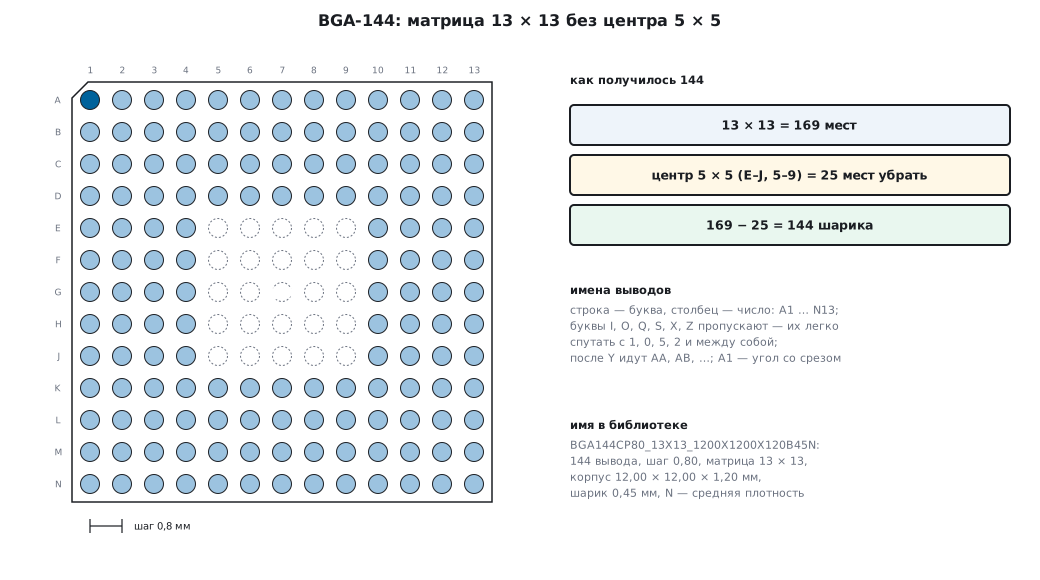
The manual builds BGA-144 from a matrix:
- Units — mm, Pattern / Standard Pad Properties: Surface, Ellipse, 0.45 × 0.45 mm.
- On the Pattern Properties panel: style Matrix, 13 columns, 13 rows, pitch 0.8 mm in X and Y. 169 pads appear.
- Select the 5 × 5 centre with a frame and delete it: 169 − 25 = 144.
- The numbers are now 1…169 with a hole in the middle — not acceptable for BGA. Select all (Ctrl+A) → right-click → Pad Array Numbers → type BGA Matrix. Now the numbers are A1, A2…
Row letters. In the standard library of BGA with 0.8 mm pitch the rows are labelled A…H, J…N, P, R, T, U, V, W, Y, then AA, AB… The letters O, Q, S, X, Z do not appear in any of the 546 patterns, and I appears only as an exception. The reason: they are easy to confuse with digits (I and 1, O and 0). So in a 13 × 13 matrix the last row is N, not M.
Contour numbering. For packages with pins on all four sides (QUAD — for example, QFP) there is the Contour numbering type: the first pad is the one you right-clicked, so numbering can start from any corner or from the middle of a side.
Checking your pattern. First find out which view the drawing in the datasheet uses — top view or bottom view: BGA ball maps and the pins of many connectors are often given in bottom view. The pattern on the board is drawn in top view, so put A1 in the corner where it is seen from the top, and check a pair of distant numbers — A1 and N13. Print the finished pattern at 1:1 scale and lay the real part on the sheet: for connectors this catches a mirrored pattern before the board is ordered.
132а.6 SOIC-28 from the datasheet
The second manual example is an IC in SOIC-28:
| Parameter | Value |
|---|---|
| style on the panel | Lines, 28 pads |
| pad | Surface, Rectangle, 0.6 × 2 mm |
| pitch (Pad Spacing) | 1.27 mm |
| distance between rows (Line Spacing) | 9.4 mm |
Each row has 14 pads, from the first to the last 13 × 1.27 = 16.51 mm. The numbers come out right at once — no renumbering needed. The manual then rotates the pattern by 90° (Edit / Rotate Pattern, Ctrl+Alt+R) to match the drawing in the datasheet.
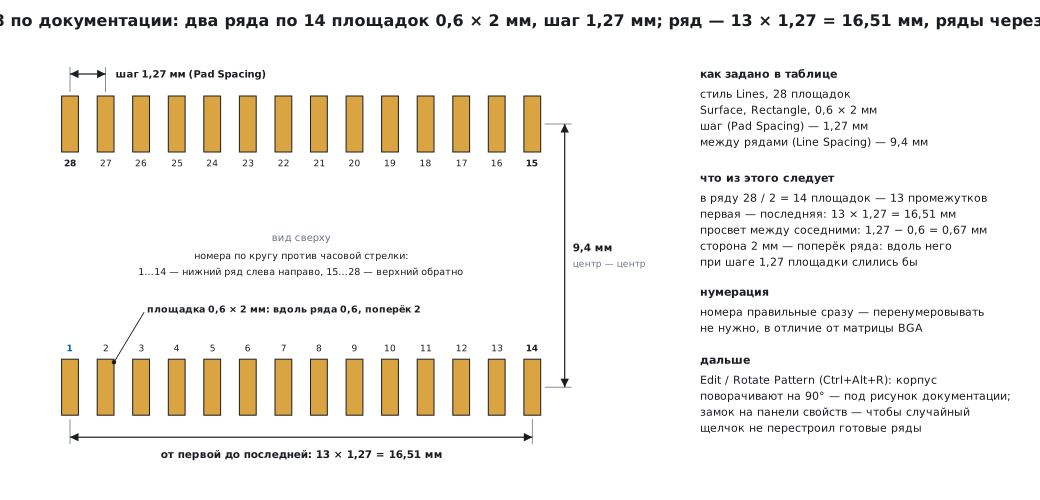
A tip the manual gives along the way: lock the pattern properties with the lock button on the panel, so that a stray click does not rebuild a finished pad matrix.
132а.7 3D model: three ways
| Way | When |
|---|---|
| model file (STEP, IGES, WRL, 3DS) | there is a model from the manufacturer or from the DipTrace model package |
| model from the generator | the pattern was made by the IPC-7351 generator — the model is already there |
| model from the outline | an SMD part of simple shape: DipTrace extrudes the outline to a given height |
From a file. The 3D button on the Pattern Properties panel → All Models.
For RES 400 the manual takes res-10.16_5.1x2.5.step — the model name has
the same lead pitch, 10.16 mm. The model had to be rotated about Z by 90°
and raised — a Z offset of 0.03 inch. When a model is attached, the
3D button lights up green.
A similar model also works. For BGA-144 the manual took the model
bga-144_12x12x1.27_17x17.step — a larger body, 1.27 mm pitch — and reduced the
scale: for a solid view, accuracy
to a tenth of a millimetre is not needed.
From the outline. Objects / Precise Shape Placement: a rectangle of 11 × 11 mm on the Top Outline layer, anchored at the centre; then in the 3D window — By Component Outline mode and a height of 1 mm.
Two typos in the manual, so you do not search for what is not there: the text says "Precize Shape Placement", but in the program itself the item is called Precise Shape Placement; the text calls the generator button "IPC-7315 Pattern Generator", but the standard is IPC-7351.
132а.8 Symbol and pattern attachment
The Component Editor works the same way as the Pattern Editor. The differences:
- There are four symbol styles: Free, 2 Sides, IC-2 Sides, IC-4 Sides. 2 Sides and IC-2 Sides differ only in the body rectangle.
- Part type: Normal, Power and GND, Net Port. A component can have only one power part; a net port is a single-part symbol that connects wires by name (that is how VCC and GND are made).
- Grid 0.1 inch. The pin length and the pin spacing must be multiples of the grid step — then all key points of the pin, including the end where the wire connects, lie on grid nodes.
Attaching a pattern: Component / Attached Pattern. DipTrace itself connects the symbol pins to the pads by number; you can check the links and reassign them with "pin → pad" clicks. Pin numbers and their types are easier to edit in Component / Pin Manager.
Inversion in a pin name is written with a tilde: normal ~invert — the bar
over part of the name starts and ends at ~. Labels are moved with the
View / Move Text Tool (F10).
For the capacitor the manual uses the ready-made pattern CAPPRD500W60D1050H1450
from the standard library of electrolytic capacitors — how to read
such a name is in the next subsection.
132а.9 How to read a pattern name
Names in the standard DipTrace libraries follow the IPC-7351 rule:
the dimensions are written right in the name, in hundredths of a millimetre. A short
program parses them (_verify/dip132a/ipcname.py):
H = lambda s: int(s) / 100          # «1200» → 12,00 мм

RULES = [
    # BGA144CP80_13X13_1200X1200X120B45N
    (r"BGA(\d+)CP(\d+)_(\d+)X(\d+)_(\d+)X(\d+)X(\d+)B(\d+)([MNL])",
     lambda m: dict(kind="BGA", pins=int(m[1]), pitch=H(m[2]), cols=int(m[3]), rows=int(m[4]),
                    body_l=H(m[5]), body_w=H(m[6]), height=H(m[7]), ball=H(m[8]), density=DENSITY[m[9]])),
    # SOIC28P127_1790X1032X265L83X42N
    (r"SOIC(\d+)P(\d+)_(\d+)X(\d+)X(\d+)L(\d+)X(\d+)([MNL])",
     lambda m: dict(kind="SOIC", pins=int(m[1]), pitch=H(m[2]), body_l=H(m[3]), span=H(m[4]),
                    height=H(m[5]), lead_l=H(m[6]), lead_w=H(m[7]), density=DENSITY[m[8]])),
    # CAPPRD500W60D1050H1450
    (r"CAPPRD(\d+)W(\d+)D(\d+)H(\d+)",
     lambda m: dict(kind="CAPPRD", spacing=H(m[1]), lead_w=H(m[2]), diameter=H(m[3]), height=H(m[4]))),
]
Three examples:
| Name | What it contains |
|---|---|
BGA144CP80_13X13_1200X1200X120B45N |
144 balls, pitch 0.80 mm, 13 × 13 matrix, body 12.00 × 12.00 × 1.20 mm, ball 0.45 mm, nominal density |
SOIC28P127_1790X1032X265L83X42N |
28 pins, pitch 1.27 mm, body 17.90 mm, lead span 10.32 mm, height 2.65 mm, lead 0.83 × 0.42 mm, nominal density |
CAPPRD500W60D1050H1450 |
polarized radial capacitor: lead spacing 5.00 mm, lead 0.60 mm, diameter 10.50 mm, height 14.50 mm |
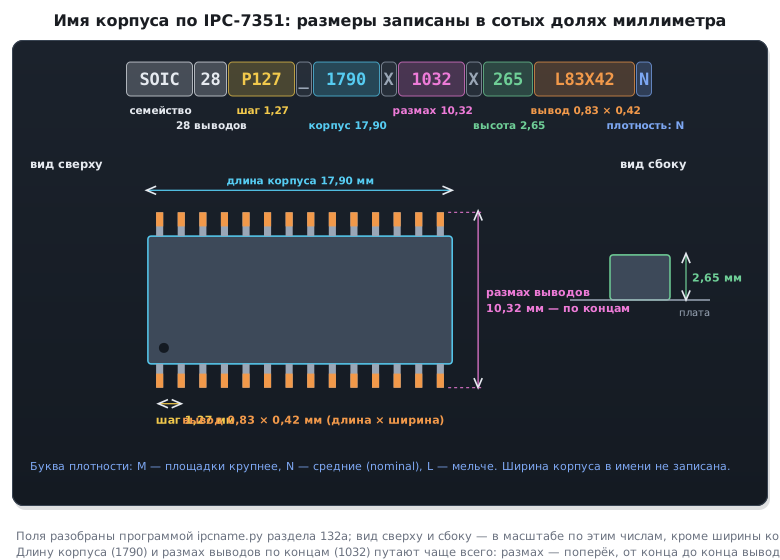
The last letter is the assembly density: M (most) — the largest pads with margin for soldering, N (nominal) — medium, L (least) — the smallest, for dense layouts. Many patterns are in the library in all three variants — for example, a 16-ball BGA with 0.8 mm pitch.
The check went through three libraries — BGA with 0.8 mm pitch (546 names),
SOIC with 1.27 mm pitch (955) and electrolytic capacitors (128) —
and compared every parsed name with the description next to it. There are no
mismatches, if you remember one thing: the size in the name is rounded to hundredths. The description
says "10.325mm lead span", the name says 1032.
The suffixes _AD1, _AD2 are duplicates of the same pattern (the
description calls them that, "alternative duplicate"), _AP1 is a pattern in which
only some of the pins are populated: SOIC16-28P127…_AP1 — 16 pins out of 28 with numbering
up to 28.
132а.10 Pitfalls
Your component in a standard library. DipTrace will not let you put it there, and a file dropped into the installation folder by hand is easily lost on reinstall.
The pattern "cannot be edited" in the Component Editor. That is by design: only the Pattern Editor. The Component Editor only attaches.
BGA pins are numbered 1…169. The matrix numbers sequentially by default; after deleting the centre you need Pad Array Numbers → BGA Matrix.
The part only fits the board mirrored. The pattern was drawn from the bottom view in the datasheet, but the board needs the top view (132а.5).
Symbol pins do not land on the schematic grid. The pin length or spacing is not a multiple of the grid step. The editor's rule: everything is a multiple of the grid, preferably 0.1 inch.
The generator does not create a pattern with a unique name. The manufacturer is not entered while Use Unique Pattern Name is on.
An SMD pad "through the whole board". An SMD pad lies only on the current layer; its hole size is ignored. If the part is on the bottom, its pads are moved with the Change Side command.
The pattern name "does not match" the datasheet in the hundredths. Not an error: in the name the dimensions are rounded to hundredths of a millimetre; the exact ones are in the pattern description.
Git shows only "binary file changed" for the library. Save
it as XML — .libxml or .elixml.
132а.11 Summary
- Component = symbol + pattern + 3D model; the pattern is edited only in the Pattern Editor. Pattern first, then symbol.
- Your libraries go into your own group and your own folder; for git — XML.
- RES 400: pitch 0.4 inch = 10.16 mm, the first pad is rectangular.
- The IPC-7351 generator computes the pads from the datasheet dimensions; red fields are required.
- BGA-144 = 13 × 13 matrix without the 5 × 5 centre; rows A…N without I, O, Q, S, X, Z; numbering — BGA Matrix.
- SOIC-28: 0.6 × 2 mm, pitch 1.27, 9.4 mm between rows; a row is 16.51 mm.
- An IPC-7351 pattern name holds all dimensions in hundredths of a millimetre; M/N/L is the assembly density. On 1629 names the parse matched the descriptions.
Full sources
ipcname.py — parsing a pattern name by the IPC-7351 rule.
# -*- coding: utf-8 -*-
"""Разбор имени корпуса по правилу IPC-7351, как их пишет библиотека DipTrace.

    python ipcname.py BGA144CP80_13X13_1200X1200X120B45N SOIC28P127_1790X1032X265L83X42N
"""
import re
import sys

DENSITY = {"M": "most", "N": "nominal", "L": "least"}
H = lambda s: int(s) / 100          # «1200» → 12,00 мм: размеры записаны в сотых долях миллиметра

RULES = [
    # BGA144CP80_13X13_1200X1200X120B45N
    (r"BGA(\d+)CP(\d+)_(\d+)X(\d+)_(\d+)X(\d+)X(\d+)B(\d+)([MNL])",
     lambda m: dict(kind="BGA", pins=int(m[1]), pitch=H(m[2]), cols=int(m[3]), rows=int(m[4]),
                    body_l=H(m[5]), body_w=H(m[6]), height=H(m[7]), ball=H(m[8]), density=DENSITY[m[9]])),
    # SOIC28P127_1790X1032X265L83X42N
    (r"SOIC(\d+)P(\d+)_(\d+)X(\d+)X(\d+)L(\d+)X(\d+)([MNL])",
     lambda m: dict(kind="SOIC", pins=int(m[1]), pitch=H(m[2]), body_l=H(m[3]), span=H(m[4]),
                    height=H(m[5]), lead_l=H(m[6]), lead_w=H(m[7]), density=DENSITY[m[8]])),
    # CAPPRD500W60D1050H1450
    (r"CAPPRD(\d+)W(\d+)D(\d+)H(\d+)",
     lambda m: dict(kind="CAPPRD", spacing=H(m[1]), lead_w=H(m[2]), diameter=H(m[3]), height=H(m[4]))),
]


def decode(name):
    for rx, make in RULES:
        m = re.fullmatch(rx, name)
        if m:
            return make(m)
    return None


if __name__ == "__main__":
    for n in sys.argv[1:]:
        print(n, decode(n))
Next: section 132б "DipTrace: layers, rules, routing and copper" — the outline and cutouts, net classes, pours and thermal reliefs.