 Embedded HandbookApps
4а. Keil: the project and the structure of a program
Section 4 ends with an empty project with a single main.c. A month later
the firmware has dozens of files, two boards, debug and production builds, and all of it
must build on a colleague's machine and on a server exactly as it does on yours. Here is how
to lay the program out in layers and how to arrange a µVision project for it: groups,
include paths, targets, run-time environment components, pinned pack versions
and building from the command line.
Everything shown is not screenshots but two real projects, BluePill and Discovery F407, from the same sources. Both are built by µVision 5.43 itself from the command line, the numbers come from its reports.
Terms used in the documentation
Term Meaning project, target the project, a build target — a set of settings source group a group of files in the project tree Run-Time Environment (RTE) the run-time environment: the components that can be added software component a software component ( CMSIS:CORE,Device:Startup)software pack, device family pack (DFP) a pack, the family support package configuration file a component's settings file — a copy in the project include path, preprocessor define the path to headers, a preprocessor definition scatter file the memory layout file for the linker map file the memory map after linking static call graph the call graph built at compile time board support package (BSP) the board layer hardware abstraction layer (HAL) the layer that hides the hardware
4а.1 Three layers of a program
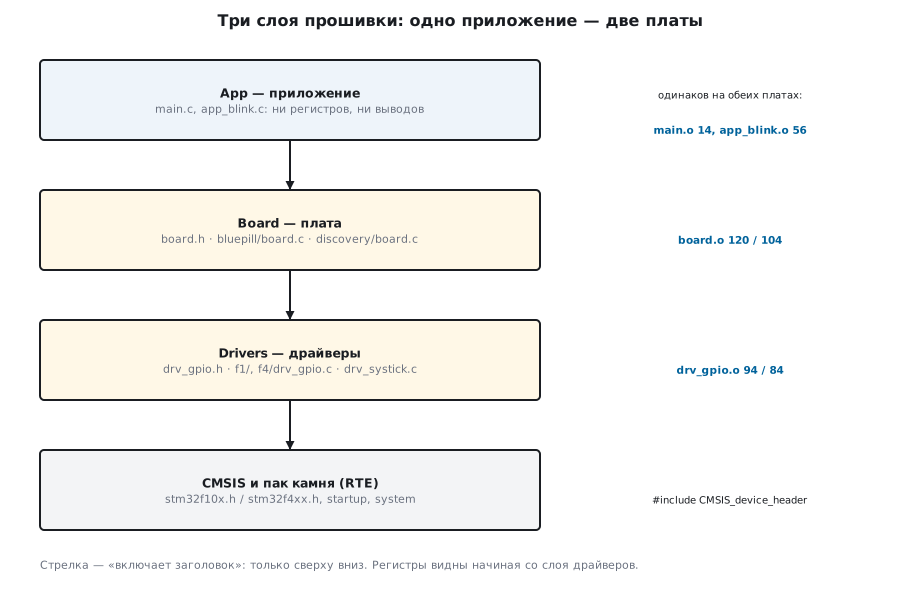
The firmware code is divided into layers, and each knows only about what is below it:
| Layer | Folder | What it knows | What it does not know |
|---|---|---|---|
| application | App/ |
what the device does: blinks, counts, responds | neither registers nor pins |
| board | Board/ |
what is connected to which pin and how the LED lights | how the series' registers are organised |
| drivers | Drivers/ |
registers: CRL/CRH on F1, MODER/PUPDR on F4 |
what is connected to the pin |
Below them are CMSIS and the chip files: the startup file, system_*.c, the header
stm32f10x.h or stm32f4xx.h. They come from the pack (4а.4).
The application talks only to the board:
#include "board.h"
#include "app_blink.h"

int main(void)
{
    board_init();
    for (;;) {
        app_blink_step(board_millis());
    }
}
And its logic has not a single register either:
void app_blink_step(uint32_t now_ms)
{
    static uint32_t last;
    static int on;
    uint32_t period = board_button() ? FAST_MS : PERIOD_MS;

    if (now_ms - last >= period) {      /* разность без знака переживает переполнение */
        last = now_ms;
        on = !on;
        board_led(on);
    }
}
The boundary runs along the board header: board.h declares four functions
and does not include the chip header — registers are simply not visible to the application. This
is checked by the compiler: main.c and app_blink.c are built with no paths at all
to the chip headers, and the line GPIOC->BSRR = 1u << 13; in the same layer does not
build — "use of undeclared identifier 'GPIOC'".
4а.2 One program — two boards
The board layer is the only place where it is written what is connected to what. On the BluePill the LED sits between the supply and the pin, on the Discovery between the pin and ground, and this difference lives in one line:
#define LED_PORT GPIOC
#define LED_PIN  13u        /* светодиод к питанию: горит при 0 */

void board_led(int on)
{
    drv_gpio_write(LED_PORT, LED_PIN, !on);
}
#define LED_PORT GPIOD
#define LED_PIN  12u        /* зелёный LD4: горит при 1 */

void board_led(int on)
{
    drv_gpio_write(LED_PORT, LED_PIN, on);
}
The driver hides the difference between the series behind one header. Which chip header to include is decided by the project (4а.4):
#include "RTE_Components.h"
#include CMSIS_device_header        /* stm32f10x.h или stm32f4xx.h — решает проект */

/* Один интерфейс на обе серии; как это ложится на регистры — в f1/ и f4/. */
enum drv_gpio_mode { DRV_GPIO_OUT, DRV_GPIO_IN, DRV_GPIO_IN_PULLUP };
On F1 a pin has four bits in CRL/CRH, and the pull-up is selected by ODR —
an oddity best hidden in the driver once and for all:
    *cr = (*cr & ~(0xFu << shift)) | (cfg[mode] << shift);
    if (mode == DRV_GPIO_IN_PULLUP)
        port->BSRR = 1u << pin;     /* у F1 подтяжку вверх выбирает ODR = 1 */
On F4 the mode, the pull and the output type are in different registers:
    port->OTYPER &= ~(1u << pin);                                /* двухтактный выход */
    port->PUPDR = (port->PUPDR & ~(3u << shift)) | (pupdr << shift);
    port->MODER = (port->MODER & ~(3u << shift)) | (moder << shift);
What this gives can be seen from the memory map (4а.7) — the code bytes of each module in the Release build:
| Module | BluePill (F103) | Discovery (F407) |
|---|---|---|
main.o |
14 | 14 |
app_blink.o |
56 | 56 |
board.o |
120 | 104 |
drv_gpio.o |
94 | 84 |
drv_systick.o |
72 | 72 |
The application is identical to the byte. Only the board and the GPIO driver change;
drv_systick.c is even one file for both series — SysTick is part of the core, not
of ST's peripherals.
4а.3 Folders on disk and groups in the project
The tree in the Project window is µVision groups, not folders: a file in a group
stores its own path on disk. The rule is simple — one group per folder,
as here with App, Board, Drivers. In the project file a group looks like this:
<GroupName>Board</GroupName>
<Files>
<File>
<FileName>board.c</FileName>
<FileType>1</FileType>
<FilePath>.\Board\bluepill\board.c</FilePath>
</File>
Headers are put into groups only for navigation: the compiler looks for them along the paths
from Options for Target → C/C++ → Include Paths. Here this is .\App;.\Board;.\Drivers
— paths relative to the project file, so the project opens in any folder and on any
machine. An absolute path like C:\Users\…\Drivers works only for the author.

4а.4 Environment components: CMSIS and the startup file
For working with registers two components in Manage Run-Time Environment are enough,
as in section 4.4: CMSIS → CORE and Device → Startup.
µVision copies the component's configuration files into the project, into RTE\Device\<chip>\:
| BluePill | Discovery | |
|---|---|---|
| startup file | startup_stm32f10x_md.s |
startup_stm32f407xx.s |
| system file | system_stm32f10x.c |
system_stm32f4xx.c |
Next to each is a *.base@version file, the untouched original from the pack: when
the pack is updated, µVision compares your copy with it and offers to merge the
changes. Edit the copy in RTE, not the file in the pack directory — an edit there
will be lost at the very first update.
For each target µVision creates RTE\_<target>\RTE_Components.h, which has
one useful line — #define CMSIS_device_header "stm32f10x.h" for the BluePill
and "stm32f4xx.h" for the Discovery. So the driver writes #include CMSIS_device_header
and one and the same header builds for both series. The chip definitions —
STM32F10X_MD and STM32F407xx — µVision takes from the chip description in the pack
and passes to the compiler itself: unlike the build in section 4.8, you do not need to
write them by hand.
4а.5 Targets: Debug and Release
A target is a set of settings under one name. Each project has two:
| Debug | Release | |
|---|---|---|
| optimisation | -O0 — stepping follows the lines |
-Oz — less code |
| definition | DEBUG=1 |
NDEBUG |
| HEX file | no | yes |
| folders | Objects\F103_Debug\, Listings\F103_Debug\ |
…\F103_Release\ |
A separate folder for each target is mandatory: with a shared folder the build of one target overwrites the object files of the other. What optimisation changes:
| BluePill Debug | BluePill Release | Discovery Debug | Discovery Release | |
|---|---|---|---|---|
| code, bytes | 1718 | 1062 | 1356 | 872 |
| maximum stack, bytes | 72 | 28 | 72 | 24 |
The stack comes from the static call graph that µVision puts next to
the firmware (Objects\<target>\keil4a.htm, the line "Maximum Stack Usage").
Targets are switched with a list on the toolbar; to build all at once —
Project → Batch Build.
4а.6 What µVision passes to the compiler
The real command line of each file lies in Objects\<target>\keil4a_<target>.dep.
For main.c in the "F407 Release" target it contains, among other things:
| Flags | Where from |
|---|---|
-mcpu=cortex-m4 -mfpu=fpv4-sp-d16 -mfloat-abi=hard |
the chip: an M4 core with floating point |
-std=c11 -Oz -Wall -Wextra |
the target's C/C++ tab |
-I ./App -I ./Board -I ./Drivers |
your include paths |
-I./RTE/_F407_Release |
the folder with this target's RTE_Components.h |
paths into CMSIS/5.9.0 and STM32F4xx_DFP/2.17.1 |
the packs pinned to the project (4а.9) |
-DSTM32F407xx -D_RTE_ -D__UVISION_VERSION="543" |
the chip description and the environment itself |
-DNDEBUG |
your definition |
For the BluePill the list also has ./RTE/Device/STM32F103C8: the Device:Startup component
of the F1 pack puts the configuration header RTE_Device.h there. For the F407 there are no headers in this
folder — and no path.
From this list the build is easy to repeat outside µVision — for example, in the CMake of section 115.
4а.7 Memory layout and the map

As long as Options for Target → Linker has the "Use Memory Layout from
Target Dialog" box ticked, µVision itself writes the layout file from the chip's memory sizes.
For the BluePill:
LR_IROM1 0x08000000 0x00010000  {    ; load region size_region
  ER_IROM1 0x08000000 0x00010000  {  ; load address = execution address
   *.o (RESET, +First)
   *(InRoot$$Sections)
   .ANY (+RO)
   .ANY (+XO)
  }
  RW_IRAM1 0x20000000 0x00005000  {  ; RW data
   .ANY (+RW +ZI)
  }
}
The vector table (RESET) comes first at address 0x08000000, code and constants
next, variables in RAM from 0x20000000. You write your own layout file when
this is not enough: room for a bootloader, a non-zeroed area, code in RAM — section 11.3.
The memory map (Listings\<target>\keil4a.map) after linking shows
what each module costs — the table in 4а.2 comes from it. Two lines are worth
knowing by sight. The startup file takes 1536 bytes of RAM — this is the 0x400 stack
and the 0x200 heap set in it. The whole BluePill image is 1352 bytes of Flash
(Total ROM Size), the Discovery one 1316.
The first record of the HEX file confirms the layout:
:10000000780600201D0300082503000827030008C8
The first word is 0x20000678, the initial top of the stack: 0x20000000 + 1656,
exactly as much as the variables together with the stack and the heap take. The second is 0x0800031D,
the address of Reset_Handler with a one in the lowest bit: Thumb instructions.
The HEX file can be viewed without a board too — in STM32CubeProgrammer open it
with the "Open file" tab. For the "F407 Release" target it is one chunk from address
0x08000000 with a length of 0x528 = 1320 bytes — 4 more than Total ROM Size.
This is padding: after the SystemCoreClock variable the linker aligns
the next RAM region to 8 bytes and puts 4 empty bytes into the image (PAD
in the map), but does not count them in the total. The first line of the table has the same stack
top 0x20000678, and Reset_Handler here is 0x080003A1:

4а.8 What to put into git
| File or folder | In git? | Why |
|---|---|---|
*.uvprojx |
yes | targets, groups, paths, components, pack versions |
RTE\Device\… with the *.base@version files |
yes | your copies of the startup and system files |
*.uvoptx |
by agreement | debugger and window settings; a shared ST-Link — yes |
*.uvguix.<name> |
no | one person's window layout |
RTE\_<target>\ |
no | RTE_Components.h is created during the build |
Objects\, Listings\ |
no | build results |
DebugConfig\ |
no, unless edited | created from the pack during the build |
The project's .gitignore file:
Objects/
Listings/
DebugConfig/
RTE/_*/
*.uvguix.*
*.bak
build_*.log
4а.9 Pin the pack versions
By default µVision takes the newest of the installed packs — whatever versions are written in the project. An experiment on the same two projects, with the pinning removed:
- The BluePill built, but already with CMSIS 6.2.0 instead of 5.9.0 — this can be seen from the paths
in
.dep. Today there is no difference, tomorrow it may turn up in any macro. - The Discovery did not build at all: the newest F4 pack, 3.1.1, is organised differently
and has no
Device:Startupcomponent:
Error #540: 'Keil::Device:Startup@2.6.3' component is not available for target 'F407 Release', pack 'Keil::STM32F4xx_DFP@2.17.1' is not selected
The cure is in Project → Manage → Select Software Packs: untick "Use latest
versions of all installed Software Packs" and tick the required versions. µVision
writes the choice into the project file:
<package name="STM32F4xx_DFP" schemaVersion="1.7.2" url="http://www.keil.com/pack/" vendor="Keil" version="2.17.1">
<targetInfos>
<targetInfo name="F407 Release" versionMatchMode="fixed" />
</targetInfos>
</package>
With pinning, both projects build with CMSIS 5.9.0 and their own family packs — for anyone and a year from now.
4а.10 Building from the command line
The same µVision builds the project without a window:
UV4 -r keil4a_f407.uvprojx -t "F407 Release" -j0 -o build.log
-r — rebuild everything (-b — only what changed), -t — the target, -j0 — no
window, -o — the report file. At the end of the report are the same lines as in the Build
Output window: Program Size: Code=872 RO-data=440 RW-data=4 ZI-data=1652
and 0 Error(s), 0 Warning(s). The exit code:
| Code | What happened | Line in the report |
|---|---|---|
| 0 | clean | 0 Error(s), 0 Warning(s) |
| 1 | warnings | warning: unused variable 'unused', 1 Warning(s) |
| 2 | errors | error: use of undeclared identifier 'missing', 1 Error(s) |
| 3 and above | 3 — a fatal error; 11 — the project file cannot be opened for writing; 12 — no chip with that name in the database (usually the pack is not installed); 13 — an error writing the project; 15 — an error reading XML on import; 20 — a project conversion error | — |
On a build server (section 110) any code other than 0 is considered a failure (or
other than 0 and 1, if warnings are allowed in the project), and the build is done with -r:
a full rebuild does not depend on file times.
4а.11 Pitfalls
| Symptom | Cause |
|---|---|
a colleague gets file not found on your own header |
an absolute path in Include Paths |
| an edit to the startup file was lost after a pack update | the file in the pack directory was edited, not the copy in RTE\Device\ |
undefined symbol at link time, although the file is in the folder |
the file is not added to a group: µVision builds only files from groups |
| an interrupt does not fire, no errors | a typo in the handler name: the weak symbol from the startup file remained (section 71.6) |
| the second target "spoils" the first | a shared Objects folder for two targets |
| someone else's project: "uses RTOS support that is part of a Legacy Pack" | the old RTX OS is enabled in the target settings (Operating system: RTX Kernel) |
a colleague has a different CMSIS version or Error #540 |
the pack versions are not pinned (4а.9) |
| the firmware is 60 % larger than expected | -O0 in the Release target: 1718 bytes instead of 1062 |
| moving to another board means editing all the code | registers in the application layer |
4а.12 Summary
- Three layers: the application without registers, the board — what is connected to what,
the drivers — the registers of the series. The application is identical to the byte on both boards:
main.o14 bytes,app_blink.o56. - One group — one folder, the include paths are relative:
.\App;.\Board;.\Drivers. CMSIS:COREandDevice:Startupcopy the startup and system files intoRTE\Device\<chip>\— edit these copies;#include CMSIS_device_headerselects the chip header for you.- Debug and Release are two targets with their own folders: on the BluePill 1718 and 1062 bytes of code, a stack of 72 and 28 bytes.
- µVision writes the memory layout itself (
LR_IROM1 0x08000000,RW_IRAM1 0x20000000), the map shows the cost of each module. - Pack versions are pinned: without that the BluePill built with CMSIS 6.2.0, and the Discovery did not build at all.
UV4 -r … -j0 -o build.log: code 0 — clean, 1 — warnings, 2 — errors.
Full sources
main.c — the application layer: only the board and its own logic, not a single register.
/* Раздел 4а: слой приложения. Ни одного регистра и ни одного вывода —
 * только плата (board.h) и своя логика (app_blink.h). */
#include "board.h"
#include "app_blink.h"

int main(void)
{
    board_init();
    for (;;) {
        app_blink_step(board_millis());
    }
}
app_blink.c — the blinking logic: slow or fast depending on the button.
#include "app_blink.h"
#include "board.h"

#define PERIOD_MS 500u
#define FAST_MS   100u

void app_blink_step(uint32_t now_ms)
{
    static uint32_t last;
    static int on;
    uint32_t period = board_button() ? FAST_MS : PERIOD_MS;

    if (now_ms - last >= period) {      /* разность без знака переживает переполнение */
        last = now_ms;
        on = !on;
        board_led(on);
    }
}
board.c (BluePill) — what is connected to which pin on the BluePill board (STM32F103C8).
/* Плата BluePill (STM32F103C8): что к какому выводу подключено. */
#include "board.h"
#include "drv_gpio.h"
#include "drv_systick.h"

#define LED_PORT GPIOC
#define LED_PIN  13u        /* светодиод к питанию: горит при 0 */
#define BTN_PORT GPIOA
#define BTN_PIN  0u         /* кнопка на землю: нажата — 0 */

void board_init(void)
{
    SystemCoreClockUpdate();
    RCC->APB2ENR |= RCC_APB2ENR_IOPAEN | RCC_APB2ENR_IOPCEN;
    drv_gpio_mode(LED_PORT, LED_PIN, DRV_GPIO_OUT);
    drv_gpio_mode(BTN_PORT, BTN_PIN, DRV_GPIO_IN_PULLUP);
    board_led(0);
    drv_systick_start(SystemCoreClock);
}

void board_led(int on)
{
    drv_gpio_write(LED_PORT, LED_PIN, !on);
}

int board_button(void)
{
    return !drv_gpio_read(BTN_PORT, BTN_PIN);
}

uint32_t board_millis(void)
{
    return drv_systick_ms();
}
board.c (Discovery F407) — what is connected to which pin on the Discovery F407 board.
/* Плата Discovery F407 (STM32F407VG): что к какому выводу подключено. */
#include "board.h"
#include "drv_gpio.h"
#include "drv_systick.h"

#define LED_PORT GPIOD
#define LED_PIN  12u        /* зелёный LD4: горит при 1 */
#define BTN_PORT GPIOA
#define BTN_PIN  0u         /* кнопка USER: нажата — 1, подтяжка вниз стоит на плате */

void board_init(void)
{
    SystemCoreClockUpdate();
    RCC->AHB1ENR |= RCC_AHB1ENR_GPIOAEN | RCC_AHB1ENR_GPIODEN;
    drv_gpio_mode(LED_PORT, LED_PIN, DRV_GPIO_OUT);
    drv_gpio_mode(BTN_PORT, BTN_PIN, DRV_GPIO_IN);
    board_led(0);
    drv_systick_start(SystemCoreClock);
}

void board_led(int on)
{
    drv_gpio_write(LED_PORT, LED_PIN, on);
}

int board_button(void)
{
    return drv_gpio_read(BTN_PORT, BTN_PIN);
}

uint32_t board_millis(void)
{
    return drv_systick_ms();
}
drv_gpio.h — one GPIO interface for both series.
#ifndef DRV_GPIO_H
#define DRV_GPIO_H

#include <stdint.h>
#include "RTE_Components.h"
#include CMSIS_device_header        /* stm32f10x.h или stm32f4xx.h — решает проект */

/* Один интерфейс на обе серии; как это ложится на регистры — в f1/ и f4/. */
enum drv_gpio_mode { DRV_GPIO_OUT, DRV_GPIO_IN, DRV_GPIO_IN_PULLUP };

void drv_gpio_mode(GPIO_TypeDef *port, uint32_t pin, enum drv_gpio_mode mode);
void drv_gpio_write(GPIO_TypeDef *port, uint32_t pin, int high);
int drv_gpio_read(const GPIO_TypeDef *port, uint32_t pin);

#endif
drv_gpio.c (F1) — GPIO for F1: four bits CNF and MODE per pin.
/* GPIO для F1: на вывод четыре бита — CNF (два старших) и MODE (два младших). */
#include "drv_gpio.h"

static const uint32_t cfg[] = {
    [DRV_GPIO_OUT] = 0x2u,          /* CNF = 00, MODE = 10: выход 2 МГц */
    [DRV_GPIO_IN] = 0x4u,           /* CNF = 01, MODE = 00: вход без подтяжки */
    [DRV_GPIO_IN_PULLUP] = 0x8u,    /* CNF = 10, MODE = 00: вход с подтяжкой */
};

void drv_gpio_mode(GPIO_TypeDef *port, uint32_t pin, enum drv_gpio_mode mode)
{
    volatile uint32_t *cr = (pin < 8u) ? &port->CRL : &port->CRH;
    uint32_t shift = (pin % 8u) * 4u;

    *cr = (*cr & ~(0xFu << shift)) | (cfg[mode] << shift);
    if (mode == DRV_GPIO_IN_PULLUP)
        port->BSRR = 1u << pin;     /* у F1 подтяжку вверх выбирает ODR = 1 */
}

void drv_gpio_write(GPIO_TypeDef *port, uint32_t pin, int high)
{
    port->BSRR = high ? (1u << pin) : (1u << (pin + 16u));
}

int drv_gpio_read(const GPIO_TypeDef *port, uint32_t pin)
{
    return (int)((port->IDR >> pin) & 1u);
}
drv_gpio.c (F4) — GPIO for F4: mode, pull and output type in different registers.
/* GPIO для F4: режим, подтяжка и тип выхода — в разных регистрах, по два бита на вывод. */
#include "drv_gpio.h"

void drv_gpio_mode(GPIO_TypeDef *port, uint32_t pin, enum drv_gpio_mode mode)
{
    uint32_t shift = pin * 2u;
    uint32_t moder = (mode == DRV_GPIO_OUT) ? 1u : 0u;          /* 01 — выход, 00 — вход */
    uint32_t pupdr = (mode == DRV_GPIO_IN_PULLUP) ? 1u : 0u;    /* 01 — подтяжка вверх */

    port->OTYPER &= ~(1u << pin);                                /* двухтактный выход */
    port->PUPDR = (port->PUPDR & ~(3u << shift)) | (pupdr << shift);
    port->MODER = (port->MODER & ~(3u << shift)) | (moder << shift);
}

void drv_gpio_write(GPIO_TypeDef *port, uint32_t pin, int high)
{
    port->BSRR = high ? (1u << pin) : (1u << (pin + 16u));
}

int drv_gpio_read(const GPIO_TypeDef *port, uint32_t pin)
{
    return (int)((port->IDR >> pin) & 1u);
}
Next: section 4б "STM32CubeIDE: project, build, debugging and failure analysis".