 Embedded HandbookApps
4б. STM32CubeIDE: project, build, debugging and failure analysis
STM32CubeIDE is ST's free environment: Eclipse with the C/C++ module (CDT),
the GCC compiler for Arm and the GDB debugger; the CubeMX configurator is built into it in versions 1.x
and is a separate program from 2.0. Its buttons are
convenient, but behind each of them is a call to an ordinary program: the compiler,
the linker, the debugger. This section takes apart what these calls are. Then the project
is understandable without screenshots, builds and is debugged even without the environment's window, and
a failure like HardFault is analysed from the registers rather than guessed.
Everything shown is real CubeIDE project files from ST's example package for the
Discovery F407 (GPIO_EXTI): the startup file, the linker script,
syscalls.c, sysmem.c, .cproject and .project — without a single edit. To them
a small main.c program is added. The build is done with arm-none-eabi-gcc 12.2
with the options from .cproject, it is run in the QEMU emulator (the netduinoplus2 board
with an STM32F405 — the same core and the same memory), debugged with GDB 13.1, using the same
commands that CubeIDE gives the debugger behind its buttons
(_verify/cubeide4b/).
Terms used in the documentation
Term Meaning workspace, project the workspace (a folder with the environment's settings), the project build configuration: Debug, Release the debug and the release build configurations managed build a build managed by the environment: it writes the Makefile itself linker script ( .ld)the file that tells the linker where everything goes startup file the vector table and Reset_Handlersystem calls ( syscalls.c,sysmem.c)system call stubs for the C library newlib, newlib-nano the C library for microcontrollers and its reduced variant debug configuration, GDB server the debug launch settings, the debugger server (ST-LINK GDB server, OpenOCD) breakpoint, watchpoint a stop at a line, a stop when a variable changes Live Expressions variables updated on the fly without stopping SFRs (special function registers) the peripheral registers from the SVD file Fault Analyzer analysis of the cause of a HardFaultfrom the registersSWV (Serial Wire Viewer), ITM a trace over the SWO pin, the core's output channel Build Analyzer, Static Stack Analyzer the memory map after the build, the stack per function
4б.1 What is inside the environment
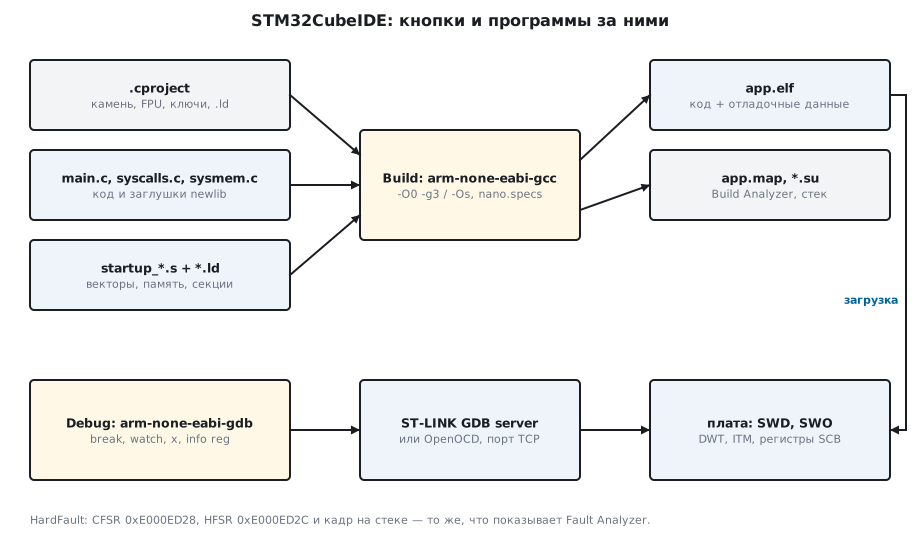
The environment is made of four parts, and each has an ordinary command-line substitute:
| In CubeIDE | What it does | Without the environment |
|---|---|---|
a CDT project, .project and .cproject |
the list of files and the build options | a Makefile or CMake |
| GNU Tools for STM32 | compiler, assembler, linker | arm-none-eabi-gcc |
CubeMX (the .ioc file; not built in from version 2.0) |
pins, clocks, initialisation code | the separate STM32CubeMX |
| debugging: GDB and the ST-LINK server or OpenOCD | loading, stops, registers | gdb + openocd or st-util |
The workspace is a folder with the settings of the environment itself; it is not put
into git. The project is a folder with .project, .cproject, the sources and the
linker script; it is put in whole, except the Debug/ and Release/ folders
with the build results.
4б.2 The project files
Six files make a folder a CubeIDE project:
| File | What for |
|---|---|
.project |
the project name and linked files — references to sources outside the folder |
.cproject |
the Debug and Release configurations: chip, FPU, options, paths, linker script |
STM32F407VGTX_FLASH.ld |
the linker script: memory and sections |
Startup/startup_stm32f407vgtx.s |
the vector table and Reset_Handler in assembly |
syscalls.c |
_write, _read and other stubs for printf and scanf |
sysmem.c |
_sbrk — where malloc takes memory from |
In ST's example the HAL and BSP sources are not copied into the project but included
by links: there are 18 of them in .project. It looks neat, but the project stops
building as soon as it is moved to another folder. For your own projects
it is more reliable to put the drivers inside.
.cproject is XML, and everything set with checkboxes in the project properties lies in
it as text. An extract from the check:
 2 option.floatabi.value.hard
 2 option.fpu.value.fpv4-sp-d16
 2 option.target_mcu" value="STM32F407VGTx
 3 debuglevel.value.g3
 2 optimization.level.value.os
 2 USE_STM32F4_DISCO | STM32F407xx | USE_HAL_DRIVER
The twos are because there are two configurations: the FPU fpv4-sp-d16 with hardware
passing of floating-point numbers, the chip STM32F407VGTx and the definitions
STM32F407xx, USE_HAL_DRIVER — in both. The -Os optimisation is written
only for Release; for Debug the default value is -O0.
4б.3 Debug and Release: the options on the command line
Everything CubeIDE passes to the compiler for this project fits into a few lines:
arm-none-eabi-gcc -mcpu=cortex-m4 -mthumb -mfpu=fpv4-sp-d16 -mfloat-abi=hard \
    -std=gnu11 -g3 -O0 -DDEBUG -DSTM32F407xx -ffunction-sections -fdata-sections -Wall -fstack-usage -c main.c
arm-none-eabi-gcc ... startup.o main.o syscalls.o sysmem.o -T STM32F407VGTX_FLASH.ld \
    --specs=nosys.specs --specs=nano.specs -Wl,--gc-sections -static -Wl,-Map=app.map -Wl,--print-memory-usage
The startup file is built by the same gcc with -x assembler-with-cpp, so that
the preprocessor works in it. The options --specs=nano.specs (the reduced newlib) and
--specs=nosys.specs (system call stubs) are not visible in .cproject:
they are the environment's defaults for "Reduced C". The linker report and the sizes:
== build Debug
Memory region         Used Size  Region Size  %age Used
          CCMRAM:          0 GB        64 KB      0.00%
             RAM:        1688 B       128 KB      1.29%
             ROM:        8816 B         1 MB      0.84%
size: 8708 100 1588
== build Release
             ROM:        8500 B         1 MB      0.81%
size: 8392 100 1588
The three size numbers are code with constants, .data and .bss. Release with -Os
is 316 bytes smaller than Debug; in such a tiny program almost all the space
is taken by newlib, not by our code. The -DDEBUG flag is not passed in Release,
so code under #ifdef DEBUG does not get into the release.
4б.4 The CubeIDE linker script
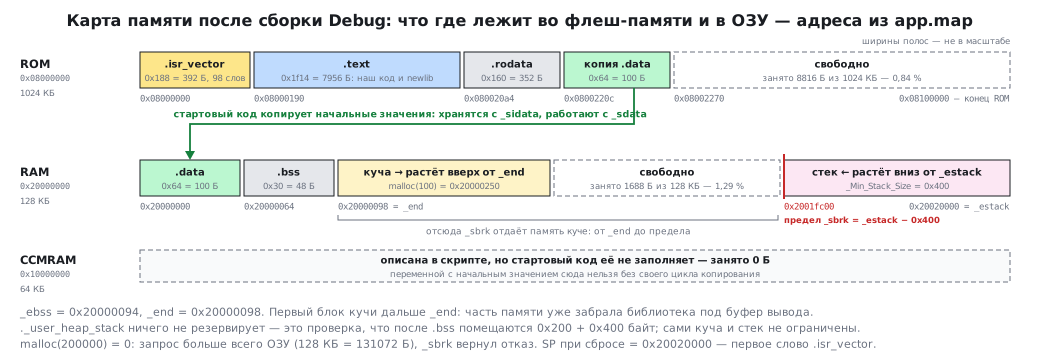
The environment's script is longer than the home-made one in section 4в, but the basis is the same. Memory is
three regions, and the flash memory is called ROM here:
_estack = ORIGIN(RAM) + LENGTH(RAM); /* end of "RAM" Ram type memory */
_Min_Heap_Size = 0x200; /* required amount of heap */
_Min_Stack_Size = 0x400; /* required amount of stack */
CCMRAM    (xrw)    : ORIGIN = 0x10000000,   LENGTH = 64K
RAM    (xrw)    : ORIGIN = 0x20000000,   LENGTH = 128K
ROM    (rx)    : ORIGIN = 0x08000000,   LENGTH = 1024K
The initial values of .data lie in flash memory but are used in RAM:
_sidata = LOADADDR(.data);
} >RAM AT> ROM
The map after the build confirms every line:
.isr_vector 0x08000000 0x188
.text 0x08000190 0x1f14
.rodata 0x080020a4 0x160
.data 0x20000000 0x64 load address 0x0800220c
.bss 0x20000064 0x30
0800220c A _sidata
20000000 D _sdata
20000064 D _edata
20000094 B _ebss
20000098 B _end
20020000 R _estack
.data works from 0x20000000 but is stored at 0x0800220c — right after
.rodata. The vector table is 0x188 = 392 bytes: 98 .word words, one
per vector. _estack = 0x20000000 + 128 KB = 0x20020000.
Two things in the CubeIDE script are not obvious. The ._user_heap_stack section reserves
nothing in the image — it is a check: if _Min_Heap_Size + _Min_Stack_Size
do not fit after .bss, the linker will report an overflow.
The stack and heap themselves are not limited: the stack grows down from _estack, the heap up
from _end. And CCMRAM (64 KB on the F407, fast memory without DMA) is described, but
the startup code does not fill it: it neither copies the initial values nor
zeroes it. There will be garbage there even in a variable without an initialiser, which C
promises to zero — only buffers that the program fills itself
are suitable, and a variable with an initial value must not be put there
without your own copy loop.
4б.5 printf and malloc: syscalls.c and sysmem.c
newlib does not know where to output text and where the free memory is. It needs
functions named _write and _sbrk, and CubeIDE puts them into the project.
_write from syscalls.c calls the weak function __io_putchar
for each character — and the program defines it:
int __io_putchar(int ch)                              /* syscalls.c зовёт её из _write для каждого символа */
{
    while (!(USART1_SR & (1u << 7))) {
    }
    USART1_DR = (uint32_t)ch;
    return ch;
}
USART1_SR and USART1_DR are declared in main.c with volatile (section
3.4). Without it the Release build (-Os) reads SR once and, if TXE
is 0 at that instant, goes into an endless branch to itself; in Debug (-O0) the bug
is not visible.
_sbrk from sysmem.c hands out memory from the _end symbol up to
_estack − _Min_Stack_Size. The function is short — here it is in full, together
with the file variable that remembers how far memory has already been handed out:
static uint8_t *__sbrk_heap_end = NULL;

void *_sbrk(ptrdiff_t incr)
{
  extern uint8_t _end; /* Symbol defined in the linker script */
  extern uint8_t _estack; /* Symbol defined in the linker script */
  extern uint32_t _Min_Stack_Size; /* Symbol defined in the linker script */
  const uint32_t stack_limit = (uint32_t)&_estack - (uint32_t)&_Min_Stack_Size;
  const uint8_t *max_heap = (uint8_t *)stack_limit;
  uint8_t *prev_heap_end;

  /* Initialize heap end at first call */
  if (NULL == __sbrk_heap_end)
  {
    __sbrk_heap_end = &_end;
  }

  /* Protect heap from growing into the reserved MSP stack */
  if (__sbrk_heap_end + incr > max_heap)
  {
    errno = ENOMEM;
    return (void *)-1;
  }

  prev_heap_end = __sbrk_heap_end;
  __sbrk_heap_end += incr;

  return (void *)prev_heap_end;
}
The program output in the emulator:
printf через _write: square(7) = 49
malloc(100) = 0x20000250, _end = 0x20000098
malloc(200000) = 0
calls = 1, float:
сейчас будет HardFault
The heap started at _end, but the first block turned out further on: part of the memory had already
been taken by the library itself for its output buffer. A request for 200 000 bytes is more than
all of RAM, _sbrk returned a refusal, malloc returned zero.
And the main trap: printf("%.2f") printed nothing. In newlib-nano output
of floating-point numbers is disabled by default for the sake of size. It is enabled with
the linker option -u _printf_float — in CubeIDE this is the checkbox "Use float
with printf":
app.elf: text 8708
float.elf: text 22004
calls = 1, float: 4.50
One checkbox — plus 13 296 bytes of code. On an F103 with 64 KB that is a fifth of the flash memory. It is often simpler to print the number as integer parts.
4б.6 Building without a window
A CubeIDE project builds without the environment's window too, for example on a build server: CubeIDE has Eclipse's headless mode:
stm32cubeide --launcher.suppressErrors -nosplash \
    -application org.eclipse.cdt.managedbuilder.core.headlessbuild \
    -data /tmp/ws -import ./GPIO_EXTI -build GPIO_EXTI/Debug
On Windows, instead of stm32cubeide the console stm32cubeidec.exe is called:
the windowed one releases the console immediately, while this one waits for the build to end and returns an error
code.
-data is a temporary workspace, -import the project folder,
-build the project and the configuration. The environment itself writes a makefile into the
Debug/ folder, and after one build in the window the project can be built simply with make
in that folder. But such a Makefile contains absolute paths of your machine;
for a server it is more reliable to rewrite the options from 4б.3 once into your own Makefile
or CMake — as in section 4в.
4б.7 Debugging: what the "Debug" button does
The "Debug" button does three things: builds the project, starts the debugger server
(ST-LINK GDB server or OpenOCD) and connects arm-none-eabi-gdb to it.
Breakpoints, steps, variables in the environment's windows are GDB commands. They
can also be given by hand, to a board through the server or to an emulator. The session below is
QEMU stopped at the first instruction:
target remote :1234
Reset_Handler () at Startup/startup_stm32f407vgtx.s:61
pc 0x8001da4 0x8001da4 <Reset_Handler>
sp 0x20020000 0x20020000
The core itself loaded SP from the first word of the vector table (_estack) and PC
from the second. A breakpoint on a function and a watchpoint on a variable:
break square
watch calls
Breakpoint 1, square (x=7) at main.c:32
#0 square (x=7) at main.c:32
#1 0x08001eaa in main () at main.c:43
Hardware watchpoint 2: calls
Old value = 0
New value = 1
bt showed who called square. The watchpoint stopped the program
at the line that changed calls and showed the old and new values.
Such points are hardware ones: on the Cortex-M4 the DWT block has four comparators,
so you cannot watch more than four addresses at once. In CubeIDE
the same is set in the Expressions window. Breakpoints in code in Flash are also
hardware ones: the FPB block of the Cortex-M3/M4 holds six (section 35д.6), and GDB
will not be able to set a seventh.
The environment's windows correspond to GDB commands:
| CubeIDE window | GDB command |
|---|---|
| Variables, Expressions | print x, display, watch |
| Registers | info registers |
| Memory | x/16xw 0x20000000 |
| SFRs | x at the register address from the SVD file |
| Debug (call stack) | bt, frame |
4б.8 HardFault: analysis from the registers
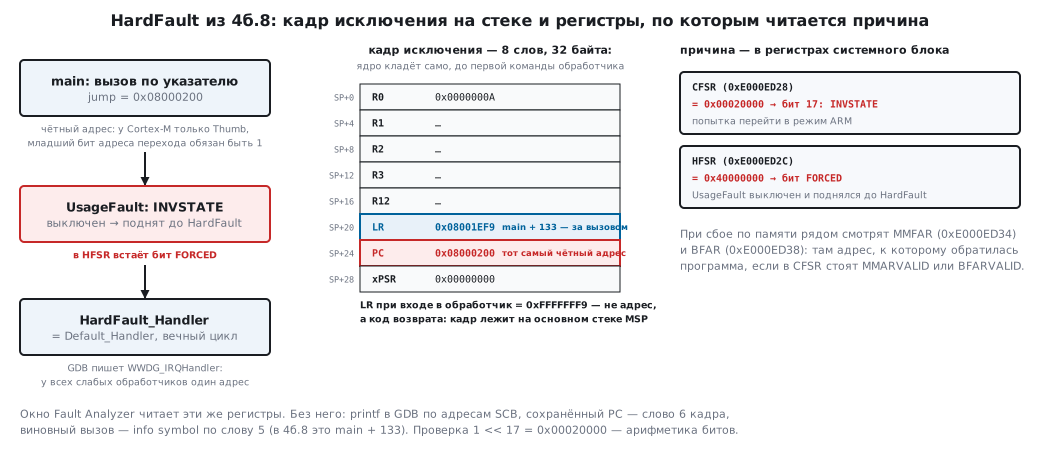
CubeIDE has a Fault Analyzer window, and everything it shows is read from the registers of the system control block. The program deliberately jumps to an even address:
    void (*jump)(void) = (void (*)(void))0x08000200;  /* чётный адрес: у Cortex-M нет режима ARM */
    jump();
The HardFault_Handler in the startup file is a weak alias of the
endless loop Default_Handler, and the debugger stops in it:
Breakpoint 3, WWDG_IRQHandler () at Startup/startup_stm32f407vgtx.s:113
113  b Infinite_Loop
CFSR = 0x00020000
HFSR = 0x40000000
lr 0xfffffff9 -7
кадр: R0 0x0000000a LR 0x08001ef9 PC 0x08000200 xPSR 0x00000000
main + 133 in section .text
Step-by-step analysis:
- Where we are. GDB named the point
WWDG_IRQHandler: all the weak handlers share one address, and the debugger takes the first name. Whether this is a fault is seen from the registers, not from the name. - CFSR (
0xE000ED28) =0x00020000— bit 17, INVSTATE: an attempt to switch to ARM mode. The Cortex-M has only Thumb, and the lowest bit of a branch address must be one. - HFSR (
0xE000ED2C) =0x40000000— the FORCED bit: UsageFault is disabled by default and was escalated to a HardFault. - LR =
0xFFFFFFF9— this is not an address but an exception return code: the frame lies on the main stack MSP. - The exception frame — eight words on the stack: R0–R3, R12, LR, PC, xPSR.
The saved PC is
0x08000200, that very even address. The saved LR0x08001ef9ismain + 133, the line right after the call.
The commands with which this is read:
printf "CFSR = 0x%08x\n", *(unsigned int *)0xE000ED28
printf "HFSR = 0x%08x\n", *(unsigned int *)0xE000ED2C
info symbol ((unsigned int *)$sp)[5]
On a real memory fault, MMFAR (0xE000ED34) and
BFAR (0xE000ED38) are also looked at: they hold the address the program accessed if
the MMARVALID or BFARVALID bits are set in CFSR.
4б.9 Memory and stack: Build Analyzer and .su
The Build Analyzer window is a parsed map file: the memory regions with the fill
percentage (the same line that --print-memory-usage prints) and the size of
each symbol. The Static Stack Analyzer takes the frames from the .su files written
by the -fstack-usage option:
main.c:22:5:__io_putchar 16 static
main.c:30:12:square 16 static
main.c:36:5:main 24 static
sysmem.c:53:7:_sbrk 32 static
syscalls.c:80:27:_write 32 static
This is the frame of one function without its callees: to estimate the stack, the
frames along the deepest call chain are added up. .su does not look inside newlib,
and printf there eats hundreds of bytes of stack. That is why
_Min_Stack_Size = 0x400 is a lower estimate, not a guarantee.
4б.10 SWV, ITM and live variables — only on a board
Part of CubeIDE debugging needs a real core and debugger; it cannot be shown in an emulator:
- Live Expressions — variables are updated while the program runs: the debugger reads memory over SWD on the fly, without stopping the core.
- SWV and ITM — the core sends data over a separate SWO pin:
printfwithout a UART (ITM port 0), interrupt timestamps, variable values on a timer. This needs the SWO pin on the connector, an ST-LINK with SWO and the core frequency in the debug settings; the Cortex-M0 and M0+ have no SWO at all. - Preserving state on a failure — CubeIDE can avoid resetting the core when connecting, so as to analyse a hung program as in 4б.8.
4б.11 Pitfalls
| Symptom | Cause |
|---|---|
printf("%f") prints nothing |
float output is disabled in newlib-nano; -u _printf_float, +13 KB of code |
printf prints nothing at all |
there is no __io_putchar, or the stdout buffer is not flushed — a \n or setvbuf is needed |
| the project does not build after being moved | the sources are linked from .project rather than lying in the folder |
malloc returns 0 although RAM is free |
_sbrk does not hand out memory below _estack − _Min_Stack_Size |
a variable in .ccmram contains garbage |
the CubeIDE startup code neither copies nor zeroes the .ccmram section; put there only what the program fills itself, or add copying from _siccmram to Reset_Handler |
| the debugger stopped in a "wrong" handler | all the weak handlers are one address; look at CFSR and HFSR |
a HardFault right after a jump through a pointer |
an even function address — INVSTATE |
| Release behaves differently from Debug | -Os instead of -O0: undefined behaviour and a forgotten volatile surfaced |
| a watchpoint cannot be set | the DWT has four comparators — remove the extra ones |
| SWV is silent | no SWO on the connector, a wrong core frequency in the settings, or an M0 core |
| the "Open Project" button in CubeMX opens nothing | the .cproject and .project extensions are not associated with CubeIDE — associate them once by hand |
4б.12 Summary
- CubeIDE = Eclipse CDT + GCC + GDB, in versions 1.x also CubeMX (separate from 2.0); everything configurable lies as text in
.cproject. - A project:
.project,.cproject, the.ldscript, the startup file,syscalls.c,sysmem.c. - Debug:
-g3 -O0 -DDEBUG; Release:-Os; bothfpv4-sp-d16, hard float. - The example: Debug 8708 bytes of code, Release 8392; RAM 1688 bytes of 128 KB.
.dataworks from 0x20000000 and is stored after.rodata; the vectors are 98 words = 392 bytes.- newlib-nano: float in
printfis disabled; with it the code is 22 004 bytes instead of 8708. - A HardFault at an even address: CFSR 0x00020000 (INVSTATE), HFSR 0x40000000 (FORCED), PC in the frame 0x08000200.
- The debugger windows are GDB commands, and they can be given without the environment.
Full sources
main.c — a program on top of the CubeIDE project files: printf to USART1, malloc and a deliberate error for HardFault analysis.
/* Раздел 4б: программа поверх файлов проекта STM32CubeIDE — стартовый код, скрипт компоновщика,
 * syscalls.c и sysmem.c взяты из проекта ST без правок. printf идёт через _write → __io_putchar в USART1,
 * malloc — через _sbrk; в конце нарочная ошибка, чтобы разобрать HardFault в отладчике. */
#include <stdint.h>
#include <stdio.h>
#include <stdlib.h>

#define RCC_APB2ENR (*(volatile uint32_t *)0x40023844)
#define USART1_SR   (*(volatile uint32_t *)0x40011000)
#define USART1_DR   (*(volatile uint32_t *)0x40011004)
#define USART1_BRR  (*(volatile uint32_t *)0x40011008)
#define USART1_CR1  (*(volatile uint32_t *)0x4001100C)

extern uint8_t _end;                                  /* конец .bss — начало кучи, из скрипта компоновщика */
int calls;                                            /* .bss — за ней следит точка наблюдения */

void SystemInit(void)                                 /* в настоящем проекте — system_stm32f4xx.c: такты, FPU */
{
    *(uint32_t *)0xE000ED88 |= 0xFu << 20;            /* SCB->CPACR: доступ к FPU, иначе первая же операция с float — сбой */
}

int __io_putchar(int ch)                              /* syscalls.c зовёт её из _write для каждого символа */
{
    while (!(USART1_SR & (1u << 7))) {
    }
    USART1_DR = (uint32_t)ch;
    return ch;
}

static int square(int x)
{
    calls++;
    return x * x;
}

int main(void)
{
    RCC_APB2ENR |= 1u << 4;
    USART1_BRR = 0x008B;
    USART1_CR1 = (1u << 13) | (1u << 3);
    setvbuf(stdout, NULL, _IONBF, 0);                 /* без буфера: каждый printf сразу уходит в _write */

    printf("printf через _write: square(7) = %d\n", square(7));
    char *p = malloc(100);
    printf("malloc(100) = %p, _end = %p\n", (void *)p, (void *)&_end);
    char *big = malloc(200000);                       /* больше всего ОЗУ: _sbrk вернёт отказ */
    printf("malloc(200000) = %p\n", (void *)big);
    printf("calls = %d, float: %.2f\n", calls, 1.5f * 3);
    printf("сейчас будет HardFault\n");

    void (*jump)(void) = (void (*)(void))0x08000200;  /* чётный адрес: у Cortex-M нет режима ARM */
    jump();
    printf("сюда не дойдём\n");
    return 0;
}
Next: section 4в "Building without an environment" — your own Makefile, startup code in C and a linker script from scratch.