 Embedded HandbookApps
22д. Character LCD LCD1602 on the HD44780: 4 bits, initialization, command timing, CGRAM, I²C adapter
Two lines of 16 characters, a green or blue backlight, sixteen pins in a row: the most common text display in hobby and teaching electronics. Inside is an HD44780 controller or a compatible one. In section 22в the microcontroller drove the LCD glass itself; here the controller on the module board does all of that, and the program only sends it commands and character codes. The protocol is simple, but there are three places where everyone stumbles: an initialization that "sometimes works", the execution time of commands, and Cyrillic, which the module does not have. Below: how the module is built, how to connect it with six pins or through an I²C adapter, why the initialization is exactly what it is, and what printing one line costs.
Sources: a common edition of the HD44780U datasheet (Hitachi): the
instruction set, execution times at an oscillator frequency of 270 kHz, bus
timing, the 4-bit initialization sequence, the character table of ROM A00;
the PCF8574 and PCF8574A datasheets (NXP, Texas Instruments): addresses and
bus speed. These documents are not in the project, so their figures are
qualified in the caption at the end. DocID13587 Rev 17 (STM32F103x8/xB):
pins PA4–PA7 are not 5 V tolerant, p. 29; PB6 and PB7 are FT, I2C1_SCL and
I2C1_SDA, p. 32. Every number below comes from the calculation
_verify/lcd22f/ref22f.py (Python 3.11, image stm-lab:1) and from running the
bench sim22f.c with a controller model on a PC (gcc 12.2.0) and in
QEMU 7.2.22 on a Cortex-M3 (arm-none-eabi-gcc 12.2.1).
Terms used in the documentation
Term Meaning character LCD module a text LCD module with its own controller DDRAM (display data RAM) memory holding the character codes on screen CGROM (character generator ROM) the built-in font ROM CGRAM (character generator RAM) RAM for your own characters address counter (AC) the address counter, the cursor position busy flag (BF) the flag that says a command is still running enable (E) the write strobe register select (RS) selects command or data function set, entry mode set bus mode selection, input mode display shift, cursor shift moving the display window, moving the cursor initializing by instruction initialization by commands contrast (VO, VEE) the contrast input backlight the backlight LED I/O expander a port expander chip
22д.1 How the module works: DDRAM, the character generator and CGRAM
The module has three memories. DDRAM holds 80 bytes of character
codes. The screen is a window into it: the LCD1602 shows 16 character
cells in two lines, but a line in memory is longer, 40 cells. The first
line starts at address 0x00, the second at 0x40, not at 0x10: there
is a gap in the addresses between them. On 20×4 displays the four lines
are at addresses 0x00, 0x40, 0x14, 0x54: the third line continues
the first one, the fourth continues the second; the commands that jump to
the start of each line are 80 C0 94 D4.
The character generator (CGROM) is the font ROM: for a code from DDRAM
it outputs a 5×8 dot pattern. Codes 0x20…0x7D match ASCII, except 0x5C, which holds the yen sign.
The upper half of the table depends on the ROM variant, which is fixed in
the chip at manufacture. The most common, A00, is Japanese: it holds
katakana and a few math symbols, and no Cyrillic. Variant A02 is a
European set with some Cyrillic letters; there are modules with compatible
controllers that have full Cyrillic. You cannot tell which ROM your module
has by looking at it: print codes 0xA0…0xFF and see.
CGRAM is 64 bytes for eight characters of your own: eight rows per
character, with the five low bits of each row being five dots. Your own
characters get codes 0…7 (and again 8…15), see 22д.8.
A word about the glass. An LCD must not be kept under a DC voltage (section 22в), and the HD44780 itself drives the segments with alternating, multiplexed signals. The program need not care about this, but it does need to set the contrast (22д.2).
22д.2 Pins and power: contrast, backlight, RW
The sixteen pins of the module:
| Pin | Name | Goes to |
|---|---|---|
| 1 | VSS | 0 V |
| 2 | VDD | +5 V (3.3 V for 3.3 V modules) |
| 3 | VO | contrast: the wiper of a potentiometer between VDD and 0 V |
| 4 | RS | 0 is a command, 1 is data |
| 5 | RW | 0 is write, 1 is read |
| 6 | E | strobe |
| 7–14 | D0–D7 | data; in 4-bit mode only D4–D7 |
| 15, 16 | A, K | backlight anode and cathode |
Contrast. The visibility of the dots is set by the voltage between VDD and VO: the lower VO, the darker the dots. A 10 kΩ potentiometer between +5 V and ground draws 0.5 mA and gives smooth adjustment. The most common trouble with a new module is "it does not work" when it does: with the wiper in a bad position the screen is blank, or the first line is filled with black boxes. Black boxes in the first line with an empty second line also tell you that the controller is alive but not initialized.
The backlight is an LED (or a string of them) between pins 15 and 16. Many modules already have a current-limiting resistor on the board; if not, fit an external resistor based on the current and forward voltage in the datasheet of your module. For example: with a forward voltage of 3.2 V and a current of 15 mA from 5 V, it is 120 Ω and 27 mW in the resistor.
RW to ground. The module can return data (the busy flag, memory contents), but for that the data bus must become an input of the microcontroller, and a 5 V module drives five-volt levels. Pins PA4–PA7 of the F103 are not 5 V tolerant (the DocID13587 pin table does not mark them FT, p. 29). So in this section the module only receives: RW is tied to ground, and the execution time of each command is waited out with a delay (22д.6).
Levels. A 5 V module accepts a logic one from a 3.3 V output: the input threshold of the HD44780 at 5 V is about 2.2 V according to a common edition of the datasheet. But a 5 V module powered from 3.3 V usually gives no contrast: the dots do not get enough voltage. For 3.3 V, use a module designed for 3.3 V.
22д.3 Eight bits and four: the E strobe and latching on the falling edge
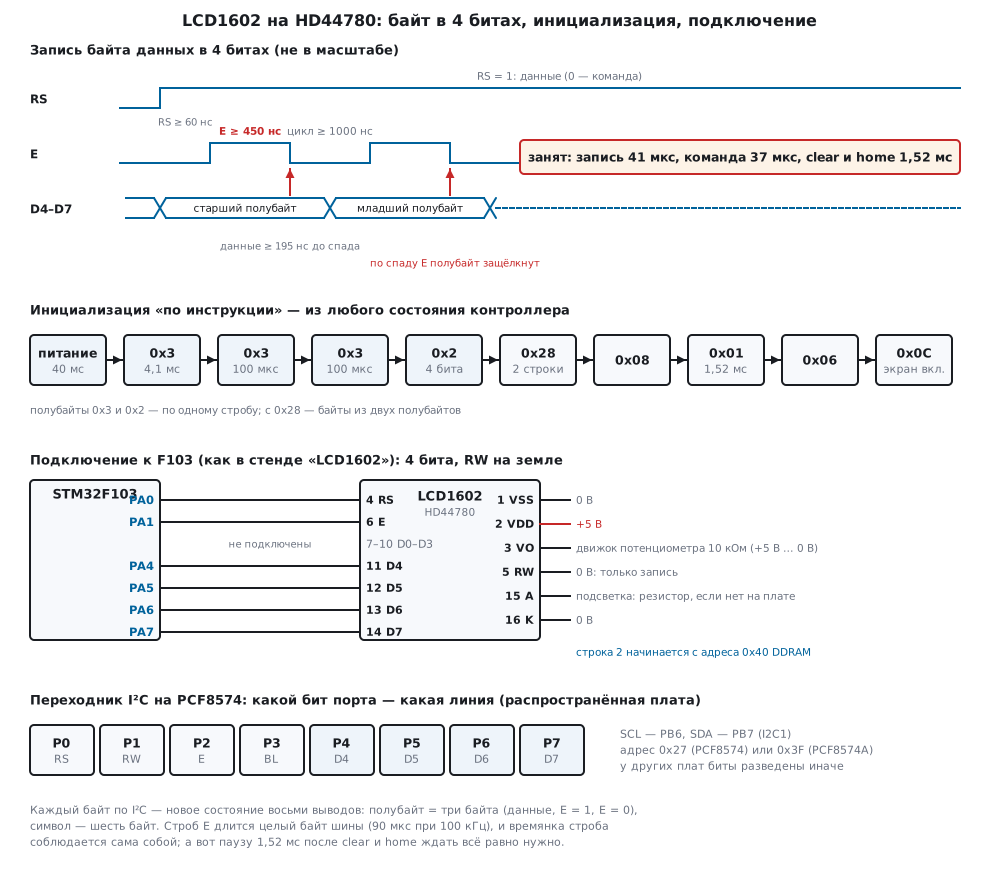
The controller has two bus modes. In 8-bit mode a byte goes over D0–D7 in one strobe: this needs 10 pins (RS, E and eight data lines). In 4-bit mode it goes over D4–D7 in two strobes, the high nibble first, then the low one: 6 pins. Through an I²C adapter, 2 wires (22д.9). Speed hardly suffers: the time is set not by the bus but by the controller executing the command (22д.6).
The write order: set RS and the data, raise E, lower E. The data are latched on the falling edge of E, and by that moment they must be stable. The connection is the same as in the Lab bench: RS on PA0, E on PA1, D4–D7 on PA4–PA7.
The driver of this section knows nothing about registers: the port
function out gets a byte of lines (RS, RW, E, backlight and D4–D7 in the
high bits), and the port decides how to set it, with GPIO pins or with a
byte over I²C:
void lcd_nibble(lcd_port_t *p, uint8_t rs, uint8_t n)
{
    uint8_t bus = (uint8_t)((n & 0x0Fu) << 4) | (rs ? LCD_RS : 0u) | p->bl;
    p->out(p, bus);                         /* RS и данные — раньше строба */
    if (p->e_us)
        p->delay_us(p, p->e_us);
    p->out(p, bus | LCD_E);
    if (p->e_us)
        p->delay_us(p, p->e_us);            /* E в единице: не меньше 450 нс при 3 В */
    p->out(p, bus);                         /* спад E: контроллер защёлкивает полубайт */
}

void lcd_byte(lcd_port_t *p, uint8_t rs, uint8_t v)
{
    lcd_nibble(p, rs, v >> 4);              /* старший полубайт первым */
    lcd_nibble(p, rs, v & 0x0Fu);
    if (p->flush)
        p->flush(p);                        /* I2C: байт для дисплея — одна посылка */
    if (p->byte_us)
        p->delay_us(p, p->byte_us);         /* занят: 37 мкс после команды, 41 после записи */
}
For GPIO the port function is a single write to BSRR (section 8.2): the
upper half resets all six lines, the lower half sets the needed ones, and
if a bit is in both, set wins. So RS, E and D4–D7 change at once, with no
intermediate states:
static void gpio_out(lcd_port_t *p, uint8_t bus)
{
    (void)p;
    uint32_t set = ((bus & LCD_RS) ? 1u : 0u)           /* RS → PA0 */
                 | ((bus & LCD_E) ? 2u : 0u)            /* E  → PA1 */
                 | (bus & 0xF0u);                       /* D4–D7 → PA4–PA7 */
    GPIOA->BSRR = (0xF3u << 16) | set;                  /* сброс и установка одной записью */
}
22д.4 Bus timing: the length of E and data setup
The HD44780 bus is slow by microcontroller standards. According to a common edition of the HD44780U datasheet:
| 5 V supply | 3 V supply | |
|---|---|---|
| RS and RW before the rising edge of E | ≥ 40 ns | ≥ 60 ns |
| E high time | ≥ 230 ns | ≥ 450 ns |
| data before the falling edge of E | ≥ 80 ns | ≥ 195 ns |
| E period (rising edge to rising edge) | ≥ 500 ns | ≥ 1000 ns |
At 72 MHz a CPU clock cycle is 13.9 ns, and a pulse made of two port writes in a row lasts only a few cycles, shorter than the table requires. Hence a common puzzle: the display worked at 8 MHz, and after moving to 72 MHz (section 6) it shows garbage. The driver of this section uses the 3 V values with a margin and does not count cycles: a 1 µs delay before the rising edge of E and a 1 µs strobe. So RS and the data are stable 1000 ns before the rising edge, E is high for 1000 ns, and the E period is 2000 ns. The bench model checks all four conditions on every strobe: 0 violations. Through an I²C adapter these conditions are met by themselves: every change of a line is a whole byte on the bus, 90 µs at 100 kHz and 22.5 µs at 400 kHz.
22д.5 Initialization "by instruction", and why it is done this way
After power is applied, the controller performs an internal reset and ends up in 8-bit mode. Until it is ready, strobes are lost: the datasheet says to wait more than 15 ms after the supply reaches 4.5 V, and more than 40 ms after it reaches 2.7 V. The driver waits 40 ms, which suits both 5 V and 3.3 V.
Then comes the sequence from the datasheet:
void lcd_init(lcd_port_t *p)
{
    p->delay_us(p, 40000u);                 /* 40 мс после подачи питания (при 5 В хватит 15) */
    lcd_nibble_wait(p, 0x3u, 4100u);        /* 0x30 «8 бит» трижды: из любого состояния */
    lcd_nibble_wait(p, 0x3u, 100u);         /* контроллер приходит в 8-битный режим */
    lcd_nibble_wait(p, 0x3u, 100u);
    lcd_nibble_wait(p, 0x2u, 100u);         /* 0x20 в 8 битах: переход на 4 бита */
    lcd_cmd(p, LCD_FUNC_4B_2L);             /* теперь — байтами из двух полубайтов */
    lcd_cmd(p, LCD_DISP_OFF);
    lcd_cmd(p, LCD_CLEAR);
    lcd_cmd(p, LCD_ENTRY_INC);
    lcd_cmd(p, LCD_DISP_ON);
}
In 8-bit mode the D0–D3 pins of the module hang on ground, so a single
nibble 0x3 on D4–D7 is read by the controller as the full byte 0x30,
the "8-bit bus" command. The nibble 0x2 gives 0x20, "4-bit bus", and
from that moment every byte goes as two nibbles. The whole sequence takes
46678 µs, of which 40 ms is the wait for power.
Why three times 0x3, if after power-up a single 0x2 would do?
Because power-up is not the only way to get into lcd_init. The RESET
button, flashing over SWD and the watchdog reset the microcontroller,
while the display stays powered, in 4-bit mode. Worse, the reset may
have come between two nibbles, and the controller already holds the high
nibble and waits for the low one. From such a state a single 0x2 becomes
the wrong half of a byte.
The bench goes through every state of the controller: 8 bits after power-up, 4 bits waiting for the high nibble, and 4 bits with the high nibble already received (16 possible values of it). After the initialization two lines are printed, and the screen is compared with the expected one:
| State at start | 0x3, 0x3, 0x3, 0x2, first pause 4.1 ms |
same, first pause 100 µs | 0x2 only |
|---|---|---|---|
| 8 bits (power just applied) | yes | yes | yes |
| 4 bits, waiting for the high nibble | yes | yes | no |
| 4 bits, high nibble already received | 16 of 16 | 15 of 16 | 14 of 16 |
How the three 0x3 work. If the controller is in 8 bits, each 0x3 is
the harmless command 0x30. If it is in 4 bits waiting for the high
nibble, the first two 0x3 form the byte 0x33, "8 bits", and the third
is already read as 0x30. If the high nibble has already been received,
the first 0x3 completes an unknown byte, and the next two again form
0x33 (and if the completed byte itself happened to be the "8 bits"
command, they are read as 0x30). From any
state, after three strobes the controller is in 8 bits, and 0x2 moves it
to 4 bits predictably.
The 4.1 ms pause after the first 0x3 is not arbitrary either. If the
received high nibble was 0, the first 0x3 forms the byte 0x03, the
"home" command, which takes 1.52 ms. With a 100 µs pause the next 0x3
arrives while the controller is busy, is lost, and everything after it
slips by a nibble: the model shows 9 lost nibbles and remains of the old
text on screen. Hence 15 of 16 in the middle column.
A single 0x2 on a controller waiting for the high nibble works like
this: 0x2 is stored, the next 0x2 from the command 0x28 completes the
byte 0x22, "4 bits, one line", and the nibble 0x8 arrives while
that command runs and is lost. In the model the first line is printed and
the second is not. This bug is treacherous: after power-up everything
works, and it only shows up when the microcontroller alone is reset.
Try it in the app: Lab → bench "LCD1602".
22д.6 Commands, their execution time and the busy flag
| Command | Code | Time at 270 kHz |
|---|---|---|
| clear display (clear) | 0x01 |
1.52 ms |
| cursor home (home) | 0x02 |
1.52 ms |
| entry mode: address increments, no shift | 0x06 |
37 µs |
| display on/off, cursor, blink | 0x08…0x0F |
37 µs |
| cursor or display shift | 0x10…0x1F |
37 µs |
| function set: 4 bits, 2 lines, 5×8 | 0x28 |
37 µs |
| CGRAM address | 0x40 + address |
37 µs |
| DDRAM address | 0x80 + address |
37 µs |
| data write (RS = 1) | character code | 41 µs |
While a command executes, the controller is busy and does not accept new strobes: the nibble is lost, and all bytes after it are built from the wrong halves. The times are given for an internal oscillator frequency of 270 kHz; the oscillator of a real module differs, so the driver waits with a margin: 50 µs after each byte and 2 ms after clear and home. Between the falling edge of E of the last nibble and the falling edge of E of the next one, 52 µs pass, a 27 % margin over 41 µs; 2 ms is a 32 % margin over 1.52 ms.
The bench shortens the pause after a byte: at 39 µs no nibbles are lost yet (39 + 2 = 41 µs), at 38 µs 18 nibbles are lost and the text on screen is wrong. And a clear without the 2 ms pause ruins all the text that follows: 26 nibbles arrive while the controller is erasing its memory, and the screen stays blank.
void lcd_cmd(lcd_port_t *p, uint8_t c)
{
    lcd_byte(p, 0, c);
    if (c == LCD_CLEAR || (c & 0xFEu) == LCD_HOME)
        p->delay_us(p, 2000u);              /* clear и home — 1,52 мс */
}
The busy flag. Instead of a delay you can ask the controller: with RS = 0 and RW = 1 the BF flag appears on D7, and while it is 1, the controller is busy. This is faster (no need to wait for the worst case), but it needs the RW pin and switching D4–D7 to inputs, and a 5 V module drives a five-volt logic one (22д.2). With RW tied to ground the flag cannot be read, so you wait.
22д.7 Cursor address, lines and display shift
Writing a character puts its code at the address in the AC counter and
increments it (mode 0x06). Moving to a position is the command
0x80 | address:
void lcd_goto(lcd_port_t *p, uint8_t row, uint8_t col)
{
    static const uint8_t row_addr[4] = {0x00u, 0x40u, 0x14u, 0x54u};   /* 1602, 1604 и 2004 */
    lcd_cmd(p, (uint8_t)(LCD_DDRAM | (row_addr[row & 3u] + col)));
}
A line does not wrap to the next one: after the 16th character the
writes go into the invisible cells of the same line. The bench writes 20
characters ABCDEFGHIJKLMNOPQRST into the first line: the screen shows the
first 16, the second line is empty, and the address counter is 0x14.
Only on the 41st character does the address jump from 0x27 to 0x40,
and the character appears at the start of the second line.
The invisible part of a line is useful: the command 0x18 moves the
display window left by one cell, and the codes in memory are not
touched. After four shifts, characters 4 to 19 are visible:
EFGHIJKLMNOPQRST. This is how a scrolling line of up to 40 characters is
made without rewriting. The shift acts on both lines at once.
Update the screen without clearing it: clear costs 1.52 ms and gives a visible flicker. Move to the position and rewrite only the characters that changed, padding the number with spaces to its previous width.
22д.8 Your own characters: CGRAM and Cyrillic
A custom character is eight bytes in CGRAM: the command
0x40 + 8·code, then eight data writes, one row per write (the addresses
of characters 0…7 are 40 48 50 58 60 68 70 78). Bit 4 of a row is the
left dot, bit 0 the right one; the eighth row is where the cursor goes,
so it is left empty.
void lcd_glyph(lcd_port_t *p, uint8_t code, const uint8_t rows[8])
{
    lcd_cmd(p, (uint8_t)(LCD_CGRAM | ((code & 7u) << 3)));   /* 8 строк на знак */
    for (uint32_t i = 0; i < 8u; i++)
        lcd_byte(p, 1, rows[i]);
    /* адрес остался в CGRAM: следующая запись испортит знак, пока не будет lcd_goto */
}
After a character is loaded, the address counter points into CGRAM. If you
print text right away without lcd_goto, it goes not to the screen but
into the pattern of the next character: the bench wrote AB, the screen is
blank, and the rows of the character with code 1 got 01 and 02.
Cyrillic. ROM A00 has no Russian letters, and a UTF-8 string prints as
garbage: each Russian letter is two bytes D0 xx or D1 xx, and both map
to Japanese characters. Eight custom characters are not enough for the
whole alphabet, but they are enough for a typical label. The trick: the
letters that look like Latin ones (A V E K M N O R S T U Kh) are printed as
Latin letters, and the rest are drawn. The driver of this section draws
B G D Zh I L P Ya, and lcd_utf8 converts a UTF-8 string into module codes:
static const char lcd_cyr[32] = {
    'A', 8, 'B', 9, 10, 'E', 11, '3', 12, '?', 'K', 13, 'M', 'H', 'O', 14,
    'P', 'C', 'T', 'Y', '?', 'X', '?', '?', '?', '?', '?', '?', 'b', '?', '?', 15,
};
The custom characters use codes 8…15, not 0…7: these are the same CGRAM
characters, but code 0 inside a C string is its end, and lcd_puts stops
there. The string ПРИВЕТ, ДРУГ! ("hello, friend!"), 23 bytes of UTF-8,
turns into 13 codes 0E 50 0C 42 45 54 2C 20 0A 50 59 09 21, and the model
screen shows ПPИBET, ДPYГ! (P, I, D and G are custom characters, the
rest are Latin). ROM A00 already has a degree sign, code 0xDF; the line
ТЕМП. 23,5°C ("temp.") is printed the same way. Letters with no
replacement (F, Y, lowercase) become ?, which is more honest than
garbage. A full alphabet needs a module with another ROM.
22д.9 The PCF8574 I²C adapter
The adapter board soldered onto the module pins is a PCF8574 port expander: eight pins P0–P7 that are set by a byte over I²C. On the common board P0 is RS, P1 is RW, P2 is E, P3 is the backlight (through a transistor), and P4–P7 are D4–D7. This is not a standard: there are boards wired differently, and then a driver with the "usual" table will not bring the screen to life. The bench gave the driver an imaginary table with the halves of the byte swapped, and the controller never left 8-bit mode, the screen stayed blank. Check the wiring of your board with a continuity tester from the PCF8574 pins to the module pins.
Address. The PCF8574 has addresses 0x20…0x27, the PCF8574A has
0x38…0x3F; the three low bits are set by jumpers A0–A2. On most boards the
jumpers are open, and the address is 0x27 or 0x3F, or on the wire,
with the write bit, 0x4E or 0x7E (on the address shift, see section
17.2). If you do not know which chip it is, scan the addresses and see who
answers.
Every byte over I²C is a new state of all eight pins. A nibble is three
bytes: the data, the data with E = 1, the data with E = 0. The character
H (0x48) with the backlight on goes out as six bytes
49 4D 49 89 8D 89. The transfer on I2C1 of the F103 by polling the flags
(set up for 100 kHz, CCR = 180, section 17.3):
static void i2c_flush(lcd_port_t *p)
{
    (void)p;
    if (!i2c_n)
        return;
    I2C1->CR1 |= I2C_CR1_START;
    while (!(I2C1->SR1 & I2C_SR1_SB))
        ;
    I2C1->DR = PCF_ADDR << 1;                           /* 0x4E: адрес и бит записи */
    while (!(I2C1->SR1 & (I2C_SR1_ADDR | I2C_SR1_AF)))
        ;
    if (I2C1->SR1 & I2C_SR1_AF) {                       /* никто не ответил: не тот адрес */
        I2C1->SR1 &= ~I2C_SR1_AF;
        I2C1->CR1 |= I2C_CR1_STOP;
        i2c_nack++;
        i2c_n = 0;
        return;
    }
    (void)I2C1->SR2;                                    /* чтение SR2 снимает ADDR */
    for (uint32_t i = 0; i < i2c_n; i++) {
        while (!(I2C1->SR1 & I2C_SR1_TXE))
            ;
        I2C1->DR = i2c_buf[i];                          /* каждый байт — новое состояние P0…P7 */
    }
    while (!(I2C1->SR1 & I2C_SR1_BTF))
        ;
    I2C1->CR1 |= I2C_CR1_STOP;
    i2c_n = 0;
}
The backlight is also a bit in every byte. The driver keeps it in p->bl
and adds it to every byte: a forgotten bit turns the backlight off on the
very first write. According to its datasheets the PCF8574 is rated for a
100 kHz bus; many boards work at 400 kHz, but that is beyond the document.
Pins PB6 and PB7 of the F103 are 5 V tolerant (FT, p. 32), so an adapter
with pull-ups to 5 V will not harm them; pull-ups on the bus are mandatory
(section 17.1).
22д.10 What one line costs: GPIO versus I²C
A line is an address command plus 16 characters, 17 bytes. Over GPIO the driver spends 4 µs per byte on two nibbles and 50 µs of waiting, 54 µs, and 918 µs per line. By the datasheet the controller needs 693 µs (37 + 16·41); the difference is the margin for oscillator spread.
Over I²C every byte for the display is a transfer of the address and six bytes: 65 clock periods (in the model, start and stop take one period each). No wait after a byte is needed, since the transfer itself is longer than 41 µs:
| Bus | Character | Line (17 bytes) | Initialization | From falling edge of E to the next one | Nibbles lost |
|---|---|---|---|---|---|
| GPIO | 54 µs | 918 µs | 46678 µs | 52 µs | 0 |
| I²C 100 kHz | 650 µs | 11050 µs | 51170 µs | 380 µs | 0 |
| I²C 400 kHz | 162.5 µs | 2762.5 µs | 47592.5 µs | 95 µs | 0 |
| I²C 1000 kHz (outside PCF8574) | 65 µs | 1105 µs | 46877 µs | 38 µs | 10 |
At 1 MHz the transfer is shorter than the write time, and the model loses 10 nibbles: the bus provides the pause only while it is slower than the controller. You can save bytes by setting the data together with the rising edge of E (two bytes per nibble) and sending the whole line in one transfer: 6230 µs at 100 kHz and 1557.5 µs at 400 kHz. But then only 45 µs remain between falling edges of E at 400 kHz, just 4 µs more than the write time, and RS changes together with the rising edge of E, without the required setup. Three bytes per nibble are more reliable.
The CPU. Polling the I²C flags keeps the CPU busy for the whole transfer. If both lines are redrawn 10 times a second, that is 1.8 % of CPU time over GPIO, 22.1 % over I²C at 100 kHz, and 5.5 % at 400 kHz. So redraw only what changed, no more than a few times a second (the eye cannot read faster anyway), and for background work give I²C to interrupts or DMA.
The firmware of this section, fw22f.c, does the initialization, eight
custom characters and two lines in Russian: over GPIO it is 1024 bytes of
code and 16 bytes of data, over I²C 1260 bytes of code, 16 bytes of data
and 16 bytes of .bss.
22д.11 Pitfalls
The screen is blank, or the first line has black boxes. Contrast: turn the potentiometer on VO. Boxes with an empty second line mean the controller is not initialized: check RS, E and D4–D7.
Garbage after reflashing, all fine after a power cycle.
Initialization with a single 0x2: the display stayed in 4 bits. Three
0x3 with pauses of 4.1 ms and 100 µs before 0x2.
Only the first line is visible. Function set 0x20 instead of 0x28,
or a nibble was lost during initialization and the controller built
0x22.
Text disappears or slips after a clear. No 2 ms pause after clear and home.
Garbage at 72 MHz, worked at 8 MHz. The E strobe is shorter than 450 ns, or the data change right at the falling edge. Delays in microseconds, not empty instructions.
Russian text shows Japanese characters. ROM A00 has no Cyrillic, and the string is UTF-8. Custom CGRAM characters and look-alike Latin letters.
Custom characters "melted" after printing text. No lcd_goto after
loading CGRAM: the text went into CGRAM.
A custom character with code 0 cuts the string short. Use codes 8…15.
Text longer than 16 characters does not wrap to the second line. A
line in memory is 40 cells; for the second line use lcd_goto(1, 0).
The I²C adapter is silent. Address 0x3F instead of 0x27 (PCF8574A),
or the address was sent unshifted: on the wire it is 0x4E. A board wired
differently: the pcf_map_t table.
The backlight goes off on the first write. The backlight bit is not added to every PCF8574 byte.
Reading the busy flag killed a pin. A 5 V module drove a logic one onto PA4–PA7, which are not 5 V tolerant. RW to ground, wait with a delay.
22д.12 Summary
- DDRAM is 80 bytes, 40 per line; the LCD1602 lines start at
0x00and0x40, a 2004 adds0x14and0x54. ROM A00 has no Cyrillic. - 4 bits means 6 pins, a nibble is latched on the falling edge of E; at 3 V, E is at least 450 ns long, the period 1000 ns.
- Initialization: 40 ms,
0x3three times with pauses of 4.1 ms and 100 µs, then0x2, from any state; a single0x2after resetting only the MCU gives garbage or one line. - Times: clear and home take 1.52 ms, commands 37 µs, a write 41 µs; the driver waits 2 ms and 50 µs. With RW to ground the busy flag cannot be read.
- A line does not wrap;
0x18moves the window, not the text. - CGRAM: eight 5×8 characters with codes 8…15; after loading,
lcd_goto. - PCF8574: address
0x27or0x3F, the bit wiring differs between boards, a 100 kHz bus; a nibble is three bytes. - A line: 918 µs over GPIO, 11050 µs over I²C at 100 kHz, 2762.5 µs at 400 kHz.
Full sources
lcd22f.h — lines, commands, the port, Cyrillic, PCF8574.
/* lcd22f.h — раздел 22д: символьный ЖК-дисплей на HD44780 в 4 битах, без регистров.
 * Одна логика для двух подключений: выводы GPIO и переходник I2C на PCF8574.
 * Тот же код — в прошивке fw22f.c и в стенде sim22f.c. */
#ifndef LCD22F_H
#define LCD22F_H
#include <stdint.h>

/* ── логические линии: биты байта, который драйвер отдаёт порту ───────── */
#define LCD_RS 0x01u            /* 0 — команда, 1 — данные */
#define LCD_RW 0x02u            /* всегда 0: только запись, RW на земле */
#define LCD_E  0x04u            /* строб: полубайт защёлкивается по спаду */
#define LCD_BL 0x08u            /* подсветка (есть только у переходника I2C) */
/* D4…D7 — биты 4…7 */

/* ── команды ──────────────────────────────────────────────────────────── */
#define LCD_CLEAR      0x01u    /* очистка: 1,52 мс */
#define LCD_HOME       0x02u    /* курсор и сдвиг — в начало: 1,52 мс */
#define LCD_ENTRY_INC  0x06u    /* адрес растёт, экран не сдвигается */
#define LCD_DISP_OFF   0x08u
#define LCD_DISP_ON    0x0Cu    /* экран включён, курсора нет */
#define LCD_SHIFT_L    0x18u    /* окно экрана — на знакоместо влево */
#define LCD_FUNC_4B_2L 0x28u    /* 4 бита, 2 строки, знак 5×8 */
#define LCD_CGRAM      0x40u    /* | адрес CGRAM 0…63 */
#define LCD_DDRAM      0x80u    /* | адрес DDRAM */

typedef struct lcd_port {
    void (*out)(struct lcd_port *p, uint8_t bus);    /* выставить RS, RW, E, BL, D4–D7 */
    void (*flush)(struct lcd_port *p);               /* I2C: отправить накопленное; у GPIO — 0 */
    void (*delay_us)(struct lcd_port *p, uint32_t us);
    uint8_t e_us;       /* пауза до строба и длина строба: GPIO — 1, I2C — 0 (байт по шине дольше) */
    uint8_t byte_us;    /* пауза после байта: GPIO — 50 (команда 37 мкс, запись 41), I2C — 0 */
    uint8_t bl;         /* LCD_BL — подсветка включена */
} lcd_port_t;

void lcd_nibble(lcd_port_t *p, uint8_t rs, uint8_t n);
void lcd_byte(lcd_port_t *p, uint8_t rs, uint8_t v);
void lcd_cmd(lcd_port_t *p, uint8_t c);
void lcd_init(lcd_port_t *p);
void lcd_goto(lcd_port_t *p, uint8_t row, uint8_t col);
void lcd_puts(lcd_port_t *p, const char *s);
void lcd_glyph(lcd_port_t *p, uint8_t code, const uint8_t rows[8]);   /* после неё — lcd_goto */

/* ── кириллица: UTF-8 → коды знакогенератора A00 ──────────────────────── */
extern const uint8_t lcd_cyr_glyph[8][8];           /* Б Г Д Ж И Л П Я — коды 8…15 */
uint32_t lcd_utf8(char *dst, uint32_t max, const char *src);

/* ── PCF8574: какой вывод P0…P7 у каждой логической линии ─────────────── */
typedef struct {
    uint8_t pin[8];     /* для RS, RW, E, BL, D4, D5, D6, D7 */
} pcf_map_t;
extern const pcf_map_t PCF_MAP_COMMON;
uint8_t pcf_byte(const pcf_map_t *m, uint8_t bus);

#endif
lcd22f.c — the register-free driver: the part shared by the firmware and the bench.
/* lcd22f.c — раздел 22д: HD44780 в 4 битах — инициализация, команды, CGRAM, кириллица, PCF8574 (без регистров). */
#include "lcd22f.h"

void lcd_nibble(lcd_port_t *p, uint8_t rs, uint8_t n)
{
    uint8_t bus = (uint8_t)((n & 0x0Fu) << 4) | (rs ? LCD_RS : 0u) | p->bl;
    p->out(p, bus);                         /* RS и данные — раньше строба */
    if (p->e_us)
        p->delay_us(p, p->e_us);
    p->out(p, bus | LCD_E);
    if (p->e_us)
        p->delay_us(p, p->e_us);            /* E в единице: не меньше 450 нс при 3 В */
    p->out(p, bus);                         /* спад E: контроллер защёлкивает полубайт */
}

void lcd_byte(lcd_port_t *p, uint8_t rs, uint8_t v)
{
    lcd_nibble(p, rs, v >> 4);              /* старший полубайт первым */
    lcd_nibble(p, rs, v & 0x0Fu);
    if (p->flush)
        p->flush(p);                        /* I2C: байт для дисплея — одна посылка */
    if (p->byte_us)
        p->delay_us(p, p->byte_us);         /* занят: 37 мкс после команды, 41 после записи */
}

void lcd_cmd(lcd_port_t *p, uint8_t c)
{
    lcd_byte(p, 0, c);
    if (c == LCD_CLEAR || (c & 0xFEu) == LCD_HOME)
        p->delay_us(p, 2000u);              /* clear и home — 1,52 мс */
}

static void lcd_nibble_wait(lcd_port_t *p, uint8_t n, uint32_t us)
{
    lcd_nibble(p, 0, n);
    if (p->flush)
        p->flush(p);
    p->delay_us(p, us);
}

void lcd_init(lcd_port_t *p)
{
    p->delay_us(p, 40000u);                 /* 40 мс после подачи питания (при 5 В хватит 15) */
    lcd_nibble_wait(p, 0x3u, 4100u);        /* 0x30 «8 бит» трижды: из любого состояния */
    lcd_nibble_wait(p, 0x3u, 100u);         /* контроллер приходит в 8-битный режим */
    lcd_nibble_wait(p, 0x3u, 100u);
    lcd_nibble_wait(p, 0x2u, 100u);         /* 0x20 в 8 битах: переход на 4 бита */
    lcd_cmd(p, LCD_FUNC_4B_2L);             /* теперь — байтами из двух полубайтов */
    lcd_cmd(p, LCD_DISP_OFF);
    lcd_cmd(p, LCD_CLEAR);
    lcd_cmd(p, LCD_ENTRY_INC);
    lcd_cmd(p, LCD_DISP_ON);
}

void lcd_goto(lcd_port_t *p, uint8_t row, uint8_t col)
{
    static const uint8_t row_addr[4] = {0x00u, 0x40u, 0x14u, 0x54u};   /* 1602, 1604 и 2004 */
    lcd_cmd(p, (uint8_t)(LCD_DDRAM | (row_addr[row & 3u] + col)));
}

void lcd_puts(lcd_port_t *p, const char *s)
{
    while (*s)
        lcd_byte(p, 1, (uint8_t)*s++);
}

void lcd_glyph(lcd_port_t *p, uint8_t code, const uint8_t rows[8])
{
    lcd_cmd(p, (uint8_t)(LCD_CGRAM | ((code & 7u) << 3)));   /* 8 строк на знак */
    for (uint32_t i = 0; i < 8u; i++)
        lcd_byte(p, 1, rows[i]);
    /* адрес остался в CGRAM: следующая запись испортит знак, пока не будет lcd_goto */
}

/* Б Г Д Ж И Л П Я — строки 5×8, бит 4 — левая точка. В ПЗУ A00 этих букв нет. */
const uint8_t lcd_cyr_glyph[8][8] = {
    {0x1F, 0x10, 0x10, 0x1E, 0x11, 0x11, 0x1E, 0x00},   /* Б */
    {0x1F, 0x10, 0x10, 0x10, 0x10, 0x10, 0x10, 0x00},   /* Г */
    {0x06, 0x0A, 0x0A, 0x0A, 0x0A, 0x1F, 0x11, 0x00},   /* Д */
    {0x15, 0x15, 0x0E, 0x04, 0x0E, 0x15, 0x15, 0x00},   /* Ж */
    {0x11, 0x11, 0x13, 0x15, 0x19, 0x11, 0x11, 0x00},   /* И */
    {0x07, 0x09, 0x09, 0x09, 0x09, 0x09, 0x11, 0x00},   /* Л */
    {0x1F, 0x11, 0x11, 0x11, 0x11, 0x11, 0x11, 0x00},   /* П */
    {0x0F, 0x11, 0x11, 0x0F, 0x05, 0x09, 0x11, 0x00},   /* Я */
};

/* А…Я (U+0410…U+042F): похожая латинская буква, свой знак 8…15 или «?».
 * Коды 8…15 — те же знаки CGRAM, что 0…7, но ноль в строке C — её конец. */
static const char lcd_cyr[32] = {
    'A', 8, 'B', 9, 10, 'E', 11, '3', 12, '?', 'K', 13, 'M', 'H', 'O', 14,
    'P', 'C', 'T', 'Y', '?', 'X', '?', '?', '?', '?', '?', '?', 'b', '?', '?', 15,
};

uint32_t lcd_utf8(char *dst, uint32_t max, const char *src)
{
    const uint8_t *s = (const uint8_t *)src;
    uint32_t n = 0;
    while (*s && n + 1u < max) {
        uint8_t c = *s++;
        if (c < 0x80u) {
            dst[n++] = (char)c;
            continue;
        }
        uint32_t u = 0;
        if ((c & 0xE0u) == 0xC0u && (*s & 0xC0u) == 0x80u)
            u = ((uint32_t)(c & 0x1Fu) << 6) | (*s++ & 0x3Fu);
        while ((*s & 0xC0u) == 0x80u)       /* хвост длинных последовательностей — мимо */
            s++;
        if (u >= 0x410u && u <= 0x42Fu)
            dst[n++] = lcd_cyr[u - 0x410u];
        else if (u == 0x401u)               /* Ё */
            dst[n++] = 'E';
        else if (u == 0xB0u)                /* знак градуса — в ПЗУ A00 код 0xDF */
            dst[n++] = (char)0xDF;
        else
            dst[n++] = '?';
    }
    dst[n] = 0;
    return n;
}

/* Распространённая плата: P0 RS, P1 RW, P2 E, P3 подсветка, P4…P7 — D4…D7. Бывают и другие. */
const pcf_map_t PCF_MAP_COMMON = {{0, 1, 2, 3, 4, 5, 6, 7}};

uint8_t pcf_byte(const pcf_map_t *m, uint8_t bus)
{
    uint8_t v = 0;
    for (uint32_t i = 0; i < 8u; i++)
        if (bus & (1u << i))
            v |= (uint8_t)(1u << m->pin[i]);
    return v;
}
fw22f.c — the STM32F103 firmware: GPIO or PCF8574 on I2C1.
/* fw22f.c — раздел 22д: LCD1602 (HD44780) от STM32F103 (BluePill), 72 МГц.
 * Способ 1 (основной): 4 бита на GPIO — RS PA0, E PA1, D4–D7 PA4–PA7 (как в стенде «LCD1602»), RW на земле.
 * Способ 2 (LCD22F_I2C): переходник на PCF8574 через I2C1 (PB6 — SCL, PB7 — SDA), 100 кГц, адрес 0x27.
 * Тактирование до 72 МГц — как в разделе 6 (здесь не повторяется); задержки — по счётчику тактов DWT. */
#include "stm32f10x.h"
#include "lcd22f.h"

#define CPU_MHZ 72u

static void delay_us(lcd_port_t *p, uint32_t us)
{
    (void)p;
    uint32_t t0 = DWT->CYCCNT;
    while (DWT->CYCCNT - t0 < us * CPU_MHZ)
        ;
}

#ifndef LCD22F_I2C
/* ── способ 1: шесть выводов GPIO ─────────────────────────────────────── */
static void gpio_out(lcd_port_t *p, uint8_t bus)
{
    (void)p;
    uint32_t set = ((bus & LCD_RS) ? 1u : 0u)           /* RS → PA0 */
                 | ((bus & LCD_E) ? 2u : 0u)            /* E  → PA1 */
                 | (bus & 0xF0u);                       /* D4–D7 → PA4–PA7 */
    GPIOA->BSRR = (0xF3u << 16) | set;                  /* сброс и установка одной записью */
}

static lcd_port_t lcd = {gpio_out, 0, delay_us, 1u, 50u, 0u};

static void port_init(void)
{
    RCC->APB2ENR |= RCC_APB2ENR_IOPAEN;
    /* PA0, PA1, PA4–PA7: выход push-pull 2 МГц (MODE = 10, CNF = 00); PA2, PA3 — как после сброса */
    GPIOA->CRL = 0x22224422u;
}
#else
/* ── способ 2: PCF8574 на I2C1 ────────────────────────────────────────── */
#define PCF_ADDR 0x27u                                  /* PCF8574, A2–A0 = 111; у PCF8574A — 0x3F */
static uint8_t i2c_buf[8];
static uint32_t i2c_n;
static volatile uint32_t i2c_nack;                      /* сколько посылок осталось без ответа */

static void i2c_out(lcd_port_t *p, uint8_t bus)
{
    (void)p;
    if (i2c_n < sizeof i2c_buf)
        i2c_buf[i2c_n++] = pcf_byte(&PCF_MAP_COMMON, bus);
}

static void i2c_flush(lcd_port_t *p)
{
    (void)p;
    if (!i2c_n)
        return;
    I2C1->CR1 |= I2C_CR1_START;
    while (!(I2C1->SR1 & I2C_SR1_SB))
        ;
    I2C1->DR = PCF_ADDR << 1;                           /* 0x4E: адрес и бит записи */
    while (!(I2C1->SR1 & (I2C_SR1_ADDR | I2C_SR1_AF)))
        ;
    if (I2C1->SR1 & I2C_SR1_AF) {                       /* никто не ответил: не тот адрес */
        I2C1->SR1 &= ~I2C_SR1_AF;
        I2C1->CR1 |= I2C_CR1_STOP;
        i2c_nack++;
        i2c_n = 0;
        return;
    }
    (void)I2C1->SR2;                                    /* чтение SR2 снимает ADDR */
    for (uint32_t i = 0; i < i2c_n; i++) {
        while (!(I2C1->SR1 & I2C_SR1_TXE))
            ;
        I2C1->DR = i2c_buf[i];                          /* каждый байт — новое состояние P0…P7 */
    }
    while (!(I2C1->SR1 & I2C_SR1_BTF))
        ;
    I2C1->CR1 |= I2C_CR1_STOP;
    i2c_n = 0;
}

static lcd_port_t lcd = {i2c_out, i2c_flush, delay_us, 0u, 0u, LCD_BL};

static void port_init(void)
{
    RCC->APB2ENR |= RCC_APB2ENR_IOPBEN;
    RCC->APB1ENR |= RCC_APB1ENR_I2C1EN;
    /* PB6, PB7: альтернативная функция, открытый сток, 50 МГц (CNF = 11, MODE = 11) */
    GPIOB->CRL = (GPIOB->CRL & ~(0xFFu << 24)) | (0xFFu << 24);
    I2C1->CR2 = 36u;                                    /* APB1 36 МГц */
    I2C1->CCR = 180u;                                   /* 36 МГц / (2 × 100 кГц) */
    I2C1->TRISE = 37u;
    I2C1->CR1 = I2C_CR1_PE;
}
#endif

int main(void)
{
    char s[17];
    CoreDebug->DEMCR |= CoreDebug_DEMCR_TRCENA_Msk;     /* счётчик тактов DWT для задержек */
    DWT->CYCCNT = 0;
    DWT->CTRL |= DWT_CTRL_CYCCNTENA_Msk;
    port_init();
    lcd_init(&lcd);
    for (uint8_t k = 0; k < 8u; k++)
        lcd_glyph(&lcd, k, lcd_cyr_glyph[k]);           /* Б Г Д Ж И Л П Я → коды 8…15 */
    lcd_goto(&lcd, 0, 0);
    lcd_utf8(s, sizeof s, "ПРИВЕТ, ДРУГ!");
    lcd_puts(&lcd, s);
    lcd_goto(&lcd, 1, 0);
    lcd_utf8(s, sizeof s, "ТЕМП. 23,5°C");
    lcd_puts(&lcd, s);
    for (;;)
        ;
}
Next: section 22е "LED display drivers TM1637 and MAX7219: a custom two-wire protocol, SPI words, brightness, a cascade of 8×8 matrices".