 Embedded HandbookApps
22а. A graphical interface on a display: frame buffer, LTDC, DMA2D and touch
The seven-segment display from section 22 shows a number. A display with a touch panel shows an interface: buttons, charts, menus — and here, for the first time, the microcontroller runs not into its peripherals but into memory and bandwidth. A 240×320 frame in 16-bit colour is 153600 bytes, and it has to be redrawn dozens of times a second. This section is about where this frame lives, how it gets onto the glass — over SPI or through the LTDC controller, — how the DMA2D accelerator helps and how a touch panel and a GUI library fit into all this.
The structure of LTDC and DMA2D, the blending formula and the timing example are taken from the
reference manual for F405/407/427/429 (from the Keil pack); the constants and structures are from
HAL 2.17.1; the SPI speed of the F411 is from its datasheet. Buffer sizes, frame times,
timings and blending are recomputed by the program _verify/gui22a/gui_calc.c, built with
gcc on the computer. The check is _verify/gui22a_check.py.
Terms used in the documentation
Term Meaning frame buffer an array of pixels in memory LTDC (LCD-TFT display controller) a controller that itself sends the frame to a parallel RGB display DMA2D (Chrom-ART) two-dimensional DMA: fill, copy, format conversion, blending pixel clock (LCD_CLK) the clock frequency of pixels HSYNC, VSYNC, back porch, front porch sync pulses and the "margins" before and after the active area layer an LTDC layer — up to two, blended from bottom to top PFC (pixel format converter) the pixel format converter CLUT a colour table for indexed formats line offset, pitch how many bytes from the start of one line to the start of the next blending, alpha mixing by transparency tearing a torn frame: half old, half new is shown
22а.1 Two paths to the glass
A display with its own controller. Small TFTs (240×240, 240×320) carry on the board a chip with its own frame memory. The microcontroller sets a window over SPI and sends pixels; after that the display shows them on its own, without the host. A frame memory on the microcontroller is not required — you can draw in pieces. This is the path for the F411, the F103 and any chip with SPI (the bus is section 18, practice is 83.3).
The same display with its own controller also comes with an 8080 parallel bus (8 or 16 bits). It is connected to FSMC/FMC, and to the microcontroller the display becomes external memory: a command and a pixel are writes to one of two addresses. This is done on high-density F103 and on F407, which have no LTDC.
A display without a controller — parallel RGB. A 480×272 or 800×480 panel with a 40-pin ribbon cable stores nothing itself: it needs a continuous supply of pixels with a clock, sync pulses and margins, 60 times a second, like a monitor. This is the job of the LTDC — it reads the frame buffer from memory and drives it onto the pins for as long as it is enabled. The F411 has no such block (it is not in the list of interfaces in the datasheet), it exists on F429/F439, F7 and H7 — and they also have DMA2D.
The path is chosen not by the library but by the screen size: up to 320×240 it is usually SPI, beyond that a parallel bus: 8080 through FSMC to a display with its own controller, or RGB through LTDC to a panel without one, because SPI cannot keep up (22а.3). F469, F769 and H747 also have MIPI DSI — a fast serial interface to panels.
22а.2 The frame buffer: how much memory
| Screen | Format | Bytes |
|---|---|---|
| 240×240 | RGB565, 2 bytes | 115200 |
| 240×320 | RGB565 | 153600 |
| 480×272 | RGB565 | 261120 |
| 480×272 | ARGB8888, 4 bytes | 522240 |
| 800×480 | RGB565 | 768000 |
| 800×480 | ARGB8888 | 1536000 |
For the F411 128 KB of RAM means 131072 bytes: a 240×320 frame does not fit, 240×240 barely fits. The F429 has 256 KB of internal memory, 64 of which are for the core only; a 480×272 frame in 16 bits does not fit there. That is why boards with LTDC carry external SDRAM on the FMC bus (section 41), the frame buffer lives there, and the LTDC reads it over the bus continuously.
When there is no buffer or it is small, drawing is done in stripes: the library renders a rectangle into a small buffer — say, ten lines, — and sends it to the display with its own controller, then the next one. Two such buffers taken in turn let DMA send one while the processor draws the other.
22а.3 A frame over SPI: how long it takes
A 240×320 frame in RGB565 is 1228800 bits. The F411 SPI goes up to 50 Mbit/s (datasheet), but on breadboard wires it does not work above 8–10 MHz (section 18):
| SPI | Frame | Frames per second |
|---|---|---|
| 50 Mbit/s | 24.6 ms | 40.7 |
| 36 Mbit/s | 34.1 ms | 29.3 |
| 25 Mbit/s | 49.2 ms | 20.3 |
| 9 Mbit/s | 136.5 ms | 7.3 |
Hence two rules. First: redraw only what has changed —
GUI libraries keep a list of "dirty" rectangles and send only those
to the display; a digit on a clock changes in fractions of a millisecond, not in 25. Second:
send through DMA, otherwise the processor spends the whole frame time shuffling
bytes and the interface stops responding to touch. And the pitfall from 83.3 has not gone
anywhere: the display expects the high byte first, while a uint16_t is stored in memory low byte
first — either the 16-bit SPI mode or a byte swap.
22а.4 LTDC: a frame like a monitor's
A parallel panel needs not only a stream of pixels but also a "frame" around
every line and every frame — like an analogue monitor: a sync pulse,
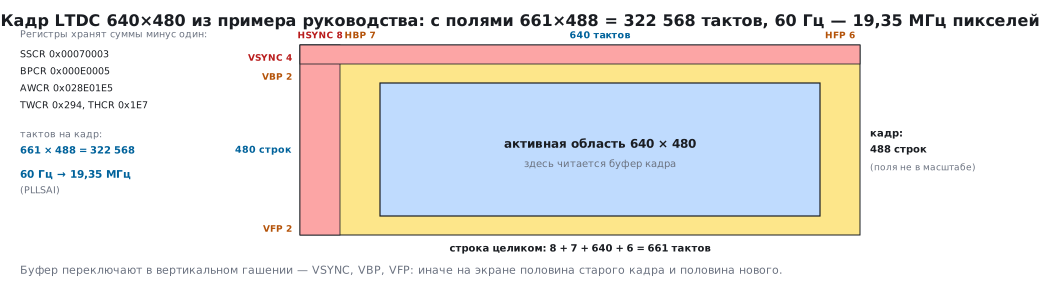
the back porch, the active area, the front porch. The example from the manual for 640×480:
HSYNC 8 clocks, back porch 7, active 640, front porch 6; vertically
VSYNC 4 lines, porch 2, active 480, porch 2. A whole line is 661 clocks, a frame is
488 lines, 322568 clocks per frame; to show 60 frames a second,
the pixel clock must be 19.35 MHz. It is produced by a separate PLL,
PLLSAI.
The registers hold not the porches themselves but accumulated sums minus one — this is more convenient for the counter:
LTDC_SSCR = 0x00070003   HSYNC − 1 = 7,             VSYNC − 1 = 3
LTDC_BPCR = 0x000E0005   HSYNC + HBP − 1 = 14,      VSYNC + VBP − 1 = 5
LTDC_AWCR = 0x028E01E5   … + 640 − 1 = 654,         … + 480 − 1 = 485
LTDC_TWCR = 0x029401E7   … + HFP − 1 = 660,         … + VFP − 1 = 487
As in the other three, the width and height are in one register: in TWCR
the total width is in bits 27:16, the total height in bits 10:0. In the manual's
example and in the figure below the second half is labelled THCR, but
the LTDC has no separate register with that name: right after TWCR, at
offset 0x18, comes GCR.
What the controller can do: two layers blended from bottom to top — first layer 1 with the background colour, then layer 2 with the result; each layer has its own window, its own pixel format (8 formats: ARGB8888, RGB888, RGB565, ARGB1555, ARGB4444, L8, AL44, AL88) and its own 256-entry colour table for indexed formats; transparency is constant or per pixel; a colour key; dithering of the low bits for 18-bit panels. Some registers are shadowed: new values take effect on a reload — immediately or during vertical blanking, so as to switch the frame buffer between two frames rather than in the middle of a line.
The price: the LTDC reads memory continuously. A 480×272 panel in RGB565 at 60 Hz is 15.7 MB/s over the bus; 800×480 in 32 bits is 92.2 MB/s. This stream is on the AHB all the time, and the processor, DMA2D and all other DMAs compete with it; in SDRAM it is the first thing to hit the limit.
22а.5 DMA2D: the processor does not draw
Filling a rectangle, copying a picture, rendering a font — these are thousands of identical memory accesses, and DMA2D does them instead of the core. Four modes:
| Mode | What it does | In HAL |
|---|---|---|
| register → memory | fill a rectangle with a colour | DMA2D_R2M |
| memory → memory | copy a block of pixels | DMA2D_M2M |
| … with format conversion | put an RGB565 picture into an ARGB8888 buffer | DMA2D_M2M_PFC |
| … with conversion and blending | overlay with transparency on a background | DMA2D_M2M_BLEND |
The input formats are the same as for LTDC, plus the pure "transparency" formats A8 and A4:
they have no colour, only alpha, and the colour is set by a register — this is how
fonts are stored: a glyph is a transparency mask, the text colour is a constant. A format without
alpha (RGB565) gets alpha 255 automatically; you can replace it with a constant
or multiply by one.
The main subtlety is the line offset (line offset, in HAL OutputOffset and
InputOffset): DMA2D draws a rectangle of width Width inside a buffer
whose line is longer. The offset is how many pixels to skip at the end of each
line, that is, the buffer width minus the rectangle width. Forget it and you get
a picture that slides diagonally.
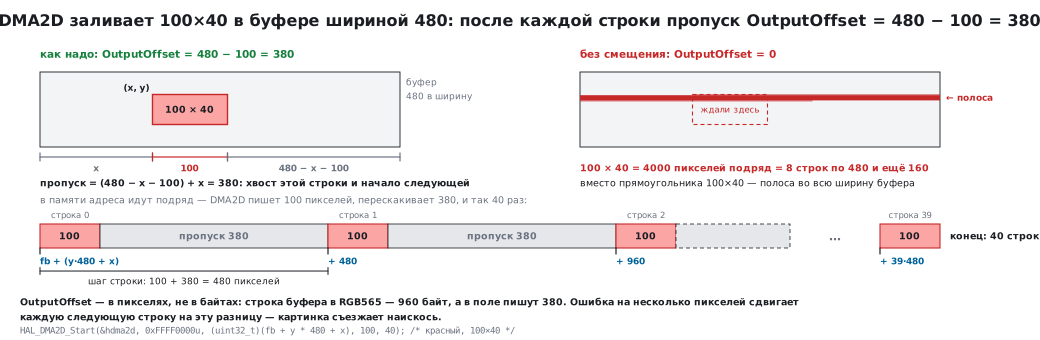
hdma2d.Init.Mode         = DMA2D_R2M;           /* заливка */
hdma2d.Init.ColorMode    = DMA2D_OUTPUT_RGB565;
hdma2d.Init.OutputOffset = 480 - 100;           /* буфер 480 в ширину, прямоугольник 100 */
HAL_DMA2D_Init(&hdma2d);
HAL_DMA2D_Start(&hdma2d, 0xFFFF0000u, (uint32_t)(fb + y * 480 + x), 100, 40);   /* красный, 100×40 */
HAL_DMA2D_PollForTransfer(&hdma2d, 10);
HAL always takes the fill colour in ARGB8888 and converts it to the output
format itself: 0xFFFF0000 becomes 0xF800 for RGB565. You must not pass an RGB565 value
here — HAL will read 0xF800 as green 0xF8 and fill
the rectangle with the colour 0x07C0. The destination address is a uint32_t number,
so the buffer pointer is cast explicitly.
Blending is computed with the formula from the manual: αMult = αFG · αBG / 255,
αOUT = αFG + αBG − αMult, C = (CFG · αFG + CBG · αBG − CBG · αMult) / αOUT
for each of R, G, B. In numbers: a foreground of 200 with alpha 255 over a background of 50
gives 200 (an opaque one covers everything); alpha 0 gives 50 (the background); alpha 128 over
an opaque background gives 125, exactly halfway; two semi-transparent ones (128 and 128) give alpha
192 and colour 150. There is also a "dead time" between DMA2D bus accesses —
a throttle so that the accelerator does not eat the whole bandwidth from the LTDC.
22а.6 Touch: where touches come from
A resistive touch panel is four wires to the ADC: power one pair in turn, measure the voltage on the other — that is a coordinate. Cheap, works with gloves, a single touch, needs calibration.
A capacitive one has a separate controller on the glass, over I²C (section 17): it
computes the touches itself and returns ready coordinates, and the INT pin signals that data
is available. Poll it on the interrupt, not in a loop: while there is no finger, the bus is free.
In both cases the touch coordinates are not screen coordinates: the axes may be flipped or swapped relative to the frame buffer, and the sizes differ. The conversion is one multiplication and one addition per axis, and it is fitted on the very first run using the screen corners. A touch, bounce and "release" turn into events for the library: pressed, dragging, released.
22а.7 The GUI library and what it asks of you
Buttons, lists, fonts and animations are not written by hand — you take a library: a vendor one from the manufacturer or a free one. Any of them wants the same things from the program:
- Where to draw — the whole frame buffer (LTDC) or a stripe buffer (SPI display).
- How to hand over what is drawn — a "rectangle ready" function: for an SPI display this is sending through DMA followed by "done", for LTDC it is switching the layer address during vertical blanking.
- Time — a call once a millisecond, animations and timeouts live on it.
- Input — a "is there a touch and where" function.
Under an RTOS (part IV) rendering goes into a separate task with low priority: better that a frame finishes drawing 10 ms later than that a sensor misses a sample. Touch and communication are higher. Between the tasks there is an event queue, not shared variables (section 27).
22а.8 Pitfalls
| Symptom | Cause |
|---|---|
| colours "drifted", red became blue | RGB565 byte order over SPI (83.3): you need the 16-bit mode or a byte swap |
| the picture slid diagonally | the line offset is not set in DMA2D, or the line length of the LTDC layer |
| a horizontal tear runs across the screen | the buffer changes during output: switch during vertical blanking, use a second buffer |
| the panel flickers or does not sync | wrong pixel clock: compute it from the full sizes with porches, as in 22а.4 |
| the interface is slow on the F411 | the whole frame is redrawn: only changed rectangles and DMA |
| the frame buffer "does not fit" | 240×320 in 16 bits is 153600 bytes, more than 128 KB: stripes or another chip |
| on F7/H7 DMA2D draws stale content | the data cache: clean the lines before DMA2D and invalidate after |
| text without anti-aliasing or with a background | the font was stored as a picture, not as an A8/A4 mask with the colour from a register |
| the touch "presses" in the wrong place | the touch axes do not match the buffer axes — conversion and calibration by the corners |
| touches are lost during animation | the touch panel is polled from the rendering task: a separate task and an interrupt on INT |
| everything became slow after adding LTDC | its 15–90 MB/s stream shares the bus with the rest: SDRAM and DMA2D sit under it |
22а.9 Summary
- Two paths: a display with its own memory — over SPI (F411, F103) or over an 8080 bus through FSMC (high-density F103, F407) — and a parallel panel through LTDC from a frame buffer (F429, F7, H7).
- The buffer: 240×320 RGB565 is 153600 bytes, it does not fit into the 128 KB of the F411; 480×272 is 261120, it lives in SDRAM; without a buffer use stripes and two buffers for DMA.
- SPI: a 240×320 frame takes 24.6 ms at 50 Mbit/s, 136.5 ms at 9; redraw only what changed, and through DMA.
- LTDC: porches around the active area; 640×480 with porches is 322568 clocks, 60 Hz needs 19.35 MHz; the registers hold accumulated sums minus one; two layers, shadow registers, a continuous stream of 15.7–92.2 MB/s over the bus.
- DMA2D: fill, copy, conversion, blending; line offset = buffer width − rectangle width; fonts as A8/A4 masks; the blending formula with the verified numbers 200/50/125/150.
- Touch: resistive on the ADC or capacitive over I²C with an INT pin; axis conversion.
- The library needs a buffer, an output function, a tick and input; rendering is a separate task with low priority.
Next: section 22б "A camera over DCMI: a frame into memory through DMA" — the reverse path: a frame from a camera into memory through DCMI and DMA.