 Embedded HandbookApps
149. Graphics and games in C: SDL2, the game loop, OpenGL
A game is the same kind of real-time program as firmware with a
display (section 22а): poll the input, recompute the state, draw a
frame, and do it sixty times a second. The difference is scale: a million
pixels instead of a thousand, and a graphics card that draws them for
the program. This section is about two layers: SDL2, which gives you a window, input,
sound and simple drawing on any system, and OpenGL, which hands
drawing to the graphics card through shaders. Both programs were run in
stm-sys:1 without a screen: SDL on the dummy driver, OpenGL through
offscreen and the Mesa software rasterizer; the frames were saved as BMP and
checked pixel by pixel (_verify/sys149/).
Terms used in the documentation
Term Meaning game loop the game loop: input → update → frame fixed timestep updating in steps of a fixed length frame rate (FPS), frame time how often frames come and how long one takes renderer, surface, texture the drawing object, a pixel buffer in memory, an image for drawing event an event (a key, the mouse, closing the window) GPU, graphics pipeline the graphics processor, the chain of drawing stages vertex, fragment a corner of a triangle, a fragment (a pixel to be) shader (GLSL) a shader: a program for the graphics card VAO, VBO the description and the buffer of vertices rasterization rasterization: from triangles to pixels software rasterizer (llvmpipe) rasterization in software on the CPU double buffering, vsync drawing into a hidden buffer, synchronization with the display refresh
149.1 What a game is from the program's point of view
    while (SDL_GetTicks() - 0 < 1000 && frames < 100000) {  /* одна секунда игрового времени */
        SDL_Event e; while (SDL_PollEvent(&e)) if (e.type == SDL_QUIT) goto done;   /* 1. ввод */
        Uint32 now = SDL_GetTicks(); lag += now - prev; prev = now;
        while (lag >= STEP_MS) { update(&b, STEP_MS / 1000.0); lag -= STEP_MS; updates++; }   /* 2. догнать физику */
        render(r, &b); frames++;                            /* 3. нарисовать */
        SDL_Delay(1);
    }
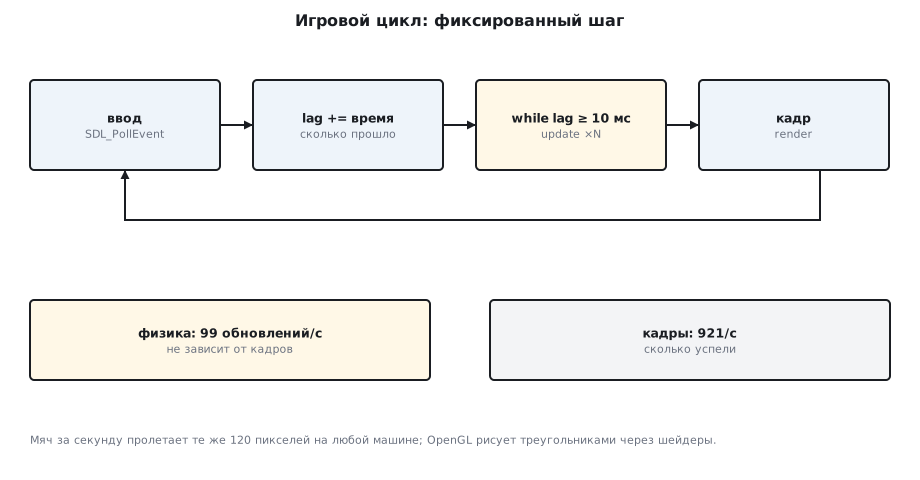
Three steps in the loop — and the main question: what does motion depend on. If
you move the ball by a constant step every frame, the speed of the game depends on the
frame rate: on a fast machine the ball flies faster. If you move it by the frame
time, then on a long frame the ball jumps through the wall. The solution is a
fixed timestep: the physics is computed in 10 ms portions as many times as
needed to catch up with real time (lag), and as many frames are drawn
as there is time for:
SDL 2.26.5, видеодрайвер dummy
за 1 с: обновлений физики 99 (шаг 10 мс), кадров 921; мяч в (169, 139)
в кадре 256 жёлтых пикселей (мяч 16×16 = 256)
99 updates per second with 921 frames: the physics runs at its own pace
regardless of drawing, and on any machine the ball covers the same
120 pixels in a second. update gets dt only from the step, not from the frame:
static void update(struct ball *b, double dt)             /* физика — только от шага, не от кадра */
{
    b->x += b->vx * dt; b->y += b->vy * dt;
    if (b->x < 8 || b->x > W - 8) b->vx = -b->vx;
    if (b->y < 8 || b->y > H - 8) b->vy = -b->vy;
}
A fixed timestep has two traps. The first: if update takes longer than the step
(a slow machine, a stop in the debugger), lag grows faster than the loop
can work it off: the catching-up eats the whole CPU and never catches up.
That is why lag is capped from above — if (lag > 250) lag = 250; — and after
a pause the game simply skips the time. The second: with 921 frames per 99 physics
steps, nine or ten frames in a row draw the same position, and on a
fast screen the motion stutters. Draw an intermediate position instead:
x_prev + (x − x_prev) · lag / STEP_MS, where x_prev is the position before
the last step.
The same principle is used in firmware: a timer gives a tick, processing runs on the tick, and the screen is updated when it can be (section 22а).
149.2 SDL2: a window, input, drawing
SDL hides the operating system: one API for Windows, Linux, macOS,
Android and consoles. SDL_Init, SDL_CreateWindow, SDL_CreateRenderer —
and you have somewhere to draw; events come from SDL_PollEvent in a loop; SDL_GetTicks gives
milliseconds since startup; SDL_Delay yields the CPU.
static void render(SDL_Renderer *r, const struct ball *b)
{
    SDL_SetRenderDrawColor(r, 20, 30, 60, 255); SDL_RenderClear(r);
    SDL_Rect q = { (int)b->x - 8, (int)b->y - 8, 16, 16 };
    SDL_SetRenderDrawColor(r, 250, 200, 40, 255); SDL_RenderFillRect(r, &q);
    SDL_RenderPresent(r);
}
The frame is drawn in a hidden buffer and shown as a whole
(SDL_RenderPresent) — double buffering, no flicker. Without a screen,
SDL can use the dummy driver (the container has x11 wayland KMSDRM
offscreen dummy evdev): everything works, and the frame can be read with
SDL_RenderReadPixels and saved with SDL_SaveBMP. The frame contains exactly 256
pixels of the ball's color — 16 × 16, not one more. This is how a game is checked
automatically, without a person at the screen.
Add-ons: SDL_image — PNG and JPEG, SDL_ttf — fonts, SDL_mixer —
sound, SDL_net — sockets. Ports of classic games and
emulators are built on SDL; it is also used as a layer under OpenGL and Vulkan.
149.3 OpenGL: the pipeline and shaders
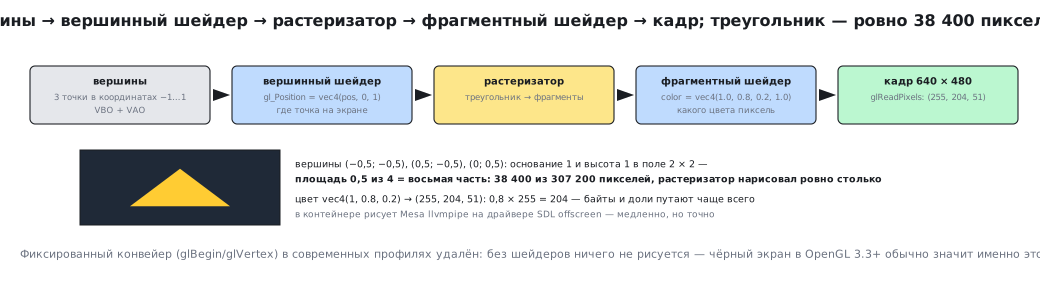
A graphics card does not draw a "ball" — it draws triangles. The program gives it vertices, and the card runs them through the pipeline: the vertex shader decides where a point is on the screen; the rasterizer turns the triangle into fragments; the fragment shader decides the color of each one. Shaders are programs in GLSL, compiled at run time:
static const char *vs_src =
    "#version 330 core\n"
    "layout(location = 0) in vec2 pos;\n"                    /* вершинный шейдер: где точка */
    "void main() { gl_Position = vec4(pos, 0.0, 1.0); }\n";
static const char *fs_src =
    "#version 330 core\n"
    "out vec4 color;\n"                                      /* фрагментный шейдер: какого цвета пиксель */
    "void main() { color = vec4(1.0, 0.8, 0.2, 1.0); }\n";
The vertices are put into a buffer on the graphics card (VBO), and their layout is described (VAO); one command draws:
float tri[] = { -0.5f, -0.5f, 0.5f, -0.5f, 0.0f, 0.5f }; /* три вершины в координатах −1…1 */
glBufferData(GL_ARRAY_BUFFER, sizeof tri, tri, GL_STATIC_DRAW); /* вершины — в память видеокарты */
glUseProgram(prog); glDrawArrays(GL_TRIANGLES, 0, 3); /* конвейер: вершины → растеризация → фрагменты */
The OpenGL context is created by SDL (SDL_GL_CreateContext), and the OpenGL functions
above version 1.1 are loaded by GLEW. There is no graphics card in the container, but there is
Mesa with the llvmpipe software rasterizer, and the SDL offscreen driver
gives it a surface:
OpenGL 4.5 (Core Profile) Mesa 22.3.6, llvmpipe (LLVM 15.0.6, 256 bits)
треугольник: 38400 пикселей цвета (255,204,51) из 307200 (ожидается около 38400)
The frame was read back with glReadPixels: the triangle with vertices
(−0.5, −0.5), (0.5, −0.5), (0, 0.5) covers exactly one eighth of the
640 × 480 screen — 38400 pixels out of 307200, and the rasterizer drew
exactly that many. The color vec4(1.0, 0.8, 0.2) became (255, 204, 51): 0.8 ×
255 = 204.
The fixed pipeline of old OpenGL (glBegin/glVertex) has been removed
from modern profiles: without shaders nothing is drawn. Today, next to
OpenGL there is Vulkan (lower level, more code) and Metal (Apple);
for a game in C it is simpler to take a ready-made engine or SDL with its renderer.
149.4 A whole game
The minimal set: a loop with a fixed timestep, the game state in one
struct, input parsed into events, drawing from the state, sound through
SDL_mixer, a high-score table in a file. Mistakes that repeat from project
to project: physics tied to the frame; drawing inside update; everything in a
two-thousand-line main; SDL_Delay(16) instead of measuring time
(on a slow machine the game slows down, on a fast one it burns the CPU).
Named patterns: the game loop, the component, the state machine (menu →
game → pause), the object pool (section 72 — a pool of nodes) — the same as in
firmware, along with the function tables familiar from section 146.
149.5 Pitfalls
| Symptom | Cause |
|---|---|
| the game is faster on a fast machine | the physics step is tied to the frame — use a fixed timestep |
| the ball flies through the wall | a long frame and one big dt — several steps of 10 ms |
| after a pause the game "freezes" and loads the CPU | lag without an upper bound: the catching-up never catches up |
| motion stutters at high frame rates | the last physics position is drawn instead of an intermediate one by lag / STEP_MS |
| 100 % CPU while idle | no SDL_Delay or vsync |
| the window is "not responding" | SDL_PollEvent is not called every frame |
| a black screen in OpenGL 3.3+ | no shaders: the fixed pipeline has been removed |
glGenVertexArrays — "undefined reference" or a crash |
functions above 1.1 without a loader (GLEW) |
SDL_GL_CreateContext: Invalid window |
the dummy driver cannot do OpenGL — use offscreen |
| the color is wrong | vec4(1.0, 0.8, 0.2) → (255, 204, 51); bytes and fractions get mixed up |
| there is no graphics card in the container | Mesa llvmpipe: slow but exact — good enough for checks |
149.6 Summary
- The game loop: input → update in fixed steps → frame; 99 updates and 921 frames per second, and motion does not depend on the frames.
- SDL2: a window, events, a renderer,
dummywithout a screen; the frame was checked pixel by pixel (256 = 16 × 16). - OpenGL: vertices → vertex shader → rasterization → fragment shader; VAO/VBO; the triangle is exactly 38400 pixels out of 307200.
- Without a graphics card — Mesa
llvmpipethrough SDLoffscreen.
Part XVII is complete.
Full sources
loop_sdl.c — a game loop in SDL2 with a fixed update step.
/* Раздел 149: игровой цикл на SDL2 с фиксированным шагом обновления и рисованием «как успеем»;
   без экрана — драйвер dummy, кадр сохраняется в BMP. Мяч летает и отскакивает от стенок. */
#include <stdio.h>
#include <stdlib.h>
#include <SDL2/SDL.h>

#define W 320
#define H 200
#define STEP_MS 10                                        /* шаг физики: 100 обновлений в секунду */

struct ball { double x, y, vx, vy; };

static void update(struct ball *b, double dt)             /* физика — только от шага, не от кадра */
{
    b->x += b->vx * dt; b->y += b->vy * dt;
    if (b->x < 8 || b->x > W - 8) b->vx = -b->vx;
    if (b->y < 8 || b->y > H - 8) b->vy = -b->vy;
}

static void render(SDL_Renderer *r, const struct ball *b)
{
    SDL_SetRenderDrawColor(r, 20, 30, 60, 255); SDL_RenderClear(r);
    SDL_Rect q = { (int)b->x - 8, (int)b->y - 8, 16, 16 };
    SDL_SetRenderDrawColor(r, 250, 200, 40, 255); SDL_RenderFillRect(r, &q);
    SDL_RenderPresent(r);
}

int main(void)
{
    if (SDL_Init(SDL_INIT_VIDEO) < 0) { printf("SDL_Init: %s\n", SDL_GetError()); return 1; }
    SDL_Window *w = SDL_CreateWindow("ball", 0, 0, W, H, 0);
    SDL_Renderer *r = SDL_CreateRenderer(w, -1, SDL_RENDERER_SOFTWARE);
    printf("SDL %d.%d.%d, видеодрайвер %s\n", SDL_MAJOR_VERSION, SDL_MINOR_VERSION, SDL_PATCHLEVEL, SDL_GetCurrentVideoDriver());
    struct ball b = { 50, 50, 120, 90 };                   /* пикселей в секунду */
    Uint32 prev = SDL_GetTicks(); double lag = 0;
    int frames = 0, updates = 0;
    while (SDL_GetTicks() - 0 < 1000 && frames < 100000) {  /* одна секунда игрового времени */
        SDL_Event e; while (SDL_PollEvent(&e)) if (e.type == SDL_QUIT) goto done;   /* 1. ввод */
        Uint32 now = SDL_GetTicks(); lag += now - prev; prev = now;
        while (lag >= STEP_MS) { update(&b, STEP_MS / 1000.0); lag -= STEP_MS; updates++; }   /* 2. догнать физику */
        render(r, &b); frames++;                            /* 3. нарисовать */
        SDL_Delay(1);
    }
done:
    printf("за 1 с: обновлений физики %d (шаг %d мс), кадров %d; мяч в (%.0f, %.0f)\n", updates, STEP_MS, frames, b.x, b.y);
    SDL_Surface *s = SDL_CreateRGBSurface(0, W, H, 32, 0, 0, 0, 0);
    SDL_RenderReadPixels(r, NULL, s->format->format, s->pixels, s->pitch);
    SDL_SaveBMP(s, "/tmp/frame.bmp");                     /* кадр — в файл, раз экрана нет */
    Uint32 *px = s->pixels; int yellow = 0;
    for (int i = 0; i < W * H; i++) if ((px[i] & 0xffffff) == 0xfac828) yellow++;
    printf("в кадре %d жёлтых пикселей (мяч 16×16 = 256)\n", yellow);
    SDL_FreeSurface(s); SDL_DestroyRenderer(r); SDL_DestroyWindow(w); SDL_Quit();
    return 0;
}
gl_tri.c — a minimal OpenGL program: a window, shaders, a triangle.
/* Раздел 149: минимальная программа OpenGL — окно SDL с контекстом, шейдеры, треугольник.
   Без экрана работает через SDL_VIDEODRIVER=offscreen и программный растеризатор Mesa (llvmpipe). */
#include <stdio.h>
#include <stdlib.h>
#include <SDL2/SDL.h>
#include <GL/glew.h>

static const char *vs_src =
    "#version 330 core\n"
    "layout(location = 0) in vec2 pos;\n"                    /* вершинный шейдер: где точка */
    "void main() { gl_Position = vec4(pos, 0.0, 1.0); }\n";
static const char *fs_src =
    "#version 330 core\n"
    "out vec4 color;\n"                                      /* фрагментный шейдер: какого цвета пиксель */
    "void main() { color = vec4(1.0, 0.8, 0.2, 1.0); }\n";

static GLuint shader(GLenum type, const char *src)
{
    GLuint s = glCreateShader(type);
    glShaderSource(s, 1, &src, NULL); glCompileShader(s);
    GLint ok; glGetShaderiv(s, GL_COMPILE_STATUS, &ok);
    if (!ok) { char log[512]; glGetShaderInfoLog(s, sizeof log, NULL, log); printf("шейдер: %s\n", log); }
    return s;
}

int main(void)
{
    SDL_Init(SDL_INIT_VIDEO);
    SDL_GL_SetAttribute(SDL_GL_CONTEXT_MAJOR_VERSION, 3); SDL_GL_SetAttribute(SDL_GL_CONTEXT_MINOR_VERSION, 3);
    SDL_Window *w = SDL_CreateWindow("gl", 0, 0, 640, 480, SDL_WINDOW_OPENGL);
    SDL_GLContext ctx = SDL_GL_CreateContext(w);
    if (!ctx) { printf("контекст OpenGL: %s\n", SDL_GetError()); return 1; }
    glewInit();
    printf("OpenGL %s, %s\n", glGetString(GL_VERSION), glGetString(GL_RENDERER));
    GLuint prog = glCreateProgram();
    glAttachShader(prog, shader(GL_VERTEX_SHADER, vs_src)); glAttachShader(prog, shader(GL_FRAGMENT_SHADER, fs_src));
    glLinkProgram(prog);
    float tri[] = { -0.5f, -0.5f, 0.5f, -0.5f, 0.0f, 0.5f };  /* три вершины в координатах −1…1 */
    GLuint vao, vbo;
    glGenVertexArrays(1, &vao); glBindVertexArray(vao);
    glGenBuffers(1, &vbo); glBindBuffer(GL_ARRAY_BUFFER, vbo);
    glBufferData(GL_ARRAY_BUFFER, sizeof tri, tri, GL_STATIC_DRAW);   /* вершины — в память видеокарты */
    glEnableVertexAttribArray(0); glVertexAttribPointer(0, 2, GL_FLOAT, GL_FALSE, 0, 0);
    glClearColor(0.1f, 0.1f, 0.2f, 1); glClear(GL_COLOR_BUFFER_BIT);
    glUseProgram(prog); glDrawArrays(GL_TRIANGLES, 0, 3);      /* конвейер: вершины → растеризация → фрагменты */
    SDL_GL_SwapWindow(w);
    unsigned char *px = malloc(640 * 480 * 3);                 /* прочитать кадр обратно из видеопамяти */
    glReadPixels(0, 0, 640, 480, GL_RGB, GL_UNSIGNED_BYTE, px);
    int yellow = 0;
    for (int i = 0; i < 640 * 480; i++) if (px[3 * i] == 255 && px[3 * i + 1] == 204 && px[3 * i + 2] == 51) yellow++;
    printf("треугольник: %d пикселей цвета (255,204,51) из %d (ожидается около %d)\n", yellow, 640 * 480, 640 * 480 / 8);
    SDL_Surface *s = SDL_CreateRGBSurfaceFrom(px, 640, 480, 24, 640 * 3, 0x0000ff, 0x00ff00, 0xff0000, 0);
    SDL_SaveBMP(s, "/tmp/tri.bmp"); SDL_FreeSurface(s); free(px);
    SDL_GL_DeleteContext(ctx); SDL_DestroyWindow(w); SDL_Quit();
    return 0;
}
Next: section 150 "ESP32 as a platform: chip, module, memory, pins, boot".