 Embedded HandbookApps
148. Databases from C: SQLite, PostgreSQL (libpq), Redis (hiredis)
A device that collects data has to store it somewhere, and a file of
lines quickly stops being enough: you need search, selection by date,
the average over an hour, reliability when the power goes off. That is the job of a
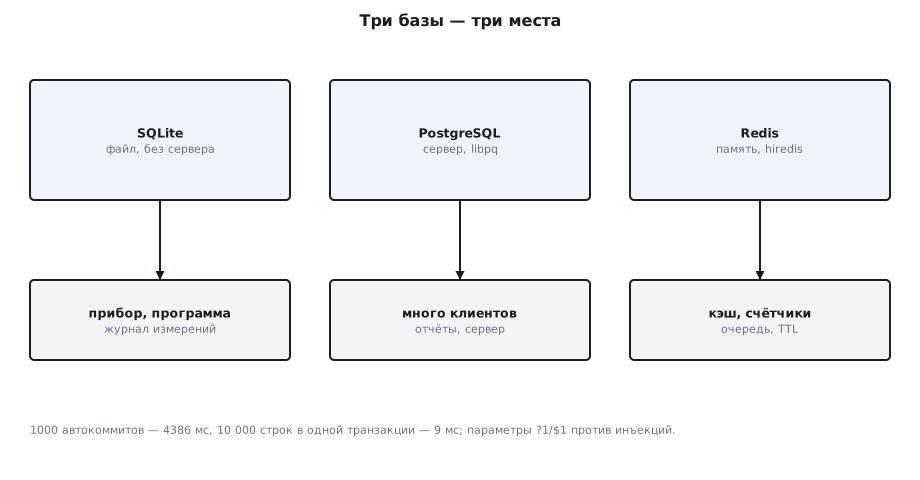
database. Here are three of them, each with its own place: SQLite — a file on the device's
disk with no server; PostgreSQL — a server for many clients; Redis —
fast memory for keys and queues. All three are queried from C in
stm-sys:1 (_verify/sys148/): SQLite right in the container, PostgreSQL and
Redis in neighboring containers on the same network.
All three are written in C, like most DBMSs in general — which in itself says something about the language.
Terms used in the documentation
Term Meaning DBMS database management system table, row, column table, row, column primary key the key that uniquely identifies a row transaction, commit, rollback transaction, confirmation, undo ACID (atomicity, consistency, isolation, durability) all or nothing, valid state, no visible half-done changes, survives power loss prepared statement, bind parameter a query parsed once, a value passed separately SQL injection breaking a query through glued-in text OLTP / OLAP transaction processing / analytics normalization normalization: no repeated data key-value store a "key — value" store TTL (time to live) the lifetime of a key embedded database an embedded database: a library, not a server
148.1 What a database is and why transactions
A relational database is tables of rows and columns linked by keys;
the query language is SQL. The database's promise is ACID: an operation is either performed
completely or not performed at all (atomicity); the data is always in a valid
state (consistency); parallel clients do not see other clients'
unfinished changes (isolation); what has been committed will not be lost even
when the power is cut (durability). The last one is what the database
spends time on: COMMIT waits until the data is on the disk.
OLTP is many short transactions (recording measurements, orders); OLAP is rare heavy queries over the whole data set (reports). For a device it is almost always the first. Normalization is the rule "each fact is stored once": the sensor's name lives in the sensors table, and a measurement refers to it by number instead of repeating the name in every row.
148.2 SQLite: a database in one file
SQLite is not a server but a library: the whole database is one file, and queries are executed inside the process itself. It is the default database for a device, a phone and a desktop program.
if (sqlite3_open("/tmp/meas.db", &db) != SQLITE_OK) { fprintf(stderr, "%s\n", sqlite3_errmsg(db)); return 1; }
Three calls for everything: sqlite3_exec for commands without a result,
sqlite3_prepare_v2 + sqlite3_bind_* + sqlite3_step for queries with
parameters and result rows, and sqlite3_finalize at the end:
sqlite3_prepare_v2(db, "INSERT INTO meas(sensor, value) VALUES(?1, ?2)", -1, &st, NULL); /* разбор один раз */
        sqlite3_bind_text(st, 1, i % 2 ? "temp" : "hum", -1, SQLITE_STATIC);   /* параметры, не склейка строк */
        sqlite3_bind_double(st, 2, 20 + i % 10);
        sqlite3_step(st);
        sqlite3_reset(st);
The query is prepared once; after that only the parameters are substituted
and step/reset are called. The result of a SELECT is read in a
while (sqlite3_step(st) == SQLITE_ROW) loop through sqlite3_column_*:
SQLite 3.40.1
hum   n=5500 avg=24.00 max=28
temp  n=5500 avg=25.00 max=29
ошибка SQL: no such column: nope
файл базы: 380928 байт
An error comes as text through sqlite3_errmsg or through char *err in
sqlite3_exec — it is freed with sqlite3_free. A file with 11000 rows is
380 KB; the sqlite3 command-line utility opens the same file:
sqlite3 /tmp/meas.db "SELECT COUNT(*) FROM meas" → 11000.
148.3 The cost of a transaction
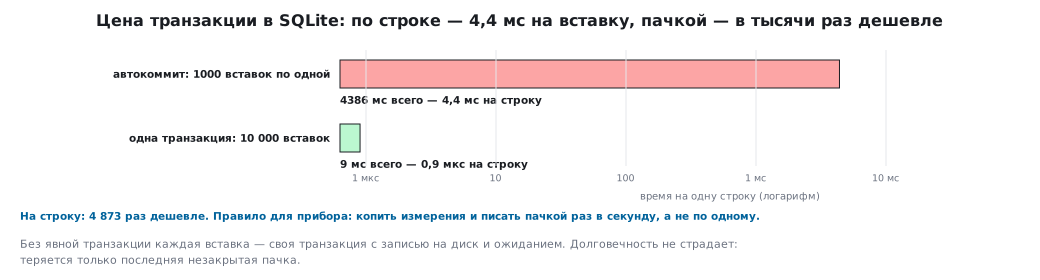
The same insert done two ways:
1000 вставок по одной (автокоммит): 4386 мс
10000 вставок в одной транзакции: 9 мс
Without an explicit transaction, each insert is its own transaction with a write to
disk and a wait: 4.4 ms per row. In one BEGIN …
COMMIT transaction, ten thousand rows went in within 9 ms — thousands of times faster per
row. The rule for a device: accumulate measurements and write them in a batch once a
second, not one at a time. Committed data is not lost this way: when
the power goes, only the batch that has not yet reached
COMMIT is lost — up to a second of measurements.
The second lever is the journal mode. PRAGMA journal_mode=WAL appends
changes to the end of a separate log and moves them into the database later: reading
does not wait for writing, and writing does not wait for reading. With PRAGMA synchronous=NORMAL the log
also does not wait for the storage medium on every transaction. The same 1000 autocommits
in the same container: in WAL about 2.5 s, almost twice as fast; in WAL
with synchronous=NORMAL about 15 ms. The price of the second: the last
transactions before a power loss may be rolled back, but the database itself
stays intact.
148.4 Parameters against injection
Building SQL by gluing strings — "... WHERE sensor = '" + name + "'" —
is forbidden: the name x' OR '1'='1 turns the query into "all rows", and '; DROP
TABLE into a deletion. The parameter ?1 is passed separately from the query
text and is never parsed as SQL:
sqlite3_bind_text(st, 1, "x' OR '1'='1", -1, SQLITE_STATIC);
WHERE sensor = «x' OR '1'='1» через параметр: 0 строк (инъекция не прошла)
The same rule applies in libpq ($1, PQexecParams) and in all other
libraries. It also saves parsing: a query with parameters is prepared
once.
148.5 PostgreSQL: the server and libpq
When there are many clients or the database is on another machine, you need a server.
PostgreSQL is one of the most widespread open-source servers. The client
library in C is libpq; psycopg2 for Python, for example, is built on top of it,
while the Go and Java drivers implement the protocol themselves.
    PGconn *c = PQconnectdb(conn);
    if (PQstatus(c) != CONNECTION_OK) die(c, "connect");
The connection string is host=… user=… password=… dbname=…. Commands go through
PQexec, queries with parameters through PQexecParams with $1, $2; the result is a
PGresult, which must always be freed with PQclear:
r = PQexecParams(c, "INSERT INTO meas(sensor, value) VALUES($1, $2::real)", 2, NULL, vals[i], NULL, NULL, 0); /* $1, $2 — параметры */
libpq 150019, сервер 160014
строк 2, столбцов 3
  1 temp 21.5
  2 hum 40
ошибка: ERROR:  column "nope" does not exist
The versions are numbers: major × 10000 + minor, that is, library 15.19,
server 16.14. The row bad,
inserted between BEGIN and ROLLBACK, is missing from the selection — the rollback
worked. PQntuples/PQnfields give the size of the result, PQgetvalue gives a
cell as a string (there is a separate mode for the binary format). The server
for the experiment is a postgres:16-alpine container, and the client is in a neighboring
container on the same Docker network: host=stm148-pg.
148.6 Redis: keys in memory
Redis keeps everything in RAM and answers in microseconds:
counters, cache, the latest sensor values, message queues.
The hiredis library is one call, redisCommand, with a format like
printf; the answer is a redisReply with a type:
    redisReply *r = redisCommand(c, "SET sensor:temp %s", "21.5");
    printf("SET: %s\n", r->str); freeReplyObject(r);
SET: OK
GET: 21.5
INCR ×3: 3
LRANGE: 3 элементов: a b c
TTL token: 10 с
GET nope: (nil)
redis_version:7.4.10
INCR is an atomic counter, RPUSH/LRANGE is a list (a queue), SET …
EX 10 is a key that disappears after 10 seconds, and GET of a non-existent key returns
REDIS_REPLY_NIL. Keys are usually named with colons:
sensor:temp. Redis's durability is weaker by default — snapshots to
disk once every few minutes; for measurements that must not be lost it is not a replacement for
SQLite but a cache in front of it.
148.7 What to choose
| Task | Database |
|---|---|
| a log of measurements on the device itself, one process | SQLite |
| a desktop program, settings, history | SQLite |
| several devices write to a server, reports, many clients | PostgreSQL |
| latest values, counters, a queue between services | Redis |
| billions of rows over time | PostgreSQL with a time-series extension |
On a microcontroller without an OS there is no database; the closest things are a log in Flash (section 11) and FatFS (section 42). SQLite does not fit on most microcontrollers: even a stripped-down build is hundreds of kilobytes of code (the full library on a computer is 1.4 MB), plus RAM for the page cache. On high-end chips with external memory it is run on top of FatFS through its own file layer (VFS).
148.8 Pitfalls
| Symptom | Cause |
|---|---|
| a thousand inserts take seconds | autocommit on each one; batch them with BEGIN … COMMIT |
no such column / column does not exist |
a typo in the SQL — the error text names the column |
| a query "suddenly" returns everything or deletes a table | string gluing; use only parameters ?1/$1 |
a memory leak in libpq |
PQclear not called on every PGresult |
a leak in hiredis |
freeReplyObject not called |
SQLITE_BUSY |
another process holds the database; retry or use WAL mode |
| the SQLite database got "corrupted" on power-off | a file on a medium without an honest fsync; the default journal is delete |
| Redis lost data after a restart | snapshots once every few minutes; enable AOF or do not keep irreplaceable data there |
libpq-fe.h: No such file |
the headers are in /usr/include/postgresql — -I or pg_config --includedir |
148.9 Summary
- ACID; OLTP for a device; each fact is stored once.
- SQLite:
open,prepare/bind/step/finalize; 11000 rows take 380 KB. - Transactions: 1000 autocommits take 4386 ms, 10000 rows in one take 9 ms.
- WAL: reading does not wait for writing; with
synchronous=NORMAL1000 autocommits take about 15 ms, but the last transactions may be rolled back on a power loss. - Parameters, not gluing: the injection
x' OR '1'='1returned 0 rows. libpq:PQconnectdb,PQexecParamswith$1,PQclear;ROLLBACKrolled back.hiredis:redisCommandwith a format,INCR, lists,EX; a cache, not a store.
Full sources
sqlite_demo.c — SQLite from C: prepared statements, inserting in a transaction, an aggregate, an SQL error.
/* Раздел 148: SQLite из C — таблица измерений, подготовленные запросы с параметрами,
   вставка 10 000 строк по одной и в транзакции, выборка с агрегатом, ошибка SQL. */
#include <stdio.h>
#include <stdlib.h>
#include <time.h>
#include <sqlite3.h>

static double now(void) { struct timespec t; clock_gettime(CLOCK_MONOTONIC, &t); return t.tv_sec + t.tv_nsec / 1e9; }

static void insert_n(sqlite3 *db, int n, int tx)
{
    sqlite3_stmt *st;
    sqlite3_prepare_v2(db, "INSERT INTO meas(sensor, value) VALUES(?1, ?2)", -1, &st, NULL);   /* разбор один раз */
    double t = now();
    if (tx) sqlite3_exec(db, "BEGIN", NULL, NULL, NULL);
    for (int i = 0; i < n; i++) {
        sqlite3_bind_text(st, 1, i % 2 ? "temp" : "hum", -1, SQLITE_STATIC);   /* параметры, не склейка строк */
        sqlite3_bind_double(st, 2, 20 + i % 10);
        sqlite3_step(st);
        sqlite3_reset(st);
    }
    if (tx) sqlite3_exec(db, "COMMIT", NULL, NULL, NULL);
    sqlite3_finalize(st);
    printf("%d вставок %s: %.0f мс\n", n, tx ? "в одной транзакции" : "по одной (автокоммит)", (now() - t) * 1e3);
}

int main(void)
{
    sqlite3 *db;
    remove("/tmp/meas.db");
    if (sqlite3_open("/tmp/meas.db", &db) != SQLITE_OK) { fprintf(stderr, "%s\n", sqlite3_errmsg(db)); return 1; }
    printf("SQLite %s\n", sqlite3_libversion());
    char *err = NULL;
    sqlite3_exec(db, "CREATE TABLE meas(id INTEGER PRIMARY KEY, sensor TEXT NOT NULL, value REAL, "
                     "ts DATETIME DEFAULT CURRENT_TIMESTAMP)", NULL, NULL, &err);
    insert_n(db, 1000, 0);
    insert_n(db, 10000, 1);
    sqlite3_stmt *st;
    sqlite3_prepare_v2(db, "SELECT sensor, COUNT(*), AVG(value), MAX(value) FROM meas GROUP BY sensor ORDER BY sensor", -1, &st, NULL);
    while (sqlite3_step(st) == SQLITE_ROW)
        printf("%-5s n=%d avg=%.2f max=%.0f\n", sqlite3_column_text(st, 0), sqlite3_column_int(st, 1),
               sqlite3_column_double(st, 2), sqlite3_column_double(st, 3));
    sqlite3_finalize(st);
    if (sqlite3_exec(db, "SELECT nope FROM meas", NULL, NULL, &err) != SQLITE_OK) { printf("ошибка SQL: %s\n", err); sqlite3_free(err); }
    /* подстановка: параметр с кавычкой не ломает запрос */
    sqlite3_prepare_v2(db, "SELECT COUNT(*) FROM meas WHERE sensor = ?1", -1, &st, NULL);
    sqlite3_bind_text(st, 1, "x' OR '1'='1", -1, SQLITE_STATIC);
    sqlite3_step(st);
    printf("WHERE sensor = «x' OR '1'='1» через параметр: %d строк (инъекция не прошла)\n", sqlite3_column_int(st, 0));
    sqlite3_finalize(st);
    sqlite3_close(db);
    return 0;
}
pg_demo.c — PostgreSQL through libpq: a parameterized INSERT, a selection, a transaction rollback.
/* Раздел 148: PostgreSQL через libpq — подключение, таблица, параметризованный INSERT,
   выборка, транзакция с откатом. Адрес сервера — в переменной PG_CONN. */
#include <stdio.h>
#include <stdlib.h>
#include <libpq-fe.h>

static void die(PGconn *c, const char *what) { fprintf(stderr, "%s: %s", what, PQerrorMessage(c)); PQfinish(c); exit(1); }

int main(void)
{
    const char *conn = getenv("PG_CONN") ? getenv("PG_CONN") : "host=stm148-pg user=postgres password=pw dbname=postgres";
    PGconn *c = PQconnectdb(conn);
    if (PQstatus(c) != CONNECTION_OK) die(c, "connect");
    printf("libpq %d, сервер %d\n", PQlibVersion(), PQserverVersion(c));
    PGresult *r = PQexec(c, "DROP TABLE IF EXISTS meas; CREATE TABLE meas(id SERIAL PRIMARY KEY, sensor TEXT NOT NULL, value REAL)");
    if (PQresultStatus(r) != PGRES_COMMAND_OK) die(c, "create");
    PQclear(r);
    const char *vals[2][2] = { { "temp", "21.5" }, { "hum", "40" } };
    for (int i = 0; i < 2; i++) {
        r = PQexecParams(c, "INSERT INTO meas(sensor, value) VALUES($1, $2::real)", 2, NULL, vals[i], NULL, NULL, 0);   /* $1, $2 — параметры */
        if (PQresultStatus(r) != PGRES_COMMAND_OK) die(c, "insert");
        PQclear(r);
    }
    r = PQexec(c, "BEGIN"); PQclear(r);
    r = PQexec(c, "INSERT INTO meas(sensor, value) VALUES('bad', 0)"); PQclear(r);
    r = PQexec(c, "ROLLBACK"); PQclear(r);                                        /* откат: строки bad не будет */
    r = PQexec(c, "SELECT id, sensor, value FROM meas ORDER BY id");
    if (PQresultStatus(r) != PGRES_TUPLES_OK) die(c, "select");
    printf("строк %d, столбцов %d\n", PQntuples(r), PQnfields(r));
    for (int i = 0; i < PQntuples(r); i++) printf("  %s %s %s\n", PQgetvalue(r, i, 0), PQgetvalue(r, i, 1), PQgetvalue(r, i, 2));
    PQclear(r);
    r = PQexec(c, "SELECT nope FROM meas");
    printf("ошибка: %s", PQresultErrorMessage(r));
    PQclear(r);
    PQfinish(c);
    return 0;
}
Next: section 149 — graphics and games: SDL2, OpenGL, the game loop.