 Embedded HandbookApps
69. Floating-point numbers
float looks like an ordinary number with a fractional part, but it behaves
differently: its precision is limited, the same calculation done in a different
order gives a different result, and a test for equality works
by chance.
On a microcontroller there is also the question of cost. The Cortex-M4 has a
floating-point unit, but single precision only: it computes a float
in one instruction, while a double goes to a library. A single missing
letter f in a constant silently turns one instruction into three function
calls. The Cortex-M3 has no such unit at all. All of this is visible in the machine code.
Terms used in the documentation
Term Meaning floating point, IEEE 754 floating point, the IEEE 754 standard sign, exponent, mantissa (significand) sign, exponent, mantissa bias the offset added to the exponent normalized, denormal (subnormal) normalized, denormalized machine epsilon machine epsilon ulp (unit in the last place) the step between neighbouring numbers infinity, NaN infinity, "not a number" rounding mode how results are rounded FPU floating-point unit single, double precision single, double precision fixed point, Q15 fixed point, the Q15 format double promotion implicit widening to double
69.1 How a number is stored
A number is stored in normalized form — as in scientific notation, only with base 2:
значение = (−1)^знак × 1,мантисса × 2^(порядок − смещение)
float |
double |
|
|---|---|---|
| total bits | 32 | 64 |
| sign | 1 | 1 |
| exponent | 8, bias 127 | 11, bias 1023 |
| mantissa | 23 (+1 hidden) | 52 (+1 hidden) |
The leading one of the mantissa is not stored: a normalized number always
has it. That is why a float has 24 significant bits with 23 stored.
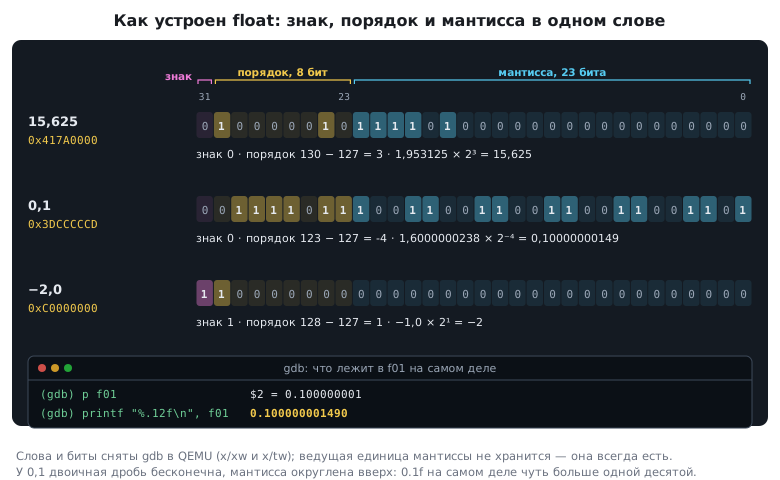
The example from section 63.15: 15.625 = 1111.101₂ = 1.111101 × 2³. Sign 0,
exponent 3 + 127 = 130, mantissa — everything after the binary point. The result is the word
0x417A0000. A few more numbers:
| Number | Word in memory |
|---|---|
| 1.0 | 0x3F800000 |
| −2.0 | 0xC0000000 |
| 0.625 | 0x3F200000 |
| 3.875 | 0x40780000 |
| 64 | 0x42800000 |
| 0.1 | 0x3DCCCCCD |
| 3.14 | 0x4048F5C3 |
| 3.1415926535 | 0x40490FDB |
The row for 0.1 deserves attention. The binary form of 0.1 is infinite, and
the mantissa is cut off with rounding — up. So 0.1f is actually
equal to 0.10000000149…, slightly more than one tenth.
To take any number apart bit by bit, use the "float / Q" tab in the app's calculators: the word in memory, the exponent, the mantissa, what is really stored, and the same number in Q15 and Q16.16 (section 69.9).
69.2 Precision: about seven digits
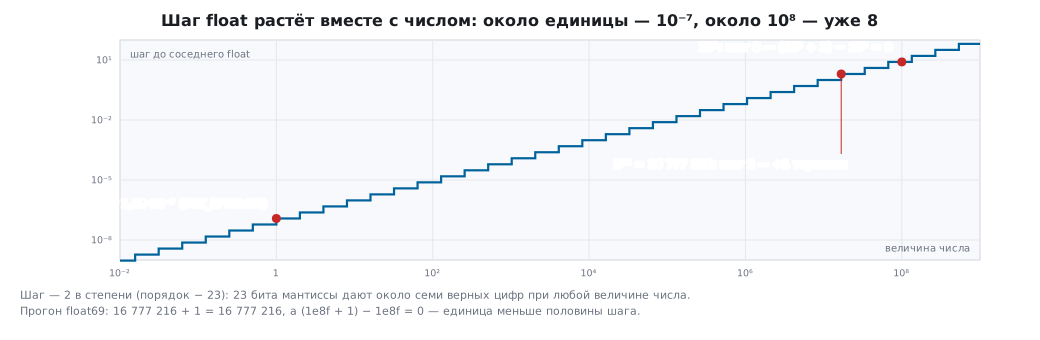
The main characteristic is the step between neighbouring numbers. Near one,
for float it is 1.19·10⁻⁷ — this is FLT_EPSILON, 2⁻²³. For double it is
2.2·10⁻¹⁶.
float |
double |
|
|---|---|---|
| step after 1.0 | 1.19·10⁻⁷ | 2.2·10⁻¹⁶ |
| guaranteed correct decimal digits | 6 | 15 |
| largest | 3.4·10³⁸ | 1.8·10³⁰⁸ |
| smallest normal | 1.18·10⁻³⁸ | 2.2·10⁻³⁰⁸ |
The step grows with the number: the larger the value, the coarser the grid. This leads to two effects that surprise people.
Large integers lose units. A float holds integers exactly only up to
2²⁴ = 16777216. Add one to this number and you get the same number back:
the next representable number is 2 higher. A pulse counter in a float
will one day stop growing.
A small value is lost next to a large one. Near 10⁸, neighbouring float values are
8 apart. So (1e8f + 1.0f) − 1e8f is zero, not one.
When you add up many numbers of different scale, sort them from smaller to
larger — then the small ones have a chance to accumulate.
For double the same effects start much further out — but on the Cortex-M4 it is
expensive (69.6).
69.3 Comparison
Since the numbers are approximate, a test for equality is a lottery:
0.1f + 0.2f == 0.3f     /* истина — совпало случайно */
0.1  + 0.2  == 0.3      /* ложь — в double не совпало */
The same expression gives "equal" in single precision and "not equal"
in double precision. You can trust neither. And 0.1f added ten times
gives 1.000000119, which is not equal to 1.0f at all (section 65.7).
Compare with a tolerance:
if (fabsf(a - b) < 1e-6f)                              /* абсолютный */
if (fabsf(a - b) <= 1e-6f * fmaxf(fabsf(a), fabsf(b))) /* относительный */
An absolute tolerance works when the scale of the numbers is known: voltages,
angles. For quantities that can be both tiny and huge you need a
relative one — otherwise, for large values, the tolerance is smaller than the grid step and
never triggers. A relative tolerance, in turn, does not work near zero: with b = 0
it is zero itself. So usually both are checked:
fabsf(a - b) <= 1e-6f || fabsf(a - b) <= 1e-5f * fmaxf(fabsf(a), fabsf(b)) —
absolute for small values, relative for large ones.
69.4 Infinity and "not a number"
Floating-point arithmetic does not crash on division by zero:
| Expression | Result |
|---|---|
1.0f / 0.0f |
infinity, inf |
0.0f / 0.0f |
"not a number", NaN |
NaN == NaN |
false |
any operation with NaN |
NaN again |
NaN is not equal even to itself — that is why it is tested with the function isnan
(or with the trick x != x). And it is contagious: once it gets into a calculation, it travels
through every formula to the result.
On the chip it looks like this: a sensor returned zero, the division gave
infinity, the controller (section 47) computed NaN from it — and from then on
all its outputs are NaN, and the PWM gets garbage. Nothing crashed, everything just
stopped working. Check the inputs of a formula before dividing, and check the result
with isnan or isfinite before you pass it to the hardware.
Between the smallest normal number and zero there are also denormalized numbers — down to 1.4·10⁻⁴⁵. They exist so that subtracting close numbers does not give a sudden zero.
69.5 Rounding
There are several ways, and they give different results:
| Expression | Result | How it rounds |
|---|---|---|
(int)2.7f, (int)-2.7f |
2, −2 | drops the fraction (section 64.7) |
roundf(2.5f) |
3 | half away from zero |
rintf(2.5f) |
2 | half to even |
roundf(-2.7f) |
−3 | to the nearest |
(int)(-2.7f + 0.5f) |
−2 | the "add one half" trick breaks on negative numbers |
Round-half-to-even is the default mode of the arithmetic itself: when values accumulate, it does not drift systematically in one direction.
About the cost: the cast (int)x on the Cortex-M4 is one instruction, while roundf is
a library function call.
69.6 The Cortex-M4 FPU: what it can do
This is what the compiler makes of simple functions on a Cortex-M4 with a floating-point unit:
| Operation | Machine code |
|---|---|
a * b, float |
vmul.f32 — one instruction |
a / b, float |
vdiv.f32 |
sqrtf(x) |
vsqrt.f32; with GCC only with -fno-math-errno, otherwise a check and a fallback call are added |
fabsf(x) |
vabs.f32 |
x < y |
vcmp.f32 and a flag transfer with vmrs |
(int)x |
vcvt.s32.f32 |
a * b, double |
a call to __aeabi_dmul |
roundf(x) |
a library call |
The M4 FPU is single precision only. Every operation on a double is
a call to a software function, tens of times slower (section 3.1). The Cortex-M7
in the H7 and F76x/F77x has a double-precision unit, and there double is also instructions; the F74x/F75x
and the Cortex-M33 (U5, L5) again have only float. What exactly the chip has, the code
can learn from the bits of the predefined name __ARM_FP (section 77.2).
The Cortex-M3 has no such unit at all, and even a float is multiplied by the library function
__aeabi_fmul. On the F103, floating-point arithmetic is always done in software, and
this is the main argument for fixed point (69.9).
69.7 The invisible double
Three places where a double appears without your knowledge:
A constant without a suffix.
float scale(float x)  { return x * 0.1;  }   /* 0.1 — это double */
float scalef(float x) { return x * 0.1f; }
On the Cortex-M4 the first function is three library calls: widen
x to double, multiply in double, narrow back. The second is one
vmul.f32 instruction. The difference is one letter.
Sometimes the compiler helps on its own. If the constant is exactly representable as a float
— 1.5, 0.5, 3.0 — and the result is again a float, it is allowed to compute it
in one instruction: the answer is the same down to the bit. With 0.1 this is not possible — as a float
it is a different number, and the multiplication stays in double. This is what both
compilers do with the same file for a Cortex-M4 with FPU:
float x, expression |
GCC -O0 |
GCC -O2 |
GCC -O2 -fsingle-precision-constant |
armclang -O0 |
armclang -O2 |
|---|---|---|---|---|---|
x * 1.5 |
FPU | FPU | FPU | library | FPU |
x / 3.0 |
FPU | FPU | FPU | library | FPU |
x * 0.1 |
library | library | FPU | library | library |
sin(x) |
double |
double |
double |
double |
double |
The GCC option -fsingle-precision-constant makes all constants without a
suffix float, but it acts on the whole file — including where double precision was needed:
with it, double y = x * 1.5 is computed in float and only then widened.
armclang does not know this option and skips it with a warning. The option does not
touch functions at all: sin(x) with float x is a widening, sin in double and
a narrowing; you need sinf(x). So the rule stays the same — the suffix f on every
floating-point constant.
Assigning or returning a double. double y = x; with float x is
a call to __aeabi_f2d.
printf with a float. Functions with a variable number of arguments receive
a float widened to double — that is the language rule. printf("%f", x)
with float x also calls __aeabi_f2d, and nothing can be done about it:
%f accepts only double.
Worst of all, the compiler stays silent — even with -Wall -Wextra. All
three places are found only by the option -Wdouble-promotion. In a project for the M4 it is
worth enabling from day one, together with the habit of writing f in every
floating-point constant.
69.8 The FPU has to be enabled
After reset the floating-point unit is disabled. It is enabled by
a write to the SCB->CPACR register — full access for coprocessors 10 and 11:
SCB->CPACR |= (3UL << 10 * 2) | (3UL << 11 * 2); /* 0x00F00000 */
Usually you do not see this: the line sits in SystemInit in the F4 system file
and runs before main. But only if the chip has an FPU and the
project is built with it: the options -mfpu=fpv4-sp-d16 and -mfloat-abi=hard or
softfp (section 77.3), in Keil — the FPU choice in the target settings. Then
__FPU_USED equals 1; otherwise the condition is false and the line is skipped. In your own
startup code, put __DSB(); __ISB(); after the write to CPACR: before them,
a floating-point instruction may not yet see the unit as enabled.
float in an interrupt is allowed on the M4. If the interrupted code used the FPU,
the core on entry also reserves room on the stack for its registers: the frame grows from 32
to 104 bytes. The core saves them lazily — only when the handler itself executes
a floating-point instruction. Size task and interrupt stacks with this margin (7а.4).
If the FPU is not enabled and the code contains a floating-point instruction,
the processor goes into a fault: in the fault status register the
NOCP bit, bit nineteen, is set — "no coprocessor" (section 35.2).
A typical case is your own startup code without SystemInit, or a floating-point
operation that runs before it.
69.9 Fixed point
If there is no FPU or predictability matters, fractional quantities are stored as integers with a known scale (section 3.1).
The scale is a convenient unit. The ADC voltage in millivolts instead of volts:
int mv_i = adc * 3300 / 4095;                   /* целые */
int mv_f = (int)(adc * 3.3f / 4095.0f * 1000);  /* через float */
For codes 0, 2048 and 4095 both lines give the same thing: 0, 1650 and
3300 mV. But the integer version needs no library even on the Cortex-M3, and
no divide instruction either — the compiler replaced the division by the constant 4095 with
a multiplication by its reciprocal. The product 4095 × 3300 = 13513500
easily fits in 32 bits. The conversion formula is in section 14.1.
The Q15 format is the standard for digital signal processing: a number
is stored in an int16_t and means n / 32768. The range is from −1 to
0.99997. Multiplication is an integer multiplication and a shift:
int16_t q15_mul(int16_t a, int16_t b) { return (int16_t)(((int32_t)a * b) >> 15); }
/* 0,5 × 0,5: 16384 × 16384 >> 15 = 8192, то есть 0,25 */
One pair breaks this formula: −1 × −1. The product 32768 does not fit in an int16_t
and becomes −32768 — minus times minus gave minus one.
In filters and controllers working at full scale this pair does occur, so
the result is clamped:
int16_t q15_mul_sat(int16_t a, int16_t b)
{
    int32_t p = ((int32_t)a * b) >> 15;
    return p > 32767 ? 32767 : (int16_t)p;      /* за край выходит только −1 × −1 */
}
On the Cortex-M3 and M4 the same is done by the saturation instruction SSAT — in C
__SSAT(p, 16); the Q15 functions of the CMSIS-DSP library also use it
to clamp their results (section 81а).
The Q16.16 format — when a quantity has an integer part: the number is stored in
an int32_t, the upper 16 bits are the integer part, the lower ones the fractional part, the value is
n / 65536. The range is from −32768 to 32767.99998, the step is 0.0000153.
Addition and subtraction use ordinary integer instructions; multiplication and division
need a 64-bit intermediate:
typedef int32_t q16_t;
#define Q16(x) ((q16_t)((x) * 65536.0))

static q16_t q16_mul(q16_t a, q16_t b) { return (q16_t)(((int64_t)a * b) >> 16); }
static q16_t q16_div(q16_t a, q16_t b) { return (q16_t)(((int64_t)a << 16) / b); }
In the experiment, 3.3 is written as 216268: the conversion drops the fraction
of a step, and 3.29999 is stored. Multiplying by 1.5 gives 4.949982, dividing gives
2.199982. The intermediate product 216268 × 98304 = 21260009472 does not
fit in 32 bits, and without the cast to int64_t the result would be
garbage — this is signed overflow, that is, undefined
behaviour.
On the Cortex-M4 a Q16.16 multiplication costs three instructions: SMULL gives
the 64-bit product, two shifts assemble the 32 bits you need. There is no hardware division of
64 by 32 bits — the compiler calls the library function
__aeabi_ldivmod. So in fast loops you divide in advance: multiply by
a reciprocal computed once.
Fixed point makes you think about overflow and scale, but in return the result is the same on any chip, and the speed does not depend on whether there is an FPU.
69.10 Pitfalls
The calculation on the M4 is slow, although there is an FPU. There is a double somewhere: a constant
without f, a double variable, a double return value. The option
-Wdouble-promotion will find it.
printf("%f") pulls in the double library. That is how functions with a
variable number of arguments work.
A == comparison works sometimes and sometimes not. Equality of floating-point numbers is a matter
of chance; you need a tolerance.
The tolerance does not trigger on large values. The absolute tolerance is smaller than the grid step; you need a relative one.
A counter in a float stopped growing. After 16777216 a unit is lost.
The sum of many small numbers came out smaller than expected. The small ones were lost against the large accumulated value.
The controller outputs NaN. A division by zero somewhere at the start of the formula;
the NaN travelled all the way to the output.
(int)(x + 0.5f) rounds negative numbers wrongly. You need
roundf.
The program crashes on the first floating-point operation. The FPU is not enabled:
the NOCP bit in the fault register.
On the F103 a floating-point calculation is tens of times slower than on the F407. The Cortex-M3 has no FPU: everything is done in software.
69.11 Summary
- A
floatis 1 sign bit, 8 exponent bits with a bias of 127, and 23 mantissa bits plus a hidden one; 15.625 is0x417A0000. - The grid step near one is 1.19·10⁻⁷, about seven correct digits; the step grows with the number: after 16777216 units are lost, near 10⁸ the step is 8.
- Equality of floating-point numbers is a matter of chance:
0.1f + 0.2f == 0.3fis true,0.1 + 0.2 == 0.3is false. Compare with a tolerance. - Division by zero gives infinity or
NaN;NaNis not equal to itself and contaminates calculations. roundf(2.5f)is 3,rintf(2.5f)is 2, and the trick of adding one half breaks on negative numbers.- The Cortex-M4 FPU computes a
floatin one instruction and adoublein a library; the M3 has no FPU. - A constant without
fturns one instruction into three calls; the compiler stays silent,-Wdouble-promotionfinds it. - The FPU is enabled in
SystemInitby writing0x00F00000toSCB->CPACR; without this you get a fault with theNOCPbit. - Fixed point means integers with a scale: millivolts, hundredths of a degree, Q15.
Full sources
q1616.c — the Q16.16 format: multiplication and division.
/* Подраздел 69.9: формат Q16.16 — старшие 16 бит целая часть, младшие 16 дробная.
 * Значения печатаются на компьютере и на ARM (qemu-arm); во что компилируются
 * умножение и деление для Cortex-M4 — смотрит q16_ops.c. */
#include <stdint.h>
#include <stdio.h>

typedef int32_t q16_t;
#define Q16(x) ((q16_t)((x) * 65536.0))

static q16_t q16_mul(q16_t a, q16_t b) { return (q16_t)(((int64_t)a * b) >> 16); }
static q16_t q16_div(q16_t a, q16_t b) { return (q16_t)(((int64_t)a << 16) / b); }

int main(void)
{
    q16_t v = Q16(3.3), k = Q16(1.5);
    q16_t p = q16_mul(v, k), d = q16_div(v, k);
    printf("v=%ld k=%ld\n", (long)v, (long)k);
    printf("mul=%ld val=%.6f\n", (long)p, p / 65536.0);
    printf("div=%ld val=%.6f\n", (long)d, d / 65536.0);
    printf("step=%.9f max=%.5f\n", 1 / 65536.0, 2147483647 / 65536.0);
    long long wide = (long long)v * k;
    printf("wide=%lld fits32=%d\n", wide, wide <= 2147483647LL);
    printf("done=1\n");
    return 0;
}
Next: section 70 "Structures and files".