 Embedded HandbookApps
68. Arrays and strings
An array is several values of the same type stored one after another. A string in C is the same kind of array of characters, with a zero at the end. The language has no other "string", and almost all string bugs follow from the fact that it is just an array.
On a microcontroller arrays raise a question nobody asks on a
computer: where they are stored. A single word, const, decides whether
a table takes space only in Flash or also in RAM, of which there is
tens of times less. This was measured on real object files.
Terms used in the documentation
Term Meaning array, element, index a run of values, one value, its number initializer list the list of initial values designated initializer an initial value given with its index out-of-bounds access access past the end of an array variable-length array (VLA) an array sized at run time row-major order rows stored one after another null-terminated string a string ending in a zero byte string literal a string constant in the source buffer overflow writing past the end of a buffer truncation cutting off what does not fit scan set a set of characters in scanfchecksum, CRC a check value, a cyclic redundancy code
68.1 An array: identical elements in a row
int a[5];                   /* пять int подряд: a[0] … a[4] */
float t[24];                /* температура по часам */
Indices start at zero, and the last one is one less than the size. All
elements sit back to back, and a[i] is *(a + i) (section 67.4).
The number of elements is computed like this:
#define COUNT(arr) (sizeof(arr) / sizeof((arr)[0]))
This works as long as arr is a real array. An array passed to a function
becomes a pointer, and there the formula gives a wrong answer (section 67.5).
The size of an array must be known at compile time: a number or a
#define. A variable will not do — except in the case described in 68.5.
68.2 Initial values
int x[5] = {7, 5};          /* 7 5 0 0 0 — недостающие становятся нулями */
int z[100] = {0};           /* все сто — нули */
static const int lut[5] = {[3] = 9};   /* 0 0 0 9 0 — задан только четвёртый */
The rule is simple: if at least one element is given, all the others are zeros.
The [3] = 9 form is handy for tables where the index is a command or
state number: you can see which number maps to what.
Without initial values it works as for any variable (section 64.1):
a local array contains garbage, a global or static one contains zeros.
Zeroing an array later is a separate task: = {0} works only
in the declaration. Afterwards you use memset(a, 0, sizeof a) or a loop — and
they are the same thing: the compiler turns both the zeroing loop and memset into
one and the same call to the library function __aeabi_memclr4.
68.3 Where an array lives on the chip
This is what happens to the same 256-byte array depending on its declaration — according to the section sizes of the object file:
| Declaration | Flash | RAM |
|---|---|---|
const unsigned char table[256] = {1}; |
256 | 0 |
unsigned char table[256] = {1}; |
256 | 256 |
unsigned char zeros[256]; |
0 | 256 |
| local array in a function | 0 | 256 on the stack while the function runs |
The second row is the most expensive. An array without const but with initial
values takes space twice: the image of the initial values sits in
Flash and is copied to RAM at startup (section 11.2). A font,
sine or command table declared without const is kilobytes of RAM
spent on nothing. Hence the rule from section 3.6: everything that does not
change is const.
The third row is cheaper: an array of zeros is not stored in Flash at all, the startup code simply zeroes the required RAM area.
The fourth is about the stack. A large local array eats stack on every
call (section 66.7), so kilobyte buffers are made static or
global.
68.4 Going out of bounds
Nobody checks the index. a[5] on a five-element array
reads or writes whatever follows in memory — usually a neighbouring
variable:
int a[5];
int n = 1;
a[n - 2] = 3;       /* a[-1]: запись перед началом массива */
a[5] = 100;         /* запись после конца */
The compiler notices an out-of-bounds access only when the index is a constant:
for a[5] it warns without any flags — "array index 5 is past the
end of the array". An index taken from a variable is not checked at all.
On a computer such a bug sometimes crashes the program; on the chip almost never — there is simply other data after the array, and it is silently corrupted. It shows up as "a variable changes by itself" — in a place that has nothing to do with the bug.
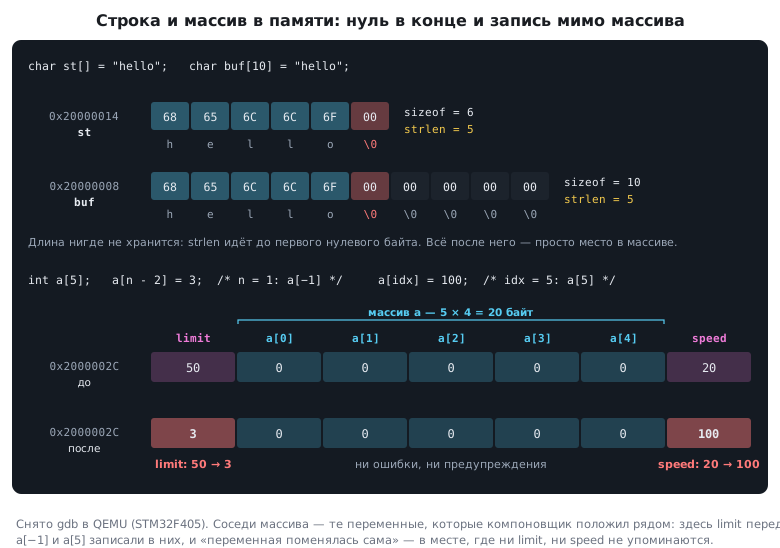
The protection is discipline: keep the size next to the array, check the index at the function entry, and always limit the length when receiving data.
68.5 Variable-length arrays
The C99 standard allows a local array whose size is known only at run time:
void process(int n)
{
    int buf[n];         /* размер — значение n */
    ...
}
On a computer this is convenient. On a microcontroller it is dangerous: the array goes on the stack, and how much stack is needed depends on the data. Neither you nor the linker can compute that in advance (section 66.7).
The compiler accepts such an array silently — even with -Wall -Wextra.
Only the separate flag -Wvla warns about it, and in microcontroller
projects it is worth enabling. The right replacement is an array of the
maximum size plus a separate variable with the number of elements
in use.
68.6 Common operations
Take int a[6] = {5, 3, 8, 1, 9, 2}.
Position of the minimum and maximum — one pass that remembers the index; here the minimum is at position 3, the maximum at 4.
Rotate left — remember the first element, shift the rest,
put the first at the end: 3 8 1 9 2 5.
Reverse — swap elements from both ends up to the middle:
2 9 1 8 3 5.
void reverse(int *a, int n)
{
    for (int i = 0; i < n / 2; i++) {
        int t = a[i];
        a[i] = a[n - 1 - i];
        a[n - 1 - i] = t;
    }
}
Bubble sort — neighbouring elements that are out of order are swapped; on each pass the largest one "bubbles up" to the end. If a pass made no swaps at all, the array is already sorted and you can stop:
for (int i = 0; i < n - 1; i++) {
    int swapped = 0;
    for (int j = 0; j < n - 1 - i; j++)
        if (a[j] > a[j + 1]) { swap(&a[j], &a[j + 1]); swapped = 1; }
    if (!swapped) break;
}
On ten elements this is 9 comparisons if the array is already sorted, and
45 if it is sorted in reverse. Selection sort —
find the minimum of the remaining part and put it in place — gives the same
result. For small arrays on the chip both are fine; for large ones there is
qsort in the standard library (section 74), and how to compare
algorithms is covered in section 76.
68.7 Two-dimensional arrays
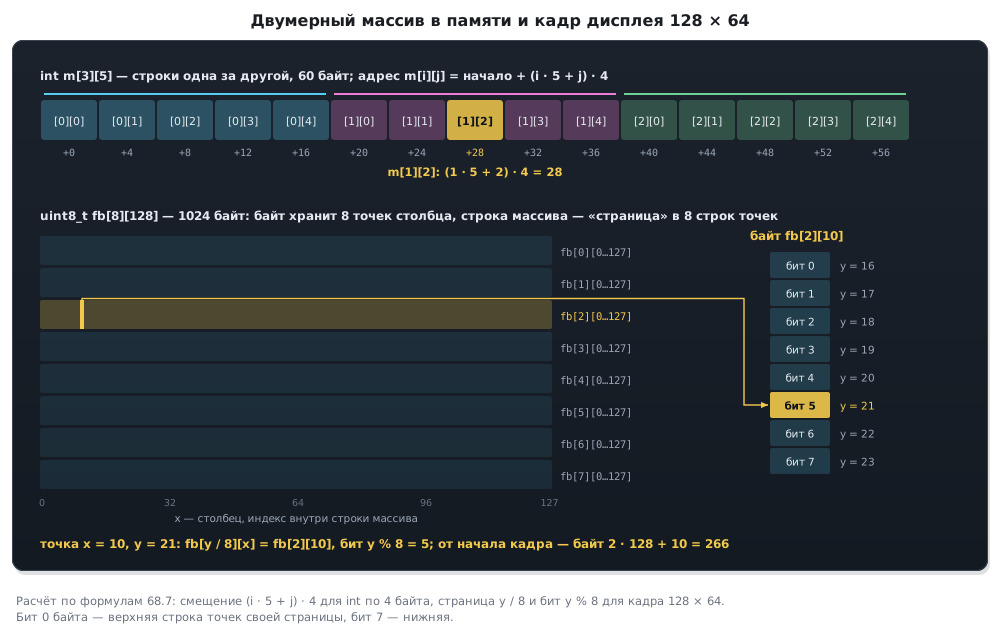
int m[3][5]; /* 3 строки по 5 элементов */
In memory this is one row after another: first the five elements of m[0],
then the five of m[1], then m[2]. Adjacent rows are 5 elements apart,
a row takes 20 bytes, the whole array 60. The compiler computes the address of m[i][j]
as start + (i · 5 + j) · 4.
This has two practical consequences.
Traverse the array by rows: the inner loop runs over the last index. That way the accesses go sequentially through memory.
A two-dimensional array is passed to a function with the row size — otherwise the compiler cannot compute the address:
void print(int rows, int a[][5]);              /* число столбцов — константа */
void print(int rows, int cols, const int *a);  /* a[i * cols + j]; вызов: print(3, 5, &m[0][0]) */
The form a[rows][cols] with variable sizes is also a variable-length array,
and -Wvla (section 68.5) will warn about it.
An example from the chip: the frame of a 128 × 64 pixel monochrome display. Each byte
holds eight pixels of a column, so the frame is uint8_t fb[8][128],
1024 bytes. On a chip with 20 KB of RAM that is 5 % of all memory — which is why
the image is often drawn straight into the display, without a frame in memory.
68.8 A string is an array with a zero at the end
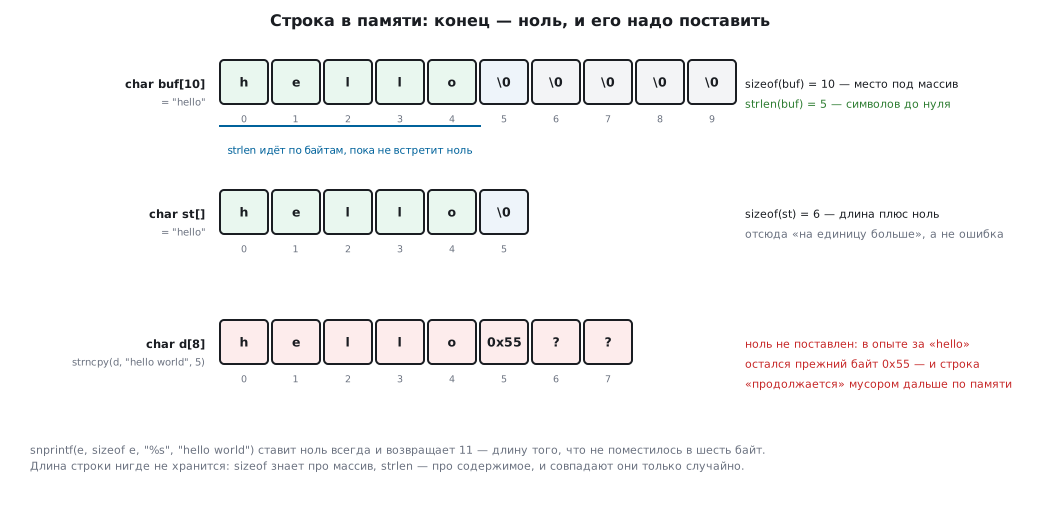
char st[] = "hello";    /* 6 байт: h e l l o \0 */
char buf[10] = "hello"; /* 10 байт: hello, \0 и ещё четыре нуля */
The length of a string is not stored anywhere. The end is marked by a character with code zero, and all functions walk the string until they meet it. Hence a difference you must remember:
buf from the example |
|
|---|---|
sizeof(buf) — space for the array |
10 |
strlen(buf) — characters before the zero |
5 |
strlen is simple inside:
size_t my_strlen(const char *s)
{
    size_t n = 0;
    while (*s++) n++;
    return n;
}
Two consequences. First: strlen walks the whole string every time —
calling it in the condition of a loop over the same string is wasteful. Second,
important for data exchange: binary data is not a string. strlen will take a 0x00 byte
in the middle of a packet for the end (section 37).
And do not confuse the three zeros: '\0' is the character with code 0, the end of a string; '0' is
a digit, code 48; "0" is a string of a digit and a terminating zero, two bytes.
68.9 Strings in Flash and in RAM
Placement of strings follows the same story as arrays, but with one subtlety:
| Declaration | Flash | RAM |
|---|---|---|
char buf[] = "hello"; |
a copy | 6 bytes — the array can be changed |
const char *msg = "hello"; |
10 bytes — the string and the initial value of the pointer | 4 bytes of pointer |
const char *const msg = "hello"; |
10 bytes — the string and the pointer | 0 |
In the second row the string itself is in Flash, but the pointer to it is
an ordinary variable that can be redirected, so it is in RAM, and its
initial value is copied from Flash at startup (as in table 68.3).
To move the pointer into Flash as well, you need a second const. In Flash there is no
difference — 10 bytes in both cases — but it saves RAM: 4 bytes per string,
400 for a table of a hundred messages.
You must not write to a string literal: it is undefined behaviour, and on STM32 the literal sits in Flash, which an ordinary write cannot change anyway (section 11.5). If the string needs to change, declare an array.
68.10 String functions
The standard functions from string.h — strlen, strcpy, strcat,
strcmp and others — are covered in detail in section 74. Here are three traps.
Strings cannot be compared with ==. That compares addresses, not
contents: two arrays with the same text "hello" give false for ==.
Compare with strcmp: it returns zero when they are equal, a negative
number if the first string is smaller, and a positive one if it is larger.
strcpy does not know the size of the destination and writes until it meets a zero
in the source. A string longer than the buffer overwrites everything behind it.
strncpy does not save you the way it seems. If the string does not fit,
it copies exactly as many characters as allowed — and does not add
the terminating zero:
char d[8];
strncpy(d, "hello world", 5);   /* d = h e l l o и дальше — что было в памяти */
The safe way is snprintf: it always adds the zero and never
writes more than allowed:
char e[6];
int n = snprintf(e, sizeof e, "%s", "hello world");   /* e = "hello", n = 11 */
if (n >= (int)sizeof e) { /* не поместилось */ }
It returns the length the result would have had without the limit — from it you can see that the string was truncated. On the chip this is the main tool for building strings: messages to a port, lines for a display.
68.11 Parsing strings
A line from a serial port is the most common input on the chip.
sscanf parses it by a format, and a scan set %[…] defines what
counts as part of a field:
char key[20], val[20];
int r = sscanf(line, "%19[0-9]=%19[a-z]", key, val);
The width 19 is the buffer size minus room for the terminating zero. Without it a long line from the port overwrites memory past the buffer (section 74.5).
sscanf returns how many fields it managed to fill — that is the
parse check:
| String | Result |
|---|---|
123=hello |
2 — both fields |
123=123 |
1 — no letters after = |
hello=123 |
0 — the first field is not digits |
| empty | −1 — input ended |
Checking the result is mandatory: with zero or one, val keeps whatever
it held before.
For numbers on the chip strtol is used more often — it reports where the
number ended and does not drag in the whole format parser (section 74).
A byte array and a checksum. A typical array operation on the
chip is computing the checksum of a packet. Here is CRC-8 with the polynomial
0x31 and the initial value 0xFF:
uint8_t crc8(const uint8_t *p, unsigned len)
{
    uint8_t crc = 0xFF;
    while (len--) {
        crc ^= *p++;
        for (int b = 0; b < 8; b++)
            crc = (crc & 0x80) ? (uint8_t)((crc << 1) ^ 0x31) : (uint8_t)(crc << 1);
    }
    return crc;
}
For the string "123456789" it gives 0xF7 — this is the check value of
the algorithm, used to verify any implementation. The hardware CRC block
is faster, but not for every CRC: on F1 and F4 it can do only CRC-32 with
the polynomial 0x04C11DB7, and this CRC-8 is beyond it. The polynomial 0x31,
a width of 8 bits and the initial value can be set only on the configurable block — on
G4, L4 and the other families from section 12.5.
68.12 Pitfalls
A table "ate" the RAM. It is declared without const — it takes space both in
Flash and in RAM.
A variable changes by itself. A write past the end of a neighbouring array.
The array size inside a function is wrong. sizeof of a pointer; pass the size
as a parameter.
The stack overflowed on some data and not on other data. A variable-length
array. The -Wvla flag finds such places.
A two-dimensional array is traversed slowly. The inner loop runs over the first index — across memory.
strlen returned less than the number of bytes received. The binary data contained a
zero.
sizeof of a string is one more than its length. The terminating zero.
if (s == "on") never fires. Addresses are compared; you need
strcmp.
After strncpy the string "continues" with garbage. The terminating zero
was not added.
A display line overwrote neighbouring data. strcpy or sprintf
without a length limit; you need snprintf.
Command parsing sometimes takes an old value. The result of
sscanf is not checked.
Writing to a string does not work. It is a constant in Flash; you need an array.
68.13 Summary
- An array is elements in a row;
sizeof(a) / sizeof(a[0])is the number of elements, as long asahas not become a pointer. - Initial values not given are zeros if at least one is given;
{[3] =
  9}
sets an element by index. - On the chip a
consttable sits only in Flash, a table withoutconstin Flash and in RAM, an array of zeros only in RAM. - Nobody checks out-of-bounds access; the compiler notices only a constant index.
- A variable-length array means unknown stack usage; only
-Wvlawarns about it. - Bubble sort on 10 elements takes from 9 to 45 comparisons.
- A two-dimensional array is stored by rows; a 128 × 64 display frame is 1024 bytes.
- A string is an array with a zero at the end;
sizeofis the space,strlenis the length. const char *leaves the pointer in RAM;const char *constmoves it into Flash too.- Compare strings with
strcmp, build them withsnprintf;strncpydoes not add a zero when it truncates. sscanfreturns the number of parsed fields — always check it; give%[…]and%sa width — the buffer size minus one.- The CRC-8 of the string
"123456789"with the polynomial0x31is0xF7.
Next: section 69 "Floating-point numbers".