 Embedded HandbookApps
70. Structures and files
A structure gathers several values of different types under one name: a sensor record, port settings, a protocol frame. It is the main way to describe data in C — and on a microcontroller the peripheral registers are described with structures too (section 3.3).
Structures have a property you can ignore on a computer but not on a chip: the compiler inserts empty bytes between the members. The size depends on the order of the members, and the packing affects speed and even whether a member can be read at all. The section shows this in real machine code and ends with files — where these same empty bytes also land on the disk.
Terms used in the documentation
Term Meaning structure, member, field a structure, a member of it designated initializer initialization by member name alignment, padding alignment, the filler bytes it adds packed structure a structure without filler bytes unaligned access an access to a misaligned address union members sharing one address type punning reading the same bytes as another type bit-field a member a few bits wide serialization turning data into bytes stream, file position a stream, the position in a file text, binary mode text, binary mode end of file (EOF) end of file
70.1 A structure: several members under one name
struct sensor {
    uint8_t  day;
    uint8_t  month;
    uint16_t year;
    int8_t   t;         /* температура, градусы */
};

struct sensor rec = { .day = 10, .month = 9, .year = 2026, .t = -5 };
rec.t = 3;              /* обращение к полю — точка */
Initialization by member name — .year = 2026 — does not depend on the order
of the members and does not break when a new one is added to the structure. Members that are not given,
as in an array, become zeros (section 68.2).
Through a pointer, a member is accessed with an arrow: p->t is the same as
(*p).t. The parentheses are needed because the dot binds tighter than the asterisk.
typedef gives a structure a short name: typedef struct { … } sensor_t;
— and from then on you write sensor_t rec; without the word struct.
Assignment copies all members, including arrays inside the structure:
after s2 = s1, s2 has the same string in its name member as s1. On the
Cortex-M3, copying a 16-byte structure is a block load and
store with ldm/stm, a few instructions.
You cannot compare structures with == — it is a compile error.
Compare them member by member. And not with memcmp — the next
subsection explains why.
70.2 Alignment and holes
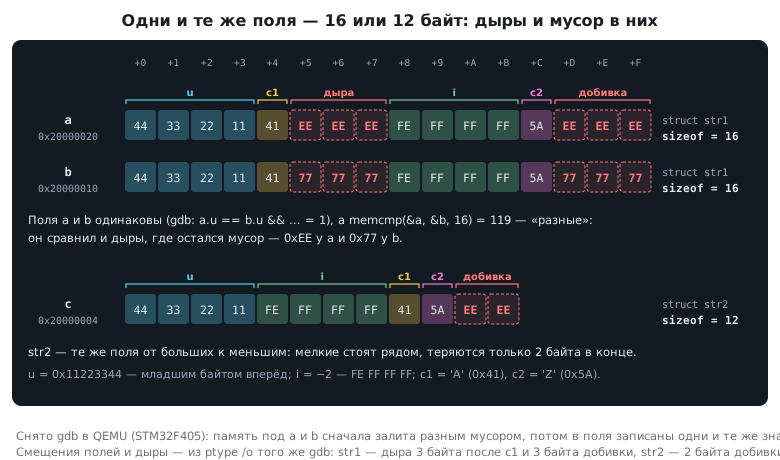
It is easier for the processor to read a 32-bit number from an address that is a multiple of 4. So the compiler aligns the members by inserting empty bytes between them. The same four members in a different order:
struct str1 { uint32_t u; uint8_t c1; int32_t i; uint8_t c2; };  /* 16 байт */
struct str2 { uint32_t u; int32_t i; uint8_t c1; uint8_t c2; };  /* 12 байт */
Both hold 10 bytes of useful data. In the first, there are three empty
bytes after c1 so that i lands at offset 8, and three more after c2 so that
an array of such structures does not break the alignment of the next element. In the
second, the small members sit next to each other, and the loss is only two bytes at the end.
The rule: order the members from larger to smaller. For an array of a thousand such records this is 4000 bytes of RAM.
The sensor record from 70.1 takes 6 bytes with five bytes of members: the year is aligned to an even address, and at the end there is one empty byte.
The empty bytes contain garbage — whatever was in memory before. Hence
a trap: memcmp may report two structures with equal members as
different, because it compares the holes as well. Verified: the memory
under two structures was filled with different garbage, the same values were written to
all members — the members are equal, but memcmp returns "not equal".
70.3 Packed structures
Sometimes holes are not allowed: the format of a packet or a file header is defined byte by byte. Then the structure is packed:
struct __attribute__((packed)) str3 { uint32_t u; uint8_t c1; int32_t i; uint8_t c2; };
/* 10 байт, поле i — по смещению 5 */
The member i ended up at an odd address. What that costs depends on the core:
| Core | Reading p->i from a packed structure |
|---|---|
| Cortex-M3, M4 | one ldr instruction: an unaligned read with single ldr and ldrh is allowed |
| Cortex-M0 (F0 series) | 11 instructions: four byte reads and assembling the number |
| any, member aligned | one instruction |
On the Cortex-M3 and M4, packing is almost free. On the Cortex-M0 every access to an unaligned member expands into byte-by-byte assembly — and that is still the lucky case: if you take the address of such a member and pass it to a function that expects an ordinary pointer, the function reads it with one instruction and on the M0 gets a processor fault (section 35.2). The compiler warns about this without any options: the address of a packed member "may result in an unaligned pointer value".
On the M3 and M4 such a fault also happens. There an unaligned address is forgiven only
for single ldr, ldrh, str and strh; the pair and multiple instructions (ldrd, ldm)
and the floating-point vldr always require an aligned address. For the packed
struct { uint8_t tag; float t; int64_t stamp; }, armclang for the M4 reads
r->t and r->stamp with ordinary ldr at offsets 1, 5 and 9, but the same members
through const float * and const int64_t * with the instructions vldr and ldrd.
The address of a packed float, double or int64_t member passed to
an ordinary function crashes the program on the F4 too.
In practice: packed structures are used to describe a format, while the data is worked with in ordinary ones. Or the members are assembled from bytes by hand altogether — which also settles the question of byte order (section 3а.8).
70.4 A structure as a function argument
A structure can be passed by value — then the function gets a copy:
int by_value(struct str1 s) { return s.c2; }
On the Cortex-M a 16-byte structure fits entirely into the four argument registers
r0–r3 (section 66.3): the member c2 ended up in r3, and the function
came down to one instruction. A larger structure is copied onto the stack on
every call.
So the usual practice is to pass the address, and if the function must not change the data, an address of a constant:
void log_record(const struct sensor *rec);
That is four bytes instead of a copy, and const guarantees that the function
will not spoil anything (section 67.6).
70.5 Unions
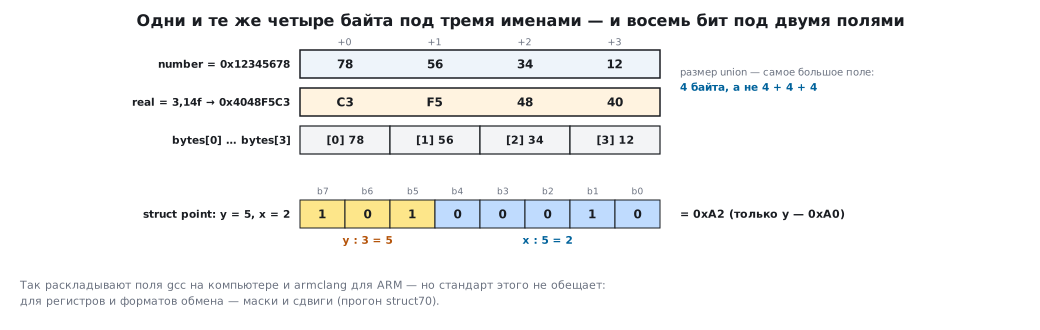
In a union all members start at the same address, and its size is the size of the largest member:
union intbytes {
    uint32_t number;
    float    real;
    uint8_t  bytes[4];
};
Write one member, read another. number = 0x12345678 byte by byte
looks like 78 56 34 12 — the least significant byte first (section 3а.8). And
after writing the number 3.14 to real, you see 0x4048F5C3 in number — its
bit pattern (section 69.1).
In C, reading the same bytes as another type through a union is allowed — unlike casting pointers (section 67.9).
The second use is a message with variants. A tag member says which variant is stored in the union:
struct msg {
    uint8_t kind;               /* что внутри */
    union {
        struct { uint16_t ch; uint16_t value; } adc;
        struct { uint8_t code; } error;
    } u;
};
The size is that of the largest variant, not the sum. This is how messages of different types are passed through one queue (section 27).
70.6 Bit-fields
A member can be declared a few bits wide:
struct point {
    unsigned char x : 5;        /* 0 … 31 */
    unsigned char y : 3;        /* 0 … 7  */
};                              /* вся структура — 1 байт */
Both on a computer and in armclang for ARM, x goes into the lower five bits
of the byte: with y = 5 the byte is 0xA0, and after x = 2 it is 0xA2.
But the standard does not guarantee this: the bit order, the width of the memory access and the alignment of the members are left to the compiler. Two compilers that agreed here might just as well not have. Hence the rule from section 3а.7: bit-fields are good for your own flags, where the layout is invisible to anyone. For peripheral registers and exchange formats — only masks and shifts. And one more thing: a write to one member is a read of the whole word, a modification and a write back. If a neighbouring member of the same word is changed by an interrupt, that change can be lost, so flags written by both the main program and an interrupt are kept in separate variables (section 3.4).
70.7 Records: a sensor example
A typical task is to keep a log of measurements and sort it. The records are kept in an array of structures, and for sorting by date it is convenient to build one key from the members:
uint32_t date_key(const struct sensor *r)
{
    return (uint32_t)r->year << 16 | (uint32_t)r->month << 8 | r->day;
}
For 10 September 2026 the key is 0x07EA090A: the year in the upper digits,
the day in the lower ones. Comparing keys is comparing dates, in one operation.
Sorting an array of structures uses the same algorithms as for numbers
(section 68.6), only the swap exchanges whole records.
70.8 Files
The standard library works with files through a pointer to FILE:
FILE *f = fopen("in.txt", "r");
if (f == NULL) { /* файла нет или нет доступа */ }
...
fclose(f);
| Mode | What it does |
|---|---|
"r" |
read an existing file |
"w" |
write; an existing file is truncated to zero |
"a" |
append to the end |
"r+", "w+", "a+" |
read and write |
with the letter b — "rb", "wb" |
binary mode |
fopen returns NULL if the file could not be opened — checking it is
mandatory. fclose writes to the disk whatever is still in the buffer.
A text file is read and written with the formatted functions:
int sum = 0, n;
while (fscanf(f, "%d", &n) == 1)    /* пока число прочитано */
    sum += n;
For a file with the numbers 10 20 30 and -5 7 the sum is 62. The loop condition is
the result of fscanf, just as with sscanf (section 68.11).
A binary file stores bytes exactly as they are in memory:
struct sensor log[3] = { … };
fwrite(log, sizeof log[0], 3, f);   /* вернёт 3 — число записанных элементов */
Three records of 6 bytes give an 18-byte file, and fread reads them back
unchanged. The size of a file is found like this: fseek(f, 0, SEEK_END) —
go to the end, ftell(f) — the position in bytes.
The end-of-file trap. fgetc returns an int: a byte from 0 to 255
or EOF, that is, −1. The variable for it must be an int:
| Variable type | File of the bytes 41 FF 42 |
|---|---|
int c |
all 3 bytes read |
signed char c |
reading stopped at FF — it matched −1 |
char c on ARM |
never ends: char is unsigned, 255 is not equal to −1 |
The last row is literal: the compiler turns a comparison of a char with EOF on ARM
into "always false" and warns about it without any options.
70.9 Files on a microcontroller
The chip has no file system — until you add one. For a memory card
or external Flash this is done by FatFS (section 42), and its functions mirror the
standard ones: f_open, f_read, f_write, f_close, f_printf
(section 42.5). Everything said about modes, checking the result and closing the
file carries over one to one — and what happens when power is lost
in the middle of a write is covered separately in section 42.6.
The main question on the chip is the data format. Writing an array of structures
with one fwrite is convenient, but the file also gets the empty bytes, the native byte order
and the layout of the particular compiler. Reading such a file on
a computer with another program means repeating all these details.
So for data exchange the records are serialized: the members are written one by one, in
a defined byte order, without holes. There is a bit more code, but the format is
described rather than implied. If the format is still described by a structure, it is
pinned down with a compile-time check: _Static_assert(sizeof(struct str3) == 10,
"packet format"); and _Static_assert(offsetof(struct str3, i) == 5, "offset of i");.
With a different layout the build will stop (section 74.9).
70.10 Pitfalls
The structure is larger than the sum of its members. Alignment; reorder the members from larger to smaller.
memcmp reports equal structures as different. The empty
bytes with garbage are compared too.
The program crashes when reading a packet member. An unaligned access
through a pointer to a member of a packed structure: on the F0 any member, on the F4 a
float, a double or a 64-bit one.
Passing a structure by value slows the call down. A large structure is copied onto the stack; pass the address.
Bit-fields in a peripheral register landed in the wrong place. The layout is chosen by the compiler; use masks for registers.
fopen returned NULL, and the program crashed later. The result was not
checked.
A file was opened for writing — and the data was gone. The "w" mode truncates
an existing file; to append, use "a".
The data was not written. fclose was not called, and the buffer stayed in memory.
Reading the file never ends. The result of fgetc was stored in a char.
Reading stops in the middle of a binary file. The result of fgetc was stored in a
signed char: the byte 0xFF was taken as the end.
A file written on the chip is read with errors on the computer. The structures were written as they are — with holes and the native byte order.
70.11 Summary
- A structure is members of different types under one name;
.for a variable,->for a pointer; initialization by member name does not depend on the order. - Assignment copies everything;
==for structures is an error,memcmpis unreliable because of the garbage in the holes. - Members are aligned: the same members give 16 or 12 bytes depending on their order. Order them from larger to smaller.
- A packed structure has no holes: on the M3 and M4 reading an unaligned member is
one instruction, on the M0 it is 11. A pointer to its
floatorint64_tmember causes a fault on the M4 too:vldrandldrddo not forgive unaligned addresses. - A structure of up to 16 bytes passed by value goes in registers, a larger one through
the stack; usually a
constpointer is passed. - A union is members at one address: byte access, the bit pattern, messages with variants.
- The layout of bit-fields is chosen by the compiler; they are not suitable for registers and exchange formats.
- Check
fopenforNULL,fcloseflushes the buffer; store the result offgetcin anint. - On the chip, files mean FatFS with the same functions; for exchange, data is serialized member by member.
Next: section 71 "Multi-module programs, the preprocessor, command-line arguments".