 Embedded HandbookApps
200. First power-on of a new board
The prototype works, the board is routed, the assembly order has arrived — the box holds the first assembled units. The temptation is clear: plug in power, flash it and see what happens. The right order is different. A freshly assembled board is a product that nobody has ever switched on: it may have solder bridges, parts mounted the wrong way round and a short between supply and ground. Half an hour with a magnifier and a multimeter before the first power-on costs less than a burnt regulator — and much less than conclusions about a "bad circuit" drawn from an assembly defect.
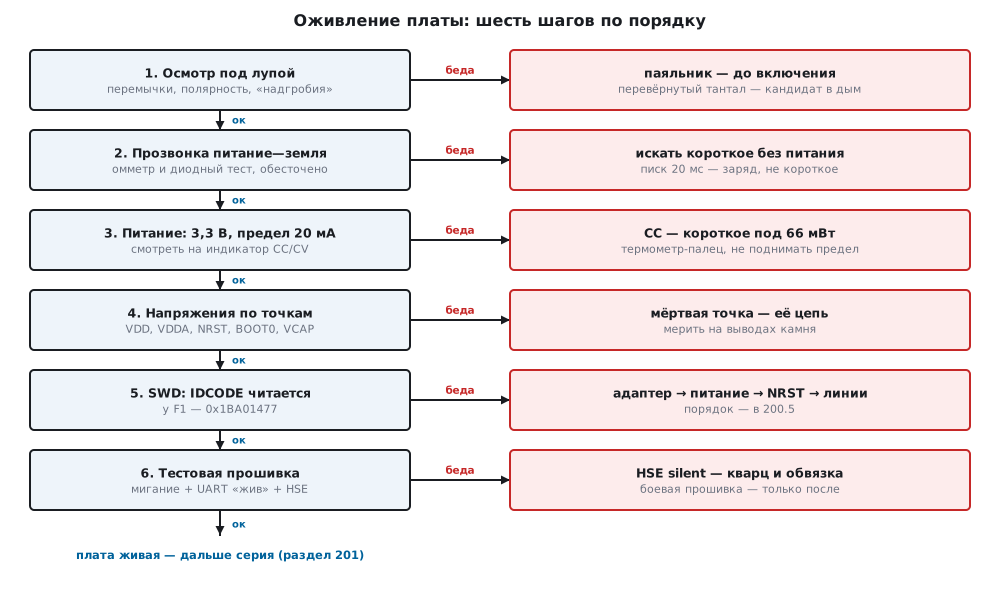
This section is about the order of bringing up the first board: inspection, continuity testing, power under
a current limit, voltages at the test points, the first contact over SWD and
the test firmware. The numbers come from the STM32F103 and STM32F407 datasheets in the packs;
the test firmware is built with arm-none-eabi-gcc and run in QEMU
(_verify/fpo200), the arithmetic is in calc200.py in the same place.
Terms used in the documentation
Term Meaning board bring-up the first start of a new product smoke test the first power-on under a limited current solder bridge solder joining neighbouring pins cold (dry) joint a dull, poorly wetted joint tombstoning a part standing up on its end continuity test checking that a circuit is intact diode test measuring the drop across a junction test point a pad for the probe known-good board a reference board known to work
200.1 The board has arrived: inspection under a magnifier
The first bring-up tool is not the lab supply but a magnifier with tenfold magnification or a phone camera in macro mode. A photo of the board viewed on a large screen catches defects that the eye misses "on the hardware"; and the photos of both sides of every board stay as a record — a month later they show what has changed.
What to look for:
| Defect | What it looks like | Where to look first |
|---|---|---|
| solder bridge | a shiny bridge between neighbouring pins | 0.5 mm pitch packages, connectors |
| cold joint | a dull grainy lump; solder is there, wetting is not | hand soldering, large copper pours |
| tombstone | a chip part standing on its end, one pad in the air | small resistors and capacitors |
| shift | the part sits on half of the pad | all the small parts |
| polarity | the IC key dot is not at the first pin; the diode band is in the wrong place; the plus of a tantalum capacitor is in the wrong place | all polarized packages |
| missing part | an empty pad with traces of paste | check against the BOM of the assembly variant |
⚠️ Polarized packages are checked before power-on, not after. A regulator IC mounted backwards and a tantalum capacitor with its plus to ground are the two main candidates for "smoke" on the first power-up. Checking keys and bands takes minutes; replacing a burnt area of the board takes hours.
Flux residue around the joints is normal for no-clean pastes; a sticky layer over the whole board or whitish streaks are a reason to ask the assemblers what they soldered and washed with. For high-impedance analog circuits flux residue means leakage, and such areas are cleaned separately (section 44).
200.2 Continuity test before applying power
The board is unpowered; the multimeter is in continuity mode (section 36а.1). The first pair of points is supply and ground: a short between them must be found with the ohmmeter, not with the power supply.
A continuity test measures resistance with a small current — around a milliampere. Because of this, the supply capacitors look like a short at first: while they charge, the meter beeps. Charging 10 µF to a 2 V threshold with 1 mA takes 20 ms — a short beep, and the reading creeps up; on a board with 100 µF on the supply the same beep stretches to 200 ms. This is normal. A short is when the meter shows a steady zero and beeps without stopping. On a good board the settled supply-to-ground resistance is kilohms or more: dividers, pull-ups, the regulator feedback network.
The second check is the diode test on the same points, in both polarities. Inside the chip and most ICs there are protection junctions between ground and supply: in one direction the test shows a drop of hundreds of millivolts, in the other — noticeably more or "out of range". Zero millivolts in both directions is a dead short, and you must find it before power-on (techniques in 200.7).
🔧 What to check for continuity on a typical board. 3.3 V to ground; 5 V to ground (if there is a 5 V input); 3.3 V to 5 V (a bridge between the rails is also a short, even though each rail "beeps" normally to ground); VDDA to ground. It is worth writing the list down: it will become the draft of the production test (section 201).
200.3 First power: a supply with a current limit
The first time, the board is powered from a lab supply with a current limit — the recipe and why not USB are described in 36а.8. Here: which limit to set and how to read what the supply shows.
The limit is calculated from the expected current, and the expectation for a new board is modest. An erased F103 starts from the internal HSI oscillator at 8 MHz; by the row "8 MHz, peripherals disabled" of the datasheet's typical current table this is 4 mA. Add the power LED and the regulator's own current — still a few milliamps. A limit of 20 mA gives a fivefold margin and at the same time will not let anything burn: even if the whole limit goes into one spot, the board gets no more than 3.3 V × 20 mA = 66 mW — less than what a medium-size chip resistor dissipates. For comparison, the ceiling of a working F103 is 50 mA at 72 MHz with all peripherals on (datasheet maximum); an erased F407 at its startup 16 MHz draws about 5 mA, and the ceiling at 168 MHz is 87 mA typical and 109 mA maximum. The board will reach these figures later, with the production firmware — for the first power-on there is no reason to raise the limit.
Switch on — and for the first seconds watch not the board but the supply's indicator:
| The supply shows | What it means |
|---|---|
| CV mode, current near the expected value | normal: you can measure voltages (200.4) |
| current 0.0 mA | the circuit is open: regulator not soldered, a trace, a connector |
| CV mode, current well above the expected value | something extra is running or leaking: look for heat (200.7) |
| CC mode, voltage has dropped | a short: with a 20 mA limit a 1 Ω short leaves 20 mV |
The last row is the key one: a supply in CC has not "failed to switch on the board", it has caught a short and holds it safe. The voltage on the board is then millivolts, and the current is exactly the limit.
⚠️ Do not raise the limit "to make it start". If the supply has gone into CC, raising the limit will not start the board — it will only start heating the bridge or the reversed part. First find where the current goes, then raise the limit to the working value — deliberately.
200.4 Voltages at the test points
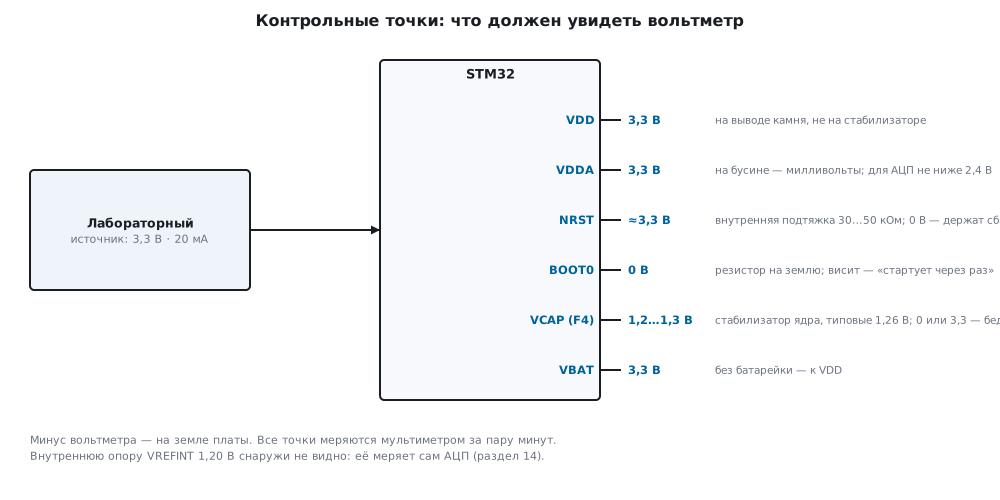
Supply in CV, current reasonable — now the voltmeter. Measure at the pins of the chip, not at the regulator output: between them there are connectors, a ferrite bead and traces, and "3.3 V at the regulator" does not yet mean "3.3 V at VDD".
| Point | What it should be | If it is not |
|---|---|---|
| VDD, all pins | 3.3 V (F103 operating range is 2.0…3.6 V) | a sag: supply in CC, a thin trace, a connector |
| VDDA | practically VDD: millivolts across the filter bead; the ADC needs at least 2.4 V | 0 V — the VDDA filter is not soldered: the ADC is dead, the chip may behave strangely |
| VREF+ (where brought out) | equal to VDDA or to the reference source | 0 V — the ADC has no reference |
| NRST | about 3.3 V: internal pull-up of 30…50 kΩ | 0 V — something holds reset: a button, a stuck bridge, the debugger |
| BOOT0 | 0 V through a resistor to ground (section 61.5) | floating — "starts every other time" |
| VCAP_1, VCAP_2 (F4) | 1.2…1.3 V — the output of the internal core regulator (typical 1.26 V) | 0 V or 3.3 V — the VCAP capacitors are not soldered or there is a bridge: the core will not start |
| VBAT | equal to VDD if there is no battery (section 61.1) | 0 V — the RTC domain is unpowered |
The internal reference VREFINT — typical 1.20 V — is not visible from outside: it is measured by the ADC itself, and that is a job for the test firmware (section 14). But everything listed above is checked with an ordinary multimeter in a couple of minutes — and these are exactly the points worth bringing out to pads at the layout stage (section 61.7 is about the debug connector, the logic is the same).
200.5 First contact with the chip: ST-Link sees the IDCODE
The power is fine — time to find out whether the chip itself is alive. Connect
the programmer/debugger: SWDIO, SWCLK, ground — and query the chip with the commands
from section 35б: st-info --probe, or OpenOCD with interface/target files
(35б.2), or STM32CubeProgrammer.
The first thing the debugger reads is the ID code of the SW-DP debug port. According to the reference
manuals it is one per family: 0x1BA01477 on F1, 0x2BA01477 on F4.
Then the tools read the device code from DBGMCU_IDCODE
and report the series and the flash size (section 2а). If you see the port code, the series
and the flash — the chip is alive, its circuits are assembled correctly, and you can flash it.
If not — check in order, from the computer to the chip:
- The adapter. If
st-infofound no programmer at all, things never got as far as the board: the USB cable (charge-only cables without data lines are a classic), the port, the adapter itself. Do not touch the board at this step — it is not to blame. - Chip power. SWD is silent without power: 3.3 V at the VDD pins — as in 200.4. If the debugger can measure the target voltage, compare.
- NRST. The pin should be at about 3.3 V (internal pull-up). Zero means the chip is held in reset and does not have to answer.
- The SWD lines. SWDIO and SWCLK swapped is the most common pair;
next come a common ground between the board and the adapter, wire length, lowering the frequency
(
adapter speed, 35б.2). - BOOT0 and the flash contents. A blank chip cannot "go away" anywhere,
but an already flashed one can: sleep or remapped SWD pins. Then use
connect under reset
connect_assert_srst(35б.2), or BOOT0 high and a reset: the chip starts in the factory bootloader and the SWD pins are free.
🔧 Write down what the chip answered. Port code, series, revision, flash size — one line in the bring-up log. With the next batch this line tells "the chip does not answer" from "it answers, but it is a different one" — including counterfeits (section 2а).
200.6 Test firmware: blink, UART "alive", HSE
It is too early to load the production firmware onto a fresh board: it is big, and it can crash for
a thousand reasons. The first thing to load is a test firmware — tiny, answering three
questions: does the core execute code? can you talk over UART? does the crystal work?
Ours (_verify/fpo200/blink200.c) fits in 392 bytes and is written
at register level so it can be read in full; it is built with arm-none-eabi-gcc with
the startup code and linker script from section 4в.
Setup and the first line — the core, the flash and the UART are alive if it arrives:
    RCC_APB2ENR |= (1u << 2) | (1u << 4) | (1u << 14);  /* GPIOA, GPIOC, USART1 */

    GPIOA_CRH = (GPIOA_CRH & ~0xF0u) | 0xA0u;   /* PA9: альтернативный выход 2 МГц */
    GPIOC_CRH = (GPIOC_CRH & ~(0xFu << 20)) | (0x2u << 20); /* PC13: выход 2 МГц */

    USART1_BRR = 8000000u / 115200u;            /* 115200 от HSI 8 МГц после сброса */
    USART1_CR1 = (1u << 13) | (1u << 3);        /* UE + TE: только передача */

    uart_puts("alive: core+uart ok\r\n");       /* дошли сюда — ядро, флеш и UART живы */
The UART divider is calculated from HSI: BRR = 8 MHz / 115200 = 69, the actual rate is 115942 baud — a 0.6 % error, within the receiver's tolerance. You must not clock from the crystal at this step: the crystal is one of the suspects, and the first line must get through even with a dead HSE.
The second part checks the crystal, with a timeout:
    RCC_CR |= (1u << 16);                       /* HSEON: запустить кварц */
    uint32_t n = 100000;                        /* таймаут с запасом: кварцу типично 2 мс */
    while (n && !(RCC_CR & (1u << 17)))         /* HSERDY: генератор стабилен */
        n--;
    uart_puts(n ? "HSE: ok\r\n" : "HSE: silent, staying on HSI\r\n");
The typical crystal startup time on the F103 is 2 ms (HSE characteristics table);
the timeout gives a margin many times over. Waiting for HSERDY without a timeout is wrong: with
a dead crystal the firmware will silently hang — and will not tell you the main thing.
The run in QEMU (the stm32vldiscovery machine, a Cortex-M3 with USART1 at the same address) prints:
alive: core+uart ok
HSE: silent, staying on HSI
QEMU has no crystal — the RCC registers read as zeros, and the firmware honestly takes
the timeout branch. On a real board with a working crystal the second line is
HSE: ok; and silent on hardware is already a diagnosis: the crystal, its capacitors,
the traces (61.6). The third answer — the blinking LED — is visible without any
instruments: it blinks, so the core is running the main loop.
🔧 The test firmware lives in the board repository. Next to the schematic and the Gerbers, with the revision number. Every new board revision and every new batch starts with it — not with the production firmware, which has a hundred suspects.
200.7 If it does not work
The order above narrows the trouble down to a step: "a short", "no VDDA", "the chip does not answer", "the crystal is silent". From there, three techniques work.
Bisection — in hardware. The same technique as for code (36.1), but you split the circuit: unpower half of the blocks and see whether the symptom has gone. For this the board needs "switches" — jumpers or 0 Ω resistors in the supply of each block. They are planned at layout time; on a board without them you are left heating the iron and lifting pins, which is slower and riskier. Ten minutes at the schematic stage save an hour of bring-up on every board.
Finger thermometer. Under a 20 mA limit nothing should get warm — 66 mW cannot be felt. So any package that is warm right after power-on is a suspect: a warm regulator — a short or an overload behind it, a warm chip — reversed power or latch-up, a single warm capacitor — broken down or mounted with its plus to ground. A finger finds this faster than a thermal camera, because it is always with you.
Comparison with a known-good board. A second board from the same batch (or a working prototype) is a measuring instrument: measure the same things on both — the voltages of the points from 200.4, the continuity resistances, the NRST and crystal waveforms — and look for where the numbers differ. A difference is a lead; follow it. If one board from a batch does not work, the trouble is in the assembly of that specific unit; if they all behave the same, the trouble is in the circuit or in the values, and that is already a topic for section 36.
200.8 Pitfalls
The board draws exactly the supply limit, and the voltage has dropped. This is not "the limit is a bit low" — the supply in CC mode is holding a short. Raising the limit is useless and harmful: first the diode test and the finger thermometer, then the current.
Continuity between supply and ground beeps when the probes touch. The first 20…200 ms are the supply capacitors charging, this is normal. A short is a steady zero that does not rise over time.
st-info sees no programmer at all. Things never got as far as the board:
a USB cable without data lines, the port, the adapter. Change the cable, do not
resolder SWD.
The debugger does not see the chip although the power is fine. Go through the order of 200.5: NRST at about 3.3 V? SWDIO and SWCLK not swapped? Ground between the board and the adapter present? SWD frequency lowered?
The board works with the debugger connected and dies without it. All this time the board was powered from the 3.3 V pin of the debug connector, and its own regulator is dead. Check: disconnect the debugger and measure VDD.
It blinks, but the UART is silent. The board's TX must go to the adapter's RX: a swapped TX/RX pair is the mirror classic of SWDIO/SWCLK. An oscilloscope on the TX pin at reset will show the startup line — then the problem is in the cable, not in the firmware.
HSE: silent on a live board. The crystal did not start: the capacitors do not match
its load capacitance, long traces, a bad solder joint on the crystal itself (61.6).
The treacherous part is that the board keeps running from HSI and looks healthy —
until the first USB or precise timing measurements.
VCAP shows zero or the full 3.3 V. On an F4 without working capacitors on VCAP_1 and VCAP_2 (2.2 µF each, section 61.1) the internal core regulator does not work: the chip does not answer over SWD although VDD is fine. Measure this point before concluding that the "chip is dead".
200.9 Summary
- Bring-up order: inspection → continuity → power under a limit → test points → SWD → test firmware. Each step narrows the trouble down to its own area.
- Inspection under a magnifier before power-on: solder bridges, cold joints, tombstones, polarity of all polarized packages, empty pads.
- Continuity: a beep during the first 20…200 ms is the capacitors charging (10 µF to 2 V at 1 mA — 20 ms); a short is a steady zero. A diode test in both directions tells protection junctions from a dead short.
- First power-on: 3.3 V with a 20 mA limit — a fivefold margin over the 4 mA of an erased F103 and a ceiling of 66 mW for any defect. CC mode on the indicator is a short you have found, not a reason to raise the limit.
- Test points: VDD 3.3 V, VDDA at least 2.4 V for the ADC, NRST about 3.3 V (pull-up 30…50 kΩ), BOOT0 at 0 V, on an F4 VCAP at a typical 1.26 V.
- SW-DP port code: 0x1BA01477 on F1, 0x2BA01477 on F4. No answer — check in order: adapter, chip power, NRST, SWD lines, BOOT0.
- A 392-byte test firmware answers three questions: the core is alive (a line over UART from HSI), the crystal started (HSERDY with a timeout — typical start 2 ms), the main loop runs (blinking). It lives in the board repository.
- If it does not work: bisection of the circuits through 0 Ω resistors, the finger thermometer, paired measurements against a known-good board.
Full sources
blink200.c — the first power-on test firmware for the BluePill.
/* Раздел 200: тестовая прошивка первого включения для BluePill (STM32F103C8).
 * Три ответа тремя строками: ядро и UART живы, кварц запустился или нет,
 * мигание PC13 — видно без приборов. Регистры — напрямую, без заголовков:
 * прошивка нарочно минимальная, чтобы её можно было прочитать целиком. */
#include <stdint.h>

#define RCC_CR      (*(volatile uint32_t *)0x40021000u)   /* HSEON, HSERDY */
#define RCC_APB2ENR (*(volatile uint32_t *)0x40021018u)   /* такты GPIO и USART1 */
#define GPIOA_CRH   (*(volatile uint32_t *)0x40010804u)   /* PA9 = TX1 */
#define GPIOC_CRH   (*(volatile uint32_t *)0x40011004u)   /* PC13 = светодиод */
#define GPIOC_ODR   (*(volatile uint32_t *)0x4001100Cu)
#define USART1_SR   (*(volatile uint32_t *)0x40013800u)
#define USART1_DR   (*(volatile uint32_t *)0x40013804u)
#define USART1_BRR  (*(volatile uint32_t *)0x40013808u)
#define USART1_CR1  (*(volatile uint32_t *)0x4001380Cu)

static void uart_puts(const char *s)
{
    for (; *s; s++) {
        while (!(USART1_SR & (1u << 7))) {       /* TXE: буфер передатчика пуст */
        }
        USART1_DR = (uint8_t)*s;
    }
}

int main(void)
{
    RCC_APB2ENR |= (1u << 2) | (1u << 4) | (1u << 14);  /* GPIOA, GPIOC, USART1 */

    GPIOA_CRH = (GPIOA_CRH & ~0xF0u) | 0xA0u;   /* PA9: альтернативный выход 2 МГц */
    GPIOC_CRH = (GPIOC_CRH & ~(0xFu << 20)) | (0x2u << 20); /* PC13: выход 2 МГц */

    USART1_BRR = 8000000u / 115200u;            /* 115200 от HSI 8 МГц после сброса */
    USART1_CR1 = (1u << 13) | (1u << 3);        /* UE + TE: только передача */

    uart_puts("alive: core+uart ok\r\n");       /* дошли сюда — ядро, флеш и UART живы */

    RCC_CR |= (1u << 16);                       /* HSEON: запустить кварц */
    uint32_t n = 100000;                        /* таймаут с запасом: кварцу типично 2 мс */
    while (n && !(RCC_CR & (1u << 17)))         /* HSERDY: генератор стабилен */
        n--;
    uart_puts(n ? "HSE: ok\r\n" : "HSE: silent, staying on HSI\r\n");

    for (;;) {                                  /* мигание — видно без единого прибора */
        GPIOC_ODR ^= (1u << 13);
        for (volatile uint32_t i = 0; i < 400000; i++) {
        }
    }
}
Next: section 201 "Production test and programming on the line" — how the same thing is done not with one board on the desk but with a hundred on the line.