 Embedded HandbookApps
199. Board assembly at the factory: BOM, placement file and Gerber
The board is routed and checked (sections 130–135), the prototype works, and it is time to turn it into a product. The factory does two different things: it fabricates the bare board from the Gerber and drill files, and it assembles it — buys the parts from the bill of materials and places them by machine from the placement file. How to export these files from DipTrace is covered in 132в; this section is about something else: what each file contains, how the factory reads it and how to check the package before you send it, before the factory's questions turn into a week of e-mails.
The experiments use the board from section 131 (LQFP-48, 45×32 mm) in KiCad 9.0.9 from the
kicad/kicad:9.0 image: exports and cross-checks are done by _verify/fab199/exports.sh
with bom.py, the panel arithmetic by panel.py. Everything is checked by
_verify/fab199_check.py.
Terms used in the documentation
Term Meaning fiducial mark a copper circle the pick-and-place camera looks for stencil a steel sheet with openings cut from the paste layer turnkey turnkey assembly: the factory buys the parts consigned assembly assembly from parts supplied by the customer DNP, do not populate the part is in the design but is not placed MSL, moisture sensitivity level how sensitive a package is to moisture before soldering tab routing, mouse bites milling that leaves tabs with perforation X-out a rejected board inside a panel AOI, automated optical inspection automatic optical inspection of the solder joints
199.1 What the factory wants from you
The package is four files, and each one has its own reader at the factory:
| File | Who reads it | What is in it |
|---|---|---|
| Gerber + drill | board fabrication | the geometry of every layer and hole |
| bill of materials (BOM) | purchasing | what to buy: values, packages, part numbers, alternates |
| placement file | pick-and-place machine | where each part sits: coordinates, rotation, side |
| assembly drawing | engineer and inspection | a view of the board with reference designators — the finished board is checked against it |
If you order bare boards only, the first row is enough. For assembly you need all four — and the factory cuts the paste stencil itself from the paste layer of the same Gerber set.
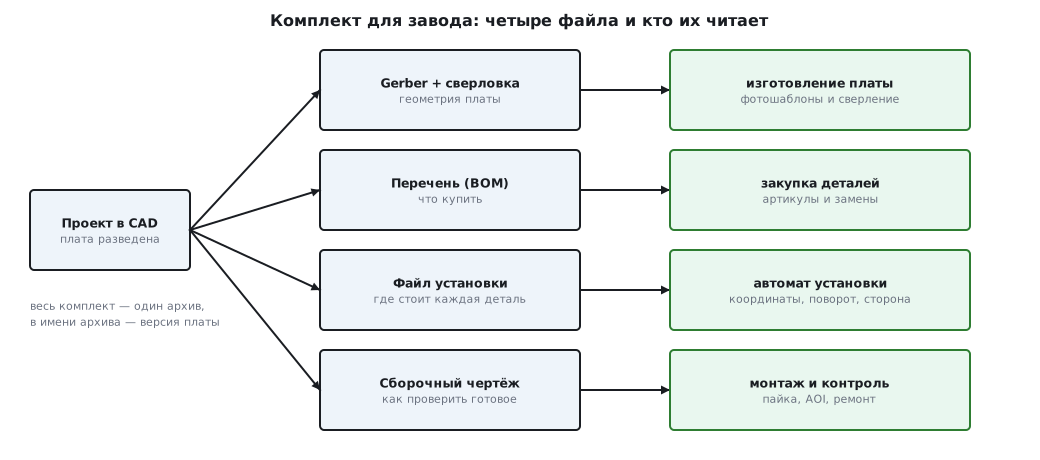
The whole package goes out as one archive, and the archive name carries the board revision. The factory has no "e-mail context": it will assemble exactly what is in the archive, so half a package from a week-old e-mail plus half a package of "here is the new Gerber" is a sure way to a Frankenstein board.
199.2 Bill of materials (BOM)
The BOM is a table of "what to buy and where to place it". The minimum set of columns:
| Column | Example | Why |
|---|---|---|
| reference designators | C1 C2 C3 C4 C5 C6 | link to the board and the placement file |
| quantity | 6 | purchasing counts by it |
| value and tolerance | 100 nF ±10 %, 50 V, X7R | "just 100 nF" can be rated 6.3 V |
| package | 0603 (1608 metric) | which tape the part comes in |
| manufacturer part number | the exact variant, not the series | the part is bought by it |
| alternates | 1–2 equivalent part numbers | otherwise assembly stops on a shortage |
The CAD tool gives you the start of the BOM: board parts grouped by the pair
"value + package". On the board from section 131 fifteen parts collapse
into nine lines — six 0603 capacitors in one line, two 0805, and
one line each for the microcontroller, the regulator, the crystal, the resistor, the LED
and the two connectors (bom.py run):
строк перечня: 9, деталей: 15
деталей, у которых номинал пуст или повторяет имя корпуса: 15 из 15
The second line of the run is the main lesson. The board from section 131 was built by a script, nobody gave the parts values, and the value column ended up holding the package name: the BOM looks filled in, but there is nothing you can buy from it. The CAD tool knows exactly what you wrote into a part; value, tolerance and part number will not appear by themselves. Typical BOM mistakes:
| Mistake | What it leads to |
|---|---|
| value without voltage and tolerance | purchasing takes the cheapest part |
| package "0603" without the unit system | metric 0603 is imperial 0201 |
| series part number instead of the exact variant | a series has dozens of package and tape options |
| "do not place" parts not marked DNP | they get bought and placed |
| no alternates | one missing line stops the whole assembly |
The imperial and metric package grids are easy to remember from the KiCad
footprint names — they carry both: C_0603_1608Metric is imperial
0603, which is metric 1608.
199.3 Placement file (pick-and-place)
The placement file is a table for the machine: the centre of each part, its rotation and the board side. DipTrace exports it with File / Export / Pick and Place (132в.3), KiCad with the command:
kicad-cli pcb export pos --format csv --units mm -o out/pos.csv board.kicad_pcb
A few lines of the file for our board (the full file is in the exports.sh run):
Ref,Val,Package,PosX,PosY,Rot,Side
"C1","C_0603_1608Metric","C_0603_1608Metric",26.750000,-21.962500,90.000000,top
"C2","C_0603_1608Metric","C_0603_1608Metric",30.962500,-12.250000,0.000000,top
"C5","C_0603_1608Metric","C_0603_1608Metric",5.000000,-11.500000,90.000000,top
"U1","LQFP-48_7x7mm_P0.5mm","LQFP-48_7x7mm_P0.5mm",24.000000,-15.000000,0.000000,top
There are 15 lines in total — one per part, all with side top. What you should
check by eye:
- The coordinates are the package centre, not pin 1: U1 has the point (24; −15) — exactly where the board script put the middle of the LQFP-48.
- The Y axis points up, as in mathematics, not down as on a screen: the script placed C5 at (5; 11.5) from the top left corner, and in the file it became (5; −11.5). The factory aligns the file with the Gerber and will not get it wrong, but when you check the file yourself the minus sign is the first thing that scares you.
- Rotation is in degrees counter-clockwise from "how the package is drawn in the library": our capacitors have 0 and 90.
- The coordinate origin must match the origin of the Gerber and drill files — it is the same Offset from the export dialogs (132в.3).
And one cross-check worth doing every time: the set of designators in the placement
file equals the set of designators in the BOM. Ours are 15 and 15, they match
(bom.py run). A part that is in one file and missing from the
other is either a forgotten DNP or a line lost during an edit.
199.4 Gerber and drill files
What you hand over for a two-layer board: copper of both layers, solder mask and silkscreen on both sides, paste for the SMD side, the outline — and Excellon drill data as a separate file, not as holes in the Gerber. For the board from section 131 that is eight Gerber files plus the drill file; which checkboxes matter during export and how the format reads line by line is covered in 132в.3 and 132в.5, so we will not repeat it.
Before sending, look at the output files in a third-party Gerber viewer — not in the CAD tool that wrote them: it will show you what you have already seen. What to look for:
- there are as many copper layers as you ordered, and they are not swapped;
- the outline is there and matches on all layers; the board size is yours (for board 131 it is 45×32 mm);
- the mask is open over the pads and closed over the vias; paste is only on the SMD pads;
- the drill holes land in the centres of the pads, and the units and coordinate format in the drill file read unambiguously;
- the silkscreen does not run onto the pads, and the bottom-side text is mirrored.
The numbers between files must agree: on board 131 paste 74 = the number of SMD pads, mask 80 = 74 + 6 through-hole, 10 holes — as many as pins and vias (checked in 132в.5). This cross-check catches a broken export in a minute — before the factory, not after.
199.5 Fiducial marks and tooling rails
The machine places parts to hundredths of a millimetre, but the board reaches it with the accuracy of "put on the conveyor". The camera closes the gap: it looks for fiducial marks — circles of bare copper — and uses them to convert all coordinates of the placement file into coordinates of the real board.
A fiducial is a copper circle with a clear zone around it: no mask, silkscreen
or nearby copper, otherwise the camera will not get enough contrast. Typical sizes are visible
right in the standard KiCad library Fiducial.pretty (exports.sh
run): copper from 0.5 to 1.5 mm, a mask opening at least twice the
copper; a typical middle of the range is Fiducial_1mm_Mask2mm: a 1 mm circle
in a 2 mm opening.
How many and where:
- three global fiducials in the corners, asymmetric — from three points the camera recovers the offset, the rotation and the scale of the board, and the asymmetric layout prevents loading the panel rotated by 180°;
- a local pair on the diagonal next to fine-pitch packages — our LQFP-48 with 0.5 mm pitch is exactly such a case;
- keep fiducials away from the edge: a strip of the board a few millimetres wide is taken by the conveyor and the clamps.
The board from section 131 has zero fiducials (bom.py run) — for factory
assembly you must add them before ordering.
The conveyor holds the edge on two sides, and if parts sit right up to the edge, the board needs tooling rails — strips along the edge that are broken off after assembly. The typical width is 5 mm: the same, 0.2 inch, is what the DipTrace panelization example suggests (132в.2). The rails carry the panel fiducials and the tooling holes.
199.6 Panelization
Small boards are not assembled one at a time but as a panel — several copies on one blank with shared rails. You need a panel when the board is smaller than the conveyor handles comfortably, when parts sit right at the edge, or when there are many boards and machine time for each one separately is a waste.
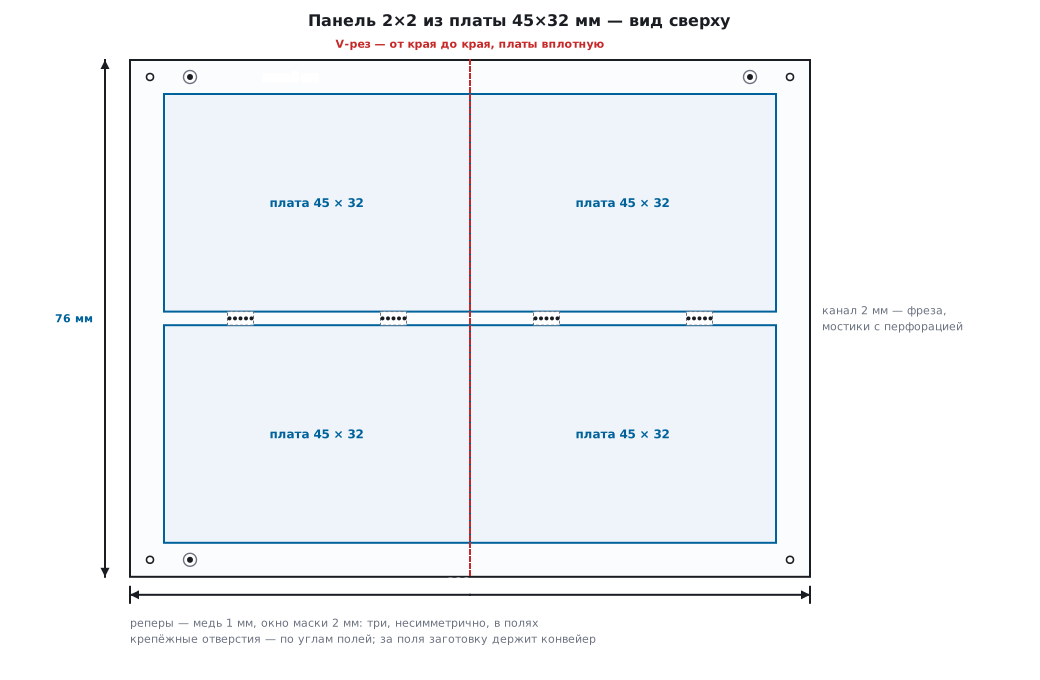
Boards are separated in two ways:
- V-score — a blade cuts a groove from the top and from the bottom, each removing about a third of the thickness; a 1.6 mm board keeps a web of about 0.5 mm, which is snapped over the edge of a table. The blade only goes in a straight line and only from edge to edge of the blank — so it suits rectangular boards without protrusions.
- Tab routing — a router bit cuts a channel around a board of any shape; the channel width equals the bit diameter, typically 2 mm. The board is held by tabs 2–5 mm wide: narrower and the panel bends under the weight of the parts, wider and it will not break off without a burr. To make a tab break predictably, it is drilled with perforation — "mouse bites": 0.5 mm holes at a 0.8 mm pitch leave webs of 0.3 mm.
The arithmetic of a 2×2 panel of our 45×32 mm board: the columns are separated by a
V-score — boards butted together, the rows by a 2 mm routed channel, rails
of 5 mm on all sides (panel.py run):
ширина: 5 + 45 + 0 + 45 + 5 = 100 мм
высота: 5 + 32 + 2 + 32 + 5 = 76 мм
A 100×76 mm blank carries four boards — and that is already a size the conveyor likes. How to build such a panel in DipTrace — Tools / Panelizing, 132в.2. One more word from the factory's vocabulary is left: X-out — a panel in which one of the boards is rejected and marked. Whether you accept such panels or require complete ones only is agreed when ordering: complete panels cost more.
199.7 What to order
Three ways to order, in order of rising price and falling hassle:
| Option | You supply | The factory does |
|---|---|---|
| boards only | Gerber + drill | bare boards |
| boards + assembly from your parts | the whole package and the parts themselves | consigned: places what you sent |
| turnkey | the whole package | buys the parts and assembles |
For a small batch, turnkey almost always wins on time: a week of e-mails about alternates is cheaper than a month of buying parts yourself. Customer-supplied parts make sense when the board has something hard to get that you have already bought.
How much to stock:
- Boards — two or three more than the products you need: one will go to the first power-on with mistakes (section 200), one is a spare.
- Small parts on tape (resistors, capacitors) — with a margin: loading
the feeder eats the start of the tape, and the machine loses parts on pickup.
The typical rule is plus 5 % or plus 10 pieces, whichever is larger: 10 boards
of our example need 60 0603 capacitors, the margin is 10 pieces (
panel.pyrun). - Expensive ICs — the exact count plus one or two: machine losses are rare but not zero.
And about moisture: IC packages absorb it from the air, and during reflow soldering the water boils inside the package — the sensitivity level is called MSL. The practical conclusion for whoever supplies the parts: send ICs in unopened dry packs, and solder opened ones within their floor life or hand them to the factory for baking.
199.8 Checking the package before sending
A checklist — every line catches a real assembly stop:
- DRC, net connectivity and comparison with the schematic were run after the last edit (132в.1).
- The numbers between files agree: paste = SMD pads, mask = pads, holes are in the drill file, not in the Gerber (132в.5).
- The coordinate origin is the same for Gerber, drill and placement files (132в.3).
- The designator sets in the BOM and the placement file match — ours are 15 and 15.
- Every BOM line has: value with tolerance and voltage, package with the unit system, exact part number and alternates; DNP parts are marked.
- There are fiducials on the board or the panel; parts at the edge mean there are rails.
- The output files were viewed by eye in a third-party viewer: layers, outline, size, mirrored bottom silkscreen.
- Everything in one archive with the revision in its name; inside, a short note for the factory: number of layers, thickness, what to assemble, what is DNP.
Items 1–3 are done by the CAD tool, 4 by a ten-line script, 5–8 by your eyes. Half an hour on the list against a week of e-mails with the factory is a good trade.
199.9 Pitfalls
The factory stopped the assembly and sent a list of questions. The BOM was taken from
the CAD tool "as is": the value repeats the package name — like all 15 parts of our
board in the bom.py run. There is nothing to buy from such a BOM: values,
part numbers and alternates are filled in by hand before sending.
0201 tape arrived instead of 0603. The package in the BOM was written as a number without
the unit system: metric 0603 is imperial 0201. Write both, as
in the name C_0603_1608Metric.
When checking the placement file, every Y has a minus, "parts are off the board". The Y axis of the file points up, not down as on a screen: C5 at (5; 11.5) became (5; −11.5). This is not an error — but it is worth checking one part against the Gerber.
Polarized parts are placed backwards. The zero rotation of your library does not match how the part sits in the tape. The machine does not care who is right — the factory checks disputed rotations against the assembly drawing, which is why the drawing goes into the package.
The machine rejected the board: no fiducials. The board from section 131 has zero — like most boards routed "for a prototype". Three global ones in the corners plus a local pair next to the LQFP — before ordering.
The panel was broken apart and the edge capacitors cracked. Ceramics do not tolerate bending: when the panel is snapped it bends, and small parts right at the break line crack. Do not place capacitors right next to the V-score, and orient them with their long side along the line.
The tape was ordered to the exact count and fell short. Loading the feeder eats the start of the tape, and an exact count turns into a shortage on the last board. Small parts always with a margin: +5 % or +10 pieces.
199.10 Summary
- The package for the factory is four files: Gerber with drill, BOM, placement file, assembly drawing; one archive, revision in the name.
- The BOM of board 131 is 9 lines for 15 parts; the CAD tool only gives the grouping, values with tolerances, part numbers and alternates are filled in by hand.
- Placement file: 15 lines of Ref/Val/Package/X/Y/Rot/Side, the coordinate is the package centre, Y axis up, rotation counter-clockwise, origin shared with the Gerber.
- Fiducials: copper 0.5–1.5 mm, mask opening at least twice as large; three asymmetric in the corners plus a local pair at 0.5 mm pitch.
- A 2×2 panel of the 45×32 board with 5 mm rails, a V-score between the columns and a 2 mm channel between the rows is a 100×76 mm blank; the V-score leaves ~0.5 mm of 1.6; tab perforation is 0.5 mm holes at a 0.8 mm pitch.
- Margin: small parts +5 % or +10 pieces (60 pcs of 0603 for 10 boards → +10), boards 2–3 extra; before sending, the eight items of the 199.8 list.
Next: section 200 "First power-on of a new board".