 Embedded HandbookApps
201. Production test and programming on the line
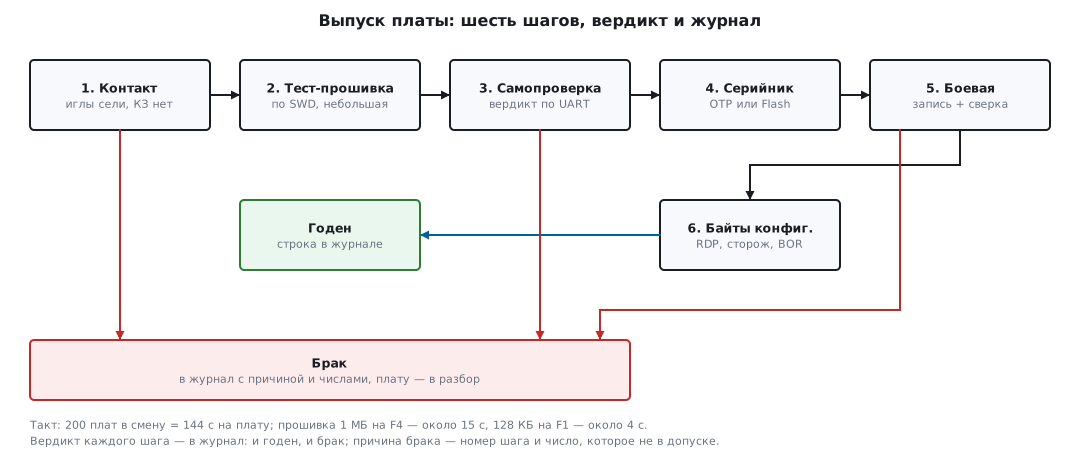
While you have three boards, you program each one at your desk: plug in the ST-LINK, press the button, look at the result. By the fiftieth board this stops working, and by the five hundredth it becomes the main bottleneck. A production test is not "debugging, only faster": it is a different genre. Nobody is looking for a bug in the code — the code was verified before the line (section 184). The line answers one question about every board: was it assembled correctly — is the crystal soldered, is a part value mixed up, does the sensor respond — and it does so in seconds, by script, with a "pass" or "fail" verdict and a line in the log. This section is about how to set up such a station: the fixture, the test firmware, the serial number, the option bytes and the release log. The command-line tools that all of this rests on are covered in section 35б — here they are assembled into a pipeline.
The numbers in this section can be checked: the Flash timings come from the characteristics tables in the datasheets of
STM32F103x8/xB and STM32F405/407 in the support packs; the syntax and frequencies of
STM32_Programmer_CLI 2.23.0 come from its --help and its own device database
(saved in _verify/ptest201/); the OTP and UID addresses come from the header
stm32f407xx.h and the reference manuals; the timing calculation is calc_time.py;
the self-test and the log were built and run on a computer (gcc and python in
Docker), and the self-test core was also compiled for Cortex-M3. Nothing was run
against hardware, and no hardware output is quoted. The check is
_verify/ptest201_check.py.
Terms used in the documentation
Term Meaning production test / end-of-line test the test in production, at the end of the line bed of nails a fixture with spring-loaded contacts pogo pin a spring-loaded needle contact test point / test pad a pad on the board for a needle or a probe DUT (device under test) the device being tested in-circuit test (ICT) nets and part values checked before power-up functional test (FCT) the assembled device is checked to work flying probe a test with moving needles, no fixture needed golden sample a reference unit used to check the fixture itself go / no-go "pass / fail": a verdict with no grades in between
201.1 How a line test differs from debugging
At the desk an engineer spends an hour on one board; on the line an operator must get a verdict on the next board within a minute. Everything else follows from that:
| Debugging | Line test | |
|---|---|---|
| question | why does it not work | was it assembled correctly |
| who | an engineer | an operator or a machine |
| time | hours per board | seconds to minutes per board |
| tool | IDE, GDB, oscilloscope | fixture + script, no GDB at all |
| result | understanding | "pass / fail" and a line in the log |
The time arithmetic is strict: if the line assembles 200 boards per shift — 8 hours — each board gets a cycle time of 144 seconds, and the test has to fit into it together with placing the board on the fixture and taking it off. Whatever does not fit is removed from the test or split off to a second fixture running in parallel.
The classic inspection pipeline has two stages. The in-circuit test (ICT) checks the board while it is still unpowered: needles on the pads measure the resistance and capacitance of nets and look for shorts and open solder joints — on large volumes this is done by a dedicated machine, on small volumes the first half is replaced by "flying probes" or just visual inspection. The functional test (FCT) is what we cover here: the board is powered, programmed and made to test itself. The fixture has to be checked as well: once per shift a golden sample — a board known to be good — is run through it; if the "golden" board suddenly fails, you repair the fixture, not the batch.
201.2 The fixture: a bed of nails and what to bring out to pads
A connector on every board is expensive, so a production fixture is a bed of nails: a fixture in which the board lies with its test pads on spring-loaded contacts (pogo pins). Press the lid down and all connections are made; lift it and the next board goes in. On a small batch the same thing is done more simply: a service connector, holding the board by hand, even soldering three wires — a bed of nails pays off over hundreds of boards, but the set of signals stays the same.
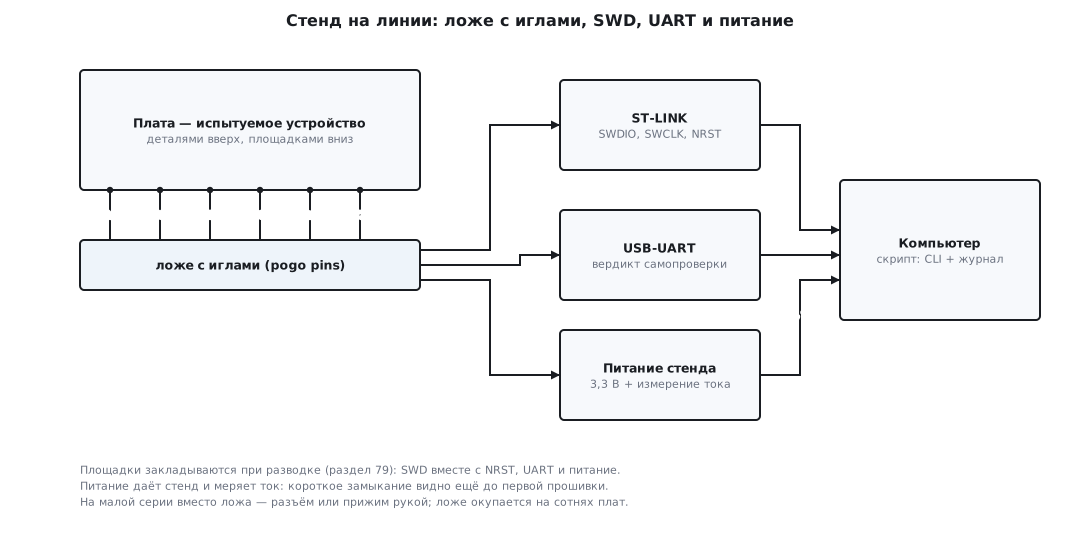
Which pads to plan already when routing the board (testability is one of those requirements that people remember at the testing stage, section 79):
- Full SWD:
SWDIO,SWCLK,NRST, ground. They carry the programming, the UID readout and the option bytes. - UART
TX(better withRXtoo): the test firmware sends its verdict over it, and on a working product the same UART is the diagnostic channel. - Power. The fixture powers the board, not the other way round: then the first test happens before any programming — apply 3.3 V and look at the current. A short circuit or a regulator fitted backwards shows up in the current within a fraction of a second, before anything has burned.
Pads are brought out to one side of the board (usually the bottom), not under components, and on a grid with clearances for standard needles — these are decisions that cost nothing during routing, and after assembly they can no longer be bought at any price: you cannot draw a pad onto a finished board.
⚠️
NRSTon a pad is mandatory. A chip whose firmware immediately goes to sleep or reassigns the SWD pins cannot be reached without the reset line: you need the "connect under reset" technique (section 35б.2). In STM32_Programmer_CLI this is the connection modemode=UR— but it physically has nothing to holdNRSTwith if the pin is not routed to a needle. On the line this is not exotic: once protection and the watchdog are enabled (201.6), service access is done exactly this way.
201.3 Programming on the line: the CLI from a script, and how many seconds it costs
On the line you program with the same tools as in section 35б, only they are called not by a person but by the fixture script. The full ST command line:
STM32_Programmer_CLI -c port=SWD freq=4000 sn=57FF6A06... -q \
    -e all -w app.elf -v -rst -log line.log
Everything follows the program's own help: freq= is the SWD frequency in kilohertz
(4000 by default for ST-LINK/V2 and 8000 for ST-LINK/V3), sn= is the serial number
of the programmer itself, so that a fixture with two ST-LINKs does not mix up the boards, -e all
erases everything, -w writes, -v verifies by reading back, -rst resets,
-q removes the progress bar, -log writes a detailed protocol to a file. The script
checks the command's exit code — as with any program (the same technique as
in the build pipeline, section 110). The open alternative in one line is
openocd … -c "program fw.elf verify reset exit" (section 35б.3); and when SWD
is not available at all, there is still the system bootloader over UART or USB DFU via
BOOT0 (sections 4.9 and 35б.7).
Now the arithmetic: how many seconds a megabyte costs over SWD. A write packet for one 32-bit word in the SWD protocol is 8 request bits, bus turnaround, 3 acknowledge bits, turnaround, 32 data bits and a parity bit: 46 clocks; a read is the same 46. At 4 MHz this is 11.5 µs per word; a megabyte holds 262144 words — no less than 3.01 s of pure transfer (at 8 MHz — 1.51 s). This is a lower bound: idle clocks, WAIT responses and USB overhead only push it up. The second component is the Flash itself: on the F407 programming a word takes 16 µs typical (100 max), on the F103 a half-word takes 52.5 µs (40—70). Transfer and programming can overlap (data goes in chunks through a buffer in RAM), so an honest lower estimate is the larger of these two components, not their sum. And the third one is erasing before writing:
| Component | F103CB, 128 KB | F407, 1 MB |
|---|---|---|
| erase | whole Flash: 20—40 ms | whole Flash at x32: 8 typ. / 16 max. s |
| transfer over SWD, 4 MHz | no less than 0.38 s | no less than 3.01 s |
| write (the Flash itself) | 65536 half-words × 52.5 µs = 3.44 s | 262144 words × 16 µs = 4.19 s |
| verify (read back) | another ~0.4 s | another ~3 s |
| total, lower estimate | ≈4 s | ≈15 s |
The breakdown is instructive. On the F1 erasing is instant, and the bottleneck is the slow
half-word write. On the F4 it is the other way round: writing at x32 is fast, but erasing
the whole Flash takes 8 seconds typical, and there is no way around it: erasing sectors one
by one takes even longer (4 × 0.25 + 0.55 + 7 × 1.0 = 8.55 s at typical times),
so -e all is not laziness but an optimization. Programming a megabyte is a noticeable
part of the 144-second cycle, and it is worth knowing this before you choose a chip
with a large Flash for a mass-produced product.
🔧 Keep the test firmware small. On the line the chip is programmed twice: first the self-test firmware (201.4), and after its verdict the production firmware. A self-test of a few tens of kilobytes loads in a fraction of a second and adds almost nothing to the cycle; there is no reason to pull HAL and the whole project into it.
201.4 The self-test firmware: what it checks and how it reports the verdict
The self-test is a separate small firmware that measures whatever could
have been assembled wrong and prints the numbers to the UART. Its core is a table of steps with
tolerances; from _verify/ptest201/selftest201.c, which was built and run:
struct check {
    const char *name;            /* имя шага — уходит в журнал */
    uint32_t (*fn)(void);        /* измерение */
    uint32_t lo, hi;             /* допуск: годен, если lo <= v <= hi */
};

static const struct check TAB[] = {
    { "VDD_MV", meas_vdd_mv,   3135,    3465    },  /* 3,3 В +-5 % */
    { "HSE_HZ", meas_hse_hz,   7920000, 8080000 },  /* 8 МГц +-1 % */
    { "UART_N", meas_uart_echo, 16,     16      },  /* вернулись все 16 байт */
    { "I2C_ID", meas_i2c_id,    0x68,   0x68    },  /* датчик назвал свой код */
};
Each step is about the assembly, not about the code. The supply is measured by the ADC against the internal
reference VREFINT (section 14): a sagging 3.0 V instead of 3.3 means bad
soldering of the regulator. The crystal is checked by counting its pulses with a timer clocked from
the internal RC (section 6): an unsoldered or cracked crystal gives zero, not
8 MHz ± 1 %. The UART sends 16 bytes through a loopback on the fixture — which also checks
the traces to the pads. The sensor on the I2C bus must report its code in the
"who am I" register (section 17). "Visual" steps are usually added here too: blinking
the LEDs, the operator pressing a button — but whatever can be measured as a number
is better measured as a number.
The verdict is printed line by line, in a machine-readable format:
    for (unsigned i = 0; i < sizeof TAB / sizeof TAB[0]; i++) {
        uint32_t v = TAB[i].fn();
        int pass = v >= TAB[i].lo && v <= TAB[i].hi;
        printf("%02u %-6s %lu %s\r\n", i + 1u, TAB[i].name,
               (unsigned long)v, pass ? "OK" : "FAIL");
        if (!pass && !bad)
            bad = (int)(i + 1u);
    }
The verdict logic is plain C without registers, so it can be built on a computer and checked by running it (the same technique as in sections 79 and 184). A good board in the experiment:
SELFTEST v1.2 UID 066DFF3033564E4343125623
01 VDD_MV 3312 OK
02 HSE_HZ 8001234 OK
03 UART_N 16 OK
04 I2C_ID 104 OK
=== PASS
In the first line the firmware states its version and the 96-bit factory ID of the die — it goes straight into the log (201.5). The numbers are printed in decimal (104 is 0x68), and they are printed always, not only on failure: a log with numbers lets you see later that the "good" boards of a new batch all sit near the lower limit of the tolerance. A board with an unsoldered crystal:
02 HSE_HZ 0 FAIL
=== FAIL 02
The host build returns the number of the failed step as its exit code (in the experiment
exit=2) — the fixture script does not even have to parse the text. On the board
the role of the exit code is played by the === PASS/=== FAIL line and an LED — green
or red, so that the operator sees the verdict without a screen. The core itself is tiny:
for Cortex-M3 it compiled to 343 bytes of code.
⚠️ The self-test must not ship to the customer. It is a separate firmware, and after its verdict the production firmware is written to the board (201.3) — with verification. If the final step of the fixture does not check what exactly was written, one day a box of products will ship with the test firmware inside; the "version" field in the log is your safeguard.
201.5 The serial number: the chip UID or your own in OTP
Every die already has a number: the 96-bit UID programmed at the factory
(section 2а.4). The reference manual says plainly that it is unique for
any die in any context and that it cannot be changed; it is located
at 0x1FFFF7E8 on the F1 and at 0x1FFF7A10 on the F4, next to the Flash size register
(0x1FFFF7E0 and 0x1FFF7A22). As a traceability key the UID is ideal:
free, unique, impossible to forge. But as a "product number" it is awkward:
24 hex digits, no sequential numbering — on the box and on the
warranty card you want "No. 000042", not 066DFF30….
So on the line you do both: the UID is read and written to the log, and your own short number is written into the die. Where it goes depends on the family:
- F4: the OTP area — one-time programmable, the only truly
one-time memory in the chip. 512 bytes of data from address
0x1FFF7800— 16 blocks of 32 bytes — plus 16 lock bytes (0x1FFF7A00—0x1FFF7A0F, 528 in total). OTP cannot be erased; a block can be written further until its lock byte holds0x00, after that it is read-only. The only values allowed in a lock byte are0xFFand0x00. - F1: there is no OTP — you will not find it in the reference manual or in the
headers. Your own number goes into the last Flash page (1 KB on the F103,
section 11.5), which is closed with WRP write protection (section 11.6) — the firmware
and stray code will not overwrite it, but the mass erase when RDP is removed will
erase it, and service staff must remember this. A couple of bytes also exist in the option
bytes themselves —
Data0/Data1; they are not enough for a serial number, but enough for the board revision number.
🔧 Reading and writing from the CLI — at the addresses above, with commands from the help
(-r32 <address> <size>, -w32 <address> <words separated by spaces>, -w8 for
the lock byte):
STM32_Programmer_CLI -c port=SWD -r32 0x1FFF7A10 12          # UID: три слова
STM32_Programmer_CLI -c port=SWD -w32 0x1FFF7800 0x0000002A  # № 42 в блок 0 OTP
STM32_Programmer_CLI -c port=SWD -w8 0x1FFF7A00 0x00         # замок блока 0
The firmware gets the number with an ordinary read at the same addresses — OTP and the Flash page are memory-mapped (section 11.5).
⚠️ The OTP lock is irreversible — lock only after verification. The order is strict: write the number → read it back and compare → only then write
0x00to the lock. A block locked with a typo can never be fixed — 32 bytes are lost, and the product lives with a "wrong" number or moves to the next block (there are only 16 of them).
201.6 Option bytes at release: RDP, watchdog, BOR
During debugging the option bytes (sections 11.6 and 35б.7) are usually left alone. In
a product they are not: as its last step the line puts the chip into the "production" state.
The names and values below come from CubeProgrammer's own device database for F405/407
(file 0x413) and F1 medium-density (0x410):
| Byte | In production | Why |
|---|---|---|
RDP |
level 1: F4 — any value except 0xAA and 0xCC (for example 0xBB); F1 — any value except 0xA5 |
the debugger cannot read the firmware and calibrations; removal only with a mass erase |
WDG_SW |
0 — hardware watchdog |
the IWDG (section 12.2) starts by itself at power-up: a hung product restarts even if the firmware forgot to enable the watchdog |
BOR_LEV (F4 only) |
threshold set by the board supply; for 3.3 V — 0 (level 3: reset below 2.70—3.60 V) |
a supply dip gives a clean reset rather than operation at an invalid voltage; on the F1 the threshold is fixed, nothing to configure |
nRST_STOP, nRST_STDBY |
1 if the product uses low-power modes (section 10) |
otherwise the very first entry into Stop/Standby is a reset |
STM32_Programmer_CLI -c port=SWD -ob displ      # показать все байты
STM32_Programmer_CLI -c port=SWD -ob WDG_SW=0   # сторож — аппаратный
STM32_Programmer_CLI -c port=SWD -ob BOR_LEV=0  # сброс ниже 2,70—3,60 В
STM32_Programmer_CLI -c port=SWD -ob RDP=0xBB   # защита чтения — последней
RDP is set by the last command of the last step: after level 1 the debugger
no longer reads the Flash, so you can neither verify the firmware nor read the OTP any more.
For service, level 1 is reversible: -rdu takes the protection back to level 0,
in the words of the CLI help — "shifting the RDP level from level 1 to level 0", and this
is always a full Flash erase (section 11.6).
⚠️ Level 2 (
RDP=0xCC) is a decision with no "back" button. Debugging and the system bootloader are disabled forever; a unit returned from repair can only be reprogrammed through the product's own bootloader (section 48), if it exists and still works. Level 2 is set on the line deliberately, and not in the first month of production.
201.7 The release log: one line per board — forever
A verdict without a log is forgotten within a minute. The release log is a simple file (or
a table in a database) to which the fixture appends one line per board — both good ones
and failures. From the fixture script journal201.py, run in the experiment:
row = ";".join([f"{serial:06d}", ts, station, uid, "1.4.0", crc] + meas + [verdict])
with open(path, "a", encoding="utf-8") as f:
    f.write(row + "\n")
000042;2026-09-24T10:41:07;ST-01;066DFF3033564E4343125623;1.4.0;96D91CA4;3312;8001234;16;104;PASS
What the line holds: the serial number, the time, the fixture number, the die UID, the version of the production firmware and its CRC32, all measured numbers and the verdict. The script takes the next serial number from the log itself — the last one plus one: the log is the single source of numbering. Storing it is cheap: the line in the experiment is 98 bytes, a hundred thousand boards take less than 10 MB; there is no need for "log rotation" for the release log, it is written once and kept for the whole life of the product.
Why numbers and not just "pass": the log shows what you cannot see on a single
board. A batch where VDD_MV drifted from 3312 to 3200 means the supplier is changing the
regulator; a rise in failures at step 02 after a new reel of crystals is
a conversation with purchasing, not with the programmer. And when a product comes back from the field
a year later, the log line for its serial number will tell you which firmware, which
fixture and which numbers it left with. Returns and failure analysis are part of
support (section 79.8); the log is what makes them possible to analyze.
201.8 Pitfalls
The board programs at the desk but not on the fixture. Between the ST-LINK and the chip
there are now needles, fixture wiring and interference from nearby equipment: the SWD frequency
you debugged with at the desk gives connection errors on the fixture. The cure is
freq=1000 (or lower) in the connection string and checking the needle contact pressure; the symptom
"the first boards went fine, then errors started" means worn or dirty
needles — they are consumables.
A box of products shipped with the test firmware. The chip is programmed twice,
and if the fixture does not verify the production firmware after the self-test (-v)
and does not write its version to the log, a skipped step goes unnoticed. The final check is to
read the version/CRC from the chip, not to take the script's word for it.
RDP was set before verification. After level 1 the debugger cannot read the Flash:
-v, reading the OTP and completing the log are impossible, and removing the protection erases
the whole chip. The protection bytes are strictly the last step, after all checks.
The OTP lock was written before the number was verified. 0x00 in the lock byte is irreversible:
a block with a typo stays that way forever. First write, read back,
compare — then lock (201.5).
Two fixtures issued the same serial number. Each fixture kept its own counter — the numbers
collided on the very first parallel run. There must be one source of numbers: a shared log or ranges per fixture (ST-01 — from 1, ST-02 —
from 500000), and the fixture number goes into the log line.
The hardware watchdog restarts the self-test. If WDG_SW=0 was written
before the test (or remained from a previous attempt), the IWDG starts at power-up, and
the self-test, which does not refresh it, is reset halfway through — "the board
keeps rebooting, fail", although the board is good. Option bytes go after
the self-test; and the service fixture must remember: on released boards the watchdog is already
in hardware mode, so connect under reset (mode=UR, 201.2).
201.9 Summary
- The line answers not "is the code right" but "was the board assembled right"; the verdict is pass/fail plus a line in the log. The cycle at 200 boards per shift is 144 s for everything: place, test, remove.
- The fixture is a bed of nails; during routing, SWD with
NRST, UART and power are brought out to pads; the fixture powers the board and measures the current first. - The cost of programming over SWD can be calculated: a packet of 46 clocks per word → a megabyte at
4 MHz takes no less than 3 s of transfer; plus the Flash itself (F4: 4.2 s to write and 8 s
to erase; F1: 3.4 s to write half-words with instant erase). In total
128 KB on the F1 — ≈4 s, 1 MB on the F4 — ≈15 s; on the F4
-e allis faster than erasing sector by sector. - The self-test is a table of steps with tolerances (3.3 V ± 5 %, 8 MHz crystal ± 1 %, 16-byte echo, sensor code); the verdict comes as numbers over UART and as an exit code; the core is 343 bytes, and the logic was checked by running it on a computer.
- The UID (96 bits, cannot be changed) is the traceability key; your own number: on the F4 —
OTP 512 + 16 lock bytes, a
0x00lock is irreversible; the F1 has no OTP — a Flash page under WRP. - Option bytes come last:
WDG_SW=0,BOR_LEVaccording to the supply (for 3.3 V — reset below 2.70—3.60 V),RDPlevel 1 at the very end; level 2 is irreversible. - The log: 98 bytes per board, a hundred thousand boards take less than 10 MB; write the numbers, not only the verdicts — they show batch drift; serial numbers come from a single source.
Full sources
selftest201.c — the self-test firmware: steps, tolerances, verdict.
/* selftest201.c — тестовая прошивка-самопроверка, раздел 201.4.
 *
 * Ядро одно и то же для платы и для компьютера: таблица шагов, допуски,
 * вердикт. На плате meas_* читают ADC, таймер и периферию, а printf
 * уходит в UART; на компьютере (-DHOST) те же шаги получают числа из
 * сценария — логика вердикта проверяется прогоном без железа, как
 * в разделе 184.
 */
#include <stdint.h>
#include <stdio.h>

uint32_t meas_vdd_mv(void);      /* питание: ADC по внутреннему опорному */
uint32_t meas_hse_hz(void);      /* кварц: таймер считает HSE против HSI */
uint32_t meas_uart_echo(void);   /* UART: 16 байт в петлю стенда и обратно */
uint32_t meas_i2c_id(void);      /* датчик платы: регистр «кто я» по I2C */
const uint32_t *uid(void);       /* 96 бит заводского номера (раздел 2а.4) */

struct check {
    const char *name;            /* имя шага — уходит в журнал */
    uint32_t (*fn)(void);        /* измерение */
    uint32_t lo, hi;             /* допуск: годен, если lo <= v <= hi */
};

static const struct check TAB[] = {
    { "VDD_MV", meas_vdd_mv,   3135,    3465    },  /* 3,3 В +-5 % */
    { "HSE_HZ", meas_hse_hz,   7920000, 8080000 },  /* 8 МГц +-1 % */
    { "UART_N", meas_uart_echo, 16,     16      },  /* вернулись все 16 байт */
    { "I2C_ID", meas_i2c_id,    0x68,   0x68    },  /* датчик назвал свой код */
};

int selftest_run(const char *ver)
{
    const uint32_t *u = uid();
    int bad = 0;
    printf("SELFTEST %s UID %08lX%08lX%08lX\r\n", ver,
           (unsigned long)u[2], (unsigned long)u[1], (unsigned long)u[0]);
    for (unsigned i = 0; i < sizeof TAB / sizeof TAB[0]; i++) {
        uint32_t v = TAB[i].fn();
        int pass = v >= TAB[i].lo && v <= TAB[i].hi;
        printf("%02u %-6s %lu %s\r\n", i + 1u, TAB[i].name,
               (unsigned long)v, pass ? "OK" : "FAIL");
        if (!pass && !bad)
            bad = (int)(i + 1u);
    }
    if (bad)
        printf("=== FAIL %02d\r\n", bad);
    else
        printf("=== PASS\r\n");
    return bad;    /* на плате по вердикту зажигается зелёный или красный */
}

#ifdef HOST
/* Сценарии: 0 — все измерения в норме; 1 — кварц молчит, таймер
 * насчитал ноль. Числа «в норме» — обычные для платы с 3,3 В и 8 МГц. */
static const uint32_t S[2][4] = {
    { 3312, 8001234, 16, 0x68 },
    { 3308, 0,       16, 0x68 },
};
static int sc;

uint32_t meas_vdd_mv(void)    { return S[sc][0]; }
uint32_t meas_hse_hz(void)    { return S[sc][1]; }
uint32_t meas_uart_echo(void) { return S[sc][2]; }
uint32_t meas_i2c_id(void)    { return S[sc][3]; }

static const uint32_t UID_HOST[3] = { 0x43125623u, 0x33564E43u, 0x066DFF30u };
const uint32_t *uid(void) { return UID_HOST; }

int main(int argc, char **argv)
{
    sc = argc > 1 && argv[1][0] == '1';
    return selftest_run("v1.2");    /* код возврата читает скрипт стенда */
}
#endif
journal201.py — the fixture script: the release log, one line per board.
# -*- coding: utf-8 -*-
"""Раздел 201.7: журнал выпуска — одна строка на плату.

Скрипт стенда: запускает самопроверку (в опыте — её HOST-сборку),
разбирает вывод и дописывает строку в journal.csv. Серийный номер —
следующий за последним в журнале; CRC32 считается от исходника
самопроверки (на линии — от прошитого образа)."""
import os
import re
import subprocess
import sys
import zlib

exe, sc, ts, station = sys.argv[1:5]

out = subprocess.run([exe, sc], capture_output=True, text=True).stdout
uid = re.search(r"UID ([0-9A-F]{24})", out).group(1)
meas = re.findall(r"^\d\d \S+\s+(\d+) ", out, re.M)
m = re.search(r"=== FAIL (\d+)", out)
verdict = ("FAIL " + m.group(1)) if m else "PASS"
crc = "%08X" % (zlib.crc32(open("selftest201.c", "rb").read()) & 0xFFFFFFFF)

path = "journal.csv"
serial = 42                      # первый номер партии
if os.path.exists(path):
    with open(path, encoding="utf-8") as f:
        for line in f:
            if line.strip():
                serial = int(line.split(";")[0]) + 1

row = ";".join([f"{serial:06d}", ts, station, uid, "1.4.0", crc] + meas + [verdict])
with open(path, "a", encoding="utf-8") as f:
    f.write(row + "\n")
print(row)
print("bytes=%d" % (len(row.encode("utf-8")) + 1))
Next: section 201а "Firmware release: version, metadata and one file for production" — where the version and the CRC that the fixture writes to the log come from, and how to build one file for the line.