 Embedded HandbookApps
41. External memory: SPI Flash, NAND, SD
A microcontroller has little built-in Flash: 64 KB on the BluePill, 1 MB on the F407 — and all of it is taken by the program. As soon as you need to write logs, store images for a display or accumulate measurements, you have to add external memory.
Terms used in the documentation
Term Meaning page program writing one page sector / block erase erasing a sector / a block write enable latch the latch that permits writing busy flag the flag set while an operation runs endurance the number of rewrite cycles a cell survives data retention how long the data is kept wear levelling spreading wear evenly over the memory bad block management handling faulty blocks error correction code (ECC) a code that corrects bit errors memory-mapped mode the memory appears as a range of addresses
41.1 What there is
| Type | Capacity | Read | Write | Endurance | What it is good for |
|---|---|---|---|---|---|
| EEPROM | bytes to kilobytes | byte by byte | byte by byte | 1 million | settings, counters |
| FRAM | kilobytes | byte by byte | byte by byte, instantly | 10¹² | places that are written constantly |
| NOR Flash | 1–32 MB | byte by byte | in pages | 100 thousand | logs, images, firmware |
| NAND Flash | 128 MB to GB | in pages | in pages | 1–100 thousand | lots of data, cheap |
| SD / eMMC | gigabytes | in blocks | in blocks | depends | removable medium, ready-made file system |
What people casually call an "SPI flash" — chips like the W25Q or AT45 — is NOR, not NAND. The difference is fundamental.
41.2 NOR versus NAND
| NOR | NAND | |
|---|---|---|
| reading | any byte directly | only whole pages |
| erase unit | 4 KB sector | 64–256 KB block |
| bad blocks | none | present from the factory, this is normal |
| error correction | not needed | mandatory |
| price per megabyte | higher | lower |
| typical capacity | up to 32 MB | from 128 MB |
| driver complexity | low | high |
The main practical difference. In NAND some blocks do not work straight from the factory — the manufacturer documents this and marks such blocks with a special byte. The driver must find them, skip them and keep a table of replacements. On top of that, bits in NAND flip spontaneously, so you need an error correction code: usually 1 to 8 bits for every 512 bytes, and on a 2 KB page — up to 32 bits. A NAND with an SPI interface often has the correction and bad block handling built into the chip — that is easier to start with if you do need NAND.
The conclusion: do not start your own project with NAND. If you need megabytes, take a NOR over SPI; its driver can be written in an evening. If you need gigabytes, take an SD card, where all this machinery is already hidden inside the card by its own controller.
NAND is justified when you need a large capacity in a small package specifically and you have a ready-made translation layer — for example, file systems designed specially for it.
41.3 How to connect it
| Interface | Speed | Where it exists | Notes |
|---|---|---|---|
| SPI | up to 2.25 MB/s on the F103 (18 MHz), up to 5.25 MB/s on the F407 (SPI1, 42 MHz) |
everywhere | four wires, as simple as it gets |
| Quad SPI | up to ~50 MB/s | F412, F446, F469 and higher | memory mapping: the contents look like an ordinary array |
| SDIO | up to ~24 MB/s | high-density F103, F4 | a four-bit bus for SD |
| FSMC / FMC | tens of MB/s | F103xC/xD/xE in 100- and 144-pin packages, F405/F407 (FSMC), F42x and F446 (FMC); the F401 and F411 do not have it | a parallel bus: SRAM, NOR, NAND, SDRAM |
⚠️ The BluePill has neither SDIO nor FSMC. The STM32F103C8 is "medium density"; these controllers appear only on the larger chips of the line (xC/xD/xE). So on the BluePill you are left with SPI — and as a rule it is enough.
The memory-mapped mode of Quad SPI is worth knowing about separately: the controller shows the contents of the external flash as an ordinary range of addresses. You can read from there as from an array, and even execute code — a technique used to extend program memory when the built-in memory is not enough.
41.4 How an SPI NOR Flash is organised
Three levels of organisation, and they are easy to mix up:
| Unit | Size | What you can do with it |
|---|---|---|
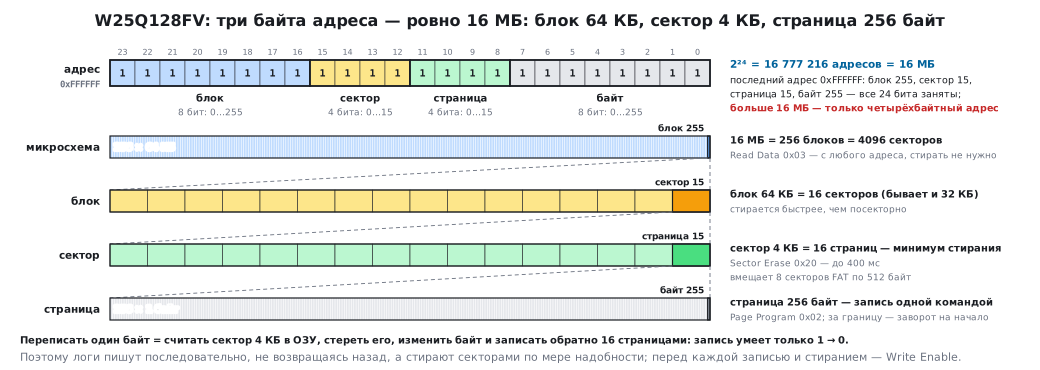
| page | 256 bytes | write it with one command |
| sector | 4 KB | the smallest amount that can be erased |
| block | 32 or 64 KB | erase it faster than sector by sector |
The key rule of flash memory: a write can only turn ones into zeros. Going back is possible only by erasing, and only a whole sector. So "rewriting one byte" physically means: read the sector into RAM, erase the sector, change the byte, write the sector back.
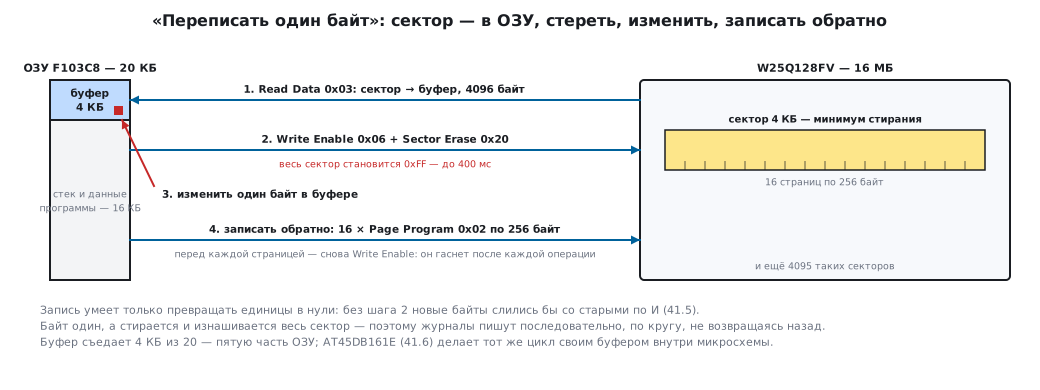
This also gives the approach to logs: write sequentially, never going back, and erase sectors as needed.
The order of any write operation:
- send
Write Enable— otherwise the chip silently ignores the command; - send the command itself with the address and data;
- wait for the busy flag in the status register to clear.
The write enable is cleared by the hardware automatically after every operation, so it is set before each one, not once at startup.
41.5 🔧 W25Q128FV: a typical chip
16 MB, 256-byte page, 4 KB sector, supply 2.7–3.6 V — it connects to the STM32 directly, without level shifting.
First of all, check the connection. The chip must identify itself:
#define W25_CMD_JEDEC_ID  0x9Fu

uint32_t w25_read_id(void)
{
    uint32_t id;

    CS_LOW();
    spi_xfer(W25_CMD_JEDEC_ID);
    id  = (uint32_t)spi_xfer(0xFF) << 16;   /* производитель: 0xEF — Winbond */
    id |= (uint32_t)spi_xfer(0xFF) << 8;    /* тип памяти */
    id |= (uint32_t)spi_xfer(0xFF);         /* ёмкость: 0x18 = 128 Мбит */
    CS_HIGH();

    return id;
}
For the W25Q128FV the answer is 0xEF4018. If you get zeros or 0xFFFFFF, the problem
is in the wiring, not in the code: check the supply, CS, the SPI mode and the pull-ups
on WP#/HOLD#.
Reading is the simplest operation; it needs no erase:
void w25_read(uint32_t addr, uint8_t *buf, uint32_t len)
{
    CS_LOW();
    spi_xfer(0x03);                      /* Read Data */
    spi_xfer((uint8_t)(addr >> 16));
    spi_xfer((uint8_t)(addr >> 8));
    spi_xfer((uint8_t)addr);
    for (uint32_t i = 0; i < len; i++) {
        buf[i] = spi_xfer(0xFF);
    }
    CS_HIGH();
}
Writing and erasing rely on two service commands. Write Enable
(0x06) permits one following write or erase, and bit 0 BUSY
of status register 1 (read with command 0x05) is one while
the operation is in progress:
static void w25_write_enable(void)
{
    CS_LOW();
    spi_xfer(0x06);                      /* Write Enable */
    CS_HIGH();
}

static void w25_wait_ready(void)
{
    CS_LOW();
    spi_xfer(0x05);                      /* Read Status Register-1 */
    while (spi_xfer(0xFF) & 0x01u) { }   /* бит 0 — BUSY */
    CS_HIGH();
}
Bit 1 of the same register is WEL: after Write Enable it becomes
one, and when the write or erase finishes the chip clears it
itself. You check it to confirm that the enable got through. In a product the wait
is limited by a timeout.
Programming a page — with the mandatory enable and wait:
void w25_page_program(uint32_t addr, const uint8_t *buf, uint32_t len)
{
    /* Запись, вышедшая за границу страницы, заворачивается на её начало
       и затирает то, что там уже лежало. Обрезаем по границе. */
    uint32_t space = 256u - (addr % 256u);
    if (len > space) {
        len = space;
    }

    w25_write_enable();

    CS_LOW();
    spi_xfer(0x02);                      /* Page Program */
    spi_xfer((uint8_t)(addr >> 16));
    spi_xfer((uint8_t)(addr >> 8));
    spi_xfer((uint8_t)addr);
    for (uint32_t i = 0; i < len; i++) {
        spi_xfer(buf[i]);
    }
    CS_HIGH();

    w25_wait_ready();
}
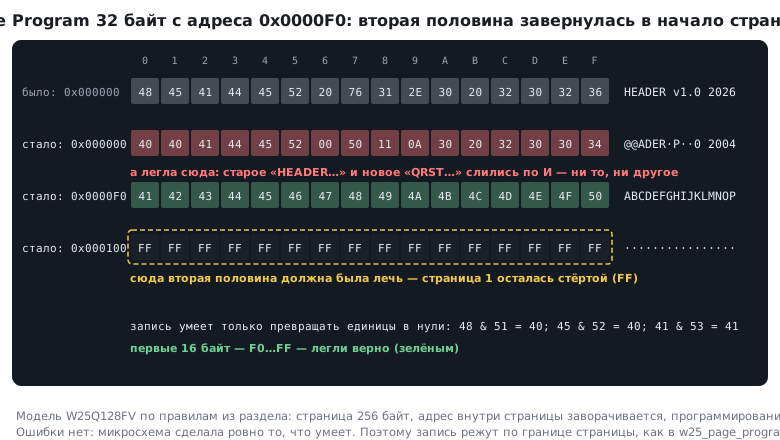
⚠️ Wrap-around inside a page is a trap that is not noticed right away. If you start writing at address
0x0000 00F0and pass 32 bytes, the first 16 land at addressesF0…FF, and the next 16 go not to the start of the next page but back to00…0Fof the same page, on top of what was already written. There is no error; the data simply ends up in the wrong place. Hence the trimming at the page boundary in the example above.
And since a write can only turn ones into zeros, the wrapped bytes do not replace the old ones but merge with them by AND — both get corrupted.
Erasing — only a whole sector at a time:
void w25_sector_erase(uint32_t addr)      /* 4 КБ, адрес любой внутри сектора */
{
    w25_write_enable();

    CS_LOW();
    spi_xfer(0x20);                      /* Sector Erase */
    spi_xfer((uint8_t)(addr >> 16));
    spi_xfer((uint8_t)(addr >> 8));
    spi_xfer((uint8_t)addr);
    CS_HIGH();

    w25_wait_ready();                    /* до 400 мс — это долго */
}
⚠️ An erase takes hundreds of milliseconds, a whole-chip erase takes tens of seconds. A polling loop blocks the program for that whole time. In a real product the busy flag is polled from the main loop or by a timer, not spun on.
Why a three-byte address means exactly 16 MB. Three bytes give 2²⁴ = 16777216 addresses. The W25Q128 uses all of them, and that is the limit: larger chips require switching to four-byte addressing mode, where every command gets an extra byte.
41.6 🔧 AT45DB161E: when the chip is non-standard
A useful counterexample. Also an SPI Flash, also 3.3 V, but organised differently.
| W25Q128FV | AT45DB161E | |
|---|---|---|
| capacity | 16 MB | 2 MB |
| page | 256 bytes | 528 bytes |
| on-chip buffers | none | two SRAM buffers of 528 bytes |
| smallest erase | 4 KB sector | 528-byte page |
| changing a byte in place | through RAM: read the sector, erase, write | inside the chip: read, modify, erase and write through a buffer |
Where 528 comes from. It is 512 bytes of data plus 16 service bytes — historically for
checksums and tags. The chip can also work with 512-byte
pages. On the E series the switch is reversible: the command 3D 2A 80 A6
sets 512 bytes, 3D 2A 80 A7 sets 528 again, and the size is stored
in a non-volatile register rated for about 10000 switches.
It was one-time on the old D series — check the revision in the datasheet.
The two buffers are its strong point. You can write data into a buffer and then move it into the main array with one command, with automatic erasing of the page. While the transfer is running, you can already prepare the next portion in the second buffer. For a microcontroller with 20 KB of RAM this is a noticeable saving: you do not need to keep a copy of the sector yourself.
When to take which:
- you need capacity, a standard part and a simple layer under a file system — W25Q128;
- you need frequent edits of individual records with little RAM, and 2 MB is enough — AT45DB161E;
- for FatFS the first is more convenient: 4096 divides by 512 evenly, while 528 requires either switching to 512-byte pages or address translation.
41.7 An SD card over SPI
A way to get gigabytes and a removable medium without dealing with NAND: inside the card is its own controller, which already takes care of wear, bad blocks and error correction.
The initialisation order:
- send at least 74 clocks with
CShigh — the card "wakes up"; CMD0— put it into the idle state;CMD8— find out the version (SDv1 or SDv2);ACMD41in a loop — wait until it is ready;CMD58— find out whether the card is addressed in bytes or in blocks.
⚠️ Initialisation runs at low speed — no faster than 400 kHz. Only after it finishes is the SPI divider switched to the working frequency. Trying to start straight away at 20 MHz gives a card that "is not detected", and differently on different cards, which makes things completely confusing.
CMD0 arrives while the card is still in its native SD mode, where the checksum
is always checked, and the card checks CMD8 against a checksum even in SPI mode,
so their frames are taken ready-made: 40 00 00 00 00 95 and 48 00 00 01 AA 87 —
the last byte is the CRC7 with the stop one. For the other commands the checksum
is not checked in SPI by default, and 0x01 is sent in its place — a single
stop one.
Exchanging a block:
- read —
CMD17with the block number (on old SDSC cards — with a byte address; that is whatCMD58finds out), response R1 = 0x00, then wait for the 0xFE token, receive 512 bytes and 2 bytes of CRC; - write —
CMD24, response R1 = 0x00, send the 0xFE token, 512 bytes and any two CRC bytes. The card answers with a byte of the formxxx00101— "data accepted" — and holds MISO low while it writes: wait for 0xFF.
After CS goes high one more 0xFF byte is needed: the card releases MISO only
on clocks, and without it a neighbouring chip on the same bus (for example,
the W25Q128 from 41.5) will read garbage.
The SD block is always 512 bytes — exactly a FAT sector, so the disk layer for the file system is written with almost no adapters.
Power is a separate topic: at peak the card draws up to 100 mA and pulls the voltage down on thin traces. A capacitor next to the holder is mandatory.
41.8 Pitfalls
A forgotten Write Enable. The write command runs "idle", there is no error,
the data does not change. Check by reading the WEL bit (bit 1 of status
register 1).
Writing without erasing. Flash changes ones to zeros, but not back. If you wrote into a non-empty sector, you get a bitwise AND of the old and new data. The data will look plausible but be corrupted.
Waiting on busy. A sector erase lasts hundreds of milliseconds. The program freezes for that time, and the watchdog may fire.
Wrong SPI mode. Most such chips work in modes 0 and 3.
Swapped CPOL/CPHA give garbage on reads, often stable garbage — it looks
like "the chip is broken".
Unconnected WP# and HOLD#. Left floating, they pick up
noise: a write sometimes goes through, sometimes not. Pull them up to the supply.
Long wires. On a breadboard at 20 MHz SPI works every other time. To check, lower the frequency to a couple of megahertz: if it starts working, the problem is the wiring, not the code.
A DMA buffer in CCM. If the transfer goes through DMA, the buffer must not be in memory connected directly to the core (section 9).
Endurance. 100000 cycles per sector is a lot, but not infinite. A log that writes to the same sector every second wears it out in a day. Write sequentially in a circle.
41.9 Summary
- An "SPI flash" is NOR. NAND is cheaper and larger, but requires bad block handling and error correction; do not start your own project with it.
- You need megabytes — NOR over SPI. You need gigabytes — an SD card, where everything complex is hidden inside.
- The BluePill has no SDIO and no FSMC — only SPI. Quad SPI appears on the F412 and higher and can show the flash as a memory range.
- A write turns ones into zeros; getting them back is possible only by erasing a whole sector.
- Before every write —
Write Enable; after it — wait for the busy flag. - A write past the page boundary wraps around to its start and corrupts the data without any error.
- A three-byte address is exactly 16 MB; beyond that the four-byte mode is needed.
- SD initialisation runs at no more than 400 kHz, then switches to the working speed.
Next: section 41а "SD card over SDIO: four data lines, commands, DMA and FatFS" — the same card, but over its native protocol and four times faster.