 Embedded HandbookApps
191. Embedded Linux: when you need it and what the image is made of
A microcontroller runs your program in its entirety: the program is the system.
A Linux device is built differently — there the kernel sits between the hardware and your program,
and your program is just one of many. This section is about when the move
is justified and what parts make up the image that is written to the board's memory.
The experiments run in the stm-linux:1 image (Debian 12, gcc 12, dtc 1.6.1, cpio 2.13);
the numbers in the text come from the runs and are checked by _verify/linux191_check.py.
Terms used in the documentation
Term Meaning system on chip (SoC) CPU core, memory and controllers in one package memory management unit (MMU) the block that gives virtual addresses instead of physical ones bootloader the program that starts the kernel device tree (DTS, DTB) a description of the board for the kernel, in text and binary form root filesystem (rootfs) the root file system initramfs a root in RAM, unpacked by the kernel at startup init the first process of the system, PID 1
191.1 When a microcontroller is not enough
Moving to Linux is not a step up in class but a change in the set of tasks. Counting motor steps and holding a 20 kHz PWM is easier without a general-purpose operating system; storing gigabytes, talking TCP with encryption and showing graphics on a screen is easier with one.
| What the device needs | Microcontroller | Linux device |
|---|---|---|
| response within microseconds, predictably | yes, that is its job | no: the scheduler and preemption get in the way |
| startup within milliseconds | yes | no: starting the kernel and services takes seconds |
| networking with TLS, over-the-air updates, a database | hard, by hand | standard, with ready-made packages |
| a file system of gigabytes | external, with your own code | standard |
| display, browser, video | hardly at all | standard |
| cost and power consumption | pennies and microamps | more expensive and noticeably more power-hungry |
The main technical limitation is simple: the regular Linux kernel needs a memory
management unit. Cortex-M does not have one. A variant of the kernel without it exists
and boots on the STM32F429, F746 and H743 with external SDRAM of a few
megabytes, but without memory protection and without fork() — for products it is exotic.
It does not fit the F407: that chip has no SDRAM controller, and its own 192 KB of RAM
is too little for the kernel. Linux devices use chips with a memory management unit —
the MP1 series or general-purpose processors (Cortex-A).
Hence a common and successful design: two processors on one board. The microcontroller handles real time — polling sensors, control, the watchdog timer (section 12); the Linux processor takes care of networking, storage and the display, and they talk over UART, SPI or Ethernet (sections 16, 18, 105). Quite often it is the Linux half that updates the microcontroller firmware.
191.2 The four parts of the image
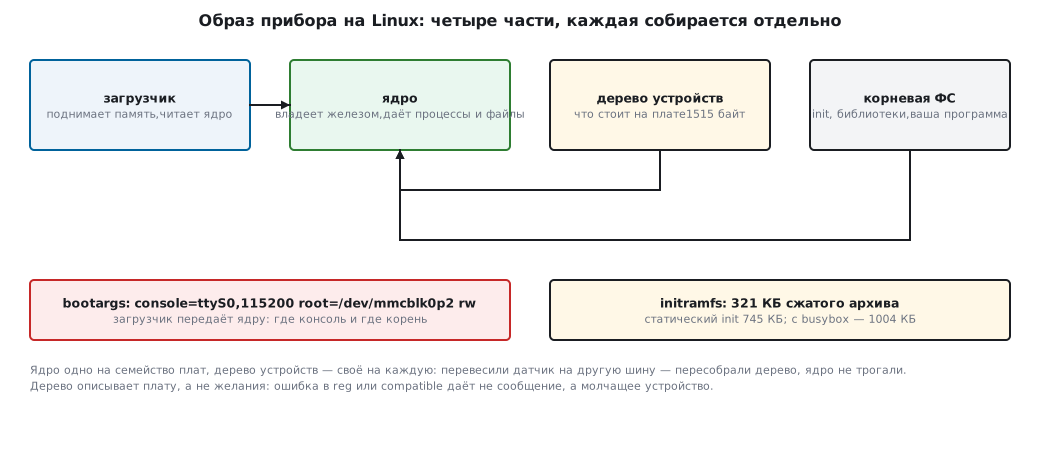
A device image is not one file but four independent parts. This matters in practice: each one is built and updated separately.
| Part | What it does | What builds it |
|---|---|---|
| bootloader | brings up memory and clocks, reads the kernel, passes arguments to it | U-Boot, less often your own |
| kernel | owns the hardware, gives processes memory, files, sockets | kernel sources for your architecture |
| device tree | tells the kernel what exactly is on this board | dtc from the .dts text |
| root FS | everything else: init, libraries, your program |
Buildroot, Yocto or a ready-made distribution |
There is one kernel for the whole family of boards, but each board has its own device tree. That is the point of the split: you move a sensor from one bus to another — you rebuild the tree and leave the kernel alone.
The argument string from the bootloader to the kernel (bootargs) is also part of the image.
In the experiment it looks like this:
console=ttyS0,115200 root=/dev/mmcblk0p2 rw
Where the console is (which UART and what baud rate), where the root is (the second partition of the memory card) and how to mount it. If a device "booted but is silent", this is the first place to look.
191.3 The device tree: the board separate from the kernel
A device tree is a text file: nodes, and the nodes have properties. The dtc compiler
turns it into a binary .dtb that the kernel reads.
/ {
    compatible = "handbook,demo-board";
    #address-cells = <1>;
    #size-cells = <1>;

    memory@40000000 {
        device_type = "memory";
        reg = <0x40000000 0x08000000>;      /* 128 МБ */
    };

    i2c0: i2c@44e0b000 {
        compatible = "ti,omap4-i2c";
        reg = <0x44e0b000 0x1000>;
        #address-cells = <1>;
        #size-cells = <0>;
        clock-frequency = <100000>;         /* DS1307 — только стандартный режим, раздел 17 */

        rtc@68 {
            compatible = "dallas,ds1307";
            reg = <0x68>;                   /* тот же адрес, что и в разделе 17.2 */
        };
    };
};
You read it the same way as a schematic: i2c@44e0b000 is a controller at that
physical address; the nested rtc@68 is a chip on the bus at address
0x68, the same seven-bit address as in section 17.2. The compatible property
is the key by which the kernel selects a driver; reg is the address, clock-frequency
is the bus speed. It is 100 kHz because the DS1307 only works
in standard mode; for 400 kHz you fit a clock chip that supports it, for example
the DS3231 (maxim,ds3231). #address-cells and #size-cells say how many
cells reg has in the child nodes: on an I²C bus the address is one cell and there is no length.
Without them dtc issues warnings, and reg = <0x68> is parsed incorrectly.
Experiment: the board from the example, five peripheral nodes.
| What | Value |
|---|---|
.dts text |
2218 bytes |
binary .dtb tree |
1515 bytes |
| nodes in the tree | 13 |
first bytes of the .dtb |
d00dfeed — the device tree magic number |
| I²C speed after the build | 0x186a0 = 100 000 Hz |
| clock chip address on the bus | 0x68 |
| memory | 0x40000000, length 0x8000000 — 128 MB |
Decompiling with dtc -I dtb -O dts turns the binary file back into text —
this is the main debugging technique: you look not at what you wrote, but at what is actually
in the image.
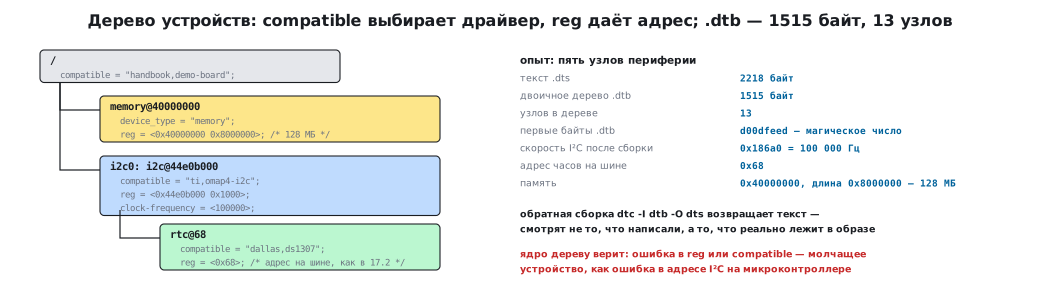
⚠️ The tree describes the board, not your wishes. The kernel does not check that the chip is really at that address: it trusts the tree. An error in
regor incompatiblegives you not an error message but a silent device — just like a wrong I²C address on a microcontroller (section 17.2).
191.4 A root in memory: initramfs
The smallest working root is an archive that the kernel unpacks
into memory and from which it runs /init. It is built in two steps: directory →
cpio archive → compression.
/* init.c — первый процесс системы */
int main(void)
{
    struct utsname u;
    uname(&u);
    printf("init: pid=%d ядро=%s\n", getpid(), u.release);
    mount("proc", "/proc", "proc", 0, NULL);
    for (;;) {
        pause();
    }
}
gcc -static -O2 -o root/init init.c
( cd root && find . | sort | cpio -o -H newc --quiet > initramfs.cpio )
gzip -9 -n -c initramfs.cpio > initramfs.cpio.gz
| What | Size |
|---|---|
init, statically linked |
762 688 bytes (745 KB) |
cpio archive (init and three empty directories) |
763 392 bytes |
the same, compressed with gzip -9 |
321 KB |
| entries in the archive | 5 |
Three quarters of a megabyte for a twenty-line program is the glibc standard
library linked statically into the file; with a small C library
(musl, which Buildroot offers as an option) the same file comes out many
times smaller. Hence two techniques that are standard in embedded systems: a small
C library and a single multi-call executable for all commands.
In the experiment this is busybox: 1 982 256 bytes (1.9 MB) — with 269 commands in it,
from sh and ls to ip and wget. A complete root with it is 1004 KB
compressed, and that is already a system you can work in by hand.
PID 1 is a special process. It starts first, adopts orphaned processes (section 136.4) and is not allowed to exit: for the kernel,
initexiting means a panic. That is why the example has an endlesspause().
191.5 What builds the image
Nobody builds a root file system by hand. The choice is usually between three approaches, and it is decided not by taste but by who will maintain the device afterwards.
| Approach | What it gives | What you pay |
|---|---|---|
| Buildroot | one configuration file, an image of tens of megabytes, a build from scratch in minutes | everything is rebuilt on every change, no package management on the device |
| Yocto | reproducible builds, layers, your own distribution and updates | the learning curve and build time |
| a ready-made distribution (Debian, Alpine, Armbian) | familiar packages, updates from the network | size and unneeded services, less control over startup |
The practical order: the prototype is built on a ready-made distribution to check the hardware and drivers; the production device is moved to Buildroot or Yocto when you need a predictable image, startup time and whole-image updates.
191.6 Pitfalls
The kernel booted, but there is no console. The wrong console= in bootargs.
Check the string the bootloader actually passed, not the one
in the configuration file.
The tree is built, but the device has not appeared. Check three things in order:
is the node in the decompiled .dtb, does it have status = "okay",
does the kernel have a driver with that compatible.
The device hangs right after "Freeing unused kernel memory". The kernel
could not find or could not run /init: the wrong path, the wrong executable
format (dynamic, with no libraries in the image), no execute
permission.
init exited — kernel panic. The first process is not allowed to exit.
The image has bloated out of nowhere. Debug symbols and static linking
of everything: 20 lines of C give 745 KB, and busybox with 269 commands
1.9 MB. Track the image size from day one, not just before the release.
191.7 Summary
- Linux is needed where networking, storage and a display matter; a microcontroller is needed where a predictable response matters. Often a board has both.
- The regular kernel needs a memory management unit. A variant without one boots on the F429, F746 and H743 with external SDRAM, but in products it is exotic, and the F407 does not fit it.
- The image consists of four parts: bootloader, kernel, device tree and root FS; they are updated independently.
- The device tree is a description of the board:
compatibleselects the driver,regsets the address. In the experiment 2218 bytes of text gave a 1515-byte.dtbwith 13 nodes. - The smallest root is an
initramfs: a 745 KB staticinitgives a 321 KB compressed archive;busyboxwith 269 commands gives 1004 KB, and that is already a working system. - Images are built with Buildroot or Yocto; a ready-made distribution is handy for a prototype.
Full source code
init.c — a static init for the initramfs.
/* Первый процесс системы для раздела 191.4: статический init для initramfs.
 * Ничего не делает, кроме как показывает, что он PID 1 и что корень уже смонтирован. */
#include <stdio.h>
#include <sys/mount.h>
#include <sys/utsname.h>
#include <unistd.h>

int main(void)
{
    struct utsname u;
    uname(&u);
    printf("init: pid=%d ядро=%s\n", getpid(), u.release);
    mount("proc", "/proc", "proc", 0, NULL);
    printf("init: /proc смонтирован, дальше — служба прибора\n");
    for (;;) {
        pause();
    }
}
Next: section 192 "Peripherals from a program: gpiochip, i2c-dev, spidev, sysfs".