 Embedded HandbookApps
190. Telemetry and release: ring buffer, decimation, storage, build
The last section of this part: the device sends readings for hours, and the app has to display them, store them and survive the release of a new version. Three questions that get numbers here: what to keep in memory, what to draw on the screen and what format to store the log in.
The numbers come from the _verify/dart190 package: five tests and a series of
200 000 points with a single spike.
Terms used in the documentation
Term Meaning ring / circular buffer a fixed-size buffer where new data overwrites the oldest downsampling, decimation reducing the number of points min-max decimation decimation that keeps the minimum and maximum retention how long data is kept append-only log a log that is only ever appended to gzip, deflate compression preferences, key-value store settings: "key — value" pairs build number, version code the build number release build, obfuscation a build for release, scrambling of the code
190.1 Ring buffer: memory does not grow
An app that keeps everything it receives crashes after a day. The screen only needs recent history, so the points go into a ring of fixed size:
| What was checked | Value |
|---|---|
| buffer capacity | 10 000 points |
| points fed in | 25 000 |
| left in the buffer | 10 000 |
| first point in the buffer | the 15000th |
Memory does not grow at all: the list is allocated once, and new points overwrite old ones. Everything that has to be kept longer goes into a log on disk — that is the next topic.
190.2 Decimation: the screen is narrower than the data
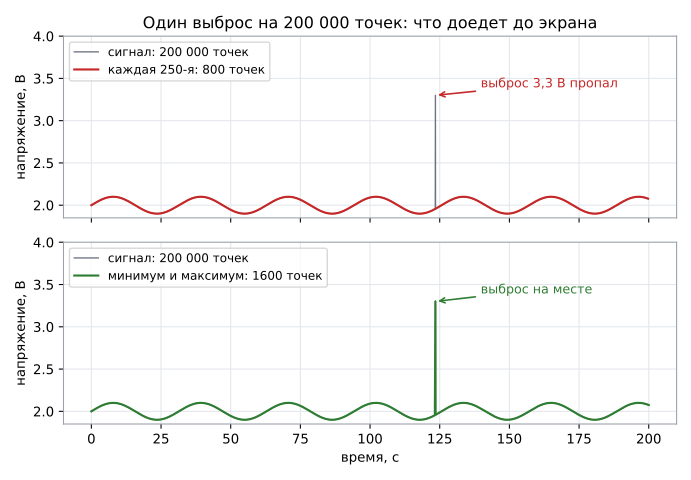
On a chart 800 pixels wide there is no point in drawing 200 000 values. The question is how to reduce them. A simple "every 250th" is fast and wrong:
| Method | Points on screen | 3.3 V spike |
|---|---|---|
| every 250th | 800 | lost |
| minimum and maximum per bucket | 1600 | kept |
The second method looks at all the points in a bucket and takes two of them — the lowest and the highest:
for (int j = i; j < end; j++) {
  if (src[j].volts < lo.volts) lo = src[j];
  if (src[j].volts > hi.volts) hi = src[j];
}
The price is twice as many points on the screen and a full pass over the data. The gain is that the chart shows what people look at it for: a short spike, a supply dip, a one-off glitch.
190.3 Storage: binary format, text and compression
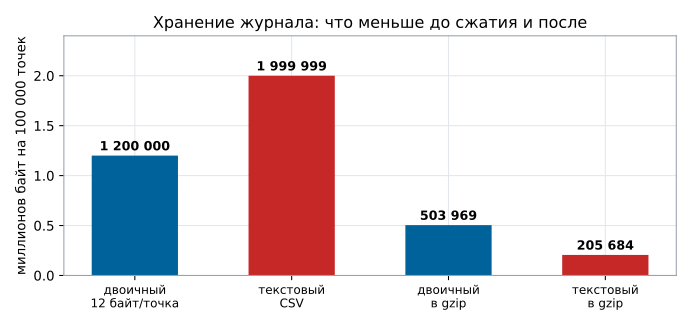
A log of 100 000 points, each with a time in milliseconds since 1970 and a voltage:
| Format | Size, bytes |
|---|---|
| binary, 12 bytes per point | 1 200 000 |
| CSV text | 1 999 999 |
| binary after gzip | 503 969 |
| text after gzip | 205 684 |
The result is surprising only until you think about it: text is bigger but compresses better. The binary representation of floating-point numbers is almost random as far as compression is concerned, while text repeats digits, commas and the same high-order digits of the time. For sending to a server, text in gzip turns out to be 2.5 times smaller than binary in gzip.
But the comparison is unfair. CSV stores the voltage to the millivolt, while a floating-point number keeps all its digits, and on a smooth wave the low-order ones change from point to point. A binary record of the same precision — millivolts as a 16-bit integer, time as an increment from the previous point, also 16 bits — takes 4 bytes per point: 400 000 bytes, and after gzip 3 662. It comes out this small for a smooth wave without noise; with ±2 mV of noise, as from a real ADC, it is 66 485 bytes against 300 916 for text in gzip, still 4.5 times smaller. So "text compresses better" is a property of the chosen record format, not a rule: what helps compression is not text but the absence of excess precision.
The practical choice: on the device store binary (fast to write, easy to read in chunks) and no more precise than needed; send it compressed — as text when any tool on the other end must be able to read it, or in the same compact binary record when traffic is expensive.
190.4 Settings: what to keep next to the app
The device address, units of measurement, the selected channel, the alarm threshold — these are "key — value" pairs, and there are two requirements for them:
- Default values are set in code. The app must start on a clean device without any setup.
- Nothing secret. The settings store is not protected; passwords and keys go into the platform's secure storage or nowhere.
A separate case is the device address and name: it is useful to remember them, but also to show them to the user and let them be changed, otherwise replacing the board turns into reinstalling the app.
190.5 Release: the version and what to check before the build
The app version is one for everything: the number in pubspec.yaml, the same number
on the "about" screen and in the log. They drift apart instantly if
you set them by hand, so the number is taken from one place, and the build is done
with a command, not with the mouse.
Before a release it is worth running exactly what this part has covered:
| What | Where from |
|---|---|
| package and screen tests | 185–189, dart test and flutter test |
| release build and version number | this section |
| pipeline: a build on every change | section 110 |
| a test for every fixed bug | section 184 |
And the rule from section 182, which is worth more than all the others: freeze changes before a release. A "just in case" edit in a release candidate is a 7 % chance of a new bug with no gates left ahead.
190.6 Pitfalls
Keeping all the points. The app eats up memory within a day of running and crashes exactly when the device has shown something.
Drawing "every Nth". The chart looks nice and lies: the spike you were looking at it for is gone.
A text log without compression. Twice the space and traffic you need.
A binary log without a format description. In half a year nobody will remember where the time is and where the voltage is; the description goes in the same repository, right next to it.
Secrets in the settings. The settings store can be read by anyone who has the device.
The version is set by hand. One on the screen, another in the store, a third in the log — and analysing a case from the field turns into guesswork.
190.7 Summary
- The ring buffer keeps the last 10 000 points: after 25 000 have been fed in it holds exactly 10 000, starting from the 15000th, and memory does not grow.
- Decimation by "every 250th" gives 800 points and loses the spike; min-max decimation gives 1600 and keeps it.
- 100 000 points take 1 200 000 bytes as binary and 1 999 999 as text, but after gzip 503 969 and 205 684: text compresses 2.5 times better. Yet a binary record to the millivolt with time increments is smaller than text after gzip: 3 662 bytes, and with ±2 mV of noise 66 485 against 300 916.
- Settings come with default values and without secrets; the version comes from one place.
- Before a release, run all the tests of parts XXII and XXIII and freeze changes.
Next: section 191 "Embedded Linux: when you need it and what the image is made of".