 Embedded HandbookApps
132в. DipTrace: checks, panels and fabrication files
The board is routed — what remains is to make sure it is correct, to replicate it on a panel if needed, and to give the factory the files it will be made from. This section covers the three DipTrace checks, panelizing and every file of the release: what is in it and which checkboxes matter on export. At the end we look inside the files themselves: a short program reads the Gerber and drill files of a real board and shows that the numbers in different files must agree.
Menus and parameters were checked against the manual of the installed DipTrace 5.3
and against the interface strings of Pcb.exe. The fabrication files are the export of the board
from section 131 (produced by that section's check); they are parsed by
_verify/dip132c/fabread.py. Checked by _verify/dip132c_check.py.
Terms used in the documentation
Term Meaning net connectivity check checking that every net is whole compare to schematic comparing the board against the schematic panelizing placing several boards on one panel V-scoring V-grooves for breaking the panel apart edge rail a technological strip along the panel edge solder mask swell how much the mask opening grows around a pad drill symbols hole symbols on the drill drawing aperture, flash an aperture (the shape of the "pen") and its single imprint file function (Gerber X2) the file's purpose, written inside the file itself
132в.1 Three checks
The manual advises running all three — they catch different errors.
| Check | Menu | What it finds |
|---|---|---|
| DRC | Verification / Check Design Rules, F9 | clearances, object sizes, differential pair parameters |
| net connectivity | Verification / Check Net Connectivity | broken and merged nets — through layers, pours and shapes |
| compare to schematic | Verification / Compare to Schematic | differences in net structure and unknown components |
DRC works in two modes: normal (on command) and real time — red circles appear right while you move objects and route. Even if real time was on throughout the work, run the normal check at least once before exporting Gerber.
The rules are in Verification / Design Rules, with the Clearances, Sizes, Real-time DRC and Options tabs. On the Options tab you choose what to check: class-to-class rules, length matching, pours. The Same Net Clearance checkbox enables clearance checks within a single net too.
The error list shows the actual and the required value, Localize shows the spot on the board, and the Rule Details section shows where to fix the rule. A red circle is a clearance error, a magenta one is a size error. Once fixed — Run DRC right from the list window.
Net connectivity is especially needed on a multilayer board with pours: DRC checks distances, but will not notice that a pour has cut a net into two pieces or merged two nets into one.
Compare to schematic takes the source schematic file and checks the board against it — it catches a change made on the board but forgotten in the schematic.
A summary of the board — the number of objects and layers, board and hole sizes — is shown by File / Layout Information; the Show on Board button in the hole size window highlights the holes of the selected diameter on the board.
132в.2 Panel
Small boards are made and assembled not one at a time but as a panel. Tools / Panelizing: the manual's example is 12 copies, 3 columns × 4 rows, separated by V-scoring (V-Scoring), with 0 spacing between boards, and along the edge an Add Edge Rail strip of 0.2 inch (5.08 mm) on each side for assembly at the factory.
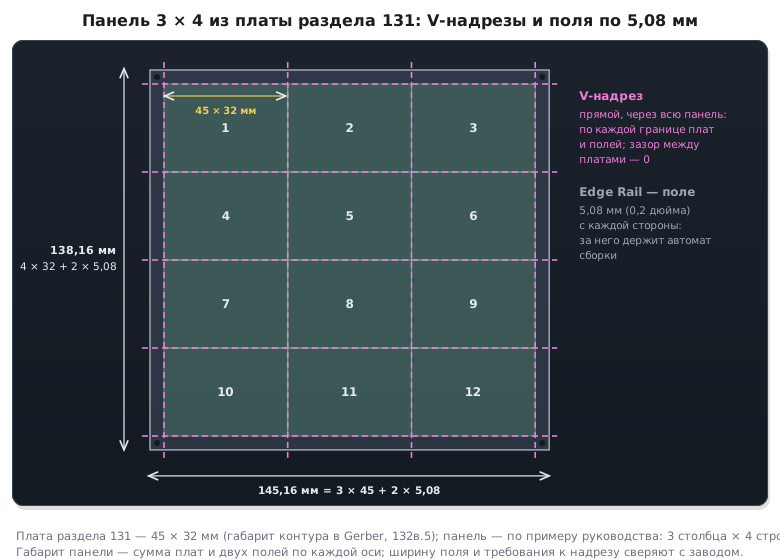
- Panelizing works only if the board has an outline.
- Individual objects can be excluded from the copies: right-click → Do Not Panelize (the item is visible only while panelizing is on).
- On screen the copies are rectangles with "#"; the real view is in File / Preview and in the exported files.
- V-scoring suits boards of regular shape with no parts sticking out past the edge. For the rest — routing with breakaway tabs (Tab-Routing).
- Always check the spacing between boards and the rail width against the factory's requirements.
Different boards on one panel: turn on Edit / Keep RefDes while Pasting, copy the board and paste it next to the first. The outline and cutouts for the panel are drawn as shared ones. A curious detail from the manual: with Keep RefDes while Pasting turned on, the pin limit of the DipTrace edition does not apply — on the free version you can build a panel from several boards of 300 pins each.
132в.3 Fabrication files
| File | Menu | What matters on export |
|---|---|---|
| Gerber RS-274X | File / Export / Gerber | each layer in its own file; Export All — a Gerber archive, or Gerber together with the drill file |
| Gerber X2 | File / Export / Gerber X2 | the same window; the file records the layer's purpose, the layer order and the pad functions; it can put the drill data into Gerber files, but most factories expect Excellon |
| drill file | File / Export / N/C Drill | Excellon format; Auto assigns the tools; for through holes all layers are selected, for blind ones only the style's layer pair |
| ODB++ | File / Export / ODB++ | CAM350 or Mentor Graphics mode (ODB++ version 8.1), Make Zip Archive |
| DXF | File / Export / DXF | all layers into one file with the Select All button; for mechanical work and for milling |
| pick-and-place file | File / Export / Pick and Place | for the assembly machine: designator, coordinates, angle and side of every part; CSV or text; the zero point as for Gerber: Offset or Use Design Origin |
Gerber layers and their checkboxes.
- Solder mask (Top/Bottom Mask) is built automatically — from the pads and the global Solder Mask Swell. Vias are usually covered with mask, so the Vias checkbox is cleared for the mask. A custom mask opening for a pad is set with right-click → Mask / Paste Settings.
- Paste — for SMD only: Paste Mask for SMT Pads Only (the manual says "for SMD Pads only"; in the program itself it reads as given here).
- Copper — the Vias checkbox must be set on every copper layer.
- Pad/Via Holes — only for drilling the board yourself: then the file holds two layers, the artwork and a "clearing" over the holes. Factories prefer Gerber without holes — they take the holes from the drill file.
- Board Outline — the outline of the board or of the whole panel; V-Scoring — the score lines; Top/Bottom Dimensions — dimensions that help the factory avoid mistakes.
- Text on bottom layers is mirrored automatically (View / Flip Text Automatically).
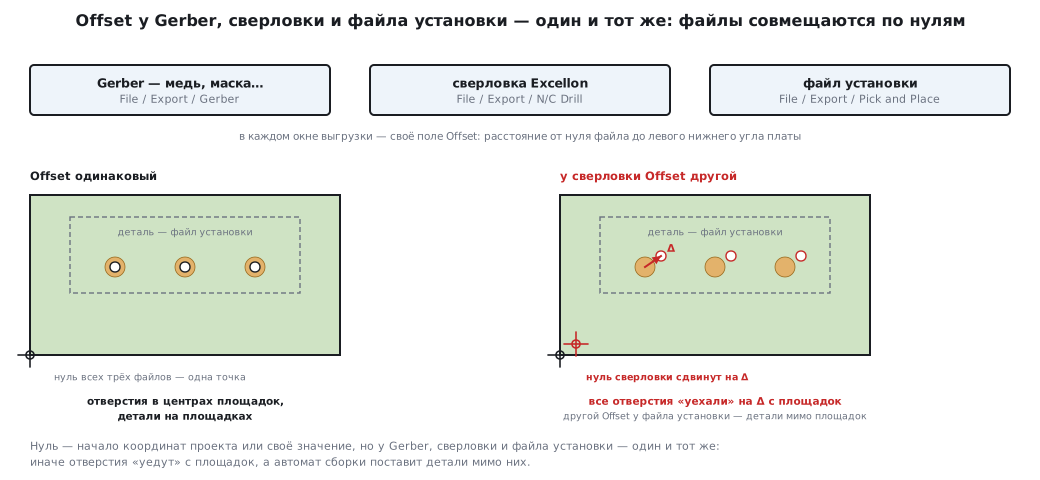
Offset in every export window is the distance from the zero point to the lower left corner of the board: the project origin or a value of your own. It must be the same for Gerber, the drill file and the pick-and-place file, otherwise the holes "drift" off the pads and the machine places the parts beside them. The bill of materials for purchasing and assembly is exported separately — 132д.6.
Drill Symbols is a separate file with hole symbols and a table of diameters; some factories ask for it. After exporting it, clear the checkbox: otherwise the other layers are exported empty.
The manual advises opening the finished files in a third-party Gerber viewer — preferably the one the factory uses: programs read the format slightly differently.
132в.4 Milling and printing at home
Milling. The DXF window has Edge_Top and Edge_Bottom layers — these are not board layers but cutter paths around the copper. For a board with traces on the bottom you choose Edge_Bottom and Mirror. Edge Width is the width of the cut; the cutter's centre line runs at half that width. If the clearances between objects are smaller than the cut width, DipTrace warns you before export. Pours are not taken into account in the paths (thermals are). The machine needs G-code — the DXF is converted to it by a separate program.
Printing a home-made board — File / Preview: scale, layer, Mirror, Print in Black Only, export to PDF or an image. A laser printer slightly stretches the image as the paper heats up; the print window has a calibration.
132в.5 What is inside the files
The formats are standard, so you can look inside on any board.
The files here were produced by KiCad from the board of section 131, not by DipTrace: hence
the 0.3 mm vias (the DipTrace Default style has a 0.51 mm hole, 132б.3)
and the .gbrjob job file, which the DipTrace manual does not have. The Gerber
and Excellon commands and the rule "the numbers agree" do not depend on the program;
a DipTrace export will have its own file names and its own set of X2 attributes.
We took the board of section 131 (two sides, LQFP-48, decoupling, crystal), exported
eight Gerber X2 layers and the drill file, and read them with the program
_verify/dip132c/fabread.py. Its core is the parser of Gerber commands:
aper_func, pending, cur, region = {}, None, None, False
for cmd in re.findall(r"%[^%]*%|[^%*]+\*", txt):
    cmd = cmd.strip()
    if cmd in ("G36*", "G37*"):                 # внутри G36…G37 отрезки — края залитой области
        region = cmd == "G36*"
        continue
    m = re.match(r"%TA\.AperFunction,([^,*]*)", cmd)
    if m:
        pending = m.group(1)
        continue
    m = re.match(r"%ADD(\d+)", cmd)
    if m:
        aper_func[int(m.group(1))] = pending or "?"
        info["apertures"] += 1
        continue
    if cmd.startswith("%TD"):
        pending = None
        continue
    m = re.match(r"(?:G54)?D(\d+)\*$", cmd)
    if m and int(m.group(1)) >= 10:
        cur = int(m.group(1))
        continue
    m = re.match(r"(?:X(-?\d+))?(?:Y(-?\d+))?(?:I-?\d+J-?\d+)?D0([123])\*$", cmd)
    if m:
        if m.group(1):
            info["xs"].append(int(m.group(1)) / 10 ** ndec)
        if m.group(2):
            info["ys"].append(int(m.group(2)) / 10 ** ndec)
        if m.group(3) == "3":
            info["flash"][aper_func.get(cur, "?")] += 1
        elif m.group(3) == "1":
            info["edges" if region else "draws"] += 1
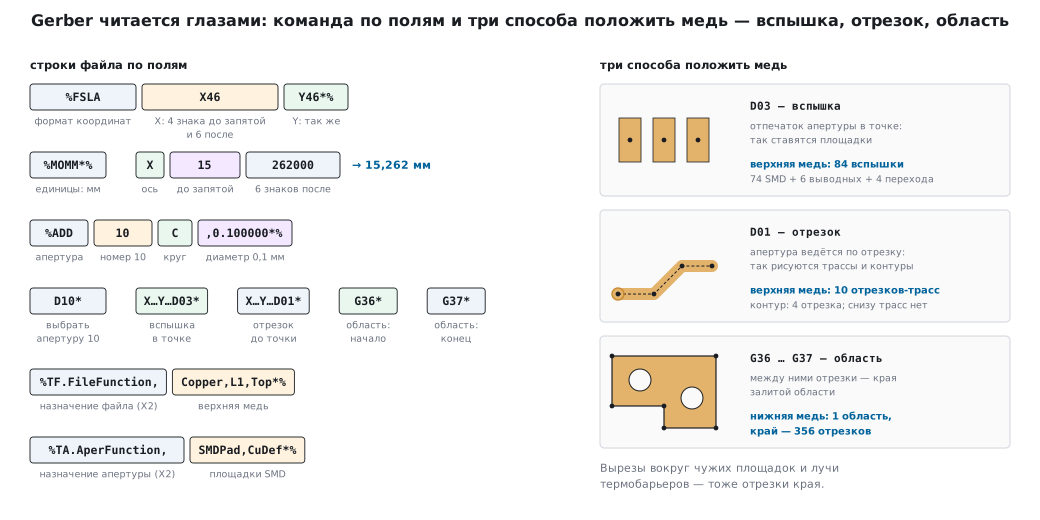
The Gerber vocabulary is small. %FSLAX46Y46*% — coordinates as integers,
4 digits before the decimal point and 6 after: X15262000 is 15.262 mm. %MOMM*% — millimetres.
%ADD10C,0.100000*% — aperture 10: a circle 0.1 mm in diameter. D03 — an imprint
of the aperture at a point (a "flash" — this is how pads are placed), D01 — drawing with the aperture
along a segment (this is how traces and outlines are drawn), G36…G37 — a filled region.
The X2 attribute %TF.FileFunction,Copper,L1,Top*% states right in the file that this is the top
copper, and %TA.AperFunction,SMDPad,CuDef*% before an aperture says that it is used
to place SMD pads.
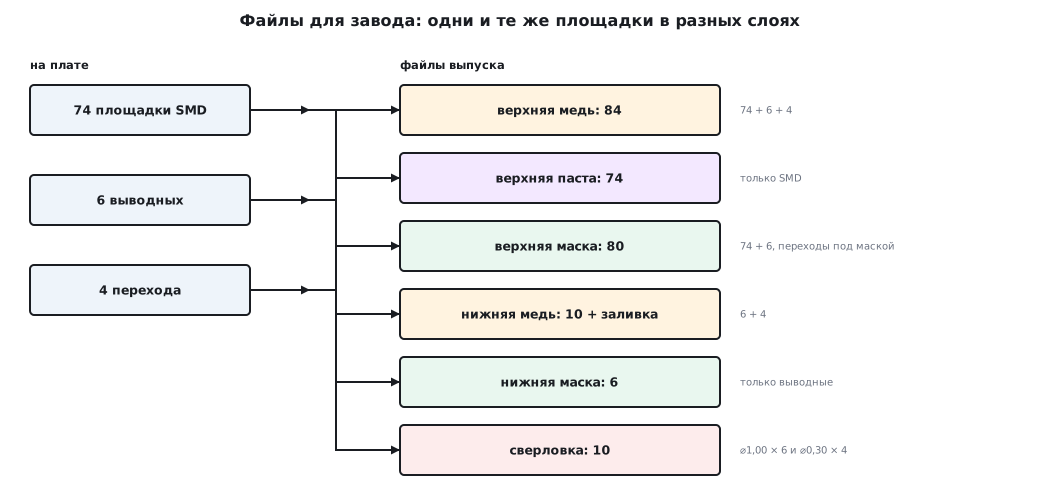
The result:
| File | Function (X2) | Flashes | Segments | Regions |
|---|---|---|---|---|
| top copper | Copper,L1,Top | 74 SMD + 6 through-hole + 4 vias = 84 | 10 | 0 |
| bottom copper | Copper,L2,Bot | 6 through-hole + 4 vias = 10 | 0 | 1 (edges — 356 segments) |
| top mask | Soldermask,Top | 80 | 0 | 0 |
| bottom mask | Soldermask,Bot | 6 | 0 | 0 |
| top paste | Paste,Top | 74 | 0 | 0 |
| outline | Profile,NP | — | 4 | 0 |
| Drill | Diameter | Holes | Function |
|---|---|---|---|
| T1 | 0.30 mm | 4 | Plated, ViaDrill |
| T2 | 1.00 mm | 6 | Plated, ComponentDrill |
The numbers in different files must agree, and this is a handy manual check of the export:
- paste = SMD pads only: 74 in the paste = 74 SMD flashes on the top copper;
- the mask is open over all pads but not over vias (they are under the mask): 80 = 74 + 6; on the bottom — only the 6 through-hole pads;
- holes in the drill file 10 = 6 through-hole + 4 vias — the same as the flashes of through-hole pads and vias on each copper layer;
- the outline — 4 segments, overall size 45.00 × 32.00 mm, as the board size was set
in section 131. In the summary job file (
.gbrjob) the size is written as 45.1 × 32.1 mm — the 0.1 mm outline line width is added to the overall size.
The bottom copper is the ground pour: one G36…G37 region whose edge is described
by 356 segments — including the cutouts around other nets' pads and the
thermal spokes. There is not a single trace on the bottom: all 10 trace segments are on the top copper.
132в.6 Pitfalls
Real-time DRC seemed enough — the normal check was not run. Real time may have been off for some actions. Before export — F9.
DRC is clean, but the board does not work. A pour has cut a net: this is caught by the net connectivity check, not by DRC.
The board was fixed, the schematic was not. Compare to Schematic will show the difference.
Panelizing will not turn on. There is no board outline.
Vias were left without mask and collected solder. The Vias checkbox was set on the mask layer. Clear it for the mask, set it for copper.
All layers after Drill Symbols are empty. The Drill Symbols checkbox was not cleared after exporting the symbols.
Holes are offset from the pads. Different Offset for Gerber and the drill file.
The machine placed the parts beside the pads. Different Offset for Gerber and the pick-and-place file.
The factory sent the files back: "no drill file". Gerber was exported without N/C Drill. Export All can put both into one archive.
The cutter "ate" the pour. Pours are not taken into account in milling paths — better not to pour copper on a milled board.
The numbers do not agree. The paste count does not match the number of SMD pads, or the mask count the number of pads: somewhere there is a custom mask opening, an SMD part on the bottom side, or vias without mask. Sort it out before sending to the factory.
132в.7 Summary
- Three checks: DRC (F9), net connectivity, compare to schematic. A red circle is clearance, a magenta one is size.
- Panel — Tools / Panelizing; an outline is required; V-scoring is for boards of regular shape; the edge rail is for assembly at the factory.
- To the factory — Gerber (or Gerber X2) and an Excellon drill file; mask without vias, paste for SMD only, holes not in Gerber but in the drill file. The same Offset everywhere. For assembly — also the pick-and-place file (Pick and Place) and the bill of materials.
- Gerber can be read by eye:
FS— coordinate format,MO— units,AD— apertures,D03— pads,D01— lines,G36— regions, X2 — purpose. - On the section 131 board: paste 74 = SMD 74, mask 80 = 74 + 6, holes 10 = 6 + 4 — in a correct export the numbers agree between files.
Full source code
fabread.py — reads Gerber files and the Excellon drill file and counts per layer.
# -*- coding: utf-8 -*-
"""Читает файлы для завода: Gerber (RS-274X с атрибутами X2) и сверловку Excellon.

    python fabread.py каталог_с_файлами
Печатает по каждому слою: назначение (TF.FileFunction), формат координат, число апертур,
вспышек (D03) по назначению площадки, отрезков (D01) и областей (G36); по сверловке —
инструменты и число отверстий; по контуру — габарит платы."""
import collections
import os
import re
import sys


def gerber(path):
    txt = open(path, encoding="ascii").read()
    fs = re.search(r"%FSLAX(\d)(\d)Y(\d)(\d)\*%", txt)
    ndec = int(fs.group(2))
    info = {"function": re.search(r"%TF\.FileFunction,([^*]*)\*%", txt).group(1),
            "units": "мм" if "%MOMM*%" in txt else "дюймы",
            "format": "%s.%s" % fs.group(1, 2),
            "apertures": 0, "flash": collections.Counter(), "draws": 0, "edges": 0,
            "regions": txt.count("G36*"), "xs": [], "ys": []}
    aper_func, pending, cur, region = {}, None, None, False
    for cmd in re.findall(r"%[^%]*%|[^%*]+\*", txt):
        cmd = cmd.strip()
        if cmd in ("G36*", "G37*"):                 # внутри G36…G37 отрезки — края залитой области
            region = cmd == "G36*"
            continue
        m = re.match(r"%TA\.AperFunction,([^,*]*)", cmd)
        if m:
            pending = m.group(1)
            continue
        m = re.match(r"%ADD(\d+)", cmd)
        if m:
            aper_func[int(m.group(1))] = pending or "?"
            info["apertures"] += 1
            continue
        if cmd.startswith("%TD"):
            pending = None
            continue
        m = re.match(r"(?:G54)?D(\d+)\*$", cmd)
        if m and int(m.group(1)) >= 10:
            cur = int(m.group(1))
            continue
        m = re.match(r"(?:X(-?\d+))?(?:Y(-?\d+))?(?:I-?\d+J-?\d+)?D0([123])\*$", cmd)
        if m:
            if m.group(1):
                info["xs"].append(int(m.group(1)) / 10 ** ndec)
            if m.group(2):
                info["ys"].append(int(m.group(2)) / 10 ** ndec)
            if m.group(3) == "3":
                info["flash"][aper_func.get(cur, "?")] += 1
            elif m.group(3) == "1":
                info["edges" if region else "draws"] += 1
    return info


def excellon(path):
    tools, holes, cur = {}, collections.Counter(), None
    func = {}
    last = None
    for line in open(path, encoding="ascii"):
        line = line.strip()
        m = re.match(r"; #@! TA\.AperFunction,(.*)", line)
        if m:
            last = m.group(1)
        m = re.match(r"T(\d+)C([\d.]+)$", line)
        if m:
            tools[int(m.group(1))] = float(m.group(2))
            func[int(m.group(1))] = last
            continue
        m = re.match(r"T(\d+)$", line)
        if m:
            cur = int(m.group(1))
            continue
        if re.match(r"X-?[\d.]+Y-?[\d.]+$", line):
            holes[cur] += 1
    return tools, holes, func


if __name__ == "__main__":
    d = sys.argv[1]
    for fn in sorted(os.listdir(d)):
        p = os.path.join(d, fn)
        if fn.endswith(".drl"):
            tools, holes, func = excellon(p)
            for t in sorted(tools):
                print("%-22s T%d ⌀%.2f мм — %d отв. (%s)" % (fn, t, tools[t], holes[t], func[t]))
        elif not fn.endswith(".gbrjob"):
            g = gerber(p)
            size = ""
            if g["function"].startswith("Profile"):
                size = " габарит %.2f × %.2f мм" % (max(g["xs"]) - min(g["xs"]), max(g["ys"]) - min(g["ys"]))
            print("%-22s %-22s %s %s апертур %2d вспышек %s отрезков %d областей %d (краёв %d)%s" % (
                fn, g["function"], g["format"], g["units"], g["apertures"], dict(g["flash"]), g["draws"],
                g["regions"], g["edges"], size))
Next: section 132г "DipTrace: high-speed nets, differential pairs, vias to copper pours".