 Embedded HandbookApps
132г. DipTrace: high-speed nets, differential pairs, vias to copper pours
On a slow board the length of a trace does not matter. On an external memory bus, USB or Ethernet it does: the signals of one transfer must arrive at the same time, and the two wires of a differential pair must run side by side all the way. This section shows how DipTrace helps with such nets: length matching and meanders, delay inside the package, differential pairs with neck-down at a BGA and phase tuning. It also covers three tools that place vias in bulk: fanning pads out to inner layers (Fanout), shielding a trace with rows of vias, and stitching pours.
Menus and parameters were checked against the manual of the installed DipTrace 5.3
and against the interface strings of Pcb.exe; the inch conversions, the propagation delay
and the meander lengths were calculated. Checked by _verify/dip132d_check.py.
Terms used in the documentation
Term Meaning length matching making trace lengths equal meander a serpentine that makes a trace longer pad signal delay signal delay inside the package bond wire the thin wire from the die to the pin differential pair two traces carrying a signal and its inverse uncoupled length the length where the pair runs apart neck-down narrowing the pair in a tight spot phase tune correcting the phase of a pair fanout bringing pads out to inner layers through vias via shielding, via stitching shielding and stitching with rows of vias
132г.1 Length matching
The manual's example is the board BGA_Autorouter.dip from the DipTrace samples:
five data bus nets between an FPGA and memory.
- Put all bus nets into a separate class (Memory in the example). The Length Matching by Class checkbox immediately creates a rule that DRC checks.
- You can compare against a fixed length (Fixed Length) or compare the nets with each other — within a tolerance (Tolerance). In the example it is 30 mm, and the default tolerance becomes 1.27 mm.
- High Speed / Length Matching is the rule window: nets outside the tolerance are highlighted in red (four in the example), and the length is recalculated on the fly.
A tolerance of ±1.27 mm is a corridor 2.54 mm wide. The manual says "2.57 mm" — a typo: 2 × 1.27 = 2.54.
You can match lengths without a class too: right-click a net → Length Matching / Add Selected Nets or Compare Selected Nets Only. But until you press Create New Rule with a rule name, DRC does not check the length. For a net with several pads you can match only the stretch between two selected pads.
What this means in time. A signal on an FR-4 board travels slower than light: the delay per millimetre equals √ε / c. For an inner layer (ε ≈ 4.3) this is about 6.9 ps/mm; for an outer layer with air above it the effective ε is lower — about 3.3, which gives roughly 6.1 ps/mm. A ±1.27 mm corridor is ±8–9 ps. For an SDRAM bus at tens of megahertz this leaves a large margin; for DDR at hundreds it is already a noticeable share of the budget.
132г.2 Meanders
You lengthen a short trace with meanders: High Speed / Add Meander, then grab the trace and pull it to the side. Meanders are placed one at a time, and DipTrace helps you make them identical; you can drag the peaks.
- You can also slide meanders along a segment and change their height in the normal trace editing mode.
- The gap between turns is the net class clearance by default; to set your own — right-click → Meander Gap (0.3 mm in the example). It is usually kept at no less than three to four trace widths: close turns couple, part of the signal takes a "shortcut", and the delay grows less than the length does.
- The manual advises avoiding sharp corners on high-speed nets.
How much one turn adds: a rectangular "tooth" of height A lengthens the trace by 2A — up and back down. If a net is 3 mm short, with a height of 1 mm you need two teeth (2 × 2 = 4 mm; the extra millimetre fits within the tolerance), and with a height of 1.5 mm exactly one.
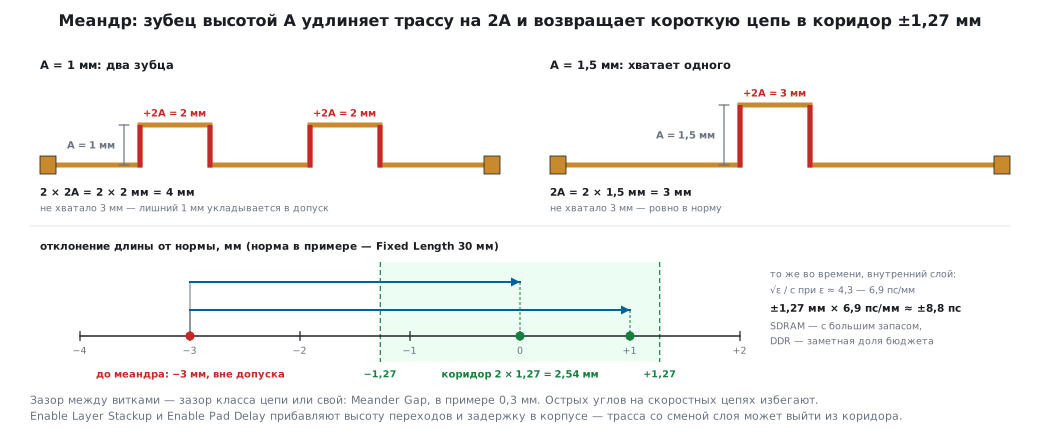
Via height and package delay. By default the length is measured along the copper on the board. The settings button in the length matching window → Enable Layer Stackup (add the via height from the layer stackup) and Enable Pad Delay (add the delay inside the package). After that, traces that change layers may fall outside the tolerance.
132г.3 Delay inside the package
From the die to the pin the signal travels along a thin wire inside the package (bond wire), and its length differs from pin to pin. The manufacturer gives this delay in the documentation — in picoseconds or as a length.
DipTrace adds it to the trace length during length matching and phase tuning. The manual advises setting it in the component editor, but you can also do it on the board: right-click a part → Pad Signal Delay, or a pad → Signal Delay; the value is in mm, mils or inches. You can apply it to one part or to all parts with the same name.
132г.4 Differential pair
A pair is two closely spaced conductors: one carries the signal, the other its mirror copy. Such a line radiates less and picks up less noise, which is why almost all fast interfaces — USB, Ethernet, LVDS — are differential.
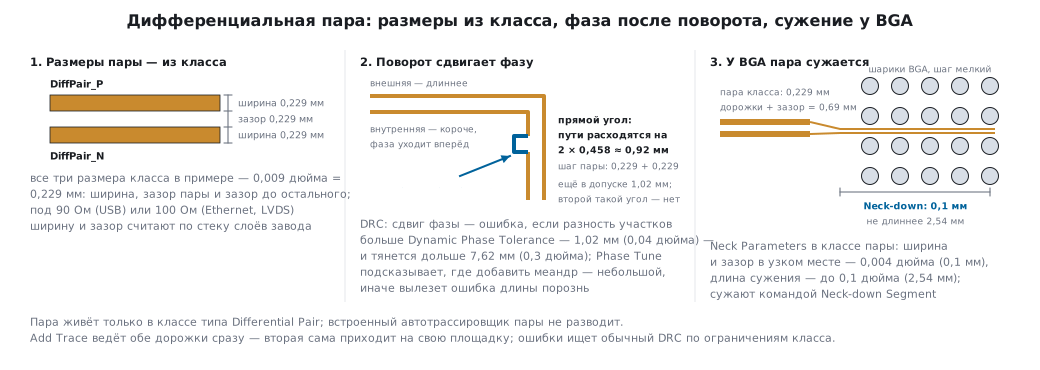
A pair exists only inside a net class of the Differential Pair type: Objects / Net Classes → Add → type Differential Pair. The class has the trace width, the gap between the traces and the clearance to everything else. In the manual's example all three are 0.009 inch (0.229 mm).
These numbers are not universal: the pair's width and gap are chosen for the characteristic impedance — 90 Ω for USB, 100 Ω for Ethernet and LVDS. It also depends on the dielectric thickness to the ground layer (section 160.2), so the width is calculated with a calculator from the factory's layer stackup. With a 0.2 mm gap, a 90 Ω pair comes out with traces of about 0.3 mm on a four-layer board (0.2 mm to ground) and about 1.2 mm on a 1.5 mm thick two-layer board — which is why USB High Speed is usually routed on four layers. USB Full Speed (12 Mbit/s) on the F103 and F4 is not sensitive to this: a pair running side by side and a short length are enough.
To declare a pair: Objects / High Speed / Define Differential Pair, then choose
the positive and the negative net. The nets are renamed to DiffPair_P
and DiffPair_N and get an icon. You can also declare a pair on the board — the pair's
colour is chosen there as well.
The built-in autorouter does not route pairs — only by hand or with an external router.
Pair constraints for DRC (Route / Net Classes, the pair's class):
| Parameter | Meaning | In the example |
|---|---|---|
| maximum uncoupled length | how far the conductors may run apart | default |
| length difference tolerance | how much longer one conductor may be than the other | default |
| Dynamic Phase Tolerance | the length difference of corresponding stretches | 0.04 inch (1.02 mm) |
| Dynamic Phase Error Length | a phase shift is an error only if it lasts longer than this | 0.3 inch (7.62 mm) |
| Neck Parameters | width and gap in a tight spot, maximum neck-down length | 0.004 inch (0.1 mm); 0.1 inch (2.54 mm) |
Neck-down is needed at a fine-pitch BGA: a pair of 0.229 mm + a 0.229 mm gap will not fit between the balls.
132г.5 Routing a pair
The mode is the usual one — Route / Manual Routing / Add Trace: click a pad of the pair, and two traces are routed at once; the second one reaches its own pad by itself.
| Action | How |
|---|---|
| change the control trace | right-click → Change Control Trace |
| narrow the pair at a BGA | right-click → Neck-down Segment |
| finish the conductors one at a time | right-click → Route Single Trace or Z |
| arbitrary angle | Free Line segment — S twice |
| show lengths | right-click → Show Trace Length |
| move the pair to another layer | Segment Layer / Bottom — the vias are placed automatically |
Editing has two modes: normal (both traces move together keeping the gap) and one trace at a time; each has a "free" variant.
132г.6 Phase tuning and the pair manager
Pair errors are found by the ordinary DRC: it takes the constraints from the pair's class. In the manual's example there are three — a neck-down that is too long, a phase shift and one more pair-related error. You shorten a neck-down by dragging the transition point closer to the pad.
A phase shift is fixed with High Speed / Differential Pair Tools / Phase Tune: when you hover over a trace, the window shows the phase lead (Forward and Backward Point Phase Lead) and suggests which trace needs a meander. The meander goes on the leading trace — and a small one, otherwise you get an uncoupled length error.
You see a shift, but DRC is silent? Then it lasts less than Dynamic Phase Error Length and stays within tolerance.
High Speed / Differential Pair Manager lists all pairs of the project: name, colour, nets, class, rules and actual values; violations are shown in red.
High Speed / Define Paired Pads is for the case when the pair's nets have several pads close together and DipTrace cannot tell which of them the traces should end on: you specify the pad pairs by hand or with the Update button.
132г.7 Vias in bulk: Fanout, shielding, stitching
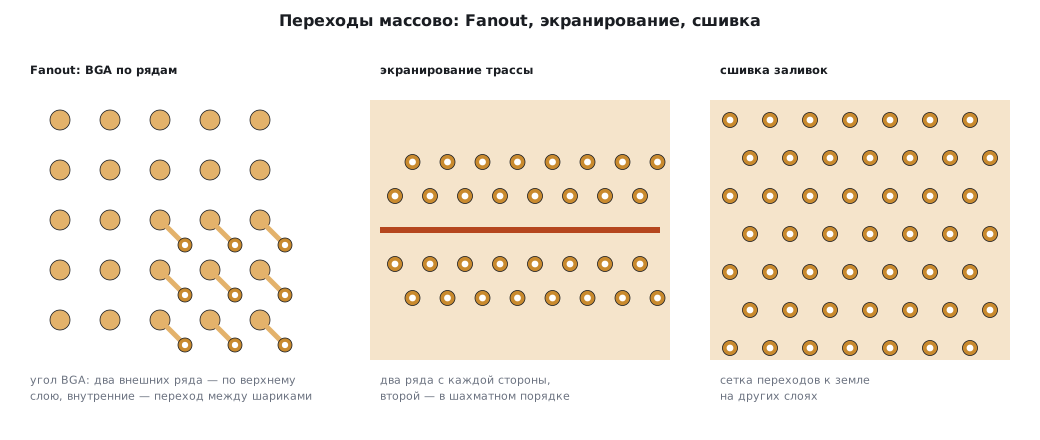
Fanout brings pads out to inner layers through vias. Right-click the package → Fanout:
- SOIC/QUAD — Outside or Zig-zag placement, side selection (Left, Top…), the Use Connected Pads Only checkbox;
- BGA – All pads — a via at every ball;
- BGA – By rows — a separate via style for each row, or no via: the outer rows are usually routed on the top layer. In the manual's example the BGA vias are 0.3 mm with a 0.15 mm hole, and the first two rows have none.
Fanout by net: right-click a pad of the net → Fanout — all SMD pads of that net get vias to the plane layer, for example to the ground layer.
Shielding (Via Shielding) places rows of vias along a trace, connected to ground: Objects / Via Tools / Net Via Shielding. It works only if there is a pour both on the trace's layer and on at least one other layer, and the pours and the vias belong to the same net. In the example: clearance to the trace and via pitch of 0.5 mm each, a second row at 0.5 mm and Stagger Alternate Row — a staggered arrangement. The program simply skips vias that would break the rules.
Stitching (Via Stitching) is a grid of vias joining the ground pours on different layers: Objects / Via Tools / Board Via Stitching for the whole board or Area Via Stitching for an area. In the example the grid is 2 mm, staggered. A grid with a 2 mm pitch means (10 / 2)² = 25 vias per square centimetre of pour. Options: stitch only overlapping pours, leave higher-priority pours alone, place vias only along the perimeter.
132г.8 Pitfalls
DRC does not see the length difference. Lengths were matched without a class and Create New Rule was not pressed.
The lengths are equal, but the signals drift apart. Enable Layer Stackup and Enable Pad Delay are off — vias and bond wires in the package are not counted.
The autorouter did not touch the pair. It does not route pairs — only by hand.
The pair will not fit between the BGA balls. You need Neck Parameters in the class and Neck-down Segment at the package; keep the neck-down length within the rule.
The meander fixed the phase, but a new error appeared. The meander is too big — the uncoupled length is violated. Make it smaller and farther from the package.
Shielding placed nothing. There is no pour on the second layer, or the pour belongs to another net.
Stitching "welded" vias to other nets' pours. Update the pours — Objects / Update All Copper Pours.
The manual says "2.57 mm". A typo: a ±1.27 mm corridor is 2.54 mm.
132г.9 Summary
- Put the bus into a class with Length Matching by Class; without a class — Create New Rule, otherwise DRC does not check the length.
- The default tolerance ±1.27 mm = a 2.54 mm corridor ≈ ±8–9 ps on FR-4.
- A meander tooth of height A adds 2A.
- A pair exists only in a class of the Differential Pair type; the autorouter does not route it; at a BGA — neck-down.
- A phase shift is an error only if it lasts longer than Dynamic Phase Error Length; it is fixed with a meander on the leading trace.
- Fanout, shielding and stitching place vias in bulk and avoid rule violations by themselves.
Next: section 132д "DipTrace: schematic and board together — hierarchy, SPICE, BOM, 3D".