 Embedded HandbookApps
80. Arduino prototype: the board, the IDE, the first sketch
Arduino is not a microcontroller but a platform: a board with a microcontroller,
a library of functions such as digitalWrite, and an IDE that builds and
uploads the program with one button. For a prototype (section 79.4) this is
a fast path: a sensor on a breadboard, twenty lines — and you can see whether
the idea works.
An STM32 developer should know Arduino for three reasons: people often start with it, prototypes are brought in on it, and code is ported from it to STM32. This section covers what is inside the board, how it differs from STM32 in ways that break ported code, how to read a button correctly and the easiest ways to kill both boards.
Facts about the ATmega328P were checked with the avr-gcc compiler and the
avr-libc headers, facts about STM32 — with armclang and the pack description files.
Terms used in the documentation
Term Meaning sketch a program in the Arduino environment board, shield the board, an add-on board that plugs on top core the Arduino core — the library for a specific microcontroller bootloader a small program that loads the firmware serial monitor a terminal window for the serial port pull-up, INPUT_PULLUPa resistor to the supply, an input with pull-up enabled floating input an input connected to nothing contact bounce, debouncing contact chatter, suppressing it rotary (quadrature) encoder a rotary knob with two phase-shifted contacts absolute maximum ratings limits beyond which the part is damaged reverse polarity supply connected the wrong way round back-powering power fed into the board "from the wrong side"
80.1 What is inside: Uno versus STM32
The classic Uno board is built on the 8-bit ATmega328P microcontroller with a 5 V supply. For comparison — the Blue Pill on the F103C8 and the F407VG:
| Uno (ATmega328P) | Blue Pill (F103C8) | F407VG | |
|---|---|---|---|
| core | AVR, 8-bit | Cortex-M3, 32-bit | Cortex-M4F, 32-bit |
| supply | 5 V | 3.3 V | 3.3 V |
| Flash | 32 KB | 64 KB | 1 MB |
| RAM | 2 KB | 20 KB | 128 + 64 KB |
| EEPROM | 1 KB | none — data is kept in Flash (section 11.5) | none |
int |
2 bytes | 4 bytes | 4 bytes |
double |
4 bytes, like float |
8 bytes | 8 bytes |
| pointer | 2 bytes | 4 bytes | 4 bytes |
| step-by-step debugging | not out of the box | SWD | SWD |
The Uno memory sizes come from the avr-libc header (FLASHEND, RAMSTART, RAMEND,
E2END), the STM32 memory sizes from the Keil pack description files. The Blue Pill has
twice as much Flash and ten times as much RAM as the Uno; for STM32 clock speeds and peripherals
see sections 2 and 6.
Word size is the main porting trap. Code written "for Arduino" and code for STM32 diverge on the simplest lines:
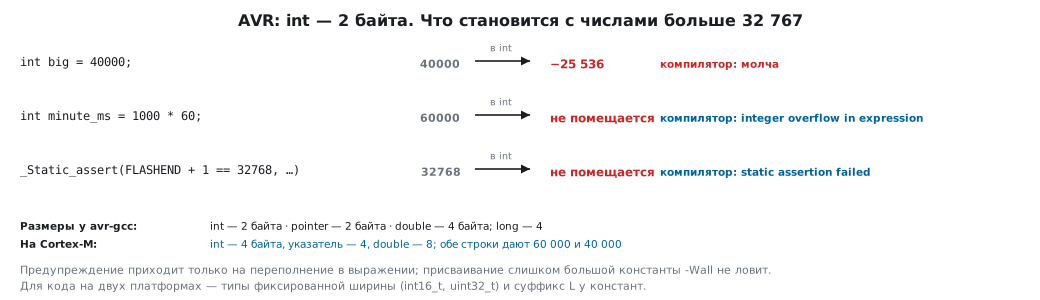
int minute_ms = 1000 * 60;      /* переполнение: компилятор предупреждает */
int big = 40000;                /* а здесь молчит — и хранит −25536 */
long minute_ok = 1000L * 60;    /* так правильно */
On AVR, int is 16-bit, up to 32767. 1000 * 60 is computed in int and
overflows — avr-gcc reports integer overflow in expression. But
int big = 40000 compiles without a single warning with -Wall and
stores −25536. On Cortex-M both lines give the correct 60000 and 40000.
The check for this section fell into this trap itself. The Uno Flash size
was checked with the line _Static_assert(FLASHEND + 1 == 32768, …) — and it did not
pass: FLASHEND equals 0x7FFF, and adding one overflows the
16-bit int. The correct form is FLASHEND + 1L. The habit of a 32-bit int
is stronger than it seems.
Hence the rule for code that lives on two platforms: fixed-width types
— int16_t, uint32_t (section 64), and constants with a
suffix where headroom is needed.
The same goes for double: on AVR it is 4 bytes, the same precision as float.
A calculation that "worked on Arduino" will give different last
digits on STM32 — if only because there double is a true 64-bit type (section 69).
80.2 The IDE: a sketch is C++ with its own main
A sketch has no main — it has two functions:
setup()runs once after reset;loop()is called again and again while there is power.
The IDE supplies main itself: it sets up the timer for millis() and
delay(), calls setup() and then loop() in an endless loop.
A sketch is C++: the IDE adds the necessary headers and declarations to it and
builds it with avr-gcc together with the core library. The same scheme exists for
STM32 too: there are Arduino cores for these chips as well, including the Blue Pill.
Here is the same "sketch" without the IDE — on an STM32F103 with CMSIS registers (section 8).
It builds with armclang without warnings:
#include "stm32f10x.h"

void setup(void)
{
    RCC->APB2ENR |= RCC_APB2ENR_IOPCEN;                      /* такт порта C */
    GPIOC->CRH = (GPIOC->CRH & ~(0xFu << 20)) | (0x2u << 20); /* PC13 — выход, 2 МГц */
}

void loop(void)
{
    GPIOC->ODR ^= 1u << 13;                                  /* светодиод Blue Pill */
    for (volatile uint32_t i = 0; i < 100000; i++)
        ;
}

int main(void)
{
    setup();
    for (;;)
        loop();
}
Uploading to the Uno goes through a bootloader in the microcontroller itself: the IDE sends the firmware over USB, and a chip on the board converts USB to UART. That is why you select the board and the port before uploading. Cheap Uno clones use a different USB–UART chip, and it needs its own driver — "the port does not appear" most often means exactly this. STM32 has more ways: SWD, the built-in bootloader over UART or USB (section 4.9).
80.3 The first sketch: LED, button, encoder
An LED — through a resistor (section 49.3). A 220 Ω resistor with a red LED (about 2 V across it) gives 13.6 mA from the 5 V of the Uno and only 5.9 mA from the 3.3 V of STM32. A circuit carried over from the Uno as is will glow noticeably dimmer.
A button. The first attempt is usually this: the button between the pin and the supply,
the pin configured as a plain input. It works unpredictably — because
while the button is released, the input is connected to nothing. This is a floating
input: it picks up interference and reads as anything. The cure is a pull-up —
a resistor to the supply or to ground, external or built-in:
INPUT_PULLUP on Arduino, GPIO_PULLUP on STM32 (section 8). With a pull-up
to the supply, the button goes between the pin and ground: released — 1, pressed — 0.
⚠️ A pull-up does not cure bounce. These are two different phenomena. A floating input is when there is no signal at all; bounce is when there is a signal, but on closing it jumps several times before settling (section 50.7). The first is cured only by a resistor, the second by an RC circuit or in software.
An encoder is a rotary knob with two contacts that close with a phase shift: the order in which they close gives the direction. On an encoder with 20 pulses per revolution one click is 18°. Its contacts bounce just like a button's. On STM32 a timer can count an encoder by itself, without software (section 13).
80.4 Bounce: what works and what does not
A capacitor of a few picofarads is useless. An RC circuit smooths out bounce if its time constant is comparable to it, and bounce lasts from hundreds of microseconds to several milliseconds, longer on worn buttons. With a 10 kΩ resistor a 5 pF capacitor gives 50 ns — twenty thousand times less than the 1 ms you get with 100 nF (section 50.7).
delay(300) between two reads stops the whole program for
a third of a second and proves almost nothing: two matching samples
300 ms apart can both land on the bounce of two presses.
A sample history is a good method: every 10 ms shift the next pin reading into a byte, and the button is pressed when all eight bits are zeros. The function does not read the pin and does not know the time itself — it is given the milliseconds and the level, so it can be checked by a test (section 79.5):
#define PERIOD_MS 10

typedef struct {
    uint32_t last;      /* время последнего отсчёта */
    uint8_t history;    /* восемь последних отсчётов, младший бит — свежий */
} btn_t;

/* Вернёт 1, пока кнопка нажата: восемь отсчётов подряд — ноль. */
int btn_poll(btn_t *b, uint32_t now, int level)
{
    if (now - b->last >= PERIOD_MS) {       /* «>=», а не «>»: иначе период 11 мс */
        b->last = now;
        b->history = (uint8_t)((b->history << 1) | (level & 1));
    }
    return b->history == 0x00;
}
The initial value of history is 0xFF, that is, "released eight times
in a row": btn_t b = { 0, 0xFF };. A zeroed structure is read as a pressed button
for the first 10 ms, until the first sample — a false press at
every power-up.
On Arduino now is millis(), on STM32 it is a counter
incremented by the SysTick interrupt. What the test showed:
| Input | Recognised after |
|---|---|
| button pressed and held | 80 ms — eight samples of 10 ms |
the same, but with > instead of >= |
88 ms — a sample every 11 ms |
| 25 ms of bounce that fell into two samples | 100 ms |
| a 50 ms touch | not recognised |
| 10 ms before the counter overflows | 80 ms — as usual |
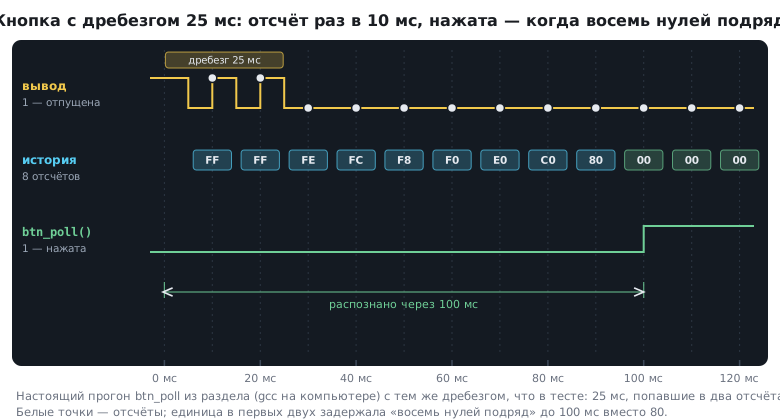
Two conclusions. First: the condition > 10 with whole milliseconds triggers
on the eleventh — a small thing that makes the period differ from the intended one.
Second: eight samples of 10 ms is 80 ms, and a quick touch shorter than
that will be lost. The number of samples and the period are chosen to match the requirement
(section 79.2), not "as in the example". The button state takes 8 bytes: 4 + 1
and three bytes of padding (section 70).
millis() overflow. A 32-bit millisecond counter overflows
after 49.7 days. The difference now - last is unsigned and survives the wrap
through zero — the test confirmed this (section 7). But a comparison with a "deadline"
does not survive it:
uint32_t deadline = now + 100;   /* за 10 мс до переполнения: deadline = 90 */
if (now > deadline) { … }        /* сработает сразу, на 100 мс раньше */
if (now - start >= 100) { … }    /* правильно */
80.5 How to kill a board — and how not to
Absolute maximum ratings are the limit of destruction, not an operating point (sections 49.7 and 62). The two boards have different ones:
| Uno (ATmega328P) | STM32F103 | |
|---|---|---|
| current per pin, limit | 40 mA | 25 mA |
| through the supply pins, including the chip itself | 200 mA | 150 mA |
| voltage on a pin | up to supply + 0.5 V, that is 5.5 V | up to 3.6 V; tolerant pins up to 5.5 V, only with power applied |
| supply, absolute limit | 6 V | 4.0 V |
Ways to destroy a board — from a single pin to the whole board:
- An output shorted to ground or to another output. An Uno pin has an output resistance of about 25 Ω: 5 V / 25 Ω = 200 mA — five times above the limit. Two outputs in antiphase joined by a wire are the same thing, but for two pins at once.
- A voltage above the supply on a pin. The built-in protection diode opens, and it is rated for milliamps (section 62.2). On STM32 the trap is subtler: 5 V from a sensor on a non-tolerant pin, for example an analog one, is beyond the limit; on a tolerant pin it is allowed, but only while the board is powered (section 62.1).
- Reverse supply polarity. The board's supply input may have no reverse-polarity protection — then swapped wires kill everything at once.
- External voltage on the regulator output. A regulator does not reduce what is applied directly to its output: more than 6 V on the 5 V pin of the Uno or 5 V on the 3.3 V pin of the Blue Pill goes straight to the microcontroller — and into the computer's USB along the way.
- Back-powering. The board is powered through the 5 V pin, while something is connected to the regulator input — current flows backwards through the regulator and burns it.
- Total current. Ten LEDs at 20 mA each are already the whole total current of the Uno, 200 mA; on the F103 the limit is reached at five: 150 mA goes through the supply, and up to 50 of it is taken by the chip itself (section 62.6). The per-pin limit is respected, but the chip is overloaded.
- An inductive load without a diode — a relay or motor driven directly from a pin (section 52).
- Static — touching a pin with a finger after a walk across a carpet (section 62.8).
80.6 From prototype to STM32
What carries over and what does not:
| Carries over | Does not carry over |
|---|---|
| logic, if it is separated from the pins and from time | pin numbers and calls to digitalWrite, analogRead |
| algorithms and tables | int and double — they have a different width |
| communication protocols | 5 V levels: a sensor powered from 5 V outputs 5 V (section 62.5) |
| tests of functions on a computer | delay() calls instead of timers and interrupts |
The porting order: first make sure the logic is collected in functions that do not
touch the pins, like btn_poll; then replace the types with
fixed-width ones; then recalculate levels and currents for 3.3 V; and only
then write the layer that reads and writes the STM32 pins.
80.7 Pitfalls
The button "presses itself". An input without a pull-up.
A pull-up was added, but the button still triggers twice. A pull-up does not cure bounce.
A capacitor on the button changed nothing. A few picofarads means nanoseconds; you need tens or hundreds of nanofarads.
The program "freezes" when the button is pressed. delay() in the button polling.
Short presses are lost. Polling over eight samples needs 80 ms of holding — the parameters do not match the requirement.
Once every month and a half the device behaves strangely. The comparison
millis() > deadline did not survive the counter overflow.
Code from Arduino calculates differently on STM32. A 16-bit int and a 32-bit
double on AVR; on STM32 — 32 and 64.
LEDs glow dimly after porting. The same resistor at 3.3 V instead of 5.
The board's port does not appear in the system. There is no driver for the USB–UART chip on the clone board.
An STM32 pin died after a sensor was connected. 5 V on a non-tolerant pin, or on a tolerant one while the board was off.
80.8 Summary
- Arduino is a platform: a board, a core library and an IDE. The Uno is an ATmega328P, 5 V, 32 KB Flash, 2 KB RAM; the Blue Pill has twice the Flash and ten times the RAM at 3.3 V.
- On AVR
intis 2 bytes anddoubleis 4:1000 * 60overflows,int big = 40000silently stores −25536. For shared code use fixed-width types. - A sketch is C++ with a supplied
mainthat callssetup()once andloop()forever; on STM32 the same is written explicitly. - A floating input and bounce are different phenomena: the first is cured by a pull-up, the second
by an RC circuit with a time constant of about a millisecond or by polling with a sample
history. The condition is
>=, not>; the parameters match the requirement. - The millisecond counter overflows after 49.7 days: compare differences, not deadlines.
- The absolute maximum ratings of the Uno and STM32 differ: 40 and 25 mA per pin, 200 and 150 mA through the supply, 5.5 V and 3.6 V on a pin. Boards are killed by a short circuit, a voltage above the supply, reverse polarity, power bypassing the regulator and total current.
- Porting to STM32 starts with logic separated from the pins, and with the types.
Next: section 81 "Sensors on a prototype and fighting noise".