 Embedded HandbookApps
79. How a device is born: the stages of development
The earlier parts of the handbook are about making a microcontroller work. This one is about how a working board becomes a product: what is decided before the first line of code, what is checked before ordering boards, what is built into the firmware for the sake of production, and what happens after the sale.
There are few registers here and many decisions. But decisions also have a part that can be checked: a power budget can be calculated, a requirement turns into a test, and build reproducibility is checked with the compiler — all of this is recalculated and assembled in this section.
Terms used in the documentation
Term Meaning requirements, specification what the device must do; the written requirements document functional / non-functional requirement what the device does / the limits it must do it within stakeholder anyone with an interest in the device: customer, user, maker power budget an estimate of average current and battery life bill of materials (BOM) the list of all components on the board schematic, layout the circuit diagram, the board routing ERC, DRC electrical rule check of the schematic, design rule check of the layout EVT, DVT, PVT engineering, design and production validation tests verification / validation built to the specification / the right device was built unit test, hardware-in-the-loop (HIL) a test of one function, a test bench with the real device reproducible build the same source always gives the same binary traceability linking each unit to its firmware, boards and parts design for manufacturing / testing (DFM / DFT) ease of manufacture, ease of testing test fixture the jig that tests boards on the production line end of life (EOL), NRND discontinued, "not recommended for new designs"
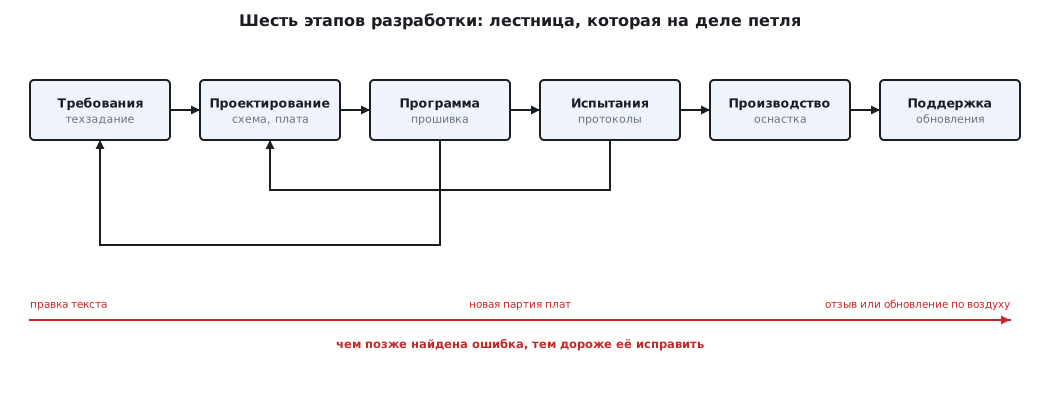
79.1 Six stages — and why they form a loop
| Stage | Question it answers | What you have in hand |
|---|---|---|
| requirements | what the device must do and within what limits | the specification |
| design | what it will be made of and how | block diagram, component choice, schematic, board |
| software | how it will work | firmware under version control |
| testing | does it do what is written | test reports |
| production | how to make it identically and in quantity | documentation for the factory, fixtures, test firmware |
| support | how to live with it after the sale | updates, failure analysis |
You can draw this as a staircase, but in practice the stages return to each other. Testing finds an error in the schematic — back to design. The prototype shows the battery will not last — back to requirements. There is one rule: the later an error is found, the more it costs to fix. A typo in the requirements is fixed by editing text, a mistake in the layout — by a new batch of boards, a mistake in devices already sold — by a recall or an over-the-air update.
79.2 Requirements: measurable only
A requirement that cannot be checked is a wish. Compare:
| Wish | Requirement |
|---|---|
| "the button responds quickly" | "a press is recognised within 50 ms; bounce of up to 10 ms causes no false presses" |
| "runs a long time on a battery" | "one year on a CR2032 with a measurement once a minute" |
| "works outdoors" | "from −20 to +50 °C, dust and water protection to a specified class" |
| "cheap" | "the bill of materials costs no more than a specified sum at a batch of N units" |
Functional requirements say what the device does: measures, transmits, displays. Non-functional ones say within what limits: power, size, temperature, price, certification. The latter are forgotten more often — and it is they that later turn the project upside down.
Every requirement in the specification must have a way to check it. Then, by the testing stage, the list of checks is ready: one requirement — one or more checks. This handbook is built the same way: every number in the text is recalculated by a verification script.
79.3 A back-of-the-envelope estimate: can it be done at all
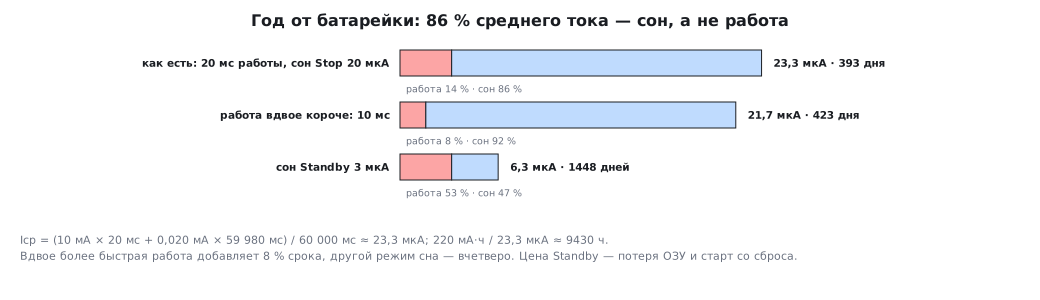
Before choosing components, requirements are checked with a rough calculation. Example — "a year on a battery". The input data of the example: once a minute the device wakes for 20 ms and draws 10 mA while running; it sleeps in Stop mode at 20 µA; the battery is 220 mAh. The order of magnitude of mode currents for the F103 is in section 10.
The average current is the time-weighted sum:
Iср = (10 мА × 20 мс + 0,020 мА × 59 980 мс) / 60 000 мс ≈ 23,3 мкА
220 мА·ч / 23,3 мкА ≈ 9430 ч ≈ 393 дня
A year is only just reached, but the main thing is visible in the breakdown: 86 % of the average current is sleep, not work. Making the program twice as fast is almost useless: with 10 ms of work instead of 20 you get 423 days — only 8 % longer. But sleeping in Standby mode at 3 µA gives 6.3 µA on average and 1448 days — almost four years. The price: in Standby the RAM contents are lost, and after wake-up the program starts from a reset (section 10).
All these lifetimes are an upper estimate. The rated capacity of a CR2032 is given at a small constant current; 10 mA pulses pull the voltage down and reduce the capacity actually delivered, more so in the cold, and self-discharge takes about one percent a year (section 53.6). So the calculation includes a margin of at least one and a half to two times, and a capacitor is placed next to the battery to supply the current pulses. With a twofold margin Stop gives 196 days — the "one year" requirement is not met without Standby; Standby gives 724 days, almost two years.
This is how a back-of-the-envelope estimate changes the requirements for the circuit and the program before the first component is bought: you need Standby mode, you need a sensor that can sleep, and you need to check the sleep current on the very first prototype.
⚠️ Plausibility check. The problem: a 24 V source, a lamp and two 18 Ω resistors, the lamp resistance is half a resistor, the current is 875 mA; find the internal resistance of the source. If you assume everything is connected in series, you get 27.43 − 45 = −17.6 Ω: negative resistance does not exist — so the model is wrong. The lamp in series with two parallel resistors gives 9.4 Ω, all three in parallel — 22.9 Ω. Without a diagram the problem has two answers. This is exactly an ambiguous requirement: a statement without a drawing. The laws for such calculations are in sections 49 and 50.
79.4 Design: from blocks to the board
First comes the block diagram: which blocks, how they are connected, where the power is, where the interfaces are. Then the choice of components for the blocks, and only then the schematic and the board.
Choosing the microcontroller (section 2.5): peripherals for the task, memory with a margin, a package you can solder, availability from suppliers and lifecycle status. A chip marked NRND — "not recommended for new designs" — is not used in a new project.
A prototype before your own board. A development board (section 2.6) and modules on a breadboard let you write the program and measure current while your own board has not yet been ordered. Section 80 is about such a prototype.
Your own board. The schematic is checked with ERC, the layout with DRC. For STM32 do not forget the minimum support circuitry and start-up conditions (section 61), pin protection (section 62) and what you will need at all the following stages:
- an SWD connector or contact pads — programming and debugging (section 4.9);
- access to
BOOT0— the built-in bootloader as a last resort (section 11.7); - a free UART for the log;
- test points for power and key signals — for the fixture in production;
- a couple of spare pins "just in case".
All of this is cheap on the schematic and very expensive once the board is ordered.
79.5 Software: from day one, as for series production
Logic separate from hardware. Code that makes decisions should not reach into registers itself: it is called with data and returns a result. Then it can be checked by a test on a computer. Example — the button requirement from 79.2, turned into a function:
#define PRESS_MS 20

typedef struct {
    uint8_t stable;     /* принятое состояние: 1 — нажата */
    uint8_t count;      /* сколько миллисекунд подряд уровень не равен принятому */
} button_t;

/* raw — уровень вывода (1 — нажата), вызов раз в 1 мс. Вернёт 1 ровно
 * один раз — в ту миллисекунду, когда нажатие принято. */
int button_update(button_t *b, int raw)
{
    if (raw == b->stable) {
        b->count = 0;
        return 0;
    }
    if (++b->count < PRESS_MS)
        return 0;
    b->stable = (uint8_t)raw;
    b->count = 0;
    return raw;         /* событие — только нажатие, отпускание молча */
}
On the board it is called from a timer interrupt once a millisecond with the pin level (the nature of bounce — section 50.7). On a computer, the test feeds it predefined sequences of levels:
| Input | Result | Requirement |
|---|---|---|
| clean press | one event at the 20th ms | within 50 ms ✓ |
| 10 ms of bounce, then held | one event at the 30th ms from the first contact | within 50 ms, no false presses ✓ |
| 15 ms press | no event | bounce is not a press ✓ |
| held for 1 s | one event | one press — one event ✓ |
| two presses | two events | ✓ |
| 5 ms contact dropout in the middle of a hold | one event | not a release ✓ |
The same file is built with armclang for Cortex-M3 and M0 without
warnings and with gcc for the test; the button state takes 2 bytes of RAM. The test
stays in the project: any change to the function is rechecked in a second.
The next level is bench testing, where the device receives
real signals from another board or instrument.
The version is in the firmware, and without __DATE__. A device must be able
to tell which firmware it runs. The temptation is to put in __DATE__ and __TIME__
(section 71). But then two builds of the same source in a row give
different files, and you can no longer prove which source the
firmware in a particular device was built from. Checked:
- with
__DATE__and__TIME__two builds in a row differ; - the
-Wdate-timeoption warns about every such place; - the environment variable
SOURCE_DATE_EPOCH=0fixes the date (Jan 1 1970 00:00:00), and the builds match byte for byte; - best of all, the version is passed in by the build system:
#ifndef FW_VERSION
#define FW_VERSION "0.0.0-dev"
#endif
const char version[] = FW_VERSION;
The number is set with a compiler option, and the quotes must reach the compiler:
in the shell the option is put in single quotes — '-DFW_VERSION="1.4.2"', in a Makefile
you write -DFW_VERSION=\"1.4.2\". Without this the shell eats the quotes,
FW_VERSION expands to 1.4.2 without quotes, and the string will not compile.
The number itself is conveniently taken from the version control system — with the command
git describe (section 109). With such an option the builds match,
and the string 1.4.2 is present
in the object file. But a string nobody refers to is
discarded by the linker (section 77.5), and it will not be in the finished
firmware. So the version is either used — returned on a command to the port,
printed at start-up — or kept explicitly: with armlink — by the option
--keep=version, with GNU ld — by the line KEEP(*(.rodata.version))
in the linker script. It is checked by searching for the string in the finished image — then
it can be seen both in the file and through the debugger (section 77.9).
Version control from the first line, field firmware update (section 48), the watchdog timer (section 12) and an error log are built in right away — adding them to a finished product is harder than to a prototype.
79.6 Testing
Two words that get confused:
- verification — was the device built right, to the specification: every requirement has been checked;
- validation — was the right device built: does it solve the user's problem. A device can pass every check in the specification and turn out to be useless — if the specification was wrong.
| Test | What it looks for |
|---|---|
| functional | every function, per the specification |
| integration | blocks together: data exchange, synchronisation |
| long-term | memory leaks, rare hangs, failures once a day |
| power | sleep current, supply dips and slow supply ramp-up |
| temperature | frequency drift, ADC drift, display failure in the cold |
| electromagnetic compatibility | interference from the device and immunity to others' — for certification |
| user | clarity and ease of use |
In electronics manufacturing, tests are divided by the maturity of the product:
| Stage | What is checked | On what |
|---|---|---|
| EVT | does the idea work | the first boards, often with rework |
| DVT | are all requirements met, does it pass certification | samples in final form |
| PVT | does the factory produce identical good units | a pilot batch from the line |
79.7 Production
Firmware at the factory. A programmer over SWD through contact pads or the built-in bootloader over UART (section 4.9). After programming — read protection with the option bytes (section 11.6).
Test firmware. A separate program checks the assembled board: power, crystal, LEDs, sensors, interfaces — and reports "pass / fail" to the fixture. Test points on the board are planned back at the design stage (79.4) — that is exactly what design for testing means.
Serial number. STM32 has a factory unique ID that is
96 bits long. On the F407 it is at address 0x1FFF7A10, next to it is the
Flash size register 0x1FFF7A22; both names (UID_BASE, FLASHSIZE_BASE) are declared in
stm32f407xx.h. The old-style F1 header stm32f10x.h does not have these names.
On the F1 the ID starts at address 0x1FFFF7E8, the Flash size is at address
0x1FFFF7E0, on the G4 — 0x1FFF7590 and 0x1FFF75E0. Each family has its own
address, so take it from the reference manual of your chip (section 39).
uint32_t serial32(void)
{
    const volatile uint32_t *uid = (const volatile uint32_t *)UID_BASE;
    return uid[0] ^ uid[1] ^ uid[2];
}
That is three 32-bit reads and two XORs. Folding 96 bits into 32 can give a collision between different chips; where the number matters, all 12 bytes are stored.
Traceability. The serial number is linked to the firmware version, the board batch and the component batches. When a failure comes back from the field, this lets you find all the device's "neighbours" from the same batch.
Components. For each item in the bill of materials — a second supplier or a substitute; lifecycle status is tracked even after series production starts.
79.8 Support after release
- Updates — through your own bootloader or over the air (section 48); without an update mechanism any bug in the firmware means a trip to the device.
- An error log in the device: the cause of the last reset, a counter of watchdog timer resets, the code of the last failure. A returned device then tells you what happened to it.
- Analysis of returns: every failure raises the question of the stage at which it should have been caught, and adds a new check at that stage.
- Compatibility: new firmware must understand settings written by the old one.
79.9 The team
A device is rarely made by one person: a circuit designer, a mechanical designer, a programmer, a test engineer, a production engineer, a project manager. The more people, the more important the shared documents — specification, schematic, bill of materials, change log — and the shared rules of work.
| Approach | The essence in one line |
|---|---|
| Agile | short iterations, each ending with a working result |
| Scrum | fixed-length iterations, a plan for each iteration, a review at the end |
| Kanban | a board of tasks by stage and a limit on work in progress |
| Lean | remove everything that adds no value to the product |
| DevOps | build, test and release — automatically, on every change |
For hardware, iterations are slower than for software: you cannot rebuild a board in a minute. So whatever can be checked without hardware is checked without it — with unit tests on a computer (79.5) and an automatic build on every change. This handbook is released the same way: no version goes out until all checks have passed.
79.10 Pitfalls
A requirement of "fast" or "long". Without a number it can be neither met nor checked.
The battery lasts a month instead of a year. The power budget was not calculated; the sleep current was not measured on the prototype.
The program was made faster — battery life did not grow. The average current is set by sleep, not by work.
The board has arrived, but there is nothing to program it with. SWD or BOOT0 were not brought out.
Two firmware images with the same version behave differently. The version was not
changed at build time, or the build is not reproducible because of __DATE__.
A bug fixed six months ago is back. There was no test that catches it.
At the factory every board is checked by hand, for an hour. There is no test firmware and no test points.
A failure from the field cannot be reproduced. The device does not store the reset cause and the failure code.
The chip was discontinued in the middle of a production run. The lifecycle status was not tracked, and there is no substitute.
The answer to a problem is a negative resistance. The model is wrong, not the arithmetic.
79.11 Summary
- The stages — requirements, design, software, testing, production, support — form a loop; an error costs more the later it is found.
- A requirement is measurable and has a way to check it; non-functional requirements are the ones forgotten most often.
- A back-of-the-envelope estimate checks the requirements before components are bought: with 20 ms of work per minute, 86 % of the average current is sleep; Stop gives 393 days from 220 mAh, Standby almost four years. This is by rated capacity; with a twofold margin only Standby meets "one year".
- Logic is separated from hardware and checked by a test on a computer: one file
for
armclangand forgcc. - The firmware version comes from the build system;
__DATE__makes the build non-reproducible, and-Wdate-timewarns about it. - Verification is "built to the specification", validation is "built what is needed"; the stages are EVT, DVT, PVT.
- The board gets SWD,
BOOT0, UART and test points; at the factory — test firmware, read protection, a serial number from the chip's unique ID. - After release — updates, a failure log and analysis of returns.
Full source code
ver79.c — the version from the build system.
/* Раздел 79.5: версия из системы сборки. На строку никто не ссылается — компоновщик её выбросит. */
#ifndef FW_VERSION
#define FW_VERSION "0.0.0-dev"
#endif
const char version[] = FW_VERSION;
Next: section 80 "Arduino prototype: the board, the IDE, the first sketch".