 Embedded HandbookApps
188. The app's networking: HTTP, WebSocket and MQTT
A cable and BLE reach a device that is nearby. Everything else goes over the network, and the choice of method decides what the app will be like: whether it polls, waits or subscribes.
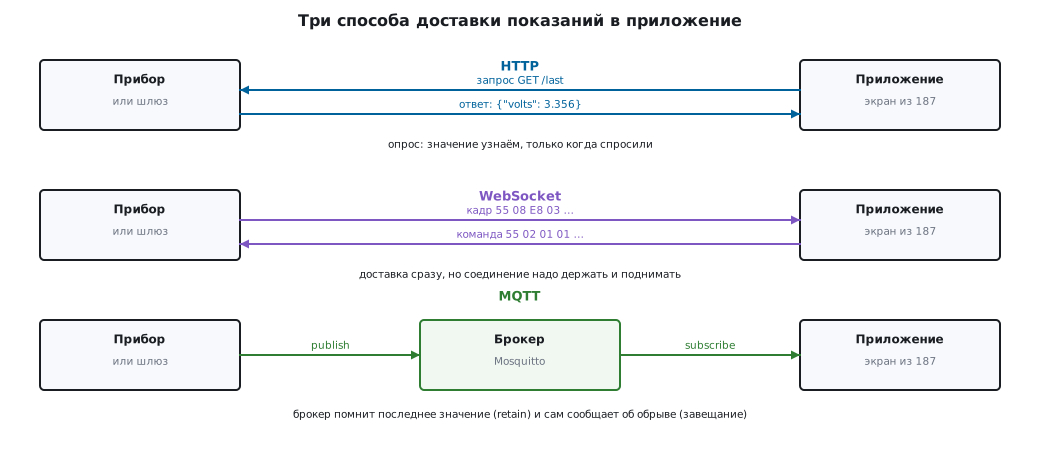
We look at three methods on one and the same device. Nothing is made up: HTTP and WebSocket are brought up right inside the test, MQTT is a real Mosquitto broker in a container (the same one as in section 87).
Terms used in the documentation
Term Meaning request-response a request and its answer polling the app asks by itself push delivery started by the source WebSocket upgrade switching an HTTP connection to two-way mode broker, topic the message hub; the named channel publish / subscribe sending to a topic and listening to it retained message the last value of a topic, kept by the broker last will and testament (LWT) what the broker publishes when the link drops QoS 0/1/2 delivery level keepalive the period of liveness checks
188.1 Three methods and how they differ
| Method | Who starts the exchange | Strength | Weakness |
|---|---|---|---|
| HTTP | the app | simple, passes everywhere | a new value is learned only by polling |
| WebSocket | both sides | instant delivery in both directions | the connection has to be kept and re-established |
| MQTT | both sides via the broker | many devices and many listeners, there is a "last value" | needs a broker and its upkeep |
The rule of choice is simple. Settings and commands — HTTP: rarely, when needed, with a clear response code. Live readings on the screen — WebSocket. A fleet of devices watched by several apps at once — MQTT.
188.2 HTTP: request-response with a timeout and a clear refusal
The gateway serves the latest measurement as JSON, and the app reads it:
final HttpClientRequest request = await http.getUrl(url).timeout(timeout);
final HttpClientResponse response = await request.close().timeout(timeout);
if (response.statusCode != HttpStatus.ok) {
  await response.drain<void>();
  throw NetError('шлюз ответил отказом', code: response.statusCode);
}
Three things without which this does not work in the field:
- A timeout on every step — connection, response, reading the body.
A silent gateway gives a
TimeoutExceptionin 100 ms, not an endless wait. - The response code is part of the protocol. A 503 refusal turns into an error with the code inside, and the user sees "link: the gateway refused (code 503)", not an empty screen.
- The body is read to the end even on a refusal — otherwise the connection stays hanging.
In the test the server is brought up in the same process (HttpServer.bind), and
all three cases — a normal answer, a 503 refusal and silence — are tested
without a single real server.
188.3 WebSocket: the same frames, only over the network
WebSocket keeps message boundaries: what the gateway sent as one message is what arrives. But a gateway usually forwards the port bytes in the chunks in which it received them, so one frame ends up in two messages, and two frames in one. That is why the same parser as for the port runs on top of it:
Stream<FrameEvent> wsFrames(Stream<dynamic> socket) =>
    frames(socket.where((dynamic m) => m is List<int>).cast<List<int>>());
Frames are sent only as binary messages: text would go through UTF-8, and every
byte from 0x80 up would turn into a pair — 0xC0 would become C3 80, and the CRC would not match.
A text message on such a channel is a protocol error, and the parser
discards it.
In the test the server sends a frame as two messages (the first two bytes and
the rest), the app assembles it into one FrameReady and answers with a command
frame — the server receives exactly encodeFrame(<int>[0x01, 0x01]).
This leads to a consequence that saves a lot of work: all the parsing, timeout and reconnection code from section 186 moves to the network without changes. Only the byte source changes.
188.4 MQTT: the broker, the retained value and the will
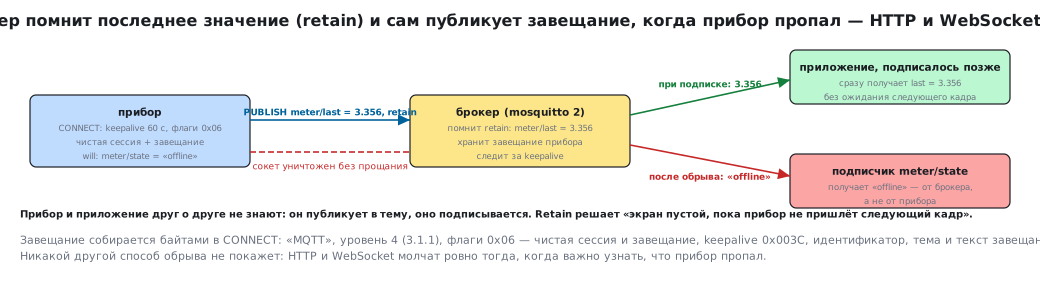
MQTT turns the scheme around: the device publishes to a topic, the app
subscribes, and they know nothing about each other. The test works with
a real eclipse-mosquitto:2 in a container.
Retained value (retain). The device publishes a reading with the
retain flag, and the broker remembers it. An app that connects an hour later
gets the last value right on subscribing — before the device
sends the next one:
| What was tested | Value |
|---|---|
published with retain to meter/last |
3.356 |
| received by a new subscriber right after subscribing | 3.356 |
This solves the eternal problem of "the screen is empty until the device sends the next frame".
The will (LWT). On connecting, the device tells the broker: if I
disappear, publish the word offline to meter/state. The test does
this in bytes, exactly as the firmware does:
final body = <int>[
  ...str('MQTT'), 0x04,                     // уровень 3.1.1
  0x06,                                     // чистая сессия + завещание
  0x00, 0x3C,                               // keepalive 60 с
  ...str(id), ...str(willTopic), ...str(willMessage),
];
After the connection drops (the socket is simply destroyed, with no goodbye)
the subscriber gets offline — from the broker, not from the device. With a direct
WebSocket a dropped link shows up as the connection closing and as silence to ping, while
the will solves a different task — it reports the drop to everyone who is not connected
to the device directly.
The flags 0x06 are clean session and will, but without retain.
For a subscriber that is already waiting this is enough, but an app opened after the
drop will not see the will: for it there is nothing in meter/state — or
an old online. That is why in a device the will is set with the retain flag —
0x26 (bit 0x20), and right after connecting the device itself publishes online
with retain to the same topic. An experiment with the same broker: a subscriber that arrives
after the drop gets online with 0x06, and offline with 0x26.
When the broker publishes the will: immediately, if the connection closed without
DISCONNECT, and only after one and a half keepalive periods — 90 s at 60 s — if
the device simply went silent, for example left the Wi-Fi zone (in the experiment with a keepalive
of 2 s — after 3–4 s). The keepalive is chosen by how quickly you need to learn
about a drop.
188.5 What to choose for the task
| Task | Method | Why |
|---|---|---|
| read the settings, write a calibration | HTTP | rare requests, clear response codes |
| a live chart on the screen | WebSocket | delivery without polling, both directions |
| ten devices and three apps | MQTT | the broker connects everyone, retain gives the starting value |
| "device gone" on the screen | MQTT + LWT | the message comes from the broker |
| firmware update | HTTP | a file, resumed download, a response code |
Mixing is normal: commands over HTTP, readings over MQTT — a common layout for a fleet of devices.
188.6 Pitfalls
Polling instead of subscribing. The app asks once a second, the network and battery are used up, and the reading is still late.
No timeout. A vanished gateway hangs the screen, and that is the only thing the user sees.
The response code is swallowed. 503 and 200 with an empty body look the same to the app — and nobody knows what broke.
The response body is not read to the end. Connections pile up, and an hour later the gateway refuses everyone.
MQTT without retain. The screen is empty until the device's first message, which is sometimes minutes.
MQTT without a will. The app shows the last value and claims everything is fine, although the device went offline an hour ago.
A will without retain. An app opened after the drop does not
see it: you need bit 0x20 in CONNECT and your own online with retain.
Frame parsing rewritten for WebSocket. Messages are cut differently from the bytes in the port, and a second parser catches its own bugs — the same code works in both places.
188.7 Summary
- HTTP is for rare requests: a timeout on every step, the response code as part of the protocol, the body always read to the end.
- WebSocket is for live readings: messages arrive in pieces, so the parsing is the same as for the port.
- MQTT is for a fleet of devices:
retaingives a new subscriber the last value at once, and the will reports a drop on behalf of the broker. - The tests need neither the device nor the internet: HTTP and WebSocket are brought up in the same process, the broker is a container next to it.
Next: section 189 "BLE and USB serial: the link to the device, MTU, write queue, permissions".