 Embedded HandbookApps
187. A device screen in Flutter: widgets, state, commands, tests
The frame stream is there (section 186) — time to show it. A device screen is simple: readings, link state, a noise counter and a button that sends a command to the board. The difficulty is not in drawing but in three things: where the state lives, what gets redrawn and how to test it without the device and without a phone.
Everything below is tested by five widget tests: flutter test in the image
ghcr.io/cirruslabs/flutter:stable (Flutter 3.44) — without an emulator,
in a fraction of a second.
Terms used in the documentation
Term Meaning widget a description of a piece of the screen StatelessWidget / StatefulWidget a widget without state and with state State, setState the widget's state and changing it build building: the state produces a description of the screen immutable cannot be changed const constructor a constant constructor: a widget that is a constant rebuild building again Key a key by which a widget is found and recognised widget test, pump a widget test; advancing by one frame dispose releasing: unsubscribe, close
187.1 State is a record, not scattered fields
The first decision: everything the screen knows about the device goes into one immutable record, and events rebuild it.
MeterView apply(Object event) => switch (event) {
      LinkState s => MeterView(state: s, last: last, errors: errors),
      FrameReady(data: final d) when d.length >= 8 =>
        MeterView(state: LinkState.online, last: decodeMeasurement(d), errors: errors),
      FrameError() => MeterView(state: state, last: last, errors: errors + 1),
      _ => this,
    };
Why not a set of fields volts, amps, online, errors: they are easy to
change one by one and end up with a screen that shows a fresh current
with an old voltage, and "link up" after a disconnect. A record changes
as a whole — either the new state or the old one.
A frame is turned into a measurement by decodeMeasurement from section 185 — the same
code that was checked by a cross run against the firmware.
187.2 The subscription lives in the state, not in build
build may be called many times and at any moment — you must not subscribe
in it. The place to subscribe is initState, the place to unsubscribe is dispose:
@override
void initState() {
  super.initState();
  _sub = widget.events.listen((Object e) => setState(() => view = view.apply(e)));
}

@override
void dispose() {
  _sub?.cancel();        // без этого подписка переживёт экран
  super.dispose();
}
A forgotten cancel is the most common leak in device apps: the screen
was closed, but the frame stream keeps waking setState on a discarded
state.
187.3 What is rebuilt on every frame
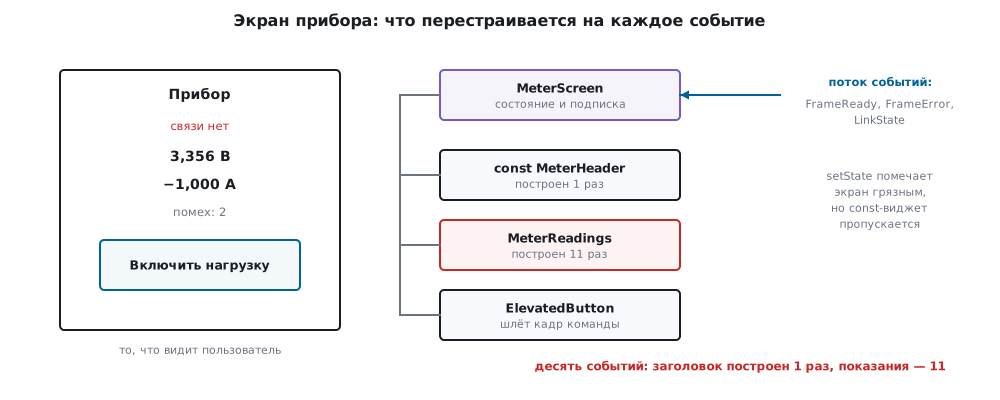
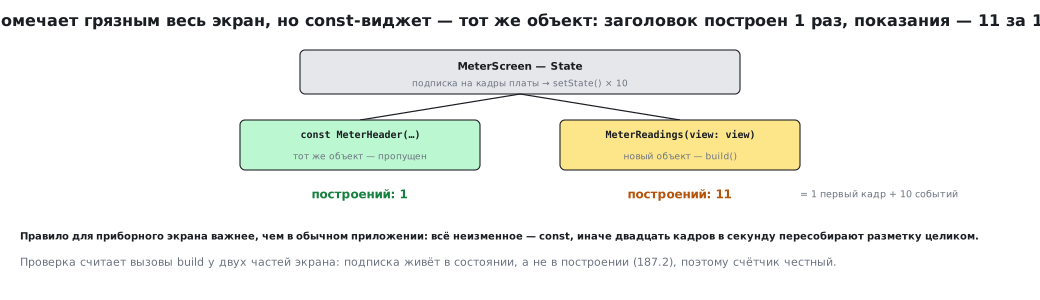
setState marks the whole screen dirty, but Flutter does not rebuild
everything: a widget created as const is skipped when its parent is rebuilt,
because it is literally the same object.
The test counts build calls for two parts of the screen: the header
(const MeterHeader(...)) and the readings (MeterReadings(view: view)).
Ten events:
| What we count | Value |
|---|---|
| header builds | 1 |
| readings builds | 11 |
Eleven is the first frame plus ten events. The header was built
once over the whole run. Hence a rule that matters more on a device screen
than in an ordinary app: everything that does not change is const, otherwise
twenty frames per second will rebuild the whole layout.
187.4 A command to the board is the same frame
The button does not "send bytes to the port" but calls the handler it was given: the screen does not know what is behind it — UART, a socket or BLE.
ElevatedButton(
  key: const Key('load'),
  onPressed: () => widget.onCommand(encodeFrame(<int>[0x01, 0x01])),
  child: const Text('Включить нагрузку'),
),
In the test the handler simply puts frames into a list, and the test
compares what was sent with encodeFrame(<int>[0x01, 0x01]) — that is, with the
frame that the same function from section 185 builds. The screen
is tested without a single byte of a real link.
187.5 Widget tests: a screen without a phone
flutter test brings the screen up in memory. The key technique: events from the
stream arrive in a microtask, so after add you need two frames:
Future<void> send(WidgetTester tester, Object event) async {
  events.add(event);
  await tester.pump();
  await tester.pump();
}
Five tests cover the whole screen:
| Test | What it confirms |
|---|---|
| readings appear after a frame | "3,356 V" and "−1,000 A" on the screen |
| a dropped link is visible on the screen | "no link" appears and disappears |
| parse errors are counted | "noise: 2" after two broken frames |
| the button sends a command frame | exactly one correct frame went out |
| only what is subscribed gets redrawn | 1 header build versus 11 |
None of them needs the device or an emulator: this is the ordinary unit level from section 184, only for the screen.
187.6 Pitfalls
Subscribing in build. Every rebuild adds one more — and the
readings start to "twitch" twice as often as frames arrive.
A forgotten cancel in dispose. The screen is closed, the stream is alive, setState
on a dead state — an exception in the log and a leak.
Fields instead of a record. Half of the state was updated, half was not: "link up" with a dead device.
Nothing is const. Every frame rebuilds the whole screen;
on a phone this is noticeable at once.
The test waits for one frame. The event has not been delivered yet — the test fails
every other time, and it gets "fixed" by switching to pumpAndSettle instead of understanding.
Numbers formatted with a decimal point. On a screen in Russian, "3.356 V" instead of "3,356 V" is a small thing that shows at once that nobody has looked at the screen.
187.7 Summary
- The screen state is one immutable record; events rebuild it as a whole rather than edit fields one by one.
- The subscription is opened in
initStateand closed indispose. conston unchanging parts saves rebuilds: over ten events the header was built 1 time, the readings 11.- A command to the board is the same frame as in the firmware: the screen knows nothing about the port and is tested without a link.
- Five widget tests check the readings, a dropped link, the noise counter, the command and that redrawing is targeted — in a fraction of a second, without the device or an emulator.
Next: section 188 "The app's networking: HTTP, WebSocket and MQTT".