 Embedded HandbookApps
189. BLE and USB serial: the link to the device, MTU, write queue, permissions
The network from section 188 works well once the device is already connected to something. But things usually start differently: the device sits on the desk, next to it there is a phone or a laptop, and the only links are a cable and Bluetooth.
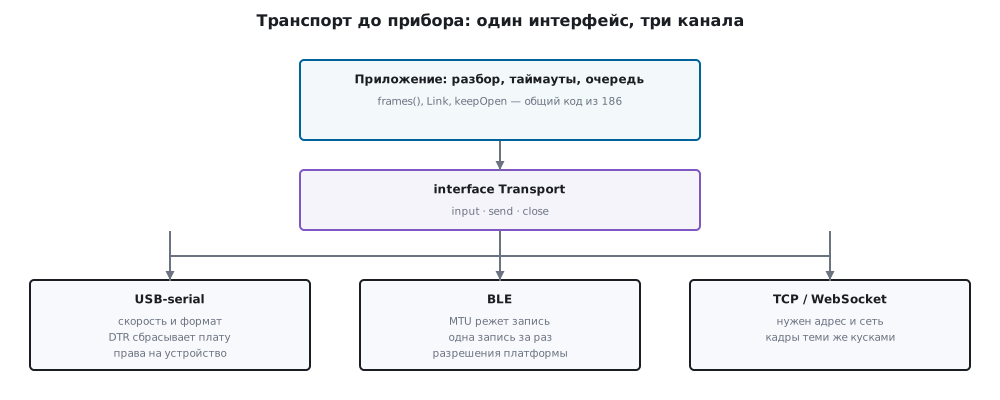
Everything here rests on one decision: the transport is an interface. The app does not know what is underneath — a cable, BLE or a socket; frame parsing, timeouts and reconnection stay the same as in section 186.
The numbers below come from a channel model: it behaves like a platform BLE stack — it cuts writes by MTU and accepts them one at a time. The BLE stack itself can only be tested on a device, and 189.5 says so openly.
Terms used in the documentation
Term Meaning transport the transport: the link to the device GATT characteristic a characteristic: a slot for reads, writes and notifications notification / indication a notification without and with acknowledgement MTU the largest size of a single packet write with / without response a write with and without acknowledgement pairing / bonding pairing and remembering the pairing runtime permission a permission requested while the app runs CDC ACM, virtual COM port a serial port over USB DTR / RTS port control signals
189.1 One interface, different channels
abstract interface class Transport {
  Stream<List<int>> get input;
  Future<void> send(List<int> bytes);
  Future<void> close();
}
The app needs nothing more. What stands behind it:
| Channel | Where it works | What limits it |
|---|---|---|
| USB serial (CDC) | desktop systems, Android with OTG | needs a cable and access rights to the device |
| BLE | phones, desktop systems, the web with caveats | MTU, one write at a time, permissions |
| TCP / WebSocket | anywhere there is a network | needs an address and a network path to the device |
Next we look at BLE — it is the most temperamental, and it is its quirks that most often leak into the app code.
189.2 MTU cuts frames
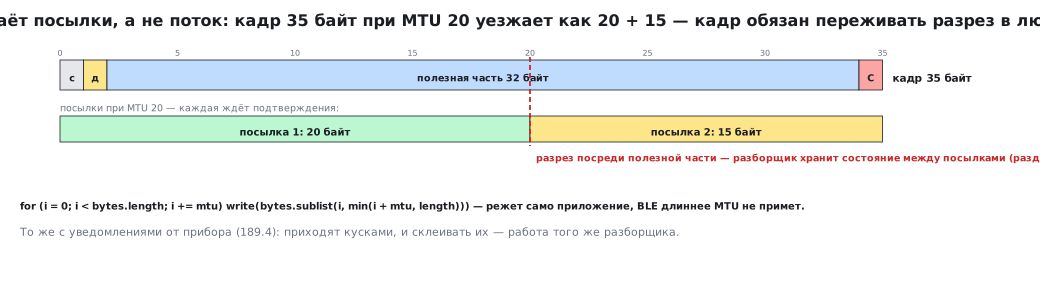
BLE carries packets, not a stream. One write holds the MTU minus
the three-byte ATT header (section 158.5): with the default MTU of 23 that is 20 bytes.
Below, "MTU 20" means exactly these 20 bytes of payload, and mtu in the code
is the same thing; after negotiating an MTU of 247 you cut into pieces of 244. Anything longer
the app cuts up itself:
for (int i = 0; i < bytes.length; i += mtu) {
  final int end = i + mtu > bytes.length ? bytes.length : i + mtu;
  chunks++;
  await _write(bytes.sublist(i, end));     // ждём подтверждения каждого куска
}
A frame with a 32-byte payload is 35 bytes including the start byte, the length and the CRC. With MTU 20 it goes out as two packets:
| What was checked | Value |
|---|---|
| frame length | 35 bytes |
| packets at MTU 20 | 2 |
| their sizes | 20 and 15 bytes |
Hence the protocol rule: a frame must survive being cut at any point. Our format has handled this since section 185 — the parser keeps its state between packets, and it does not care how the bytes were split along the way.
189.3 One write at a time, or you get "busy"
On Android only one GATT operation runs at a time per connection — a write, a read, a subscription: until the previous one is acknowledged, the next one is rejected. iOS queues writes by itself, but for writes without response you have to wait until the stack is ready. That is why you make one queue per connection and pass all operations through it. An app that sends commands "whenever it feels like it" loses them:
| How ten commands are sent | Delivered | "Busy" errors |
|---|---|---|
| no queue, all at once | 1 | 9 |
| through the queue | 10 | 0 |
The queue is four lines: each new write is chained to the tail of the previous one.
final Future<void> started = _tail.then((_) => job());
_tail = started.catchError((Object _) {});   // очередь не должна рассыпаться от одной ошибки
The catchError on the tail is mandatory: without it the very first failed write
breaks the chain, and all the following commands silently never go out.
The test also checks the order: ten commands arrive in the same order in which they were sent — for commands to a device this matters more than speed.
189.4 Notifications arrive in pieces
The reverse direction works the same way: the device sends notifications, and a frame arrives in parts. The same parser runs on top of the transport:
Stream<FrameEvent> transportFrames(Transport t) => frames(t.input);
In the test a frame arrives as two notifications (3 bytes and the rest) and
is assembled into a single FrameReady. There is not a single BLE-specific line
in the parser.
189.5 Permissions and platform limitations
This is the part that cannot be tested in a container — and it is exactly the part that eats days:
| Platform | What you need to know |
|---|---|
| Android | from version 12 — the BLUETOOTH_SCAN and BLUETOOTH_CONNECT permissions (location is not needed with the neverForLocation flag); before 12 — the location permission and the location service switched on in settings. They are requested at runtime; without them a scan returns an empty list with no error |
| iOS | needs usage descriptions in Info.plist; background operation is declared separately |
| web | Web Bluetooth only on a user action and only over HTTPS; some browsers do not support it at all |
| desktop | BLE is not available everywhere, but USB serial is; on Linux — access rights to the device |
The general rule: the screen always shows the state — scanning, connected, no permission. A silent screen with no explanation is the most common complaint about companion apps for devices.
189.6 USB serial: what is different
A cable is simpler than BLE in every respect, except for small things that break the link:
- Baud rate and format matter for a USB-UART adapter and for the debug probe's port: there is a real UART behind them, and a mismatch gives garbage that the parser rightly rejects by CRC. For the virtual port on the STM32's own USB the baud rate is nominal: the firmware only receives it, and the bytes travel at USB speed.
- DTR and RTS. Some boards reset when DTR goes high: you open the port and the device reboots.
- The driver buffer hands out bytes however they come: two frames in one read and half a frame in another — exactly what the parser is ready for.
- Access rights to the device. On Linux you need access to
/dev/ttyACM0; on Windows you need the COM port number, which changes from connector to connector.
For the app this is the same Transport: the implementation of send and
the source of input change, the rest is shared code.
189.7 Pitfalls
The frame is sent as one write. At MTU 20 the platform will truncate it or refuse; the app must do the cutting.
Commands are sent without a queue. Nine out of ten are lost with a "busy" error, and usually nobody reads it.
A queue without catchError. One failed write — and silence from then on
forever.
The parser is rewritten "for BLE". A second parser with the same bugs; the frame must survive being cut at any point.
The permission was never requested. The scan returns an empty list, and the app shows "no devices".
Opening the port resets the device. DTR goes high and the board reboots; in the log it looks like "the device restarted on its own".
189.8 Summary
- The transport is an interface of three methods; parsing, timeouts and reconnection from 186 work on top of any channel.
- BLE cuts writes by MTU: a 35-byte frame goes out as two packets of 20 and 15.
- Strictly one write at a time: ten commands without a queue give 1 delivered and 9 "busy" errors, through the queue 10 of 10, in order.
- The queue tail swallows the error, otherwise one failure breaks the chain forever.
- Permissions and platform limitations can only be tested on a device — the screen must show the state, not stay silent.
Next: section 189а "Firmware update from a mobile app: from a button in Flutter to the STM32 bootloader".