 Embedded HandbookApps
133. Altium Designer: project, rules, output
Altium Designer is the largest of the three programs: the schematic, the board, the libraries, the documentation output and the files for the fab all live in one project. The machine has Altium Designer Agile 26.0.0.14.
Here we take apart a project from the example set — Bluetooth Sentinel with the STM32F101 microcontroller — and we do it without Altium itself: the project, the rules and the output job are read by Python, and KiCad opens the board for cross-checking. This is how you look at someone else's project when Altium is not at hand — and how you check that the project will survive a move to another program.
When Altium is at hand, the same things are found in the menus of the PCB editor (the names are from the installed version 26):
| What | Where in Altium |
|---|---|
| rules (133.3) | Design / Rules |
| layer stack (133.4) | Design / Layer Stack Manager |
| design rule check | Tools / Design Rule Check |
| output by job (133.5) | open the .OutJob, on the output container — Generate content |
| a project from another program | File / Import Wizard |
Terms used in the documentation
Term Meaning PCB project ( .PrjPcb)the board project schematic document ( .SchDoc)a schematic sheet PCB document ( .PcbDoc)the board document Output Job ( .OutJob)the job that produces output files design rule a rule the board is checked against query, scope a query: which objects a rule applies to layer stack the order and thickness of board layers overlay silkscreen solder mask, paste mask the mask, the solder paste stencil NC Drill the drill file device sheet a ready-made sheet block from a library compound file a file system inside a single file
133.1 The project is a text file
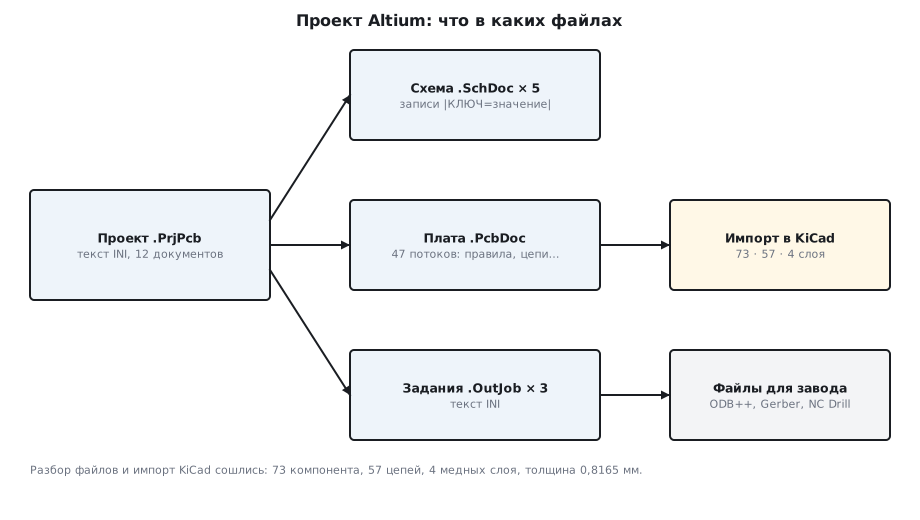
.PrjPcb is text in INI format: sections in square brackets, lines
"key=value". In the example:
| Section | How many | What it is |
|---|---|---|
[DocumentN] |
12 | project documents |
[DeviceSheetN] |
17 | ready-made sheet blocks from a library |
[ConfigurationN] |
3 | output configurations: Documentation, Assembly, Fabrication |
[OutputGroupN] |
10 | groups of output files |
There are 12 documents: five .SchDoc schematic sheets, one .PcbDoc board, three
.OutJob output jobs, two .Harness and one .Annotation. The project
is convenient to keep in git: it is text, and a change to it shows up as a line.
The trap is in the first three bytes: the file starts with a UTF-8
byte order mark, and Python's standard INI parser trips over it. It has to be read
with the utf-8-sig encoding:
def ini(path):
    cp = configparser.ConfigParser(interpolation=None, strict=False)
    cp.optionxform = str
    cp.read(path, encoding="utf-8-sig")          # файл начинается с метки порядка байтов UTF-8
    return cp
133.2 Schematic and board are compound documents
.SchDoc and .PcbDoc start with the same eight bytes
D0 CF 11 E0 A1 B1 1A E1 — this is an OLE compound document, a file system
inside a file, like old Word documents. The board holds 47 data
streams — one per kind of object: Rules6/Data — rules,
Components6/Data — components, Nets6/Data — nets, Board6/Data —
settings and layer stack, Tracks6/Data — tracks.
The rule, component, net and schematic streams hold text records of the form
|KEY=value|…, each ending with a null byte. Pulling them out takes ten
lines:
def kv(rec):
    d = {}
    for part in rec.split("|"):
        if "=" in part:
            k, v = part.split("=", 1)
            d.setdefault(k.upper(), v)
    return d


def stream(ole, name):
    s = ole.openstream(name).read().decode("latin-1")
    return [kv(m.group(0)) for m in re.finditer(r"\|[^\x00]+", s)]
The compound document is opened by the olefile package; here it lives in the stm-ole:1 image.
The schematic sheet with the microcontroller starts with a header record
"Protel for Windows - Schematic Capture Binary File Version 5.0", followed by
948 records. The record kind is the RECORD number, and the keys tell you what object it is:
RECORD |
How many | Keys | What it is |
|---|---|---|---|
| 1 | 16 | LIBREFERENCE, PARTCOUNT |
component |
| 2 | 130 | NAME, DESIGNATOR, ELECTRICAL |
pin |
| 27 | 85 | LOCATIONCOUNT, X1, Y1 |
wire |
| 25 | 53 | TEXT |
net label |
| 34 | 16 | TEXT, NAME |
designator: U2, C15, R9 … |
| 41 | 331 | NAME, TEXT |
parameter |
The microcontroller is MC-ARM-STM32F101-SQ37: its description says "36-Pin VFQFPN"
and "32 kB Flash, 6 kB Internal RAM". On the sheet it is drawn in two parts —
the designator U2 appears twice. On the board its footprint is
VFQFPN36_N.
133.3 Board rules
The example has 38 rules. Each has a name, a kind (RULEKIND), a priority and
a scope. The rules with numbers:
| Rule | In the file | In millimeters |
|---|---|---|
Clearance — clearance |
3.937mil | 0.1 |
Width — track width |
3.937–19.685mil, preferred 3.937mil | 0.1–0.5, preferred 0.1 |
RoutingVias — via |
19.685mil, hole 11.811mil | 0.5, hole 0.3 |
HoleToHoleClearance — between holes |
3.937mil | 0.1 |
ComponentClearance — between packages |
7.874mil | 0.2 |
DiffPairsRouting — differential pair |
10mil | 0.254 |
Altium stores lengths in mils even when the board was laid out in millimeters: 3.937 mil is 0.1 mm written in another unit. The conversion is mil × 0.0254.
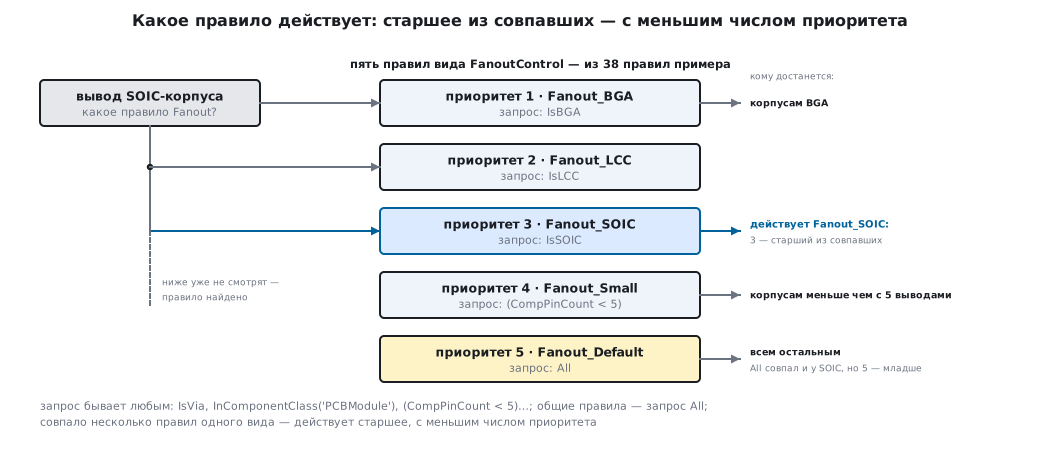
The scope is set by a query. General rules apply to all
objects (All), specific ones to selected objects: (CompPinCount < 5) — packages
with fewer than five pins, IsSOIC, IsBGA, IsVia,
InComponentClass('PCBModule'). Among rules of one kind the
senior one wins — the one with the smaller priority number: for pin fanout the specific
rules have priorities 1–4, the general Fanout_Default has priority 5.
133.4 Layer stack
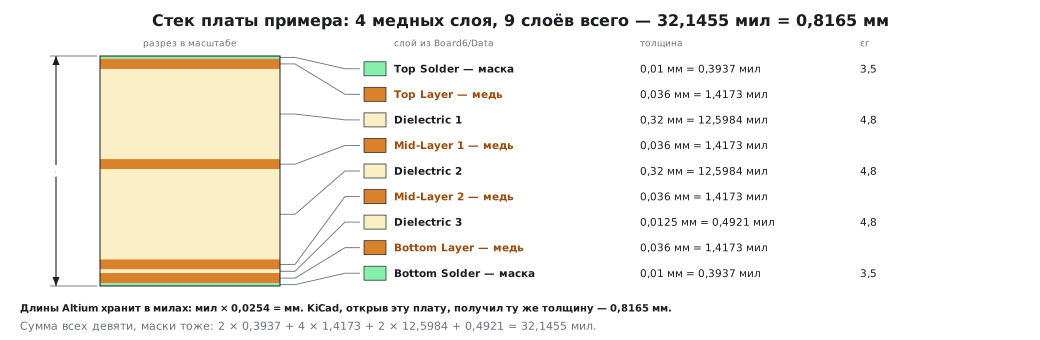
The board has four layers. The stack from the Board6/Data stream:
| Layer | Thickness | εr |
|---|---|---|
Top Solder — mask |
0.3937 mil = 0.01 mm | 3.5 |
Top Layer — copper |
1.4173 mil = 0.036 mm | |
Dielectric 1 |
12.5984 mil = 0.32 mm | 4.8 |
Mid-Layer 1 — copper |
0.036 mm | |
Dielectric 2 |
0.32 mm | 4.8 |
Mid-Layer 2 — copper |
0.036 mm | |
Dielectric 3 |
0.4921 mil = 0.0125 mm | 4.8 |
Bottom Layer — copper |
0.036 mm | |
Bottom Solder — mask |
0.01 mm | 3.5 |
The example stack is asymmetric: the third dielectric is only 12.5 µm. A board for ordering is not made like that — the stack is taken from the fab's standard ones, symmetric about the middle of the board, otherwise the board warps during soldering.
The total is 32.1455 mil, 0.8165 mm:
out["thickness_mm"] = round(sum((l["copper_mil"] or 0) + (l["diel_mil"] or 0) for l in stack) * MIL, 4)
KiCad, having opened this board, got the same thickness — 0.8165 mm (133.6).
133.5 Output: the .OutJob job
Altium produces the files for the fab from a job — .OutJob, also INI text.
The example's Fabrication.OutJob has three outputs: ODB++, Gerber and NC Drill.
The settings the fab must know:
| Output | Setting | Value |
|---|---|---|
| Gerber | units | Imperial — inches |
| digits after the decimal point | 5 | |
| zeros | SuppressLeadingZeroes — leading zeros omitted |
|
| NC Drill | units | Imperial — inches |
| format | 2 digits before the point, 5 after — "2:5" | |
| zeros | SuppressTrailingZeroes — trailing zeros omitted |
|
| plated separately | False — all holes in one file |
If the fab reads inches as millimeters or takes the wrong format, the holes will miss the pads. That is why the units and the drill format are also written in the cover letter.
The project itself knows more outputs than this job uses: the Fabrication Outputs group has 12 of them — among them Gerber X2 and IPC-2581, the Netlist Outputs group has 21 netlist formats, Export Outputs has 11, from STEP to Specctra.
133.6 Checking someone else's project without Altium
The altium_read.py script reads the whole project — documents, rules, stack,
components, nets, the sheet with the microcontroller, the output job — and returns
JSON. For cross-checking, KiCad 9 opens the same board: it has an Altium importer.
KiCad did not open the board on the first try: LoadBoard returned an empty result —
the format is not guessed from the file. The format has to be named:
b = pcbnew.LoadBoard(path, pcbnew.PCB_IO_MGR.ALTIUM_DESIGNER)
| What | File parsing | KiCad after import |
|---|---|---|
| components | 73 | 73 |
| nets | 57 | 57 plus the service "no net" |
| copper layers | 4 | 4 |
| thickness | 0.8165 mm | 0.8165 mm |
| clearance, smallest | 0.1 mm | 0.1 mm |
| track, smallest | 0.1 mm | 0.1 mm |
| via, smallest | 0.5 mm, hole 0.3 mm | 0.5 mm, hole 0.3 mm |
| between holes | 0.1 mm | 0.1 mm |
Two independent readings agree. But the move is not free: KiCad could not map 28 Altium layers
and skipped them, and replaced three fonts with its own. And the net
classes — All Nets from Altium and its own Default — got KiCad's own settings:
0.2 mm clearance and 0.2 mm track, not the 0.1 mm from the example's rules. The board
minimums carried over, the classes did not; after import you set them again.
133.7 The example's rules against the profile from section 130
The profile from section 130 is the rules KiCad uses to create a new board. The example's rules are finer in four places:
| Rule | Example | Profile 130 |
|---|---|---|
| clearance | 0.1 mm | 0.2 mm |
| track | 0.1 mm | 0.2 mm |
| via | 0.5 mm | 0.6 mm |
| between holes | 0.1 mm | 0.25 mm |
This is not a mistake in the example: the board has small packages — the footprints
VFQFPN36_N, CSR-CSR1010A05-IQQM-R-QFN32_M, LGA16-3X3X1_L. But it is
a requirement for the fab: such a board is ordered where 0.1 mm is an ordinary
capability, not the limit. Check this before routing, not after.
133.8 Pitfalls
| Symptom | Cause |
|---|---|
configparser: "File contains no section headers" on .PrjPcb |
the file starts with a UTF-8 byte order mark — read it as utf-8-sig |
| the rules say "3.937mil" instead of 0.1 mm | Altium stores lengths in mils, even for a metric board |
KiCad does not open the .PcbDoc, LoadBoard returned nothing |
the format was not guessed — specify PCB_IO_MGR.ALTIUM_DESIGNER |
| layers disappeared after import into KiCad | 28 layers were not mapped — check the stack after import |
| net classes in KiCad are 0.2 mm, but in Altium they were 0.1 | the classes got KiCad's settings, not the Altium rules |
| the fab drills off the pads | the 2:5 inch drill format was not passed to the fab |
| the fab refuses the order | the rules are finer than its capabilities — check before routing |
133.9 Summary
- The
.PrjPcbproject and the.OutJobjob are INI text with a UTF-8 mark at the start; the schematic and the board are OLE compound documents with text records|KEY=value|. - In the example: 12 documents, 38 rules, 4 copper layers, 73 components, 57 nets, thickness 0.8165 mm — file parsing and the KiCad import agree.
- Lengths are in mils: 3.937 mil = 0.1 mm.
- The example's drilling is 2:5 in inches; tell the fab the units and the format.
- When moving to KiCad the minimums stay, the net classes do not.
- The example's rules are finer than profile 130 in four places — this is a requirement for the fab.
Full source code
altium_read.py — reading an Altium project without Altium: documents, rules, stack, output.
# -*- coding: utf-8 -*-
"""Раздел 133: что лежит в проекте Altium Designer — без самого Altium. Запуск в образе stm-ole:1.

python altium_read.py <папка проекта> <имя>.PrjPcb     → JSON в stdout

Проект .PrjPcb и задание на выпуск .OutJob — текст в формате INI. Схема .SchDoc и плата .PcbDoc —
составные документы OLE: внутри потоки по видам объектов (Rules6/Data, Components6/Data, …),
в потоках — текстовые записи «|КЛЮЧ=значение|…», каждая оканчивается нулевым байтом. Длины
в записях — с единицами: «3.937mil»."""
import configparser, json, os, re, sys
import olefile

MIL = 0.0254                                     # мм в одном миле


def kv(rec):
    d = {}
    for part in rec.split("|"):
        if "=" in part:
            k, v = part.split("=", 1)
            d.setdefault(k.upper(), v)
    return d


def stream(ole, name):
    s = ole.openstream(name).read().decode("latin-1")
    return [kv(m.group(0)) for m in re.finditer(r"\|[^\x00]+", s)]


def mil(v):
    m = re.fullmatch(r"(-?[\d.]+)mil", (v or "").strip())
    return float(m.group(1)) if m else None


def ini(path):
    cp = configparser.ConfigParser(interpolation=None, strict=False)
    cp.optionxform = str
    cp.read(path, encoding="utf-8-sig")          # файл начинается с метки порядка байтов UTF-8
    return cp


def sections(cp, prefix):
    return [cp[s] for s in cp.sections() if re.fullmatch(prefix + r"\d+", s)]


def main(folder, prj):
    cp = ini(os.path.join(folder, prj))
    docs = [s["DocumentPath"] for s in sections(cp, "Document")]
    out = {"documents": docs,
           "device_sheets": len(sections(cp, "DeviceSheet")),
           "configurations": [s["Name"] for s in sections(cp, "Configuration")],
           "output_groups": {s.get("Name"): sum(1 for k in s if re.fullmatch(r"OutputType\d+", k))
                             for s in sections(cp, "OutputGroup")}}

    # ── плата ──
    pcb = os.path.join(folder, next(d for d in docs if d.lower().endswith(".pcbdoc")))
    out["pcb_magic"] = open(pcb, "rb").read(8).hex()
    ole = olefile.OleFileIO(pcb)
    out["pcb_streams"] = len([s for s in ole.listdir() if s[-1] == "Data"])
    rules = []
    for r in stream(ole, "Rules6/Data"):
        if "RULEKIND" in r:
            rules.append({"name": r.get("NAME"), "kind": r["RULEKIND"], "priority": int(r.get("PRIORITY", "0")),
                          "scope1": r.get("SCOPE1EXPRESSION"), "scope2": r.get("SCOPE2EXPRESSION"),
                          **{k.lower(): mil(r[k]) for k in ("GAP", "MINLIMIT", "MAXLIMIT", "PREFEREDWIDTH", "MINWIDTH",
                                                              "MAXWIDTH", "MINHOLEWIDTH", "MAXHOLEWIDTH") if k in r}})
    out["rules"] = rules
    board = stream(ole, "Board6/Data")[0]
    stack, i = [], 0
    while "V9_STACK_LAYER%d_NAME" % i in board:
        p = "V9_STACK_LAYER%d_" % i
        stack.append({"name": board[p + "NAME"], "copper_mil": mil(board.get(p + "COPTHICK")),
                      "diel_mil": mil(board.get(p + "DIELHEIGHT")), "er": float(board.get(p + "DIELCONST") or 0) or None})
        i += 1
    out["stack"] = stack
    out["copper_layers"] = [l["name"] for l in stack if l["copper_mil"]]
    out["thickness_mm"] = round(sum((l["copper_mil"] or 0) + (l["diel_mil"] or 0) for l in stack) * MIL, 4)
    comps = [c for c in stream(ole, "Components6/Data") if "PATTERN" in c]
    out["components"] = len(comps)
    out["patterns"] = sorted({c["PATTERN"] for c in comps})
    out["nets"] = len([n for n in stream(ole, "Nets6/Data") if "NAME" in n])

    # ── лист схемы с микроконтроллером ──
    for d in docs:
        if not d.lower().endswith(".schdoc"):
            continue
        recs = stream(olefile.OleFileIO(os.path.join(folder, d)), "FileHeader")
        mcu = [r for r in recs if r.get("RECORD") == "1" and "STM32" in r.get("LIBREFERENCE", "")]
        if not mcu:
            continue
        kinds = {}
        for r in recs[1:]:
            kinds[r.get("RECORD")] = kinds.get(r.get("RECORD"), 0) + 1
        out["sheet"] = {"file": d, "header": recs[0].get("HEADER"), "records": len(recs) - 1,
                        "kinds": {k: kinds.get(k, 0) for k in ("1", "2", "25", "27", "34", "41")},
                        "keys": {k: sorted(next(r for r in recs if r.get("RECORD") == k)) for k in ("1", "2", "25", "27", "34", "41")},
                        "magic": open(os.path.join(folder, d), "rb").read(8).hex(),
                        "mcu": mcu[0]["LIBREFERENCE"], "mcu_parts_drawn": len(mcu),
                        "mcu_description": mcu[0].get("COMPONENTDESCRIPTION", ""),
                        "designators": sorted(r.get("TEXT") for r in recs if r.get("RECORD") == "34")}

    # ── выпуск для завода ──
    oj = ini(os.path.join(folder, "Fabrication.OutJob"))
    g = oj["OutputGroup1"]
    outs = []
    for i in range(1, 20):
        t = g.get("OutputType%d" % i)
        if t:
            item = dict(p.split("=", 1) for p in g.get("Configuration%d_Item1" % i, "").split("|") if "=" in p)
            outs.append({"type": t, "name": g.get("OutputName%d" % i), "settings": item})
    out["fabrication"] = outs
    json.dump(out, sys.stdout, ensure_ascii=False, indent=1)


if __name__ == "__main__":
    main(sys.argv[1], sys.argv[2])
Next: section 134 — other programs and moving boards between them.