 Embedded HandbookApps
134. Other programs and moving boards between them
There are dozens of board design programs: besides KiCad, DipTrace and Altium there are EasyEDA, Eagle, P-CAD, CADSTAR and others. There is no need to study each one. What you need to know is how a board moves from one program to another and what gets lost on the way: a customer sends a project in a foreign format, the factory asks for its own, the mechanical engineer needs a 3D model.
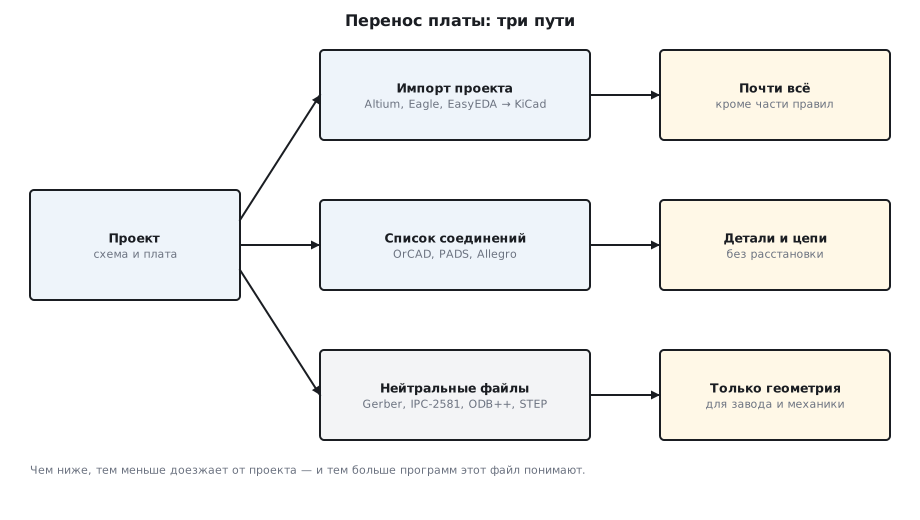
There are three paths: importing someone else's project, a netlist from schematic to board,
and neutral files for the factory and for mechanical design. All the experiments are done in KiCad 9.0.9 from
the kicad/kicad:9.0 image on the board from section 131 and on the Altium example from
section 133; what DipTrace can do is taken from its manual.
Terms used in the documentation
Term Meaning import, export reading in, writing out netlist the list of connections neutral format a format that belongs to no single program IPC-2581 an open whole-board format for the factory, one XML file ODB++ a whole-board format for the factory, a tree of files IPC-D-356 a netlist for electrical testing of the bare board bare board test electrical testing of the bare board position file, pick and place the placement file: where and how each part sits STEP a 3D model format for mechanical design footprint mapping matching footprints between libraries
134.1 Three paths
| What is moved | How | What arrives |
|---|---|---|
| the whole project | import in another program | components, nets, tracks, some of the rules |
| the schematic into the board | a netlist | components and nets, no placement |
| the board to the factory and to mechanical design | Gerber, Excellon, IPC-2581, ODB++, STEP | geometry for manufacturing, not for editing |
The further down the table, the less of the project survives — and the more programs understand the file.
134.2 Import: KiCad as an adapter
KiCad 9 knows 15 board formats:
| Group | Formats |
|---|---|
| its own | KiCad, Legacy |
| Altium | Altium Designer, Altium Circuit Maker, Altium Circuit Studio |
| other programs | Eagle, EasyEDA / JLCEDA Std, EasyEDA / JLCEDA Pro, P-Cad, CADSTAR PCB Archive, Fabmaster, GEDA/Pcb, Solidworks PCB |
| for the factory | IPC-2581, ODB++ |
The last two KiCad only writes. It does not open its own IPC-2581 and ODB++ exports
back: LoadBoard returns an empty result. For the factory
that is enough, for moving between programs it is not.
How an import goes in practice was shown by the Altium example (133.6): components, nets, copper layers, thickness and rule minimums matched to the number, but 28 layers were not mapped, three fonts were replaced, and the net classes got KiCad's settings. An import is the beginning of a transfer, not the end.
Sprint-Layout and Proteus are not in this list.
134.3 Netlist
When the schematic is in one program and the board is laid out in another, what travels between them is a netlist: which parts there are and which pins are connected. It has no placement and no tracks — the board is laid out anew.
| Format | KiCad 9 writes | DipTrace 5.3 reads and writes | Altium writes |
|---|---|---|---|
| OrCAD PCB2 | orcadpcb2 |
OrCAD | Orcad/PCB2 Netlist |
| PADS | pads |
PADS | PADS ASCII Netlist |
| Allegro | allegro |
Allegro | — |
| P-CAD | — | P-CAD | PCAD Netlist |
| Protel | — | Protel | Protel |
| Tango | — | Tango | Tango Netlist |
| CADSTAR | cadstar |
— | — |
From KiCad to DipTrace you can get across with OrCAD, PADS and Allegro, from Altium to DipTrace with OrCAD, PADS, P-CAD, Protel and Tango. In total KiCad writes 8 formats, DipTrace reads 8, Altium writes 21.
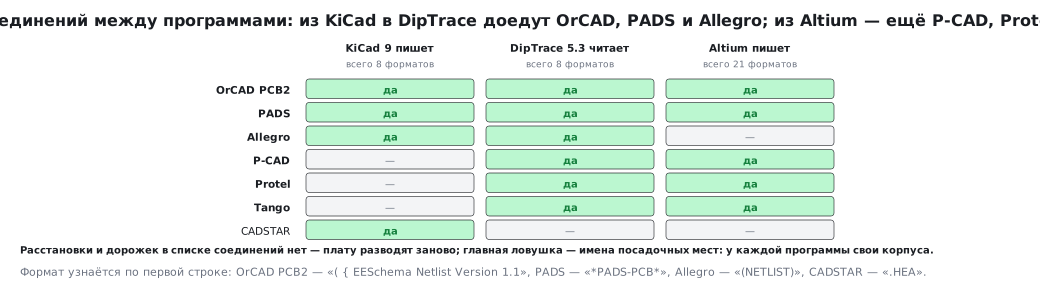
Files of different formats are recognised by their first line. The KiCad demo schematic
pic_programmer in four formats:
SCH=/usr/share/kicad/demos/pic_programmer/pic_programmer.kicad_sch
for f in orcadpcb2 pads allegro cadstar; do
    kicad-cli sch export netlist --format $f -o out/netlist.$f $SCH
done
| Format | Start of file |
|---|---|
| OrCAD PCB2 | ( { EESchema Netlist Version 1.1 |
| PADS | *PADS-PCB* |
| Allegro | (NETLIST) |
| CADSTAR | .HEA |
The main trap of a netlist is footprint names. Every program has its own libraries and its own package names: in the example from the DipTrace manual, the package "CAP 225" from the netlist is assigned DipTrace's own "CAP_2225_N". On import DipTrace first looks for packages by name (Assign all Patterns by Names), and whatever it does not find is matched by hand.
134.4 Files for the factory: not only Gerber
The Gerber and drill files from section 131 are not the factory's only language. The same board from section 131 in five other formats:
kicad-cli pcb export ipc2581 -o out/board.xml board.kicad_pcb
kicad-cli pcb export odb -o out/board-odb.zip board.kicad_pcb
kicad-cli pcb export ipcd356 -o out/board.d356 board.kicad_pcb
kicad-cli pcb export pos --format csv --units mm -o out/board-pos.csv board.kicad_pcb
kicad-cli pcb export gencad -o out/board.cad board.kicad_pcb
| Format | What is inside |
|---|---|
| IPC-2581 | one XML file of revision C, about half a megabyte: the whole board in one file |
| ODB++ | an archive of 103 files: layers, outline, netlist |
| IPC-D-356 | a netlist for electrical testing of the bare board |
| placement file | 15 lines — one per part: designator, package, X, Y, rotation, side |
| GenCAD | the GenCAD 1.4 text format |
IPC-D-356 is worth a closer look: the factory uses it to check that the bare board
is connected as intended. Each test point is a line. There are 74 lines of type 327,
exactly the number of SMD pads on the board; there are 10 lines of type 317: six through-hole pins
of the connectors J1 and J2 and four vias. The last
line is 999, the end of the file.
ODB++ is written by all three programs of this part: KiCad with the command above, Altium with the "ODB++ Files" output, DipTrace with File / Export / ODB++. IPC-2581 by KiCad and Altium (the "IPC-2581 Files" output).
134.5 Mechanical design: STEP
The device enclosure is drawn in a mechanical CAD program, and it needs the board with its parts in 3D. The common language is STEP:
kicad-cli pcb export step -o out/board.step board.kicad_pcb
The file starts with the line ISO-10303-21; — the number of the standard. DipTrace
exports STEP and VRML 2.0, and accepts 3D models of parts in the 3DS,
VRML, STEP and IGES formats. Altium's outputs include STEP, PARASOLID, VRML and IDF.
134.6 A transfer step by step
- Import — and check the numbers right away: components, nets, copper layers, thickness. For the Altium example they matched: 73, 57, 4, 0.8165 mm.
- Layer stack: are all layers mapped? For Altium, 28 are not mapped.
- Rules and net classes — redo them: on import the classes get the settings of the new program, not the old rules.
- Fonts — replaced with the program's own; check the silkscreen text by eye.
- DRC in the new program — before the first edit: the violations after the transfer then come from the transfer, not from you.
- Compare the netlists of the old and the new board (IPC-D-356) — not line by line but by groups: for each net, the set of "designator.pin" entries, without net names and coordinates. If all the sets match, no net was broken or merged.
134.7 Pitfalls
| Symptom | Cause |
|---|---|
| KiCad did not open its own IPC-2581 or ODB++ | KiCad only writes these formats |
| after importing a netlist the parts have no packages | footprint names differ between programs — map them |
| a KiCad script did not open an Altium board | the format was not named explicitly (133.6) |
| after import DRC is clean, but the clearances are "wrong" | the net classes hold the new program's settings |
| the mechanical engineer got a board without parts | no 3D models are attached to the parts |
| a netlist from one program cannot be read by another | the formats do not match — use a common one: OrCAD or PADS |
134.8 Summary
- Three paths: project import, netlist, neutral files.
- KiCad 9 knows 15 board formats; IPC-2581 and ODB++ it only writes.
- A netlist between KiCad and DipTrace is OrCAD, PADS or Allegro; it does not carry placement or tracks.
- IPC-D-356 of board 131: 74 records
327for the SMD pads and 10 records317. - For mechanical design — STEP, the file starts with the line
ISO-10303-21;. - After an import: check the numbers, the stack, the rules, the fonts, DRC and the netlist.
Full source code
exports.sh — KiCad exports for the factory, for mechanical design and for other programs.
#!/bin/sh
# Раздел 134: плата раздела 131 — в нейтральные форматы для завода и механики, демо-схема KiCad — в
# списки соединений чужих программ. Запуск в образе kicad/kicad:9.0 из папки с board.kicad_pcb.
mkdir -p out
kicad-cli pcb export ipc2581 -o out/board.xml board.kicad_pcb
kicad-cli pcb export odb -o out/board-odb.zip board.kicad_pcb
kicad-cli pcb export ipcd356 -o out/board.d356 board.kicad_pcb
kicad-cli pcb export pos --format csv --units mm -o out/board-pos.csv board.kicad_pcb
kicad-cli pcb export gencad -o out/board.cad board.kicad_pcb
kicad-cli pcb export step -o out/board.step board.kicad_pcb
SCH=/usr/share/kicad/demos/pic_programmer/pic_programmer.kicad_sch
for f in orcadpcb2 pads allegro cadstar; do
    kicad-cli sch export netlist --format $f -o out/netlist.$f $SCH
done
Next: section 135 "The process: startup, environment, memory, limits, termination".