 Embedded HandbookApps
26. Tasks
The task is the one thing you take an operating system for. Everything else — queues, semaphores, timers — serves how tasks interact. This section covers how tasks are built, by what rules they get the CPU, and the four mistakes people make with them most often.
Terms used in the documentation
Term Meaning task function the function the task runs task handle a reference to a task stack depth stack size, in words time slicing sharing time between tasks of equal priority round-robin handing out time in turn, in a circle starvation the task never gets the CPU at all blocked / suspended waiting / paused yield give up the CPU voluntarily high water mark the smallest stack remainder over all time task control block (TCB) the kernel's record of a task
26.1 What a task looks like
static void worker_task(void *arg)
{
    const uint32_t period = (uint32_t)arg;

    for (;;) {                      /* цикл обязателен */
        do_work();
        vTaskDelay(pdMS_TO_TICKS(period));
    }
}
Three required properties.
It returns void and takes void *. The signature is fixed — the kernel
calls the function through a pointer and cannot pass anything else.
The argument is often used to serve several tasks with one function:
a channel number, a period, the address of a settings structure.
An endless loop inside. A task does not finish — it runs the whole time the device is powered.
⚠️ You must not return from a task function. This is not a matter of style but a requirement: there is nowhere to return to, there is no return address on the task's stack. The kernel catches such a return with a check and halts the program. If a task has to run once and disappear, it must delete itself explicitly:
c
static void one_shot(void *arg)
{
    do_the_thing();
    vTaskDelete(NULL);      /* NULL means "delete myself" */
}
Its own stack. All local variables of the task live in it, and its size is set when the task is created.
26.2 Priorities: the main misunderstanding
The scheduler has one rule, and you have already heard it: the ready task with the highest priority runs. It leads to a conclusion that is often understood the wrong way round.
Tasks of different priority do not share time. Not at all. The higher one runs until it blocks; the lower ones get nothing.
Hence the main beginner's mistake:
static void high_task(void *arg)
{
    for (;;) {
        poll_sensor();          /* и никакого ожидания */
    }
}
A high-priority task without a single blocking call completely stops everything below it. The device looks frozen, although formally it is running: the lower tasks simply never execute. This is called starvation, and the cure is not to lower the priority but to add a wait.
Tasks of the same priority do share time — one tick each,
in turn. This is time slicing, and it is enabled by the macro
configUSE_TIME_SLICING.
| Situation | What happens |
|---|---|
| tasks of different priorities | the higher one runs, the lower ones wait |
| tasks of the same priority | one tick each, in turn |
| the higher one has blocked | the CPU goes to the next in seniority |
| everyone is waiting | the idle task runs |
How many levels and how to choose them
There are as many levels as configMAX_PRIORITIES sets; numbering
starts from zero, and level zero is taken by the idle task.
⚠️ A priority above the maximum. Before clipping it, the kernel checks
configASSERT(uxPriority < configMAX_PRIORITIES). With the check enabled — and CubeMX enables it — the chip stops right in it, when the task is created. Without the check, priority 10 with five levels silently becomes 4: two tasks given 10 and 99 end up on the same level and start sharing time, while the code says one of them is more important (experiment — in 26.9).
A sensible priority scheme for a device:
| Level | For whom |
|---|---|
| high | handling whatever cannot wait |
| medium | the main logic of the device |
| low | display output, the log, the link to the computer |
| 0 | the idle task; none of your tasks here |
You do not need many levels. Three or four cover almost any device; each extra level is one more ready list in kernel memory and one more decision to make when you add a task.
Is there enough CPU
Priorities decide who goes first, but they do not tell you whether everyone makes it. For
periodic tasks this is calculated in advance. Each task has an execution time
C and a period T; priorities are assigned by rate: the more often a task runs, the higher it is.
Utilization is the sum of C / T over all tasks. The Liu–Layland bound:
if utilization is no more than n·(2^(1/n) − 1), all deadlines are guaranteed; for
three tasks this is 77.98%. The bound is sufficient but not necessary: above it
a set may meet its deadlines or may not — then you calculate the response time
of each task: its own C plus everything the higher ones manage to preempt it with,
R = C + Σ ⌈R / Tj⌉ · Cj, until the value stops changing.
Three sets — a sensor (1 ms every 5 ms), a controller (3 ms every 20 ms) and a display with different redraw lengths, period 50 ms:
| Display | Utilization | Bound 77.98% | Display response | Deadline 50 ms |
|---|---|---|---|---|
| 10 ms | 55% | passed | 17 ms | meets it |
| 25 ms | 85% | not passed | 39 ms | meets it |
| 32 ms | 99% | not passed | 52 ms | misses it |
A direct simulation of a preemptive scheduler — all tasks start at once, which is the worst case — gave the same response times and a missed deadline in the third set. The sensor responds in 1 ms in all three, the controller in 4 ms: a lower task has no effect on the higher ones.
The "Tasks" tab in the app's calculators does the same calculation for your own set of tasks: utilization, the bound and the response time of each task.
26.3 Blocking: what counts as waiting
A task gives up the CPU only if it has called a kernel function that blocks it. Nothing else counts as waiting.
| Blocks | Does not block |
|---|---|
vTaskDelay, xTaskDelayUntil |
an empty for loop |
xQueueReceive with a timeout |
while (!flag) { } |
xSemaphoreTake with a timeout |
polling a peripheral register in a loop |
ulTaskNotifyTake with a timeout |
a loop with __NOP() inside |
The difference is fundamental. The first column moves the task into the blocked state, and the kernel removes it from the ready list. The second leaves the task running: it simply wastes its time and does not let anyone below it run.
The only way to give up the CPU without waiting for an event:
taskYIELD(); /* отдать остаток кванта равным по приоритету */
But even that does not help against starvation: you can only yield to tasks of the same priority or higher.
Five states
| State | How to get there | How to leave |
|---|---|---|
| running | the scheduler picked it | preempted or blocked |
| ready | created or done waiting | the scheduler picked it |
| blocked | called a blocking function | an event or a timeout |
| suspended | vTaskSuspend |
only vTaskResume |
| deleted | vTaskDelete |
no way |
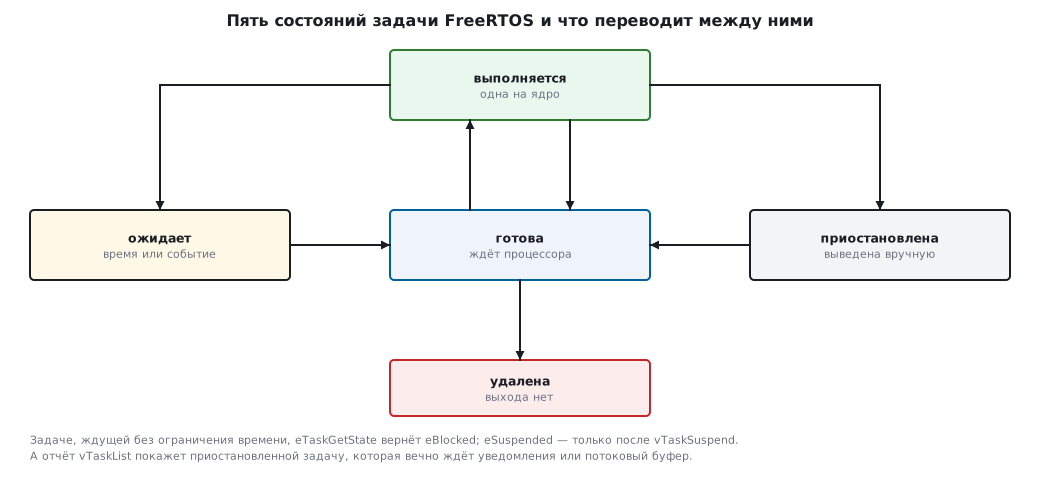
⚠️ A task waiting with no time limit sits in the same kernel list as suspended ones.
eTaskGetStatetells them apart and returnseBlockedfor it;eSuspendedcomes only aftervTaskSuspend. But thevTaskListreport anduxTaskGetSystemStateshow as suspended a task that waits forever for a notification or a stream buffer (which waits through notifications) — this is confusing when debugging. An infinite wait on a queue or a semaphore is shown correctly.
26.4 🔧 A periodic task: two versions
The most common kind of task does something with a constant period. The obvious solution turns out to be wrong.
/* Неверно: период уплывает */
for (;;) {
    do_work();                              /* занимает 3 мс */
    vTaskDelay(pdMS_TO_TICKS(10));
}
vTaskDelay counts from the moment of the call. So the period is
not 10 ms but 13: ten milliseconds of waiting plus three of work. And that is
optimistic — as soon as the task is preempted, the period grows further.
The numbers show how much this matters. In one minute with a period of 10 ms there should be 6000 activations. With an actual period of 13 ms there will be 4615. 1385 activations lost in one minute — almost a quarter.
/* Верно: период точный */
TickType_t last = xTaskGetTickCount();

for (;;) {
    do_work();
    xTaskDelayUntil(&last, pdMS_TO_TICKS(10));
}
xTaskDelayUntil counts from the previous wake-up, not from the call.
The task's working time is subtracted from the wait automatically, and the period
stays exact however long the task computes — as long as it fits
within the period.
vTaskDelay |
xTaskDelayUntil |
|
|---|---|---|
| counts from | the moment of the call | the previous wake-up |
| period | delay + work | exactly as set |
| error accumulates | yes | no |
| used for | pauses, retries | periodic measurement, polling, control |
⚠️ Do not touch the reference variable by hand.
xTaskDelayUntilupdates it itself on every call. It is initialized once, before the loop, withxTaskGetTickCount(). Assigning anything to it inside the loop breaks the whole point of the function.
There is a second subtlety: if the work took longer than the period, the function does not wait at all and returns a flag saying the task did not sleep. A device in this mode is running at its limit, and you should know about it — checking the return value gives you a free overload signal.
26.5 The idle task
The kernel creates it itself when the scheduler starts. Its priority is zero; it runs when everyone else is waiting.
Three things it does:
Frees the memory of tasks that deleted themselves. A task cannot return
the stack it is running on, so vTaskDelete(NULL) only puts
it in the deletion queue, and the control block and stack are returned to the heap
by the idle task. For another task, vTaskDelete frees the memory at once.
Calls the idle hook, if it is enabled. This is usually where you put CPU sleep (section 10) — the device draws current only when it is working.
Does nothing if neither is required.
⚠️ If the idle task does not get the CPU, the memory of tasks that deleted themselves is not returned. A device in which tasks are created and deleted while the lower priority levels are always busy will slowly lose heap. The symptom is running out of memory after hours of operation with code that looks correct.
The idle hook must be fast and must never block. The idle task must always stay ready — freeing memory depends on it.
The macro configIDLE_SHOULD_YIELD controls whether the idle task
yields its time slice to tasks of the same — that is, zero —
priority. It matters only if you have created your own tasks with priority zero,
which you should not do.
26.6 Scheduler modes
Two macros give three behaviours.
configUSE_PREEMPTION |
configUSE_TIME_SLICING |
Result |
|---|---|---|
| 1 | 1 | preemption with time slicing — the normal mode |
| 1 | 0 | preemption without slicing: equal tasks do not alternate |
| 0 | — | cooperative: switching only on taskYIELD or when a task blocks |
The normal mode is the first row, and there is no reason to change it without cause.
The cooperative mode is sometimes chosen for predictability: switching happens only where you allowed it, and races between tasks almost never occur. The price: any task can stop the system by forgetting to yield, and the reaction to events is limited by the length of the longest uninterrupted stretch. In essence it is a superloop with more convenient notation.
26.7 The stack: how much to give and how to check
There is no theoretical answer to this question. A task's stack is used by local variables, nested calls and, on Cortex‑M, also the interrupt frame that the processor pushes onto the current task's stack.
The practice is: give it with a margin, then measure and trim.
UBaseType_t words = uxTaskGetStackHighWaterMark(handle);
uint32_t    bytes = words * sizeof(StackType_t);
The function returns the smallest remainder over the whole life of the task, and returns it in words.
⚠️ The value is in words, not bytes. A remainder of 20 means 80 bytes of free stack, not 20. A factor-of-four error is especially nasty here: the margin seems critical when it is acceptable — or the other way round.
A remainder of at least a quarter of the allocation is considered healthy. Zero means the stack was exhausted — and, most likely, with consequences already.
The overflow hook catches trouble at the moment it happens, not after the fact:
void vApplicationStackOverflowHook(TaskHandle_t task, char *name)
{
    (void)task;
    for (;;) { }        /* имя виновной задачи лежит в name */
}
It is enabled by the macro configCHECK_FOR_STACK_OVERFLOW. Value 1 compares
the stack pointer with the limit at each switch, value 2 additionally
checks that the tail of the stack still holds a known pattern. The second method
is more reliable and slightly slower; use it during development.
⚠️ No check catches an overflow instantly. Both fire on a task switch, that is, after someone else's memory has already been corrupted. The hook names the culprit but does not undo the damage — which is why the margin matters more than the diagnostics. Only hardware catches it instantly: on Cortex-M33 (L5, U5, H5) the FreeRTOS port writes the task's stack limit into the
PSPLIMregister, and going past it raises an exception at once; on M3/M4 the same is done with an MPU guard region below the stack.
A separate mine is printf and everything to do with floating point.
One harmless line of formatted output can eat
several hundred bytes of stack at once; a task with a minimal stack
falls over right on it.
26.8 Static or dynamic
Returning to section 25 as it applies to tasks:
/* динамически: память из кучи, может не получиться */
if (xTaskCreate(worker, "worker", 256, NULL, 2, &h) != pdPASS) {
    /* не хватило кучи */
}

/* статически: память ваша, не получиться не может */
static StaticTask_t tcb;
static StackType_t  stack[256];

h = xTaskCreateStatic(worker, "worker", 256, NULL, 2, stack, &tcb);
For tasks the difference is especially noticeable: their stacks are the largest item of memory use in a device. With static allocation the total is visible in the memory map right after the build, and the question "will it fit" is closed before the first flashing.
26.9 🔧 Experiment: who gets the CPU
Everything said about priorities is easy to check: give tasks a load and ask
the kernel how much CPU each one got. That is what task run-time
accounting is for — configGENERATE_RUN_TIME_STATS: the kernel itself accumulates, in the control block
of each task, how long that task has run.
/* работа без единого ожидания */
void busy_task(void *arg)
{
    volatile uint32_t *n = arg;
    for (;;)
        (*n)++;
}

/* 2 мс работы, 8 мс ожидания — пятая часть процессора */
void duty_task(void *arg)
{
    volatile uint32_t *n = arg;
    for (;;) {
        TickType_t t0 = xTaskGetTickCount();
        while (xTaskGetTickCount() - t0 < pdMS_TO_TICKS(2))
            (*n)++;
        vTaskDelay(pdMS_TO_TICKS(8));
    }
}

/* сколько процессора задача получила с момента создания — по счётчику ядра */
configRUN_TIME_COUNTER_TYPE task_runtime(TaskHandle_t h)
{
    TaskStatus_t st;
    vTaskGetInfo(h, &st, pdFALSE, eRunning);
    return st.ulRunTimeCounter;
}
The counter needs a time source — the macro portGET_RUN_TIME_COUNTER_VALUE().
On the chip this is DWT->CYCCNT or a free-running timer (section 73), and it must tick
much more often than the system tick: time is handed out at every task switch,
and a counter that ticks less often than the switches hands it out at random. That is exactly what
happened with the port's own counter for the PC — it ticks once every 10 ms, and the shares
of equal tasks jumped from run to run. So the experiment uses a counter
in microseconds.
The counter is limited from above too. A 32-bit CYCCNT at 72 MHz overflows
every 59.7 s, and the kernel accumulates task time in 32 bits and does not
notice the overflow — after a minute of operation the shares become garbage. So you take
a timer at 10–100 kHz (at 100 kHz overflow comes after 11.9 h) or accumulate
time in 64 bits: configRUN_TIME_COUNTER_TYPE = uint64_t, and the upper
half on top of CYCCNT is counted in software.
The experiment runs on the real kernel 10.5.1 with the POSIX port: tasks are threads of the computer, the tick is 1 ms. A supervisor with the highest priority creates the scenario's tasks, sleeps for a second, stops them and asks the kernel for the counters.
| Scenario | Task priorities | CPU shares |
|---|---|---|
| three equal, no waiting | 1, 1, 1 | 33, 33, 33% |
| higher one with no waiting | 2, 1, 1 | 100, 0, 0% |
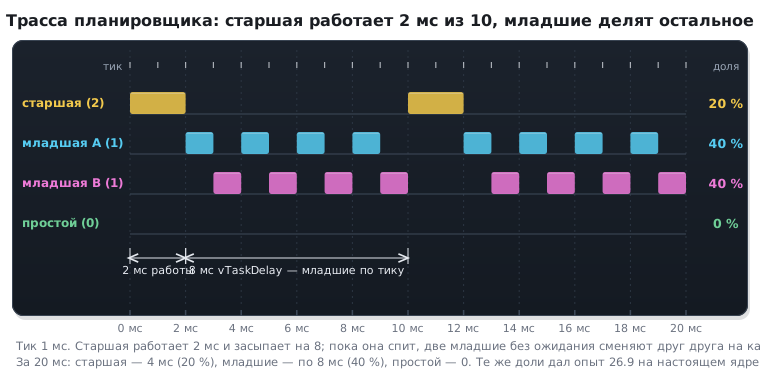
| higher one works 2 ms out of 10 | 2, 1, 1 | 20, 40, 40% |
| priorities 10 and 99 with five levels | 4, 4 after clipping | 50, 50% |
The idle task got 0% in all four: there was always enough work.
There are four conclusions. Equal tasks share time evenly — that is time slicing by tick.
A higher task with no waiting takes everything: the lower ones and idle do not get a single
tick — starvation (26.2) in its pure form. As soon as the higher one waits 8 ms out of 10, it
takes its fifth, and the lower ones share the rest evenly. And priorities 10 and 99
turned out to be the same fourth level: the configASSERT check fired on both
(here it only recorded the hit and let go), after which the kernel clipped
the priorities, and the tasks split the time in half.
The third scenario tick by tick — as a trace, the kind trace tools draw:
26.10 Pitfalls
The device hangs, but not completely. A high-priority task does not block. Look for an endless loop with no wait.
Two tasks with different priorities behave as equals. Priorities
of at least configMAX_PRIORITIES are clipped to the maximum — this happens when
configASSERT is disabled.
The chip stops when a task is created. configASSERT fired on a priority
of at least configMAX_PRIORITIES.
The task period is not the one you set. vTaskDelay was used instead of
xTaskDelayUntil; the period equals the delay plus the working time.
The program stops right after a task starts. The task returned
from its function. You need an endless loop or vTaskDelete(NULL).
A task stopped running after vTaskSuspend. Only vTaskResume
brings it out of suspension; no event will wake it.
vTaskList shows a working task as suspended. It waits forever for
a notification or a stream buffer, and the report only recognizes waiting on queues
and semaphores; eTaskGetState returns eBlocked for it.
Memory melts away as tasks are created and deleted. The tasks delete themselves, and the idle task does not get the CPU and cannot free their memory.
The stack runs out on printf. Formatted output costs hundreds of bytes
of stack. Either a margin, or no printf in tasks.
The stack margin looks four times smaller than it really is. The function returns words, not bytes.
Task shares in the run-time statistics jump around. The counter ticks less often than tasks switch; you need a source much faster than the system tick (26.9).
26.11 Summary
- A task function returns
void, takesvoid *and contains an endless loop; you must not return from it. - Tasks of different priority do not share time: the higher one runs until it blocks. Hence starvation of the lower ones.
- Tasks of the same priority share time tick by tick, in turn.
- A priority of at least
configMAX_PRIORITIES: withconfigASSERT— a halt when the task is created, without it — silent clipping toconfigMAX_PRIORITIES − 1. - Only a call to a kernel function with a timeout blocks; an empty loop and register polling are not blocking.
eTaskGetStateshows a wait with no time limit aseBlocked;vTaskListshows it as suspension if the task waits for a notification.vTaskDelaygives a period equal to the delay plus the working time; for an exact period you needxTaskDelayUntil.- The idle task frees the memory of tasks that deleted themselves (for another task
vTaskDeletereturns it at once) — it must get the CPU. uxTaskGetStackHighWaterMarkreturns the smallest remainder over all time and returns it in words.- Stack overflow checks fire on a switch, that is, after the memory has been corrupted; the margin matters more than the diagnostics.
- Task run-time accounting shows all of this in numbers: a higher task with no waiting gets the whole CPU, the lower ones and idle get zero; the counter needs a source much faster than the tick (26.9).
Next: section 27 "Queues" — how tasks pass data to each other and why a queue copies rather than references.