 Embedded HandbookApps
27. Queues
Tasks must not touch shared variables directly — that is the straight road to the races covered in section 30. They communicate through queues: a mechanism that passes data and synchronizes the moment of transfer at the same time.
Terms used in the documentation
Term Meaning queue a FIFO of fixed-size messages item an element, one message queue length the number of slots in the queue item size the size of one message send to back / to front send to the end / to the beginning peek look without removing block time / ticks to wait how long to wait queue set a group of queues waited on together overwrite overwriting the single slot messages waiting the number of messages in the queue
27.1 The main property: a queue copies
The decision that defines all the rest of its behaviour.
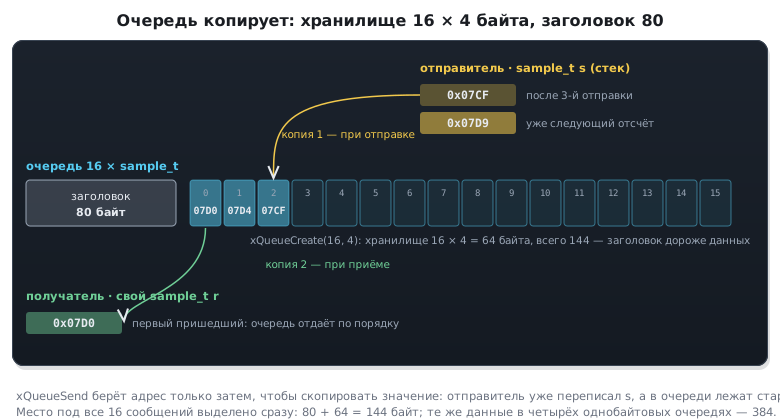
Sending puts a copy of the value into the queue, not a reference to it.
sample_t s;

s.raw = ADC1->DR;
xQueueSend(q, &s, portMAX_DELAY);   /* адрес передан, скопировано значение */
The address is passed only so that the kernel has somewhere to copy from.
After the function returns, the variable s no longer matters: it can
change, go out of scope, vanish together with its stack frame —
the queue holds an independent copy.
This is exactly what you need for passing data between tasks. The sender does not have to keep the data until it is received, the receiver does not have to hurry, and no shared memory appears between them.
The price is copying. A message is copied twice: when it is sent to the queue and when it is received from it. For four bytes this is nothing; for a kilobyte frame it is no longer nothing, and there another technique is used (27.5).
Where the copies live — in a memory window: the sender's variable, the queue storage and the receiver's variable:
Creation
QueueHandle_t q = xQueueCreate(16, sizeof(sample_t));
if (q == NULL) {
    /* не хватило кучи */
}
Two numbers: how many slots and how big each one is. Both are fixed for the whole life of the queue.
⚠️ A queue takes its maximum from the moment it is created. Space for all sixteen messages is allocated at once, regardless of how many are in it. An empty queue and a full one cost the same.
What it costs
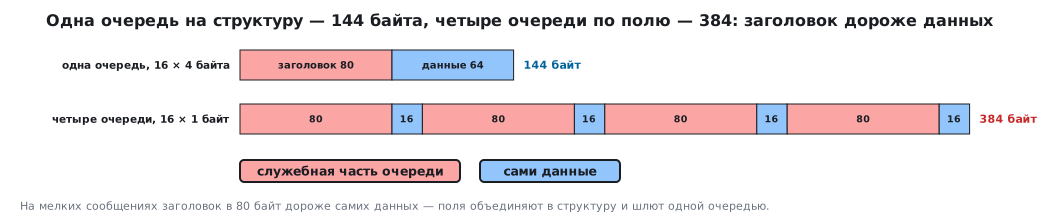
| Part | Bytes |
|---|---|
| queue header | 80 |
| storage: 16 messages of 4 bytes | 64 |
| total | 144 |
Note the ratio: the 80 bytes of overhead cost more than the 64 useful ones. With small messages the header dominates, and a queue of eight one-byte values costs ten times more than its data weighs.
The practical conclusion: one queue for several fields is better than several queues of one field each. Sixteen four-byte messages in one queue cost 144 bytes; the same data spread over four one-byte queues costs 384.
27.2 Sending and receiving
/* задача-производитель */
xQueueSend(q, &s, pdMS_TO_TICKS(10));       /* ждать место до 10 мс */

/* задача-потребитель */
xQueueReceive(q, &s, portMAX_DELAY);        /* ждать сообщение сколько нужно */
The third argument is the wait time, and it is what turns the queue from a container into a means of synchronization.
| Value | Behaviour |
|---|---|
0 |
try and return at once |
pdMS_TO_TICKS(n) |
wait up to n milliseconds |
portMAX_DELAY |
wait without limit — if FreeRTOSConfig.h has INCLUDE_vTaskSuspend 1 (Appendix D); otherwise it is a timeout of 2³² − 1 ticks, 49.7 days at 1 kHz |
A waiting task does not use the CPU. It goes into the blocked state, and the kernel wakes it exactly when a message appears. That is what makes the producer–consumer pair over a queue so convenient: the consumer is written as a simple endless loop, and it sleeps exactly as long as it needs to.
static void consumer_task(void *arg)
{
    sample_t s;

    for (;;) {
        if (xQueueReceive(q, &s, portMAX_DELAY) == pdPASS) {
            process(&s);
        }
    }
}
⚠️ Always check the result. With a limited wait, failure means no message arrived, and the variable
skept its previous content — that is, garbage on the first pass. Processing unchecked data produces a bug that is later hunted for in the most unlikely place. Check it withportMAX_DELAYas well: withoutINCLUDE_vTaskSuspend 1that is also a limit, just a long one.
A reminder of the mine from section 24: you cannot tell "queue empty" from "queue full"
by the return code — errQUEUE_EMPTY, errQUEUE_FULL
and pdFAIL are one and the same zero. The meaning is given by which function
you called.
Sending to the front of the queue
xQueueSendToBack(q, &s, 0);      /* обычный порядок; то же, что xQueueSend */
xQueueSendToFront(q, &s, 0);     /* вперёд всех */
The second variant breaks the order on purpose — this is how an urgent message is pushed past the queue. A typical use: a stop command in a motor command queue must overtake the accumulated motion commands.
Look without removing
xQueuePeek(q, &s, 0); /* сообщение остаётся в очереди */
Useful when several consumers look at the same value or when the decision on how to parse is made by the first field.
A mailbox: a one-slot queue
For a "latest value" — temperature, state, mode — the queue is made exactly 1 long and written with overwrite:
QueueHandle_t mb_temp = xQueueCreate(1, sizeof(int16_t));   /* длина строго 1 */

xQueueOverwrite(mb_temp, &t);      /* писатель: не ждёт и не отказывает, старое затёрто */
xQueuePeek(mb_temp, &t, 0);        /* читатели: последнее значение, не забирая */
xQueueOverwrite is allowed only for a queue of length 1: on a longer one
configASSERT fires. From an interrupt — xQueueOverwriteFromISR. This is
the direct way to "drop the old instead of the new" from 27.6.
27.3 From an interrupt — only FromISR
Every function has a twin for interrupt handlers:
void ADC1_2_IRQHandler(void)
{
    BaseType_t woken = pdFALSE;
    sample_t s = { .raw = ADC1->DR };

    xQueueSendFromISR(q, &s, &woken);
    portYIELD_FROM_ISR(woken);
}
Two differences from the ordinary function.
No wait time. An interrupt cannot wait — there is no one in it to do the waiting. If it could not put the item into the queue, then it could not.
There is an output wake-up flag. If the send woke a task
of higher priority than the interrupted one, you must switch to it right on exit
from the interrupt, not wait for the next tick. The woken flag
and portYIELD_FROM_ISR do exactly that; without them the reaction is delayed
by up to a millisecond.
The mechanism and its subtleties are covered in full in section 28 — along with which interrupts are allowed to call the kernel at all.
27.4 Receiving from several sources
A task often has to react to events from different places: commands from the link, samples from a sensor, a timer firing. Waiting on several queues one after another does not work — asleep on the first, the task will not see the second.
Three solutions, in order of preference.
One queue with a tagged message — the simplest and usually the best:
typedef struct {
    enum { EV_SAMPLE, EV_COMMAND, EV_TIMEOUT } kind;
    union {
        uint16_t sample;
        uint8_t  command;
    } data;
} event_t;
All sources write into one queue, the task dispatches on the kind field.
The order of events is preserved, memory is spent once, the code reads
linearly.
A queue set (configUSE_QUEUE_SETS) lets you wait on several
at once. The mechanism works, but it costs more both in memory
and in time, and code that uses it is noticeably more complex. Use it when the queues
already exist and cannot be reworked.
An event group (section 31) — if what you need to pass is not data but the fact of an event itself.
27.5 Variable-length data and large messages
A queue stores items of one fixed size. You cannot put a variable-length frame into it, and copying a kilobyte one is expensive.
The standard technique: put a pointer into the queue.
static uint8_t frame_pool[4][256];
QueueHandle_t q_frames = xQueueCreate(4, sizeof(uint8_t *));

uint8_t *p = frame_pool[i];
xQueueSend(q_frames, &p, 0);        /* передаём четыре байта вместо 256 */
The saving is obvious: a queue of four pointers is sixteen bytes of storage instead of a kilobyte, and four bytes are copied instead of two hundred and fifty-six.
But a question appears that did not exist before — who owns the buffer.
⚠️ A pointer to a local variable is the most common mistake with queues. The sender puts into the queue the address of a variable on its own stack and returns from the function. The receiver takes an address that now points to someone else's garbage. It works until the stack is reused — that is, unstably and seemingly at random.
The rule is simple: the buffer must outlive the receive. A static array, a buffer pool, heap memory will do; nothing local will.
And second: agree on who frees the buffer. The usual scheme: the sender takes a buffer from the pool, the receiver returns it after parsing. Free buffers are conveniently kept in the same kind of pointer queue: taking a buffer is receiving from the free queue, returning it is sending it back.
27.6 ⚠️ Queue problems
The queue overflows
This means exactly one thing: the producer is faster than the consumer. No queue size cures that — it only postpones the moment.
if (xQueueSend(q, &s, 0) != pdPASS) {
    dropped++;              /* считать потери, а не игнорировать */
}
Silently losing messages is the worst of all solutions: the device works, the data disappears, and no one knows about it. What to do about a loss depends on the task: count it, report it, drop the old instead of the new, slow down the producer. But the decision must be made deliberately.
Watching the fill level is cheap:
UBaseType_t waiting = uxQueueMessagesWaiting(q);
A number that keeps growing over time is a direct sign that the consumer cannot keep up. It is always worth printing this during debugging.
Waiting with portMAX_DELAY in both directions
If both the sender and the receiver wait without limit, and a third party for some reason stays silent, both tasks stop forever, and from the outside it looks like the device has hung. A limited wait with failure handling is more reliable.
A queue does not solve priorities
A queue does not inherit priority — that is the mutex's job (section 30). If a high-priority task waits for a message that a low-priority one should send, and that one does not get the CPU, the wait will be long. A queue passes data but does not move anyone up in the line for the CPU.
The wake-up order of waiting tasks, however, is defined: the highest-priority of the waiting tasks wakes first, and among equals — the one that has waited longest.
Copying costs time
With frequent exchange of large messages the double copy becomes noticeable. This is exactly the case where you switch to passing pointers.
A queue between an interrupt and a task is not always the best choice
To pass a single fact "the event happened", a queue is overkill: 80 bytes of header for a flag. A task notification (section 31) does the same cheaper and faster.
27.7 🔧 Button → queue → LED
Two tasks and a queue between them is the shortest way to feel how a queue decouples the producer and the consumer. The button task polls the input once every 10 ms, debounces it and puts a "pressed" event into the queue. The LED task waits on the queue — and the wait itself serves as its blink timer.
typedef struct {
    uint8_t    button;                      /* какая кнопка */
    TickType_t at;                          /* когда нажата, в тиках */
} btn_event_t;                              /* очередь копирует структуру целиком */

static void button_task(void *arg)
{
    uint32_t stable = 0, last = 0, same = 0;
    (void)arg;
    for (;;) {
        uint32_t now = button_read();
        same = (now == last) ? same + 1 : 0;        /* сколько чтений подряд одинаковые */
        last = now;
        if (same == 2 && now != stable) {           /* третье одинаковое — состояние устоялось */
            stable = now;
            if (stable) {
                btn_event_t ev = { 0, xTaskGetTickCount() };
                if (xQueueSend(q, &ev, 0) == pdPASS)    /* задача опроса не ждёт места */
                    presses++;
                else
                    dropped++;
            }
        }
        vTaskDelay(pdMS_TO_TICKS(10));
    }
}

static const uint16_t half_period_ms[] = { 500, 250, 100 };

static void led_task(void *arg)
{
    unsigned mode = 0;
    btn_event_t ev;
    (void)arg;
    for (;;) {
        /* ожидание очереди и есть таймер мигания */
        if (xQueueReceive(q, &ev, pdMS_TO_TICKS(half_period_ms[mode])) == pdPASS)
            mode = (mode + 1) % 3;                  /* нажатие — следующая частота */
        else
            led_toggle();                           /* тайм-аут — переключить */
    }
}
Debouncing: three identical reads in a row. The state is considered settled when the input has been read the same three times in a row, that is, after 20–30 ms; contact bounces shorter than that do not get through (other methods — in 8.5).
The wait timeout is the timer. xQueueReceive with a timeout equal to
half the blink period returns pdPASS if a press arrived, and failure if
the time ran out. The failure is the moment to toggle the LED, and a press cycles
the half-period: 500 → 250 → 100 ms. No separate timer is needed.
Polling does not wait on the queue. The button task sends the event with zero wait: if the queue is full, it is better to count the loss (27.6) than to get stuck and stop polling the button.
The experiment runs on the real kernel with the POSIX port. A "presser" presses the button three times, each time with bounce — five jumps one tick apart on press and on release — and between presses the LED toggles over two seconds are counted.
| Half-period | 500 ms | 250 ms | 100 ms | 500 ms again |
|---|---|---|---|---|
| Toggles in 2 s | 3 | 8 | 20 | 4 |
Presses caught: 3 of 3, queue losses: 0. In the first window there are three toggles, not four: the fourth falls exactly on the window boundary.
27.8 Summary
- A queue copies the value rather than referencing it: the sender's variable is free after the call.
- The length and item size are fixed forever; space for all items is taken at once.
- The queue header is 80 bytes; with small messages it costs more than the data, so one queue with a structure is better than several, one per field.
- The wait time turns a queue into a means of synchronization: a waiting task does not use the CPU.
- Always check the result of a receive — on failure the receiving variable is not filled.
- From interrupts only the twins ending in
FromISRare called; they have no wait time but do have a wake-up flag. - You cannot wait on several queues; instead use one queue with a tagged message.
- Large and variable data are passed by pointer, and then the buffer must outlive the receive, and ownership must be agreed.
- Overflow means the producer is faster than the consumer; queue size postpones it but does not cure it.
uxQueueMessagesWaitingis a cheap and reliable sign that the consumer cannot keep up.- A queue wait timeout can serve as a timer: failure means time is up, data means an event. A polling task sends to the queue without waiting and counts losses (27.7).
Next: section 28 "Interrupts in an RTOS" — which kernel functions can be called from a handler, why only some of them, and what priority threshold separates some interrupts from others.