 Embedded HandbookApps
2. The STM32 portfolio and choosing a chip
The STM32 portfolio has more than two thousand microcontrollers in over two dozen subfamilies if you count the package variants: the MCU selector of this handbook (2.5) lists 2187 of them. This section is about how to find your way around it, how to read the part number and why exactly the F103 and the F4 were chosen for practice.
Terms used in the documentation
Term Meaning portfolio, series, line the levels into which ST groups its chips part number the marking, the order code package: LQFP, UFQFPN, BGA, WLCSP package: with leads on the sides, leadless, with balls, die-sized pin-to-pin compatible compatible pin for pin density: low, medium, high, XL density class — the amount of Flash on F1 device header the CMSIS header of a device MCU finder the microcontroller selection tool second source a replacement from the same or another supplier
2.1 Four groups of subfamilies
ST divides the portfolio not by numbers but by purpose.
| Group | Subfamilies | Core | What for |
|---|---|---|---|
| Mainstream | C0, F0, F1, F3, G0, G4 | M0/M0+/M3/M4 | mass-market tasks, best price |
| High Performance | F2, F4, F7, H5, H7, H7R/S, N6 | M3/M4/M7/M33/M55 | computing, multimedia, communications |
| Ultra Low Power | L0, L1, L4, L4+, L5, U0, U3, U5 | M0+/M3/M4/M33 | battery power |
| Wireless | WB, WB0, WBA, WL | M0+/M4/M33; WB and WL5 have an M4 + M0+ pair | Bluetooth LE, Zigbee, LoRa, Sub-GHz |
ST tries to lay out the pins identically for chips of different series in the same package —
this is perhaps the main practical property of the portfolio. Having started development on an F103RB in
LQFP64, by the end of the project you can move to an F401RE in the same package if
performance falls short. But the board has to be prepared for this in advance: on the F401 pin 30, where the F103 has
PB11, carries VCAP_1 — it needs a capacitor to ground, and the supply, BOOT0 and the crystal
are checked against the pinout tables (2.9). And the package must be the same: the F103C8 on the BluePill is in
LQFP48, while the 48-pin F401 comes only in UFQFPN48. It also works the other way — making the
product cheaper by stepping down to the F0.
⚠️ Pin compatibility does not mean code compatibility. The board stays the same, but the firmware will have to be changed: different subfamilies have different clock buses, GPIO registers, DMA controller. That is what this whole handbook is about.
2.2 How to read the part number
Let us take STM32F401RET6 apart — the chip on the Nucleo-F401RE board:
STM32  F  401  R  E  T  6
  │    │   │   │  │  │  └── температурный диапазон
  │    │   │   │  │  └───── корпус
  │    │   │   │  └──────── объём Flash
  │    │   │   └─────────── число выводов
  │    │   └─────────────── подсемейство
  │    └─────────────────── тип
  └──────────────────────── платформа
Pin count (position 4):
| Letter | Pins | Letter | Pins | |
|---|---|---|---|---|
F |
20 | R |
64 | |
G |
28 | M |
80 | |
K |
32 | V |
100 | |
T |
36 | Z |
144 | |
C |
48 | I |
176 | |
B |
208 |
Flash size (position 5):
| Letter | Flash | Letter | Flash | |
|---|---|---|---|---|
4 |
16 KB | D |
384 KB | |
6 |
32 KB | E |
512 KB | |
8 |
64 KB | F |
768 KB | |
B |
128 KB | G |
1 MB | |
C |
256 KB | H |
1.5 MB | |
I |
2 MB |
Package (position 6): T — LQFP, P — TSSOP, H — BGA, U — UFQFPN/VFQFPN, Y — WLCSP,
J — UFBGA.
Temperature (position 7): 6 — −40…+85 °C, 7 — −40…+105 °C, 3 — −40…+125 °C.
So STM32F401RET6 is an F401, 64 pins, 512 KB Flash, LQFP package, up to +85 °C.
And the STM32F103C8T6 on the BluePill is an F103, 48 pins, 64 KB Flash, LQFP, up to +85 °C,
the STM32F030F4P6 an F030, 20 pins, 16 KB Flash, TSSOP, up to +85 °C.
A hint from the CMSIS headers. The file names in the device pack confirm the scheme:
stm32f412cx.h/f412rx.h/f412vx.h/f412zx.hdiffer in the letter for the pin count, whilestm32f401xc.h/f401xe.hdiffer in the letter for the Flash size. The letterxstands where the attribute does not affect the registers. So the header name shows that for the F412 the number of pins matters (a different set of ports), while for the F401 it is the memory size.
2.3 The STM32F4 line in detail
The F4 is the most widespread Cortex-M4F series in the High Performance group
and the first STM32 series with DSP instructions and floating point. It is pin-compatible
with the F2, but its core and ADC are faster, it has 64 KB of CCM memory, I²S receives and transmits
simultaneously (the second I2Sext block), and the real-time clock gained sub-seconds
(RTC_SSR) and fine calibration (RTC_CALR). Year of release — 2011.
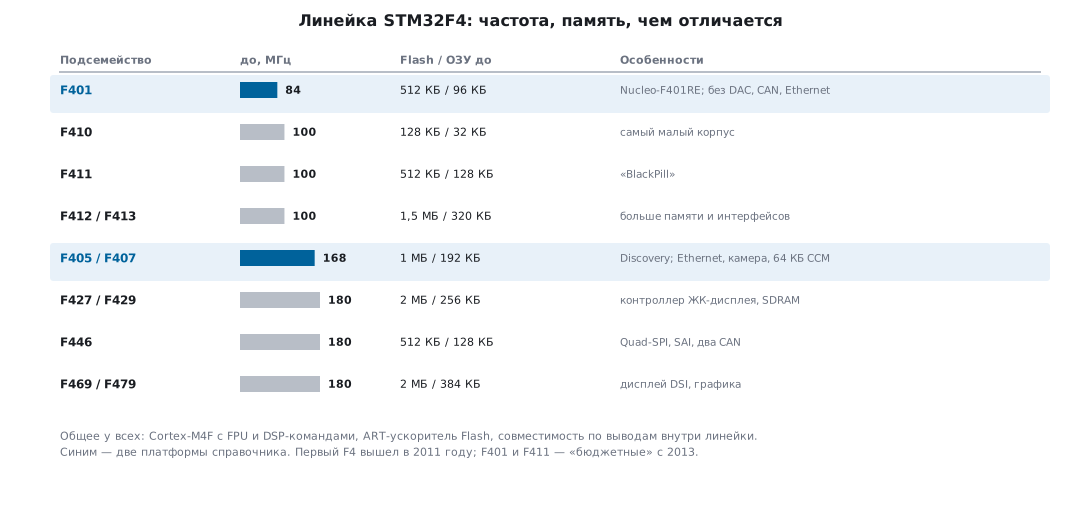 Summary table of the STM32F4 series
Common to all F4:
- a Cortex-M4F core with the ART Accelerator, Thumb / Thumb-2 / saturating arithmetic / DSP / FPU instruction sets;
- oscillators: HSI 16 MHz, LSI 32 kHz, external HSE 4–26 MHz, LSE 32.768 kHz;
- low-power modes: Sleep, Stop, Standby;
- supply 1.7–3.6 V, 5 V tolerant pins, up to 136 fast I/O lines;
- up to 3 × 12-bit ADCs and up to 2 × 12-bit DACs, a temperature sensor;
- 16- and 32-bit timers, hardware CRC, two watchdogs, an RTC calendar;
- a 96-bit unique device ID programmed at the factory;
- packages: LQFP (64…208), UFQFPN 48, UFBGA (64…176), TFBGA 216, WLCSP (36…168).
Three lines inside the F4
| Line | Model | Flash, KB | RAM, KB | MHz | What makes it interesting |
|---|---|---|---|---|---|
| Access | F401 | 128–512 | 64–96 | 84 | the cheapest entry into the F4, USB OTG FS |
| F410 | 64–128 | 32 | 100 | minimal, best quiescent current (down to 6 µA in Stop) | |
| F411 | 256–512 | 128 | 100 | "an F401 with headroom", popular on Nucleo and Black Pill | |
| F412 | 512–1024 | 256 | 100 | + QSPI, CAN, lots of memory | |
| F413 | 1024–1536 | 320 | 100 | the most memory in Access | |
| Foundation | F405 | 512–1024 | 192 | 168 | no Ethernet, "the workhorse" |
| F407 | 512–1024 | 192 | 168 | + Ethernet, 2 × CAN, camera — the most widely used F4 | |
| F446 | 256–512 | 128 | 180 | + QSPI, SAI, SPDIF, 180 MHz | |
| Advanced | F427 | 1024–2048 | 256 | 180 | + SDRAM, Chrom-ART |
| F429 | 512–2048 | 256 | 180 | + TFT display controller | |
| F469 | 512–2048 | 384 | 180 | the maximum: 384 KB RAM, TFT, SAI |
How to choose within the F4:
- you just need a fast M4 with an FPU and USB — F401 or F411;
- you need Ethernet or CAN — F407 (it is also on the Discovery, the most affordable board);
- you need a graphic display — F429/F469 with a TFT controller and Chrom-ART;
- you need minimum current — F410;
- you need external SDRAM — F427/F429, F469 or F446: their FMC controller handles SDRAM, while the FSMC of the F405/F407 handles only SRAM, NOR and NAND.
What CCM is and why it matters
The F405/F407/F415/F417/F427/F429/F437/F439/F469/F479 have 64 KB of CCM — Core Coupled Memory, memory connected directly to the core, bypassing the bus matrix. Access to it is always without wait states and without contention with DMA.
⚠️ CCM is not accessible to DMA. That is its flip side: a buffer you hand over to DMA must not be placed in CCM: DMA cannot reach it, and the stream shuts down with a transfer error (the
TEIFxflag inLISR/HISR). Whoever does not check this flag sees only one thing — "the transfer did not start". CCM is good for the stack, local variables and computation buffers, not for exchange with peripherals.
2.4 Why exactly the F103 and the F4 in this handbook
| STM32F103C8T6 (BluePill) | STM32F407VGT6 (Discovery) | |
|---|---|---|
| core | Cortex-M3, 72 MHz | Cortex-M4F, 168 MHz |
| Flash / RAM | 64 KB / 20 KB | 1 MB / 192 KB, of which 64 KB is CCM |
| FPU, DSP | no | yes |
| board price | the lowest | medium, but the board comes with peripherals |
| role in the handbook | the learning platform: mistakes are cheap | everything that needs speed, an FPU, DMA with FIFO |
The F103 remains an excellent learning platform: it has enough peripherals, the documentation has been taken apart down to the last bit, and mistakes are cheap. The F4 is needed where the F103 hits its limits — signal processing, audio, graphics, fast data exchange, floating-point controllers.
2.5 How to choose a microcontroller for the task
The ideal order: first estimate the computing power needed, then the communication requirements, then the power supply.
- computing, multimedia, graphics → the High Performance group, that is F4/F7/H7;
- Ethernet, CAN, many protocols → F4 (or the F105/F107 connectivity line);
- battery power → the L series, the subfamily chosen by the power needed;
- an ordinary task without frills → Mainstream, most often F1 or G0.
But in real life other questions decide:
- A mass-produced product or a one-off? In a small batch the difference in chip price is insignificant — take one with headroom and do not spend weeks on optimisation. In mass production the savings on the die pay for the investment in code optimisation.
- What is the budget of the whole board? A consequence of the first point.
- Space constraints. The package dictates both the pin count and the capabilities.
- What can your production do? LQFP can be soldered anywhere. BGA and WLCSP require X-ray inspection — this may settle the choice by itself.
- Is the time to market critical? If the firmware is needed yesterday, take a chip with spare power: there will be no time to optimise.
- Can existing work be reused? Your own libraries and familiar chips save months. Moving to another architecture wipes out this groundwork.
- Is it actually on sale? The question that became the main one after the semiconductor shortage. lead times reached two years, and distributors limited the number of development boards per customer. It got to the point where developers bought up Nucleo and Discovery boards to desolder the microcontrollers from them for their own products. The rule is simple: first buy the chips and put them in stock, then open the IDE.
- Does the firmware need protecting? For a commercial product this is a question of the choice
of chip, not of the program. The F1 has a single read protection — on or off
(
FLASH_ReadOutProtection(ENABLE), theRDPRTbit), and this level is bypassed by known techniques through the debug port. The other families have level 2 (OB_RDP_LEVEL_2): debugging is disabled forever, and the chip cannot be recovered even by erasing. Against laboratory power-glitch attacks even this is not absolute, so where the firmware is the main asset, families with TrustZone and secure boot are used: L5, U5, WBA, H5 (section 2б; on the H5, instead of levels there are product states fromOPENtoLOCKED). An argument in the same direction: clones and remarking are made mostly for old mass-market chips — F103, F030, F407 (section 2а); for recent families such cases are noticeably fewer.
Two ST tools help — MCU Finder for desktop systems (already built into STM32CubeIDE, no need to install it separately) and a mobile app.
This handbook has such a selection among its calculators: Tools → MCU selector — 2187 STM32 variants from the Keil pack descriptions: core, FPU, TrustZone, frequency, Flash, RAM, pin count, and for the series where the pack lists them, the peripherals. Chips can be compared side by side. Before ordering — the datasheet all the same: the pack does not list everything (for the U585, for example, the datasheet gives 786 KB of RAM, the pack 768).
2.6 Development boards
BluePill — STM32F103C8
The cheapest board to start with and the most widespread among hobbyists.
The preferred revision is the BluePill+ from WeAct on the same chip — its power is
routed more neatly and it has a USB-C connector. A single LED on PC13
(connected with its cathode to the pin), an 8 MHz HSE crystal, an SWD connector.
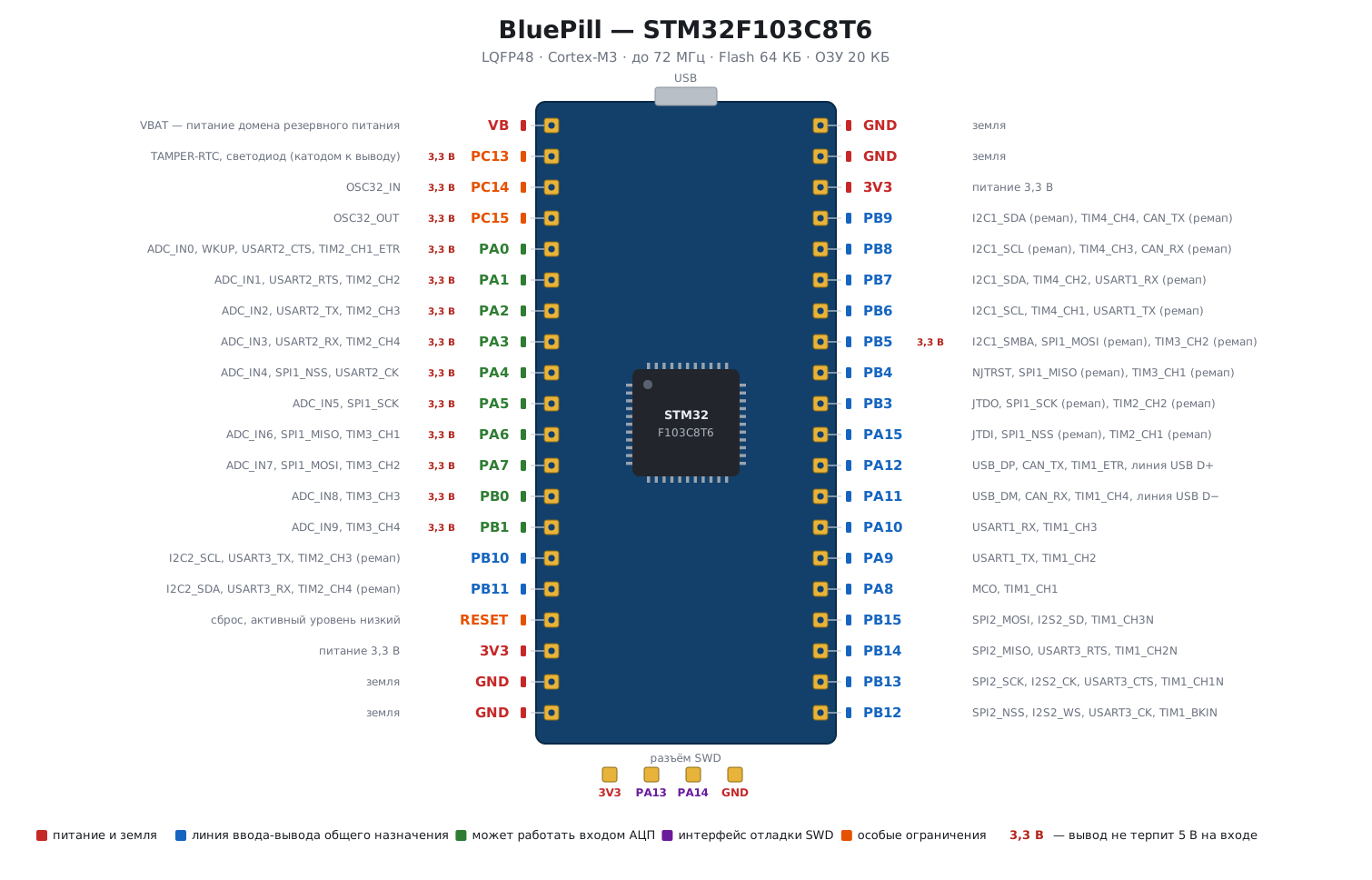
Read the map like this: the colour of the label is the pin type, to the right of the name the
alternate functions are listed. The red "3.3 V" mark means that the pin does not tolerate
5 V at its input — these are all the ADC lines (PA0–PA7, PB0, PB1), the backup
domain pins PC13–PC15 and the only such pin in port B — PB5.
Three pins need special attention:
PC13,PC14,PC15are powered through the backup domain switch. The total current through them is no more than 3 mA, speed no higher than 2 MHz, load capacitance up to 30 pF. They must not be used as a current source, which is why the LED on the board is connected with its cathode toPC13: the pin works as a current sink, not a source.PA13,PA14are taken by the SWD debug interface. If you give them over to GPIO, you lose debugging and flashing over SWD, but not the board: withBOOT0= 1 the bootloader starts after reset, the SWD pins are free, and the debugger sees the chip again. Connecting the debugger under reset also helps.PA15,PB3,PB4work as JTAG pins after reset and are pulled up. To free them and keep SWD, enable theAFIOclock (RCC_APB2ENR_AFIOEN) and writeSWJ_CFG= 010 intoAFIO_MAPR(AFIO_MAPR_SWJ_CFG_JTAGDISABLE).
⚠️ The market has many BluePills with remarked or counterfeit chips: instead of an STM32F103C8 they fit CS32/CKS clones or chips with less Flash. The sign is that Keil or the ST-Link sees the wrong device ID. This most often does not affect the examples, but it is useful to know.
NR Blue Kit
A training board on the same STM32F103 with ready-made peripherals: LEDs, buttons, a display, a temperature sensor, potentiometers. It is convenient because the examples run without breadboarding and flying wires.
Nucleo — the ST line
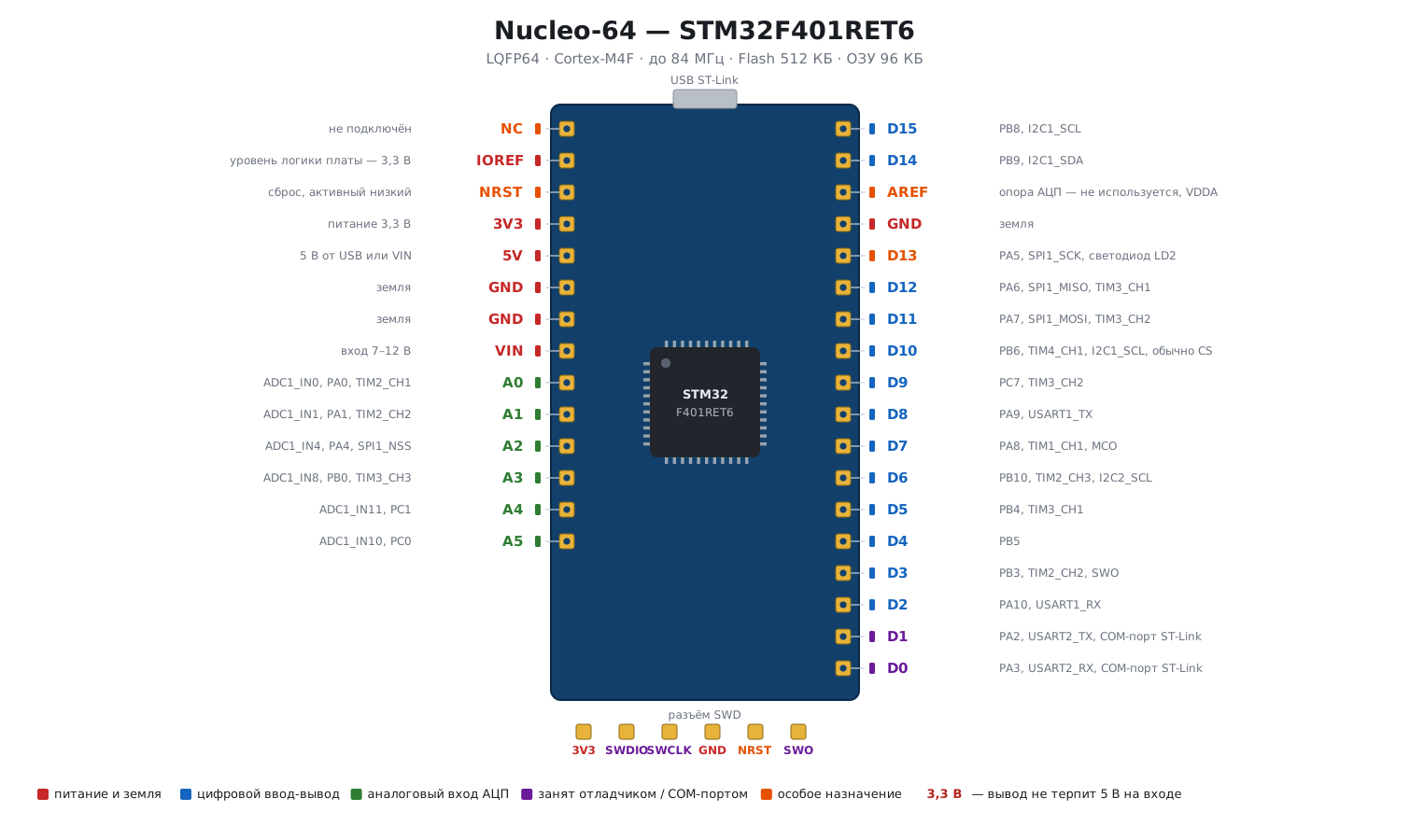 The Nucleo board
They appeared in 2015, three groups by the chip package type: Nucleo-32 (LQFP-32), Nucleo-64 (LQFP-64), Nucleo-144 (LQFP-144). The Nucleo-64 line is the most complete — usually the word "Nucleo" means exactly that one.
The board layout:
- a detachable part with ST-LINK 2.1 — a programmer and debugger; it can be snapped off
along the marked line and used as a standalone ST-Link (one sold separately
costs about 25 dollars). You do not have to snap it off: by removing the
ST-LINKjumpers you get an SWD output to an external board; - a virtual COM port over the same USB — convenient for debug output;
- the target microcontroller, a RESET button (black), a user button (blue), an LED;
- the HSE crystal is not fitted on the board (position X3 is empty): 8 MHz comes from the
ST-LINK microcontroller, from its MCO output, to the
OSC_INinput — this is how the MB1136 board is from revision C-02 (except the NUCLEO-L476RG). So HSE is enabled as an external signal: firstRCC_CR_HSEBYP, thenRCC_CR_HSEON(in CubeMX — "BYPASS Clock Source"); the LSE watch crystal is fitted on new boards; - Arduino headers — they accept ready-made shields;
- ST's own Morpho headers — two 2×19 rows at 2.54 mm pitch, bringing out all the pins.
The price is 10–15 dollars, and the boards are connector-compatible: a shield and the wiring from a Nucleo-F103RB can be moved to a Nucleo-F401RE if more power is needed. The firmware is rebuilt for the new chip in that case, and register-level code is rewritten (2.9).
Discovery
More than fifty different boards for specific chip capabilities. For our topic the main one is the STM32F407G-DISC1 (in older revisions STM32F4-Discovery): F407VG, an accelerometer, a microphone, an audio DAC, USB OTG, eight LEDs. This is the most affordable way to get your hands on an F4 seriously.
2.7 The ST-Link programmer
Any version will do: V2, V2.1, V3. The cheapest option is an ST-Link V2 "dongle" from AliExpress, and it is quite enough. If you have a Nucleo or a Discovery, you do not need a separate programmer — it is already on the board.
Besides the programmer, for practice you will need:
- a USB–UART converter (for debug output);
- a multimeter;
- DuPont wires and a button.
Setting up the ST-Link in Keil is covered separately.
2.8 ⚠️ Clock constants: a trap when moving to F4
A practical mine on which it is easy to lose an evening.
| STM32F1 | STM32F4 | |
|---|---|---|
where HSI_VALUE/HSE_VALUE are defined |
in the CMSIS header stm32f10x.h |
not in the header, but in system_stm32f4xx.c |
default HSI_VALUE |
8 MHz | 16 MHz |
default HSE_VALUE |
8 MHz (25 MHz on F105/F107) | 25 MHz |
This is for a project on bare CMSIS. In a project with HAL both constants are set by stm32f4xx_hal_conf.h
(on F1 — stm32f1xx_hal_conf.h), and CubeMX writes the frequency from the clock tree there: change
it in CubeMX or with a define in the project settings.
Two consequences:
- The internal oscillator on F4 is twice as fast. All PLL multiplier calculations carried over from F1 without changes will give a frequency twice too high.
- The default external crystal value is 25 MHz, while the Discovery F407
has an 8 MHz crystal fitted. If you do not override
HSE_VALUE, the library will compute frequencies on the basis of 25 MHz — andHAL_Delay(1000)will measure out not a second, andSystemCoreClockwill differ from reality by more than three times.
The cure is a define in the project settings:
-DHSE_VALUE=8000000
Both constants are declared via #if !defined(...), so the definition from the project
takes priority and there will be no warnings — your value will be taken silently.
That is exactly why the error is so hard to notice.
2.9 Replacing a chip: pin compatibility
A chip is replaced for three reasons: it is out of stock, its power was not enough, or you want to make the product cheaper. There are two cases of replacement, and they are quite different.
Within a series only the memory changes. STM32F103C8T6 and
STM32F103CBT6 — both have 48 pins in an LQFP package, Flash of 64 and 128 KB
(2.2). They share one header: both belong to the medium-density class
STM32F10X_MD. The F1 classes by header:
| Class | Macro | Flash |
|---|---|---|
| low density | STM32F10X_LD |
16–32 KB |
| medium density | STM32F10X_MD |
64–128 KB |
| high density | STM32F10X_HD |
256–512 KB |
| XL | STM32F10X_XL |
768–1024 KB |
| F105/F107 connectivity line | STM32F10X_CL |
64–256 KB |
| F100 value line | STM32F10X_LD_VL, _MD_VL, _HD_VL |
16–512 KB |
Firmware moves between chips of the same class without changes if it fits in memory. Hence the usual strategy: prototype on the bigger chip, go to production with the smaller one in the same package once the memory map shows the real size of the firmware (section 11).
Between series the pins match, but not the code. ST lays out the pins so that chips of different series in the same package fit the same board: the supply, the crystal and the main interfaces end up in the same places (2.1). But inside it is a different chip:
| F103 | F401 | |
|---|---|---|
| GPIOA address | 0x40010800, APB2 bus |
0x40020000, AHB1 bus |
| port registers | CRL, CRH, IDR, ODR, BSRR, BRR, LCKR |
MODER, OTYPER, OSPEEDR, PUPDR, IDR, ODR, BSRR, LCKR, AFR |
ODR offset |
0x0C |
0x14 |
| port clock | RCC->APB2ENR, bit IOPAEN |
RCC->AHB1ENR, bit GPIOAEN |
| timers on APB1 | 72 MHz, prescaler for 1 µs — 71 | 84 MHz, prescaler — 83 |
| Flash and RAM | from 0x08000000 and 0x20000000 |
the same |
Even registers with the same names sit at different offsets. One and the same line compiles into different addresses:
GPIOA->BSRR = 1u << 5;           /* зажечь PA5 */

F103:  movw r0, #2064            F401:  movs r0, #24
       movt r0, #16385                  movt r0, #16386
       movs r1, #32                     movs r1, #32
       str  r1, [r0]    ; 0x40010810    str  r1, [r0]    ; 0x40020018
The firmware is rebuilt for the new header, and everything written at the register level — ports, clocks, timers — is rewritten. HAL and LL reduce this work but do not eliminate it (5.6). The clock constants change as well (2.8).
The same pin count is not yet the same package. The Black Pill board
carries an STM32F401CCU6 or STM32F411CEU6. They have as many pins, 48,
as the BluePill chip, but the letter U means a UFQFPN package, while
STM32F103C8T6 has the letter T — LQFP. Such a chip will not fit the BluePill
board: this is a board replacement, not a chip replacement.
How to plan a replacement:
- Candidates. CubeMX (and MCU Finder) shows, for the original chip, a list of replacements with the degree of compatibility by peripherals, memory and pins.
- Pinout tables. They are compared for both chips: the supply, the
BOOT0pin, the core regulator pins, the crystal. "Almost compatible" most often breaks exactly there. - The board. Footprints for the differences are provided already at layout time.
- The firmware. Peripheral configuration is kept in one place, so that on replacement you rewrite it, not the whole code.
2.10 Pitfalls
You took a pin-compatible chip — the board is the same, the firmware does not work. Pin compatibility does not mean code compatibility: clocking, GPIO and DMA differ between subfamilies (2.1).
DMA from a buffer in CCM does not run. CCM is not accessible to DMA, the stream dies with the TEIFx flag — exchange buffers go into ordinary RAM (2.3).
The debugger sees the "wrong" ID. BluePills come with clones and remarked chips (2.6).
On F4 all frequencies are off by two or three times. The default HSI_VALUE is 16 MHz, HSE_VALUE 25 MHz, while the board
has an 8 MHz crystal; set -DHSE_VALUE=8000000 in the project (2.8).
2.11 Summary
- The portfolio is more than two thousand chips in over two dozen subfamilies, arranged in four groups by purpose: Mainstream, High Performance, Ultra Low Power, Wireless.
- The part number is read by position: subfamily, pin count, Flash, package,
temperature.
STM32F401RET6= F401, 64 pins, 512 KB, LQFP, up to +85 °C. - Pin compatibility lets you change the chip at a late stage, but the code will have to be changed.
- The F4 is the first STM32 series with an FPU and DSP. Access (F401/F410/F411/F412/F413) is the cheap entry, Foundation (F405/F407/F446) the working middle with Ethernet and CAN, Advanced (F427/F429/F469) graphics, SDRAM, the most memory.
- The CCM memory of the bigger F4 parts is fast but not accessible to DMA.
- In a real choice the technical characteristics often give way to stock availability, production capabilities and reusable groundwork.
- On F4
HSI= 16 MHz and the defaultHSE_VALUEis 25 MHz — double-check before being surprised by wrong delays. - There are two kinds of chip replacement. Within a series only the memory changes: C8 and CB are one MD class. Between series the pins match, but not the code: on the F401 the port is at another address, with other registers and frequencies. The same pin count is not yet the same package.
Next: section 2а "STM32 clones and fakes: how to tell them apart" — what to do if the board says STM32 but there may be a different chip inside.